1
Conditioner Regeneration
Manual Regeneration
Your water conditioner regenerates for one of two
reasons:
• The control determines that the conditioner does
not have enough capacity remaining to satisfy
your soft water needs for the next day.
• The REGEN button was pressed.
To force the control to perform a regeneration, press
the REGEN push button. This button is located on the
front of the control. When you press the REGEN
button, the control performs a full regeneration of the
conditioner. You can use this feature if you need a
large amount of conditioned water but the capacity
remaining is low.
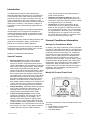
In either case, the REGENERATION INDICATOR
makes one complete counterclockwise rotation and
returns to REGENERATION COMPLETE. The
indicator pauses at some or all of the different
positions shown on the label around the indicator. The
display alternates between TIME OF DAY and
REGEN TIME REMAINING, as indicated by the green
lights next to the legends. Regen Time Remaining is
shown in minutes on the display. When the indicator
reaches REGENERATION COMPLETE and the time
remaining is zero; the regeneration is complete,
conditioned water is available for use, and the control
starts alternating the display between TIME OF DAY
and CAPACITY. No settings can be changed
during a regeneration. The settings can be viewed,
but the control beeps and ignores any attempt to
change settings.
Automatic Regeneration
The control makes regeneration decisions based on
the amount of water that has flowed through the
condi-tioner. The control uses the Hardness and
Capacity settings to calculate the number of gallons
(cubic meters for metric) which can be conditioned. At
the Time of Regeneration, the control updates the
average usage for the previous day and adjusts the
reserve capacity accordingly. The reserve is kept at a
minimum for optimal economy. The control reacts to
a sudden increase in water usage. If a day's is more
than double the current average, the control
anticipates that a second day of high usage is likely to
occur. The high usage amount is used as the reserve
when the control performs the regeneration
computation.
The Guest Cycle option and the Calendar Override
option may override this computation. Refer to the
Additional Features section in this manual or contact
your dealer for more information about these options.
The factory setting for Time of Regeneration is 2:00
AM. You can change this time. Refer to the Time of
Regeneration section in this manual for additional
information.
AST1052TMP-960
Page 21
Note: If you press this button again a minute or more
after regeneration begins, a second regeneration will
start when the first regeneration is complete. The
display shows the REGEN TIME REMAINING
information.
Care of Your Water Conditioner
General
Check the salt level in the salt storage tank a few
weeks after installation and weekly after that. Always
maintain the salt level above the water level for a
consistent salt dosage and proper water conditioner
operation. Don't allow the conditioner to run out of salt
before refilling. When refilled, the salt storage tank
contains enough salt to support numerous resin bed
regenerations. Use pellet, block, or nugget water
conditioner salt. Do not use rock salt. Some rock salt
may contain high levels of impurities, which affect
conditioner operation. Have the salt storage tank
serviced once a year to remove accumulated
sediment that may impede brine draw.
Cleaning the Injector/Injector Screen
The injector is the component, which creates the
vacuum necessary to draw the brine into the water
conditioner. Clean the injector and the injector screen
once a year in order to maintain proper water
conditioning. Some locations may require more
frequent injector and screen servicing.
Complete the following steps to clean the injector and
the injector screen:
1. Unplug the wall mount transformer.
2. Shut off the water supply or put the bypass
valve(s) into the bypass position.
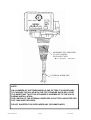
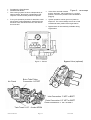
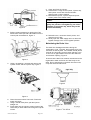
3. Remove the rear cover by pushing back the tab
provided on the cover, Next, lift the rear cover off
the valve, Figure 2.
20/11/2006