1
þ
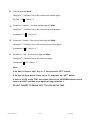
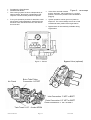
The last digit will blink –
Using the ñò buttons, key in the current last minute figure.
Eg, AM 11.25 – Key in ‘5’
þ Press the ï button - the first minute digit will blink.
Using the ñò buttons, key in the current first minute figure.
In example 11.25 – Key in ‘2’
þ
Press the ï button – the second hour digit will blink.
Using the ñò buttons, key in the current second hour figure.
In example 11.25 – Key in ‘1’
þ
Press the ï key – the first hour digit will blink.
Using the ñò buttons, key in the first hour figure.
In example, 11.25 – Key in ‘1’
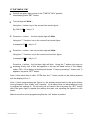
Now –
If the time is 10am or after, key in “1” and press the “SET” button.
If the time of day is before 10am, key in “0” and press the “SET” button.
If there is a DOT under "PM" then press either of the UP/DOWN button once to
remove the DOT and then press again to bring up the No. 1.
DO NOT FORGET TO PRESS "SET" TO LOCK IN THE TIME.
AST1052TMP-960
Page 7
20/11/2006