1
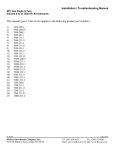
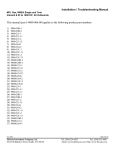
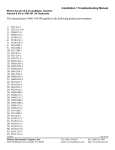
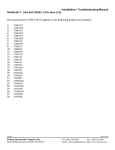
Installation / Troubleshooting Manual TWINSCAN 3”, GAS GPH (New LCD) Inboard & IO to 1000 HP, All Outboards This manual (part # 1000-158-00) applies to the following product part numbers: 1) 2) 3) 4) 5) 6) 7) 8) 9) 10) 11) 12) 13) 14) 15) 16) 17) 18) 19) 20) 21) 22) 23) 24) 25) 26) 27) 28) 29) 30) 31) 32) 33) 34) 35) 36) 37) 38) 39) 40) 41) 3FB010U 3FB010U3 3FB012U 3FB012U1 3FB013U 3FB013U1 3FB014M2 3FB015U 3FB015U1 3FB016M1 3FB016U1 3FB016U2 3FB018M 3FB018M1 3FB018M2 3FB022U 3FB022U1 3FB022U2 3FB023U 3FB023U1 3FB028M 3FS012U 3FS012U1 3FS013U 3FS013U1 3FS013U2 3FS021M 3FS022U 3FS022U1 3FS023U 3FS023U1 3FS024M2 3FS025U 3FS025U1 3FS026U1 3FS028M 3FS028M2 3FW016U1 3FW020U 3FW020U3 3FW021M 5/25/2004 FloScan Instrument Company, Inc. 3016 NE Blakeley Street, Seattle, WA 98105 1000-190-02 Tel: (206) 524-6625 Fax: (206) 523-4961 email: [email protected] http://www.floscan.com 42) 43) 44) 45) 46) 47) 48) 49) 50) 51) 52) 53) 54) 55) 3FW021M1 3FW022U 3FW022U1 3FW022U2 3FW023U 3FW023U1 3FW024M 3FW025U 3FW025U1 3FW025U3 3FW026U 3FW026U1 3FW028M1 3FW028M2 5/25/2004 FloScan Instrument Company, Inc. 3016 NE Blakeley Street, Seattle, WA 98105 1000-190-02 Tel: (206) 524-6625 Fax: (206) 523-4961 email: [email protected] http://www.floscan.com ! INSTALLATION PLANNING ! READ ME FIRST - Mechanical & Electrical Installation Planning Saves Time! FloScan systems are not difficult to install. Installing one requires only basic electrical & mechanical skills. With forethought and planning, your system will be installed with few problems. I. Installation Preparation: Review the mechanical installation instructions, then survey your vessel. Determine where the Sensor(s), Pulsation Damper(s), (if used) Switches and Instruments are to be mounted. Place them at their approximate locations. Measure fuel line lengths between system components, (Primary Filter, Sensor(s), Damper(s), Engine, and Fuel Tank). Determine fitting sizes and type of fittings needed for each plumbing connection, (JIC, SAE, NPT, NPTF, or Hose Barb). FloScan Gasoline, “Hi-Flo” system components have ½” Female NPT ports. FloScan Gasoline, “Lo-Flo” system components have ¼” Female NPT ports. Review the electrical installation instructions. Open and survey your vessels wire ways and run 3-conductor cables from each sensor to the instrument. Tachometers require 1 or 2 additional conductors. If there’s an existing tachometer, its signal wires can be used. II. Mechanical Installation: Install or mount the Sensor(s), Pulsation Damper(s), (If required) Instruments and Switches, (Reset, MPG, Port/Starboard, Synch). III. Plumbing: Mount sensor(s) where they’re to be installed. On installations using Fabric Braid A-1 Fuel Hose install the correct HB X MNPT fitting into each sensor. Always assemble fittings using a fuel proof pipe thread sealant. Never use Teflon Tape. Use a hose cutter or knife to cut the fuel hose. Next install the hose onto the barb fittings. Hose should not be twisted, have adequate slack, an ample radius at all bends and be supported at reasonable distances, approximately 2-4 feet. When clamping hose onto the barbs, use 2 narrow or 1 wide stainless hose clamp on each hose end. Wire Braid A-1 Aeroquip Type Fuel Hose or Hydraulic Hose: Mount the sensor(s) or sensor assemblies where they’re to be installed. Mark the hose where it is to be cut. Remove hose and bring it to a hydraulic shop. Have them cut the hose and install hose ends. Reinstall the hoses and install the correct fitting into each sensor or sensor assembly. Always assemble fittings using a fuel proof pipe thread sealant. Never use Teflon Tape. Hoses should not be twisted, have adequate slack, an ample radius at all bends and be adequately supported at reasonable distances, approximately 2-4 feet. AP-50 copper sealing washers, (Connie Seals) or Flaretite seals may be required to seal JIC & SAE fittings. IV. Electrical Installation: Run cables between Sensor(s) and Instrument(s). Cables must be adequately supported at reasonable distances, approximately 2-4 feet. Wire Terminations—Referring to the wiring diagram. Connect Sensor, Instrument and Switches to their respective wires with crimp type butt or ring connectors. Always cover connectors and wire ends with heat shrink tubing. V. System Start-Up: Prime the fuel system and check for leaks. Start and run your engines. Look for leaks and other installation problems. If system is not operating properly refer to the Troubleshooting Instructions and correct any deficiencies. 5/25/2004 FloScan Instrument Company, Inc. 3016 NE Blakeley Street, Seattle, WA 98105 4001-386-01D Tel: (206) 524-6625 Fax: (206) 523-4961 email: [email protected] http://www.floscan.com VI. Calibration: When system is running properly, refer to the calibration instructions and calibrate your system. USCG approved fuel hose with either fabric or wire reinforcing braid meet the following standards: Hose Marking USCG Type A-1 USCG Type A-2 USCG Type B-1 USCG Type B-2 Permeation Rating 100g/m²/24hrs. 300g/m²/24hrs. 100g/m²/24hrs. 300g/m²/24hrs. 2½ Minute Fire Test Required Required Not Required Not Required Table I Installation Do’s & Don’ts Do Don’t Use a Fuel Proof Pipe Thread Sealant when assembling fittings into fuel system components, (Locktite PST, Leak-Lock, or equivalent). Never use Teflon Tape! Use thin wall, low pressure, full flow type NPT or NPTF hose barb fittings. Don’t use Push-Lok, or Barb-Tite fittings. Avoid using JIC or SAE swivel fittings. If used always install copper conical sealing washers, (Connie seals) or fitting seals on fittings. Double clamp all hose barb fittings. Avoid using 90º elbow fittings. Install Sensor(s) at a low point in the fuel system, as far from the engine as practical. Fuel must travel, If possible, avoid bolting or mounting sensor(s) “Up-hill” slightly after leaving the sensor. Verify directly onto the engine. correct orientation and fuel flow direction. Connect all, “Ground” wires to a Ground Buss, or directly to the Battery’s Negative Terminal. Connect Never connect Instrument or Sensor “Ground” wires to the hull, engine block, or other or, “Ground” wire shields to the engine block. machinery. On Instruments with a GPS interface, connect Do not connect FloScan’s Data (–) to the GPS FloScan’s Data (+) to the GPS signal output. Data (–). Connect Data (–) to the GPS signal ground. Always use non-illuminated switches for Totalizer Reset, Port/Starboard Select, Hours/Synch, and GPH/MPG. 5/25/2004 FloScan Instrument Company, Inc. 3016 NE Blakeley Street, Seattle, WA 98105 Never use illuminated, or back-lit switches. 4001-386-01D Tel: (206) 524-6625 Fax: (206) 523-4961 email: [email protected] http://www.floscan.com OPERATION ® TwinScan 3” GPH Instrument – Gallons Per Hour (LCD) To ensure years of trouble free operation of your new TwinScan instrument, please read all of these instructions carefully before beginning your installation. 1. Mounting Location The TwinScan® GPH instrument allows you to quickly monitor and compare port and starboard engine performance. The front faces of all TwinScan® instruments are water-resistant and include a gasket to seal the instrument to the panel in which it is installed. Caution: TwinScan® instruments contain magnets that may affect your compass. Use care in choosing your mounting location. 2. Start-up Sequence and Normal Operation The TwinScan® GPH instrument performs a quick self-test each time it is powered up. The self-test verifies adequate power, good ground connections, that the pointers are free, and the LCD display is working. During this test, the pointers will sweep smoothly from zero to full scale and then back to zero. The LCD shows a series of numbers as detailed below (example values are used so actual numbers may be different). Switches and configurations are shown on the LCD as: “0123456789AbCdEF” “8.8.8.8” “ 1.21” “F 3” “- - 34” “ ” “123.4” Checks LCD segments and backlighting. Software version number. The red (left) and black (right) switch settings. Internal configuration (scale range, units, etc.) Blank Current total gallons or total liters (normal operation). After the self-test, the instrument goes into its normal operating mode. The needles indicate fuel flow in gallons (or liters) per hour and the LCD shows the total gallons (or liters) consumed since the last reset. 3. Testing the Totalizer The TwinScan GPH instrument has a non-volatile memory to track the total fuel consumed and therefore can only be reset by holding the reset switch in the “RESET” position for approximately 15 seconds. You will notice the LCD totalizer blinking during the reset mode—warning you that it is about to reset. After 10-15 seconds, the LCD will blink “E 0.0”. Release the switch to return to normal operation. 4. Illumination TwinScan® instruments use a dual method of illumination to create a high contrast display making it easy to read at night without affecting your night vision. The pointers are individually lighted so all the port pointers light when the port key switch is energized and all the starboard pointers light when the starboard key switch is energized. “Light piping” directs the light from an incandescent lamp across the dial face instead of bouncing it off the dial face and into your eyes. 5. Caring For Your Instrument The front lens of your TwinScan® instrument is made of hardened Lexan and is resistant to mild abrasion. Use mild soap and water to clean. Never wipe with a dry cloth. This can scratch the lens and builds up static electricity attracting dust and dirt. Avoid solvents such as acetone, benzene, and lacquer thinner as they attack the surface of the lens. Most window and kitchen cleaners contain at least one of these solvents plus mild abrasives and should be avoided. Applying automobile or furniture wax covers minor scratches on the lens and helps prevent further scratching. 5/13/1999 FloScan Instrument Company, Inc. 3016 NE Blakeley Street, Seattle, WA 98105 1000-203-00 Tel: (206) 524-6625 Fax: (206) 523-4961 email: [email protected] http://www.floscan.com INSTALLATION / WIRING TwinScan 3” Instrument – Tachometer & GPH Gas– NMEA 0183 Input (LCD) ****************************** *COMBINATION ONLY* ****************************** This unit conforms to NMEA 183, Version 1.5 and 2.0 interface standards, and requires a message that includes “VTG”, “RMC” or “RMA”. Check your owner’s manual to verify your GPS / LORAN-C includes this information. To insure an easy trouble free installation, read all instructions before starting. WIRING 1. Refer to the electrical wiring section of the GPS / LORAN-C Owner’s Manual for the proper procedure to connect your GPS / LORAN-C to NMEA 183 devices. Use shielded wire between instruments and ground the shield ONLY at the GPS / LORAN-C (sender end), not at the FloScan instrument end (receiver end). The shield is not to be used as a ground path. 2. Connect the WHITE/ORANGE wire to the NMEA (+) (BNC center terminal) terminal coming from your GPS / LORAN-C instrument. 3. Connect the GREEN/BLACK wire to the NMEA (-) (BNC shield) terminal coming from your GPS / LORAN-C instrument. 4. Connect the BLUE wire to the WHITE/RED wire from the TwinScan GPH meter and to one terminal of a single pole, single throw switch. Connect the other terminal to the BLACK wire (system ground). CALIBRATION 1. 2. See your GPS / LORAN-C owner’s manual and set output for NMEA 0183 version 1.5 or 2.0 at 4800 bits/sec. (standard). Speed is always sent on the NMEA string as speed over ground in knots no matter what units your GPS / LORAN-C displays. Fuel flow rate calibration is automatically done when the totalizer is calibrated. To calibrate, see the Totalizer calibration instruction page. FUEL ECONOMY/SYNCH OPERATION The blue wire must be connected to an operating TwinScan fuel flow meter to show fuel economy, otherwise the instrument shows the synchronizer regardless of this switch position. 1. With the MPG/SYNCH switch in the ON position (BLUE wire closed, grounded), your instrument displays the engine synchronizer. In the OFF (open) position, the instrument shows fuel economy in nautical miles per gallon or liters per nautical mile and is automatically selected by the TwinScan GPH/LPH instrument. You must have valid NMEA 0183 version 1.5 or 2.0 speed data to display fuel economy; otherwise you receive an error code: ERROR CODES Display Reason “ OFF” No signal activity present on NMEA 0183 terminals for four seconds. “ - - -” “- Lo -” “ - hi ” “ Err1” “ Err2” Receiving NMEA 0183 Version 1.5 or 2.0 message, but speed message is invalid. (MPG mode) Speed valid but flow rate less than 0.25 GPH. (LPM mode) Speed valid but less than 0.2 KM. Some pulsing signal present but no NMEA 0183 message received in last four seconds. NMEA 0183 message detected, but no “VTG”, “RMC” or “RMA” sentence found. 5/15/2002 FloScan Instrument Company, Inc. 3016 NE Blakeley Street, Seattle, WA 98105 Cause GPS / LORAN-C OFF NMEA OUTPUT not selected Leads not connected (+) & (-) leads reversed GPS satellite reception is poor GPS / LORAN-C in startup mode Flow rate too low—engine stopped Speed too low—boat stopped Leads connected to wrong source GPS / LORAN-C set to NMEA 0180 or 0182 (+) & (-) leads reversed. GPS / LORAN-C incompatible with NMEA 0183, version 1.5 or newer 1000-205-00B Tel: (206) 524-6625 Fax: (206) 523-4961 email: [email protected] http://www.floscan.com Note: THIS SHEET IS TO BE USED ONLY WHEN INSTALLING A TWINSCAN GPH METER AND TACHOMETER COMBINNED. Back of GPH Instrument 0 Back of Tachometer 0 0 Red Switch Black Switch WHITE/RED MPG Red Switch WHITE/ORANGE BLUE SYNC * Do not use Back-lit, or Illuminated switches CABLE Black Switch 0 GREEN/BLACK CABLE RED/WHITE 1/2 amp fuse RED/WHITE To Port key switch Data (-) To STARBOARD tachometer input VIOLET BLACK Data (+) To PORT tachometer input YELLOW RED 1/2 amp fuse To Starboard key switch RED BLACK WHITE PORT R CABLE B Flow Sensor W WHITE RED RED BLACK BLACK BROWN WHITE Battery (-) buss BLACK GREEN Totalizer Reset Switch * Do not use Back-lit, or Illuminated switches 5/15/2002 FloScan Instrument Company, Inc. 3016 NE Blakeley Street, Seattle, WA 98105 STARBOARD R CABLE B W Flow Sensor * If installing TwinScan tachometer and TwinScan GPH Instrument, parallel power and ground wires as shown. Otherwise, wire as single instrument as shown. 1000-205-00B Tel: (206) 524-6625 Fax: (206) 523-4961 email: [email protected] http://www.floscan.com ELECTRICAL Series 5400(0)/5500(0)/56100/5800(0)/6500(0)/6600(0) AccuTroll & CruiseMaster, All Multi Function Instruments, & TwinScan® SET UP Wire & Switches: Use 18 AWG stranded wire on runs under 50’. For runs over 50’ use 16 AWG. Shielded wire is recommended for all Diesel systems and suggested for Inboard & I/O gasoline systems. Always, “Ground” the wire shield or shield drain wires in the engine room by connecting them to the bonding system or engine block. The double wiring harness for twin engine Pulse/NMEA Diesel installations is included in all, (97/9800(0)) kits. FloScan suggests using J-Boxes, Terminal Blocks, and three conductor cables between diesel sensors and instrument to make wiring easier. Install Single Pole Single Throw (SPST) switches for Totalizer Reset, Port–Starboard Select, Engine Hours / Synchronizer, and GPH / MPG, (switches are not included with kit). To determine which switch types are required for your system, refer to the table below. All instruments except TwinScan Tachometers require a totalizer reset switch. SYSTEM 2500 5400(0) 5500(0)/56100 5800(0) 6500(0)/6600(0) 65/6600(0) Cummins PT 7000/8000 Gasoline MFI 75/7600(0) Diesel MFI 9000 Gasoline MFI 95/96/97/9800(0) TwinScan GPH Meter TwinScan Tachometer TwinScan GPH & Tachometer NA = Not Applicable TOTALIZER RESET SPST or Momentary ON SPST or Momentary OFF SPST or Momentary OFF SPST or Momentary OFF SPST or Momentary OFF SPST or Momentary OFF SPST or Momentary ON SPST or Momentary ON SPST or Momentary ON SPST or Momentary ON SPST or Momentary ON NA SPST or Momentary ON PORT/STBD Twin Engine Systems SPST SPST SPST NA NA SPST SPST NA SPST NA NA NA NA HOURS/ SYNCH NA NA NA NA NA NA SPST NA SPST NA NA NA NA GPH/ MPG NA NA NA NA NA NA NA NA SPST SPST NA NA NA MPG/ SYNCH NA NA NA NA NA NA NA NA NA NA NA NA SPST Grounding: Each Black sensor wire must be connected directly to the Black, “Instrument Ground” wire. Use a single wire to connect the Black wire junction to the battery’s negative terminal, or a ground buss. Power: FloScan Instruments & sensors operate on 9 to 12 VDC. Voltages exceeding 16 VDC will damage equipment. 24 & 32 VDC systems must be reduced to 12 VDC. Two different types of voltage reducers are available through FloScan. WIRE CONNECTIONS Installation: Connect wires one at a time and install heat shrink tubing before proceeding to the next wire, (refer to diagram). Connect ground wires first, (BLACK instrument ground wire to the BLACK sensor wires). Connect this junction to the battery’s negative terminal or the ground buss. Connect all other wires leaving the Red power wires for last to prevent short circuits during installation. Splicing: Splice or join individual wires per the diagram. Slide heat shrink tubing over the splices to prevent shorts. Do not seal splices until the installation is finished and has been tested. 1. Slide heat shrink tubing over one wire. 2. Insert wire ends into butt splice. 3. Crimp butt splice. 4. Slide heat shrink tubing over butt splice. HEAT 5. Apply heat. An adequate number of crimp-on connectors and heat-shrink tubing are included with system. The heat-shrink is a special type that will bond to wire insulation and make a watertight connection. See diagram for proper tubing application. Crimp-on connectors are sized for 18 or 20 gauge stranded wire. 5/21/2004 FloScan Instrument Company, Inc. 3016 NE Blakeley Street, Seattle, WA 98105 4001-100-00I Tel: (206) 524-6625 Fax: (206) 523-4961 email: [email protected] http://www.floscan.com Tachometer Wiring Information applies only to MFI & TwinScan Instrument Tachometers Tachometer signal wires on MFI & TwinScan Tachometers should be shielded. For proper tachometer operation on gasoline EFI engines, (especially outboards) the engine Ground wire must be physically connected to the MFI or TwinScan instrument ground wire. Note: FloScan recommends using dedicated 18 AWG shielded cable for tachometer signal wire connections. Always, “Ground” wire shields or the shield drain wire in the engine room by connecting to the bonding system or engine block. MULTI FUNCTION & TWINSCAN INSTRUMENT TACHOMETERS for CARBURETOR & CLOSED LOOP EFI GASOLINE ENGINES with POINTS or STANDARD ELECTRONIC IGNITIONS Inboard, & I/O Engines: Connect the YELLOW wire from pin # 8 to the distributor coil’s negative terminal. On twin engine systems the Yellow wire from pin # 8 connects to the port engine, the VIOLET wire from pin # 16 to starboard. Outboard Engines: Outboard tachometers are connected to either the engine alternator or tachometer signal wire. Connect the YELLOW wire from pin # 8 to the engine alternator or tachometer signal wire. On twin engine systems the Yellow wire from pin # 8 connects to the port engine, the VIOLET wire from pin # 16 to starboard. MULTI FUNCTION & TWINSCAN INSTRUMENT TACHOMETERS for CLOSED LOOP EFI GASOLINE ENGINES with CPU IGNITION SYSTEMS Inboard, I/O, & Outboard Engines: Connect the YELLOW wire from pin # 8 to the engines’ tachometer signal wire. On twin engine systems the Yellow wire from pin # 8 connects to the port engine, the VIOLET wire from pin # 16 to starboard. Outboard Engines: Connect the YELLOW wire from pin # 8 to the engines’ tachometer signal wire. On twin engine systems the Yellow wire from pin # 8 connects to the port engine, the VIOLET wire from pin # 16 to starboard. MULTI FUNCTION INSTRUMENT TACHOMETERS for OPEN RETURN EFI GASOLINE ENGINES with CPU IGNITION SYSTEMS Inboard & I/O Engines: Connect the YELLOW wire, pin # 8 to the engines’ tachometer signal wire. Connect the VIOLET wire, pin # 16 to ground. • MULTI FUNCITON INSTRUMENT TACHOMETERS - DIESEL ENGINES Keep existing tachometer: Connect the YELLOW and VIOLET wires to the existing tachometer signal wires. If one lead is grounded at the pickup or alternator, connect the YELLOW wire to the tachometer signal wire. Connect the VIOLET wire to a ground buss. • Replace existing tachometer: Connect the YELLOW and VIOLET wires to the existing magnetic pickup or signal generator. If one lead is grounded at the pickup or alternator, connect the YELLOW wire to the existing signal wire terminal at the tachometer and connect the VIOLET wire to a ground buss. • Install as a new tachometer. On engine alternator installations, connect the YELLOW wire to the tachometer output terminal (usually marked “tach” or “sig”) and connect the VIOLET wire to a ground buss. For mechanically driven A-C signal generators and magnetic pickups, connect the YELLOW wire to one terminal and the VIOLET wire to the other. • TWINSCAN INSTRUMENT TACHOMETERS – DIESEL ENGINES Connect the YELLOW wire to one terminal the Port tachometer sender, (AC signal generator, Magnetic pickup, or the engines’ alternators tach or sig terminal). Connect the VIOLET wire to the Starboard sender. The tachometer senders’ second terminal must be grounded. FINAL ACTIONS Check Electrical Installation: Test all connections. Support and secure all dangling wires. Start engine and calibrate system. 5/21/2004 FloScan Instrument Company, Inc. 3016 NE Blakeley Street, Seattle, WA 98105 4001-100-00I Tel: (206) 524-6625 Fax: (206) 523-4961 email: [email protected] http://www.floscan.com Mechanical Installation Series 5400(0)/ 5500(0)/ 56100/ 7000(0)/ 8000(0)/ 9000(0)/ TwinScan® - GPH Instrument Gasoline Engines - Inboard/ I/O/ Outboard FLOW SENSOR INSTALLATION Flow Sensors must be placed in a horizontal section of fuel line at a low point in the fuel system. Fuel should travel, “Up-hill” when exiting the sensor. Its outlet should be at least 1 or 2 inches lower than the fuel pump inlet, priming bulb or pulsation damper, (if used). Pulsation Dampers and Priming Bulbs must also be mounted horizontally. Installing sensor(s) 12” upstream of the fuel pump, priming bulb or pulsation damper improves system accuracy. Install sensors in a protected location, away from water spray. Model 20A, 20B, 231, & 233C gasoline sensors must be installed downstream of a fuel filter or water separator. On vessels not equipped with off engine filters, we suggest installing a Flow Ezy model ILA-02 filter with 238 micron screen directly to the 20A, 20B or 231 Low-Flow Sensors’ inlet. Use model 4ILA-04 with 595 micron screens with High Flow 233C Sensors’. Flow Ezy can be reached at (800) 237-1165. Caution: NEVER install sensor(s) downstream of an engine mounted fuel filter. NEVER use Teflon Tape when installing sensors. Teflon Tape can jam a sensor’s rotor. Instead, always use a fuel proof pipe thread sealant. For proper system operation, Carburetor Inboard & I/O Engines having diaphragm fuel pumps require Gasoline Pulsation Dampers. FloScan Systems are not shipped with Pulsation Dampers’ as carburetor Inboard and I/O engines are no longer in production. If you have a Carburetor Inboard or I/O engine, Pulsation Dampers can be purchased factory direct. Standard Flow Dampers’ are $30.00 each and High Flow Dampers’ are $45 each. Damper orders ship via UPS-3 day on purchase date. Prices include shipping and handling. To order please contact FloScan Sales or Service, (206) 524-6625, X-306, 316, 309, or 302. E-mail: [email protected], or [email protected]. The following engine types DO NOT require Pulsation Dampers: • • • Outboard Gasoline Engines Including Ficht, Optimax, 2 & 4-Cycle. Closed Loop EFI Gasoline Outboard, Inboard, and I/O Engines. Open Return EFI Gasoline Inboard and I/O Engines. • Sensors are marked with orientation and fuel flow arrows. They must be installed with these arrows pointing in the right direction. Standard-Flow Pulsation Damper 20A/ 20B/ 231 SENSOR Outlet Inlet ARROW UP Fuel Flow Direction 5/19/2004 FloScan Instrument Company, Inc. 3016 NE Blakeley Street, Seattle, WA 98105 ARROW UP 7000-036-00J Tel: (206) 524-6625 Fax: (206) 523-4961 email: [email protected] http://www.floscan.com High-Flow Pulsation Damper 233C SENSOR Outlet Inlet ARROW UP • Install sensor(s) with orientation arrows pointing UP Ï. Fuel must enter through the port marked IN or with an inward pointing Î fuel flow arrow, and exit through the port marked OUT or with an outward pointing Î arrow. • The sensor must be installed horizontally at a low point in the fuel system. When fuel exits the sensor it must travel up-hill slightly. One or two inches of vertical rise is adequate, more is ok. • The sensor must be installed downstream of, and protected by a screen, filter, or water separator. Sensors are tolerant of fine debris. A coarse screen, (up to 800 microns) or water separator is all that is required. • It is recommended that the sensor be installed between the fuel filter and fuel pump inlet. There should be at least twelve inches of fuel hose, (more is ok) between the sensor and fuel pump inlet. • If required, the pulsation damper must be installed horizontally, with its orientation arrow pointing up, (refer to fuel flow schematics below). • Minimize the number of 90º elbows and pipe fittings. Excessive use may create a high vacuum, fuel restricting pressure drop across the fuel system. Whenever possible, use a large radius hose bend instead of elbows. Refer to the engine owner’s manual for maximum fuel pump vacuum. A vacuum gauge can be used to confirm that the system is within limits. • If swivel fittings are used, (JIC or SAE) their mating surfaces should be sealed with AP 50 Copper Conical Sealing Washers or Flaretite Fitting Seals. Seals and sealing washers can be purchased through Fittings Inc. in Seattle, WA (206) 767-4670, 1-800552-0632, or a local hydraulic supply house. CAUTION, DO NOT OVER TIGHTEN FLOW SENSOR FITTINGS. Over-tightening may crack the sensor’s body. Cracks cause leaks and fuel leaks sometimes cause catastrophic explosions and fire. Torque pipe thread fittings to a maximum of 15 ft-LB, (180 inch-LB) or two full turns beyond hand tight, (Whichever comes first). Use a fuel proof pipe thread sealant be used when installing fittings into the flow sensors, (LockTite PST, Rector Seal, Jomar, etc). INSTRUMENT INSTALLATION • Before cutting holes in your Instrument Panel, verify that the instrument will be installed approximately 12” away from the compass, and in a shaded location out of direct sunlight. Mounting it within 12” of a compass may interfere with compass operation. Direct sunlight may cause the LCD display to temporarily turn black due to heat. Instrument Series 5400(0), 5500(0) 7000(0), 8000(0), 9000(0), TwinScan® 5/19/2004 FloScan Instrument Company, Inc. 3016 NE Blakeley Street, Seattle, WA 98105 Cutout Size 3 1/16” 3 3/8” Table 1 Instrument Depth 3” – Console Panel Thickness 2 ½” – Console Panel Thickness 7000-036-00J Tel: (206) 524-6625 Fax: (206) 523-4961 email: [email protected] http://www.floscan.com Standard-Flow Gasoline System Schematics FUEL TANK FUEL FILTER 1" to 2" Minimum 20A/ 20B/ 231 Vertical Rise Flow Sensor Vane, Gear, Gear-Rotor Electric Fuel Pump (EFI & Carburetor Engines) ENGINE ARROW UP 12" Minimum Distance: A-1 Fabric Braid Flexible Fuel Line Preferred Outboard Motor Diaphragm Fuel Pump FUEL TANK FUEL FILTER 20A/ 20B/ 231 Flow Sensor Priming Bulb 1" to 2" Minimum Vertical Rise ENGINE ARROW UP 12" Minimum Distance: A-1 Fabric Braid Flexible Fuel Line Preferred Engine Driven Diaphragm Fuel Pump (Carbureted Inboards and I/O's) Pulsation Damper 1" to 2" Minimum Vertical Rise FUEL TANK FUEL FILTER 20A/ 20B/ 231 Flow Sensor ENGINE ARROW UP 12" Minimum Distance: A-1 Fabric Braid Flexible Fuel Line Preferred 5/19/2004 FloScan Instrument Company, Inc. 3016 NE Blakeley Street, Seattle, WA 98105 7000-036-00J Tel: (206) 524-6625 Fax: (206) 523-4961 email: [email protected] http://www.floscan.com High-Flow Gasoline Fuel Flow Schematics FUEL TANK FUEL FILTER 233 Flow Sensor 1" to 2" Minimum Vertical Rise Vane, Gear, Gear-Rotor Electric Fuel Pump (EFI & Carburetor Engines) ENGINE 12" Minimum Distance: A-1 Fabric Braid Flexible Fuel Line Preferred Pulsation Damper Engine Driven Diaphragm Fuel Pump (Carbureted Inboards and I/O's) 1" to 2" Minimum Vertical Rise FUEL TANK FUEL FILTER 233 Flow Sensor ENGINE 12" Minimum Distance: A-1 Fabric Braid Flexible Fuel Line Preferred 5/19/2004 FloScan Instrument Company, Inc. 3016 NE Blakeley Street, Seattle, WA 98105 7000-036-00J Tel: (206) 524-6625 Fax: (206) 523-4961 email: [email protected] http://www.floscan.com TwinScan ® WIRING Gas 3” GPH Instrument Only To ensure years of trouble free operation of your new TwinScan Instrument please read all of these instructions carefully before beginning your installation. CAUTION: To avoid electrical shorts and possible fire, turn OFF the power to the instrument panel until installation is complete. Please Note: The pointer is accurate only when gauge is energized. The pointer may stop at any position when power is OFF and is not indicative of a faulty gauge. This instrument fits in a standard 3 3/8” tachometer hole. The analog needles show the PORT and STARBOARD fuel flow rates of each engine and the totalizer shows the total consumption of both engines. Fuel consumption is stored in non-volatile RAM and does not require power to retain its memory. Resetting the totalizer is done with an external switch (not supplied). An excellent choice is a momentary on (normally open) switch. You can also use a single throw, single pole (SPST) switch. Wiring Use No. 18 AWG mufti-strand wire, the included butt splices and self-sealing heat shrink to make all connections. Alternate installation: Use insulated ring tongue connectors and a terminal strip. Important: Protect wires from damage caused by sharp edges, moving and hot engine parts. Cable tie and support all wire runs for safety. Back of Instrument Wire Color RED/WHITE RED BLACK WHITE BROWN GREEN WHITE/RED Function PORT Instrument & flow sensor +12 VDC Power STARBOARD Instrument & flow sensor+12 VDC Power Battery Ground (Instrument & flow sensor ground) PORT Flow Sensor Input STARBOARD Flow Sensor Input Totalizer Reset Switch Pulse Output to Tachometer/MPG Switch if Installed Dial Lamp 0 Black Switch 0 Calibration Knobs Red Switch Wires 1. Connect the RED/WHITE wire to the “power on” side of the PORT ignition switch. 2. Connect the RED wire to the “power on” side of the STARBOARD ignition switch. In multiple gauge installations, join all the RED/WHITE wires together and run a single wire to the keyed terminal of the PORT ignition switch. Do the same for the RED wires on the STARBOARD side. 3. Connect the BLACK wire of the gauge to the BLACK wire(s) at the flow sensor(s). Run a BLACK wire to the negative battery bus from this point. This instrument requires a single point ground system. Connecting the gauge to a ground at the instrument panel and the flow sensor(s) to a different ground can introduce noise and affect the accuracy of the instrument. 4. Connect the WHITE wire of the instrument to the WHITE wire of the PORT flow sensor. 5. Connect the BROWN wire of the instrument to the WHITE wire of the STARBOARD flow sensor. 6. Connect the GREEN wire to one of the terminals of a single pole, single throw (SPST) or momentary on (normally open) switch. Run a BLACK wire from the other terminal of the switch to the Instrument BLACK wire (ground.) Totalizer reset switch OPEN Normal operation , Totalizer reset switch CLOSED - Reset mode. 5/15/2002 FloScan Instrument Company, Inc. 3016 NE Blakeley Street, Seattle, WA 98105 1000-108-00E Tel: (206) 524-6625 Fax: (206) 523-4961 email: [email protected] http://www.floscan.com Back of GPH Instrument 0 0 Black Switch Red Switch WHITE/RED (This wire is used when a tach is installed) Port Engine key switch 1/2 amp fuse CABLE + 12 VDC Starboard Engine key switch 1/2 amp fuse + 12 VDC RED/WHITE RED BLACK WHITE R CABLE B W WHITE RED PORT Flow Sensor RED BLACK BLACK BROWN WHITE STARBOARD R CABLE B W Flow Sensor Battery (-) buss BLACK GREEN Totalizer Reset Switch * Do not use Back-lit, or Illuminated switches 5/15/2002 FloScan Instrument Company, Inc. 3016 NE Blakeley Street, Seattle, WA 98105 1000-108-00E Tel: (206) 524-6625 Fax: (206) 523-4961 email: [email protected] http://www.floscan.com CALIBRATION TwinScan 3” GPH Instrument Gasoline and Diesel Engines To ensure years of trouble free operation of your new GPH Meter, please read all of these instructions carefully before beginning your installation. Calibration and flow sensor selection of your TwinScan 3” GPH Instrument is done with the sixteen position rotary switches on the back of the instrument. The RED switch is used for sensor type and pointer damping selection; the BLACK switch is used to calibrate your instrument. It is critical that you set the sensor selection switch correctly. Before re-calibrating your instrument, note the current position of the switch and check the calibration table for the correct flow sensor selection. Changing the totalizer calibration also changes the analog needle calibration. Re-calibration is required only if you find your totalizer reading to be more than 2% different from the actual fuel put into the tank. Various things such as the attitude of the boat in the water, the amount of the fill up, and how full the tank is filled affect accuracy. The larger the amount of fuel you base calibration on, the more accurate your system will be. To check the calibration: 1. Fill the tank(s) and reset the totalizer to zero. 2. Operate the boat in a normal manner until you would ordinarily refuel. 3. Fill the tank(s) as close to the same level as possible. Check the amount of fuel the tank actually took as well as the amount the totalizer shows you used. In most cases, these two amounts are within 2% of each other and no additional calibration is required. 4. To change the calibration, rotate the BLACK switch on the back of the instrument until the totalizer reads as close to your actual fill up as possible. If your reading is off by more than you can calibrate, go to the troubleshooting guide. BLACK Switch 0 1 2 3 Effect to Totalizer No Change +2% +4% +6% RED Switch 0 1 2 3 Sensor 20B 20B 20B 20B Results Light meter damping Heavy meter damping Light meter damping Light meter damping 4 5 6 7 8 9 A B C D E F +8% +10% -20% -18% -16% -14% -12% -10% -8% -6% -4% -2% 4 5 6 7 8 9 A B C D E F 231 231 231 231 233C 233C 233C 233C w/diesel* w/diesel* w/diesel* w/diesel* Light meter damping Heavy meter damping Light meter damping Light meter damping Light meter damping Heavy meter damping Light meter damping Light meter damping Light meter damping Heavy meter damping Light meter damping Light meter damping *TwinScan + MFI combination 9/19/2003 FloScan Instrument Company, Inc. 3016 NE Blakeley Street, Seattle, WA 98105 1000-148-00E Tel: (206) 524-6625 Fax: (206) 523-4961 email: [email protected] http://www.floscan.com TROUBLESHOOTING ® TwinScan 3” Instrument - Gallons Per Hour (LCD) BEFORE CALLING FOR ASSISTANCE, COMPLETE THESE TROUBLESHOOTING CHECKS AND RECORD YOUR FINDINGS. TECHNICAL SUPPORT REQUIRES THIS INFORMATION BEFORE A RETURN AUTHORIZATION WILL BE ISSUED. IT TAKES ABOUT 20 MINUTES AND IS VERY IMPORTANT IN ANALYZING SYSTEM PROBLEMS. Before starting, record instrument model number and switch settings. MODEL # _____________________ SERIAL # ____________ RED SWITCH POSITION __________ BLACK SWITCH POSITION _________ Perform the Instrument Diagnostic & Duty Cycle Tests outlined in Sections I & II First. Record your findings. I. INSTRUMENT DIAGNOSTIC SELF-TEST • • • • Secure power to the Red, and Red/White wires, (Turn both key switches OFF). Turn power on, (Either to one or both switches). At start-up, the instrument automatically performs a, “Self-test”. Verify that the pointer’s back-lighting glows Red, and that the LCD back-light is glowing Green. Observe that the pointers smoothly sweep to near full scale, (Slightly above or below) then smoothly drop back to zero. The LCD display shows the following numbers and letters in sequence. These are examples, actual readings may vary. Switch settings and configurations are shown on the LCD as, “0123456789AbCdEF”. 8.8.8.8 1.21 F 3 - - 34 123.4 • LCD segment and back-lighting check. Software version number. Red, (Port) and Black (Starboard) switch settings. Internal configuration (scale range, units, etc.) Blank Current total gallons or total liters, (Indicates normal operation). Record the software version __________ and switch settings _____ _____. FloScan Technical Support will ask for these. The self-test verifies adequate power, a good ground, that the pointers move, and the LCD display is working. If the self-test fails, the LCD shows, “Po” plus a two-digit number code. The pointers also show the error number as a, “Blink Code”. Sitting near center scale the pointers will twitch upwards, showing a numeric value. For Po23 the pointers twitch twice, pause for a moment, and then twitch three times. After a long wait the twitching resumes. This continues until power is secured. If the self-test fails, verify that supply voltage is at least 10 VDC. If voltage drops below 10V, the self-test may fail. II. DUTY CYCLE TEST • • • • • • • • Start both engines and run at idle. Close and open the RESET switch twice within 0.6 seconds—like double-clicking a computer mouse. The LCD will show dcy when it’s in duty cycle check mode. With the display showing dcy the pointers should remain steady and in the middle third of their scales. At very low flow rates, the pointers track the on/off signal from each sensor and will wiggle. Increase engine rpm until the pointers are steady. Steady readings with occasional, “Hick-ups” may indicate air or vapor bubbles passing through the sender. “Double-click” the RESET switch to return to the normal fuel flow display mode. 9/19/2003 FloScan Instrument Company, Inc. 3016 NE Blakeley Street, Seattle, WA 98105 1000-204-00B Tel: (206) 524-6625 email: [email protected] Fax: (206) 523-4961 http://www.floscan.com FAULT Blank LCD Display No back-lighting Low Totalizer Reading, over 10% High Totalizer Reading, over 10% Fluctuating GPH Readings No GPH or Totalizer Reading PROBABLE CAUSE Wiring Wiring/bulb failure Calibration Sensor orientation/failure Incorrect/defective sensor Incorrect switch settings Suction leak Suction leak Low RPM operation Wiring/Instrument failure Sensor orientation/failure Wire Harness Continuity Test SEE SECTION: Section III Section Calibration sheet Section IV, Install. sheets Section IV Calibration sheet Section VII Section VII Section X Section I, II, III, and V Section IV, Install. sheet Section V III. SUPPLY VOLTAGE and GROUND TEST • Measure voltage between the Starboard RED power wire, and the BLACK Instrument ground wire. __________VDC • Measure voltage between the Port RED/WHITE power wire, and the BLACK Instrument ground wire. __________VDC These readings should be approximately 12 - 14 VDC, but not lower than 10 VDC. • If 12 VDC is not present, measure between the RED, or RED/WHITE power wire and a known good ground in the instrument panel. If you measure 12 to 14 VDC, there may be an instrument ground problem. __________VDC • If 12 to 14 VDC is not present check wiring, switches, fuse, and the 12 VDC power source. IV. SENSOR(S) TEST 1. With your voltmeter set to a DC scale greater than 14 volts, measure between the RED (+12VDC) and BLACK (Instrument ground) wires. With engine idling, measure and record the voltage reading. ___________VDC 2. Move the voltmeters’ negative lead to the WHITE (Signal) wire. With engine idling, measure and record the voltage reading. It should be approximately 5 to 7 VDC, about ½ of the reading in step 1. ___________VDC 3. Stop the engine while observing the voltmeter. Readings should fluctuate between a high of 9 to 12 VDC, and a low of 0 to 4 VDC as the sensors’ turbine slows to a stop. ___________VDC NOTE: This may not be seen on a digital voltmeter. 4. Move the voltmeters’ negative lead to the BROWN (Signal) wire. With engine idling, measure and record the voltage reading. It should be approximately 5 to 7 VDC, about ½ of the reading in step 1. ___________VDC 5. Stop the engine and observe the voltmeter. Voltage readings should fluctuate between a high of 9 to 12 VDC, and a low of 0 to 4 VDC as the Sensors’ turbine slows to a stop. NOTE: This may not be seen with a digital voltmeter. 6. The Sensor may be defective if voltage readings in steps 3 & 5 remain constant while the engine is stopping. 7. On twin engine systems, try swapping the Brown & White signal wires. Observe the Instrument and see if the problem shifts sides, or remains on the same side. 9/19/2003 FloScan Instrument Company, Inc. 3016 NE Blakeley Street, Seattle, WA 98105 1000-204-00B Tel: (206) 524-6625 email: [email protected] Fax: (206) 523-4961 http://www.floscan.com • The Sensor(s) may be defective if voltage readings in steps 3 & 5 remain constant. • If signal voltages in steps 3 & 5 are ok, go to the backside of the Instrument. With engine(s) running, measure and record voltage readings across the Red/White & White, (Port Sensor) and Red & Brown, (Starboard Sensor) signal wires. These voltage readings should match the Sensor’ readings. This verifies that the Sensors’ signal output is reaching the Instrument. If not there is a wiring problem. V. CONTINUITY TEST 1. Continuity testing requires access to the back of the Instrument and an Ohmmeter. It verifies that wires are not broken, shorted to ground, another wire, or to power. Before starting, secure all power. You will be testing the WHITE, BROWN, and BLACK wires. 2. Disconnect the WHITE and BLACK wire harness conductors from the WHITE and BLACK Port Sensor & Instrument wires. Connect a jumper from the WHITE wiring harness conductor to a known good ground. At the Instrument, connect an Ohmmeter lead to its’ WHITE wiring harness conductor. Connect the other Ohmmeter Lead to a known, good ground. The Ohmmeter should read approximately 0.1 to 3 Ω. ____________ (Ohm Reading) Connect a jumper from the Black wiring harness conductor to a known good ground. At the Instrument connect an Ohmmeter lead to its’ Black wiring harness conductor. Connect the other Ohmmeter Lead to \a known, good ground. The Ohmmeter should read approximately 0.1 to 3 Ω. ____________ (Ohm Reading) Disconnect the Brown and BLACK wire harness conductors from the WHITE and BLACK Starboard Sensor & Instrument wires. Connect a jumper from the BROWN wiring harness conductor to a known good ground. At the Instrument, connect an Ohmmeter lead to its’ BROWN wiring harness conductor. Connect the other Ohmmeter Lead to a known, good ground. The Ohmmeter should read approximately 0.1 to 3 Ω. ____________ (Ohm Reading) Connect a jumper from the Black wiring harness conductor to a known good ground. At the Instrument connect an Ohmmeter lead to its’ Black wiring harness conductor. Connect the other Ohmmeter Lead to a known, good ground. The Ohmmeter should read approximately 0.1 to 3 Ω. ____________ (Ohm Reading) 3. VI. PULSATION PROBLEMS A stiff anti-siphon valve, sticking carburetor float or miss-plumbed Pulsation Damper(s) can cause fluctuating GPH readings. These are most pronounced at low Rpm’s and tend to disappear around mid throttle. They are annoying, but won’t affect totalizer accuracy. To eliminate, repair or replace any defective parts, or re-plumb dampers according to the Fuel Flow Schematic Instructions. VII. FINDING FUEL SYSTEM VACUUM LEAKS Fluctuating GPH and High Totalizer Readings are usually caused by a small vacuum leak between the fuel tank and fuel pump inlet. Fluctuations tend to be between 2 and 4 GPH. These vacuum leaks also affect totalizer accuracy, causing it to read 15 to 100% high. Larger leaks produce greater fluctuations and higher readings. They generally do not affect engine performance. Finding suction leaks can be time-consuming. When approached properly, they can usually be found and repaired quickly. Two common places for suction leaks to occur are at the primary fuel filter - water separator, and/or a loose valve stem packing nut. Remove the filter housing and coat all o-rings, gaskets and sealing surfaces with a medium to heavy grease, (Do not use oil) and reassemble. Grease all valve stem packings and gently tighten gland nuts. Don’t over tighten, valve handles should turn freely. Tighten all hose clamps and compression fittings. Don’t over tighten. Run the engine for 5 to 10 minutes observing GPH readings. If you’ve found the problem, fluctuations should be reduced to less than ½ GPH. 9/19/2003 FloScan Instrument Company, Inc. 3016 NE Blakeley Street, Seattle, WA 98105 1000-204-00B Tel: (206) 524-6625 email: [email protected] Fax: (206) 523-4961 http://www.floscan.com If the problem persists, temporarily install a clear piece of fuel resistant hose downstream of the forward flow sensor. Run the engine and watch for a stream of small bubbles in the clear hose, or an occasional larger bubble. Sometimes shining a light through the hose makes bubbles easier to see. Observe the clear hose while shaking the fuel lines. If the bubble stream continually increases or decreases you’ve found the leak area. Repair or replace as needed. If this occurs one-time, you probably dislodged some trapped air. If the leak hasn’t been found, the last step is to inspect each pipe joint. Thread sealant should be visible around each joint. If not, that joint is suspect and must be resealed. After resealing run the engine for a few minutes to purge any remaining air. There should now be bubble free fuel running through the clear hose. If bubbles are still present a leak was missed. Recheck your work. After all the leaks are stopped, remove the clear hose. VIII. FUEL FILTERS A dirty fuel filter, or one that is too fine (1-25 micron) will draw vapor bubbles out of the fuel, causing fluctuations and high readings. Replace it with a new 30-micron or coarser filter. IX. FLOW SENSOR ORIENTATION Sensor orientation is critical for proper operation. All Sensors have their inlet and outlet ports clearly marked (IN / OUT or Î Î). This identifies fuel flow direction. The Sensor must be, “Plumbed” correctly for it to operate properly. There is an additional single arrow on the Sensor body. It is crucial that this single arrow points up Ï. X. LOW RPM OPERATION At idle, under a no load condition, it is common for GPH readings to fluctuate slightly. This concludes system testing. If problems with your system persist, contact FloScan Technical Support with testing results. 9/19/2003 FloScan Instrument Company, Inc. 3016 NE Blakeley Street, Seattle, WA 98105 1000-204-00B Tel: (206) 524-6625 email: [email protected] Fax: (206) 523-4961 http://www.floscan.com