1
,QVWDOOLQJDQG2SHUDWLQJ,QVWUXFWLRQV
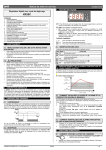
8.6 DIGITAL INPUTS POLARITY
12.1 ALARM RECOVERY
The digital input polarity depends on the “i1P” parameter.
i1P=CL: the input is activated by closing the contact.
i1P=OP: the input is activated by opening the contact
Probe alarm “P1” starts some seconds after the fault in the related probe; it
automatically stops some seconds after the probe restarts normal operation. Check
connections before replacing the probe.
Temperature alarms “HA” and “LA” automatically stop as soon as the thermostat
temperature returns to normal values and when defrost starts.
Alarms “EA” and “CA” (with i1F=bAL) recover as soon as the digital input is
disabled.
Alarm “CA” (with i1F=PAL) recovers only by switching off and on the instrument.
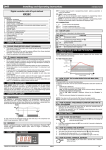
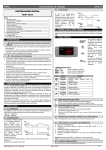
9. INSTALLATION AND MOUNTING
Instrument XR10C shall be mounted on vertical panel,
in a 29x71 mm hole, and fixed using the special
bracket supplied.
To obtain an IP65 protection grade use the front
panel rubber gasket (mod. RG-C) as shown in figure.
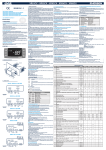
13. TECHNICAL DATA
The instrument is provided with screw terminal block to connect cables with a cross
section up to 2,5 mm2. Before connecting cables make sure the power supply
complies with the instrument’s requirements. Separate the probe cables from the
power supply cables, from the outputs and the power connections. Do not exceed
the maximum current allowed on each relay, in case of heavier loads use a suitable
external relay.
Housing: self extinguishing ABS.
Case: XR10C frontal 32x74 mm; depth 60mm;
Mounting: XR10C panel mounting in a 71x29mm panel cut-out
Protection: IP20.
Frontal protection: IP65 with frontal gasket RG-C (optional).
2
Connections: Screw terminal block ≤ 2,5 mm wiring.
Power supply: according to the model: 12Vac/dc, ±10%; 24Vac/dc, ±10%; 230Vac
±10%, 50/60Hz, 110Vac ±10%, 50/60Hz
Power absorption: 3VA max
Display: 3 digits, red LED, 14,2 mm high.
Inputs: 1 NTC or PTC probe.
Digital input: free contact
Relay outputs
compressor: SPDT relay 8(3) A, 250Vac or
SPST relay 20(8)A; 250Vac
Data storing: on the non-volatile memory (EEPROM).
Kind of action: 1B; Pollution grade: normal; Software class: A.
Operating temperature: 0÷60 °C.
Storage temperature: -30÷85 °C.
Relative humidity: 20÷85% (no condensing)
Measuring and regulation range:
NTC probe: -40÷110°C (-40÷230°F)
PTC probe: -50÷150°C (-58÷302°F)
Resolution: 0,1 °C or 1°C or 1 °F (selectable).
Accuracy (ambient temp. 25°C): ±0,7 °C ±1 digit
10.1 PROBE CONNECTION
14. CONNECTIONS
The temperature range allowed for correct operation is 0÷60 °C. Avoid places
subject to strong vibrations, corrosive gases, excessive dirt or humidity. The same
recommendations apply to probes. Let air circulate by the cooling holes.
10. ELECTRICAL CONNECTIONS
The probes shall be mounted with the bulb upwards to prevent damages due to
casual liquid infiltration. It is recommended to place the thermostat probe away from
air streams to correctly measure the average room temperature. Place the defrost
termination probe among the evaporator fins in the coldest place, where most ice is
formed, far from heaters or from the warmest place during defrost, to prevent
premature defrost termination.
Room
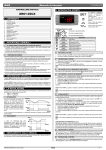
14.1 XR10C: 8A COMPRESSOR
8(3)A250V
11. HOW TO USE THE HOT KEY
11.1 HOW TO PROGRAM A HOT KEY FROM THE
INSTRUMENT (UPLOAD)
1.
2.
3.
4.
Comp
Program one controller with the front keypad.
When the controller is ON, insert the “Hot key” and push
key; the "uPL"
message appears followed a by flashing “End”
Push “SET” key and the End will stop flashing.
Turn OFF the instrument remove the “Hot Key”, then turn it ON again.
9
Hot Key
N.C .
Line
12Vac/dc supply: connect to the terminals 7 and 8.
24Vac/dc supply: connect to the terminals 7 and 8.
120Vac supply: connect to the terminals 7 and 8.
NOTE: the “Err” message is displayed for failed programming. In this case push
again
key if you want to restart the upload again or remove the “Hot key” to abort
the operation.
9
14.2 XR10C: 20A COMPRESSOR
1.
2.
3.
4.
5.
Room
11.2 HOW TO PROGRAM AN INSTRUMENT USING A HOT KEY
(DOWNLOAD)
Turn OFF the instrument.
Insert a programmed “Hot Key” into the 5 PIN receptacle and then turn
the Controller ON.
Automatically the parameter list of the “Hot Key” is downloaded into the
Controller memory, the “doL” message is blinking followed a by flashing
“End”.
After 10 seconds the instrument will restart working with the new parameters.
Remove the “Hot Key”..
20(8)A250V
Hot Key
Comp
Line
NOTE the message “Err” is displayed for failed programming. In this case turn the
unit off and then on if you want to restart the download again or remove the “Hot
key” to abort the operation.
12Vac/dc supply: connect to the terminals 7 and 8.
24Vac/dc supply: connect to the terminals 7 and 8.
120Vac supply: connect to the terminals 7 and 8.
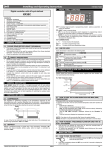
12. ALARM SIGNALS
Message
Cause
“P1”
Room probe failure
“HA”
“LA”
“dA”
“EA”
“CA”
“CA”
Maximum temperature alarm
Minimum temperature alarm
Door open
External alarm
Serious external alarm (i1F=bAL)
Pressure switch alarm (i1F=PAL)
1592007200 XR10C GB r1.0 15.05.2003.doc
Outputs
Compressor output according
to par. “Con” and “COF”
Outputs unchanged.
Outputs unchanged.
Regulation restarts
Output unchanged.
All outputs OFF.
All outputs OFF
;5&
3/4