1
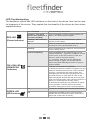
LED Troubleshooting
The fleetfinder Hybrid has LED indicators on the front of the device, that can be used
for diagnosis of the device. They explain the functionality of the device by their status
explained below.
RED LED
(Power Indicator)
YELLOW LED
(GSM/GPRS
Indicator)
GREEN LED
(GPS Indicator)
On, solid state
Unit powered by main power.
Flashing – Two quick
flashes, then pause for 2
seconds (repeated)
Unit is operating on Iridium communication, as
there is no GPRS signal available.
Flashing - On / Off every
second
Unit operating under backup battery (check
vehicle power supply)
Off
There is no power to the unit (check fuse, and
connection of the red and black wires.)
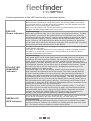
Flashing
Unit is registered on the network, and connected
to the tracking server.
On but not flashing
Unit is registered on the network, but not connected via GPRS. – The unit is unable to connect
to the server. If the LED comes on solid, and
stays on solid for a period of about
1 ~ 2 minutes, then turns off for 30seconds,
before turning on again, this means that the
device has weak GSM signal, and it is trying to
acquire GPRS.
Off
Unit has one of these 2 possibilities.
1. Means the device is unable to register onto the
network. Please ensure the sim card is inserted
correctly. And that the sim card is valid, and
activated (Can be checked by trialing the sim in
a mobile phone). In case there is a pin on the
SIM card, please ensure that the pin is removed
(this can be done when a sim card is inserted in a
phone, by accessing the security menu.)
2. Means that the device has switched to Iridium
communication. The Red LED of the device
should be flashing twice with a 2 second pause.
On
The device is able to get a current GPS location.
Off
The device is unable to get a current GPS fix.
Please check the antenna location, and ensure
that it has a clear view of the sky.
P6