1
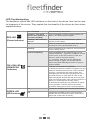
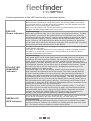
Further explanation of the LED functionality is described below:
RED LED
(Power Indicator)
When the unit is powered on using main power, the LED will be permanently on.
When the unit is powered on using main power, but is using Iridium communication because there is no GPRS connection available, the LED will flash two quick
flashes then a two second pause. (Repeated)
When the main power is cut, the unit will switch to backup battery mode, the LED
will flash until the backup battery runs out of power.
Troubleshooting:
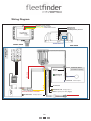
Check that you have a valid 12V or 24V source connected to the device. The Red
wire should be connected to the positive terminal, and the Black wire should be
connected to the Ground terminal. If there is power applied to these wires, please
check the power supply by using a Voltmeter across Red and Black wires of the
device. If there is 12V supplied but the device is still not powering up, please disconnect both wires, then leave the device unplugged for 5 minutes, then reconnect.
This process will reset the internal fuse on the device.
The yellow LED will flash when the device is connected to the tracking server with
a valid GPRS connection.
It will stay on continually when it is in sms mode only, or when the GSM is present
but there is no connection to the server. The LED will turn off when the device
switches to IRIDIUM communication.
YELLOW LED
(GSM/GPRS
Indicator)
GREEN LED
(GPS Indicator)
Troubleshooting:
If the yellow light is not on at all, please ensure the GSM antenna is connected,
and that the sim card is properly inserted, with the gold terminals facing the circuit
board. Please ensure the terminals are clean, and the sim card clips into place
appropriately. If this fails, please put the sim card into a phone, and make sure that
it is registered, and that you are able to send a message from the phone. Please
ensure the sim pin on the sim card has been disabled (this can be done in the
security settings in a mobile phone).
If the yellow light is on, but not flashing, please ensure that you have the correct
APN, username and password set for the network. The APN is usually different
for each network provider, and can be found by calling the telecommunications
provider, some telecommunications providers require a username and password to
be declared, please ensure that you have these details. The APN, username and
password can be set only from the primary defined phone number (please refer to
the Users Manual for setting primary identity). The primary phone needs to send
commands for setting the APN, username and password (these commands can be
found in the command list in the users manual)
If the LED comes on solid, and stays on solid for a period of about 1~ 2 minutes,
then turns off for 30 seconds, before turning on again, this means that the device
has weak GSM signal, and it is trying to acquire GPRS. Please take the vehicle
outdoors and check the GSM reception on any phone using the same service
provider. If the problem persists, please try a different GSM antenna.
This LED will stay on when there is a valid GPS fix. When there is no GPS signal,
or the device is unable to get clear view of the sky, the LED will be off.
Troubleshooting:
Please ensure that the GPS antenna (gold connector) is connected to the middle
antenna connection, and that it is mounted in a suitable spot with clear view of the
sky. The vehicle must be outside to be able to get a GPS fix.
P7