1
B-500-RX-230-IR Installation Manual
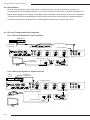
4. Receiver Layout
1
2
3
4
5
6
7 8
1.
HDMI Out
Attach HDMI cable to the display.
2. IR Receiver
Connect an IR receiver to this port for capturing commands to transmit IR signal to the matrix
switcher using IR pass-through. (3.5mm stereo mini)
3.
IR Flasher
Connect an IR flasher or control system to this port to control a display or device using IR
pass-through. (3.5mm mono mini)
4.
Latch-Locking Power Jack
Attach the included 5V DC 2A power supply to this jack.
5.
Firmware Update Port (USB)
Factory use only. Requires custom non-standard USB cable.
6.
HDBaseT Link Port (RJ45)
Attach the HDBaseT cable from the transmitting device.
7.
Power LED
Illuminates solid RED when extender is powered on.
8. Link LED
Illuminates solid GREEN when HDBaseT Link is active. Off indicates that HDBaseT Link is
not active.
pg.5
www.snapav.com Support: 866.838.5052