1
User Documentation
ODO User Manual
INSTALLATION
If you have installed a previous version of ODO PC then please ensure you
perform a synch and backup your Odo.mdb. You will also need to re-enter
your serial key so sure you have it before upgrading.
New Upgrade Serial Key
Users upgrading from a version prior to V2 will require a new serial key. Existing
V2 and above users do not require a new key.
When purchasing the upgrade you will be required to supply your Hotsync User
name to generate your upgrade key. Note: The registration name is case sensitive so
please ensure you enter it carefully.
After receiving your Upgrade key and entering it into your PDA you will be
provided with your full serial key. Please ensure you record this for future reference
as you will need it to reinstall.
Upgrade and New Installation Procedure
REQUIREMENTS Prior to installing ODO the PC must have the following software installed:
1. Palm HotSync® manager with a cradle connecting to the Palm.
2. Windows 9x, NT, 2000, XP or later. Mac is not supported for the PC
application.
EXTRACTING THE This step is required for all installations.
SETUP FILES 1. Download the ODOSetup.zip file to a temporary directory.
2. Unzip ODOSetup.zip to a temporary directory
3. In explorer locate the directory where you extracted the files.
PC INSTALL This step is required if you wish to use the PC application to synchronise ODO with
your PDA.
1. If you are an existing ODO user then please first perform a sync and backup
your odo.mdb file (just in case!)
2. Locate the Setup.exe file and run it.
3. If you are upgrading please select the Repair option, otherwise follow the
prompts.
4. Setup will prompt for an installation directory. We recommend using the
default.
5. Once Setup is complete you may need to reboot your PC. Please do so before
running ODO PC.
6. IMPORTANT! Please remember to install the ODO.prc to your Palm before
entering / modifying any data on your PC.
The PC Application is now installed. You may start the application by clicking
START\All Program\ODO PC\ODO PC.
PALM INSTALL 1. In Explorer locate the Odo.prc file in the installation directory.
2. Double click on the Odo.prc file.
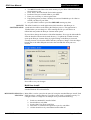
3. You may be prompted to select the user of the palm to install to, if so select the
appropriate user and click ‘OK’.
24/12/2005
Page: 7 of 32