1
Installation Manual
7.4.2 Operation Test
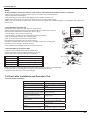
1.Before Operation Test
(1)Do not switch on power before installation is finished completely.
(2)Electric wiring must be connected correctly and securely.
(3)Cut-off valves of the connection pipes should be opened.
(4)All the impurities such as scraps and thrums must be cleared from the unit.
2.Operation Test Method
(1)Switch on power and press "ON/OFF"?button on the remote controller to start operation.
(2)Press MODE button to select the COOL, HEAT (Not available for cooling only unit), FAN to check whether the operation is normal or
not.
7.5 Installation and Maintenance of Healthy Filter
7.5.1 Installation of Healthy Filter
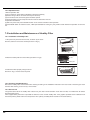
1.Lift up the front panel from its two ends, as shown by the arrow
direction, and then remove the air filter.(as shown in Fig.a)
Fig. a
Fig. b
2.Attach the healthy filter onto the air filter,(as shown in Fig.b).
Air filter
Healthy filter
3.Install the air filter properly along the arrow
direction in Fig.c, and then close the panel .
Fig.
c
7.5.2 Cleaning and Maintenance
Remove the healthy filter and reinstall it after cleaning according to the installation instruction. Don't use brush or hard things to clean
the filter. After cleaning, be sure to dry it in the shade.
7.5.3 Service Life
The general serive life for the healthy filter is about one year under normal condition. As for silver ion filter, it is invalid when its surface
becomes black (green).
●This supplementary instruction is provided for reference to the unit with healthy filter. If the graphics provided herein is different from
the actual product, please refer to the atual product. The quantity of healthy filters is based on the actual delivery.
22