1
52
UltraView PTZ
Installation Manual
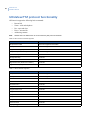
UltraView PTZ protocol functionality
All Protocols support the following basic commands:
•
•
•
•
•
Note:
Pan and tilt
Zoom—wide and telephoto
Iris—open and close
Focus—near and far
Addressing cameras
Shaded cells in the tables below are unconventional by that protocol’s standards.
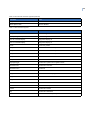
Table 10. Pelco D and P commands supported
Command
Note
Set preset out of GUI
See Pelco keypad documentation
Go to preset XX
See Pelco keypad documentation
Flip (rotate 180 degrees)
Preset 33
Run pattern (learn number 1)
See Pelco keypad documentation
Set left limit stop
Preset 92
Set right limit stop
Preset 93
Enter into menu mode
Preset 95
Begin frame-scan (Preset tour number 1)
Preset 98
Begin autoscan (Pan)
Preset 99
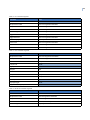
Table 11. Ultrak commands supported
Command
Note
Set preset out of GUI
See Ultrak keypad documentation
Go to preset XX
See Ultrak keypad documentation
Run learn tour 1
Preset 80
Run learn tour 2
Preset 81
Run learn tour 3
Preset 82
Program learn tour 1
Preset 83
Program learn tour 2
Preset 84
Program learn tour 3
Preset 85
Run preset tour 1
Preset 87
Run preset tour 2
Preset 88
Run preset tour 3
Preset 89
Enter into menu
Preset 90
Day/night toggle
Preset 94