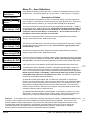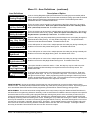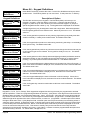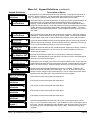
1
Specifications, Features, and Benefits
The M1 is available in two models, the ELK-M1 Standard and the ELK-M1G Gold. The features and benefits which are common to
both models is listed on the top section of this page. The bottom section highlights the key differences between both models.
General:
• Large zone capacity: 16 on-board zones expandable to 208
• Wireless capability: Up to 48 zones
• Two Way Listen-in interface
• Flash Memory - Allows field updates to firmware electronically
• RS-232 serial port to interface PCs and peripheral devices
• Time/Date stamped 512 event history log
• Menu driven, text keypad programming - no manual required!
• Voice announcement of alarms, zone descs, status, etc.
- 500+ Word/Phrase Vocabulary
- Link up to 6 words/phrases per announcement
- 10 custom recordable words/phrases
• 13 On-Board Outputs: 1 voice driver/siren, 1 siren driver/
voltage, 1 form “C” Relay, and 10 low current (50 mA) voltage
outputs
• Supports 4 wire (any zone) and 2 wire (zone 16) smoke
detectors
• Includes Fire alarm verification routine
• Can be partitioned into 8 areas and account numbers
• User Codes: 99 (4 or 6 digit) with assignable authority levels
• Arm levels: Away, Stay, Stay Instant, Nite, Nite Instant, Vacation
• Plug-in terminal blocks make service and pre-wires a snap!
• Hardware "watchdog" and nonvolatile EEPROM memory
• Supervised phone line, alarm output, and aux. overcurrent
Communications
• True V.22 bis Modem for fast reliable upload/download
• Optional Ethernet port for reporting, operation, programming
• Built-in Phone Remote Control makes any phone a keypad
• Integrated Voice Dialer uses vocabulary or custom words
• Communicator formats: SIA, Contact ID, 4 + 2, and Pager
• Installer telephone (buttset) test feature
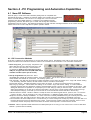
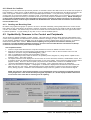
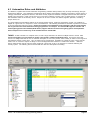
• Ness-RP PC programming software with conflict resolution
to easily highlight differences between control and PC
- Dial-up, ethernet, RS-232 port, or local house phone jack
- Automatic answering machine bypass
Keypad
• Backlit, Large Character LCD Display, 16 x 2 lines
• Built-in Temperature Sensor
• Optional Plug-in Prox Access reader (26 bit Weigand format)
• Menu navigation keys and 6 programmable function keys
• Plug-in connector, only 4 wires to the control
• 1 Zone input and 1 Output Programmable per Keypad
• Programmable display of time, date, & temperature
• Displays system diagnostics and settings.
• Maximum Keypads allowed: 16
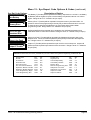
Comparisons of M1 and M1G (Gold)
•
•
•
•
•
•
•
•
•
Automation & Integration
• Create lifestyle enhancing comfort, convenience, and security
• Powerful “Whenever/And/Then” RULES Programming allows
almost any imaginable operation. No need to chain rules
together. Any single “Whenever” event can have one or more
ANDs and THENs (conditions and commands).
• Rules utilize easy to understand text based references
• Control lighting using RS-232 serial or 2-way Power Line
Control (PLC) ports including On, Off, Dim, All On, All Off
commands
• Transmit and receive custom serial ASCII strings
• Read Temperature Sensors - Communicate with Thermostats
• Turn on Tasks, Lights, Outputs via Keypad or Telephone
Remote
• Sunset/Sunrise calculation and activation built-in
Power Supply
• Heavy duty - 2.5 Amp power supply w/ 1.5 Amp continuous
• Dynamic battery test
• Master power switch and Low battery disconnect
• PTC (fuseless) resettable overload protection
• Multiple auxiliary power terminals
Ness Part Numbers and Accessories:
101-204 Standard M1 Control in 355mm x 355mm metal
enclosure
101-205 M1 GOLD Control in 355mm x 355mm metal enclosure
101 - 208 Ness power kit (power pack, battery & Dialler lead)
101 - 203
101 - 210
101 - 212
101 - 211
101 - 213
101 - 207
101 - 215
101 - 214
101 - 220
101 - 221
101 - 217
101 - 216
101 - 219
101 - 229
101 - 209
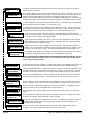
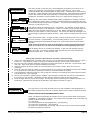
Keypad, LCD,16 character x 2 line
16 Zone (input) expander
16 Output expander, 8 Voltage / 8 Relays
16 Output expander, Voltage only
Relay board, 8 form ”C” relays
Data bus wiring hub
Ethernet Port Exp/Interface
Lighting, Thermostat Interface & Serial exp.
Mini prox reader for keypad
Wiegand 3rd party reader connection cable
Two Way Listen In Kit C/W Speaker and Mic
Two Way Listen-in module w/3 mic inputs
Speaker & Mic for Two Way Listen-in
Zone Temperature Sensor (-45 to 60C) (-50 to 140 F)
Ness-RP Technicians PC software, free with
1st Control purchase
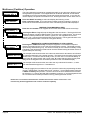
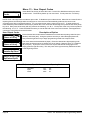
ELK-M1 (Std)
Automation (“Whenever/And/Then”) Rules Capacity
100
Serial (RS232) Port Supported
1
Phone Number Capacity
4
Number of HVAC Thermostats Supported
2
Total Number of Outputs Supported
32
Advanced Lighting Options (Pre-set Dim, Extended, Levels, Scenes) Analog Zone Definitions Supported
Additional capacity for transmission of Serial ASCII Strings
Larger capability for events (time and date), task, lights, outputs
-
NESS - M1 Installation and Programming Manual
ELK-M1G (Gold)
528
8 w/expanders
8
16
205
Yes
Yes
Yes
Yes
Page 5