1
Section 3 - Configuration
Routing
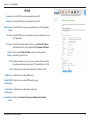
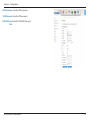
This page allows you to specify custom routes that determine how data is moved around your network.
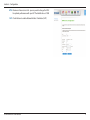
Enable Routing Check the box to enable the rule.
Rule:
Destination IP Enter the IP of the specified network that you want to access using
Address: the static route.
Destination Enter the subnet mask to be used for the specified network.
Subnet Mask:
Interface: Select the interface to be used for the rule.
Gateway IP Enter the gateway IP address for the specified network.
Address:
Metric: Enter the metric to be used for the rule.
D-Link DWR-922 User Manual
41