1
1. Introduction
1. INTRODUCTION
1.1 What is the Vertige
1.2 Useful terms and definitions
RY
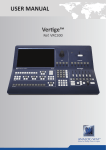
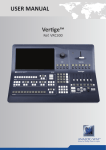
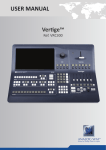
Vertige™ is a revolutionary Remote Controller integrating new ways to create and manage large events
and multi-venues. The Vertige™ brings a simple and flexible approach to show creation and management.
Vertige™ can control several screens and devices such as Ascender 48, Ascender 32, SmartMatriX Ultra
or NeXtage 16 systems, independently or simultaneously in any kind of combination, including Soft Edge
Blending. Vertige™also supports linked LiveCore™ devices (additive modularity) and LiveCore™ Expansion
modules.
NA
SHOW: a “show” is a complete set up for an event containing several devices, screens, sources and presets.
ITERATION: an “iteration” is a version of a show. Iterations can be used to create backups or variants of a
show. On a broader level, iterations allow refining your setup step by step.
ASSEMBLY: an “Assembly” or a “Device Assembly” handles one or several identical devices that can operate
on the same screens.
MI
SCREEN: A “Screen” is a destination where a picture will be displayed. For example, it could be a single display
or a projection surface, which can be composed of one or several outputs. Each screen might use one or
several layers.
PRESET: a “Preset” on the Vertige™, is a capture of a state of the scene (one or more screens). Preset allows
storing the layout of the elements and their sources for a specific step of the event.
LAYER: a “Layer” is an image display element (such as a Background, a PIP, or a Logo) that has an associated
visual priority — either in front of another layer or behind.
ELI
PIP: a “PIP” refers to Picture-in-Picture. It is a layer, typically not full size, which displays a stream on top
of another layer. PIPs can be reduced, enlarged, bordered and shadowed. They can overlap one another,
depending on their visual priority.
STREAM: a “Stream” can be Live (signal from an input plug) or Still (frame/logo) and allows you to display
content with various settings (aspect ratio, brightness, crop…) in a layer.
SOURCE: a “source” allows the user to assign a Vertige™ panel key to a stream (per screen).
PR
FRAME: a “Frame” is an image, usually used to fill a background, which is selected from the still Frame library.
It can also be loaded to a LiveCore™ device using the Web RCS.
LOGO: a “Logo” is a small image, usually used to display company logo or labels, which is selected from the
still Logo library. It can also be loaded to a LiveCore™ device using the Web RCS.
SOFT EDGE: Soft Edge blending technology is used to compensate overlapping video projectors which display
content on a single Screen. The resulting image will appear as though it were a single unified picture.
HARD EDGE: Hard Edge technology is used to display continuous content using several outputs without any
overlap. The outputs are “side by side”, they don’t overlap or share pixel information. (Opposed to Soft Edge
where some parts of the image are sent simultaneously to several displays.)
5