1
Radiocrafts
Embedded Wireless Solutions
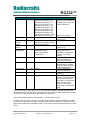
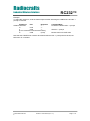
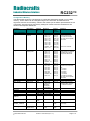
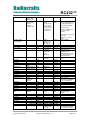
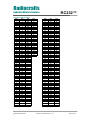
Parameter
Channel
Output power
Command Argument in hex (decimal)
„C‟ – 0x43 RC1040: 0x01-0x05 (1-5)
RC1081: 0x01-0x11 (1-17)
RC1090: 0x01-0x09 (1-9)
RC1210: 0x01-0x1E (1-30)
RC1230: 0x01-0x47 (1-71)
RC1240: 0x01-0x45 (1-69)
RC1244: 0x01-0x55 (1-85)
RC1250: 0x01-0x50 (1-80)
RC1280: 0x01-0x50 (1-80)
RC1280HP: 0x01-0x50 (1-80)
RC1290: 0x01-0x33 (1-51)
„P‟ – 0x50 0x01-0x05 (1-5)
Signal
Strength
(RSSI)
Destination
address
Memory
configuration
„S‟ – 0x53
Exit command
„X‟ – 0x58
(none)
Sleep mode
„Z‟ – 0x5A
(none)
Test mode 0
„0‟ – 0x30
(none)
Test mode 1
„1‟ – 0x31
(none)
Test mode 2
„2‟ – 0x32
(none)
„T‟ – 0x54
RC12x0: return one byte
indicating the signal strength
RC10x0: No function
0x00 – 0xFF (0-255)
„M‟ – 0x4D (Address, Data): see list of
parameters below.
0xFF exits memory
configuration.
RC232™
Note
Data is stored in volatile
memory only. For variants
not listed here, refer to the
specific data sheet.
Note: 5 HP channels
Data is stored in volatile
memory only.
Data is stored in volatile
memory only.
Used to enter memory
configuration menu.
Parameters changed are
stored in non-volatile
memory.
Exit to normal operation
mode. All changes of
parameters take effect.
CONFIG pin must be
asserted while in SLEEP
mode. Exit sleep mode by
releasing CONFIG pin.
List all configuration
memory parameters
TX carrier (lower FSK
frequency)
TX modulated signal
RC10xx: FSK square wave
RC12xx: PN9 sequence
Test mode 1 must be used
before 2 can be used.
Return to Test mode 1
before exiting configuration
mode
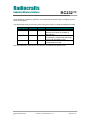
Note: ASCII characters are written as „X‟, hexadecimal numbers are written like 0x00, and
decimal numbers are written like 10 throughout the text. A table of ASCII characters and their
respective hex and decimal values are found in the Appendix.
Any invalid command will be ignored and the „>‟ prompt will be re-sent.
In order to use test mode 1 and 2, test mode 1 must always be set first. Modulation can then
be turned on using test command 2. The modulation must be turned off by using test mode 1
again before exiting the configuration mode („X‟) in order to ensure proper operation in normal
mode.
2009 Radiocrafts AS
RC232™ User Manual (rev. 1.5)
Page 6 of 14