1
Radiocrafts
Embedded Wireless Solutions
RC232™
THE FOLLOWING CHAPTERS APPLY FOR RC10xx and RC12xx (INCLUDING –HP
VERSIONS) FAMILIES OF MODULES
For other RC232-modules the features are described in their respective datasheets.
Module Configuration
PRECAUTIONS:
To ensure proper entering and exit of configuration mode follow these simple guidelines:
Avoid writing to configuration memory unless strictly necessary
Ensure correct UART speed (within 2% accuracy) at all times
Always wait for prompt after asserting configuration pin low
Always keep supply voltage above minimum limit specified in datasheet
Never switch off module or do Reset immediately after sending „FF‟ command,
always wait for prompt before further actions
Ensure configuration mode is not entered unintentionally by keeping any signal
connecting to the modules CONFIG-pin controlled (high when not entering
configuration mode)
Always leave configuration mode via „X‟-command
The configuration of the module can be changed in-circuit from the host during operation, at
the time of installation of the equipment, at the manufacturing test, or even as a stand alone
module. The configuration is changed sending commands on the UART interface after the
CONFIG pin has been asserted (low).
Once the CONFIG pin is activated the module enters command mode. The module will then
respond by sending a „>‟ prompt on the TXD pin. This indicates that the module is ready to
receive commands. The CONFIG pin can then be de-asserted. Note that the CONFIG pin
must be de-asserted before the Exit command („X‟) is sent to the module in order to return to
normal operation.
An exception for de-asserting CONFIG is when using „Z‟ to enter SLEEP mode. In this case
the CONFIG pin should not be de-asserted but kept low until the module should exit SLEEP
mode as de-asserting the CONFIG line wakes the module again. The module will enter
normal IDLE mode after exiting SLEEP mode. No „X‟ command is then necessary.
After a command is executed, the module responds with the „>‟ prompt character again
indicating it is ready for a new command. Do not send a new command before the „>‟ prompt
is received. The time required to execute a command can vary depending on the command
(see the Timing Information section). There is no „>‟ prompt after the „X‟ exit command.
The parameters that are set by commands directly take immediate effect after returning to
normal operation (IDLE), but will not be stored in non-volatile memory, and will be lost in case
the supply power is turned off or if the module is reset. These parameters are for example the
radio channel and output power.
Permanent changes of parameters can be done by writing to the configuration memory using
the memory command „M‟. These are for example default radio channel, default output power,
UART handshaking, address mode and CRC mode, see the Configuration Memory section.
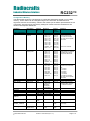
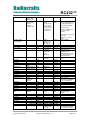
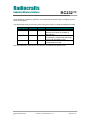
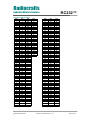
A list of commands is shown in the table below. Commands must be sent as ASCII characters
or their corresponding binary value. All arguments must be sent as binary values to the
module (not as ASCII representation for hex or decimal).
2009 Radiocrafts AS
RC232™ User Manual (rev. 1.5)
Page 5 of 14