1
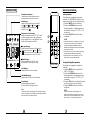
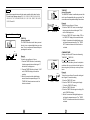
6 TIMER ON Button
11 TIMER OFF Button
7 TURBO / SELF CLEAN Button:
12
LED/FOLLOW ME Button
Disable/Active indoor screen Display. When
,
pushing more than 2 seconds, the FOLLOW ME
function will be activated. Press again for
more than 2 seconds to disable.
13
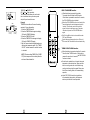
LOCK Button
When you press the recessed LOCK button,
all current settings are locked in and the
remote controller does not accept any
operation except that of the LOCK. Press
again to cancel the LOCK mode.
Press this button to initiate the auto-off time
sequence. Each press will increase the autotimed setting in 30 minutes increments. When
the setting time displays 10H, each press will
increase the auto-timed setting 60 minutes
increments. To cancel the auto-timed program,
simply adjust the auto-off time to 0:0
Press this button to initiate the auto-on time
sequence. Each press will increase the auto-timed
setting in 30 minutes increments. When the setting
time displays 10H, each press will increase the
auto-timed setting 60 minutes increments. To
cancel the auto-timed program, simply adjust
the auto-on time to 0:0.
,
ON/OFF
1
SHORTCUT
2
SWING
TEMP
FAN
SPEED
SWING
TIMER
ON
TIMER
OFF
4
SLEEP
TURBO
SELF CLEAN
LED
FOLLOWME
5
6
7
ON/OFF
1
SHORTCUT
MODE
MODE
3
,
Activate /Disable TURBO function. If pressed,
for more than 2 seconds, the SELF CLEAN
function will be activated. Press again for
2 seconds to disable (depending on models).
RESET
8
9
8 UP Button (
)
Push this button to increase setting temperO
O
ature in a range of 17 C~30 C.
10
DOWN Button ( )
Push this button to decrease setting temperature in a range of 17OC~30 OC.
11
12 9
LO CK
13
14
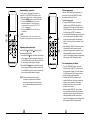
SHORTCUT Button
Used to restore the current settings or resume
previous settings.
When power is connected for the first time, select
the SHORTCUT button.The unit will operate on
O
AUTO mode, 24 C, and fan speed is Auto.
When this button is selected remote controller is on,
the system will automatically revert back to the
previous settings including operating mode,
setting temperature, fan speed level and sleep
feature (if activated). And transmit the signals to
the unit.
When this button is selected remote controller is off,
the system will only resume the previous settings
and will not transmit the signals to the unit. And
the sleep feature is disable.
When you press button for more than 2 seconds,
the system will automatically restore the current
operation settings including operating mode, setting
temperature, fan speed level and sleep feature
(if activated ).
10 FAN SPEED Button
Used to select the fan speed in four steps:
AUTO
LOW
MED
HIGH
9
2
3
SWING
TEMP
FAN
SPEED
SWING
TIMER
ON
TIMER
OFF
4
SLEEP
TURBO
SELF CLEAN
10
11
LED
FOLLOWME
12
5
6
7
8
RESET
LOCK
13
14
14 RESET Button:
When you press the recessed RESET button,
all current settings are cancelled and the
control will return to the initial settings.
NOTE:
Button de sign might be slig htly
different from the actual one you
pu rchased depending on individual
models.