1
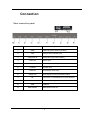
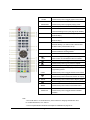
20. GREEN
ZOOM
Press to activate the “GREEN” function in teletext
In DVD mode press to toggle graphic zoom levels.
Press to activate the “RED” function in teletext
21. RED
PROGRAM
In DVD mode press to program playing order
22. EJECT
Press to eject a disc from the DVD Player
23. DVD SETUP
In DVD mode press to enter the DVD Player
Functional Settings menu (see page 29 for details)
24. CH+
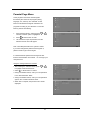
Press to select next TV channel up (see p.15
“Channel Skip”)
25. CH-
Press to select next TV channel down (see p.15
“Channel Skip”)
26. DOT
Press the number buttons with this to select
channels directly (i.e. channel 108-1 would need
the DOT button pressed after the 8).
27. SMODE
Press this button to toggle between preset sound
modes for different echoing effects.
28. EXIT
Press this button to exit in a menu.
29.
In DVD mode, press to toggle fast forward speeds
TEXT
Press to enter or exit teletext mode for TV/DVB
30.
In DVD mode press to toggle rewind speeds.
31.
In DVD mode press to go to previous chapter.
32. REPEAT
In DVD mode press to toggle repeat play settings.
33. EPG
In TV/DVB mode, press to display the Electronic
Programming Guide
LANG
34.
In DVD mode press to toggle between audio tracks
Press to access subpages for teletext
AB
In DVD mode press to select A-B section for replay
35. GOTO
In DVD mode press to enter track to skip to (p.26)
36.
Press to toggle between display aspect ratios.
/ SIZE
37. YELLOW
Press to activate the “YELLOW” function in teletext
MENU
In DVD mode press to return to the DVD menu.
38. BLUE
Press to activate the “BLUE” function in teletext
SUBTITLE
In DVD mode press to toggle between subtitles
available.
Note:
- The TV will return to TV mode when any of the buttons for changing channels are used,
i.e. the Number buttons, CH+ and CH-
- A more complete DVD mode button description is available from page 25-27.
7