1
Outage
3.
The modem does not need to be plugged into a computer at this point unless you’re testing speed problems.
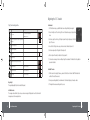
Check iiNet’s network status page or call us on 13 22 58 to find out if we have an outage that may be affecting you.
4.
If the modem still hasn’t synchronised after a few minutes, connect a telephone to that socket and make sure
that the wall socket you’re using has dial tone. You may wish to try alternative telephone sockets.
Network congestion
Congestion is not a common issue with wireless connections, as a full wireless signal has more bandwidth available than
that which your internet connection can supply. However if your wireless signal is weak it may be affected in some
way. To avoid this you can ensure you remain quite close to BoB2 to keep the signal strong or you can purchase
accessories for your modem that can extend the reach of your wireless signal in a particular direction.
TM
Prior to reporting any faults to iiNet, please remember to reboot your computer and BoB2 , wait five minutes and if the
connection is still not working, then by all means call us.
TM
If BoB2 connects, you can start plugging your telephone equipment back in. Give BoB2 around a minute after each
device is plugged back in to see if the synchronisation light goes out. If it does, it’s possible you’ve found a device
which is interfering with your broadband.
TM
TM
If a piece of equipment is interfering with your broadband, it could be for any of the following reasons:
•
The equipment is not being filtered at all (please ensure you have filters on phone line devices)
•
The equipment’s filter is damaged (try swapping the filters between different devices to confirm this)
•
The equipment’s filter is being shared between too many devices and the filter can’t filter them out well enough
Broadband modem BoB2 isolation test
•
The equipment is overpowering the filter
Isolation tests are most commonly performed when your connection drops out, although they can also help when you
are experiencing slow speeds.
If you remain disconnected
Isolation test
TM
30
If connection resumes
1.
Start by unplugging everything you can around your premises that connects to a phone line. This includes
EFTPOS terminals, dialup modems, telephones, paytv boxes, fax machines and anything else which uses the same
telephone line as your broadband.
2.
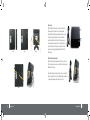
Once you’ve unplugged everything, connect BoB2 directly into a telephone wall socket using a telephone cable
no longer than a metre in length. Give it a few minutes to connect.
Troubleshooting
If you remain disconnected despite these tests, it’s possible your broadband service has stopped working altogether,
in which case it’s a good time to call our support line on 13 22 58 to report a possible fault. Don’t forget to let them
know what you’ve already tried.
TM
Troubleshooting
31