1
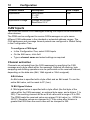
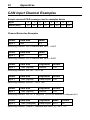
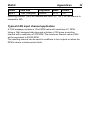
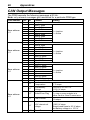
18 Configuration Channel Name InputName InputName.Voltage Description Input Status 0 = Off 1 = On Voltage on the input Resolution 0.2 V CAN Output Yes Yes CAN Inputs The PDM can receive CAN messages allowing the outputs to be controlled by other devices. The PDM can be configured to receive CAN messages on up to seven different CAN addresses in the standard or extended address ranges. The CAN addresses and message timeout periods are configured in Global Setup in the Configuration Tree. To configure a CAN input In the Configuration Tree, select CAN Inputs On the Edit menu, click Add Type a channel name and select settings as required Channel extraction Channels are extracted from the CAN messages by specifying the CAN message and a byte offset within the message. Optional bit masking, byte swapping and dividing operations can be performed on the received channel, depending on the data size (8bit, 16bit signed or 16bit unsigned). 8 Bit Values An 8bit value is specified with a byte offset and an 8bit mask. To use the entire 8bit value, set the mask to FF (hex). 16 Bit Signed Values A 16bit signed value is specified with a byte offset (the first byte of the value within the CAN message), an optional byte swap, and a divisor (1 to 255). The resulting channel will be an 8 bit value with a range of 0 to 255. The PDM treats the received value as a signed 16 bit value (i.e. -32768 to 32767). Negative values are clamped to 0. If the value after division is greater than 255 then the result value will be clamped to 255.