1
38
Appendices
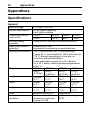
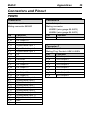
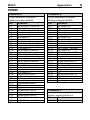
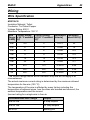
PDM15
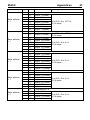
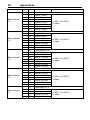
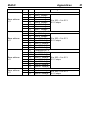
Connector A
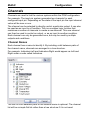
34 pin waterproof connector
Mating connector #65044
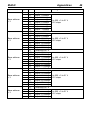
Connector B
26 pin waterproof connector
Mating connector #65045
Pin
Function
Pin
Function
A_1
A_2
A_3
A_4
A_5
A_6
A_7
A_8
A_9
A_10
A_11
A_12
A_13
A_14
A_15
A_16
A_17
A_18
A_19
A_20
A_21
A_22
A_23
A_24
A_25
A_26
A_27
A_28
A_29
A_30
A_31
A_32
A_33
A_34
20 A Output 1 (with A10)
8 A Output 9
20 A Output 2 (with A12)
8 A Output 10
20 A Output 3 (with A14)
8 A Output 11
20 A Output 4 (with A16)
8 A Output 12
20 A Output 5 (with A17)
20 A Output 1 (with A1)
8 A Output 13
20 A Output 2 (with A3)
8 A Output 14
20 A Output 3 (with A5)
8 A Output 15
20 A Output 4 (with A7)
20 A Output 5 (with A9)
Not used
Digital/Switch Input 2
Not used
Digital/Switch Input 4
Not used
Digital/Switch Input 7
Not used
Not used
Battery Negative
Digital/Switch Input 1
0V
Digital/Switch Input 3
Digital/Switch Input 5
Digital/Switch Input 6
Digital/Switch Input 8
Digital/Switch Input 9
Digital/Switch Input 10
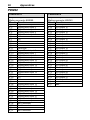
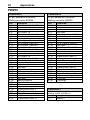
B_1
B_2
B_3
B_4
B_5
B_6
B_7
B_8
B_9
B_10
B_11
B_12
B_13
B_14
B_15
B_16
B_17
B_18
B_19
B_20
B_21
B_22
B_23
B_24
B_25
B_26
Not used
Not used
20 A Output 6 (with B9)
Not used
20 A Output 7 (with B11)
Not used
20 A Output 8 (with B13)
Not used
20 A Output 6 (with B3)
Not used
20 A Output 7 (with B5)
Not used
20 A Output 8 (with B7)
Not used
Digital/Switch Input 13
Not used
Digital/Switch Input 15
Battery Negative
Not used
Digital/Switch Input 11
Digital/Switch Input 12
0V
Digital/Switch Input 14
Digital/Switch Input 16
CAN Low
CAN High
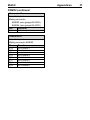
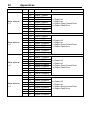
Connector C
M6 stud
Mating: eyelet and M6 nut
Pin
Function
C_1
Battery +