1
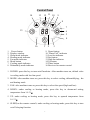
7. TIMER: under power-on or standby mode, press this key to setup on/off time from
1~24.
Remote Control
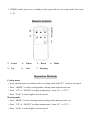
1.
Power
5.
Up
2.
6.
Timer
Fan
3.
7.
Down
4.
Mode
Sleeping
Operation Methods
Cooling mode
·After machine turns on, default value is cooling mode with 22℃ and low fan speed.
·Press “ MODE” to select cooling mode, cooling mode indictor turns on .
·Press “ UP” or “ DOWN” to adjust temperature ( from 16℃ to 31℃).
·Press “ FAN” to select high or low fan speed.
Heating mode
·Press “MODE” to select heating mode, heating mode indicator turns on.
·Press “ UP” or “ DOWN” to adjust temperature ( from 16℃ to 31℃).
·Press “ FAN” to select high or low fan speed.
8