1
2. Daily use of the thermostat
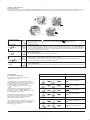
4-event clock mode
The day has been split into 4 events describing a typical day. When the thermostat is in 4-event mode it will automatically adjust the temperature according
to the required temperature to the required time. As standard the thermostat has 5 days with 4 events, and 2 days with 2 events. Programming see 3.
4-event clock mode:
The clock function symbol (
Programming see 3.
Comfort mode:
☞
5 secs.
Manual mode:
5 secs.
☞
) will be indicated.
Temporary override
To temporarily override the temperature in the 4-event schedule program, press the UP ( ) or DOWN ( ) button
once, to show the temperature, and press again to increase or decrease the temperature. The display will flash for
5 seconds, and will then revert to the time. The override will operate until the next programmed event when the
unit will resume the automatic programme.
Cancel comfort mode
To cancel the override state, press the OK (
☞
☞
) and one of the 4-event symbols (
) button twice.
Permanent override:
During holidays, the scheduled 4-event program can be overridden.
Press the OK ( ) button, and then the UP ( ) or DOWN ( ) button until the override temperature is set.
The unit will now operate to this temperature permanently.
Cancel manual mode
To cancel the permanent override state press the OK (
3. Programming
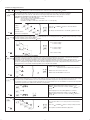
4-event time and temperature
For each event, the start time and required
temperature must be set.
Press OK (
) button once, and the unit will resume automatic function.
) button for 3 secs. to begin programming
Day 1 - 5
For example, in the morning you wish the heating to
start at 07:00 and the temperature to rise to 25˚C.
Press OK ( ) button for 3 seconds and the start time
is displayed. Change this to 07:00 with the
UP ( ) or DOWN ( ) button. Press OK ( ) to
confirm.
The temperature is now displayed. Change this to
25˚C with the UP ( ) or DOWN ( ) button.
Press OK ( ) button to confirm. This action can now
be repeated for the second event.
☞
☞
: Time and temperature
☞
☞
: Time and temperature
☞
☞
: Time and temperature
These settings will be valid with days 1-5 showing on
the display. To program the days 6 and 7, repeat the
above. Days 6 and 7 are usually Saturday and
Sunday, and only have two events.
☞
☞
: Time and temperature
☞
☞
: Time and temperature
☞
☞
: Time and temperature
The temperature can be set within the range of +5 to
+40˚C. It is also possible to select the heating OFF at
that event by reducing the setting to 5˚C, and then
pressing the ( ) once more.
Day 6 - 7