1
4. Advanced settings and read-out
☞
✚
☞
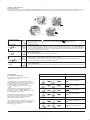
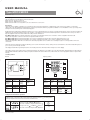
Press both UP ( ) and DOWN ( ) buttons together for 3 seconds. INFO is displayed.
Press UP( ) button until you reach the desired sub menu. Select the sub menu with the OK (
Monitoring of energy consumption
The thermostat calculates average time it has been switched on allowing you to monitor your energy consumption.
In the thermostat you can read out:. Total switch-on time in percentage in the latest 2 days, 30 days or 365 days.
Calculation of operational costs per day: (switch-on time:100) x kW x kWh-price x 24 h per day
Example: Read-out: 30 % in the latest 365 days
Size of heating system: 1,2 kW (ask the installer)
Cost of power: 0,2 USD/ kWh
Calculation: (30:100) x 1,2 kW x 0,2 USD / kWh x 24 h = 1,7 USD per day
}
2 days
30 days
365 days
Software version
☞
Actual sensor temperature
☞
}
}
☞
☞
☞
☞
☞
) button to show the different
No changes can be made here. Use the OK (
) button to end.
) button until you have days 1-6 and
5-2: 4 events in 5 days +
2 events in 2 days.
6-1: 4 events in 6 days +
2 events in 1 day
7-0: 4 events in 7 days
MCD2-1999-UA With 2 sensors;
built-in room sensor and incl. floor sensor 3m
MCC2-1991-UA Incl. floor sensor 3m
MCC2-1999-UA With built-in room sensor
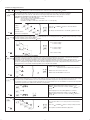
Max and min allowed temperature range
The temperature setting range of +5° to 40° C can be limited to prevent a too high or too low temperature being selected under manual
or comfort mode. For MCD2 with limit sensor the max and min temperature range refer to the temperature of the limit sensor.
For example: A wood floor covering should not be allowed to exceed a maximum of 27°C. Low limitation is used where the temperature
of the floor is required never to fall below the minimum set temperature.
☞
☞
) or DOWN (
Selection of type (only visible in type MCD2)
Type MCD2-1999-UA has a built-in temperature sensor and an externally temperature sensor. In this configuration the thermostat
controls the temperature within the room and use the externally temperature sensor as limit sensor
Type MCD2 can be changed into type MCC2-1991-UA with an external temperature sensor that normally is placed in the floor
construction. In this configuration the thermostat controls the temperature of the floor and not the temperature within the room. MCD2
can also be changed into type MCC2-1999-UA with a built-in temperature sensor. In this configuration the thermostat controls the
temperature of the room, and the external temperature sensor should not be installed.
☞
☞
Press UP (
readouts.
4-event sequence
The present event sequence flashes: Days 1-5, followed by days 6-7. To change, press the UP (
then day 7 flashing, or all 7 days are flashing.
Select the required sequence with the OK ( ) button.
☞
☞
) button.
Maximum allowed temperature setting. Use the UP ( ) or
DOWN ( ) button to increase or reduce, and OK ( ) button to
accept.
☞
Next is displayed LoLi. Press OK (
☞
Minimum allowed temperature setting. Use the UP ( ) or
DOWN ( ) button to increase or reduce and OK ( ) button to
accept.
) button to continue.
Time and temperature scale selection
☞
☞
☞
}
You can select either ˚C or ˚F scale, and 12 or 24 hour clock as
follows:
Press UP (
) or DOWN (
) button to change settings. Confirm
the required scale with the OK button (
) button.
to be continued …