1
MoTeC MDC
16
Appendices
Appendix D – ECU Communications
The MDC can communicate with the MoTeC EVO89 or EVO48 OEM ECU using existing factory wiring.
This functionality requires M800 ECU firmware V3.21D or later.
ECU Link Configuration
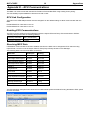
The links on the OEM adaptor board must be changed from the default settings to allow communication with the
MDC.
EVO89 OEM ECU: Close links 9 and 10
EVO48 OEM ECU: Close links 2 and 12
Enabling ECU Communications
The ECU must be configured in ECU Manager under the AdjustGeneral SetupCommunicationsRS232
Telemetry Setup menu with the following settings:
Telemetry Data Rate
3841 (38400 Baud)
Telemetry Data Set
6 (SDC)
Receiving MDC Data
If ECU/MDC communications has been enabled, data from the MDC can be assigned to ECU channels using
inputs ECU2 1 to ECU2 12 in the AdjustSensor SetupInput Setup window in ECU Manager.
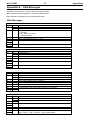
The following data is sent from the MDC to the ECU:
MDC Data
ECU Input
Scaling
Front Left Wheel Speed
ECU2 1
0.1 km/h
Front Right Wheel Speed
ECU2 2
0.1 km/h
Rear Left Wheel Speed
ECU2 3
0.1 km/h
Rear Right Wheel Speed
ECU2 4
0.1 km/h
Lateral G
ECU2 5
0.001 G
Longitudinal G
ECU2 6
0.001 G
MDC Mode
ECU2 7
0 to 5
Lock %
ECU2 8
0.1 %
Pump Hydraulic Pressure
ECU2 9
0.1 kPa
Diff Average Current
ECU2 10
0.01 A
Steering Wheel Angle
ECU2 11
1 deg
Fault Flags
ECU2 12
Bit field
The ECU Manager examples below show the four MDC wheel speeds and lateral G being allocated to ECU speed
and user channels.