1
3.1. PTZ Command (Pan/Tilt/Zoom)
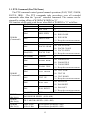
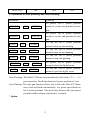
The PTZ command control general manual operations (PAN, TILT, ZOOM,
FOCUS, IRIS). The PTZ commands take precedence over all extended
commands other than the “special” extended command. The camera can be
stopped by setting all bits of WORD4, WORD5 to “0”
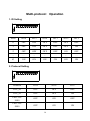
The contents which each word shows when Bit0 of WORD5 is “0” as follow:
WORD4
(Command1)
WORD5
(Command2)
-Bit7(MSB)
-Bit6
-Bit5
constant
Not Used
Not Used
-Bit4
IRIS OPEN
-Bit3
IRIS CLOSE
-Bit2
constant
-Bit1
FOCUS NEAR
-Bit0(LSB)
FOCUS FAR
-Bit7(MSB)
constant
-Bit6
ZOOM WIDE
-Bit5
ZOOM TELE
-Bit4
TILT DOWN
-Bit3
TILT UP
-Bit2
PAN LEFT
-Bit1
-Bit0(LSB)
WORD6
(DATA(1))
WORD7
(DATA(2))
WORD8
(DATA(3))
PAN RIGHT
0
0
0
00: IRIS STOP
01: IRIS CLOSE
10: IRIS OPEN
11: Keep the current movement
0
00: FOCUS STOP
01: FOCUS CLOSE
10: FOCUS OPEN
11: Keep the current movement
0
00: ZOOM STOP
01: ZOOM TELE
10: ZOOM WIDE
11: Keep the current movement
00: TILT STOP
01: TILT UP
10: TILT DOWN
11: Keep the current movement
00: PAN STOP
01: PAN RIGHT
10: PAN LEFT
11: Keep the current movement
PTZ command(0) / Extension Command(1)
PAN MOTOR SPEED (01H~ 40H)
TILT MOTOR SPEED (01H~ 40H)
Upper 4 Bits
Lower 4 Bits
Focus Motor speed(01H~ 08H)
Zoom Motor speed(01H~ 08H)
13