1
Functions and Operations
These operating instructions cover the basic operation of the dome and its
features. When the dome is used with other manufacturers control system,
please regard the system controller instruction as standard. In the event of
special requirements outside the scope of this document it is advisable to
contact your local distributor.
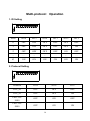
1. Setting the dome ID
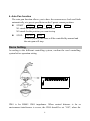
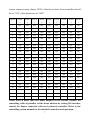
Setting dome ID by the DIP Switch of the dome, refer to the dome setting
for the details.(P.6)
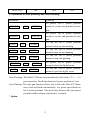
2. Set up and call preset
Preset function is that dome stores current horizontal angle and title angle of
pan/Tilt, and position parameters into the memorizer. When necessary
dome calls these parameters and adjusts Pan/Tilt and camera to that position.
Operator can store and call presets easily and promptly by using controller,
the dome supports up to 64 presets.
l
To set a preset position
l
To call a preset position Call +
preset +
N +
N +
ENTER
ENTER
3. Auto Cruise
The preset positions can be programmed to be re-called in a set of sequence.
This sequence can be set to automatically cycle from one position to the
next at a setting time. This feature is called Auto cruise.
l Cruise sequence can be programmed from 1~16 presets.
l Start Auto cruise : SHOT + 1 + ENTER
l Stop Auto cruise by moving the joystick.
5