1
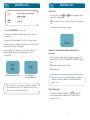
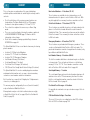
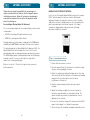
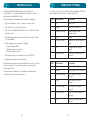
The instructions in this User Manual make it easy to operate your
new Optus MobileSat® Mobile Satellite Telephone – S2, the Optus
MobileSat S2. To make a simple phone call or to receive a phone
call, you need to refer to the instructions in Chapter 1 and Chapter 2.
For more advanced operations of the Optus MobileSat S2, read
Chapters 3 to 6.
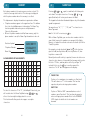
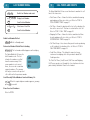
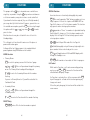
FCN (Mute) = Toggle RSSI/RSNR
FCN END = Terminate a current fax or
data call from handset
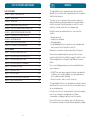
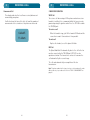
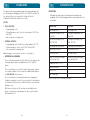
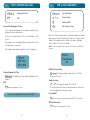
Chapter 1 – PRELIMINARY INFORMATION:
This section tells you what you receive in the Optus MobileSat S2
Basic Configuration, how to obtain optimum performance and
instructions about safety.
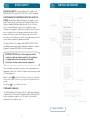
Chapter 2 – OPERATING INSTRUCTIONS:
Phone's features and how to place and receive calls.
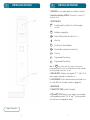
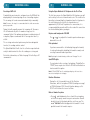
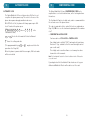
Chapter 3 – DISPLAYS AND ALERTS:
Lists commonly displayed messages, functions and status displays.
Alarm/alert messages and tones are also explained.
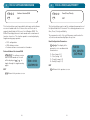
Chapter 4 – PHONE NUMBER MEMORIES:
Dialling and number storing capabilities of the Optus MobileSat S2
phone. Operation of these capabilities is explained in step-by-step
detailed procedures.
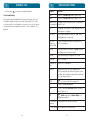
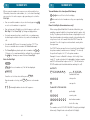
Chapter 5 – ADVANCED OPERATING INSTRUCTIONS:
All operating instructions, that are not covered in the Operating
Instructions (Chapter 2) or the Function Extensions (Chapter 6).
Chapter 6 – FUNCTION EXTENSIONS:
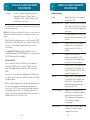
*Optus does not support this function.
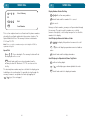
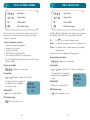
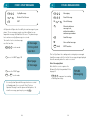
FCN 27
Handsfree
Sensitivity
FCN 37
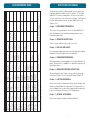
HOW TO USE THIS MANUAL
FCN 25
FCN 26
FCN 23
FCN 24
System ID
Auto Answer Ignition Lock 2-Wire
Enable
Download
FCN 32
FCN 35
FCN 36
FCN 31
FCN 33
FCN 34
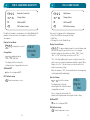
DTMF Tone
Ring Volume Ring Pitch
Ring
Tone Volume Key Beep
Enable
Cadence
FCN 42
FCN 44
FCN 45
FCN 46
FCN 41
FCN 43
Contrast
Backlight
Wakeup
Screen
FCN 52
FCN 53
FCN 51
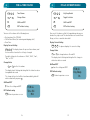
Lock Mode
Auto Lock
Lock Code
Call Credit
Network
Lock Msg
Enable
Set
Text
FCN 61
FCN 62
FCN 63
FCN 64
FCN 65
FCN 66
Time Clear
Clear Last
Number
Memory
Numbers
Prefix
Clear
FCN 71
FCN 72
FCN 73
FCN 74
Recall Sys
Messaging
Distress
Predefined
Edit CUG
Op Msg
Message
CUGs
Text
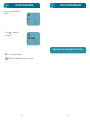
FCN 82
FCN 81
FCN 83*
FCN 84
FCN 85
Antenna
Antenna
Antenna
Calibrate
Adjust
Tracking
FCN 91
FCN 92
FCN 93
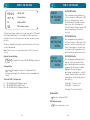
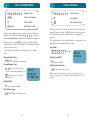
FCN 0 and FCN 9 are used during digit
FCN (Hold) = View Hidden Digits
entry give a pause or wait digit.
FCN SND = Repeat Dial
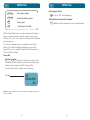
Alarm Log
FCN 16
LED Display
FCN 15
Volts/Temp
5
Clock Set
FCN 1
Time
Functions
FCN 2
Unit Status
Functions
FCN 3
Terminal
Option/Setup
FCN 4
Tone
Functions
FCN 5
Screen
Functions
FCN 6
Lock
Functions
FCN 7
Clearing
Functions
FCN 8
Message/CUG
Functions
FCN 9
Antenna
Functions
Primary Menu
1
Call Time
2
Total Call
Time
FCN 12
FCN 11
Own Number SW Version/
ESN
FCN 22
FCN 21
Horn
2W Tel/Fax
3
Outgoing Call
Time
FCN 13
Zone/Class
4
Call Time
Beeps
FCN 14
GPS Location
Secondary Menu
6
7
Clock Display
8
9
QUICK REFERENCE GUIDE
Details each function command which allows you to configure and
monitor the Optus MobileSat S2 operation. The function menu is a
series of displays that can be used to remind you which numbered
keys to use for various function key (ie, FCN) operations.
Chapter 7 – OPTIONAL ACCESSORIES:
Defines some options available from Optus MobileSat.
I