1
9
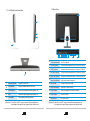
1.2 Left/Right/Look-down View
1.3 Back View
24
12
11
10
9
14 15 16 17 18 19 20 21
22
11
23
14 TV Interface (optional)
Play TV programme
15 S-VIDEO (optional)
Connect to Video equipment such as , Set-top box, DVD etc.
16 VIDEO (optional)
Connect to Video equipment such as , Set-top box, DVD etc.
17 Left Track (optional)
Connect to Audio equipment such as , Set-top box, DVD etc.
18 Right Track (optional)
Connect to Audio equipment such as , Set-top box, DVD etc.
19 Audio output interface
Audio output, connect to earphone
13
9
Supporting Frame
Support the main LCD
20 Mic. Interface
Connect to microphone outside
10
Card Reader
Support SD/MMC/MS/MS PRO Card
21 Audio Input Interface
Input audio or simple recording
11
USB interface
Connect to keyboard, mouse and printer, etc.
22 Power interface
Insert power adapter and connect to electricity
12
ODD
Insert disc, stall program and play music, etc.
23 RJ-45 interface
Connect to Internet
13
Internal Mic.
Video meeting, dub and recording
24 Ventilation slor
For system cooling
[Attention] Your All-In-One PC may not have all the interface above
according to the specific type, please check with the real.
3
[Attention] Your All-In-One PC may not have all the interface above
according to the specific type, please check with the real.
4