1
Chapeter 2: Use Computer
2.1 Connect Computer
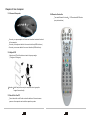
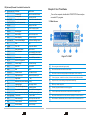
2.4 Remote Controller
Two mode Remote Controller
(see picture below)
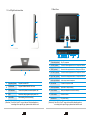
Connect your power adapter to the correct interface located at the back
of the computer.
Connect your keyboard cable to the correct interface (USB interface)
Connect your mouse cable to the correct interface (USB interface)
2.2 Adjust LCD
Adjust your LCD with look-down view to the proper angle
( -3 degree ~25 degree)
Attention
Hold firmly when carry the computer, do not grasp the
support frame directly.
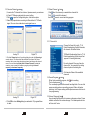
2.3 Use All-In-One PC
Press the switch on/off button under the bottom of the main screen,
power on the computer and enter the operation system.
5
6
PVR mode and MCE mode.