1
Chapter 4:Install Operation System and Driver
4.1 Install the Operation System
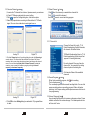
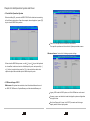
Before installing OS, you need set USB-CD/DVD to the boot device according
to the following instructions. Open the computer, when display test, press [F2]
key to enter the BIOS Setup screen.
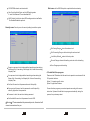
Sata Port: Sata port connect sata device information.
The specific operation can be found in the System promoted screens.
Advanced menu: Conduct the following superior settings.
When enter the BIOS Setup screen, use the [ ] key or [ ]key on the keyboard
to choose Boot, select one device in the Boot priority order, and press the [ + ]
or [ - ] button to set priorities; press the [ X ] in the exclude from boot order
options to adjust the contained option to the Boot priority order.
4.2 Other settings of SCU
Main menu: Set system time and date, check the related information such
as: BIOS, EC, MB version, System Memory, and the extended Memory, etc.
Legacy USB: under the DOS system, set if the USB device can be used.
Summary screen: set whether it need to display the system configuration
during boot-time.
Boot-time Diagnostic Screen: in the POST process to set the image
display mode or the text isplay mode.
11
12