1
ENTERPRISE SOLUTION
Troubleshooting Security Issues with nGenius InfiniStream & Sniffer Analysis Solution Overview
Use on-board flexible filtering and data mining by building capture
filters and custom rules to isolate and retrieve data from within
the InfiniStream capture store to focus on any particular security
threat. By refining the data set for analysis, by time, user, pattern
or application associated with the security issue in question, the IT
staff can accelerate problem resolution by focusing on the most
important packets related to the event. An operator can create
capture filters using any one or a combination of the following
metrics:
• MAC and IP addresses
• TCP or UDP ports
• DNS names
• Protocols
• Hex, binary, or text patterns
• ToS (Type of Service)
• Time increments
The launch of Sniffer Intelligence, a post-capture expert analysis
software solution within the nGenius InfiniStream appliance
provides critical back-in-time voice and data analysis. With
automatic recognition of hundreds of applications, such as SAP®
R/3®, Oracle®, MS Exchange, and VoIP traffic, Sniffer Intelligence
provides critical performance data to speed performance analysis
and problem resolution. Once a selection of data is isolated within
the InfiniStream Console, Sniffer Intelligence modules provide
detailed forensics analysis of each type of application, incorporating
a rich set of packet-flow statistic, charts, and graphs to simplify the
analysis process. As even more details are required, Sniffer experts
and decodes are available to translate complex technical jargon into
plain English to better understand, troubleshoot, and tune potential
security and performance issues.
Pinpoint a New Security Vulnerability
Business Challenge: A new virus or worm had made its way
into a government agency network by way of an employeeowned laptop. The agency’s IT contractors need a way to track
down systems that had already been impacted.
Solution: The nGenius InfiniStream appliance had been
continuously capturing and storing packets from strategic
segments in the affected building. The IT contractors built
a post-capture filter that matched the signature of the virus.
They ran the filter against the stored packets and found all the
IP addresses of the networked workstations and laptops that
were infected.
Business Result: Rapid identification of the infected systems
enabled quick removal from the network and remediation
of the virus from the affected equipment. In so doing, they
avoided a broad dissemination of the virus network-wide that
would have hindered the agency for the rest of the day or even
several days.
Reduce False Positives
Business Challenge: The number of potential threats identified by an IDS/IPS system was becoming difficult to validate
in a timely manner. The IT staff and security team were
concerned about both the time lost on false positives and the
potential for delay in identifying actual threats. They needed a
way to rapidly research these incidents and then re-configure
the IDS/IPS system to stop alerting on approved traffic.
Solution: The nGenius InfiniStream appliance was co-located
with the IDS/IPS sensors and continuously captured and
stored packets from those parts of the network. The IT team
would use the reports from the IDS system to filter on the timestamps around the suspect alerts and identify unknown traffic
at the same time. Using the InfiniStream Console, the IT team
performed expert analysis and packet decodes to definitively
identify the packets by the correct protocols, applications, users
and security status.
Business Result: With a systematic, repeatable process,
the IT organization was able to take the information from the
nGenius InfiniStream and re-configure the IDS/IPS sensors to
allow the new applications launched by the development team
to be passed through the network without alerts. This reduced
the false positives and improved the productivity of the security
team to be able to address actual threats more expeditiously.
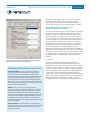
Figure 3. Sniffer Intelligence graphically represents data for quick troubleshooting analysis of
security issues.