1
RE70-09
User's Manual
7
6. Service
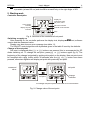
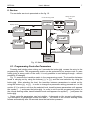
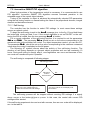
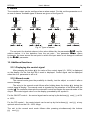
The controller service is presented on the fig. 10.
change set point
mode
normal working mode
to change press
or
measured
value
display control
signal
set point
to accept press
to cancel press
+
h___
2sec.
+
manual
mode
2 sec.
+
active
access code
tune
press and hold
to decrease
the value
self-tune mode
press and hold
to increase
the value
code
Y
N
2sec.
Y
correct
code?
locking of change
N
err
3sec.
+
parameter
programming
mode
Fig. 10. Menu of controller service
6.1. Programming Controller Parameters
Pressing and holding down during ca 2 seconds the button @ causes the entry to the
programming matrix. The programming matrix can be protected by an access code. In case
when giving a wrong value of the code, it is only possible to see settings through - without
possibility of changes.
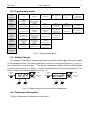
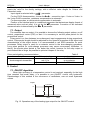
Fig. 11 presents the transition matrix in the programming mode. The transition between
levels is carrying out by using the buttons ? or > and the level selection by using the
button @ . After selecting the level, the transition between parameters is carried out by
using the buttons ? or > . In order to change the parameter setting proceed acc. to the
section 6.3. In order to exit from the selected level, transit between parameters until appears
the symbol [. . .] and press the button @ . In order to exit from the programming matrix to
the normal working mode, transit between levels until appears the symbol [. . .] and press the
button @ .
Some controller parameters can be invisible – it depends on the current configuration.
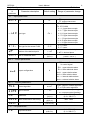
The description of parameters shows the table 1. The return to the normal working mode
follows automatically after 30 seconds since the last button pressure.