1
RE70-09
User's Manual
8
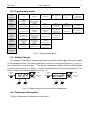
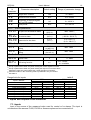
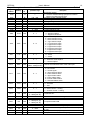
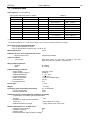
6.2. Programming matrix
inp
unit
Input
parameters
iNty
Unit
Input type
outp
out
...
Output
parameters
Output
configuration
Transition to
the higher level
ctrl
alg
type
sHif
dp
...
Type of line
Shift of measured
value
Position of decimal
point
Transition to
the higher level
Hy
sTlo
sTHi
...
Type of control
Hysteresis
Lower threshold for
self-tuning
Upper threshold for
self-tuning
Transition to
the higher level
ti
td
y0
to
...
Integral time
constant
Derivative time
constant
Correction of
control signal, for P
or PD control
Pulse period
Transition to
the higher level
aLsp
aLdu
aLHy
...
Set point for the
absolute alarm
Deviation from the
set point of the
relative alarm
Alarm hysteresis
Transition to
the higher level
Control
parameters
Control algorithm
pid
pb
PID Parameters
Proportional band
alar
Alarms
parameters
t-li
spp
spl
spH
...
Set point
parameters
lower limitation of
the set point
setting
upper limitation of
the set point
setting
Transition to
the higher level
seru
seCU
sTfn
...
Service
parameters
Access code
Self-tuning function
Transition to
the higher level
...
Exit from the
menu
Fig. 11. Programming matrix
6.3. Setting Change
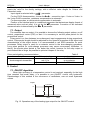
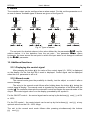
The change of parameter setting begins after pressing the button @ during the display
of the parameter name. The setting selection is carried out through the buttons ? and >
and accepted by the button @ . The change cancellation follows after the simultaneous
pressure of the buttons ? and > or after 30 seconds since the last button pressure. The
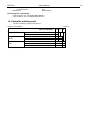
way to change the setting is shown on the fig. 12.
+
to change
press
1234
decrement
value
+
cancel
to change
press
accept new
value
increment
value
oNof
previous
text value
next text
value
Fig. 12. Setting change of number and text parameters.
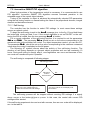
6.4. Parameters description
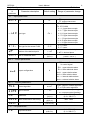
The list of parameters is presented in the table 1.
cancel
accept new
value