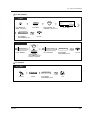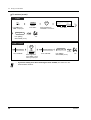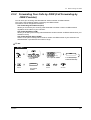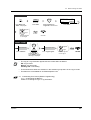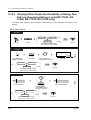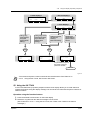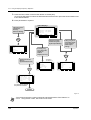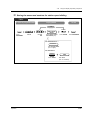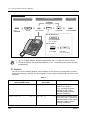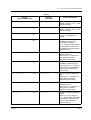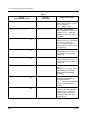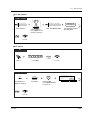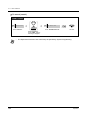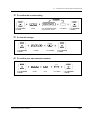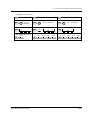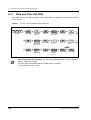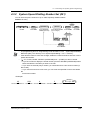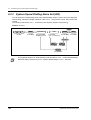
1
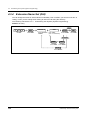
DIGITAL SUPER HYBRID SYSTEM
User Manual
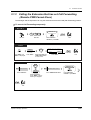
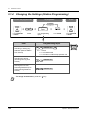
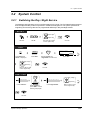
Model No.
KX-TD500
Please read this manual before connecting
the Digital Super Hybrid System.
Thank you for purchasing the Panasonic Digital Super Hybrid System.
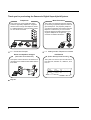
Telephones
More Extensions
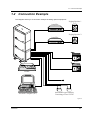
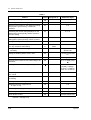
This system can connect digital and analog
Panasonic proprietary telephones. Single line
devices such as a single line telephone, facsimile, cordless telephone, voice processing system,
etc. can also be connected.
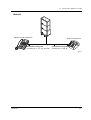
This system can double the extension capacity
by connecting a proprietary telephone and a single line telephone. The proprietary telephone
can share the extension with another single line
telephone. Furthermore, you can connect a
Panasonic digital proprietary telephone and a
single line telephone to one port and
use them as individual extensions.
DIGITAL
SUPER
HYBRID
SYSTEM
RUN
OFF
LINE
ALARM
DIGITAL
SUPER
HYBRID
SYSTEM
RUN
OFF
LINE
ALARM
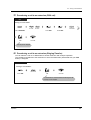
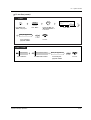
1.2 Connection Example.
1.3
Adding Another Telephone in Parallel.
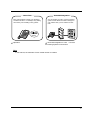
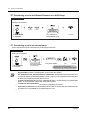
Saves on telephone charges
(Automatic Route Selection)
Call Record
(Station Message Detail Recording)
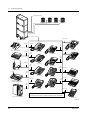
This system chooses the most cost-effective carrier based on the outside number dialled and the
time called.
This system can record or print out call information: date, time, extension no., dialled no., duration, etc.
A
DIGITAL
SUPER
HYBRID
SYSTEM
RUN
OFF
LINE
ALARM
B
C
Page 26.
2
Date
Time
06/24/97 10:03AM
06/24/97 11:07AM
Ext
123
223
• • • • • • •
• • • • • • •
• • • • • • •
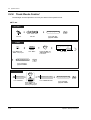
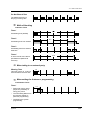
Saves Time
Voice Mail Integration
Many useful features support your operations
and eliminate tasks. For example, easy dialling
with memory and re-dialling to busy parties.
You can forward your call to a voice processing
system and let callers leave their messages in
your mailbox when you are unable to receive
calls.
Message
DIGITAL
SUPER
HYBRID
SYSTEM
RUN
OFF
LINE
Message
ALARM
Message
(One-Touch
Dialling)
Operation.
Message
Message
Message
Voice Mail Integration in 2.8.3 If a Voice
Processing System is Connected.
Note
In this manual, the last letter of each model number is omitted.
3
Important Information
WARNING
THIS UNIT MAY ONLY BE INSTALLED AND SERVICED BY QUALIFIED SERVICE
PERSONNEL.
WHEN A FAILURE OCCURS WHICH RESULTS IN THE INTERNAL PARTS BECOMING
ACCESSIBLE, DISCONNECT THE POWER SUPPLY CORD IMMEDIATELY AND RETURN THIS
UNIT TO YOUR DEALER.
DISCONNECT THE TELECOM CONNECTION BEFORE DISCONNECTING THE POWER
CONNECTION PRIOR TO RELOCATING THE EQUIPMENT, AND RECONNECT THE POWER
FIRST.
THIS UNIT IS EQUIPPED WITH AN EARTHING CONTACT PLUG. FOR SAFETY REASONS THIS
PLUG MUST ONLY BE CONNECTED TO AN EARTHING CONTACT SOCKET WHICH HAS BEEN
INSTALLED ACCORDING TO REGULATIONS.
THE POWER SUPPLY CORD IS USED AS THE MAIN DISCONNECT DEVICE. ENSURE THAT
THE SOCKET-OUTLET IS LOCATED/INSTALLED NEAR THE EQUIPMENT AND IS EASILY
ACCESSIBLE.
TO PREVENT FIRE OR SHOCK HAZARD, DO NOT EXPOSE THIS PRODUCT TO RAIN OR
MOISTURE.
The following icons are used frequently in this manual.
Hints
Conditions
Safety Instructions
When using your telephone equipment, basic safety precautions should always be followed to reduce
the risk of fire, electric shock and injury to persons, including the following:
1. Do not use this product near water, for example, near a both tub, wash bowl, kitchen sink or
laundry tub, in a wet basement or near a swimming pool.
2. Avoid using a telephone (other than a cordless type) during an electric storm. There may be a
remote risk of electric shock from lightning.
3. Do not use the telephone to report a gas leak in the vicinity of the leak.
4. Use only the power cord and batteries indicated in this manual. Do not dispose of batteries in a
fire. They may explode. Check with local codes for possible special disposal instructions.
SAVE THESE INSTRUCTIONS
4
Important Information
Attention
•
•
•
•
•
Keep the unit away from heating appliances and electrical noise generating devices such as
fluorescent lamps, motors and televisions. These noise sources can interfere with the
performance of the unit.
This unit should be kept free of dust, moisture, high temperature (more than 40°C) and vibration,
and should not be exposed to direct sunlight.
Never attempt to insert wires, pins, etc., into the vents or holes of this unit.
If there is any trouble, disconnect the unit from the telephone line. Plug the telephone directly into
the telephone line. If the telephone operates properly, do not reconnect the unit to the line until the
problem has been repaired by an authorised Panasonic Factory Service Center. If the telephone
does not operate properly, chances are that the problem is in the telephone system, and not in the
unit.
Do not use benzine, thinner, or any abrasive powder to clean the cabinet. Wipe it with a soft cloth.
The serial number of this product may be found on the label affixed to the bottom of the unit.
You should note the model number and the serial number of this unit in the space provided
and retain this manual as a permanent record of your purchase, to aid in identification in the
event of theft.
MODEL NO.:
SERIAL NO.:
For future reference
DATE OF PURCHASE
NAME OF DEALER
DEALER’S ADDRESS
Attention
5
Table of Contents
1 OVERVIEW
1.1
Capacity .......................................................................................................... 10
1.2
Connection Example ..................................................................................... 11
1.3
Adding Another Telephone in Parallel ......................................................... 13
2 Operation
2.1
Before Operating the Telephones ............................................................... 18
2.2
Making Calls ................................................................................................... 24
2.2.1
2.2.2
2.2.3
2.2.4
2.2.5
2.2.6
2.2.7
2.3
2.3.1
2.3.2
2.3.3
2.3.4
2.4
Basic Calling ............................................................................................................. 24
Easy Dialling ............................................................................................................. 27
Redial ........................................................................................................................ 33
When the Dialled Line is Busy or There is No Answer.............................................. 35
Calling without Restrictions....................................................................................... 41
Alternating the Calling Method (Alternate Calling — Ring / Voice) ........................... 45
To Access Another Party Directly from Outside (Direct Inward System Access [DISA])
46
Receiving Calls .............................................................................................. 48
Answering Calls ........................................................................................................ 48
Answering Hands-free (Hands-free Answerback) ..................................................... 50
Answering a Call Ringing at Another Telephone (Call Pickup).................................. 51
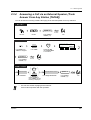
Answering a Call via an External Speaker (Trunk Answer From Any Station [TAFAS]).
53
During a Conversation................................................................................... 54
2.4.1
2.4.2
2.4.3
2.4.4
2.4.5
2.4.6
2.4.7
Holding a Call............................................................................................................. 54
Talking to Two Parties Alternately (Call Splitting) ....................................................... 59
Transferring a Call ...................................................................................................... 60
Answering a Call Waiting ........................................................................................... 64
Three-party Conversation .......................................................................................... 66
Mute ........................................................................................................................... 69
Letting Other People Listen to the Conversation (Off-Hook Monitor) [KX-T7433, KXT7436 only]............................................................................................................... 70
2.4.8 End-to-End DTMF Signalling (Tone Through)............................................................ 71
2.5
Before Leaving Your Desk............................................................................. 73
2.5.1 Forwarding Your Calls (Call Forwarding) .................................................................... 73
2.5.2 Forwarding Your Calls by ISDN (Call Forwarding by ISDN Provider) ......................... 77
2.5.3 Showing an Absent Message on the Caller's Telephone Display (Absent Message
Capability) ................................................................................................................ 79
2.5.4 Preventing Other People from Using Your Telephone (Electronic Station Lockout) ... 82
2.5.5 Leaving an Extension Group (Log-In / Log-Out) ........................................................ 84
2.6
Making / Answering an Announcement....................................................... 86
2.6.1 Paging ........................................................................................................................ 86
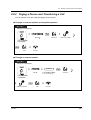
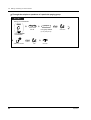
2.6.2 Paging a Person and Transferring a Call .................................................................... 89
6
Table of Contents
2.6.3
2.7
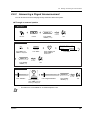
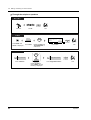
Answering a Paged Announcement........................................................................... 91
Setting the Telephone According to Your Needs ........................................93
2.7.1
2.7.2
2.7.3
2.7.4
2.7.5
2.7.6
2.7.7
2.7.8
2.7.9
2.7.10
2.7.11
2.7.12
2.7.13
2.7.14
2.8
2.8.1
2.8.2
2.8.3
2.9
Setting the Alarm (Timed Reminder) ......................................................................... 93
Refusing Incoming Calls (Do Not Disturb [DND]) ...................................................... 96
Receiving a Call Waiting (Call Waiting / Off-Hook Call Announcement [OHCA] /
Whisper OHCA) ....................................................................................................... 98
Denying the Paged Announcement (Paging — DENY) ........................................... 100
Displaying Your Number on the Called Party and Calling Party's Telephone (Calling /
Connected Line Identification Presentation [CLIP / COLP])................................... 101
Preventing Your Number Being Displayed on the Called Party's Telephone (Calling Line
Identification Restriction [CLIR])............................................................................. 102
Preventing Your Number Being Displayed on the Called Party's Telephone (Connected
Line Identification Restriction [COLR]) ................................................................... 103
Denying Other People the Possibility of Picking up Your Calls (Call Pickup Deny) .. 104
Denying Other People the Possibility of Joining Your Conversation (Executive Busy
Override Deny) ....................................................................................................... 105
Turning on the Background Music.......................................................................... 106
Protecting Your Line against Indication Tones (Data Line Security)....................... 107
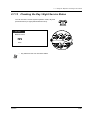
Checking the Day / Night Service Status ............................................................... 109
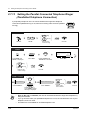
Setting the Parallel Connected Telephone Ringer (Parallelled Telephone Connection)
110
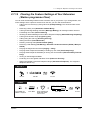
Clearing the Feature Settings at Your Extension (Station programme Clear) ........ 111
Using User-supplied Equipment .................................................................113
If a Doorphone / Door Opener is Connected ........................................................... 113
If a Host PBX is Connected ..................................................................................... 116
If a Voice Processing System is Connected ............................................................ 117
After Moving to a New Location in the Office ............................................124
2.9.1
Using the Same Extension Number and the Setting of Your Previous Extension
(Walking Station) .................................................................................................... 124
2.10
Using the Display Proprietary Telephone ................................................125
2.10.1 Calling Using the Call Log (Incoming Call Log) [KX-T7433, KX-T7436, KX-T7230, KXT7235 only] ............................................................................................................ 125
2.10.2 Recording a Call Log [KX-T7433, KX-T7436, KX-T7230, KX-T7235 only] ............ 129
2.10.3 Denying Other People the Possibility of Seeing Your Call Log (Incoming Call Log Lock)
[KX-T7433, KX-T7436, KX-T7230, KX-T7235 only]............................................... 130
2.10.4 Using the KX-T7433, KX-T7436 or KX-T7235 ....................................................... 132
2.11
Other Features ............................................................................................147
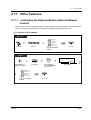
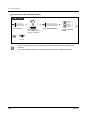
2.11.1 Controlling the External Modem (External Modem Control) .................................. 147
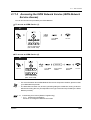
2.11.2 Accessing the ISDN Network Service (ISDN Network Service Access)................ 149
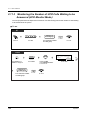
2.11.3 Monitoring the Number of UCD Calls Waiting to be Answered (UCD Monitor Mode)..
150
3 Operator / Manager Operation
3.1
3.1.1
3.1.2
3.1.3
Table of Contents
Extension Control.........................................................................................154
Setting the Alarm for Other Extensions (Remote Timed Reminder) ........................ 154
Setting or Cancelling the DND Feature to Other Extensions (Remote DND Control)....
157
Calling the Extension that has set Call Forwarding (Remote FWD Cancel-Once) .. 159
7
3.1.4 Changing the Settings (Station Programming)......................................................... 160
3.2
3.2.1
3.2.2
3.2.3
3.2.4
3.2.5
3.2.6
3.2.7
System Control ............................................................................................ 161
Switching the Day / Night Service ............................................................................ 161
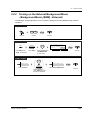
Turning on the External Background Music (Background Music [BGM] - External) . 163
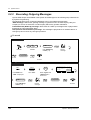
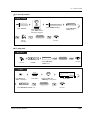
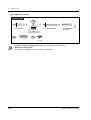
Recording Outgoing Messages................................................................................ 164
Using the ANSWER / RELEASE Button .................................................................. 167
Trunk Busy-out Setting ............................................................................................. 169
Trunk Route Control ................................................................................................. 172
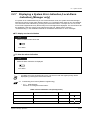
Displaying a System Error Indication (Local Alarm Indication) [Manager only]........ 173
4 Customising Your Phone & System
4.1
Customising Your Phone (Station Programming) .................................... 178
4.1.1 Initial Settings........................................................................................................... 179
4.1.2 Customising the Buttons .......................................................................................... 182
4.2
Charge Fee Management (Station Programming) .................................... 186
4.3
Customising Your System (System Programming) .................................. 187
4.3.1
4.3.2
4.3.3
4.3.4
Date and Time Set (000).......................................................................................... 194
System Speed Dialling Number Set (001) ............................................................... 195
System Speed Dialling Name Set (002) .................................................................. 196
Extension Name Set (004) ....................................................................................... 208
5 Appendix
8
5.1
Troubleshooting ........................................................................................... 212
5.2
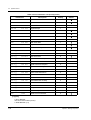
Feature Numbers List .................................................................................. 216
5.3
Directory ....................................................................................................... 219
5.4
What is This Tone? ...................................................................................... 229
5.5
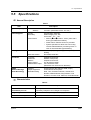
Specifications............................................................................................... 233
Table of Contents
Section 1
OVERVIEW
This section briefly outlines your system.
OVERVIEW
9
1.1 Capacity
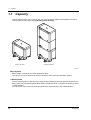
1.1 Capacity
The KX-TD500 system can consist of one, two, or three shelves (Basic and Expansion1,2). Each
shelf contains its own power supply. [Building Block System]
DIG
ITA
L SU
PER
HY
BR
ID
SYS
TEM
RU
N
OF
F LIN
E
ALA
DIG
ITA
L SU
RM
PER
HY
BR
ID
SYS
TEM
RU
PO
FU
WER
ON
OF
N
OF
F LIN
E
ALA
SE
RM
1
F
Basic System
3-Shelf System
Figure 1:
Basic System
Basic System consists of one Shelf called Basic Shelf.
You can connect up to 192 lines (including Extensions and CO lines) to the Basic System.
3-Shelf System
The KX-TD500 system's capacity can be expanded by installing up to two Expansion Shelves on the
Basic Shelf. Fully expanded system (Basic Shelf + Expansion Shelf 1 + Expansion Shelf2) is called
"3-Shelf System."
You can connect up to 512 lines (including Extensions and CO lines) to the 3-Shelf System.
10
OVERVIEW
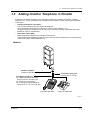
1.2 Connection Example
1.2 Connection Example
This diagram shows you a connection example including optional equipment.
Paging Sperker 1
Amplifier
DIG
ITA
L SU
PER
HY
BR
ID
SYS
TEM
RU
N
OF
F LIN
E
ALA
RM
Paging Sperker 2
Amplifier
Radio
Printer
Personal Computer (PC)
Radio
Automobile type batteries
Consisting of two 12VDC
Figure 2:
OVERVIEW
11
1.2 Connection Example
Central Office Lines
DIGIT
AL
SUPE
R HYBR
ID
SYST
EM
RUN
OFF
LINE
ALAR
M
Panasonic
Doorphone 1
Panasonic
Panasonic
Doorphone 2 Doorphone 3
Panasonic
Doorphone 4
(two pair)
KX-TD500 System
DIG
ITAL
Panaso
nic
(one pair)
(two pair)
(two
pair)
Single Line Telephone
(two pair)
(one pair)
(two
pair)
KX-T7235
KX-T7320
DIGITAL
Panasonic
KX-T7220
Panasonic
(two
pair)
Data Terminal
KX-T7230
(one pair)
KX-T7330
XX
XXXXXXXXXX
TALK
(two
pair)
ON
OFF
F
D E
1
C
A B
2
L
J K
5
3
6
O
M N
I
G H
oni
Y
W X
V
T U
S
P R
Pa
nas
4
c
9
8
7
10CH
AUTO
E R
D P
SCAN
0
REDIAL/
PAUSE
KX-T7250
(three
pair) (two pair)
XXXX
TONE
PROGRAM
AUTO
XXXXXXXXXXXXXXXXXX
XXXXXXX
SOUND
MUTE
XXXX
XXXXXXXXXX
1
2
3
4
5
6
8
7
O
LOW
N
SCA
nic
aso
Pan
CHARGER
HOLD
MUTE
VOLUME
MIC
CHARGE
XXXXXXXXXX
AUT
10CH
X
10
9
FULL
CH
X
XXXXXXXXXX
X
PAGE/INTER
COM
Cordless Phone
DIGI
TAL
19
Pana
soni
c
20
21
13
22
14
23
15
7
24
16
8
17
9
1
18
10
2
11
3
12
4
5
6
(one
pair)
KX-T7350
KX-T7433
Telephone Answering
Machine with Facsimile
(two pair)
KX-T7240
(two
pair)
(two pair)
19
20
21
13
22
14
23
15
7
24
16
8
17
9
1
18
10
2
11
3
12
4
5
6
Panasonic
XXXXXXXXXX
(one
pair)
XXXXXXXX
KX-T7340
KX-T7436
KX-T7425
Voice Processing System
(two pair)
Parallel connections of extension is available. Refer to "Paralleled
Connection of Extension" in Features Guide for further information.
KX-T7440
Figure 3:
12
OVERVIEW
1.3 Adding Another Telephone in Parallel
1.3 Adding Another Telephone in Parallel
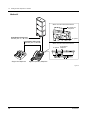
A Panasonic proprietary telephone and a single line telephone, including a facsimile, cordless
telephone, etc., can be connected to one extension jack in parallel. There are two types of parallel
connections.
• Paralleled Telephone Connection
Any proprietary telephone and a single line telephone
These telephones share the same extension number. Follow Method 1 or 2.
To ring the single line telephone, set to ring (on) if necessary. ("Setting the parallel connected
telephone ringer" in "Operations")
• Extra Device Port (XDP)
Digital proprietary telephone and a single line telephone
Each telephone has a different extension number and can work individually. For more information,
contact your dealer. Follow Method 2 or 3.
Method 1
DIGIT
AL
SUPE
R HYBR
ID
SYST
EM
RUN
OFF
LINE
ALAR
M
Modular T-Adaptor
(Panasonic KX-J66 or USOC RJA2X)
4-conductor wiring cord
For a digital proprietary telephone:
Connect pins "D1" and "D2" only.
("T" and "R" are not required.)
For an analog proprietary telephone:
Connect pins "T", "R", "D1" and "D2".
Proprietary Telephone
2-conductor wiring cord
Connect pins "T" and "R".
Single Line Telephone
Figure 4:
OVERVIEW
13
1.3 Adding Another Telephone in Parallel
Method 2
DIGIT
AL
SUPE
R HYBR
ID
SYSTE
M
RUN
OFF
LINE
ALARM
<Back of the KX-T7400 Series DPTs>
To single line
telephone
4-conductor wiring cord
Connect pins "T", "R", "D1" and "D2".
2-conductor wiring cord
Connect pins "T" and "R".
To system
<Back of the KX-T7200 Series DPTs>
To single line
To system telephone
LCD ADJ
PUSH
TO EMSS
Single Line Telephone
TO TEL
Digital Proprietary Telephone
Figure 5:
14
OVERVIEW
1.3 Adding Another Telephone in Parallel
Method 3
DIGIT
AL
SUPE
R HYBR
ID
SYSTE
M
RUN
OFF
LINE
ALARM
Digital Proprietary Telephone
4-conductor wiring cord
Connect pins “T”, “R”, “D1” and “D2”.
Single Line Telephone
2-conductor wiring cord
Connect pins “T” and “R”.
Figure 6:
OVERVIEW
15
1.3 Adding Another Telephone in Parallel
16
OVERVIEW
Section 2
Operation
This chapter shows you how to operate each feature
step by step. Read this chapter to become familiar with
the many useful features of this system.
Operation
17
2.1
Before Operating the Telephones
2.1
Before Operating the Telephones
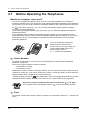
What kind of telephone can be used?
You can use a single line telephone (SLT), such as a rotary pulse telephone or a Panasonic
proprietary telephone (PT) such as the KX-T7436. Operate the feature depending on the telephone
you are using. If you are using a Panasonic proprietary telephone with a special function button such
REDIAL
as
and/or has a display (D – PT), you can follow the operation with the button or display
messages for easy programming.
If you use a large display telephone (e.g. KX-T7436), you can follow the displayed messages to
operate the features.
If your telephone does not have function buttons and/or a display, you may operate the unit by
entering a feature number instead. Follow the available operation with your telephone. If you use a
DSS Console, you can use the buttons on the DSS Console as the buttons on the connected
proprietary telephone.
•
If you use a Panasonic proprietary
telephone which does not have
function buttons, you may change one
of the unused flexible buttons to a
function button. Refer to
4.1.2 Customising the Buttons.
Feature Numbers
To operate certain features, you need to enter specified feature numbers (and an additional
parameter, if required).
There are two types of feature numbers as follows:
• Flexible feature number
• Fixed feature number
Fixed feature numbers cannot be changed. However, you can change the flexible numbers to other
numbers for easier use. If you want to change the numbers, consult your dealer. In this manual, the
default numbers (factory installed) are used for operations.
A flexible number is shown as 0 (half-shaded key). Use the new programmed number if you have
changed the feature number. Write the new number in the "Feature Number List" (Appendix).
If you use a single line telephone which does not have the " " or "#" keys;
it is not possible to access features that have " " or "#" in their feature numbers.
Tones
You will hear various tones, during or after an operation, for confirmation. Refer to 5.4
Tone?.
18
What is This
Operation
2.1
Before Operating the Telephones
Display
In this manual, you will see "the display ...". This refers to the display of a Panasonic proprietary
telephone. If your telephone is not a Panasonic proprietary telephone with a display, the message will
not be displayed.
If you use a Panasonic display proprietary telephone, the display helps you confirm the settings. For
example, when you set the Do Not Disturb feature, the display shows "Do Not Disturb". Some
proprietary telephones also give you easy access to operations. A message is displayed depending
on the operation. By pressing the corresponding button on the side or bottom of the display, or rotating
a jog dial, you can access the desired feature. For example, if turning background music on becomes
available, "BGM" will be shown on the display. Follow the instructions in each operation.
BGM
WED JA
N01 03
:00P
Extens
Featur ion STA
Call Lo es SYS Speed
Speed
g
CONT
RING
BGM
Furthermore, depending on the display proprietary
telephone, you can operate features or make calls using
the display message. Refer to 2.10 Using the Display
Proprietary Telephone.
Restrictions
Some features may be restricted at your extension under system programming. Consult your System
Manager or dealer.
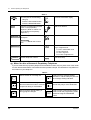
Icon Descriptions
The following icons show you the feature availability, notes and action to operate the features.
While operating the unit, you can easily refer to the Icons noted on the inside back cover of this
manual.
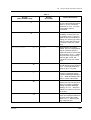
Table 1
This feature cannot be operated
with a single line telephone.
(CO)
OR
9
OR
Related Programming Title
See "Programming", if necessary.
Off-hook (One of the following).
• Lift the handset.
• Press the SP-PHONE button.
• Press the MONITOR button. (To
start talking, lift the handset.)
Operation
8
0
1
to
8
4
8
Seize an external line (One of the
following).
• Press the CO button.
• Dial automatic line access
number 9.
• Dial trunk group access number
801 to 848.
Press the Call button on the
Doorphone.
19
2.1
Before Operating the Telephones
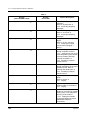
Table 1
desired no.
On-hook (One of the following).
• Hang up.
• Press the SP-PHONE button.
• Press the MONITOR button.
Press the hookswitch lightly.
Press the corresponding function
button on the proprietary
telephone. (Refer to "When You
Use a Panasonic Proprietary
Telephone".)
Wait for an answer.
Enter the required number.
<Example>
Talk.
account code
Enter the account
code.
extension no.
phone no.
Dial an extension number.
You will hear a confirmation, dial,
ring or ringback tone.
C. Tone: confirmation tone
D. Tone: dial tone
R. Tone: ring tone
R. B. Tone: ringback tone
Dial the telephone number.
One short beep
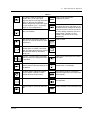
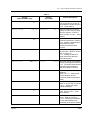
When You Use a Panasonic Proprietary Telephone
If you use a Panasonic proprietary telephone and the DSS Console, they may have some of the useful
function buttons listed below. These buttons make operations simple. The illustrations may differ from
the buttons on your telephone.
Table 2
Used to answer an incoming call.
ANSWER
AUTO ANSWER
MUTE
AUTO DIAL
STORE
20
MESSAGE
Used to receive an incoming intercom
call in the hands-free mode or mute the
microphone during a conversation.
MONITOR
Used for System Speed Dialling or
storing program changes.
PAUSE
Used to leave a message waiting
indication or call back the party who left
the message waiting indication.
Used for hands-free dialing. You can
monitor the party's voice hands-free.
Used to insert a pause during dialing.
Used to enter the programming mode
instead of using the PROGRAM
button.
Operation
2.1
Before Operating the Telephones
Table 2
(CO)
CO: Used to make or receive an
outside call. A Loop-CO button
supports all lines. Pressing this button
seizes an idle line automatically.
(Button assignment is required.) (Only
the CO "number" (e.g. 1, 2) may be
shown on some telephones.)
Used to enter and exit the
Programming mode.
PROGRAM
(PF)
Conference: Used to establish a threeparty conversation.
CONF
(DSS)
FLASH
DSS: Used to access the extension.
(Only the "S" may be shown on some
telephones.)
Used to send a flash signal to the
Central Office or another connected
PBX. Or used to disconnect the current
call and make another call without
hanging up.
Function: Located beside the display.
Used to perform the displayed function
or operation.
FWD/DND
Call Forwarding / Do Not Disturb:
Used to perform Call Forwarding or Do
Not Disturb.
Used to redial.
REDIAL
Used to disconnect the line.
RELEASE
Used to store a dialed phone number
and redial.
(SAVE)
SHIFT
Jog Dial: Used to adjust the volume
and the display contrast or select
desired items for each function.
SP-PHONE
Used to make or receive an intercom
call.
INTERCOM
Operation
Used to alternate between the
subfunctions on the display.
Soft: Used to perform a function or
operation appearing on the bottom line
of the display.
Used to place a call on hold.
HOLD
Programmable Function: Located on
the upper part of the CO button or on
the DSS Console. Assigns the desired
button and used to access the stored
function. Mostly used as a one-touch
dialing button. (Only the "F and
number" may be shown on some
telephones.)
Speakerphone: Used for the handsfree operation.
Used to transfer a call to another party.
TRANSFER
21
2.1
Before Operating the Telephones
Table 2
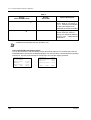
Used to adjust the ringer and speaker If the term is in parentheses like (Account) in this
volume and the display contrast.
section, it means a flexible button has been made
into an "Account" button.
VOLUME
VOICE CALL
MUTE
Used to monitor an intercom call
automatically, but it cannot be used for
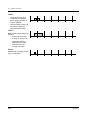
hands-free conversations. It also
mutes the handset microphone during
a conversation.
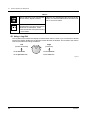
Using a Jog Dial
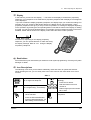
The Jog Dial can be used for the display contrast and the volume control or you can search for desired
items on the display. Rotate the Jog Dial in the either direction as desired. The contrast or the volume
level and the items will change as follows:
Left
(counter-clockwise)
Right
(clockwise)
Level decreases
Level increases
To the previous item
To the next item
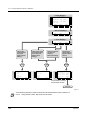
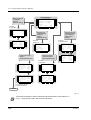
Figure 7:
22
Operation
2.1
Before Operating the Telephones
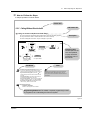
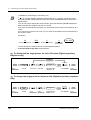
How to Follow the Steps
A sample operation is shown below.
Feature title
Sub feature title
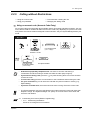
2.2.5 Calling Without Restrictions
Using an account code (Account Code Entry)
An Account Code gives information about outside calls for accounting and billing purposes.
You may not be able to make an outside call without an account code entry.
The mode is assigned to each user. Ask your manager for your mode.
Description
PT / SLT
ACCNT
OR
account code
OR
(Account)
9
OR
4
Off-hook.
9
Press “ACCNT”,
Account or dial 49.
Enter account code
(max. 10 digits).
9
Operation steps
The description of the
icons are explained
on page 20 and the
inside back cover of
this manual.
Press # or dial 99.
(CO)
OR
C.Tone
phone no.
line access
no.
Press CO or enter
line access number
(9 or 801-848).
Enter phone number.
Conditions
• A Panasonic proprietary telephone user can enter
an account code during a conversation and when
hearing a reorder tone after the other party hangs up.
• If you enter the wrong code, press the “ ” key
while entering the account code and then re-enter
the code.
• To cancel the entry, press the Account button or
the hookswitch while entering the code.
• For your convenience, you can store the code with
the phone number in memory (e.g. Speed dialling).
• If you hear a reorder tone, the entered account
code is wrong. Enter the correct code.
Hints
You may give a specified account code to extension
users and check their telephone usage. You can
specify an account code to each client and check the
call duration.
Customising Your Phone
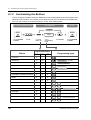
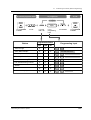
• Customising the Buttons
Create or re-arrange an Account button.
Programming References: The related or required programming is noted.
To programme, see “Customising Your Phone & System”.
Figure 8:
Operation
23
2.2 Making Calls
2.2 Making Calls
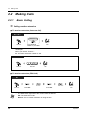
2.2.1
Basic Calling
Calling another extension
To another extension (Intercom Call)
PT
SLT
PTand
/ SLT
extension no.
OR
(DSS)
Off-hook.
Enter extension
number or press DSS.
Talk.
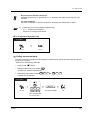
<Example>
When you call Mr. Thomas....
Mr. Thomas's extension number is 123.
PT / SLT
1
2
3
Dial 123.
Off-hook.
Talk.
To another extension (PDN Call)
PT
(SDN)
(SDN)
D.Tone
Off-hook.
•
24
Press SDN.
R.B.Tone
Press SDN.
Talk.
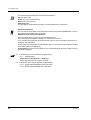
The DSS button light shows the current status as follows:
Off: The extension is idle.
Red on: You or another extension is using the line.
Operation
2.2 Making Calls
Do you have an extension directory?
Complete the directory on "Extension" in 5.3 Directory and make a photo copy for your
reference.
For quick operation
If you are an operator or dial some extensions frequently, the DSS button is useful.
•
•
4.1
Customising Your Phone (Station Programming)
• 4.1.2 Customising the Buttons
Create or re-arrange a DSS button.
To an operator (Operator Call)
PT / SLT
0
Dial 0.
Off-hook.
Calling an external party
You have to seize an outside line before dialing an outside phone number because external calls are
made via your system.
Select one of the following methods:
•
Press an idle
•
Dial automatic line access number
An idle line is selected automatically.
•
Dial trunk group access number
A specific line is selected.
(CO)
button.
8
9
.
0
1
to
8
4
8
.
PT / SLT
(CO)
OR
9
phone no.
OR
8
0
1
to
Off-hook.
8
4
8
Enter phone number.
Talk.
Seize an external line
(CO, 9 or 801-848).
Operation
25
2.2 Making Calls
•
•
•
•
•
The CO button light shows the current status as follows:
Off: The line is idle.
Green on: You are using the line.
Red on: The line is in use.
Emergency call
You can dial pre-programmed emergency numbers without any restrictions.
Hands-free operation
You can have a conversation in the hands-free mode using the SP-PHONE button. You can
then perform other tasks at the same time.
Helpful hints for hands-free operation
Use your telephone in a quiet room for best performance.
If the other party has difficulty hearing you, decrease the volume.
If you and the other party talk at the same time, parts of your conversation will be lost. To
avoid this, talk alternately.
To select the less expensive line automatically, dial "9" or press the Loop-CO button to seize
a line.(Automatic Route Selection)
If you misdial, press the FLASH button or the hookswitch lightly and then re-dial. The line
will remain engaged.
4.1
Customising Your Phone (Station Programming)
• 4.1.1 Initial Settings
Preferred Line Assignment — Outgoing
Select the seized line when going off-hook.
4.3 Customising Your System (System Programming)
• 4.3.2 System Speed Dialling Number Set (001)
• 4.3.3 System Speed Dialling Name Set (002)
26
Operation
2.2 Making Calls
2.2.2
Easy Dialling
This is convenient for frequently dialed phone numbers.
—With one button
—Using numbers stored at your extension
—Using numbers stored in the system
—To a pre-set party by going off-hook
—Using a single digit number
—To a Phantom extension
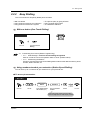
With one button (One-Touch Dialling)
PT
(One-Touch
Dialling)
Press One-Touch
Dialling.
Off-hook.
4.1
Customising Your Phone (Station Programming)
• 4.1.1 Initial Settings— Full One-Touch Dialling Assignment
Allow or cancel the one-touch operation while on-hook. (Default: Allow)
• 4.1.2 Customising the Buttons
Create or re-arrange the One-Touch Dialling button and store the desired number, phone
number, feature number, etc.
Using numbers stored at your extension (Station Speed Dialling)
You can store up to 10 numbers at your extension for your personal use.
To store a phone number
PT / SLT
3
0
station speed
dial no.
desired no.
C.Tone
Off-hook.
Dial 30.
Enter station speed
dial number (0-9).
Enter the desired
number.
Dial #.
On-hook.
Enter a line access number (9 or 801 to 848)
as the first digit before an external party number.
Operation
27
2.2 Making Calls
•
" " and PAUSE can also be stored as digits.
To dial
PT / SLT
station speed
dial no.
3
Dial 3 .
Off-hook.
Enter station speed
dial number (0-9).
Using numbers stored in the system (System Speed Dialling)
Up to 1000 frequently dialed numbers can be stored in the system. Refer to the directory "System
Speed Dialling" in 5.3 Directory.
PT / SLT
AUTO DIAL
STORE
system speed
dial no.
OR
Off-hook.
•
Press AUTO DIAL
or dial .
More than one speed dial number can be used for long telephone numbers, if the number
is divided when stored.
<Example>
If the number is divided and stored in system speed dial numbers 001 and 002:
AUTO DIAL
AUTO DIAL
0
STORE
4.3
28
Enter system speed
dial number (000-999).
0
1
0
0
2
STORE
Customising Your System (System Programming)
• 4.3.2 System Speed Dialling Number Set (001)
• 4.3.3 System Speed Dialling Name Set (002)
Operation
2.2 Making Calls
To a pre-set party by going off-hook (Pickup Dialling)
You can make an extension or outside call simply by going off-hook if you pre-assigned.
To store a phone number
PT / SLT
7
4
2
desired
party’s no.
C.Tone
Dial 742.
Off-hook.
Enter the desired
party’s number
(max. 16 digits).
Dial #.
On-hook.
Enter a line access number (9 or 801 to 848)
as the first digit before an external party number.
T7433
→P i c k u p D L P G . . #
Remote DND
MENU
SEL
FEAT
SHIFT
Press “FEAT”.
Press SHIFT until
“FEAT” is displayed.
Rotate Jog Dial
until “Pickup DL PG”
is at the arrow.
Press “SEL”.
desired
party’s no.
Enter the desired
party’s number
(max. 16 digits).
Enter a line access number (9 or 801 to 848)
as the first digit before an external party number.
C.Tone
On-hook.
Dial #.
T7436 / T7235
Features
OR
Pickup DL Prg (→..+#)
desired
party’s no.
PREV
Press “Features”.
Press “Pickup DL Prg”.
Rotate Jog Dial or
press “PREV” until the
following is displayed.
Enter the desired
party’s number
(max. 16 digits).
Enter a line access number (9 or 801 to 848)
as the first digit before an external party number.
C.Tone
Dial #.
Operation
On-hook.
29
2.2 Making Calls
To set / cancel
PT / SLT
1
7
0
Dial 74.
Off-hook.
Set
OR
4
Cancel
C.Tone
On-hook.
Dial 1 to set
or 0 to cancel.
T7433
Press “FEAT”.
Press SHIFT until
“FEAT” is displayed.
1
→P i c k u p D i a l
1/0
Pickup DL PG..#
MENU
SEL
FEAT
SHIFT
Press “SEL”.
Rotate Jog Dial
until “Pickup Dial”
is at the arrow.
Set
OR
0
Cancel
C.Tone
On-hook.
Dial 1 to set
or 0 to cancel.
T7436 / T7235
Features
OR
Pickup Dialing (→1/0)
0
PREV
Press “Features”.
Press “Pickup Dialing”.
Rotate Jog Dial or
press “PREV” until the
following is displayed.
1
Set
OR
Cancel
Dial 1 to set
or 0 to cancel.
C.Tone
On-hook.
To dial
PT / SLT
Off-hook.
30
Operation
2.2 Making Calls
•
To call another party, dial the desired party's phone number before the pre-set line is
connected.(Default: 1 second)
•
•
" " can also be stored as a digit.
This feature is not available for an ISDN telephone user.
Using a single digit number (Quick Dialling)
PT / SLT
quick dial no.
Off-hook.
Enter quick dial
number.
To a Phantom extension
You can call extensions associated with a
Phantom extension. The call arrives at all
extensions who have the corresponding
Phantom extension button.
123
123
123
123
To call to a phantom extension
PT / SLT
(Phantom)
OR
phantom
extension no.
Press Phantom or enter
phantom extenison number.
Operation
31
2.2 Making Calls
To answer
PT / SLT
(Phantom)
Press Phantom.
•
•
4.1
32
OR
Off-hook.
The Phantom extension button light shows the current status as follows:
Off: Idle
Red on: You are calling a phantom extension.
Flashing green: Incoming call
To set ringing or not, refer to 4.1 Customising Your Phone (Station Programming).
Customising Your Phone (Station Programming)
• 4.1.2 Customising the Buttons
Create or re-arrange a Phantom extension button.
Operation
2.2 Making Calls
2.2.3
Redial
This is convenient when calling the same external party again.
— Redialling the last outside phone number you dialed
— Saving the outside phone number for redialling
•
Up to 24 digits can be programmed and redialled. The line access number is not counted
as a digit.
•
To redial automatically, go off-hook with the SP-PHONE button or press the REDIAL
button directly. It will keep trying the busy number until the called party answers within a
specified time (Automatic Redial). You can perform other tasks during automatic redialling.
To cancel, press the FLASH button.
4.1
Customising Your Phone (Station Programming)
• 4.1.1 Initial Settings — Full One-Touch Dialing Assignment
Allow or cancel the one-touch operation while on-hook. (Default: Allow)
Redialling the last outside phone number you dialed (Last Number Redial)
PT / SLT
REDIAL
OR
Off-hook.
Press REDIAL or dial #.
Saving the outside phone number for redialling (Saved Number Redial)
The saved number remains intact until another number is stored.
To save
PT
PT
During a conversation or while hearing a busy tone
AUTO DIAL
STORE
Press STORE.
Operation
(Save)
Press SAVE.
33
2.2 Making Calls
To dial
PT
(Save)
Off-hook.
4.1
•
34
Press SAVE.
Customising Your Phone (Station Programming)
4.1.2 Customising the Buttons
Create or re-arrange a SAVE button.
Operation
2.2 Making Calls
2.2.4
When the Dialled Line is Busy or There is No Answer
— Reserving a busy line
— Sending a call waiting tone
— Leaving a message waiting indication
— Joining an existing call
Reserving a busy line (Automatic Callback Busy)
You can set the telephone to receive call-back ringing when a dialed line becomes idle.
When you answer the call-back ringing:
For an outside call: The line is seized.
For an intercom call: The called extension starts ringing automatically.
PT / SLT
While hearing a busy tone
C.BCK
OR
C.Tone
6
Press “C.BCK” or dial 6.
On-hook.
To answer and call
PT / SLT
● Outside call
● Intercom call
phone no.
Off-hook.
•
•
Operation
Enter phone number.
Off-hook.
If you do not answer the recall ringing within 10 seconds (four call-back rings), this feature
will be canceled.
This feature is not available for an ISDN telephone user.
35
2.2 Making Calls
To cancel
PT / SLT
4
6
C.Tone
Off-hook.
On-hook.
Dial 46.
T7433
→C a l l b a c k C a n c e l
Data Line
1/0
MENU
SEL
FEAT
SHIFT
C.Tone
Press “FEAT”.
Press SHIFT until
“FEAT” is displayed.
Rotate Jog Dial until
“Callback Cancel”
is at the arrow.
Press “SEL”.
On-hook.
T7436 / T7235
Features
OR
Callback Busy Cancel
NEXT
Press “Features”.
C.Tone
Press “Callback Busy Cancel”.
On-hook.
Rotate Jog Dial or
press “NEXT” until the
following is displayed.
Sending a call waiting tone (Busy Station Signaling [BSS])
The other party will know your call is waiting.
PT / SLT
While hearing a busy tone
BSS
OR
1
Press “BSS” or dial 1.
36
Operation
2.2 Making Calls
•
•
•
If "BSS" is not displayed or you hear a reorder tone, this feature is not set at the other
party's phone. This feature is only available if the called extension has set the "Call Waiting"
feature.
Depending on the other party's telephone, the "Off-Hook Call Announcement (OHCA)"
or the "Whisper OHCA" functions can be applied. You can talk to the other party through
the speaker and the microphone (OHCA) or you only send a call announcement through
the handset (Whisper OHCA), while they are having another conversation using the
handset.
This feature is not available for an ISDN telephone user.
Leaving a message waiting indication (Message Waiting)
If the other extension is busy or does not answer your call,
you can leave a message waiting indication (MESSAGE
button light turns on and / or indication tone* is emitted
when going off-hook) on that extension. This prompts the
other extension user to call you back.
To leave a message waiting indication
PT
When the called extension is busy or does not answer
MESSAGE
C.Tone
On-hook.
Press MESSAGE.
To leave / cancel a message waiting indication
PTand
/ SLT
PT
SLT
1
7
Off-hook.
Operation
0
Dial 70.
Leave
OR
0
extension no.
Cancel
Dial 1 to leave or
0 to cancel.
C.Tone
Enter extension
number.
On-hook.
37
2.2 Making Calls
To leave / cancel a message waiting indication (contd.)
T7433
SHIFT
→M S G O f f
MSG On
FEAT
MENU
Press SHIFT until
“FEAT” is displayed.
Press “FEAT”.
ext
ext
SEL
Press “SEL”.
“MSG On”: Leave
“MSG Off”: Cancel
Rotate Jog Dial until
“MSG Off” or “MSG On”
is at the arrow.
extension no.
C.Tone
Enter
extension number.
On-hook.
T7436 / T7235
Cancel
Features
OR
NEXT
Message Off (→ext)
Message On (→ext)
Leave
Press “Features”.
Rotate Jog Dial or
press “NEXT” until the
following is displayed.
extension no.
Enter extension number.
Press “Message On” to leave
or “Message Off” to cancel.
C.Tone
On-hook.
To check and select the party
D – PT
While on-hook
MESSAGE
Press MESSAGE
until the desired extension appears.
38
Operation
2.2 Making Calls
•
•
The extension number and name of the massage senders are shown in the received order.
Single line telephone users may hear a special ring tone as notification while on-hook, if
required.
This feature is not available for an ISDN telephone user.
*Indication tone
•
•
1s
To call back
PT / SLT
MESSAGE
OR
D.Tone
7
0
2
Press MESSAGE or dial 702.
Off-hook.
Talk.
To clear all message waiting indications
PT / SLT
7
Off-hook.
4.1
•
0
Dial 700.
0
your extension
no.
Enter your extension
number.
Customising Your Phone (Station Programming)
4.1.2 Customising the Buttons
Create or re-arrange a MESSAGE button.
Joining an existing call (Executive Busy Override)
You can call the party who is talking with another on the telephone or add a third
party to your existing conversation.
Operation
39
2.2 Making Calls
To join
PT
● Outside call
● Intercom call
Over
(CO)
OR
C.Tone
Off-hook.
Press
corresponding CO.
Talk.
C.Tone
2
Press “Over” or dial 2.
Talk.
To terminate one party and talk with another
PT
PT
(CO)
OR
INTERCOM
Press other party's
CO or INTERCOM.
•
40
C.Tone
Talk.
You can also deny others the possibility of joining your conversation (Exective Busy
Override Deny) (Default: Allow). Refer to 2.7 Setting the Telephone According to Your
Needs.
Operation
2.2 Making Calls
2.2.5
Calling without Restrictions
— Using an account code
— Using your password
— To an extension refusing the call
— Changing the dialing mode
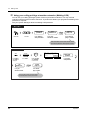
Using an account code (Account Code Entry)
An Account Code gives information about outside calls for accounting and billing purposes. You may
not be able to make an outside call without an account code entry depending on your account code
entry mode. One of three modes is assigned to each extension. Ask your System Manager about your
mode.
PT / SLT
ACCNT
OR
account code
(Account)
OR
4
Off-hook.
OR
9
9
Enter account code
(max. 10 digits).
9
Press # or dial 99.
Press “ACCNT”,
Account or dial 49.
(CO)
OR
C.Tone
Press CO or enter
line access number
(9 or 801-848).
Enter phone number.
•
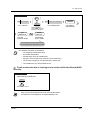
A Panasonic proprietary telephone user can enter an account code during a
conversation and when hearing a reorder tone after the other party hangs up.
•
If you enter the wrong code, press the " " key while entering the account code and then
re-enter the code.
To cancel the entry, press the Account button or the hookswitch while entering the code.
For your convenience, you can store the code with the phone number in memory (e.g.
Speed dialing).
If you hear a reorder tone, the entered account code is wrong. Enter the correct code.
•
•
•
•
The System Manager may give a specified account code to extension users and check their
telephone usage. The System Manager can specify an account code to each client and
check the call duration.
4.1
•
Operation
phone no.
line access
no.
Customising Your Phone (Station Programming)
4.1.2 Customising the Buttons
Create or re-arrange an Account button.
41
2.2 Making Calls
Using your calling privilege at another extension (Walking COS)
You can use your calling privileges (Class of Service) at another extension. You may override
restrictions which may be set at the extension. To perform this feature, pre-programmed walking COS
password is required.
Ask your System Manager about the walking COS password.
PT / SLT
4
7
walking COS
password
desired
party’s no.
your
extension no.
C.Tone
Dial 47.
Off-hook.
Enter walking
COS password.
Enter your
extension number.
Enter desired
party’s number.
Press a CO button or enter a line access number
(9 or 801-848) before an external phone number.
T7433
→W K . C O S c o d e + e x t
ABST MSG Off
MENU
SEL
FEAT
SHIFT
Press SHIFT
until "FEAT" is
displayed.
Press "FEAT".
Rotate Jog Dial
until "WK.COS"
is at the arrow.
Press "SEL".
walking COS
password
Enter walking
COS password.
desired
party's no.
your
extension no.
C.Tone
Enter your
extension number.
Enter desired
party's number.
Press a CO button or enter a line access number
(9 or 801-848) before an external phone number.
42
Operation
2.2 Making Calls
T7436 / T7235
Features
OR
Walking COS (→code+ext)
PREV
Press “Features”.
Press “Walking COS”.
Rotate Jog Dial or
press “PREV” until the
following is displayed.
walking COS
password
Enter walking
COS password.
desired
party’s no.
your
extension no.
C.Tone
Enter your
extension number.
Enter desired
party’s number.
Press a CO button or enter a line access number
(9 or 801-848) before an external phone number.
The available functions are as follows:
• The outgoing call restriction level
• An outside call duration
• Transferring a call to an outside party
• Using an account code entry mode (Account Code Entry)
• The number of digits you can dial during an outside call.
• The outside lines you are permitted to use.
To call an extension who is refusing to receive the call (Do Not Disturb (DND)
Override)
PT / SLT
While hearing the DND tone
Over
OR
1
Press “Over” or dial 1.
•
•
Operation
Only a pre-programmed extension can execute this feature.
This feature is not available for an ISDN telephone user.
43
2.2 Making Calls
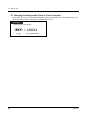
Changing the dialing mode (Pulse to Tone Conversion)
To access services such as computer telephone services, Voice Mail, etc., that require a tone, you
can temporarily change the dialing mode from Pulse to Tone.
PT / SLT
After the line is connected
desired no.
Dial
44
#.
Enter desired number.
Operation
2.2 Making Calls
2.2.6
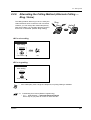
Alternating the Calling Method (Alternate Calling —
Ring / Voice)
The calling method, either ring or voice, is set by the
called extension when an intercom call is received.
However, you can change the method temporarily.
With Voice-Calling, you can talk to the party as soon
as the line is connected. (Default: Ring-Calling)
Ring
Ring
Hello
OR
For voice-calling
PT / SLT
After dialling
Voice
OR
C.Tone
Press “Voice” or
.
Talk.
For ring-calling
PT / SLT
After dialling
Tone
OR
Press “Tone” or
•
If the called party uses a single line telephone, only Ring-Calling is available.
4.1
•
Operation
.
Customising Your Phone (Station Programming)
4.1.1 Initial Settings — Intercom Alert Assignment
Which way do you prefer to receive an intercom call?
45
2.2 Making Calls
2.2.7
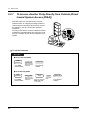
To Access Another Party Directly from Outside (Direct
Inward System Access [DISA])
External callers can call extensions in the KXTD500 system. An outgoing message greets the
caller and gives information about how to access
an extension. You do not need the operator's
assistance.
You may not be able to access the features without
a DISA user code depending on the security mode.
Ask your manager for the mode assigned to your
system.
DIGITAL
SUPER
HYBRID
SYSTEM
RUN
OFF
LINE
ALARM
To call an extension
PT / SLT
● In Non Security Mode
DISA
phone no.
Enter DISA
phone number.
desired no.
R.B.Tone and
DISA outgoing
message
Enter desired
number.
● In All Security Mode
DISA
phone no.
Enter DISA
phone number.
46
DISA user
code
R.B.Tone and
DISA outgoing
message
Enter pre-assigned
DISA user code
(4-10 digits).
desired no.
One short
beep
Enter desired
number.
Operation
2.2 Making Calls
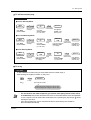
To call an external party
PT / SLT
● In Non Security Mode
DISA
phone no.
line access
no.
Enter DISA
phone number.
R.B.Tone and
DISA outgoing
message
phone no.
D.Tone from
Central Office
Enter phone
number of the
external party.
Enter line
access number
(9 or 801-848).
● In Trunk Security Mode
DISA
phone no.
DISA user
code
line access
no.
Enter DISA
phone number.
R.B.Tone and
DISA outgoing
message
phone no.
D.Tone from
Central Office
One short
beep
Enter phone
number of the
external party.
Enter pre-assigned
DISA user code
(4-10 digits).
Enter line
access number
(9 or 801-848).
● In All Security Mode
DISA
phone no.
line access
no.
DISA user
code
Enter DISA
phone number.
R.B.Tone and
DISA outgoing
message
Enter pre-assigned
DISA user code
(4-10 digits).
phone no.
D.Tone from
Central Office
One short
beep
Enter line
access number
(9 or 801-848).
Enter phone
number of the
external party.
To re-try
PT / SLT
To dial a different number during a conversation with an outside party or
while hearing the ringback, reorder, or busy tone
desired no.
D.Tone
Dial
.
Enter desired number.
Enter a line access number (9 or 801 to 848)
as the first digit when calling an external party.
•
•
Operation
If a call between two external parties (you and the other party outside of the office)
is established, both parties will hear an alert tone 15 seconds before the time limit (Default:
10 min.) expires. The can extend the call duration time, by dialing any key except " " while
hearing an alert tone.
If the wrong DISA user code is entered three times consecutively, the call will be
disconnected automatically.
47
2.3 Receiving Calls
2.3 Receiving Calls
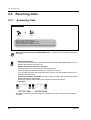
2.3.1
Answering Calls
PT / SLT
Off-hook.
Talk.
Select one of the following methods:
· Lift the handset to receive the preferred line.
(Default: Ringing line is selected.)
· Press the SP-PHONE or MONITOR* button.
· Press the flashing red CO, green INTERCOM or green DN button directly.
When going off-hook using the MONITOR button, you have to lift the handset to talk to the
other party.
•
•
Hands-free operation
You can have a conversation in the hands-free mode with the SP-PHONE button. You can
perform other tasks at the same time.
Helpful hints for the hands-free operation
Use your telephone in a quiet room for best performance.
If the other party has difficulty hearing you, decrease the volume.
If you and the other party talk at the same time, parts of your conversation will be lost. To
avoid this, talk alternately.
If the Caller ID feature is available, you may confirm the caller's phone number and name
before answering an outside call.
Pressing the SHIFT button displays the outside line number and name.
<Example>
0111111111
John Thomas
Extension
STA Speed
Features
SYS Speed
Call Log
CO1 Panasonic
Extension
Features
Call Log
SHIFT
STA Speed
SYS Speed
SHIFT
The caller's information from your telephone company will only be sent to the pre-assigned
extension.
48
Operation
2.3 Receiving Calls
4.1
Customising Your Phone (Station Programming)
4.1.1 Initial Settings— Preferred Line Assignment — Incoming
Select the seized line when going off hook.
Intercom Alert Assignment
Select the Calling method, either ring or the other party's voice.
• 4.1.2 Customising the Buttons
Re-arrange the CO button and change the ringing tone for each CO button.
•
Operation
49
2.3 Receiving Calls
2.3.2
Answering Hands-free (Hands-free Answerback)
You can answer an intercom call without going off-hook as soon as the line is
connected. You will hear the caller talking without the phone ringing.
To set / cancel
PT
While on-hook
AUTO ANSWER
MUTE
Press AUTO
ANSWER.
•
50
The AUTO ANSWER button light shows the current status as follows:
On:Set.
Off: Not set.
Operation
2.3 Receiving Calls
2.3.3
Answering a Call Ringing at Another Telephone (Call
Pickup)
You can answer an incoming call that is ringing at another extension from your phone without leaving
your desk.
The following types are available:
Outside (CO) Call Pickup: Picks up an outside call.
Group Call Pickup: Picks up a call within your extension group.
Directed Call Pickup: Picks up a specified extension's call.
PT / SLT
4
Outside call
OR
4
0
Group
C.Tone
Dial 4 for an outside call
or 40 for group.
Off-hook.
Talk.
C.Tone
4
1
extension no.
Directed
Dial 41 for directed call.
Enter extension
number.
T7433
SHIFT
FEAT
→C . P i c k u p C O
C.PickupDNY
1/0
MENU
SEL
C.Tone
Press SHIFT
until “FEAT”
is displayed.
Press “FEAT”. Rotate Jog Dial
until the following
is at the arrow.
Talk.
Press “SEL”.
→C . P i c k u p G r p
C.Waiting
0-3
MENU
SEL
C.Tone
Press “SEL”.
→C . P i c k u p D R T
ext
C.Pickup Grp
MENU
SEL
Press “SEL”.
Operation
C.Tone
extension no.
Enter extension
number.
51
2.3 Receiving Calls
T7436 / T7235
Features
OR
C.Pickup CO
NEXT
Press “Features”.
C.Tone
Talk.
Press “C.Pickup CO”.
Rotate Jog Dial
or press “NEXT”
until the following
is displayed.
C.Pickup Group
C.Tone
Press “C.Pickup Group”.
C.Tone
C.Pickup Direct (→ext)
Press “C.Pickup Direct”.
•
•
•
52
extension no.
Enter extension
number.
If you receive a call waiting tone, you can ask a third party to pick up your second call
with Directed Call Pickup.
"Group Call Pickup" is not available for an ISDN telephone user.
You can also deny other people the possibility of picking up your calls (Call Pickup Deny).
Refer to 2.7 Setting the Telephone According to Your Needs.
Operation
2.3 Receiving Calls
2.3.4
Answering a Call via an External Speaker (Trunk
Answer From Any Station [TAFAS])
You can answer an incoming outside call ringing at an external speaker from any extension.
PT / SLT
4
2
Speaker no.
C.Tone
Off-hook.
Dial 42.
Enter speaker
number (1-2).
Talk.
T7433
→P a g e - E A N S
1-2
Page-GRP ANS
MENU
SEL
FEAT
Press SHIFT until
"FEAT" is displayed.
Press "FEAT".
Rotate Jog Dial
until "Page-E ANS"
is at the arrow.
Press "SEL".
Speaker no.
C.Tone
Enter speaker
number (1-2).
Talk.
T7436 / T7235
Features
OR
Page-Ext Answer (→1-2)
Speaker no.
PREV
Press "Features".
C.Tone
Press "Page-Ext Answer".
Rotate Jog Dial or
press "PREV" until the
following is displayed.
•
Operation
Enter speaker
number (1-2).
Talk.
You can also answer a paging announcement
via an external speaker with this operation.
53
2.4 During a Conversation
2.4 During a Conversation
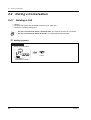
2.4.1 Holding a Call
— Holding
— Denying other people the possibility of retrieving your held calls
— Holding in a system parking zone
•
•
If a call is not retrieved within a specified time, you will hear an alarm as a reminder.
If a call is not retrieved within 30 minutes, it is automatically disconnected.
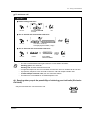
Holding (regular)
PT / SLT
During a conversation
HOLD
OR
5
0
C.Tone
On-hook.
Press HOLD or
hookswitch and dial 50.
54
Operation
2.4 During a Conversation
To retrieve a call
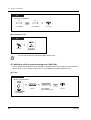
PT / SLT
● At the holding extension
OR
(CO)
INTERCOM
OR
5
Off-hook.
0
Talk.
Press CO/INTERCOM
or dial 50.
● For an outside call from another extension
(CO)
OR
5
3
trunk port physical no.
C.Tone
Press CO or dial 53 and
trunk port physical number (5 digits).
Off-hook.
Talk.
● For an intercom call from another extension
5
1
holding ext no.
C.Tone
Off-hook.
•
•
•
•
•
Dial 51.
Enter holding
extension number.
Talk.
The CO or INTERCOM button light shows the current status as follows:
Flashing green: Your held call
Flashing red: Another extension's held call
A single line telephone user can hold either an intercom call or an outside call at one time.
A proprietary telephone user can hold an intercom call and multiple outside calls.
To hold multiple intercom calls, use the "Call Park" feature.
This feature is not available for an ISDN telephone user.
Denying other people the possibility of retrieving your held calls (Exclusive
Call Hold)
Only the held extension can retrieve the call.
Operation
55
2.4 During a Conversation
PT
During a conversation
HOLD
HOLD
C.Tone
Press HOLD.
Press HOLD.
On-hook.
To retrieve a call
PT
(CO)
OR
INTERCOM
Off-hook.
•
Press CO or
INTERCOM.
You can hold an intercom call and multiple outside calls.
Holding a call in a system parking zone (Call Park)
You can park a call and perform other operations. The parked call can be retrieved by any extension.
Up to 100 calls can be parked. This function is not available for an ISDN telephone user.
To set
PT / SLT
During a conversation
TRANSFER
OR
5
2
parking zone no.
C.Tone
Dial 52.
Enter parking
zone number (00-99).
On-hook.
Press TRANSFER
or hookswitch.
56
Operation
2.4 During a Conversation
To set (contd.)
T7433
→C a l l P a r k
00-99
Callback Cansel
MENU
SEL
FEAT
SHIFT
Press SHIFT until
“FEAT” is displayed.
Press “FEAT”.
Rotate Jog Dial until
“Call Park” is at the arrow.
Press “SEL”.
parking
extension
zoneno.
no.
C.Tone
Enter parking
zone number (00-99).
On-hook.
T7436 / T7235
Features
Call Park (→O0-99)
OR
parking zone no.
NEXT
Press “Features”.
C.Tone
Press “Call Park”.
Enter parking
zone number (00-99).
Rotate Jog Dial or
press “NEXT” until the
following is displayed.
On-hook.
To retrieve
PT / SLT
5
2
parking zone no.
C.Tone
Off-hook.
Operation
Dial 52.
Enter parking
zone number (00-99).
Talk.
57
2.4 During a Conversation
To retrieve (contd.)
T7433
→C a l l P a r k
00-99
Callback Cansel
MENU
SEL
FEAT
SHIFT
Press “FEAT”.
Press SHIFT until
“FEAT” is displayed.
Rotate Jog Dial until
“Call Park” is at the arrow.
Press “SEL”.
parking zone no.
C.Tone
Enter parking
zone number (00-99).
Talk.
T7436 / T7235
Features
OR
Call Park (→OO-99)
NEXT
Press “Features”.
•
58
C.Tone
Press “Call Park”.
Rotate Jog Dial or
press “NEXT” until the
following is displayed.
parking zone no.
Enter parking
zone number (00-99).
Talk.
If you hear a busy tone when entering the zone number, the zone is in use.
Enter another number.
Operation
2.4 During a Conversation
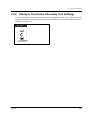
2.4.2 Talking to Two Parties Alternately (Call Splitting)
If a new call comes in on your extension when you are engaged in the call, you can answer the new
call without loosing the current call. Then you can talk to either one of two parties alternately while
putting the other on hold.
PT / SLT
TRANSFER
OR
Press TRANSFER
or hookswitch.
Operation
59
2.4 During a Conversation
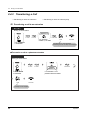
2.4.3 Transferring a Call
—Transferring a call to an extension
—Transferring a call to an external party
Transferring a call to an extension
PT / SLT
During a conversation
extension no.
TRANSFER
OR
OR
C.Tone
D.Tone
R.B.Tone
(DSS)
Enter extension
number or press DSS.
Press TRANSFER
or hookswitch.
Talk.
On-hook.
The destination is confirmed before
transferring the call. This step can be skipped.
To transfer a call to a phantom extension
PT/SLT
During a conversation
(Phantom)
TRANSFER
OR
OR
C.Tone
Press TRANSFER
or hookswitch.
Talk.
D.Tone
phantom
extension no.
R.B.Tone
Press Phantom or enter
phantom extension number.
On-hook.
This step can be skipped.
60
Operation
2.4 During a Conversation
Transferring a call to an extension (PDN call)
PT
During a conversation
TRANSFER
C.Tone
Press TRANSFER.
Talk.
(SDN)
(SDN)
Press SDN.
Press SDN.
D.Tone
R.B.Tone
On-hook.
This step can be skipped.
Transferring a call to an extension (Ringing Transfer)
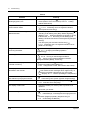
You can transfer a call on an SDN button to another extension with a simple operation.
The call will be transferred to the extension on which the PDN button (associated with your SDN
button) is assigned.
PT
During a conversation
(SDN)
Press SDN.
R.B.Tone
Talk.
On-hook.
The destination is confirmed before transferring the call.
This step can be skipped.
Operation
61
2.4 During a Conversation
Transferring a call to the Remote Resource or a UCD Group
PT/SLT
During a conversation
(DSS)
TRANSFER
OR
OR
C.Tone
D.Tone
Press TRANSFER
or hookswitch.
extension no.
of Remote/UCD
On-hook.
Press extension no.
of Remote/UCD group.
Transferring a call to an external party
Some extensions may be restricted from performing this function.
PT / SLT
During a conversation
(CO)
TRANSFER
OR
OR
C.Tone
Press TRANSFER
or hookswitch.
•
•
•
•
•
•
62
line access
no.
Press CO or enter
line access number
(9 or 801-848).
phone no.
R.B.Tone
Enter phone number.
Talk.
On-hook.
The destination is confirmed before
transferring the call. This step can be skipped.
If you misdial, press the FLASH button, and re-enter the number.
If a call between two external parties is established, both parties will hear an alert tone
15 seconds before the time limit (Default: 10 min.) runs out. The original extension will hear
an alarm 50 seconds before the time runs out.
To return to the held call, press the TRANSFER button, corresponding CO, INTERCOM
button, or the hookswitch, before the destination answers.
To return to the conversation, press the corresponding CO button.
If you hear an alert tone, the destination extension did not answer the call. Answer the call.
This feature is not available for an ISDN telephone user.
Operation
2.4 During a Conversation
•
•
•
Operation
If you transfer a call with the DSS button, you do not have to press the Transfer button
(One-Touch Transfer).
You can transfer a call to busy phantom extensions or extensions in a ring group. The call
is transferred when at least one extension becomes free. (Camp-On Transfer)
The call will be released from your extension automatically after dialing the destination
extension number (Released Link Operation).
If this feature is enabled by System Programming, you can perform another operation
without going on-hook after transferring the call.
63
2.4 During a Conversation
2.4.4 Answering a Call Waiting
—Answering a call waiting in the system
—Answering a call waiting from the central office
Answering a call waiting in the system
During a conversation, a call waiting tone or voice announcement through the telephone speaker or
the handset occurs when an outside call is received or another extension is letting you know another
call is waiting. To activate this feature, set to "On". (Default: No tone) You can answer the second call
by disconnecting the current call or placing it on hold.
To talk to the new party
PT / SLT
While hearing a tone
(CO)
HOLD
OR
OR
INTERCOM
5
OR
Press HOLD or
hookswitch and dial 50.
Press CO/INTERCOM or
off-hook and on-hook.
Disregard this step if you
terminate the current call.
Disregard this step if both
parties are extensions.
•
•
•
64
0
Depending on the other party's telephone, the "Off-Hook Call Announcement (OHCA)"
and the "Whisper OHCA" functions can be applied. You can talk to the other party through
the speaker and the microphone (OHCA) or you only receive a call announcement through
the handset (Whisper OHCA), while they are having another conversation using the
handset.
The calling extension's name or number is displayed for 5 seconds in 10 second intervals
before answering a call.
This feature is not available for an ISDN telephone user.
Operation
2.4 During a Conversation
4.1
Customising Your Phone (Station Programming)
4.1.1 Initial Settings— Call Waiting Tone Type Selection
Determine the tone depending on the second party, either an outside call or an
extension.
•
Default
Special Tones
15 s
5s
Extension
Outside
Answering a call waiting from the central office
This is an optional telephone company service. For more information, consult your telephone
company.
PT / SLT
While hearing a tone
EFA
OR
OR
6
Press “EFA”, FLASH or
hookswitch and dial 6.
•
Operation
To return to the original party,repeat the operation.
65
2.4 During a Conversation
2.4.5 Three-party Conversation
— Adding a third party during a conversation
— Leaving a conference
— Letting a third party join your call
Adding a third party during a conversation (Conference)
PT / SLT
CONF
CONF
desired
party’s no.
OR
OR
3
Enter desired
party’s number.
C.Tone
Talk.
Press CONF or
hookswitch and dial 3.
Press CONF or
hookswitch.
Press a CO button or enter a line access number
(9 or 801-848) before an external phone number.
To talk to one party by terminating the other
PT
(CO)
OR
INTERCOM
C.Tone
Press CO or
INTERCOM.
Talk.
Leaving a conference
The other two parties can continue their conversation.
PT / SLT
When you are talking with two extensions or
one extension party and one external party
PT
When you are talking with two external parties
(Unattended Conference)
CONF
On-hook.
66
Some extensions may be restricted
from performing this function.
Press CONF.
Operation
2.4 During a Conversation
To return
PT
PT / SLT
While hearing alert ringing
While the others are talking
(CO)
Press CO.
Off-hook.
Time limit
Both parties will hear an alert tone 15 seconds before the time limit (Default: 10 min.) runs
out. The original extension will hear an alert tone 50 seconds before the time runs out. The
call is disconnected when the time runs out unless the original extension returns to the
conference.
This feature is not available for an ISDN telephone user.
•
•
4.1
Customising Your Phone (Station Programming)
• 4.1.2 Customising the Buttons
Create or re-arrange a Conference button.
Letting a third party join your call (Privacy Release)
You can let a third party join your current outside call.
PT
During a conversation
(CO)
Ask the third party to perform the step below.
C.Tone
Press lighted CO.
(CO)
Press flashing green
CO within 5 seconds.
Operation
Talk.
A three-party conversation
is now established.
67
2.4 During a Conversation
To leave
PT
On-hook.
To talk to one party by terminating the other
PT
(CO)
OR
INTERCOM
Press CO or
INTERCOM.
•
68
This feature overrides "Data Line Security" 2.7.11 Protecting Your Line against
Indication Tones (Data Line Security) and "Executive Busy Override Deny"
2.7.9 Denying Other People the Possibility of Joining Your Conversation (Executive
Busy Override Deny) .
Operation
2.4 During a Conversation
2.4.6 Mute
You can disable the microphone or the handset to consult privately others in the
room while listening to the other party on the phone through the telephone
speaker or the handset. There are two types of mute as follows:
Handset Mute:
During a conversation using the handset.
This function is available for the KX-T7400 series telephone users only.
Microphone Mute:
During a conversation using the microphone.
To set / cancel
PT
AUTO ANSWER
MUTE
OR
VOICE CALL
MUTE
Press MUTE.
•
Operation
The AUTO ANSWER/MUTE or VOICE CALL/MUTE button light shows the current status
as follows:
Flashing red: Mute
Off: Normal
69
2.4 During a Conversation
2.4.7 Letting Other People Listen to the Conversation (OffHook Monitor) [KX-T7433, KX-T7436 only]
You can let other people in the room listen to the conversation through the telephone speaker while
continuing the conversation using the handset.
To set / cancel
T7433 / T7436
SP-PHONE
Press SP-PHONE.
•
•
70
This feature is only available during a conversation using the handset.
The SP-PHONE button light shows the current status as follows:
On: The voice is heard through the telephone speaker.
Off: The voice is heard only through the handset.
Operation
2.4 During a Conversation
2.4.8 End-to-End DTMF Signalling (Tone Through)
DTMF signalling is required for access to special network services offered by some telephone
companies. This system allows you to signal the other end using DTMF tones during an established
call.
End-to-End DTMF Signalling (1)
PT
During a conversation
required code
Enter required code.
DTMF signal is sent to the other end while dialling.
End-to-End DTMF Signalling (2) (When "Automatic Hold-All Calls" is enabled)
PT
During a conversation
(Tone Through)
Press Tone
Through.
required code
Enter required code.
DTMF signal is sent to the other end while dialling.
Operation
71
2.4 During a Conversation
To cancel End-to-End DTMF Signalling mode
PT
During a conversation
HOLD
(Tone Through)
Press Tone
Through.
OR
TRANSFER
Press
TRANSFER.
OR
Press HOLD.
DTMF signal is sent to the other end while dialling.
•
•
4.1
72
If the dial type of the line is assigned to DTMF, Tone Through mode is established
automatically after the dialing sequence is finished and the call is established.
Tone Through button is effective during a call between two extensions or extension to
outside.
Customising Your Phone (Station Programming)
• 4.1.2 Customising the Buttons
Create or re-arrange a Tone Through button.
Operation
2.5 Before Leaving Your Desk
2.5 Before Leaving Your Desk
2.5.1 Forwarding Your Calls (Call Forwarding)
You can have your incoming calls forwarded to a
specific destination.
ALL Calls: All calls are forwarded to another
extension.
Busy: All calls are forwarded to another extension
when your extension is busy.
No Answer: All calls are forwarded to another
extension when you do not answer the call.
Busy/No Answer(BSY N/A): All calls are
forwarded to another extension when you do not
answer or when your extension is busy.
To Outside Line(CO Line): All calls are forwarded
to an external party. The call duration is limited.
Some extensions may be restricted.
Follow Me(From): If you forget to set "All Calls" to
be forwarded before leaving your desk, you can set
the same function from the destination extension.
•
Operation
You can set your mailbox or mobile telephone as the forwarding destination.
73
2.5 Before Leaving Your Desk
To set
PT / SLT
For “Follow Me”, dial
your extension number.
2 All Calls
3 Busy
FWD/DND
OR
7
Off-hook.
1
4 No Answer
extension no.
5 Busy/No Answer
0
C.Tone
7 Follow Me
Press FWD/DND
or dial 710.
Enter required number.
On-hook.
Enter extension
number.
(Max. 16 digits)
6
line access
no.
To
Outside line
Dial 6 to select
“To Outside Line”.
phone no.
Enter line access
Enter phone
number (9 or 801-848). number.
C.Tone
On-hook.
Dial #.
T7436 / T7235
FWD/DND
FWD/DND Cancel
Do Not Disturb
FWD - All Calls ( ext)
( ext)
FWD - Busy
FWD - No Answer ( ext)
PREV
MENU
Off-hook.
extension no.
C.Tone
NEXT
OR
Press
FWD/DND.
FWD
FWD
FWD
FWD
-
BSY N/A (
CO/TIE Line (
(
From
From Cancel (
MENU
PREV
On-hook.
Enter extension
number.
NEXT
ext)
dial)
ext)
ext)
For “FWD-From” (Follow Me),
dial your extension number
NEXT
(Max. 16 digits)
FWD-CO/TIE Line(→dial)
Press desired button.
line access
no.
phone no.
Enter line access
Enter phone
number (9 or 801-848). number.
C.Tone
Dial #.
74
On-hook.
Operation
2.5 Before Leaving Your Desk
To cancel
PT / SLT
FWD/DND
0
OR
7
Off-hook.
1
0
C.Tone
On-hook.
Dial 0.
Press FWD/DND
or dial 710.
From destination
C.Tone
your
extension no.
8
Dial 8.
Enter your
extension number.
T7436 / T7235
FWD/DND Cancel
FWD/DND
C.Tone
Off-hook.
Press
FWD/DND.
On-hook.
Press FWD/DND Cancel.
From destination
C.Tone
FWD-From Cancel (→ext)
Press FWD-From Cancel.
Operation
your
extension no.
Enter your
extension number.
75
2.5 Before Leaving Your Desk
•
A call can only be forwarded to one target telephone. For example, extension A's call is
forwarded to extension B. Extension B's call is forwarded to extension C. A call to extension
A is forwarded to extension B, but the call would not be forwarded directly to extension C
from A.
The extension which is set as the destination can call the original extension.
While setting, you can temporarily cancel this feature by pressing the FWD/DND button.
Pressing the FWD/DND button alternates between setting or cancelling the mode.
You can set the "Do Not Disturb (DND)" and "Call Forwarding (FWD)" features at the same
time. However, only one feature will work at a time. Pressing the FWD/DND button while onhook changes the feature as follows:
•
•
•
DND
•
•
4.1
76
OFF
The FWD/DND button light shows the current status as follows:
Off: Both features are not set.
Red on: DND mode
Flashing red: FWD mode
This feature is not available for an ISDN telephone user.
one step
B
FWD
A
one step
C
Customising Your Phone (Station Programming)
• 4.1.2 Customising the Buttons
Create or re-arrange an FWD/DND button.
Operation
2.5 Before Leaving Your Desk
2.5.2 Forwarding Your Calls by ISDN (Call Forwarding by
ISDN Provider)
You can have your incoming calls forwarded to another number via ISDN network.
This is the Call Forwarding feature provided by the ISDN network.
This feature can be categorized as follows:
Call Forwarding Unconditional (CFU)
Allows you to have all your incoming calls forwarded to another number via ISDN network
regardless of the status of your extension.
Call Forwarding Busy (CFB)
Allows you to have your incoming calls forwarded to another number via ISDN network when your
extension is busy.
Call Forwarding No Reply (CFNR)
Used to route your incoming calls to another number via ISDN network if your extension isn't
answered after a pre-determined number of rings.
To set
PT / SLT
FWD/DND
OR
7
Off-hook.
1
0
Press FWD/DND
or dial 710.
9
2
1 Unconditional
9
3
1 Busy
9
4
1 No Reply
Enter required number.
MSN
Enter MSN (Multiple
Subscriber Number).
phone no.
C.Tone
Dial #.
Operation
Enter phone
number.
Dial #.
On-hook.
77
2.5 Before Leaving Your Desk
To cancel
PT / SLT
9
2
0 Unconditional
OR
9
3
0 Busy
1
9
9
4
0
0 No Reply
All
FWD/DND
7
Off-hook.
0
Press FWD/DND
or dial 710.
Enter required number.
MSN
Enter MSN (Multiple
Subscriber Number).
C.Tone
Dial #.
•
78
On-hook.
This feature can be used together with the regular Call Forwarding / Do Not Disturb feature
provided by the KX-TD500 System.
Operation
2.5 Before Leaving Your Desk
2.5.3 Showing an Absent Message on the Caller's Telephone
Display (Absent Message Capability)
You can show the reason for your absence, if the calling extension uses a Panasonic proprietary
telephone with a display. This way the caller will know when you will be available. You can choose one
of nine messages.
Message no.
Default Message
1
Will Return Soon
2
Gone Home
3
At Ext %%% (Extension number)
4
Back at %%:%% (Hour:Minute)
5
Out until %%/%% (Month/Day)
6
In a Meeting
7
8
9
•
Enter the desired value in the "%" space.
You must make your message in all of the "%"s using 0 to 9, #, or .
The message can be changed. Consult your System Manager or dealer.
•
To Set
PT / SLT
7
Off-hook.
5
Dial 750.
0
1
2
3
4
5
6
7
8
9
Will Return Soon
Gone Home
At Ext %%%% + Extension no.
Back at %%:%% + Hour : Minute
Out until %%/%% + Month / Day
In a Meeting
C.Tone
On-hook.
Enter required number.
Operation
79
2.5 Before Leaving Your Desk
To Set (contd.)
T7433
Press “FEAT”.
Press SHIFT until
“FEAT” is displayed.
1
2
3
4
5
6
7
8
9
→A B S T M S G O n
1-9
BSY Out Cancel
MENU
SEL
FEAT
SHIFT
Will Return Soon
Gone Home
At Ext %%%% + Extension no.
Back at %%:%% + Hour : Minute
Out until %%/%% + Month / Day
In a Meeting
Press “SEL”.
Rotate Jog Dial until
“ABST MSG On” is
at the arrow.
C.Tone
On-hook.
Enter required number.
T7436 / T7235
Features
Absent MSG On (→1-9)
OR
NEXT
Press “Features”.
Press “Absent MSG On”.
Rotate Jog Dial or
press “NEXT” until the
following is displayed.
1
2
3
4
5
6
7
8
9
Will Return Soon
Gone Home
At Ext %%%% + Extension no.
Back at %%:%% + Hour : Minute
Out until %%/%% + Month / Day
In a Meeting
Enter required number.
C.Tone
On-hook.
To cancel
PT / SLT
7
5
0
0
C.Tone
Off-hook.
80
Dial 7500.
On-hook.
Operation
2.5 Before Leaving Your Desk
To cancel (contd.)
T7433
SHIFT
→A B S T M S G O f f
ABST MSG On
1-9
MENU
SEL
FEAT
C.Tone
Press SHIFT until
“FEAT” is displayed.
Press “FEAT”.
Rotate Jog Dial until
“ABST MSG Off” is
at the arrow.
On-hook.
Press “SEL”.
T7436 / T7235
Features
Absent MSG Off
OR
NEXT
C.Tone
Press “Absent MSG Off”.
Press “Features”.
On-hook.
Rotate Jog Dial or
press “NEXT” until the
following is displayed.
•
Operation
To confirm the message, go off-hook.
It will be displayed.
81
2.5 Before Leaving Your Desk
2.5.4 Preventing Other People from Using Your Telephone
(Electronic Station Lockout)
You can lock your extension so that other users cannot make outgoing outside calls from your
extension.
To lock / unlock
PT / SLT
7
6
desired code
2
desired code Lock
OR
Dial 762.
Off-hook.
C.Tone
desired code
Unlock
On-hook.
Enter desired code (3 digits).
twice to lock or once to unlock.
T7433
→S t . L o c k
abcabc
STA. Prog Clear
MENU
SEL
FEAT
SHIFT
Press “FEAT”.
Press SHIFT until
“FEAT” is displayed.
desired code
Rotate Jog Dial until
“St.Lock” is at the arrow.
Press “SEL”.
desired code Lock
OR
desired code
C.Tone
Unlock
On-hook.
Enter desired code (3 digits).
twice to lock or once to unlock.
82
Operation
2.5 Before Leaving Your Desk
To lock / unlock (contd.)
T7436 / T7235
Features
Station Lock (→abcabc)
OR
PREV
Press “Features”.
Press “Station Lock”.
Rotate Jog Dial or
press “PREV” until the
following is displayed.
desired code
desired code Lock
OR
desired code
Enter desired code (3 digits).
twice to lock or once to unlock.
•
Operation
Unlock
C.Tone
On-hook.
If you forget the code or cannot unlock your phone, consult an operator or the manager.
They can unlock your extension (Remote Station Lock Control).
83
2.5 Before Leaving Your Desk
2.5.5 Leaving an Extension Group (Log-In / Log-Out)
You can set your status in an extension group. Set
Log-Out when you leave the office so that incoming
calls will temporarily skip your extension in the
receiving order. When you return, set Log-In so that
calls will reach your extension. (Default: Log-In)
log in
log out
PT / SLT
0
4
Off-hook.
5
Dial 45.
Log-Out
OR
1
Log-In
Dial 0 to log-out
or 1 to log-in.
C.Tone
On-hook.
PT
(Log-In/
Log-Out)
Off-hook.
84
Press Log-In/
Log-Out.
C.Tone
On-hook.
Operation
2.5 Before Leaving Your Desk
T7433
→L o g i n / o u t
MSG Off
MENU
FEAT
SHIFT
Press “FEAT”.
Press SHIFT until
“FEAT” is displayed.
0
Rotate Jog Dial until
“Login/out” is at the arrow.
1/0
ext
SEL
Press “SEL”.
Log-Out
OR
1
Log-In
C.Tone
On-hook.
Dial 0 to log-out
or 1 to log-in.
T7436 / T7235
0
Features
OR
Login/Logout (→1/0)
1
NEXT
Press “Features”.
Press “Login/Logout”.
Rotate Jog Dial or
press “NEXT” until the
following is displayed.
•
•
•
4.1
Operation
Log-Out
OR
Log-In
Dial 0 to log-out
or 1 to log-in.
C.Tone
On-hook.
The Log-In / Log-Out button light shows the current status as follows:
Off: Log-In mode
Red on: Log-Out mode
Flashing red: a call waiting
There should be at least one extension in the extension group that is in the Log-In mode.
This feature is not available for an ISDN telephone user.
Customising Your Phone (Station Programming)
4.1.2 Customising the Buttons
Create or re-arrange a Log-In / Log-Out button.
85
2.6 Making / Answering an Announcement
2.6 Making / Answering an Announcement
2.6.1 Paging
You can make a voice announcement to
several people at the same time. Your
message is sent over the proprietary
telephone speakers and/or external
speakers. The paged person can answer
your paging from any telephone (including
SLTs). There are three types as shown
below:
All: Paging through both the telephone
speakers and external speakers.
External: Paging through the external
speakers.
Group: Paging to a particular paging
group or all paging groups through the
telephone speakers.
All
PT / SLT
3
3
C.Tone
Dial 33 .
Off-hook.
Announce.
Talk.
External
PT / SLT
3
2
Speaker no.
C.Tone
Off-hook.
86
Dial 32.
Enter speaker number
(1 or 2) or 0 (for all).
Announce.
Talk.
Operation
2.6 Making / Answering an Announcement
External (contd.)
T7433
→P a g e E x t r n
0-2
Page GRP
01-16
MENU
SEL
FEAT
SHIFT
Press “FEAT”.
Press SHIFT until
“FEAT” is displayed.
Rotate Jog Dial
until “Page Extrn”
is at the arrow.
Press “SEL”.
Speaker no.
C.Tone
Announce.
Enter speaker number
(1 or 2) or 0 (for all).
Talk.
T7436 / T7235
Features
Speaker no.
Paging External (→0-2)
OR
PREV
Press “Features”.
Press “Paging External”.
Rotate Jog Dial or
press “PREV” until the
following is displayed.
Enter speaker number
(1 or 2) or 0 (for all).
C.Tone
Announce.
Talk.
Group
PT / SLT
3
3
group no.
C.Tone
Off-hook.
Operation
Dial 33.
Enter group number
(01-16) or 0 (for all).
Announce.
Talk.
87
2.6 Making / Answering an Announcement
Group (contd.)
T7433
SHIFT
Press SHIFT until
“FEAT” is displayed.
→P a g e G R P
Parallel
MENU
FEAT
Press “FEAT”.
Rotate Jog Dial until
“Page GRP” is at the arrow.
01-16
1/0
SEL
Press “SEL”.
group no.
C.Tone
Announce.
Enter group number
(01-16) or 0 (for all).
Talk.
T7436 / T7235
Features
OR
Paging Group (→#,01-16)
group no.
PREV
Press “Paging Group”.
Press “Features”.
Rotate Jog Dial or
press “PREV” until the
following is displayed.
Enter group number
(01-16) or 0 (for all).
C.Tone
Announce.
•
•
88
Talk.
A ringing, busy, Do Not Disturb extension, or a single line telephone cannot receive a paged
announcement.
The proprietary telephone user can deny a paged announcement. For more details, refer to
"To set / cancel" in 2.7.4 Denying the Paged Announcement (Paging — DENY).
Operation
2.6 Making / Answering an Announcement
2.6.2 Paging a Person and Transferring a Call
You can transfer a call after making a paging announcement.
Through an external speaker and telephone speakers
PT / SLT
During a conversation
TRANSFER
3
OR
3
C.Tone
Dial 33 .
Announce.
Wait for an answer.
Press TRANSFER
or hookswitch.
C.Tone
On-hook.
Talk.
Through an external speaker
PT / SLT
During a conversation
TRANSFER
3
OR
2
speaker no.
C.Tone
Dial 32.
Enter speaker number
(1 or 2) or 0 (for all).
Announce.
Press TRANSFER
or hookswitch.
C.Tone
Wait for an answer.
Operation
Talk.
On-hook.
89
2.6 Making / Answering an Announcement
Through the telephone speakers of a particular paging group
PT / SLT
During a conversation
TRANSFER
3
OR
3
group no.
C.Tone
Dial 33.
Enter group number
(01-16) or 0 (for all).
Announce.
Press TRANSFER
or hookswitch.
C.Tone
Wait for an answer.
90
Talk.
On-hook.
Operation
2.6 Making / Answering an Announcement
2.6.3 Answering a Paged Announcement
You can answer an announced page at any extension within the system.
Through an external speaker
PT / SLT
4
2
Speaker no.
C.Tone
Off-hook.
Dial 42.
Enter speaker
number (1 or 2).
Talk.
T7433
SHIFT
Press SHIFT until
“FEAT” is displayed.
→P a g e - E A N S
1-2
Page-GRP ANS
MENU
SEL
FEAT
Rotate Jog Dial until
“Page-E ANS” is
at the arrow.
Press “FEAT”.
Press “SEL”.
Speaker no.
C.Tone
Talk.
Enter speaker
number (1-2).
T7436 / T7235
Features
OR
Page-Ext Answer (→1-2)
Speaker no.
PREV
C.Tone
Press “Page-Ext Answer”.
Press “Features”.
Rotate Jog Dial or
press “PREV” until the
following is displayed.
•
Operation
Enter speaker
number (1-2).
Talk.
This feature is not available for an ISDN telephone user.
91
2.6 Making / Answering an Announcement
Through the telephone speakers
PT / SLT
4
3
C.Tone
Talk.
Dial 43.
Off-hook.
T7433
→P a g e - G R P A N S
Page Extrn
0-2
MENU
SEL
FEAT
SHIFT
C.Tone
Press SHIFT until
“FEAT” is displayed.
Press “FEAT”.
Rotate Jog Dial until
“Page-GRP ANS” is
at the arrow.
Talk.
Press “SEL”.
T7436 / T7235
Features
OR
Page-GRP Answer
PREV
Press “Features”.
C.Tone
Press “Page-GRP Answer”.
Talk.
Rotate Jog Dial or
press “PREV” until the
following is displayed.
92
Operation
2.7 Setting the Telephone According to Your Needs
2.7 Setting the Telephone According to Your
Needs
2.7.1 Setting the Alarm (Timed Reminder)
You can receive a ringback alarm at your telephone to remind you of a meeting, appointment or as a
wake-up call. The setting can be for either one time or daily (every day until cancelled) at a pre-set
time.
To set
PT / SLT
0
7
6
1
hour / minute
1
1
Dial 7611.
Off-hook.
0
AM
OR
Enter hour (01-12)
and minute (00-59).
One Time
OR
1
PM
Dial 0 for AM
or 1 for PM.
Daily
Dial 0 for one time
or 1 for daily.
C.Tone
On-hook.
T7433
Press SHIFT until
“FEAT” is displayed.
→T i m e d R e m i n d e r
TRK Route CTL
MENU
SEL
FEAT
SHIFT
Press “FEAT”.
0
hour / minute
Operation
AM
OR
1
Enter hour (01-12)
and minute (00-59).
Rotate Jog Dial until
“Timed Reminder” is
at the arrow.
Press “SEL”.
0
1
Dial 1.
One Time
OR
PM
Dial 0 for AM
or 1 for PM.
1
Daily
Dial 0 for one time
or 1 for daily.
C.Tone
On-hook.
93
2.7 Setting the Telephone According to Your Needs
To set (contd.)
T7436 / T7235
Features
Timed Reminder
OR
hour / minute
PREV
Press “Timed Reminder”.
Press “Features”.
Rotate Jog Dial or
press “PREV” until the
following is displayed.
0
0
AM
OR
1
One Time
Enter hour (01-12)
and minute (00-59).
PROG
OR
1
PM
Dial 0 for AM
or 1 for PM.
Daily
C.Tone
Dial 0 for one time
or 1 for daily.
Press “PROG”.
On-hook.
To cancel
PT / SLT
7
6
1
0
C.Tone
Dial 7610.
Off-hook.
On-hook.
T7433
→T i m e d R e m i n d e r
TRK Route CTL
MENU
SEL
FEAT
SHIFT
Press SHIFT until
“FEAT” is displayed.
Press “FEAT”.
Rotate Jog Dial until
“Timed Reminder” is
at the arrow.
Press “SEL”.
0
C.Tone
Dial 0.
94
On-hook.
Operation
2.7 Setting the Telephone According to Your Needs
To cancel (contd.)
T7436 / T7235
Features
CLR
Timed Reminder
OR
PREV
C.Tone
Press “Timed Reminder”.
Press “Features”.
Press “CLR”.
On-hook.
Rotate Jog Dial or
press “PREV” until the
following is displayed.
To view the setting
D – PT
7
6
1
Dial 7612.
Off-hook.
2
On-hook.
To stop or answer the ringback
PT / SLT
any key
OR
Press any key or
off-hook and on-hook.
•
•
•
•
If you receive an incoming call during ringback, ringing starts after the ringback stops.
If you are having a conversation during the pre-set time, the ringback will start after your
conversation.
This feature is not available for an ISDN telephone user.
If you go off-hook to answer, you can hear the alarm tone or the recorded message which
an operator or the manager pre-assigned.
When the dairy alarm is set, the display shows "*" in the corner.
Alarm
Operation
10:10AM*
95
2.7 Setting the Telephone According to Your Needs
2.7.2 Refusing Incoming Calls (Do Not Disturb [DND])
You may set this feature during a meeting or when
you are busy.
To set / cancel
PT / SLT
7
Off-hook.
FWD/DND
1
OR
OR
1
0
Press FWD/DND
or dial 710.
0
Set
Cancel
C.Tone
Dial 1 to set
or 0 to cancel.
On-hook.
T7436 / T7235
FWD/DND
FWD/DND Cancel
Do Not Disturb
Cancel
Set
Off-hook.
96
Press FWD/DND.
Press “FWD/DND Cancel” to
cancel or “Do Not Disturb” to set.
C.Tone
On-hook.
Operation
2.7 Setting the Telephone According to Your Needs
•
A flashing CO button tells you an outside call is received. You can answer the call by
pressing the flashing CO button.
While setting, you can temporarily cancel this feature by pressing the FWD/DND button.
Pressing the FWD/DND button alternates between setting or cancelling the mode.
You can set the "Do Not Disturb" and "Call Forwarding" features at the same time. However,
only one feature will work at a time. You can change the feature by pressing the FWD/DND
button while on-hook. Pressing the FWD/DND button changes the feature as follows:
•
•
DND
•
•
•
•
4.1
Operation
FWD
OFF
Specified extensions can override this setting and call DND extensions (Do Not Disturb
Override).
The FWD/DND button light shows the current status as follows:
Off: Both features are not set.
Red on: DND mode
Flashing red: FWD mode
This feature also works for paging-group and an incoming call from a doorphone.
This feature is not available for an ISDN telephone user.
Customising Your Phone (Station Programming)
• 4.1.2 Customising the Buttons
Create or re-arrange an FWD/DND button.
97
2.7 Setting the Telephone According to Your Needs
2.7.3 Receiving a Call Waiting (Call Waiting / Off-Hook Call
Announcement [OHCA] / Whisper OHCA)
During a conversation, you can be informed a call waiting with a tone or voice announcement through
your speaker or handset. (Default: No tone)
Call waiting tone:
a waiting tone through the handset.
You can change the tone, refer to 4.1 Customising Your Phone (Station Programming).
OHCA:
a voice announcement through the telephone speaker without pre-information.
(KX-T7436 and KX-T7235 telephone users only)
Whisper OHCA:
a voice announcement through the handset without pre-information.
(KX-T7400 series telephone users only)
To set / cancel
PT / SLT
0
No tone
OR
1
3
7
1
2
OHCA
C.Tone
OR
Dial 731.
Off-hook.
Tone
OR
3
On-hook.
Whisper OHCA
Dial 0 to 3 as you desire.
T7433
Press SHIFT until
“FEAT” is displayed.
0
→C . W a i t i n g
Call Park
MENU
FEAT
SHIFT
Press “FEAT”.
Rotate Jog Dial until
“C.Waiting” is at the arrow.
0-3
00-99
SEL
Press “SEL”.
No tone
OR
1
Tone
OR
3
C.Tone
Whisper OHCA
On-hook.
Dial 0, 1 or 3 as you desire.
98
Operation
2.7 Setting the Telephone According to Your Needs
To set / cancel (contd.)
T7436 / T7235
0
No tone
OR
Features
OR
C.Waiting (→0-3)
NEXT
Press “Features”.
1
2
Press “C.Waiting”.
Rotate Jog Dial or
press “NEXT” until the
following is displayed.
Tone
OR
OHCA
OR
3
Whisper OHCA
Dial 0 to 3 as you desire.
C.Tone
On-hook.
•
Operation
This feature is not available for an ISDN telephone user.
99
2.7 Setting the Telephone According to Your Needs
2.7.4 Denying the Paged Announcement (Paging — DENY)
You can refuse any paged announcement sent through your telephone speaker.
To set / cancel
PT
1
7
2
1
0
Dial 721.
Off-hook.
Set
OR
Cancel
C.Tone
On-hook.
Dial 1 to set
or 0 to cancel.
T7433
→P a g e D e n y
Page-E ANS
MENU
FEAT
SHIFT
Press “FEAT”.
Press SHIFT until
“FEAT” is displayed.
1
1/0
1-2
SEL
Press “SEL”.
Rotate Jog Dial until
“Page Deny” is at the arrow.
Set
OR
0
Cancel
C.Tone
On-hook.
Dial 1 to set
or 0 to cancel.
T7436 / T7235
1
Features
OR
Page Deny On/off (→1/0)
0
PREV
Press “Features”.
Press “Page Deny”.
Rotate Jog Dial or
press “PREV” until the
following is displayed.
100
Set
OR
Cancel
Dial 1 to set
or 0 to cancel.
C.Tone
On-hook.
Operation
2.7 Setting the Telephone According to Your Needs
2.7.5 Displaying Your Number on the Called Party and Calling
Party's Telephone (Calling / Connected Line
Identification Presentation [CLIP / COLP])
This is one of the ISDN supplementary services.
CLIP: When making a call, you can let the other party see your pre-assigned identification number.
COLP: When receiving a call, you can let the party calling you see your pre-assigned identification
number.
You can select to show an identification number assigned for an outside line or your extension.
To show an identification number assigned for an outside line or your extension
PT / SLT
1
7
Off-hook.
Operation
1
Dial 711.
1
Outside line
OR
2
Extension
Dial 1 for outside line
or 2 for extension.
C.Tone
On-hook.
101
2.7 Setting the Telephone According to Your Needs
2.7.6 Preventing Your Number Being Displayed on the Called
Party's Telephone (Calling Line Identification
Restriction [CLIR])
This is one of the ISDN supplementary services.
When making a call, you can prevent the other party from seeing your identification number. You can
change the setting at any time for a particular call.
To set / cancel
PT / SLT
2
5
Off-hook.
Set
OR
9
0
Cancel
C.Tone
Dial 2 to set
or 0 to cancel.
Dial 59.
On-hook.
To change the setting at any time for a particular call
PT / SLT
5
9
1
desired
party's no.
C.Tone
Off-hook.
Dial 591.
Enter desired
party's number.
On-hook.
Press CO button or enter a line access number
(9 or 801 - 848) before an external phone number.
102
Operation
2.7 Setting the Telephone According to Your Needs
2.7.7 Preventing Your Number Being Displayed on the Called
Party's Telephone (Connected Line Identification
Restriction [COLR])
This is one of the ISDN supplementary services.
When receiving a call, you can prevent the caller you from seeing your identification number.
To set / cancel
PT / SLT
1
5
Off-hook.
Operation
8
Dial 58.
Set
OR
0
Cancel
Dial 1 to set
or 0 to cancel.
C.Tone
On-hook.
103
2.7 Setting the Telephone According to Your Needs
2.7.8 Denying Other People the Possibility of Picking up Your
Calls (Call Pickup Deny)
You can prevent other extension users from pickling up your calls with the "Call Pickup" feature.
PT / SLT
1
7
2
0
Dial 720.
Off-hook.
Deny
OR
0
Allow
C.Tone
On-hook.
Dial 1 to deny
or 0 to allow.
T7433
→C . P i c k u p D N Y
1/0
C.PickupDRT
ext
MENU
SEL
FEAT
SHIFT
Press SHIFT until
“FEAT” is displayed.
1
Press “FEAT”.
Rotate Jog Dial until
“C.PickupDNY” is
at the arrow.
Press “SEL”.
Deny
OR
0
Allow
C.Tone
On-hook.
Dial 1 to deny
or 0 to allow.
T7436 / T7235
1
Features
OR
C.Pickup Deny (→1/0)
0
NEXT
Press “Features”.
Press “C.Pickup Deny”.
Rotate Jog Dial or
press “NEXT” until the
following is displayed.
104
Deny
OR
Allow
Dial 1 to deny
or 0 to allow.
C.Tone
On-hook.
Operation
2.7 Setting the Telephone According to Your Needs
2.7.9 Denying Other People the Possibility of Joining Your
Conversation (Executive Busy Override Deny)
You can deny other extension users the possibility of intruding your established call.
PT / SLT
1
3
7
0
Dial 733.
Off-hook.
Deny
OR
3
Allow
C.Tone
On-hook.
Dial 1 to deny
or 0 to allow.
T7433
→B S Y O v r D N Y
1/0
C.Pickup CO
MENU
SEL
FEAT
SHIFT
Press SHIFT until
“FEAT” is displayed.
1
Press “SEL”.
Rotate Jog Dial until
“BSY Ovr DNY” is
at the arrow.
Press “FEAT”.
Deny
OR
0
Allow
C.Tone
On-hook.
Dial 1 to deny
or 0 to allow.
T7436 / T7235
1
Features
OR
Busy Ovrd Deny (→1/0)
0
NEXT
Press “Features”.
Press “Busy Ovrd Deny”.
Rotate Jog Dial or
press “NEXT” until the
following is displayed.
•
Operation
Deny
OR
Allow
Dial 1 to deny
or 0 to allow.
C.Tone
On-hook.
Only a pre-programmed extension can execute this feature.
105
2.7 Setting the Telephone According to Your Needs
2.7.10 Turning on the Background Music
You can listen to background music through your telephone speaker while onhook. To utilize this feature, an external music source, such as a radio, must be
connected beforehand.
To set / cancel
PT
While on-hook
BGM
OR
1
Press “BGM” or dial 1.
106
Operation
2.7 Setting the Telephone According to Your Needs
2.7.11 Protecting Your Line against Indication Tones (Data
Line Security)
You can protect the line against indication tones, such as call
waiting tone or interruptions (Executive Busy Override).
Set this feature if your extension is connected to a data
communication device, such as a computer or facsimile, to
secure data transmission.
DIGITAL
SUPER
HYBRID
SYSTEM
RUN
OFF
LINE
ALARM
To set / cancel
PT / SLT
1
7
Off-hook.
3
Set
OR
0
0
Dial 730.
Cancel
Dial 1 to set
or 0 to cancel.
C.Tone
On-hook.
T7433
Press SHIFT until
“FEAT” is displayed.
1
→D a t a L i n e
Door Open
MENU
FEAT
SHIFT
Press “FEAT”.
Rotate Jog Dial until
“Data Line” is at the arrow.
1/0
1-8
SEL
Press “SEL”.
Set
OR
0
Cancel
Dial 1 to set
or 0 to cancel.
Operation
C.Tone
On-hook.
107
2.7 Setting the Telephone According to Your Needs
To set (contd.)
T7436 / T7235
1
Features
OR
Data Line On/Off (→1/0)
0
NEXT
Press “Features”.
Press “Data Line On/Off”.
Rotate Jog Dial or
press “NEXT” until the
following is displayed.
108
Set
OR
Cancel
Dial 1 to set
or 0 to cancel.
C.Tone
On-hook.
Operation
2.7 Setting the Telephone According to Your Needs
2.7.12 Checking the Day / Night Service Status
You can check the current system operation mode, day time
(business hours) or night (after business hours).
D – PT
While on-hook
Dial #.
•
Operation
Any extension user can check the status.
109
2.7 Setting the Telephone According to Your Needs
2.7.13 Setting the Parallel Connected Telephone Ringer
(Parallelled Telephone Connection)
A proprietary telephone user can choose whether the single line telephone
connected in parallel will ring or not, when an incoming call is received. (Default:
No ring)
PT
1
3
9
Dial 39.
Off-hook.
Ring
OR
0
No ring
C.Tone
Dial 1 to ring
or 0 to no ring.
On-hook.
T7433
→P a r a l l e l
1/0
Pickup Dial
1/0
MENU
SEL
FEAT
SHIFT
Press “FEAT”.
Press SHIFT until
“FEAT” is displayed.
1
Press “SEL”.
Rotate Jog Dial until
“Parallel” is at the arrow.
Ring
OR
0
No ring
C.Tone
Dial 1 to ring
or 0 to no ring.
On-hook.
T7436 / T7235
1
Features
OR
Parallel On/Off (→1/0)
0
PREV
Press “Features”.
Press “Parallel ”.
Rotate Jog Dial or
press “PREV” until the
following is displayed.
•
•
•
110
Set
OR
Cancel
Dial 1 to set
or 0 to cancel.
C.Tone
On-hook.
Even if "No ring" is selected, the call can be answered with the single line telephone by
lifting the handset.
If you go off-hook while your parallelled telephone is in use, the call will switch over to your
telephone, and vice versa.
This feature is not available for an ISDN telephone user.
Operation
2.7 Setting the Telephone According to Your Needs
2.7.14 Clearing the Feature Settings at Your Extension
(Station programme Clear)
You can clear the following features which have been set on your phone. If you change desks, and
notice settings which a previous owner left on the line, you can clear these features.
• Calling to a Pre-set Party by Going Off-Hook (Pickup Dialling): The stored number will be
cleared.
• Reserving a Busy Line (Automatic Callback Busy)
• Leaving a Message Waiting Indication (Message Waiting): All messages will be removed.
• Forwarding Your Calls (Call Forwarding)
• Showing an Absent Message on the Caller's Telephone Display (Absent Message Capability)
• Leaving an Extension Group (Log-In/Log-out)
• Calling Using the Call Log (Incoming Call Log)
• Setting the Alarm (Timed Reminder)
• Refusing Incoming Calls (Do Not Disturb [DND])
• Receiving a Call Waiting (Call Waiting / Off-Hook Call Announcement (OHCA) / Whisper
OHCA)
• Denying the Paged Announcement (Paging — Deny)
• Denying Other People the Possibility of Picking up Your Calls (Call Pickup Deny)
• Denying Other People the Possibility of Joining Your Conversation (Executive Busy Override
Deny)
• Turning on the Background Music
• Protecting Your Line against Indication Tones (Data Line Security)
• Setting the Parallel Connected Telephone Ringer (Parallelled Telephone): The single line
telephone will not ring.
PT / SLT
7
9
0
C.Tone
Off-hook.
Dial 790.
On-hook.
T7433
SHIFT
→S T A . P r o g C l e a r
Timed Reminder
MENU
SEL
FEAT
C.Tone
Press SHIFT until
“FEAT” is displayed.
Operation
Press “FEAT”.
Rotate Jog Dial until
“STA. Prog Clear”
is at the arrow.
Press “SEL”.
On-hook.
111
2.7 Setting the Telephone According to Your Needs
T7436 / T7235
Features
OR
Station Program Clear
PREV
Press “Features”.
C.Tone
Press “Station Program Clear”.
On-hook.
Rotate Jog Dial or
press “PREV” until the
following is displayed.
112
Operation
2.8 Using User-supplied Equipment
2.8 Using User-supplied Equipment
2.8.1 If a Doorphone / Door Opener is Connected
— Doorphone call
— Opening the door
Doorphone call
To call from the doorphone
Doorphone
Press doorphone
button.
To call the doorphone
PT / SLT
3
Off-hook.
1
Dial 31.
doorphone no.
Enter doorphone
number (1-8).
T7433
SHIFT
Press SHIFT until
“FEAT” is displayed.
Operation
→D o o r p h o n e
1-8
Ext-BGM On/Off
MENU
SEL
FEAT
Press “FEAT”.
Rotate Jog Dial
until “Doorphone”
is at the arrow.
Press “SEL”.
doorphone no.
Enter doorphone
number (1-8).
113
2.8 Using User-supplied Equipment
To call the doorphone (contd.)
T7436 / T7235
Features
doorphone no.
Doorphone Call (→1-8)
OR
NEXT
Enter doorphone
number (1-8).
Press “Doorphone Call”.
Press “Features”.
Rotate Jog Dial or
press “NEXT” until the
following is displayed.
Opening the door
You can unlock the dooropener to let the visitor in.
Some extensions may be restricted from performing this function by System Programming.
From a specified extension
PT / SLT
5
5
door opener
no.
C.Tone
Off-hook.
Dial 55.
Enter door opener
number (1-8).
On-hook.
T7433
SHIFT
Press SHIFT until
“FEAT” is displayed.
→D o o r O p e n
Doorphone
MENU
FEAT
Press “FEAT”.
Rotate Jog Dial
until “Door Open”
is at the arrow.
1-8
1-8
SEL
Press “SEL”.
door opener
no.
C.Tone
Enter door opener
number (1-8).
114
On-hook.
Operation
2.8 Using User-supplied Equipment
From a specified extension (contd.)
T7436 / T7235
Features
OR
Door Open (→1-8)
NEXT
Press “Features”.
door opener
no.
C.Tone
Press “Door Open”.
Rotate Jog Dial or
press “NEXT” until the
following is displayed.
Enter door opener
number (1-8).
On-hook.
From any extension while talking to the doorphone
SLT
PT
5
5
C.Tone
Dial 5.
•
•
•
Operation
C.Tone
On-hook.
Press
hookswitch.
Dial 5.
On-hook.
The door will be left open for five seconds.
To keep the door open for another five seconds, dial 5 again using a Panasonic
proprietary telephone.
If no one answers the doorphone call within 30 seconds, the call is cancelled.
115
2.8 Using User-supplied Equipment
2.8.2 If a Host PBX is Connected
Accessing external services (External Feature Access)
You can access special features (e.g. Call Waiting) offered by a host PBX or Central Office. This
feature is only effective with an outside call.
DIGITAL
SUPER
HYBRID
SYSTEM
RUN
OFF
LINE
ALARM
PT / SLT
EFA
OR
FLASH
desired no.
OR
6
TRANSFER
Enter desired number.
OR
6
Press “EFA”, FLASH, TRANSFER
and dial 6 or hookswitch and dial 6.
116
Operation
2.8 Using User-supplied Equipment
2.8.3 If a Voice Processing System is Connected
— Voice mail integration
If your system is connected to a Panasonic Voice Processing System (e.g. KX-TVP100) which can
be used with a digital proprietary telephone, the following functions are available:
— Screening calls
— Recording a conversation
Voice mail integration
If you cannot answer calls, you can forward them to your mailbox. If your telephone has a MESSAGE
button, the button light turns on and lets you know you have messages. Even if a MESSAGE button
is not provided, you will hear an indication tone* when going off-hook.
You can also transfer received outside calls to a certain mailbox so that callers can leave messages.
If you create a Voice Mail Transfer button on your phone, the transfer is done easily without confirming
the voice mail extension number (Voice Mail Transfer).
To forward your calls to a mailbox
PT / SLT
2 All Calls
FWD/DND
3 Busy
OR
7
Off-hook.
1
4 No Answer
0
voice mail
extension no.
C.Tone
5 Busy/No Answer
Press FWD/DND
or dial 710.
Enter
required number.
Enter voice mail
extension number.
On-hook.
T7436 / T7235
FWD/DND
FWD/DND Cancel
Do Not Disturb
FWD - All Calls ( ext)
( ext)
FWD - Busy
FWD - No Answer ( ext)
MENU
Off-hook.
PREV
voice mail
extension no.
C.Tone
NEXT
OR
Press
FWD/DND.
NEXT
FWD
FWD
FWD
FWD
-
MENU
BSY N/A (
CO/TIE Line (
(
From
From Cancel (
PREV
Enter voice mail
extension number.
On-hook.
ext)
dial)
ext)
ext)
NEXT
Press desired button.
Operation
117
2.8 Using User-supplied Equipment
Transferring calls
PT
extension no.
OR
(VM Transfer)
(DSS)
Press VM Transfer.
Enter extension
number or press DSS.
To listen to a stored message
PT / SLT
MESSAGE
OR
voice mail
extension no.
Off-hook.
Press MESSAGE or
voice mail extension number.
*Indication tone
1s
4.1
•
Customising Your Phone (Station Programming)
4.1.2 Customising the Buttons
Create or re-arrange a MESSAGE button and Voice Mail (VM) Transfer button.
Screening calls (Live Call Screening [LCS])
While a caller is leaving a message in your mailbox, you can monitor the call. If
desired, you can answer the call while monitoring. There are two methods
available (Default: Hands-free mode). In both modes, if you are currently having
a conversation, you will hear a call waiting tone.
Hands-free mode:
You can monitor the message automatically through the telephone speaker
at the same time.
Private mode:
You will hear an alert tone while the caller is leaving a message.
118
Operation
2.8 Using User-supplied Equipment
Before operating
•
•
•
•
Create a Live Call Screening (LCS) button (Personal Programming).
Select the mode, either Hands-free or Private (Personal Programming).
Set the Password.
Set the Live Call Screening feature.
To set / cancel the password
PT
desired
password
7
9
desired Set
password
OR
9
desired
password
Cancel
C.Tone
Dial 799.
Off-hook.
On-hook.
Enter desired password (3 digits)
twice to set or once or cancel.
T7433
→L C S #
Log Lock
MENU
FEAT
SHIFT
Press “FEAT”.
Press SHIFT until
“FEAT” is displayed.
desired
password
Rotate Jog Dial until
“LCS #” is at the arrow.
abcabc
abcabc
SEL
Press “SEL”.
desired Set
password
OR
desired
password
C.Tone
Cancel
On-hook.
Enter desired password (3 digits)
twice to set or once or cancel.
T7436 / T7235
Features
LCS Password (→abcabc)
OR
NEXT
Press “Features”.
Press “LCS Password”.
Rotate Jog Dial or
press “NEXT” until the
following is displayed.
desired
password
desired Set
password
OR
desired
password
Cancel
C.Tone
On-hook.
Enter desired password (3 digits)
twice to set or once or cancel.
Operation
119
2.8 Using User-supplied Equipment
To set Live Call Screening
PT
password
(Live Call
Screening)
Press Live Call
Screening.
Enter password.
To cancel Live Call Screening
PT
(Live Call
Screening)
Press Live Call
Screening.
120
Operation
2.8 Using User-supplied Equipment
Operation Flowchart
The operations in the shaded areas can be hands-free operations.
PT
Hands-free Mode
Private Mode
During a conversation
(Call Waiting Tone)
(Alert Tone)
*
Monitoring
Monitoring
On-hook.
No operation
Stopping the alert tone
SP-PHONE
FLASH
OR
OR
MONITOR
Stop
monitoring
Off-hook.
(LCS Cancel)
Answering
OR
Press FLASH
or LCS Cancel.
(Live Call
Screening)
FLASH
(Live Call
Screening)
OR
OR
SP-PHONE
Press
SP-PHONE,
MONITOR or
Live Call
Screening.
Off-hook.
(LCS Cancel)
Press FLASH
or LCS Cancel.
Press Live Call
Screening or
SP-PHONE.
Stop monitoring
FLASH
OR
Answering the call
(Live Call
Screening)
On-hook.
OR
(Live Call
Screening)
Off-hook.
SP-PHONE
(LCS Cancel)
Press FLASH
or LCS Cancel.
Press
Live Call
Screening.
Press Live Call
Screening or
SP-PHONE.
* To hold the current call, press the HOLD button.
•
•
Operation
The Live Call Screening (LCS) button light shows the feature status as follows:
Red on: LCS is on.
Off: LCS is off.
Flashing green rapidly: Alert ringing in the Private mode*
Flashing green slowly: Live Call Screening is in use.*
* The DSS button light is red while Live Call Screening is in use.
The operators and the manager can clear a password at any extension.
121
2.8 Using User-supplied Equipment
4.1
Customising Your Phone (Station Programming)
• 4.1.1 Initial Settings — Live Call Screening Mode Set
Select the mode, either monitoring the message automatically or receiving alert ringing,
when the caller leaves a message.
• 4.1.2 Customising the Buttons
Create or re-arrange a Live Call Screening button.
Recording a conversation (Two-Way Recording)
You can record a conversation into a mailbox while talking on the phone.
To record into your mailbox
PT
During a conversation
(Two-Way
Record)
To stop recording,
press this button again.
Press Two-Way
Record.
To record into another mailbox
PT
During a conversation
extension no.
OR
(Two-Way
Transfer)
Press Two-Way
Transfer.
(DSS)
Enter extension
number or press DSS.
To stop recording,
press this button again.
122
•
The Two-Way Record button light shows the current status as follows:
On: Recording the conversation.
Off: Not recording.
•
When you record Two-Way telephone conversations, you should inform the other party that
the conversation is being recorded.
Operation
2.8 Using User-supplied Equipment
4.1
•
Operation
Customising Your Phone (Station Programming)
4.1.2 Customising the Buttons
Create or re-arrange a Two-Way Record button and a Two-Way Transfer button.
123
2.9 After Moving to a New Location in the Office
2.9 After Moving to a New Location in the Office
2.9.1 Using the Same Extension Number and the Setting of
Your Previous Extension (Walking Station)
Used to move an extension to a new location in the office without re-programming.
Extension data such as extension number, One-Touch dialing memory remain the same after the relocation of the extension.
This feature is convenient if you don't want to change the current extension setting (extension number,
etc.) after moving to a new location in the office.
To start
PT / SLT
7
2
7
1
C.Tone
Off-hook.
On-hook.
Dial 7271.
To end
PT / SLT
7
2
7
0
C.Tone
Off-hook.
•
124
Dial 7270.
On-hook.
The telephone type (PT, SLT) must be the same at the previous location and a new location.
Operation
2.10 Using the Display Proprietary Telephone
2.10 Using the Display Proprietary Telephone
2.10.1 Calling Using the Call Log (Incoming Call Log) [KXT7433, KX-T7436, KX-T7230, KX-T7235 only]
If you do not answer an outside call, the caller's information is recorded automatically in the call log.
When the SHIFT button light turns on, there is a call in the call log. You can also store a call log during
a conversation. (See 2.10.2 Recording a Call Log [KX-T7433, KX-T7436, KX-T7230, KX-T7235
only].) Up to 30 calls can be logged per extension. You can select how the 31st call is treated; either
a new call can be disregarded or a new call overwrites the oldest call. (Default: Overwrite)
You can modify and call back the logged numbers.
To confirm
D – PT
<Information sample>
While on-hook
10101:Panasonic
012345678
Nina Thomas
May22 09:00PM
SEQ01 2 Calls
MENU
CLR
NEXT
OLD
OR
NEW
Press “OLD” or “NEW”.
•
Outside line no. & name
Phone no.
Caller’s name
Receipt date & time
Sequence no. & calling time (max. 30)
OLD:Information you have already confirmed.
NEW:Information you have not yet confirmed.
With the KX-T7433 and the KX-T7230, press the INFO button to scroll through information.
Caller’s phone no.
Caller’s name
Call duration / Seq. no.
•
•
Operation
To modify the phone no, press the " " key to erase and then enter the number. The number
is modified from the first dight. The new number is programmed.
After confirming, press the END button. You return to the intial display.
125
2.10 Using the Display Proprietary Telephone
To clear the log
D – PT
CLR
Press “CLR”.
126
Operation
2.10 Using the Display Proprietary Telephone
To call back
D – PT
When the desired number is displayed
CALL
Off-hook.
Press “CALL”.
How to treat the 31st call
D – PT
1
5
6
Dial 56.
Off-hook.
Overwrite
OR
0
Disregard
Dial 1 to overwrite
or 0 to disregard.
C.Tone
On-hook.
T7433
→L o g O v r t
Login/out
MENU
FEAT
Press SHIFT until
“FEAT” is displayed.
1
Press “FEAT”.
Rotate Jog Dial until
“Log Ovrt” is at the arrow.
1/0
1/0
SEL
Press “SEL”.
Overwrite
OR
0
Disregard
Dial 1 to overwrite
or 0 to disregard.
Operation
C.Tone
On-hook.
127
2.10 Using the Display Proprietary Telephone
How to treat the 31st call (contd.)
T7436 / T7235
1
Features
OR
Log Ovrt On/Off (→1/0)
0
NEXT
Press “Log Ovrt On/Off”.
Press “Features”.
Rotate Jog Dial or
press “NEXT” until the
following is displayed.
Overwrite
OR
Disregard
Dial 1 to overwrite
or 0 to disregard.
C.Tone
On-hook.
128
Operation
2.10 Using the Display Proprietary Telephone
2.10.2 Recording a Call Log [KX-T7433, KX-T7436, KX-T7230,
KX-T7235 only]
You can record the caller's information in the call log to call them back. If you do not answer the call,
the log is recorded automatically. You can see the call duration during the conversation.
To record a call log
D – PT
During a conversation
LOG
Press “LOG”.
To view the call duration*
D – PT
<Display example>
10101 12:00'30
INFO
Press “INFO”.
•
A KX-T7433 and a KX-T7230 users may change the displayed message as follows by
pressing the INFO button.
Caller’s phone no.
•
Caller’s name
Call duration / Sequence no.
To return to the initial display, press the END button.
4.1
•
Operation
Extension
STA Speed
Features
SYS Speed
Call Log
INFO
LOG
Customising Your Phone (Station Programming)
4.1.1 Initial Settings — Initial Display Selection
Select the initial display as either the Caller ID screen (default) or the outside line name.
129
2.10 Using the Display Proprietary Telephone
2.10.3 Denying Other People the Possibility of Seeing Your
Call Log (Incoming Call Log Lock) [KX-T7433, KXT7436, KX-T7230, KX-T7235 only]
You can lock the display of your extension so that "Call Log" of your extension is not shown on the
display.
To lock / unlock
D – PT
5
desired code
7
desired code Look
OR
desired code
Dial 57.
Off-hook.
Unlook
C.Tone
On-hook.
Enter desired code (3 digits).
twice to look or once to unlock.
T7433
→L o g L o c k
Log Ovrt
MENU
FEAT
SHIFT
Press “FEAT”.
Press SHIFT until
“FEAT” is displayed.
desired code
abcabc
1/0
SEL
Press “SEL”.
Rotate Jog Dial until
“Log Lock” is at the arrow.
desired code Look
OR
desired code
C.Tone
Unlook
On-hook.
Enter desired code (3 digits).
twice to look or once to unlock.
T7436 / T7235
Features
Log Lock Call (→abcabc)
OR
NEXT
Press “Features”.
Press “Log Lock Call”.
Rotate Jog Dial or
press “NEXT” until the
following is displayed.
desired code
desired code Look
OR
desired code
Unlook
Enter desired code (3 digits).
twice to look or once to unlock.
130
C.Tone
On-hook.
Operation
2.10 Using the Display Proprietary Telephone
•
Operation
If you forget the code, consult your operator or manager. They can unlock the call log
display of any extension (Incoming Call Log Lock Control).
131
2.10 Using the Display Proprietary Telephone
2.10.4 Using the KX-T7433, KX-T7436 or KX-T7235
— Using the KX-T7433
— Using the KX-T7436
— Using the KX-T7235
— Storing the names and numbers for
station speed dialling
— Display feature list
Using the KX-T7433
A KX-T7433 Panasonic proprietary telephone with a 3-line display allows you to make calls and
operate the features using the display message. You do not have to memorise the phone numbers or
feature numbers.
Operation
1. Press the SHIFT button repeatedly to show the third display.
2. Press the desired button, if required.
3. Rotate the Jog Dial until the desired message is at the arrow.
(See "Features" in 2.10.4
messages.)
Using the KX-T7433, KX-T7436 or KX-T7235 for the feature
4. Press the CALL button to call the party or the SEL button to select the desired feature.
5. Enter parameters if required.
132
Operation
2.10 Using the Display Proprietary Telephone
< Initial Display >
< Second Display >
WED JAN01 03:00P
CONT
RING
NEW1
OLD1
BGM
SHIFT
SHIFT
< Third Display >
EXT
STA
Calling using
names stored in
the system
(System Speed
Dialling)
→Ann Parker
Alice
MENU
CALL
NEXT
Calling using names
and numbers stored
at your extension
(Station Speed
Dialling)*
→Bob Jones
Carol
MENU
Calling an intercom
call using the
directory
(Extension Dialling)
FEAT
Operating the
various features
(System Feature
Access)
→ABST MSG On
BSY Out Cancel
MENU
MENU
CALL
NEXT
SHIFT
1-9
SEL
NEXT
If a parameter is required,
the feature name and
parameter will flash.
parameter
Figure 9:
*The names and phone numbers should be stored beforehand. See "features" in
2.10.4 Using the KX-T7433, KX-T7436 or KX-T7235.
Using the KX-T7436
A KX-T7436 Panasonic proprietary telephone with a 6-line display allows you to make calls and
operate the features using the display message. You do not have to memorise the phone numbers or
feature numbers.
Operation using the function buttons
1. Press the desired function button on the initial display.
2. Rotate the Jog Dial until the desired message is at the arrow.
(See "Features" in 2.10.4
messages.)
Operation
Using the KX-T7433, KX-T7436 or KX-T7235 for the feature
133
2.10 Using the Display Proprietary Telephone
3. Press the CALL button or the function button to call the party.
Or press the SEL button to select the desired feature at the arrow or press the function button next
to the desired feature.
4. Enter parameters if required.
< Initial Display >
Calling an intercom
call using the
directory
(Extension Dialling)
WED JAN01 03:00P
Extension STA Speed
Features
SYS Speed
Call Log
RING
BGM
CONT
SHIFT
Calling using names
stored in the system
(System Speed Dialling)
→Ronald
Zaydel
Adam
Alice
Ann Parker
MENU
MENU
Calling using names
and numbers stored
at your extension
(Station Speed
Dialling)*
Redialling using
one of the last five
outside call
numbers
(Outgoing Call Log)
CALL
NEXT
Operating the various
features
(System Feature Access)
<Example>
To select 111
1234567890
111
0987654321
000111222333
100200300400500
MENU
CLR
→Ann Parker
Beth
Bob Jones
Carol
Chris
MENU
MENU
CALL
NEXT
→Absent MSG Off
Absent MSG On
(1-9)
BSY Out Cancel (→PHY)
BSY Out Confirm(→PHY)
BSY Out Set
(→PHY)
MENU
SEL
NEXT
MENU
If a parameter is required,
the parameter will flash.
parameter
Figure 10:
*The names and phone numbers should be stored beforehand. See "features" in
2.10.4 Using the KX-T7433, KX-T7436 or KX-T7235.
134
Operation
2.10 Using the Display Proprietary Telephone
Operation using the soft buttons
1. Press the SHIFT button repeatedly to show the third display.
2. Press the desired button, if required.
3. Rotate the Jog Dial until the desired message is at the arrow.
(See "Features" in 2.10.4
messages.)
Using the KX-T7433, KX-T7436 or KX-T7235 for the feature
4. Press the CALL button to call the party or the SEL button to select the desired feature.
5. Enter parameters if required.
Operation
135
2.10 Using the Display Proprietary Telephone
< Initial Display >
1 Jan 15:00
Extension STA Speed
Features
SYS Speed
Call Log
RING
BGM
CONT
SHIFT
< Second Display >
NEW1
OLD1
SHIFT
< Third Display >
EXT
STA
Calling using
names stored in
the system
(System Speed
Dialling)
→Ronald
Zaydel
Adam
Alice
Ann Parker
MENU
MENU
CALL
NEXT
Calling using names
and numbers stored
at your extension
(Station Speed
Dialling)*
→Ann Parker
Beth
Bob Jones
Carol
Chris
MENU
MENU
Calling an intercom
call using the
directory
(Extension Dialling)
CALL
NEXT
FEAT
SHIFT
Operating the
various features
(System Feature
Access)
→Absent MSG Off
Absent MSG On
(1-9)
BSY Out Cancel
BSY Out Confirm
BSY Out Set
(→PHY)
(→PHY)
(→PHY)
MENU
MENU
SEL
NEXT
If a parameter is required,
the parameter will flash.
parameter
Figure 11:
*The names and phone numbers should be stored beforehand. See "Features" in
2.10.4 Using the KX-T7433, KX-T7436 or KX-T7235.
136
Operation
2.10 Using the Display Proprietary Telephone
Using the KX-T7235
A KX-T7235 Panasonic proprietary telephone with a 6-line display allows you to make calls and
operate the features using the display message. You do not have to memorise the phone numbers or
feature numbers.
Operation
1. Press the desired function button on the initial display.
2. Press the desired function button or NEXT button until the desired message is displayed.
(See "Features" in 2.10.4
messages.)
Using the KX-T7433, KX-T7436 or KX-T7235 for the feature
3. Press the function button next to the desired party or the feature.
4. Enter parameters if required.
Operation
137
2.10 Using the Display Proprietary Telephone
< Initial Display >
Calling an intercom
call using the
directory
(Extension Dialling)
1 Jan 15:00
Extension STA Speed
Features
SYS Speed
Call Log
RING
BGM
CONT
<Example>
To select Beth
AB
C
DE
FG
HIJ
MENU
KL
MN
OPQR
S
T-Z
Adam
Alice
Ann Parker
Ben Johns
Beth
MENU
PREV
Redialling using
one of the last five
outside call
numbers
(Outgoing Call Log)
Calling using names
and numbers stored
at your extension
(Station Speed
Dialling)*
<Example>
To select Panasonic
<Example>
To select 111
Bob
Carol
Casey
Ched Ely
Chris
NEXT
1234567890
111
0987654321
000111222333
100200300400500
MENU
CLR
Operating the various
features
(System Feature Access)
Calling using names
stored in the system
(System Speed Dialling)
<Example>
To select Beth
Absent MSG Off
Absent MSG On
BSY Out Cancel
BSY Out Confirm
BSY Out Set
MENU
Busy Ovrd Deny
C.Pickup CO
C.Pickup Deny
C.Pickup Direct
C.Pickup Group
MENU
(1-9)
(→PHY)
(→PHY)
(→PHY)
NEXT
(→1/0)
(→1/0)
(→ext)
NEXT
AB
C
DE
FG
HIJ
MENU
Adam
Alice
Ann Parker
Ben Johns
Beth
MENU
PREV
Ann Parker
Beth
Bob Jones
Carol
Chris
MENU
KME
Panasonic
Police
Ronald
Home
NEXT
0-123-4567
01111111
033333333
077777777
10
MENU
0-987-6543
0-5555555
0-999
0-4444444
0-1000000
NEXT
KL
MN
OPQR
S
T-Z
Bob
Carol
Casey
Ched Ely
Chris
NEXT
If a parameter is required,
the parameter will flash.
parameter
Figure 12:
*The names and phone numbers should be stored beforehand. See "features" in
2.10.4 Using the KX-T7433, KX-T7436 or KX-T7235.
138
Operation
2.10 Using the Display Proprietary Telephone
Storing the names and numbers for station speed dialling
T7433
To programme
To enter the programme mode
To exit
To continue
AUTO DIAL
PROGRAM
Press
PROGRAM.
9
station speed
dial no.
9
Dial 99.
Dial
.
PROGRAM
STORE
Press STORE.
Enter station speed
dial number (0-9).
Press PROGRAM.
For the desired no. *1
desired no.
Enter desired number
(max. 16 digits).
For the name *2
NEXT
Press “NEXT”.
Operation
name
Enter name
(max. 10 characters).
139
2.10 Using the Display Proprietary Telephone
T7436 / T7235
To enter the programme mode
To programme
To exit
To continue
AUTO DIAL
PROGRAM
Press
PROGRAM.
9
9
Dial 99.
input
(function)
PROGRAM
STORE
Press function.
Press STORE.
Press PROGRAM.
For the desired no. *1
desired no.
Enter desired number
(max. 16 digits).
For the name *2
NEXT
name
Press “NEXT”.
Enter name
(max. 10 characters).
*1 " ", "#", FLASH, PAUSE, SECRET (INTERCOM) and — (CONF) can also be stored.
*2 To enter characters, see "Entering characters" in 4.3 Customising Your System (System
Programming).
Features
You can access the following features. These displays can be shown by pressing NEXT or PREV
button after selecting "Features". For their operation, see the respective operating instructions in the
list below.
Table 3
Display
(KX-T7436/KX-T7235)
Absent MSG Off
Absent MSG On
140
Display
(KX-T7433)
ABST MSG Off
(
1-9) ABST MSG On
Feature Description
Cancel the absent message.
Refer to "To cancel" in
2.5.3 Showing an Absent
Message on the Caller's
Telephone Display (Absent
Message Capability).
1-9 Set an absent message. Refer
to "To set" in 2.5.3 Showing an
Absent Message on the Caller's
Telephone Display (Absent
Message Capability).
Operation
2.10 Using the Display Proprietary Telephone
Table 3
Display
(KX-T7436/KX-T7235)
Display
(KX-T7433)
Feature Description
BSY Out Cancel
(
PHY) BSY Out Cancel
Cancel the Trunk Busy-out
setting. * Refer to 3.2.5 Trunk
Busy-out Setting.
BSY Out Confirm
(
PHY) BSY Out Confirm
Confirm the Trunk Busy-out
setting. * Refer to 3.2.5 Trunk
Busy-out Setting.
BSY Out Set
(
PHY) BSY Out Set
Busy out a specific trunk. *Refer
to 3.2.5 Trunk Busy-out
Setting.
Busy Ovrd Deny
(
1/0) BSY Ovr DNY
C.Pickup CO
C.Pickup CO
1/0 Deny or allow other people the
possibility of joining your
conversation. Refer to
2.7.9 Denying Other People
the Possibility of Joining Your
Conversation (Executive Busy
Override Deny) .
Pick up an outside call for
another extension.
Refer to 2.3.3 Answering a
Call Ringing at Another
Telephone (Call Pickup).
C.Pickup Deny
(
1/0) C.PickupDNY
1/0 Deny or allow other people the
possibility of picking up your
calls. Refer to 2.7.8 Denying
Other People the Possibility of
Picking up Your Calls (Call
Pickup Deny).
C.Pickup Direct
(
ext) C.PickupDRT
ext Pick up a specific extension's
call.
Refer to 2.3.3 Answering a
Call Ringing at Another
Telephone (Call Pickup).
C.Pickup Group
C.Waiting
Operation
C.Pickup GRP
(
0-3) C.Waiting
Pick up a call within your
extension group.
Refer to 2.3.3 Answering a
Call Ringing at Another
Telephone (Call Pickup).
0-3 Cancel or set the Call Waiting
feature.
Refer to "To set / cancel" in
2.7.3 Receiving a Call Waiting
(Call Waiting / Off-Hook Call
Announcement [OHCA] /
Whisper OHCA).
141
2.10 Using the Display Proprietary Telephone
Table 3
Display
(KX-T7436/KX-T7235)
Call Park
(
Display
(KX-T7433)
00-99) Call Park
Callback Busy Cancel
Callback Cancel
Feature Description
00-99 Place a call on hold in a system
parking area. Refer to "To set"
and "To retrieve" in
2.4.1 Holding a Call.
Cancel the setting which
reserves a busy line. Refer to "To
cancel" in 2.2.4 When the
Dialled Line is Busy or There is
No Answer.
Data Line On/Off
(
1/0) Data Line
1/0 Refuse (On) or accept (Off) an
indication tone, e.g. call waiting
tone. Refer to "To set" in
2.7.11 Protecting Your Line
against Indication Tones (Data
Line Security).
Door Open
(
1-8) Door Open
1-8 Unlock the door. Refer to "From
specified extension" in 2.8.1 If
a Doorphone / Door Opener is
Connected.
Doorphone Call
(
1-8) Doorphone
1-8 Call the doorphone. Refer to "To
call the doorphone" in 2.8.1 If
a Doorphone / Door Opener is
Connected.
Extrn BGM On/Off
Ext-BGM On/Off
Extrn MODEM CTL
(
1-5) Extrn MODEM
FWD Cancel Once
(
ext) FWD Cancel Once
142
Turn on/off the background
music.*
Refer to 3.2.2 Turning on the
External Background Music
(Background Music [BGM] External).
1-5 Control the external modem by
sending a pre-assigned AT
Command. Refer to
2.11.1 Controlling the External
Modem (External Modem
Control).
Cancel the Call Forwarding
feature set at other extensions.
*Refer to 3.1.3 Calling the
Extension that has set Call
Forwarding (Remote FWD
Cancel-Once).
Operation
2.10 Using the Display Proprietary Telephone
Table 3
Display
(KX-T7436/KX-T7235)
Display
(KX-T7433)
Feature Description
LCS Password
(
abcabc) LCS #
abcabc Set or cancel the password for
the Live Call Screening feature.
Refer to "To set / cancel the
password" in 2.8.3 If a Voice
Processing System is
Connected.
Log Lock Call
(
abcabc) Log Lock
abcabc Deny or allow other people the
possibility of seeing your call
log. Refer to 2.10.3 Denying
Other People the Possibility of
Seeing Your Call Log (Incoming
Call Log Lock) [KX-T7433, KXT7436, KX-T7230, KX-T7235
only].
Log Ovrt On/Off
(
1/0) Log Ovrt
1/0 Select how the 31st call is
treated, either it is disregarded
(Off) or overwrites (On) the
oldest call. Refer to "How to treat
the 31st call" in 2.10.1 Calling
Using the Call Log (Incoming
Call Log) [KX-T7433, KXT7436, KX-T7230, KX-T7235
only].
Login/Logout
(
1/0) Login/out
1/0 Join (Log-in) or leave (Log-out)
the call receiving group. Refer to
2.5.5 Leaving an Extension
Group (Log-In / Log-Out).
Message Off
(
ext) MSG Off
ext Cancel a notification. Refer to
"Leaving a message waiting
indication (Massage Waiting)" in
2.2.4 When the Dialled Line is
Busy or There is No Answer.
Message On
(
ext) MSG On
ext Leave a notification so that the
called party may call you back.
Refer to "Leaving a message
waiting indication (Massage
Waiting)" in 2.2.4 When the
Dialled Line is Busy or There is
No Answer.
Night On/Off
(
1/0) Night Mode
1/0 Change the day (Off) / night (On)
mode. (Pre-assigned extension
can also change the mode.)
Refer to 3.2.1 Switching the
Day / Night Service.
Operation
143
2.10 Using the Display Proprietary Telephone
Table 3
Display
(KX-T7436/KX-T7235)
Display
(KX-T7433)
Feature Description
OGM Playback
(
1-8) OGM Play
1-8 Playback the outgoing
message.*
Refer to "To play back" in
3.2.3 Recording Outgoing
Messages.
OGM Recording
(
1-8) OGM Record
1-8 Record an outgoing message.*
Refer to "To record" in
3.2.3 Recording Outgoing
Messages.
Page Deny On/Off
(
1/0) Page Deny
1/0 Deny (On) or allow (Off) being
paged.
Refer to "To set / cancel in
2.7.4 Denying the Paged
Announcement (Paging —
DENY).
Page-Ext Answer
(
1-2) Page-E ANS
1-2 Answer the paged anouncement
through a speaker. Refer to
2.3.4 Answering a Call via an
External Speaker (Trunk Answer
From Any Station [TAFAS]),
"Through a speaker" in
2.6.3 Answering a Paged
Announcement.
Page-GRP Answer
Paging Group
Page-GRP ANS
(#, 01-16) Page GRP
Answer the paged annoucement
through a telephone in the same
extension group. Refer to
"Through the telephones" in
2.6.3 Answering a Paged
Announcement.
01-16 Page to all or a particular paging
group.
Refer to "Group" in
2.6.1 Paging.
Paging External
(
0-2) Page Extrn
0-2 Page through the external
speaker. Refer to "External" in
2.6.1 Paging.
Parallel On/Off
(
1/0) Parallel
1/0 Set whether a single line
telephone connected in parallel
will ring (On) or not (Off) when
receiving a call. Refer to
2.7.13 Setting the Parallel
Connected Telephone Ringer
(Parallelled Telephone
Connection).
144
Operation
2.10 Using the Display Proprietary Telephone
Table 3
Display
(KX-T7436/KX-T7235)
Pickup Dialing
(
Pickup DL Prg
(
Remote DND
(
(
1/0) Pickup Dial
..+#) Pickup DL
Remote Timed Reminder
Station Lock
Display
(KX-T7433)
ext) Remote DND
R-Timed Remind
abcabc) St.Lock
Feature Description
1/0 Set or cancel the feature, calling
to a pre-set party by going offhook. Refer to "To set / cancel" in
2.2.2 Easy Dialling.
PG..# Store the extension or phone
number to call a party by going
off-hook. Refer to "To store a
phone number" in 2.2.2 Easy
Dialling.
Set or cancel the DND feature
set at other extensions. *Refer to
3.1.2 Setting or Cancelling the
DND Feature to Other
Extensions (Remote DND
Control).
Set the alarm ringing time for
any extension.* Refer to "To set"
and "To cancel" in
3.1.1 Setting the Alarm for
Other Extensions (Remote
Timed Reminder).
abcabc Deny other people the possibility
of using your telephone. Refer to
2.5.4 Preventing Other People
from Using Your Telephone
(Electronic Station Lockout).
Station Program Clear
STA. Prog Clear
Clear the features set at your
telephone.
Refer to 2.7.14 Clearing the
Feature Settings at Your
Extension (Station programme
Clear).
Timed Reminder
Timed Reminder
Set the alarm ringing time.
Refer to "To set" and "To cancel
in 2.7.1 Setting the Alarm
(Timed Reminder).
TRK Route CTL
UCD Monitor End
Operation
(
PHY) TRK Route CTL
UCD Monitor End
Verify the status of a specific
trunk. *Refer to 3.2.6 Trunk
Route Control.
Cancel the monitoring of a UCD
Group. *Refer to "To set" in
2.11.3 Monitoring the Number
of UCD Calls Waiting to be
Answered (UCD Monitor Mode).
145
2.10 Using the Display Proprietary Telephone
Table 3
Display
(KX-T7436/KX-T7235)
UCD Monitor STRT
Walking COS
(
(
Display
(KX-T7433)
Feature Description
Start the monitoring of a UCD
Group. *Refer to "To cancel" in
2.11.3 Monitoring the Number
of UCD Calls Waiting to be
Answered (UCD Monitor Mode).
FDN) UCD Monitor STR
code+ext) WK.COS
code+ext Call using your privileges at
another extension. Refer to
"Using your password (Walking
COS)" in 2.2.5 Calling without
Restrictions.
Available for the Manager and the Operators only.
Call Forwarding/Do Not Disturb feature:
You can also access the Call Forwarding and Do Not Disturb features. Go off-hook and press the
FWD/DND button. You will see the following displays. For their operation, see the respective operating
instructions. The KX-T7436 and the KX-T7235 users only use this display operation.
FWD/DND Cancel
Do Not Disturb
FWD-All Calls
FWD-Busy
FWD-No Answer
MENU
PREV
146
(→ext)
(→ext)
(→ext)
NEXT
FWD-BSY/NA
(→ext)
FWD-CO/TIE Line (→dial)
FWD-From
(→ext)
FWD-From Cancel (→ext)
MENU
PREV
NEXT
Operation
2.11 Other Features
2.11 Other Features
2.11.1 Controlling the External Modem (External Modem
Control)
Allows you to control the external modem, connected to the KX-TD500 System, using an RS-232C
cable, by sending a pre-assigned AT command (for enabling Automatic Answer, etc.).
To activate an AT command
PT / SLT
7
Off-hook.
9
1
1
Command 1
2
Command 2
3
4
5
Command 3
Command 4
Command 5
Dial 791.
C.Tone
On-hook.
Enter AT command
number.
T7433
Press SHIFT until
“FEAT” is displayed.
1
Command 1
2
Command 2
3
4
5
Command 3
Command 4
Command 5
Enter AT command
number.
Operation
→E x t r n M O D E M
1-5
FWD Cancel Once
MENU
SEL
FEAT
SHIFT
Press “FEAT”.
Rotate Jog Dial
until “Extrn MODEM”
is at the arrow.
Press “SEL”.
C.Tone
On-hook.
147
2.11 Other Features
To activate an AT command (contd.)
T7436 / T7235
Features
OR
Extrn MODEM CTL (→1-5)
NEXT
Press “Features”.
1
2
3
4
5
Command 1
Command 1
Command 1
Command 1
Command 1
Press “Extrn MODEM CTL”.
Rotate Jog Dial or
press “NEXT” until the
following is displayed.
Enter AT Command
number.
C.Tone
On-hook.
•
•
148
An AT command can only be programmed by Serial Interface/Remote Programming
software.
For more information about AT Command, please refer to the modem instructions.
Operation
2.11 Other Features
2.11.2 Accessing the ISDN Network Service (ISDN Network
Service Access)
You can access services provided by the ISDN Network.
To access an ISDN Service (1)
PT
(CO)
OR
(ISDN Service)
9
D.Tone
OR
Off-hook.
8
0
Press ISDN
Service.
1
On-hook.
to
8
4
8
Seize an external line
(CO, 9 or 801 - 848).
To access an ISDN Service (2)
PT
(CO)
OR
service no.
(ISDN Service)
9
Off-hook.
(ISDN Service)
D.Tone
OR
8
0
1
Press ISDN
Service.
Enter service
number.
Press ISDN
Service.
On-hook.
to
8
4
8
Seize an external line
(CO 9, or 801 - 848).
•
•
4.1
Operation
For more information about ISDN Network Services or the specific numbers, please consult
your ISDN Network provider.
The ISDN Service button can be used, just after getting the outside line, during a call and
after disconnecting the call. (This depends on the type of the service provided by the ISDN
Network provider.)
Customising Your Phone (Station Programming)
• 4.1.2 Customising the Buttons
Create or re-arrange an ISDN Service button
149
2.11 Other Features
2.11.3 Monitoring the Number of UCD Calls Waiting to be
Answered (UCD Monitor Mode)
You can (if specified as the Supervisor Extension of a UCD Group) monitor the number of calls waiting
to be answered in the queue.
To set
PT
7
2
extension no.
of a UCD group
5
C.Tone
Off-hook.
Dial 725.
Enter extension number
of a UCD group.
On-hook.
T7433
Press SHIFT until
“FEAT” is displayed.
→U C D M o n i t o r S T R
WK. COS code+ext
MENU
SEL
FEAT
SHIFT
Press “FEAT”.
Rotate Jog Dial
until “UCD Monitor STR”
is at the arrow.
Press “SEL”.
extension no.
of a UCD group
C.Tone
Enter extension number
of a UCD group.
150
On-hook.
Operation
2.11 Other Features
To set (contd.)
T7436 / T7235
Features
UCD Monitor STRT (→FDN)
OR
PREV
Press “Features”.
Press “UCD Monitor STRT”.
Rotate Jog Dial or
press “PREV” until the
following is displayed.
extension no.
of a UCD group
Enter extension number
of a UCD group.
C.Tone
On-hook.
To cancel
PT
7
2
5
C.Tone
Off-hook.
Press 725
.
On-hook.
T7433
→U C D M o n i t o r E n d
UCD Monitor STR
MENU
SEL
FEAT
SHIFT
Press SHIFT until
“FEAT” is displayed.
Press “FEAT”.
Rotate Jog Dial
until “UCD Monitor End”
is at the arrow.
Press “SEL”.
C.Tone
On-hook.
Operation
151
2.11 Other Features
To cancel (contd.)
T7436 / T7235
Features
OR
UCD Monitor End
PREV
Press “Features”.
C.Tone
Press “UCD Monitor End”.
On-hook.
Rotate Jog Dial or
press “PREV” until the
following is displayed.
•
152
The Supervisor Extension of a UCD Group is specified by System Programming.
Operation
Section 3
Operator / Manager
Operation
This chapter shows the Operators and the Manager how
to control the extensions and the system. Your system
supports a group of operators and one manager.
Operator / Manager Operation
153
3.1 Extension Control
3.1 Extension Control
3.1.1 Setting the Alarm for Other Extensions (Remote Timed
Reminder)
The Manager and the Operators can remotely set or cancel the Timed Reminder feature to any
extension.
To set
PT / SLT
extension no.
7
1
hour / minute
OR
(DSS)
Off-hook.
0
Dial 7 1.
0
AM
OR
1
Enter extension
number or pressDSS.
Enter hour (01-12)
and minute (00-59).
One Time
OR
1
PM
Dial 0 for AM
or 1 for PM.
Daily
C.Tone
Dial 0 for one time
or 1 for daily.
On-hook.
T7433
SHIFT
Press SHIFT until
“FEAT” is displayed.
→R - T i m e d R e m i n d
St.Lock abcabc
MENU
SEL
FEAT
Press “FEAT”.
OR
0
hour / minute
Enter extension
number or pressDSS.
154
Enter hour (01-12)
and minute (00-59).
AM
OR
1
(DSS)
Dial 1.
Press “SEL”.
Rotate Jog Dial until
“R-Timed Remind” is
at the arrow.
extension no.
1
0
One Time
OR
PM
Dial 0 for AM
or 1 for PM.
1
Daily
Dial 0 for one time
or 1 for daily.
C.Tone
On-hook.
Operator / Manager Operation
3.1 Extension Control
To set (contd.)
T7436 / T7235
extension no.
Features
Remote Timed Reminder
OR
OR
PREV
(DSS)
Press “Remote Timed
Reminder”.
Press “Features”.
Rotate Jog Dial or
press “PREV” until the
following is displayed.
NEXT
0
hour / minute
1
Press “NEXT”.
0
AM
OR
Enter hour (01-12)
and minute (00-59).
Enter extension
number or pressDSS.
One Time
PROG
OR
1
PM
Dial 0 for AM
or 1 for PM.
Daily
C.Tone
Dial 0 for one time
or 1 for daily.
Press “PROG”.
On-hook.
To cancel
PT / SLT
extension no.
7
0
OR
C.Tone
(DSS)
Off-hook.
Dial 7 0.
Enter extension
number or press DSS.
On-hook.
T7433
SHIFT
Press SHIFT until
“FEAT” is displayed.
→R - T i m e d R e m i n d
St.Lock abcabc
MENU
SEL
FEAT
Press “FEAT”.
Rotate Jog Dial until
“R-Timed Remind” is
at the arrow.
Press “SEL”.
extension no.
0
OR
(DSS)
Dial 0.
Operator / Manager Operation
Enter extension
number or press DSS.
C.Tone
On-hook.
155
3.1 Extension Control
To cancel (contd.)
T7436 / T7235
extension no.
Features
Remote Timed Reminder
OR
OR
PREV
(DSS)
Press “Features”.
Rotate Jog Dial or
press “PREV” until the
following is displayed.
NEXT
Press “Remote Timed
Reminder”.
Enter extension
number or press DSS.
CLR
C.Tone
Press “NEXT”.
Press “CLR”.
On-hook.
To view the setting
D – PT
extension no.
7
2
OR
(DSS)
Off-hook.
•
Enter extension
number or press DSS.
On-hook.
If the daily alarm is set, the display shows "*" in the corner.
Alarm
156
Dial 7 2.
10:10AM*
Operator / Manager Operation
3.1 Extension Control
3.1.2 Setting or Cancelling the DND Feature to Other
Extensions (Remote DND Control)
The Manager and the Operators can set and cancel the DND (Do Not Disturb) feature to other
extensions.
To set / To cancel
PT / SLT
extension no.
7
2
2
OR
C.Tone
(DSS)
Dial 722.
Off-hook.
Enter extension
number or press DSS.
On-hook.
T7433
SHIFT
Press SHIFT until
“FEAT” is displayed.
→R e m o t e D N D
R-Timed Remind
MENU
SEL
FEAT
Press “FEAT”.
Rotate Jog Dial until
“Remote DND” is
at the arrow.
Press “SEL”.
extension no.
OR
(DSS)
Enter extension
number or pressDSS.
Operator / Manager Operation
C.Tone
On-hook.
157
3.1 Extension Control
To set / To cancel (contd.)
T7436 / T7235
extension no.
Features
OR
Remote DND
(→ ext)
PREV
(DSS)
Press "Remote DND".
Press "Features".
Rotate Jog Dial or
press "PREV" until the
following is displayed.
OR
Enter extension
number or press DSS.
C.Tone
On-hook.
158
Operator / Manager Operation
3.1 Extension Control
3.1.3 Calling the Extension that has set Call Forwarding
(Remote FWD Cancel-Once)
The Manager and the Operators can ring the extension that has set FWD (Call Forwarding) feature.
To cancel Call Forwarding temporarily
PT / SLT
extension no.
7
2
3
OR
(DSS)
Dial 723.
Off-hook.
R.B.Tone
Enter extension
number or press DSS.
Talk.
T7433
→F W D C a n c e l O n c e
LCS #
abcabc
MENU
SEL
FEAT
SHIFT
R.B.Tone
Press SHIFT until
"FEAT" is displayed.
Press "FEAT".
Rotate Jog Dial until
"FWD Cancel Once"
is at the arrow.
Talk.
Press "SEL".
T7436 / T7235
extension no.
Features
OR
FWD Cancel Once (→ ext)
NEXT
(DSS)
Press "FWD Cancel Once".
Press "Features".
Rotate Jog Dial or
press "NEXT" until the
following is displayed.
OR
Enter extension
number or pressDSS.
R.B.Tone
Talk.
Operator / Manager Operation
159
3.1 Extension Control
3.1.4 Changing the Settings (Station Programming)
To enter the program mode
To programme
To exit
To continue
PROGRAM
9
OR
programming
input
9
PROGRAM
AUTO DIAL
OR
STORE
PAUSE
PAUSE
Press PROGRAM
or PAUSE .
Dial 99.
Enter programming
input.
Item
Unlocking or locking any
extension (Remote Station
Lock Control)
Press STORE.
Press PROGRAM
or PAUSE .
Programming Input
0
1
extension no.*
X
X= 1 : Unlock
2 : Lock outside calls
3 : Lock intercom calls except operator call
Unlocking the call log
(Incoming Call Log Lock
Control)
0
2
extension no.*
Clearing the Live Call
Screening Password (Live
Call Screening Password
Control)
0
3
extension no.*
*To assign all extensions, press the " " key.
160
Operator / Manager Operation
3.2 System Control
3.2 System Control
3.2.1 Switching the Day / Night Service
The Manager and Operators can turn on/off the Night service mode. The TX-TD500 System supports
both the Night and Day modes of operation in a different arrangement. The system operation for
originating and receiving calls can be programmed differently in Day and Night modes.
PT / SLT
1
7
8
0
Dial 78.
Off-hook.
Day to Night
OR
Night to Day
C.Tone
Dial 1 for day to night
or 0 for night to day.
On-hook.
T7433
→N i g h t M o d e
OGM Play
MENU
FEAT
SHIFT
Press “FEAT”.
Press SHIFT until
“FEAT” is displayed.
1
Rotate Jog Dial until
“Night Mode” is at the arrow.
1/0
1-8
SEL
Press “SEL”.
Day to Night
OR
0
Night to Day
C.Tone
On-hook.
Dial 1 for day to night
or 0 for night to day.
T7436 / T7235
1
Features
OR
Night On/Off (→1/0)
NEXT
Press “Features”.
Press “Night On/Off”.
Rotate Jog Dial or
press “NEXT” until the
following is displayed.
Day to Night
OR
0
Night to Day
Dial 1 for day to night
or 0 for night to day.
C.Tone
On-hook.
Operator / Manager Operation
161
3.2 System Control
•
•
•
4.1
162
To confirm the current mode, press the "#" key while on-hook.
The Day/Night button light shows the current status as follows:
Off: Day mode
Red: Night mode
Pre-assigned extension user can also change the mode.
Customising Your Phone (Station Programming)
• 4.1.2 Customising the Buttons
Create or re-arrange a Day / Night button.
Operator / Manager Operation
3.2 System Control
3.2.2 Turning on the External Background Music
(Background Music [BGM] - External)
The Manager and the Operators can turn on/off the background music (BGM) through external
speakers.
PT / SLT
3
5
C.Tone
Off-hook.
Dial 35.
On-hook.
T7433
SHIFT
→E x t - B G M O n / O f f
Extrn MODEM 1-5
MENU
SEL
FEAT
C.Tone
Press SHIFT until
“FEAT” is displayed.
Press “FEAT”.
Rotate Jog Dial until
“Ext-BGM On/Off”
is at the arrow.
Press “SEL”.
On-hook.
T7436 / T7235
Features
OR
Extrn BGM On/Off
NEXT
C.Tone
Press “Extrn BGM On/Off”.
Press “Features”.
On-hook.
Rotate Jog Dial or
press “NEXT” until the
following is displayed.
Operator / Manager Operation
163
3.2 System Control
3.2.3 Recording Outgoing Messages
Up to 8 OGM Groups are available in the System and OGM Type for each OGM group is determined
by System Programming.
The following three types of Outgoing Messages can be recorded and played back:
DISA message: Used as the greeting message or guidance when an external party calls your
company to access an extension or external party without any operator assistance.
Timed Reminder (Wake-up) message: Often used as a wake-up message which is played when
answering the Timed Reminder alarm.
UCD (Uniform Call Distribution) message: This message is played when an outside caller to a
UCD group cannot reach any UCD group member.
To record
PT / SLT
3
6
OGM Group no.
1
C.Tone
Off-hook.
Dial 361.
Record
message.
Enter OGM Group
number (1-8).
The message
is played back.
C.Tone
C.Tone
On-hook.
T7433
SHIFT
Press SHIFT until
“FEAT” is displayed.
→O G M R e c o r d
Page Deny
MENU
FEAT
Press “FEAT”.
Rotate Jog Dial until
“OGM Record” is
at the arrow.
C.Tone
C.Tone
164
Press “SEL”.
The message
is played back.
OGM Group no.
Enter OGM Group
nubmer (1-8).
1-8
1/0
SEL
Record
message.
C.Tone
On-hook.
Operator / Manager Operation
3.2 System Control
To record (contd.)
T7436 / T7235
Features
OGM Group no.
OGM Recording (→1-8)
OR
PREV
Press “OGM Recording”.
Press “Features”.
Enter OGM Group
number (1-8).
Rotate Jog Dial or
press “PREV” until the
following is displayed.
The message
is played back.
C.Tone
C.Tone
C.Tone
Record
message.
On-hook.
To play back
PT / SLT
3
6
2
The message
is played back.
OGM Group no.
C.Tone
Off-hook.
Dial 362.
C.Tone
On-hook.
Enter OGM Group
number (1-8).
T7433
SHIFT
Press SHIFT until
“FEAT” is displayed.
Press “FEAT”.
Rotate Jog Dial until
“OGM Play” is at the arrow.
1-8
1-8
SEL
Press “SEL”.
The message
is played back.
OGM Group no.
C.Tone
Enter OGM Group number (1-8).
Operator / Manager Operation
→O G M P l a y
OGM Record
MENU
FEAT
C.Tone
On-hook.
165
3.2 System Control
To play back (contd.)
T7436 / T7235
Features
OGM Playback (→1-8)
OR
OGM Group no.
PREV
Press “Features”.
Press “OGM Playback”.
Rotate Jog Dial or
press “PREV” until the
following is displayed.
Enter OGM Group
number (1-8).
The message
is played back.
C.Tone
C.Tone
On-hook.
•
•
166
To stop recording or playing back, press the AUTO DIAL / STORE button.
Message recording limit
A maximum recording time for each OGM is 30 seconds.
Operator / Manager Operation
3.2 System Control
3.2.4 Using the ANSWER / RELEASE Button
The ANSWER and the RELEASE buttons are useful for operations with the headset or in the handsfree mode.
With the ANSWER button, you can answer all incoming calls to the paired / your own telephone.
With the RELEASE button, you can disconnect the line during or after a conversation, or complete
transferring a call.
To answer
PT & DSS Console
When a call comes in on your extension
RELEASE
ANSWER
Talk.
Press ANSWER.
Press RELEASE.
To transfer a call
PT & DSS Console
During a conversation with the headset or in the hands-free mode
desired no.
TRANSFER
The party
answers.
OR
C.Tone
D.Tone
Press TRANSFER.
RELEASE
(DSS)
Enter desired
number or pressDSS.
Press RELEASE.
To transfer an outside call to an extension with One-Touch
PT & DSS Console
During a conversation with the headset or in the hands-free mode
(DSS)
Press DSS.
The party
answers.
RELEASE
Press RELEASE.
The other party is placed on hold and the
destination extension is called immediately.
Operator / Manager Operation
167
3.2 System Control
168
•
ANSWER and RELEASE buttons are provided as a fixed button on the KX-T7441, DSS
Console. For other PTs and DSS Consoles, these buttons can be assigned to a flexible
button (CO, DSS, PF).
If you press the ANSWER button to answer a new call during the current call, the
current call will be disconnected.
If a call which comes in on your extension is not ringing, you can not answer it by
pressing the ANSWER button.
4.1
Customising Your Phone (Station Programming)
• 4.1.1 Initial Settings
Create or re-arrange an ANSWER button and a RELEASE button.
Operator / Manager Operation
3.2 System Control
3.2.5 Trunk Busy-out Setting
The Manager and the Operators can busy out a trunk.
To set
PT / SLT
7
2
6
1
trunk port physical no.
C.Tone
On-hook.
Enter trunk port
physical number.
Dial 7261.
Off-hook.
T7433
Press SHIFT until
“FEAT” is displayed.
→B S Y O u t S e t
BSY Ovr DNY 1/0
MENU
SEL
FEAT
SHIFT
Press “FEAT”.
Rotate Jog Dial until
“BSY Out Set” is
at the arrow.
Press “SEL”.
trunk port physical no.
C.Tone
Enter trunk port
physical number.
On-hook.
T7436 / T7235
Features
BSY Out Set
(→ PHY)
trunk port physical no.
C.Tone
Press "Features".
Operator / Manager Operation
Press "BSY Out Set".
Enter trunk port
physical number.
On-hook.
169
3.2 System Control
To cancel
PT / SLT
7
2
6
0
trunk port physical no.
C.Tone
On-hook.
Enter trunk port
physical number.
Dial 7260.
Off-hook.
T7433
Press SHIFT until
"FEAT" is displayed.
→B S Y O u t C a n c e l
BSY Out Confirm
MENU
SEL
FEAT
SHIFT
Press "FEAT".
Rotate Jog Dial until
"BSY Out Confirm" is
at the arrow.
Press "SEL".
trunk port physical no.
C.Tone
Enter trunk port
physical number.
On-hook.
T7436 / T7235
BSY Out Cancel (→ PHY)
Features
trunk port physical no.
C.Tone
Press BSY Out Cancel.
Press "Features".
On-hook.
Enter trunk port
physical number.
To confirm
PT / SLT
trunk port physical no.
7
2
6
2
C.Tone
Off-hook.
170
Dial 7262.
Enter trunk port
physical number.
On-hook.
Operator / Manager Operation
3.2 System Control
To confirm (contd.)
T7433
Press SHIFT until
"FEAT" is displayed.
→B S Y O u t C o n f i r m
BSY Out Set
MENU
SEL
FEAT
SHIFT
Press "FEAT".
Rotate Jog Dial until
"BSY Out Confirm" is
at the arrow.
Press "SEL".
trunk port physical no.
C.Tone
Enter trunk port
physical number.
On-hook.
T7436 / T7235
Features
BSY Out Confirm (→ PHY)
trunk port physical no.
C.Tone
Press "Features".
Operator / Manager Operation
Press BSY Out Confirm.
Enter trunk port
physical number.
On-hook.
171
3.2 System Control
3.2.6 Trunk Route Control
The Manager and the Operators can verify the status of the specified trunk.
To set
PT / SLT
7
2
4
trunk port physical no.
D.Tone
Dial 724.
Off-hook.
Enter trunk port
physical number.
T7433
→T R K R o u t e C T L
UCD Monitor End
MENU
SEL
FEAT
SHIFT
Press "FEAT".
Press SHIFT until
"FEAT" is displayed.
Rotate Jog Dial until
"TRK Route CTL" is
at the arrow.
Press "SEL".
trunk port physical no.
D.Tone
Enter trunk port
physical number.
T7436 / T7235
Features
OR
TRK Route CTL (→ PHY)
trunk port physical no.
PREV
Press "TRK Route CTL".
Press "Features".
Rotate Jog Dial or
press "PREV" until the
following is displayed.
172
D.Tone
Enter trunk port
physical number.
Operator / Manager Operation
3.2 System Control
3.2.7 Displaying a System Error Indication (Local Alarm
Indication) [Manager only]
If a system error is detected during on-line communication mode, the system alerts the Manager
extension by turning on the Alarm button indicator on it. The Alarm button lights in red. The Manager
can confirm the error indication by pressing the red lit Alarm button. If a major error occurs, minor
errors will be neglected and only the first major error message will be displayed. The second error will
be neglected, if the error priority is the same as the first one. Please refer to Section 7
"Troubleshooting" in the Installation Manual for the detailed information on error messages.
To display an alarm indication
PT
When the Alarm button turns red
(Alarm)
Press Alarm.
To clear the alarm indication
PT
While the alarm indication is displayed
(Alarm)
Press Alarm.
•
If multiple errors are generated at a time, only the error with the highest priority will be
displayed by pressing the red lit Alarm button.
4.1
Customising Your Phone (Station Programming)
• 4.1.1 Initial Settings
Create or re-arrange an Alarm button.
Table 4: Error Indications List (Priority order)
Indications
Description
Priority
ERR
CLCK IC
Calendar IC failure
1
ERR
DC DOWN
DC power down
1
Basic shelf fan alarm
1
B/S FAN FLT!
Operator / Manager Operation
Others
173
3.2 System Control
Table 4: Error Indications List (Priority order)
Indications
Description
Priority
E/S1 FAN FLT!
Expansion shelf 1 fan alarm
1
E/S2 FAN FLT!
Expansion shelf 2 fan alarm
1
ERR mm
HD WDT
Hard WDT overflow
1
ERR mm
ILL INT
Illegal interrupt
1
B/S OVER HEAT!
Basic shelf heat alarm
1
E/S1 OVER HEAT!
Expansion shelf 1 heat alarm
1
E/S2 OVER HEAT!
Expansion shelf 2 heat alarm
1
ERR mm
SF WDT
Soft WDT overflow
1
ERR
TSW DWN
TSW clock down
1
ERR
AC DOWN
AC power down
2
ERR
BAT ALM
CPU RAM battery alarm
2
ERR xyy
CHK SUM
LPR memory checksum error
2
ERR xyy
CRD ERR
Option Card failure
2
ERR xyy
DISCNCT
Card disconnect
2
ERR xyy
DTR AIS
Digital trunk AIS reception
2
ERR xyy
DTR FRM
Digital trunk frame failure
2
ERR xyy
DTR RAI
Digital trunk RAI reception
2
ERR xyy
DTR SYC
Digital trunk out of synchronization
2
ERR xyy
ECHO
Echo back error
2
ERR xyy
LPR RAM
Option Card RAM failure
2
ERR xyy
LPR ROM
Option Card ROM failure
2
ERR xyye
MODEM
Modem failure
2
ERR xyy
OGM CPU
DISA OGM CPU runaway
2
ERR xyy
OGM LOS
DISA OGM is lost
2
ERR xyyzz
OGM NG
DISA OGM ROM RAM failure
2
ERR xyy
OPX POW
OPX power failure
2
ERR xyy
RUNAWAY
LPR runaway
2
ERR
SMDR
Printer is not connected
2
Others
[Legend]
e: Error Number
mm: Error Sub-number (00-07)
x: Shelf Number (1-3)
174
Operator / Manager Operation
3.2 System Control
yy: Slot Number (01-14)
zz: Port Number (01-16)
When this problem is solved, the LED indicator(s) on the main unit (Top Shelf/
Card) will be turned off. However, the Alarm indicator on the PT will not be turned
off.
Operator / Manager Operation
175
3.2 System Control
176
Operator / Manager Operation
Section 4
Customising Your Phone
& System
This chapter shows you how to customise your
individual telephone or system according to your needs.
Find the desired setting and program as necessary.
Customising Your Phone & System
177
4.1 Customising Your Phone (Station Programming)
4.1 Customising Your Phone (Station
Programming)
If you use a Panasonic proprietary
telephone (e.g. KX-T7436), you can
customise your telephone functions. For
example, you can change the initial settings
or button functions according to your needs.
178
•
After moving to a new location in the
office, you can use the same extension
number and the setting of your previous
extension at a new location (Walking
Station).
Customising Your Phone & System
4.1 Customising Your Phone (Station Programming)
4.1.1 Initial Settings
The original settings are shown in bold letters in the shaded boxes. Find and mark your desired
selections for programming.
•
If nothing is entered within one minute in the programming mode, the mode returns to the
normal status.
To exit the mode at any time, lift the handset.
•
To enter the programme mode
To programme
To exit
To continue
PROGRAM
9
OR
9
programming
input
PROGRAM
AUTO DIAL
OR
STORE
PAUSE
Press PROGRAM
or PAUSE .
PAUSE
Dial 99.
Follow programming
input.
Item
Which line do you prefer to
seize when you go off-hook
to make calls?
(Preferred Line Assignment –
Outgoing)
Selection
Press STORE.
Press PROGRAM
or PAUSE .
Programming Input
No line
1
1
An idle outside line
1
2
A pre-assigned outside line
1
3
(PDN)
OR
(PDN)
OR
(GCO)
OR
(LCO)
The Intercom line
Customising Your Phone & System
1
3
INTERCOM
179
4.1 Customising Your Phone (Station Programming)
Item
Which line do you prefer to
seize when you go off-hook
to receive calls?
(Preferred Line Assignment –
Incoming)
Selection
Programming Input
No line
2
1
A ringing line
2
2
A pre-assigned outside line
2
3
INTERCOM
OR
(PDN)
OR
(SCO)
OR
(GCO)
OR
(LCO)
Which way do you prefer to
dial the One-Touch Dialling
feature?
(Full One-Touch Dialling
Assignment)
Going Off-hook and then pressing
the One-T
3
1
Pressing the One-Touch
Dialling button directly.
3
2
Ringing
4
1
Directly – the party’s voice is
heard without ringing.
4
2
No. Use the same tone.
5
1
Yes. Use a different tone.
5
2
Caller ID
8
1
1
Outside line name
8
1
2
Which language display do
you prefer?
(Bilingual Display Selection)
English
8
2
1
French
8
2
2
Which equipment will you
use as a receiver?
(Handset/Headset Selection)
Handset
9
1
Headset
9
2
Which voice mail service do
you prefer when a caller is
recording a message in your
mailbox?
(Live Call Screening Mode Set)
You can monitor the message
through the telephone speaker.
(Hands-free mode)
7
1
Only an alert tone is heard.
(Private mode)
7
2
Which way do you prefer to
receive an intercom call?
(Intercom Alert Assignment)
Do you prefer to distinguish the
Call Waiting tone from an outside line and an intercom call?
(Call Waiting Tone Type Selection)
Which display do you prefer
when a call is received?
(Initial Display Selection)
180
Customising Your Phone & System
4.1 Customising Your Phone (Station Programming)
To confirm the current setting
To continue
PROGRAM
9
OR
HOLD
programming input,
except for suffix no.
9
PROGRAM
OR
PAUSE
Press PROGRAM
or PAUSE.
PAUSE
Dial 99.
Enter programming input,
except for suffix number.
Press HOLD.
Press PROGRAM
or PAUSE.
To clear all settings
PROGRAM
OR
PROGRAM
AUTO DIAL
9
9
OR
STORE
PAUSE
PAUSE
Press PROGRAM
or PAUSE.
Dial 99#.
Press STORE.
Press PROGRAM
or PAUSE.
To confirm your own extension number
PROGRAM
OR
HOLD
9
9
6
OR
PAUSE
Press PROGRAM
or PAUSE.
Customising Your Phone & System
PROGRAM
PAUSE
Dial 99.
Dial 6.
Press HOLD.
Press PROGRAM
or PAUSE.
181
4.1 Customising Your Phone (Station Programming)
4.1.2 Customising the Buttons
You can change the flexible CO buttons, DSS buttons and programmable function (PF) buttons to the
following function buttons. For example, if your telephone has more CO buttons than available CO
lines, you may change an unused CO button to a One-Touch dialling button.
To enter the programme mode
To programme
To exit
To continue
PROGRAM
9
OR
9
(CO, DSS, PF)
PROGRAM
AUTO DIAL
programming
input
OR
STORE
PAUSE
PAUSE
Press PROGRAM
or PAUSE .
Dial 99.
Button
182
Press CO,
DSS or PF.
Follow
programming
input.
Press STORE.
Programmable Button
CO
DSS
Press PROGRAM
or PAUSE .
Programming Input
PF
Loop-CO
✔
Group-CO
✔
✔*1
Single-CO
✔
✔*1
0
Trunk port physical no. (5 digits)
Direct Station Selection (DSS)
✔
✔
1
Extension no.
One-Touch Dialling
✔
✔
2
Desired no.*2 (max. 24 digits)
MESSAGE
✔
✔
FWD/DND (Forward/Do Not Disturb)
✔
✔
✔
4
SAVE
✔
✔
✔
5
Account
✔
✔
✔
6
CONF (Conference)
✔
✔
✔
7
0
Log-In/Log-Out
✔
7
1
Phantom Extension
✔
7
2
Day/Night
✔
7
3
Primary Directory Number (PDN)
✔
7
4
Secondary Directory Number (SDN)
✔
7
5
Alarm
✔
7
7
Trunk group no.
✔
(01–48)
3
Phantom extension no.
Owner extension no.
Customising Your Phone & System
4.1 Customising Your Phone (Station Programming)
To enter the programme mode
To programme
To exit
To continue
PROGRAM
9
OR
9
(CO, DSS, PF)
PROGRAM
AUTO DIAL
programming
input
OR
STORE
PAUSE
PAUSE
Press PROGRAM
or PAUSE .
Dial 99.
Button
Press CO,
DSS or PF.
Follow
programming
input.
Press STORE.
Programmable Button
Press PROGRAM
or PAUSE .
Programming Input
CO
DSS
Tone Through
✔
✔
Voice Mail Transfer*3
✔
✔
Two-Way Record*3
✔
✔
9
0
Voice mail extension no.
Two-Way Transfer*3
✔
✔
9
1
Voice mail extension no.
Live Call Screening*3
✔
✔
9
2
Live Call Screening Cancel*3
✔
✔
9
3
Answer
✔
✔
✔
9
4
Release
✔
✔
✔
9
5
ISDN Service (SS)
✔
✔
✔
9
6
Customising Your Phone & System
PF
7
✔
8
8
Voice mail extension no.
Service no.
183
4.1 Customising Your Phone (Station Programming)
•
*1
•
*2
Available for monitoring the call activity only.
" ", "#", FLASH, PAUSE, SECRET (INTERCOM) and — (CONF) can also be stored.
KX-T7220 and KX-T7250 telephone users can use the PROGRAM button instead of the
PAUSE button.
If you do not want to display the stored number, press the SECRET (INTERCOM) button
before and after the numbers you wish to conceal.
If you store an external party's number, you should first store a line access number (9, 801
- 848).
If you need to enter an account code, you can enter the specified account code before the
line access number.
<Example>
SECRET
49
1234
Account code feature no. Account code
•
•
#
9
[ 123 4567 ]
Account code delimiter
Automatic line
access number
Phone number
*3
These buttons are used for the voice mail integration feature.
To exit the mode at any time, lift the handset.
To distinguish the ringing tones for each CO button (Digital proprietary
telephone only)
To continue
AUTO DIAL
PROGRAM
9
9
tone type no.
(CO)
(CO)
R.Tone
Press
PROGRAM.
Dial 99.
Press CO.
Press CO.
Enter tone type
number (1–8).
STORE
Press STORE.
PROGRAM
Press
PROGRAM.
To change the ringing tone for intercom calls (Digital proprietary telephone
only)
AUTO DIAL
PROGRAM
9
9
tone type no.
INTERCOM
INTERCOM
R.Tone
Press
PROGRAM.
184
Dial 99.
Press
Press
INTERCOM. INTERCOM.
Enter tone type
number (1–8).
STORE
Press STORE.
PROGRAM
Press
PROGRAM.
Customising Your Phone & System
4.1 Customising Your Phone (Station Programming)
To set a phantom extension ringing or not (Digital proprietary telephone
only)
2
9
PROGRAM
Press
PROGRAM.
On
AUTO DIAL
OR
9
(Phantom)
(Phantom)
Press
Phantom.
Dial 99.
1
Press STORE.
Dial 2 for on
or 1 for off.
Press
Phantom.
PROGRAM
STORE
Off
Press
PROGRAM.
To delay the ringing start timing of PDN / SDN buttons (DN type PT only)
PT
PROGRAM
9
OR
PAUSE
(PDN)
9
(SDN)
Dial 99.
Press PROGRAM
or PAUSE.
7
OR
Press PDN
or SDN.
6
Dial 76.
Enter delayed ringing
type number (0-4).
-0: lmmediate Ring
-1: 1-ring Delay
-2: 3-ring Delay
-3: 6-ring Delay
-4: No Ring
PROGRAM
AUTO DIAL
delayed ringing type no.
OR
STORE
PAUSE
Press STORE.
Press PROGRAM
or PAUSE.
To clear the button data
To continue
PROGRAM
OR
AUTO DIAL
9
9
(CO, DSS, PF)
2
OR
STORE
PAUSE
Press PROGRAM
or PAUSE.
Customising Your Phone & System
PROGRAM
PAUSE
Dial 99.
Press CO,
DSS or PF.
Dial 2.
Press STORE.
Press PROGRAM
or PAUSE.
185
4.2 Charge Fee Management (Station Programming)
4.2 Charge Fee Management (Station
Programming)
To enter the programme mode
To programme
To exit
To continue
PROGRAM
OR
9
9
8
0
PROGRAM
REDIAL
programming
input
ID code
OR
PAUSE
Press PROGRAM
or PAUSE.
PAUSE
Dial 99.
Dial 80.
Enter ID code
(4 digits).
Follow
programming
input.
Item
Press
REDIAL.
Programming Input
SEL
Checking each extension charge.
1
Extension no.
Clearing each extension charge.
1
Extension no.
Checking each outside line charge.
2
Trunk port physical no.
Checking the total charge.
3
Checking each account code charge.
4
Location no.
(0001–1000)
SEL
Clearing each account code charge.
4
Location no.
(0001–1000)
CLR
Setting a New Rate
5
New rate.
Clearing all outside line and account
code charge.
6
CLR
[
Clearing all extension charges.
6
NEXT
7
1
total telephone charge
7
2
all extension charges
7
3
Printing the total telephone charge
(each outside line and account code),
all extension charges or each
extension charge by SMDR.
PressPROGRAM
or PAUSE.
AUTO DIAL
CLR
STORE
SEL
(5 disits)
SEL
AUTO DIAL
STORE
AUTO DIAL
8
Assigning an account code.
(1-8 digits)
STORE
Displays the last
clearing date and time.
CLR
AUTO DIAL
STORE
the last
[ Displays
clearing date and time. ]
AUTO DIAL
STORE
each extension charge
Extension no.
Location no.
]
(0001-1000)
CLR
New account code
(10 digits)
AUTO DIAL
STORE
9
Setting a Charge Limit
Extension no.
AUTO DIAL
CLR
AUTO DIAL
Charge limit value.
(1-8 digits)
STORE
STORE
186
Customising Your Phone & System
4.3 Customising Your System (System Programming)
4.3 Customising Your System (System
Programming)
You can customise your system according to your application. You can control telephone conditions
for each extension, extension group, Class of Service, etc.. For example, you can restrict some
extensions from calling external parties. Furthermore, the programmed data, such as system speed
dialling, can be used by all extensions.
Your system already has default settings (factory installed). Most of the programming is done by your
dealer. Consult your dealer about system applications and re-programming according to your needs.
Only frequently changed programming items (User Programming) are shown in this manual. If you
would like to change the following features, extensions which meet certain conditions can re-program
them at any time.
The available programming is shown below. (Programme number)
•
•
•
The date and time (000)
System speed dialling numbers and names (001/002)
Extension name (004)
Required Telephone
A Panasonic Proprietary Telephone with display (e.g. KX-T7433, KX-T7436)
User Password
To enter the programming mode, a user password (4-7digits) is required. It should be programmed
by System Programming beforehand. Check Pre-programmed your password (Default:1234).
Conditions
Only one extension, which is on-hook and holding no calls, is available at one time. If another
extension is programming, "Another Use" is displayed.
List
Before programming, decide your selections and write them down in the list for each programming
item. These are useful for easy programming and future reference. Your dealer also has programming
tables which contain all of the assignments. You may ask for photo copies of these tables to be aware
of the features /conditions available.
Overlay / Button Function
The overlay is a paper sheet which is included with the telephone. In the programming mode, the
button functions are different. The overlay shows the functions in the programming mode. Place the
overlay on the telephone properly.
If your telephone display shows the necessary functions, the overlay may be not required.
Customising Your Phone & System
187
4.3 Customising Your System (System Programming)
SECRET
1QZ!?
PROGRAM PAUSE CLEAR
2A B C
3DEF
1
2
3
4GHI
5JK L
6MNO
4
5
6
7P RS
8TUV
9WXY
7
/+ – = < >
8
9
0 ., :;
#$%&@( )
,
STORE
FLASH SELECT
0
PREV
END
NEXT
KX-T7436 with the overlay
Display
The display gives you useful messages about programming. The multiple-line display also shows the
available functions. Follow the message at each step. This is a display sample in the initial
programming mode.
One line type
Message Line
Function Line
SYS-PGM NO?→
Multiple line type
(The last two lines)
SYS-PGM NO?→
CLR
NEXT
SHIFT
Soft buttons
The message line guides you through programming and lets you confirm your selection. The display
shows up to 16 characters at a time. To scroll the display, press
or . The function line shows you
the function of the Soft button located below it. When the SHIFT button light beside the display is on,
subtitles are available. Press the SHIFT button to confirm the available functions.
188
Customising Your Phone & System
4.3 Customising Your System (System Programming)
Extension Number
If you do not know the extension no., confirm it as shown below.
If you do not know the extension number
After confirming
PROGRAM
PROGRAM
END
9
OR
9
6
OR
PAUSE
PAUSE
Press PROGRAM
or PAUSE.
Press END.
Dial 996.
Press PROGRAM
or PAUSE.
Confirmation
To confirm your entry after storing data;
• The STORE button light: Lights red.
• Confirmation Tone:
— One beep: Your entry is accepted.
— Three beeps: Your entry is rejected.
Icon Descriptions
Icons are given to guide you through programming. The following is an example of how the icons may
be used:
X
X
X
Enter the programme number. (xxx= the specified number)
Press the corresponding button on the telephone or the Soft button which
corresponds to the display.
<Example>
NEXT
: "NEXT" is displayed.
In this case, both of the following methods are available:
NEXT
•
•
Press the NEXT (
) button.
Press the Soft button which corresponds to "NEXT" shown on the display.
NEXT
The display messages "SEL+, SEL- and SEL" mean "SELECT".
"CLR" means "CLEAR".
Press the button until the desired entry appears.
Enter your selection.
<Example>
extension no.
: "Extension no." is displayed.
Enter the extension number.
Customising Your Phone & System
189
4.3 Customising Your System (System Programming)
Procedure
The basic steps are shown below.
1. Entering the programming mode
PROGRAM
user password
OR
PAUSE
Press PROGRAM
or PAUSE.
Dial
.
Enter user password.
2. Programming
SKP+
SKP–
OR
Press SKP+.
To continue programming
Press SKP-.
To end
programme no.
NEXT
your entry
STORE
END
Enter programme
number (3 digits).
Press NEXT.
Enter your entry
Press STORE.
Press END.
To continue entering selections
NEXT
OR
Press NEXT.
PREV
Press PREV.
SELECT
Press SELECT.
To go to the next/previous programme or entry.
To enter the desired programme or entry.
•
•
•
190
To delete or change an entry, press CLEAR (TRANSFER).
To confirm your entry after storing data:
— The STORE button light: Lights red.
— Confirmation Tone:
One beep: Your entry is accepted.
Three beeps: Your entry is rejected.
To exit the programming mode at any time, lift the handset.
Customising Your Phone & System
4.3 Customising Your System (System Programming)
3. Exiting the mode
PROGRAM
OR
PAUSE
Press PROGRAM
or PAUSE.
Character Entry
When storing a name or message, enter the characters as follows. The
tables below and on the next page show you the characters available for
each key. You can enter letters by pressing the alphanumeric keys on your
telephone.
Example: Key 2 can enter A, a, B, b, C or c.
A, a
B, b
C, c
ABC
2
Entering characters
•
•
•
Press the desired character key.
Press the matching Soft button, press the SELECT (AUTO ANSWER) button or rotate the Jog Dial
as needed.
Repeat the appropriate steps for the remaining characters.
•
•
•
To erase the last letter, press the
(CONF) button.
To erase all letters, press the CLEAR (TRANSFER) button.
To alternate between capital and lower case letters, press the SHIFT button. Once this
button is pressed, the mode remains until the SHIFT button is pressed again.
Customising Your Phone & System
191
4.3 Customising Your System (System Programming)
Combination Table 1
Rotating
Jog Dial
(Pulses)
0
1
2
3
4
5
6
7
8
1
1
Q
q
R
r
S
s
T
t
2
2
A
a
B
b
C
c
D
d
3
3
D
d
E
e
F
f
G
g
4
4
G
g
H
h
I
i
J
j
5
5
J
j
K
k
L
l
M
m
6
6
M
m
N
n
O
o
P
p
7
7
P
p
Q
q
R
r
S
s
8
8
T
t
U
u
V
v
W
w
9
9
W
w
X
x
Y
y
Z
z
0
0
!
?
.
,
’
:
;
keys
#
*
/
+
-
=
<
>
#
$
#
$
%
&
@
(
)
A
a
Combination Table 2
Soft button
SELECT
button
pressing
times
S1
S2
3
S3
0
1
2
4
5
6
1
1
Q
q
Z
2
2
A
a
B
z
!
?
b
C
c
3
3
D
d
E
e
F
f
4
4
G
g
H
h
I
i
5
5
J
j
K
k
L
l
6
6
M
m
N
n
O
o
7
7
P
p
R
r
S
s
8
8
T
t
U
u
V
9
9
W
w
X
x
Y
v
y
0
0
.
,
’
:
;
*
/
+
-
=
<
>
#
$
%
&
@
(
)
keys
#
192
Customising Your Phone & System
4.3 Customising Your System (System Programming)
<Example> To enter "Ann",
A
n
n
– Using the Jog Dial
until “A” is
displayed.
2
6
until “n” is displayed.
6
until “n” is displayed.
– Using a soft button.
2
A
B
C
6
SHIFT
m
n
o
6
m
n
o
– Using the SELECTbutton.
SELECT
2
Customising Your Phone & System
SELECT
6
SELECT
SELECT
SELECT
SELECT
SELECT
SELECT
SELECT
6
193
4.3 Customising Your System (System Programming)
4.3.1 Date and Time Set (000)
After setting the current date and time, the proprietary telephone displays the current date and time
while on-hook.
Default :
'99 Jan. 1 FRI 12:00AM 12-hour clock time
0
0
0
Dial 000.
NEXT
year
Press NEXT.
Enter year
(00-99).
Press ➡.
Select month
(JAN.-DEC.).
SELECT
NEXT
hour
Select day
of the week
(SUN-SAT).
Press NEXT.
Enter hour
(1-12).
Press ➡.
SELECT
day
Press ➡.
Enter day
(1-31).
minute
Press ➡.
Enter minute
(00-59).
To end
SELECT
Press ➡.
•
•
•
194
Select
AM or PM.
Press ➡.
SELECT
STORE
END
Select time
notation
(12 or 24).
Press STORE.
Press END.
After changing the desired entries, you can press the STORE button. You do not have to
perform the rest of the steps.
The clock starts immediately after the STORE button is pressed.
You cannot leave an entry empty.
Customising Your Phone & System
4.3 Customising Your System (System Programming)
4.3.2 System Speed Dialling Number Set (001)
You can store the phone numbers of up to 1000 frequently dialled numbers.
Default : No entry
To end
0
0
NEXT
speed dial no.
phone no.
STORE
END
Press NEXT.
Enter speed dial
number (000-999).
Enter phone number
(max. 24 digits).
Press STORE.
Press END.
1
Dial 001.
To continue
NEXT
PREV
OR
Press NEXT.
Press PREV.
SELECT
Press SELECT.
•
•
•
The programming list is on "Programming List for 001/002" in 4.3.3 System Speed Dialling
Name Set (002). The directory is on "System Speed Dilling " in 5.3 Directory.
If the desired number is more than 24 digits, divide the number and store it into two or more
speed dial numbers.
" ", "#", FLASH, PAUSE, SECRET (INTERCOM) and — (CONF) can also be stored.
— If you do not want to display the stored number, press the SECRET (INTERCOM) button
before and after the numbers you wish to conceal.
— If you store an external party's number, you should first store a line access number (9,
801 to 848).
— If you need to enter an account code, you can enter the specified account code before
the
line access number.
<Example>
SECRET
49
1234
Account code feature no. Account code
Customising Your Phone & System
#
9
[ 1 201 123 4567 ]
Account code delimiter Automatic Line access number
Phone number
195
4.3 Customising Your System (System Programming)
4.3.3 System Speed Dialling Name Set (002)
You can store the corresponding name of the speed dialling number. These names are displayed
when making call with the display operation. (See 2.10.4 Using the KX-T7433, KX-T7436 or KXT7235)
see "Entering characters" in 4.3 Customising Your System (System Programming).
Default : No entry
To end
0
0
Dial 002.
2
NEXT
speed dial no.
Press NEXT.
Enter speed dial
number (000-999).
name
STORE
Enter name
Press STORE.
(max. 10 characters).
END
Press END.
To continue
NEXT
OR
Press NEXT.
PREV
Press PREV.
SELECT
Press SELECT.
•
196
The programming list is on "Programming List for 001/002" in 4.3.3 System Speed Dialling
Name Set (002). The directory is on " System Speed Dialling " in 5.3 Directory.
Customising Your Phone & System
4.3 Customising Your System (System Programming)
Programming List for 001/002
Speed
dial no.
Name
Phone no.
Speed
dial no.
000
046
001
047
002
048
003
049
004
050
005
051
006
052
007
053
008
054
009
055
010
056
011
057
012
058
013
059
014
060
015
061
016
062
017
063
018
064
019
065
020
066
021
067
022
068
023
069
024
070
025
071
026
072
027
073
028
074
029
075
030
076
031
077
032
078
033
079
034
080
035
081
036
082
037
083
038
084
039
085
040
086
041
087
042
088
043
089
044
090
045
091
Customising Your Phone & System
Name
Phone no.
197
4.3 Customising Your System (System Programming)
Speed
dial no.
Name
Phone no.
Speed
dial no.
092
138
093
139
094
140
095
141
096
142
097
143
098
144
099
145
100
146
101
147
102
148
103
149
104
150
105
151
106
152
107
153
108
154
109
155
110
156
111
157
112
158
113
159
114
160
115
161
116
162
117
163
118
164
119
165
120
166
121
167
122
168
123
169
124
170
125
171
126
172
127
173
128
174
129
175
130
176
131
177
132
178
133
179
134
180
135
181
136
182
137
183
198
Name
Phone no.
Customising Your Phone & System
4.3 Customising Your System (System Programming)
Speed
dial no.
Name
Phone no.
Speed
dial no.
184
230
185
231
186
232
187
233
188
234
189
235
190
236
191
237
192
238
193
239
194
240
195
241
196
242
197
243
198
244
199
245
200
246
201
247
202
248
203
249
204
250
205
251
206
252
207
253
208
254
209
255
210
256
211
257
212
258
213
259
214
260
215
261
216
262
217
263
218
264
219
265
220
266
221
267
222
268
223
269
224
270
225
271
226
272
227
273
228
274
229
275
Customising Your Phone & System
Name
Phone no.
199
4.3 Customising Your System (System Programming)
Speed
dial no.
Name
Phone no.
Speed
dial no.
276
322
277
323
278
324
279
325
280
326
281
327
282
328
283
329
284
330
285
331
286
332
287
333
288
334
289
335
290
336
291
337
292
338
293
339
294
340
295
341
296
342
297
343
298
344
299
345
300
346
301
347
302
348
303
349
304
350
305
351
306
352
307
353
308
354
309
355
310
356
311
357
312
358
313
359
314
360
315
361
316
362
317
363
318
364
319
365
320
366
321
367
200
Name
Phone no.
Customising Your Phone & System
4.3 Customising Your System (System Programming)
Speed
dial no.
Name
Phone no.
Speed
dial no.
368
414
369
415
370
416
371
417
372
418
373
419
374
420
375
421
376
422
377
423
378
424
379
425
380
426
381
427
382
428
383
429
384
430
385
431
386
432
387
433
388
434
389
435
390
436
391
437
392
438
393
439
394
440
395
441
396
442
397
443
398
444
399
445
400
446
401
447
402
448
403
449
404
450
405
451
406
452
407
453
408
454
409
455
410
456
411
457
412
458
413
459
Customising Your Phone & System
Name
Phone no.
201
4.3 Customising Your System (System Programming)
Speed
dial no.
Name
Phone no.
Speed
dial no.
460
506
461
507
462
508
463
509
464
510
465
511
466
512
467
513
468
514
469
515
470
516
471
517
472
518
473
519
474
520
475
521
476
522
477
523
478
524
479
525
480
526
481
527
482
528
483
529
484
530
485
531
486
532
487
533
488
534
489
535
490
536
491
537
492
538
493
539
494
540
495
541
496
542
497
543
498
544
499
545
500
546
501
547
502
548
503
549
504
550
505
551
202
Name
Phone no.
Customising Your Phone & System
4.3 Customising Your System (System Programming)
Speed
dial no.
Name
Phone no.
Speed
dial no.
552
598
553
599
554
600
555
601
556
602
557
603
558
604
559
605
560
606
561
607
562
608
563
609
564
610
565
611
566
612
567
613
568
614
569
615
570
616
571
617
572
618
573
619
574
620
575
621
576
622
577
623
578
624
579
625
580
626
581
627
582
628
583
629
584
630
585
631
586
632
587
633
588
634
589
635
590
636
591
637
592
638
593
639
594
640
595
641
596
642
597
643
Customising Your Phone & System
Name
Phone no.
203
4.3 Customising Your System (System Programming)
Speed
dial no.
Name
Phone no.
Speed
dial no.
644
690
645
691
646
692
647
693
648
694
649
695
650
696
651
697
652
698
653
699
654
700
655
701
656
702
657
703
658
704
659
705
660
706
661
707
662
708
663
709
664
710
665
711
666
712
667
713
668
714
669
715
670
716
671
717
672
718
673
719
674
720
675
721
676
722
677
723
678
724
679
725
680
726
681
727
682
728
683
729
684
730
385
731
686
732
687
733
688
734
689
735
204
Name
Phone no.
Customising Your Phone & System
4.3 Customising Your System (System Programming)
Speed
dial no.
Name
Phone no.
Speed
dial no.
736
782
737
783
738
784
739
785
740
786
741
787
742
788
743
789
744
790
745
791
746
792
747
793
748
794
749
795
750
796
751
797
752
798
753
799
754
800
755
801
756
802
757
803
758
804
759
805
760
806
761
807
762
808
763
809
764
810
765
811
766
812
767
813
768
814
769
815
770
816
771
817
772
818
773
819
774
820
775
821
776
822
777
823
778
824
779
825
780
826
781
827
Customising Your Phone & System
Name
Phone no.
205
4.3 Customising Your System (System Programming)
Speed
dial no.
Name
Phone no.
Speed
dial no.
828
874
829
875
830
876
831
877
832
878
833
879
834
880
835
881
836
882
837
883
838
884
839
885
840
886
841
887
842
888
843
889
844
890
845
891
846
892
847
893
848
894
849
895
850
896
851
897
852
898
853
899
854
900
855
901
856
902
857
903
858
904
859
905
860
906
861
907
862
908
863
909
864
910
865
911
866
912
867
913
868
914
869
915
870
916
871
917
872
918
873
919
206
Name
Phone no.
Customising Your Phone & System
4.3 Customising Your System (System Programming)
Speed
dial no.
Name
Phone no.
Speed
dial no.
920
966
921
967
922
968
923
969
924
970
925
971
926
972
927
973
928
974
929
975
930
976
931
977
932
978
933
979
934
980
935
981
936
982
937
983
938
984
939
985
940
986
941
987
942
988
943
989
944
990
945
991
946
992
947
993
948
994
949
995
950
996
951
997
952
998
953
999
Name
Phone no.
954
955
956
957
958
959
960
961
962
963
964
965
Customising Your Phone & System
207
4.3 Customising Your System (System Programming)
4.3.4 Extension Name Set (004)
You can assign the name for each extension individually. This is useful if you want to know who is
calling, or who you are calling when making an intercom call using the directory.
see "Entering characters" in 4.3 Customising Your System (System Programming).
Default : No entry
To end
0
0
Dial 004.
4
NEXT
Press NEXT.
extension no.
Enter extension
number.
name
STORE
Enter name
Press STORE.
(max. 10 characters).
END
Press END.
To continue
NEXT
OR
Press NEXT.
PREV
Press PREV.
SELECT
Press SELECT.
208
Customising Your Phone & System
4.3 Customising Your System (System Programming)
Programming List for 004
Extension no.
Customising Your Phone & System
Name
Extension no.
Name
209
4.3 Customising Your System (System Programming)
Extension no.
•
210
Name
Extension no.
The directory is on "Extension" in 5.3
Name
Directory.
Customising Your Phone & System
Section 5
Appendix
This chapter provides the Troubleshooting, Feature
Number List, Directory, Tone List, Specifications and the
Quick Reference Card for a Single Line Telephone.
Check the Troubleshooting before consulting your
dealer.
Appendix
211
5.1 Troubleshooting
5.1 Troubleshooting
Table 5
Problem
Remedy
The telephone does not work properly.
•
The wiring is wrong.
Check the wiring.
I cannot use the telephone.
•
The telephone is locked.
Unlock your telephone. (
"To lock" in
2.5.4 Preventing Other People from Using Your
Telephone (Electronic Station Lockout), 3.1.4 Changing
the Settings (Station Programming))
Your telephone is connected to an eXtra Device Port.
System programming is required. Consult your dealer.
•
Some features do not work.
•
•
System management may restrict certain features.
Consult your System Manager.
The feature numbers have changed.
Confirm the revised number and try again.
•
Even though following the manual
instructions, none of the operations work
when using a proprietary telephone.
The Intercom line was not seized. The seized line, when
going off-hook, was changed by personal setting. (
4.1.1 Initial Settings)
In the manual, going off-hook means an Intercom line
is seized.
If the setting has been changed, press the INTERCOM/
PDN button after going off-hook and follow the
instructions.
The parallelled single line telephones do •
not ring.
This is the default setting.
Change the setting to ring. (
2.7.13 Setting the
Parallel Connected Telephone Ringer (Parallelled
Telephone Connection))
•
The extension line has been changed. The previous
telephone's settings have not be cleared.
Clear the settings and then programme your desired
settings again. (
2.7.14 Clearing the Feature
Settings at Your Extension (Station programme Clear),
"To clear all settings" in 4.1.1 Initial Settings, "To clear
the button data in 4.1.2 Customising the Buttons)
My proprietary telephone does not have •
a function button.
Some models do not have the function button.
Change a flexible button to the desired button.
(
4.1.2 Customising the Buttons)
Enter the specified feature number instead of the
function button. (
"Feature Numbers" in 2.1 Before
Operating the Telephones)
The telephone does not work using the
personal settings or with other settings.
(One-touch dialling, forwarding
destination, etc.)
212
Appendix
5.1 Troubleshooting
Table 5
Problem
I cannot make an outside call.
Remedy
•
•
•
•
•
A reorder tone is audible or
"Restricted" is displayed.
•
•
•
I cannot make an outside call using the
One-Touch Dialling button or speed
dialling.
•
I cannot remember the feature numbers.
The telephone is locked.
Unlock your telephone. (
2.5.4 Preventing Other
People from Using Your Telephone (Electronic Station
Lockout), 3.1.4 Changing the Settings (Station
Programming))
Toll restriction is activated.
Consult your manager or dealer.
An account code is required. (
2.2.5 Calling without
Restrictions)
Another PBX is connected to your system.
A host PBX access code is required. (
2.8.2 If a
Host PBX is Connected)
Nothing was dialled within 10 seconds after going offhook.
Hang up, off-hook and re-dial again.
The telephone is locked.
Unlock your telephone. (
2.5.4 Preventing Other
People from Using Your Telephone (Electronic Station
Lockout), 3.1.4 Changing the Settings (Station
Programming))
Toll restriction is activated.
Consult your manager or dealer.
An account code is required. (
2.2.5 Calling without
Restrictions)
A line access number was not stored.
A line access number is required for outside calls. (
2.2.2 Easy Dialling, "Storing the names and numbers
for station speed dialling" in 2.10.4 Using the KXT7433, KX-T7436 or KX-T7235, 4.1.2 Customising the
Buttons)
Ask your dealer to change the feature numbers for
easier use.
Store the feature numbers into the One-Touch Dialling
buttons. (
4.1.2 Customising the Buttons)
While talking to an outside party, the line •
is disconnected.
The time limit has expired. (
"Transferring a call to an
external party" in 2.4.3 Transferring a Call, "Leaving a
conference " in 2.4.5 Three-party Conversation,
2.4.3 Transferring a Call)
Consult your dealer to extend the time, if necessary.
Redialling does not function.
•
The stored number is more than 24 digits or an extension
number. (
2.2.3 Redial)
I cannot mute the conversation.
•
You are using the handset. (
Appendix
2.4.6
Mute)
213
5.1 Troubleshooting
Table 5
Problem
Remedy
I cannot access computer services,
banking-by-phone, etc.
•
A tone signal is required. (
"Changing the dialling
mode (Pulse to Tone Conversion)" in 2.2.5 Calling
without Restrictions)
The personal computer and facsimile
communication failed.
•
An indication tone may have interrupted communication.
(
2.7.11 Protecting Your Line against Indication
Tones (Data Line Security))
I cannot send a call waiting tone to the
dialled extension.
•
The other party has not set the Call Waiting feature. (
"Sending a call waiting tone (Busy Station Signalling
[BSS]) in 2.2.4 When the Dialled Line is Busy or There
is No Answer, 2.7.3 Receiving a Call Waiting (Call
Waiting / Off-Hook Call Announcement [OHCA] / Whisper
OHCA))
The other party has set Data Line Security. (
2.7.11 Protecting Your Line against Indication Tones
(Data Line Security))
•
I forgot the lock code / Live Call
Screening Password.
Ask the Manager or an Operator to assist you.
(
3.1.4 Changing the Settings (Station
Programming))
The background music started suddenly.
Turn off the music.
(
2.7.10 Turning on the Background Music,
3.2.2 Turning on the External Background Music
(Background Music [BGM] - External))
I do not want to display a number which
is stored in memory.
Conceal the number. (
"Storing the names and
numbers for station speed dialling" in
2.10.4 Using the KX-T7433, KX-T7436 or KX-T7235)
The display does not show the message •
described in the manual.
I want to confirm my extension number
and extension port physical number.
The telephone is not a Panasonic proprietary telephone.
This manual shows messages which appear only on
Panasonic proprietary telephones (e.g. KX-T7436).
(
"Display" in 2.1 Before Operating the Telephones)
(
"To confirm your own extension number" in
4.3 Customising Your System (System Programming))
The date and time are not correct.
•
Set the date and time by system programming. (
4.3.1 Date and Time Set (000))
The display is abnormal.
•
The lithium battery for memory back-up needs to be
replaced.
Consult your dealer.
I want to distinguish the tones.
(
"To confirm the current setting" in
4.1.1 Initial Settings, "To distinguish the ringing tones for
each
CO button (Digital proprietary telephone only) in
4.1.2 Customising the Buttons)
214
Appendix
5.1 Troubleshooting
Table 5
Problem
Remedy
I hear a warning tone from the telephone. •
The handset was off-hook in an idle status for an
extended period of time.
Replace the handset.
The MESSAGE button light lit.
•
Another extension left you a message waiting indication
during you were on the phone or left your desk.
A Power Failure occurred.
When a power failure occurs...
The system and Panasonic proprietary telephones stop
all functions. Specific extensions are automatically
connected straight to specific CO lines. This provides CO
line conversations between the pre-assigned extensions
and CO lines:
Consult your dealer for detailed information.
All intercom calls and features do not function.
When turning the power back on...
Your system restarts with the stored data automatically.
Memory is protected by a pre-installed lithium battery.
There is no memory loss except for Automatic Callback
Busy (Reserving a busy line) and Held calls.
Appendix
215
5.2 Feature Numbers List
5.2 Feature Numbers List
Numbers listed below are the default settings. There are flexible feature numbers and fixed feature
numbers. If the flexible feature numbers are changed, fill in the newly assigned numbers in the list for
future reference.
Table 6
Feature
Default
Assigned no.
Additional digits
Calling the operator
0
Automatic line access number / ARS
9
Outside line group number
8
Tie line access number
77
Calling a pre-set party by going off-hook /
cancelling / storing
74
1/0/
2+phone no.+#
Calling using the number stored at your extension
Storing the numbers
3
30
0-9
[0-9]+phone no.+#
01-48
Calling using the number stored in the system
000-999
Redialling the last phone number you dialled
#
Reserving a busy line
6
Cancel the reserving of a busy line
46
Sending a call waiting tone
1
Leaving a message waiting indication / cancelling
/ calling back / clearing a received indication
70
Joining an existing call
2
31st incoming call log is stored / disregarded
56
1/0
Picking up a call for someone else
- outside call
- group
- direct
4
40
41
ext. no.
Holding or retrieving a call
50
Retrieving from another extension
- outside call
- intercom call
53
51
trunk port physical no.
ext. no.
Holding in a system parking zone or retrieving
52
00-99
Paging or transferring and paging
- all devices / all extensions /group
- external speaker
Answering a paged announcement or an
incoming call through the speaker
216
32 / 33
Fixed
Fixed
1+ext. no. / 0+ext. no. /
2 / 0+your ext.no.
Fixed
/ 0 / 01-16
32
1/2
42
1/2
Appendix
5.2 Feature Numbers List
Table 6
Feature
Default
Answering the paged annoucement through
telephones
43
Receiving or refusing a call waiting tone or voice
no tone / tone / OHCA / whisper OHCA
731
External feature access
Forwarding your call
- All calls / Busy / No
answer / Busy, No answer
- to an external party
- cancel
- Follow Me/cancel
Assigned no.
Additional digits
0/1/2/3
6
710
[2 / 3 / 4 / 5]+ ext. no.
6+phone no.+#
0
[7 / 8]+your ext. no.
Preventing others from disturbing you (DND) /
cancelling
1/0
Showing a message to the caller / cancelling
750
[1-9]+(parameter) / 0
Joining the call receiving group / leaving
45
1/0
Conference
3
Calling with account codes
49
code+[# or 99]
Calling using your privileges
47
password+your ext. no.
Temporary tone dialling
Dialling a DND extension
Setting the alarm /
#
1
Fixed
Fixed
Fixed
761
1+time+
[0 (AM) / 1 (PM)] +
[0 (once) / 1 (daily)] /
0/2
cancelling / viewing
Turning on / off the background music
1
Fixed
Refusing / receiving the indication tones
730
1/0
Denying other people the possibility of
- seeing your call logs / Allowing
57
- using your telephone / Allowing
762
- picking up your calls / Allowing
- paging through the speaker / Allowing
- joining your conversation / Allowing
720
721
733
3-digit code twice /
stored code
3-digit code twice /
stored code
1/0
1/0
1/0
Day / Night service confirmation
#
Switching the display
- date&time / extension name & no.
Parallelled telephones ring / do not ring
Appendix
Fixed
Fixed
39
1/0
217
5.2 Feature Numbers List
Table 6
Feature
Default
Switching the calling method (Ring / Voice)
Assigned no.
Additional digits
Fixed
Cancelling the feature settings
790
Displaying the number on the called and calling
party's phone [CLIP/COLP], outside line /
extension
711
1/2
Preventing the number being displayed on the
called party's phone [CLIR], restrict / present /
one-time setting
59
0/1/2
Preventing the number being displayed on the
calling party's phone [COLR], restrict / present
58
1/0
Calling the doorphone
31
1-8
Opening the door from a specified phone
from any extension while talking
55
5
Setting the Live Call Screening password /
cancelling
799
3-digit code twice /
stored code
Setting the Walking Station, Start / End
727
1 / 0+source extension
no.
Controlling the External Modem
791
[1-5]
Monitoring the number of UCD calls waiting to be
answered
725
ext. no. of UCD group /
*Setting
7
the alarm / cancelling / viewing
*Controlling the DND feature on other extensions,
1-8
Fixed
1+ext. no.+time+
[0 (AM) / 1 (PM)]+
[0 (once) / 1 (daily)] /
0+ext. no. / 2+ext. no.
722
destination ext. no.
723
destination ext. no.
set / cancel
*Calling
the extension that has set Call
Forwarding
*Turning
on / off the background music
*Switching
the Day / Night service
- to night / to day
*Recording
an outgoing message / playing back
35
78
1/0
36
1 / 2+1-8
*Trunk
Busy Out, set / cancel / confirm
726
trunk port physical no.
*Trunk
Route Control
724
trunk port physical no.
*Operator
218
/ manager only
Appendix
5.3 Directory
5.3 Directory
Extension
Extension no.
Appendix
Name
Extension no.
Name
219
5.3 Directory
Extension no.
220
Name
Extension no.
Phone
Nameno.
Appendix
5.3 Directory
System Speed Dialling
No.
000
001
002
003
004
005
006
007
008
009
010
011
012
013
014
015
016
017
018
019
020
021
022
023
024
025
026
027
028
029
030
031
032
033
034
035
036
037
038
039
040
041
042
043
044
045
046
Appendix
Name
No.
047
048
049
050
051
052
053
054
055
056
057
058
059
060
061
062
063
064
065
066
067
068
069
070
071
072
073
074
075
076
077
078
079
080
081
082
083
084
085
086
087
088
089
090
091
092
093
Name
No.
Name
094
095
096
097
098
099
100
101
102
103
104
105
106
107
108
109
110
111
112
113
114
115
116
117
118
119
120
121
122
123
124
125
126
127
128
129
130
131
132
133
134
135
136
137
138
139
140
221
5.3 Directory
No.
141
142
143
144
145
146
147
148
149
150
151
152
153
154
155
156
157
158
159
160
161
162
163
164
165
166
167
168
169
170
171
172
173
174
175
176
177
178
179
180
181
182
183
184
185
186
187
222
Name
No.
188
189
190
191
192
193
194
195
196
197
198
199
200
201
202
203
204
205
206
207
208
209
210
211
212
213
214
215
216
217
218
219
220
221
222
223
224
225
226
227
228
229
230
231
232
233
234
Name
No.
Name
235
236
237
238
239
240
241
242
243
244
245
246
247
248
249
250
251
252
253
254
255
256
257
258
259
260
261
262
263
264
265
266
267
268
269
270
271
272
273
274
275
276
277
278
279
280
281
Appendix
5.3 Directory
No.
282
283
284
285
286
287
288
289
290
291
292
293
294
295
296
297
298
299
300
301
302
303
304
305
306
307
308
309
310
311
312
313
314
315
316
317
318
319
320
321
322
323
324
325
326
327
328
Appendix
Name
No.
329
330
331
332
333
334
335
336
337
338
339
340
341
342
343
344
345
346
347
348
349
350
351
352
353
354
355
356
357
358
359
360
361
362
363
364
365
366
367
368
369
370
371
372
373
374
375
Name
No.
Name
376
377
378
379
380
381
382
383
384
385
386
387
388
389
390
391
392
393
394
395
396
397
398
399
400
401
402
403
404
405
406
407
408
409
410
411
412
413
414
415
416
417
418
419
420
421
422
223
5.3 Directory
No.
423
424
425
426
427
428
429
430
431
432
433
434
435
436
437
438
439
440
441
442
443
444
445
446
447
448
449
450
451
452
453
454
455
456
457
458
459
460
461
462
463
464
465
466
467
468
469
224
Name
No.
470
471
472
473
474
475
476
477
478
479
480
481
482
483
484
485
486
487
488
489
490
491
492
493
494
495
496
497
498
499
500
501
502
503
504
505
506
507
508
509
510
511
512
513
514
515
516
Name
No.
Name
517
518
519
520
521
522
523
524
525
526
527
528
529
530
531
532
533
534
535
536
537
538
539
540
541
542
543
544
545
546
547
548
549
550
551
552
553
554
555
556
557
558
559
560
561
562
563
Appendix
5.3 Directory
No.
564
565
566
567
568
569
570
571
572
573
574
575
576
577
578
579
580
581
582
583
584
585
586
587
588
589
590
591
592
593
594
595
596
597
598
599
600
601
602
603
604
605
606
607
608
609
610
Appendix
Name
No.
611
612
613
614
615
616
617
618
619
620
621
622
623
624
625
626
627
628
629
630
631
632
633
634
635
636
637
638
639
640
641
642
643
644
645
646
647
648
649
650
651
652
653
654
655
656
657
Name
No.
Name
658
659
660
661
662
663
664
665
666
667
668
669
670
671
672
673
674
675
676
677
678
679
680
681
682
683
684
685
686
687
688
689
690
691
692
693
694
695
696
697
698
699
700
701
702
703
704
225
5.3 Directory
No.
705
706
707
708
709
710
711
712
713
714
715
716
717
718
719
720
721
722
723
724
725
726
727
728
729
730
731
732
733
734
735
736
737
738
739
740
741
742
743
744
745
746
747
748
749
750
751
226
Name
No.
752
753
754
755
756
757
758
759
760
761
762
763
764
765
766
767
768
769
770
771
772
773
774
775
776
777
778
779
780
781
782
783
784
785
786
787
788
789
790
791
792
793
794
795
796
797
798
Name
No.
Name
799
800
801
802
803
804
805
806
807
808
809
810
811
812
813
814
815
816
817
818
819
820
821
822
823
824
825
826
827
828
829
830
831
832
833
834
835
836
837
838
839
840
841
842
843
844
845
Appendix
5.3 Directory
No.
846
847
848
849
850
851
852
853
854
855
856
857
858
859
860
861
862
863
864
865
866
867
868
869
870
871
872
873
874
875
876
877
878
879
880
881
882
883
884
885
886
887
888
889
890
891
892
Appendix
Name
No.
893
894
895
896
897
898
899
900
901
902
903
904
905
906
907
908
909
910
911
912
913
914
915
916
917
918
919
920
921
922
923
924
925
926
927
928
929
930
931
932
933
934
935
936
937
938
939
Name
No.
Name
940
941
942
943
944
945
946
947
948
949
950
951
952
953
954
955
956
957
958
959
960
961
962
963
964
965
966
967
968
969
970
971
972
973
974
975
976
977
978
979
980
981
982
983
984
985
986
227
5.3 Directory
No.
Name
987
988
989
990
991
No.
Name
No.
992
993
994
995
996
Name
997
998
999
Quick Dialling
Name
Quick dial no.
Station Speed Dialling
Name
228
No.
Name
No.
0
5
1
6
2
7
3
8
4
9
Appendix
5.4 What is This Tone?
5.4 What is This Tone?
While on-hook
Ring Tones
Tone 1
•
•
1s
Incoming call from an
external party
An outside call is held for
more than a specified time
(default: 60 seconds).
Tone 2
•
•
Incoming call from an
extension
An intercom call is held for
more than a specified time
(default: 60 seconds).
Tone 3
•
•
Incoming call from a
doorphone
The pre-set alarm time has
arrived.
Tone 4
•
•
A reserved outside line or
extension became idle.
A caller is leaving a
message in your mailbox
(Live Call ScreeningPrivate mode).
When going off-hook
Dial Tones
Tone 1
1s
Normal (The features stated in
Tone 2 through 4 are not set.)
Appendix
229
5.4 What is This Tone?
Tone 2
The following features are set.
• Alarm
• Forwarding Calls
• Call Waiting
• Calling a pre-set party
by going off-hook
• Turning on the
background music
• Showing a message to
the caller
• Denying
— an indication tone
— an incoming call
• Denying other people
the possibility of
— picking up your calls
— using your telephone
Tone 3
•
•
The alarm is being
answered.
Enter an account code to
turn off the tone.
Tone 4
A call waiting indication was
received.
When you make calls
Busy Tone
1s
Reorder Tone
•
•
The outside line you tried
to seize is not assigned or
denied.
The wrong account code
was entered.
Ringback Tone
230
Appendix
5.4 What is This Tone?
Do Not Disturb Tone
The dialled extension is
denying incoming calls.
While off-hooking
Indication Tones
Tone 1
15 s
Call waiting tone (default)
Tone 2
5s
Call waiting tone from outside
Tone 3
Call waiting tone from another
extension
Tone 4
15 s
A call is held for more than a
specified time (default: 60
seconds).
When taking to an external party
Warning Tone
1s
This tone is sent 15, 10 and 5
seconds before the time limit.
When setting the features or programming
Confirmation Tones
Tone 1
•
•
•
1s
Set/cancel to deny other
people the possibility of
using your phone.
The new setting differs from
the previous setting by
personal programming.
Completing the system
programming.
Appendix
231
5.4 What is This Tone?
Tone 2
•
•
•
The feature setting was
completed successfully.
Before paging through an
external speaker
The new setting is same as
the previous setting by
personal programming.
Tone 3
Before performing the following
features:
• Retrieving a held call
• Picking up another call
• Paging/Answering a
paged annoucement
• Answering the call
through a speaker
Tone 4
Establishing or leaving a threeparty conversation
232
Appendix
5.5 Specifications
5.5 Specifications
General Description
Table 7
Item
Description
System Capacity
Power Supplies
CO lines
Stations
Primary
Secondary
Power Failure
Dialling
Outward/Internal
Mode Conversion
192 max.
448 max. (eXtra Device Port - 64 max.)
220-240 VAC, 50/60 Hz
Station Supply Volt : 30V
Circuit Volt: 5V, 15V
• Memory backup duration : seven years with a
factory-provided lithium battery
• Power Failure Transfer function is provided.
• System operation for about four hours using
recommended batteries (consisting of two 12
VDC 40 Ah Automobile type batteries)
Dial Pulse (DP) 10 pps, 20 pps, Tone (DTMF)
Dialling
DP-DTMF, DTMF-DP
Connector
LCO lines
ISDN lines
Stations
Paging Output
External Music Input
Amphenol Connector
Modular Jack (RJ45)
Amphenol Connector
Pin Jack (RCA JACK)
Two-conductors Jack
(MINIJACK 3.5 mm 9/64 inch diameter)
SMDR
(Station Message
Detail Recording)
Interface
Output Equipment
Detail Recording
Serial Interface (RS-232C)(D-SUB, 25-pin)
Printer/Personal Computer
Date, Time, Extension Number, Outside Line
Number, Dialled Number, Ring Duration, Call
Duration, Account Code, Caller ID, Timed Reminder
Characteristics
Table 8
Item
Description
Maximum Number of Station
Instruments per Line
1 or 2 by Parallel or eXtra Device Port Connection of a
Proprietary Telephone and a Single Line telephone
Ring Voltage
75 Vrms at 25 Hz depending on the ringing load
Environmental Requirements
0 - 40 ° C, 10 - 90% relative humidity
Appendix
233