1
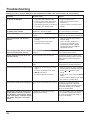
Symptoms Picture Checks Sound Interference Electrical Appliances Noisy Sound Cars / Motorcycles Fluorescent light Normal Picture No Sound No Picture No Sound No Picture Normal Sound No remote control operations can be performed. Volume (Check whether the mute function has been activated on the remote control.) Not plugged into AC outlet Not switched on PICTURE and BRIGHTNESS/Volume setting (Check by pressing the power switch or stand-by button on the remote control.) If a signal with a non-applicable color system format, or frequency is input, only the input terminal indication is displayed. Check whether the batteries have discharged completely and, if they have not, whether they were inserted properly. Check whether the remote control sensor is exposed to an outdoor light or a = ! ? & '& being used. (The unit cannot be operated by any other remote control.) A cracking sound is sometimes heard from the unit. If there is nothing wrong with the picture or sound, this is the sound of the cabinet undergoing very slight contractions in response to changes in the room temperature. There are no adverse effects on the performance or other aspects. The top or bottom of the picture on the screen Adjust the position of the picture on the screen. is cut off when I use the zoom function. Areas at the top and bottom of the screen where the image is missing appear when I use the zoom function. When using a video software program (such as a cinema size program) with a screen wider than one in the 16:9 mode, blank areas separate from the images are formed at the top and bottom of the screen. I can hear sounds coming from inside the unit. When the power is turned on, a sound of this Display panel being driven may be heard: This is normal and not indicative of malfunctioning. Parts of the unit become hot. Even when the temperature of parts of the front, top and rear panels has risen, these temperature rises will not pose any problems in terms of performance or quality. Power automatically turns off unexpectedly. Check the settings of “OFF TIMER” or “POWER SAVE”. Any of them may be set to enable (see page 25, 27). This LCD Display uses special image processing. Hence a slight time lag may occur between image and audio, depending on the type of input signal. However, this is not a malfunction. Symptoms Checks It takes a while for the picture to appear. The unit digitally processes the various signals in order to reproduce esthetically pleasing images. As such, it sometimes takes a few moments for the picture to appear when the power has been turned on, when the input has been switched. =! Due to the characteristics of the system used to drive the panel, the edges may = indicative of malfunctioning. There may be red spots, blue spots, green spots and black spots on the screen. This is a characteristic of liquid crystal panels and is not a problem. The liquid '#& ' '' details. Occasionally, a few non-active pixels may appear on the screen as >##!@ performance of your LCD. Image retention may occur. If you display a still picture for an extended period, the image might remain on the screen. However, it will disappear after a while. This is not considered as malfunction. Image retention appears 33