1
Parts and Functions
QZ[@\]^_+`{*+`|*+`}~
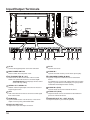
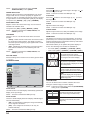
Control Panel
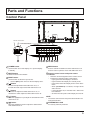
Remote control sensor
Power status Indicator
MUTE INPUT
9
1
*+
*
_
POWER button
3
MENU
4
8
Use this button to turn this Display on or put this Display
to standby.
2
MUTE button
9
Remote control sensor and power status
indicator
[ ] button
- Lights amber when this Display enters “Power Save”
mode
- When {SCHEDULE} is enabled, the light blinks
amber and red
[ ] button
[ ] button
Move the highlight bar up to adjust the selected item while
OSD menu is on.
7
MENU button
- Lights red when this Display is in standby mode
- If the light blinks red, it indicates that a failure has
been detected
Decrease the adjustment while OSD menu is on, or
decrease the audio output level while OSD menu is off.
6
8
Used as [SET] button in the On-Screen-Display menu.
Increase the adjustment while OSD menu is on, or
increase the audio output level while OSD menu is off.
5
7
Receives command signals from the remote control.
Indicates the operating status of this Display:
- Lights green when this Display is turned on
INPUT button
Use this button to select the input source.
4
6
Press to activate the OSD menu when OSD menu is off.
Press to return to previous menu while OSD menu is on.
Switch the audio mute ON/OFF.
3
5
[ ] button
Move the highlight bar down to adjust the selected item
while OSD menu is on.
- Off when the main power of this Display is turned off
NOTE:
The remote control sensor and power status indicator are
arranged downward.
10
KENSINGTON LOCK
For security and theft prevention.
9