1
3 The ISDControl program
3.2.4
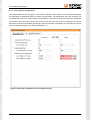
View “Sensor Configuration”
Switching between the sensor types in view “Sensor Selection” (see Section 3.2.2) automatically displays
the appropriate configuration dialog for setting the parameters. The parameters set in the document are
compared with those in the sensor. Differences between the document and the sensor data are highlighted.
The transfer of the document data into the sensor can be done with the red arrow. A reading of the sensor
data in the document is possible by pressing the green arrow button. Alternatively, the document and sensor
data are updated through the tool bar (see Section 3.2.1).
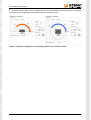
Figure 5: Numerical configuration of an inclination sensor
Document: 23999-HB-1-0-E-Starter-Kit
6