1
9
SUPPLIES FOR THE PAYMENT TERMINAL
9.1
Ordering supplies
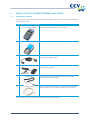
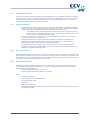
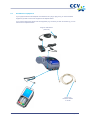
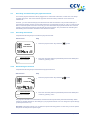
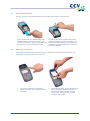
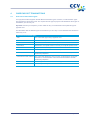
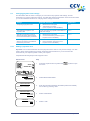
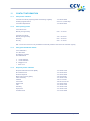
You can order supplies for your payment terminal in several different ways:
Ordering online:
www.ccv.nl, Web Shop
•
Ordering by telephone:
+31 88 228 9849
•
Ordering on your payment terminal (printer rolls only)
•
9.2
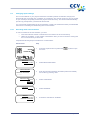
Ordering printer rolls on your payment terminal
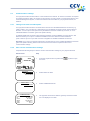
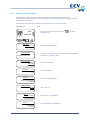
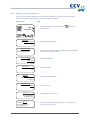
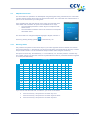
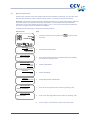
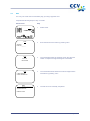
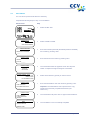
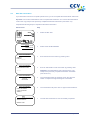
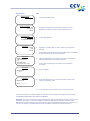
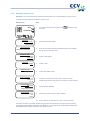
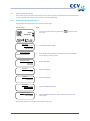
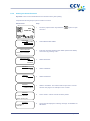
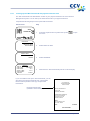
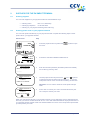
You can order printer rolls directly on your payment terminal. Complete the following steps to order
printer rolls on your payment terminal:
Vx570 screen
Step
SALE
1
Press the purple function key below the
the menu.
2
Scroll down and select ORDER PAPER ROLLS.
3
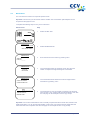
Enter the merchant password (the default password is 99999)
and confirm by pressing <OK>.
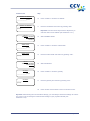
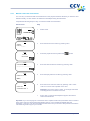
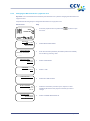
4
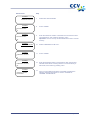
Use the purple function keys below the
and
symbols
to adjust the number of printer rolls you wish to order. You can
order printer rolls in one or more boxes containing 25 rolls each.
OTHER TRX
symbol to open
01.06.12
MAIN MENU
MERCHANT MENU
SERVICE MENU
ORDER PAPER ROLLS
PROTECTED ITEM
MERCHANT PASSWORD:
_____
ORDER PAPER ROLLS
QUANTITY:
25 ROLLS
PRESS OK TO CONFIRM
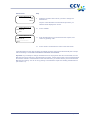
Important: You can order a maximum of 200 printer rolls per
order.
ORDER PAPER ROLLS
QUANTITY:
50 ROLLS
5
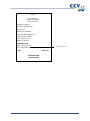
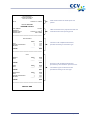
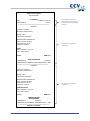
Press <OK> to confirm your order. The terminal will now print
out a receipt to confirm your order.
PRESS OK TO CONFIRM
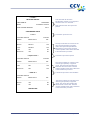
When you order printer rolls using your payment terminal, you are authorizing CCV to debit the amount
due from your account number as known to CCV. Your order will be delivered to the physical location of
your payment terminal. Please check if the address details are correct on the receipt that is printed after
you have placed your order.
CID086A/03012013
Page 51 of 54