1
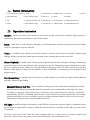
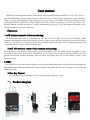
二、Button introduction
1. Lock file/One key format 5. Audio
9. GPS interface13. USB interface 17. Camera
21.Screw
2. Photo/Playback
6. REC indicator light
10. AV OUT
.
3. OK
7. Charging indicator light11. Microphone 15. On/Off button 19. Heat radiation hole
4. Video
8. MIC indicator light
14. Reset
18. Holder
12. TF card slot 16. LED fill light 20. Heat radiation hole
三、Operation instruction
On/Off : shortly press the On/Off button to turn on the product with the Rec indicator light keeping on,
continuously press the On/Off button to turn off the product.
Reset: when there is crash caused by manually or non-human made operation, shortly press the reset button
which is a interruption of power function.
Video: in standby mode, shortly press the Rec button to start the video function with REC indicator light
flashing, shortly press the Rec button again to stop the video recording and save the video files.
Photo+Playback: in standby mode, shortly press the photo/playback button for photo-shooting, continuously
press this button to enter into playback mode, shortly press the Rec button(last)or video button(next) to select
the file, in playback mode, shortly press the OK button to play/pause video file. When shortly press the Rec
button or audio button to choose fast forward(FF) or fast rewind(REW). Continuously press this button to exit
playback mode.
Sound-recording:in standby mode, shortly press the audio button to turn off/on the sound-recording function
with MIC indicator light flashing.
Manual/G-Sensor lock file:when recording, shortly press the lock file button to manually turn on the
lock file function. Shortly press the Rec button to manually stop recording and save the video file. when
recording, if sensing the strong crash or rock, it will turn on the G-sensor function to lock file ; Locked file
automatically. The time of manually lock file and G-sensor lock file is the same with the time of recording,
and the locked files won’t be overwritten. (@note: the common filesVID-XXXXXX; and G-sensor locked files
GPD-XXXXXX; Manual operate locked files:MPD-XXXXXX)
Fill light:in insufficient light environment, set the LED on in the menu to improve light, or continuously press
the OK button to turn on/off the function. When turn on this function, it will turn on the LED to get better effect
of recording.
AV OUT: connect the AVOUT data line to the navigation with AV in after power on, and the navigation will
shows the camera picture, the product can be operated normally. Pull out data line to exit.