1
Backup Aziendale
Client Edition & Server Edition v5.7
User’s Guide
DSD
July 22, 2010
Table of Content
1
Overview ...................................................................................................................................... 3
1.1
1.2
1.3
1.4
2
Installing BA-ServerEd ................................................................................................................ 6
2.1
2.2
2.3
2.4
3
Restore backup files directly from backup server ........................................................................................................ 48
Restore backup files from removable hard disk ........................................................................................................... 52
IP addresses Restriction for Online Restore ................................................................................................................ 54
In-File Delta Technology............................................................................................................ 55
8.1
8.2
8.3
8.4
8.5
9
How files are backed up ............................................................................................................................................... 43
Backup files directly to the backup server ................................................................................................................... 43
Backup files to removable hard disk (seed loading) .................................................................................................... 46
Restoring Files............................................................................................................................ 48
7.1
7.2
7.3
8
Backup Set Type .......................................................................................................................................................... 24
Backup Source ............................................................................................................................................................. 25
Backup Schedule ......................................................................................................................................................... 27
Continuous Data Protection (CDP) ............................................................................................................................. 27
Encryption ................................................................................................................................................................... 29
Mapped Network Drive ............................................................................................................................................... 30
Backup Filter ............................................................................................................................................................... 31
Pre/Post-Backup Command ......................................................................................................................................... 34
Temporary directory .................................................................................................................................................... 35
Transfer Block Size ..................................................................................................................................................... 35
Follow Symbolic Link (Linux/Unix/Mac only) ........................................................................................................... 36
Microsoft’s Volume Shadow Copy Service (VSS) ...................................................................................................... 36
Retention Policy .......................................................................................................................................................... 36
Extra Backup (Off-Line backup, Logout Reminder) ................................................................................................... 38
In-File Delta................................................................................................................................................................. 39
Local Copy .................................................................................................................................................................. 39
Using One Backup Account for Multiple Computers .................................................................................................. 42
Backing Up Files ........................................................................................................................ 43
6.1
6.2
6.3
7
System Tray Launcher (Windows Only) ...................................................................................................................... 19
Logon Dialog ............................................................................................................................................................... 20
Language Selection ...................................................................................................................................................... 21
Main Window .............................................................................................................................................................. 21
User Profile .................................................................................................................................................................. 21
Backup Logs ................................................................................................................................................................ 23
Setting Up Backup Sets .............................................................................................................. 24
5.1
5.2
5.3
5.4
5.5
5.6
5.7
5.8
5.9
5.10
5.11
5.12
5.13
5.14
5.15
5.16
5.17
6
Uninstalling BA-ServerEd for Windows ..................................................................................................................... 17
Uninstalling BA-ServerEd for Mac OS X ................................................................................................................... 17
Uninstalling BA-ServerEd for Linux/Unix/Solaris ...................................................................................................... 17
Uninstalling BA-ServerEd for Netware ....................................................................................................................... 17
Using BA-ServerEd .................................................................................................................... 19
4.1
4.2
4.3
4.4
4.5
4.6
5
Installing BA-ServerEd for Windows ............................................................................................................................ 6
Installing BA-ServerEd for Mac OS X .......................................................................................................................... 8
Installing BA-ServerEd for Linux/Unix/Solaris ............................................................................................................ 9
Installing BA-ServerEd for Netware ............................................................................................................................ 15
Uninstalling BA-ServerEd ......................................................................................................... 17
3.1
3.2
3.3
3.4
4
Benefits .......................................................................................................................................................................... 3
Features.......................................................................................................................................................................... 3
Security .......................................................................................................................................................................... 4
System Requirements..................................................................................................................................................... 5
Overview ..................................................................................................................................................................... 55
Block Size .................................................................................................................................................................... 57
Minimum File Size ...................................................................................................................................................... 57
Uploading full file again .............................................................................................................................................. 57
Advanced In-file delta type .......................................................................................................................................... 58
Backup/Restore Oracle 8i / 9i / 10g / 11g .................................................................................. 59
9.1
9.2
9.3
9.4
9.5
9.6
Requirements ............................................................................................................................................................... 59
Overview ..................................................................................................................................................................... 60
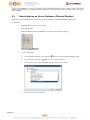
How to backup an Oracle Database (Physical Backup) ............................................................................................... 61
How to restore an Oracle Database .............................................................................................................................. 66
How to restore a single tablespace ............................................................................................................................... 72
Export and Import a Database (Logical Backup) ......................................................................................................... 75
10 Backup/Restore Microsoft SQL Server 7.0 / 2000 / 2005 / 2008 .............................................. 76
Pagina 1
10.1
10.2
10.3
10.4
Requirements ............................................................................................................................................................... 76
Overview ..................................................................................................................................................................... 76
How to backup Microsoft SQL Server database(s) ...................................................................................................... 76
How to restore Microsoft SQL Server database(s) ...................................................................................................... 78
11 Backup/Restore Lotus Domino / Notes ...................................................................................... 84
11.1
11.2
11.3
11.4
11.5
11.6
Requirements ............................................................................................................................................................... 84
Overview ..................................................................................................................................................................... 85
How to backup Lotus Domino / Notes database(s) / file(s) on Windows .................................................................... 86
How to restore Lotus Domino / Notes database(s) / file(s) on Windows ..................................................................... 88
How to backup Lotus Domino / Notes database(s) / file(s) on Linux .......................................................................... 89
How to restore Lotus Domino / Notes database(s) / file(s) on Linux........................................................................... 92
12 Backup/Restore Microsoft Exchange Server.............................................................................. 95
12.1
12.2
12.3
12.4
Requirements ............................................................................................................................................................... 95
Overview ..................................................................................................................................................................... 95
How to backup Microsoft Exchange Server ................................................................................................................ 96
How to restore Microsoft Exchange Server ................................................................................................................. 98
13 Backup/Restore Windows System State .................................................................................. 102
13.1
13.2
13.3
13.4
Requirements ............................................................................................................................................................. 102
Overview ................................................................................................................................................................... 102
How to backup Windows System State ..................................................................................................................... 102
How to restore Windows System State ...................................................................................................................... 104
14 Backup/Restore Individual Brick Level Backup for Microsoft Exchange Server.................... 106
14.1
14.2
14.3
14.4
14.5
Requirements ............................................................................................................................................................. 106
Overview ................................................................................................................................................................... 106
Granting Privileges .................................................................................................................................................... 106
How to backup Individual Brick Level Backup ......................................................................................................... 107
How to restore Individual Brick Level Backup ......................................................................................................... 110
15 Backup/Restore System with Microsoft Windows System Backup ......................................... 113
15.1
15.2
15.3
15.4
Requirements ............................................................................................................................................................. 113
Overview ................................................................................................................................................................... 113
How to backup system with Microsoft Windows System Backup ............................................................................. 113
How to restore system with Microsoft Windows System Backup ............................................................................. 118
16 Backup/Restore Windows System with ShadowProtect .......................................................... 126
16.1
16.2
16.3
16.4
Requirements ............................................................................................................................................................. 126
Overview ................................................................................................................................................................... 126
How to backup system with ShadowProtect .............................................................................................................. 126
How to restore system with ShadowProtect ............................................................................................................... 131
17 Backup/Restore MySQL Server ............................................................................................... 136
17.1
17.2
17.3
17.4
17.5
Requirements ............................................................................................................................................................. 136
Overview ................................................................................................................................................................... 136
How to backup MySQL server on Windows ............................................................................................................. 136
How to backup MySQL server on Linux (command line mode) ............................................................................... 139
How to restore MySQL server ................................................................................................................................... 140
18 Email Reporting ....................................................................................................................... 141
18.1
18.2
18.3
18.4
18.5
New User Report ....................................................................................................................................................... 141
Forgot Password Report ............................................................................................................................................ 142
Backup Job Report..................................................................................................................................................... 143
Setting Change Report ............................................................................................................................................... 145
Inactive User Reminder ............................................................................................................................................. 146
19 Web Features ............................................................................................................................ 147
19.1
19.2
19.3
19.4
19.5
19.6
Install BA-ServerEd................................................................................................................................................... 147
Update User Profile ................................................................................................................................................... 147
Request Forgotten Password ...................................................................................................................................... 148
Restore/Delete/Undelete Backup Files ...................................................................................................................... 149
Review Backup Jobs .................................................................................................................................................. 150
Review Storage Statistics ........................................................................................................................................... 151
20 Further Information .................................................................................................................. 153
20.1
20.2
Pagina 2
FAQs.......................................................................................................................................................................... 153
Contact Us ................................................................................................................................................................. 153
1
Overview
1.1
Benefits
1.2
Features
Pagina 3
Easy Backup of
1.
Microsoft Exchange Server 2000 / 2003 / 2007
2.
Microsoft SQL Server 7.0 / 2000 / 2005 / 2008
3.
Lotus Domino/Notes 5.0 or above
4.
Oracle 8i or above
5.
MySQL 3.2.4 or above
6.
Windows System State for Windows 2000 / XP / 2003
7.
(New in 5.5.3.0) Windows Complete System Backup for Windows 2008 and Windows Vista
Business / Enterprise / Ultimate edition
8.
(New in 5.5.3.0) Bare metal backup using StorageCraft ShadowProtect
9.
Outlook and Outlook Express (i.e. *.pst, *.dbx and *.wab)
10. Important personal settings, e.g. Desktop, Favorite, My Documents and History etc
11. Other common files (e.g. *.doc, *.xls)
Support backing up only changes within a file (using in-file delta technology)
Support backing up of open files on Windows XP/2003/Vista (Volume Shadow Copy)
Support backing up of Windows NTFS access privileges, Linux access privileges and modes, Mac OS X
metadata and resource forks
Easy to use, deploy and maintain
(New in 5.5.1.0) Re-design of BA-ServerEd / BA-ClientEd GUI
(New in 5.5.1.0) Continuous data protection - start backup whenever a file is being modified
(New in 5.5.1.0) Add options for user to choose to backup using 256-bit Encryption
(New in 5.5.1.0) Add the functionality of "Backup and Sleep (Hibernate)" and "Backup and standby"
(New in 5.5.1.0) Allow backup schedule to run every X minutes
Full support of Microsoft Exchange individual email, contacts, calendars, tasks etc.
Choose whether to restore “file permissions” during restore.
For “Local Copy” backup, ability to choose whether to perform a local copy backup only and skip the
offsite backup.
Lotus Notes/Domino agent for Linux.
Auto Upgrade Agent to automatically upgrade the client software.
User configurable incremental / differential in-file delta backup mode (i.e. backing up only changes within
a file since the last incremental or full backup according to each user’s preference).
Allow in-file delta backup mode to be overridden by each user individually according to backup time (e.g.
st
enforcing full (or incremental or differential) backup of all files every Sunday or the 1 day of every
month).
Volume Shadow Copy backup (i.e. backing up files even when they are exclusively open, e.g.
Outlook.pst).
In-File Delta backup (i.e. backing up only changes within files).
Off-line backup mode and logout backup reminder.
Customizable backup schedule allows backups to be scheduled at any time.
Compress and encrypt data automatically before sending them to the server (server stores only
encrypted data).
Increment backup strategy ensures that only new or updated files are sent to the backup server.
Support both full backup (database backup) and incremental backup (transaction log backup) for
Microsoft SQL Server 7.0/2000, Microsoft Exchange Server 2000/2003, Lotus Domino/Notes 5.0 and
Oracle 8i or above.
Can integrate with external “Open File Manager” to provide open file backup support to all open files.
Access backup data anytime, anywhere by using a web browser.
Comprehensive backup report lists all files backed up. Backup report delivered automatically via email.
Backup data are CRC validated before they are stored on server.
Fully user customizable data retention policy allows users to have access to deleted files using the least
possible storage space on the backup server.
Can select source backup files easily by using a backup filter, e.g. selecting all *.doc and *.xls in your
computer in a single operation.
Run any custom OS commands before/after a backup job.
Run on Windows, Mac OS X, Linux, NetWare, Unix and all other platforms supporting a Java2 Runtime
Environment.
Periodic backup files validation on backup server ensures backup files are 100% valid and fully
restorable when needed.
1.3
Security
Pagina 4
128-bit point-to-point SSL communication between server and client
Support HTTP/HTTPS Proxy and Socks v4/v5 firewall
Data are 128-bit/256-bit encrypted when stored on the backup server
Choice of different encryption algorithms, e.g. Twofish, Triple DES, Advanced Encryption Standard (AES)
Choice of different encryption modes, e.g. Electronic Cook Book (ECB) and Cipher Block Chaining (CBC)
An random initializing vector, salt and iteration count will be generated by the software automatically for
each file when encrypting your data
Each backup user can restrict online access to his files to his pre-defined list of IP addresses
1.4
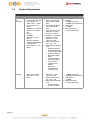
System Requirement
Client-side applications
Supported Platforms
Pagina 5
Application Compatibilities
Hardware Requirements
BAServerEd
Windows 95 / 98 / ME
/ NT / 2000 / XP /
2003 / Vista / 2008
Linux kernel 2.4 or
above
NetWare 5.2 or above
Solaris 2.x or above
AIX
HP-UX
FreeBSD
Mac OS X 10.3 or
above
All other operating
systems that supports
Java2 Runtime
Environment 1.4.2 or
above
Microsoft Exchange
Server 2000 / 2003 /
2007
Microsoft SQL Server
7.0 / 2000 / 2005 /
2008
Lotus Domino / Lotus
Notes 5.0 or above
Oracle 8i or above
MySQL 3.2.4 or above
Outlook / Outlook
Express i.e. *.pst,
*.dbx and *.wab
Other common files
e.g. *.doc, *.xls
Also supports backing
up of:
o Windows System
State (all platforms
except Vista / 2008)
o Windows System
Backup for Vista /
2008
o Windows NTFS
access privileges
o Linux access
privileges and
modes
o Mac OS X
metadata and
resource forks
Memory:
o 128MB (minimum)
o 256MB (recommended)
Disk Space:
o 110MB
Network Protocol:
o TCP/IP (http/https)
BAClientEd
Windows 2000 / XP /
2003 / Vista / 2008
Mac OS X 10.3 or
above
Outlook / Outlook
Express i.e. *.pst,
*.dbx and *.wab
Other common files
e.g. *.doc, *.xls
Also supports backing
up of:
o Windows NTFS
access privileges
Memory:
o 128MB (minimum)
o 256MB (recommended)
Disk Space:
o 110MB
Network Protocol:
o TCP/IP (http/https)
2
Installing BA-ServerEd
Before you can start backing up data to the BACKUPAZIENDALE Server SICURO, you need to install the BAServerEd onto your computer.
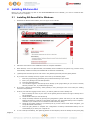
2.1
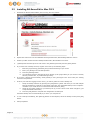
1.
Download the BA-ServerEd installer (obm-win.zip) from the website.
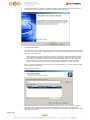
2.
Follow the instructions on the installation wizard to complete installation
3.
When finished, a new icon (BA-ServerEd / BA-ClientEd) will be installed to the system tray (near the clock)
automatically and BA-ServerEd / BA-ClientEd will be launched automatically.
4.
(optional) Enter the backup server host name in the [Address] field and press the [Next] button.
5.
If you don't have a backup account, register a trial user by the following steps:
i.
Enter the [Login Name], [Password] and [Confirm Password] of your choice
ii.
Enter your [Email] in the text field provided
iii.
Press the [Submit] button
iv.
You should be logged to the backup server already (if the [Login Name] of your choice is already
taken by another user, try a different login name)
6.
If you have a backup account already, select [already a user?] and logon to the server with your existing
username and password.
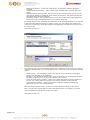
7.
If this is your first time logging into the server, you will be guided to create a backup set:
8.
Pagina 6
Installing BA-ServerEd for Windows
i.
Enter a backup set name of your choice in the [Name] field and choose the type of backup set in
the [Type] field
ii.
Select the files that you want to backup
iii.
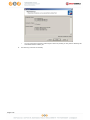
Setup the backup schedule by pressing the [Add] button (please note that you can add multiple
backup schedules to a backup set and please select the "Run scheduled backup on this computer"
checkbox if you would like to run Continuous Data Protection (CDP))
iv.
Setup the encryption setting for your backup set (if you don't know much about encryption, just
accept the default values here)
v.
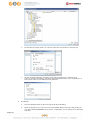
Press the [OK] button to complete the configuration of backup setScheduled backup will run
automatically if you leave your computer on.
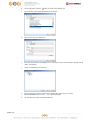
To run a backup immediately, click [Backup] button on the left panel, select the backup set and press [OK]
button.
9.
Pagina 7
Setup completed.
2.2
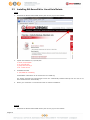
Installing BA-ServerEd for Mac OS X
1.
Download the BA-ServerEd installer (obm-mac.zip) from the website.
2.
Expand the archive and run the installation wizard [BA-ServerEd / BA-ClientEd] within the archive.
3.
Restart your Mac. Double click the desktop BA-ServerEd / BA-ClientEd icon to start.
4.
(optional) Enter the backup server host name in the [Address] field and press the [Next] button.
5.
If you don't have a backup account, register a trial user by the following steps:
i.
Enter the [Login Name], [Password] and [Confirm Password] of your choice
ii.
Enter your [Email] in the text field provided
iii.
Press the [Submit] button
iv.
You should be logged to the backup server already (if the [Login Name] of your choice is already
taken by another user, try a different login name)
6.
If you have a backup account already, select [already a user?] and logon to the server with your existing
username and password.
7.
If this is your first time logging into the server, you will be guided to create a backup set:
i.
Setup the backup schedule by pressing the [Add] button (please note that you can add multiple
backup schedules to a backup set and please select the "Run scheduled backup on this computer"
checkbox if you would like to run Continuous Data Protection (CDP))
ii.
Setup the encryption setting for your backup set (if you don't know much about encryption, just
accept the default values here)
iii.
Press the [OK] button to complete the configuration of backup set
Scheduled backup will run automatically if you leave your computer on.
Pagina 8
8.
To run a backup immediately, click [Backup] button on the left panel, select the backup set and press [OK]
button.
9.
Setup completed.
2.3
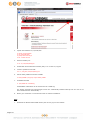
Installing BA-ServerEd for Linux/Unix/Solaris
Linux
1.
Download the BA-ServerEd tarball release (obm-nix.tar.gz) from the website.
2.
Unpack the install file to /usr/local/obm
#
#
#
#
3.
mkdir /usr/local/obm
cd /usr/local/obm
gunzip obm-nix.tar.gz
tar -xf obm-nix.tar
Install BA-ServerEd
# ./bin/install.sh >install.log
All installation information can be found in the file "install.log"
The backup scheduler and autoupgrade services are automatically installed. Backup sets can now run at
their scheduled times automatically. *
4.
Please go to X Window or command line mode to continue installation.
Solaris
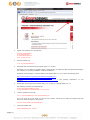
1.
Pagina 9
Download the BA-ServerEd tarball release (obm-nix.tar.gz) from the website.
2.
Unpack the install file to /usr/local/obm
#
#
#
#
3.
mkdir /usr/local/obm
cd /usr/local/obm
gunzip obm-nix.tar.gz
tar -xf obm-nix.tar
Remove bundled jvm
# rm -rf /usr/local/obm/jvm
4.
Install J2SE Java Runtime Environment (JRE) 1.4.x or later to /usr/java
5.
Create a symbolic link for JRE
# ln -s /usr/java /usr/local/obm/jvm
6.
Set the JAVA_HOME environment variable
# JAVA_HOME=/usr/java; export JAVA_HOME
7.
Install BA-ServerEd
# ./bin/install.sh >install.log
All installation information can be found in the file "install.log"
The backup scheduler and autoupgrade services are automatically installed. Backup sets can now run at
their scheduled times automatically. *
8.
Please go to X Window or command line mode to continue installation.
BSD
1.
Pagina 10
Download the BA-ServerEd tarball release (obm-nix.tar.gz) from the website.
2.
Unpack the install file to /usr/local/obm
#
#
#
#
3.
mkdir /usr/local/obm
cd /usr/local/obm
gunzip obm-nix.tar.gz
tar -xf obm-nix.tar
Remove bundled jvm
# rm -rf /usr/local/obm/jvm
4.
Download J2SE Java Runtime Environment (JRE) 1.4.x or later
Depending on your platform and BSD release, download the corresponding JRE and dependant packages.
For example, we are using FreeBSD 6.1 i386 for installation:
Download javavmwrapper-2.3.tbz and diablo-jre-freebsd5.i386.1.5.0.07.01.tbz in the following links.
http://www.freebsd-fr.org/ports/java.html#javavmwrapper-2.3
http://www.freebsdfoundation.org/downloads/java.shtml
http://www.freebsd.org/ports/java.html#diablo-jre-1.5.0.07.01_3
machine)
5.
(See
package
dependancy
of
your
Install J2SE Java Runtime Environment (JRE) 1.4.x or later to /usr/local/diablo-jre1.5.0
Use following command to install package
# pkg_add javavmwrapper-2.3.tbz
# pkg_add diablo-jre-freebsd5.i386.1.5.0.07.01.tbz
6.
Create a symbolic link for JRE
# ln -s /usr/local/diablo-jre1.5.0 /usr/local/obm/jvm
If you are using csh as your shell, you need to type "rehash" and hit enter to make the symbolic link take
effect. For other shell types it should work.
# setenv JAVA_HOME /usr/local/obm/jvm
7.
Verify the installed JRE
$JAVA_HOME/bin/java –version
Pagina 11
See if the output does not contain warning
With warning
Java HotSpot(TM) Client VM warning: Can't detect initial thread stack location java version "1.4.2_12"
Java(TM) 2 Runtime Environment, Standard Edition (build 1.4.2_12-b03)
Java HotSpot(TM) Client VM (build 1.4.2_12-b03, mixed mode)
Without warning
java version "1.5.0"
Java(TM) 2 Runtime Environment, Standard Edition (build diablo-1.5.0-b01)
Java HotSpot(TM) Client VM (build diablo-1.5.0_07-b01, mixed mode)
8.
Install BA-ServerEd
# ./bin/install.sh >install.log
All installation information can be found in the file "install.log"
9.
Install the backup scheduler and autoupgrade services
Add two entries to system file /etc/rc.conf for auto starting backup scheduler and autoupgrade agent.
# obmaua_enable="YES"
# obmscheduler_enable="YES"
Restart computer or run the following scripts
# /usr/local/etc/rc.d/obmscheduler start &
# /usr/local/etc/rc.d/obmaua start &
The backup scheduler and autoupgrade services are automatically installed. Backup sets can now run at
their scheduled times automatically. *
10. Please go to X Window or command line mode to continue installation.
X-Windows
1.
Set the DISPLAY environment variables
Linux / Unix (sh, bash): DISPLAY=IP_ADDRESS_OF_XTERMINAL[:0.0]; export DISPLAY
For example
or
or
or
or
DISPLAY=:0.0; export DISPLAY
DISPLAY=127.0.0.1; export DISPLAY
DISPLAY=127.0.0.1:0.0; export DISPLAY
DISPLAY=192.168.0.2; export DISPLAY
DISPLAY=192.168.0.2:0.0; export DISPLAY
BSD (csh): setenv DISPLAY IP_ADDRESS_OF_XTERMINAL[:0.0]
For example
or
or
or
or
2.
setenv DISPLAY :0.0
setenv DISPLAY 127.0.0.1
setenv DISPLAY 127.0.0.1:0.0
setenv DISPLAY 192.168.0.2
setenv DISPLAY 192.168.0.2:0.0
Run Backupaziendale Server Edition
# sh /usr/local/obm/bin/RunOBC.sh &
Pagina 12
3.
(Optional) Enter the backup server host name in the [Address] field and press the [Next] button.
4.
If you don't have a backup account, register a trial user by the following steps:
i.
Enter the [Login Name], [Password] and [Confirm Password] of your choice
ii.
Enter your [Email] in the text field provided
iii.
Press the [Submit] button
iv.
You should be logged to the backup server already (if the [Login Name] of your choice is already
taken by another user, try a different login name)
5.
If you have a backup account already, select [already a user?] and logon to the server with your existing
username and password.
6.
If this is your first time logging into the server, you will be guided to create a backup set
i.
Enter a backup set name of your choice in the [Name] field and choose the type of backup set in the
[Type] field
ii.
Select the files that you want to backup
iii.
Setup the backup schedule by pressing the [Add] button (please note that you can add multiple
backup schedules to a backup set and please select the "Run scheduled backup on this computer"
checkbox if you would like to run Continuous Data Protection (CDP))
iv.
Setup the encryption setting for your backup set (if you don't know much about encryption, just
accept the default values here)
v.
Press the [OK] button to complete the configuration of backup set
7.
To run a backup immediately, click [Backup] button on the left panel, select the backup set and press [OK]
button.
8.
Setup completed.
Command Line Mode
1.
2.
Use the web interface to add, update and remove backup sets
i.
If you want to update a backup set, make changes to a backup set and press the [Update] button
Enter your [Email] in the text field provided
ii.
If you want to add a new backup set, click the [Add] link
iii.
If you want to remove a backup set, Select the backup set to be remove and click the [Remove] link
Using Backup Configurator
# sh /usr/local/obm/bin/Configurator.sh
3.
Enter your Login Name, Password, Backup Server URL and proxy setting as shown below
Login Name: userXXX
Password: *******************
Backup Server URL: xxx.yyy.com
Which Protocol ? (1) Http (2) Https : 1
Use proxy ? (Y)es or (N)o : Y
Proxy Type ? (1) Http/Https Proxy (2) SOCKS : 1
Enter proxy server : aaa.bbb.com
Enter proxy port : xxx
Enter proxy username (optional) : administrator
Enter proxy password (optional) : *******************
4.
If you have created a new backup set using the web interface, you set the encrypting key, the encrypting
algorithm and the encrypting mode of this backup set by following instructions below.
Important: You cannot change these parameters once they are set
Found new backup set 'xxx'
Please enter the following values for this backup set:
Encrypting Algorithm ?
(1) Twofish (2) AES (3) Triple DES (4) No encryption : 1
Encrypting Key: *******************
Re-Enter Encrypting Key: *******************
Encrypting Mode ? (1) ECB (2) CBC : 1
Run scheduled backup on this computer ? (Y)es or (N)o : Y
5.
If you want to make any changes to the setting above, you can use the main menu below to do so.
Main Menu:
-----------(1). List Backup Setting
(2). Change Password
(3). Change Network Setting
(4). Change run scheduled backup setting
(5). Toggle Masked Field (Password, Encryption Key)
(6). Generate Configuration Report (text format)
Pagina 13
(7). Quit
Your Choice:
6.
You can then run a backup by executing the command below.
# sh /usr/local/obm/bin/RunBackupSet.sh [BACKUP_SET]
where [BACKUP_SET] is the name of backup set to be run
7.
Setup completed.
* The backup scheduler and autoupgrade services are verified to install successfully on Solaris, FreeBSD and all
major Linux distributions. If these services for other platforms cannot be installed, please refer to the specific OS
manual for further information.
Pagina 14
2.4
Installing BA-ServerEd for Netware
1.
Download the BA-ServerEd zip release (obm-netware.zip) from the website.
2.
Expand the zip file to SYS:\BA-ServerEd
3.
Install BA-ServerEd
SYS:\> SYS:\OBM\aua\bin\install-aua.ncf
4.
Start Auto Upgrade Agent
SYS:\> SYS:\OBM\aua\bin\startup.ncf
5.
If you want scheduled backup to run automatically, you must start the backup scheduler by
SYS:\> SYS:\OBM\bin\Scheduler.ncf
All backup sets will now be run at their scheduled times automatically.
6.
Open BA-ServerEd by running SYS:\BA-ServerEd\bin\RunBackupManager.ncf
7.
(Optional) Enter the backup server host name in the [Address] field and press the [Next] button.
8.
If you don't have a backup account, register a trial user by the following steps:
9.
i.
Enter the [Login Name], [Password] and [Confirm Password] of your choice
ii.
Enter your [Email] in the text field provided
iii.
Press the [Submit] button
iv.
You should be logged to the backup server already (if the [Login Name] of your choice is already
taken by another user, try a different login name)
If you have a backup account already, select [already a user?] and logon to the server with your existing
username and password.
10. If this is your first time logging into the server, you will be guided to create a backup set
Pagina 15
i.
Enter a backup set name of your choice in the [Name] field and choose the type of backup set in the
[Type] field
ii.
Select the files that you want to backup
iii.
Setup the backup schedule by pressing the [Add] button (please note that you can add multiple
backup schedules to a backup set and please select the "Run scheduled backup on this computer"
checkbox if you would like to run Continuous Data Protection (CDP))
iv.
Setup the encryption setting for your backup set (if you don't know much about encryption, just
accept the default values here)
v.
Press the [OK] button to complete the configuration of backup set
11. To run a backup immediately, click [Backup] button on the left panel, select the backup set and press [OK]
button.
12. Setup completed.
Pagina 16
3
Uninstalling BA-ServerEd
This section describes the steps required to uninstall BA-ServerEd from your computer.
3.1
Uninstalling BA-ServerEd for Windows
1.
Open [Start] -> [Control Panel]
2.
Select
3.2
1.
BA-ServerEd
-> [Add/Remove Programs]
from the list and press the [Remove] button
Uninstalling BA-ServerEd for Mac OS X
Remove all program files by running
# cd $OBM_HOME/bin
# sudo ./uninstall.sh
2.
Remove all backup setting by removing ~/.obm
# rm –rf ~/.obm
3.
3.3
1.
Restart your computer
Uninstalling BA-ServerEd for Linux/Unix/Solaris
Run the uninstall scripts
# sh /usr/local/obm/bin/uninstall.sh
Removing Scheduler from service using script name obmscheduler
Using init script path /etc/init.d
Using run level script path /etc/rc.d
Removing symbolic link from run levels
Removing script file obmscheduler from /etc/init.d
Shutting down AutoUpdateAgent
Waiting 5 seconds for AutoUpdateAgent to clean up
Removing AutoUpdateAgent from service using script name
Using init script path /etc/init.d
Using run level script path /etc/rc.d
Removing symbolic link from run levels
Removing script file obmaua from /etc/init.d
Online Backup Manager uninstall service is complete!
It is now safe to remove files from /usr/local/obm
2.
Remove installed files and all application data
#rm -rf /usr/local/obm
#rm -rf ~/.obm
3.
3.4
1.
Uninstall completed.
Uninstalling BA-ServerEd for Netware
Stop the running backup scheduler by running
SYS:\> touch SYS:\OBM\ipc\Scheduler\stop
2.
Stop the running auto upgrade agent by running
SYS:\> SYS:\OBM\aua\bin\shutdown.ncf
Pagina 17
3.
Remove all program files by removing the directory SYS:\OBM
4.
Remove all backup settings by removing the directory SYS:\.OBM
Pagina 18
4
Using BA-ServerEd
This chapter will describe all the features available in BA-ServerEd and outline how you can use BA-ServerEd to
meet various backup needs.
4.1
System Tray Launcher (Windows Only)
After you have successfully installed BA-ServerEd onto your computer, an BA-ServerEd icon will be added to the
system tray area (next to your system clock) automatically.
This icon is the entry point to BA-ServerEd. Right clicking the icon will show a menu that provides the following
functions:
Menu Item
What it does
Open
Run BA-ServerEd.
Backup
Runs a specific backup set (or all backup sets) chosen from the submenu in silent background mode.
Backup and Logoff
Runs a specific backup set (or all backup sets) chosen from the submenu in silent background mode and then logoff from Windows when
finished.
Backup and Restart
Runs a specific backup set (or all backup sets) chosen from the submenu in silent background mode and restart Windows when finished.
Backup and Shutdown
Runs a specific backup set (or all backup sets) chosen from the submenu in silent background mode and shutdown the computer when
finished.
Backup and Standby
Runs a specific backup set (or all backup sets) chosen from the submenu in silent background mode and enter the Standby mode of
Windows.
Backup and Hibernate
Runs a specific backup set (or all backup sets) chosen from the submenu in silent background mode and enter the Hibernate mode of
Windows.
Help
Shows a help dialog
Stop running backup
Interrupts a running backup set (or all backup sets) chosen from the
sub-menu.
Exit
Close this system tray launcher application.
Pagina 19
4.2
Logon Dialog
Before you can use BA-ServerEd, you have to be authenticated by BACKUPAZIENDALE Server Sicuro first. The logon
dialog shown below will check if you have the right to access BA-ServerEd by submitting the username and
password you provided to the backup server.
For secure communication, you can choose to communicate with BACKUPAZIENDALE Server Sicuro in SSL (Secure
Socket Layer) by selecting the [https] option.
The [Address] field shows the network address of BACKUPAZIENDALE Server Sicuro to which BA-ServerEd will
connect to authenticate your username and password. You can use either a resolvable host name (e.g. backup.yourdomain.com) or an IP address (e.g. 192.168.1.1).
If BACKUPAZIENDALE Server Sicuro is not accepting connection from the standard ports (Port 80 and 443 for http
and https respectively), you can append a semi-colon “:” and the custom port number to the host name of the
[Address] field (e.g. www.backup-provider.com:8080) to connect to the server using the custom port number (port
8080 in this case).
If you need to connect to the server through proxy, just enter your proxy setting in the [Proxy Setting] section. For
[SOCKS] proxy, both v4 and v5 without user authentication are supported.
Pagina 20
4.3
Language Selection
You can switch the language of the BA-ServerEd user interface by choosing the desired language available from the
[Language] drop down list. The languages available includes English, Czech, Danish, Dutch, French, Spanish,
Portuguese, Icelandic, Norwegian, Finnish, Italian, German, Swedish, Chinese (Traditional and Simplified), Japanese,
Lithuanian and Slovenian.
4.4
Main Window
Press [OK] to logon. After the backup server authenticates you successfully, the BA-ServerEd main window appears.
4.5
User Profile
You can then use BA-ServerEd to update your user profile. Press the
Pagina 21
button to open the [User Profile] dialog.
You can perform the following update to your user profile.
To change your [Display Name], enter the new display name in the [Display Name] field and press [OK].
To change your [Password], press the [Change] button next to the password field. A [Change Password] dialog will
appear. Enter your original password and new password into the text field of this dialog and press [OK].
To change your [Time Zone], just select your time zone from the drop down list next to the time zone entry.
To add a new contact email to this account, press the [Add] button in the [Contact] section. A [Add New Contact]
dialog will appear. Enter a name and an email address in the text field provided and then press the [OK] button.
To remove a contact email, select the email that is to be removed from the email list and press the [Remove] button.
Press [OK] to confirm the removal.
To update a contact email, select the email that is to be updated from the email list and press the [Properties]
button. A [Properties] dialog will appear. After you have made the changes that you want, press the [OK] button.
Pagina 22
4.6
Backup Logs
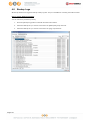
All backup activities are logged to backup activity log files. They are available for reviewing from BA-ServerEd.
How to review backup activities?
You can review all your backup Jobs by
Pagina 23
1.
Press the [Backup Log] button on the BA-ServerEd main window.
2.
Select the Backup Set you want to review from the [Backup Set] drop down list.
3.
Select the Backup Job you want to review from the [Log] drop down list.
5
Setting Up Backup Sets
A backup set contains all backup settings of a backup operation. This section will describe all features available
within a backup set and explain how you can use each of them to achieve various tasks.
Each backup account can have multiple backup sets. Each backup set is an individual and independent entity. For
example, if you want one directory to be backed up during the day and another directory to be backed up during
the night, you can create two backup sets, each with a different backup schedule and backup source, to serve this
need.
To start setting up backup sets, click the
button to open the [Backup Setting] dialog. As an example, let‟s
create a “File Backup Set” for the rest of this chapter.
On the left panel, press the
5.1
button to create a new backup set.
Backup Set Type
A backup set can be of one of the following types:
Backup Type
Description
File
Backup set type to backup common files/directories
Pagina 24
Lotus Domino Server
Backup set type to backup Lotus Domino
Lotus Notes Client
Backup set type to backup Lotus Notes
MS Exchange Server
Backup set type to backup Microsoft Exchange Server 2000 / 2003
/ 2007
MS Exchange Mail Level
Backup set type to backup individual emails, contacts, calendars,
tasks etceteras from Microsoft Exchange Server 2000 / 2003
/2007
MS SQL Server
Backup set type to backup Microsoft SQL Server 7.0 / 2000 / 2005
MySQL Server
Backup set type to backup MySQL Server
Oracle Database Server
Backup set type to backup Oracle 8i/9i/10g database
System State
Backup set type to backup Microsoft Window‟s System State
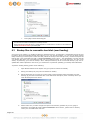
Backup set type is defined at backup set creation and cannot be modified. If you want to change the backup set
type, you have to create another backup set in the new backup set type.
5.2
Backup Source
A “Backup Source” defines the files/directories that are to be included in a backup set. There are two types of
backup source: Selected and Deselected. Selected backup source defines files/directories that are to be included in
a backup set while deselected backup source defines files/directories that are to be excluded from a backup set. BAServerEd will generate appropriate backup source setting for you automatically when you make your backup source
selection.
Please note that for Windows operating systems, if the “Hide protected operating files (Recommended)” setting is
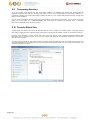
enabled for the file explorer, system folders/files will not be shown in the backup source. By selecting the parent
folders however, all subfolders (including system folders/files) will be included in the backup set. Thus if you want to
exclude system folders (e.g. recycle bin) from the backup, please select the desired folders/files directly rather than
selecting the parent folder. Alternatively, you can enter the corresponding system path to the [Exclude List] of the
backup set using the web interface.
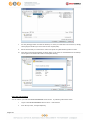
On the first screen of the dialog, you can easily select the following common folders to be backed up:
1.
“Desktop” folder
2.
“My Documents” folder
3.
“Favorites” folder
4.
“Outlook” and “Outlook Express” mail store folder
On clicking the [Advanced] button, you can easily select other common folders to be backed up as well.
Pagina 25
The checkbox next to the files/directories shown above can be in one of the following mode:
Mode Description
All files/directories (recursively) under this directory will be backed up
All files/directories (recursively), except those explicitly excluded, under this directory will
be backed up. If you add files/directories to this directory in the future, they will be
backed up as well.
Only the checked files/directories under this directory will be backed up. If you add
files/directories to this directory in the future, they will NOT be backed up.
Nothing under this directory will be backed up.
By clicking on the boxes, you can change the modes of each file/directory, in order to create a set of files to be
backed up.
You can change the backup source anytime after creating the backup set, by clicking the [Backup Source] node of
the left panel on the [Backup Setting] dialog.
Pagina 26
5.3
Backup Schedule
A “Backup Schedule” defines the frequency and the time that backups should run automatically.
Backup schedule can be in one of the following types:
Type
Description
Daily
Backup Jobs will run everyday
Weekly
Backup Jobs will run on the specified day(s) of every week
Monthly
Backup Jobs will run on the specified day or on a day with a given criteria (e.g. first
weekend, last weekday) of every month
Custom
Backup job will run once on any particular date
For each schedule type above, backup will run at the scheduled time for a maximum of the duration specified (or
until all data are backed up if [Stop on backup completion] option is chosen). If a backup job does not finish within
the maximum duration specified, it will be interrupted.
Please note that you can have more than one schedule within a backup set. For example, you can have a daily
backup schedule that runs at 13:00 at noon and another daily backup schedule that runs at 00:00 at midnight. The
combination of these schedules effectively creates a backup schedule that runs daily at 00:00 and 13:00 everyday.
You can change the backup schedules anytime after creating the backup set, by clicking the [Backup Schedule] node
of the left panel on the [Backup Setting] dialog.
5.4
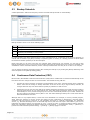
Continuous Data Protection (CDP)
BA-ServerEd / BA-ClientEd Continuous Data Protection (CDP) feature enables files to be backed automatically at the
time when there are changes to files on local hard disks. The benefits of using CDP are:
1.
All intra-day interim changes are backed up automatically. Even if the computer breaks down completely
before users had the change to backup their data at the end of the day in logout backup reminder, all
changes within the day have been backed up safely by CDP and no data are lost.
2.
Sometimes users do not save their data in the folders designated as backup source path and thus results in
data not being backed up even when backup runs. Since CDP tracks all changes of files on local hard disk
automatically for users, all files changed by the users are automatically backed up no matter whether the
files are located in the backup source paths or not. This makes defining a backup set a much easier task for
both administrators and users.
Although CDP is a very helpful feature, it does have some drawbacks. For example, a memory resident program,
which tracks file changes to the file system and backs up files continuously in background, consumes both a
computer‟s CPU and memory resources. It can potentially slow down a computer considerably. For application
servers, e.g. Microsoft Exchange Server or Microsoft SQL Server, that does not require CDP features (you can use
transaction log backup interval of as frequent as every 1 minute to mimic a continuous backup strategy instead),
please turn off CDP by changing the startup method of [Control Panel] -> [Administrative Tools] -> [Services] ->
[Continuous Data Protection (BA-ServerEd)] -> [General] -> [Startup type] to “manual”.
Pagina 27
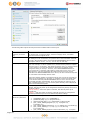
The following table explains all CDP parameters available within a backup set.
Parameter
Description
Enable Continuous Data
Protection (local disk
only)
It defines whether CDP is enabled in this backup set. Please note that CDP will
only backup files on local hard disks, not files on floppy drives, removable
drives and network mapped drives.
Time Mark Interval
It defines the interval of point-in-time views generated by CDP. For example, if
this setting is set to “60 minutes”, the point-in-time views selectable under BAServerEd / BA-ClientEd restore wizard and BACKUPAZIENDALE Server Sicuro
File Explorer will be “00:00”, “01:00”, “02:00” etc, for each day.
Minimum Update Interval It defines the minimum interval that repeatedly updated files are backed up
again. For example, if a file is updated every minute and the [Minimum Update
Interval] is set to “10 minutes”, CDP backs up this file every 10 minutes instead
of every minute. If you want all changes to be backed up instead, please
change this setting to “Always”. However, since BACKUPAZIENDALE Server
Sicuro keeps only 1 snapshot of file within a single point-in-time view (“Time
Mark Interval”), only the last backup file within each point-in-time view is
restorable from BACKUPAZIENDALE Server Sicuro, all other interim backup files
are overwritten automatically without notice.
Please note that this applies to all full file backup only, but not for files that are
backed up incrementally by in-file delta. To maintain a valid in-file delta chain
for incremental delta files, BACKUPAZIENDALE Server Sicuro will not delete
incremental delta files automatically. If you are interested in restoring any of
these snapshots backed up, you can use the [Show all files] view to display all
interim incremental backup files.
Type
[Backup file(s) selected by backup sources and filters] – when this option is
selected, CDP will only back up all changed files selected by backup set sources
and filters settings
[Backup all files] – when this option is selected, CDP will only back up all
changed files
[Custom] – when this option is selected, CDP will only back up changed files
selected by CDP backup sources and CDP backup filters settings
Do not backup files
defined as system files
If this option is enabled, CDP will exclude the following files from its backup:
1.
2.
3.
4.
5.
6.
7.
Pagina 28
'[WINDOWS_DIR]' (e.g. C:\WINDOWS\*)
'[PROGRAM_DIR]' (e.g. C:\Program Files\*)
'[RECYCLE_BIN_DIR]' (e.g. C:\RECYCLER, D:\$Recycle.Bin)
'[ALL_LOCAL_DRIVE]:\Pagefile.sys' (e.g. C:\Pagefile.sys,
D:\Pagefile.sys)
'[ALL_LOCAL_DRIVE]:\hiberfil.sys' (e.g. C:\hiberfil.sys, D:\hiberfil.sys)
'[ALL_LOCAL_DRIVE]:\***\*.tmp' (e.g. C:\xxx\abc.tmp,
D:\yyy\abc.tmp)
'[ALL_LOCAL_DRIVE]:\System Volume Information' (e.g. C:\System
8.
9.
10.
11.
12.
13.
14.
15.
16.
17.
18.
19.
20.
21.
22.
Volume Information, D:\System Volume Information)
'[APP_DATA]\Microsoft'
'[APP_DATA]\Kaspersky Lab'
'[APP_DATA]\Symantec'
'[APP_DATA]\Avg7'
'[APP_DATA]\Avg8'
'[APP_DATA]\McAfee'
'[APP_DATA]\McAfee.com'
'[APP_DATA]\Sophos'
'*\ntuser.dat'
'*\Application Data\Mozilla\*'
'*\Local Settings\Application Data\Microsoft\*'
'*\Application Data\Macromedia\*'
'~$*.(doc|dot|ppt|xls|DOC|DOT|PPT|XLS)'
'*\Local Settings\(Temp|Temporary Internet Files|History)\*'
'*\LOCALS~1\(Temp|Tempor~1|History)\*'
where
[APP_DATA] = "C:\Documents and Settings\All Users\Application Data\" (XP) or
"C:\ProgramData" (Vista)
If you are interested in contributing to the maintenance of this by adding your
suggestions, please contact us.
Backup Source
This option is only available when [Custom] CDP type is selected. When this
option is used, CDP will only backup the files under the paths defined and all
other files are ignored.
Backup Filter
This defines whether any file will be backed up by CDP. When CDP type is
[Backup all files], it is only possible to exclude files from CDP backup. CDP
backup filter is similar to backup set filter, please refer to Backup Filter section
for more information.
5.5
Encryption
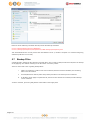
Before your files are sent to BACKUPAZIENDALE Server Sicuro, all your files are compressed and encrypted using
your choice of encryption algorithm, mode and key.
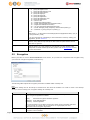
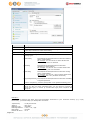
The following table explains all encryption parameters available within a backup set.
Note:
Encryption settings are set at backup set creation time and cannot be modified. You need to create a new backup
set if you want to change your encryption settings for a backup set.
Parameter
Description
Encryption Algorithm It defines the encrypting algorithm used to encrypt your backup files. There are
three encryption algorithms available:
[AES]
[DESede]
[Twofish]
Advanced Encryption Standard algorithm
Triple DES algorithm
Twofish algorithm
We recommend the use of AES as it has been chosen as the encryption standard
for commercial use. Please refer to references on Cryptography for more
information about encryption algorithms.
Encryption Mode
Pagina 29
It defines the encrypting mode used to encrypt your backup files. There are two
encryption modes available:
[ECB]
[CBC]
Electronic Cook Book Mode
Cipher Block Chaining Mode
We recommend the use of CBC mode as it offers better security. Please refer to
references on Cryptography for more information about encryption modes.
Encrypting Key
The key used to encrypt all files within a backup set. Please write it down on
paper and keep it in a safe place. If the key is lost, you will not be able to
recover your files from the encrypted backup files.
If you are not familiar with cryptography, it is recommended to use [Default] encryption. By selecting [Default], the
encryption key will be your login password.
You can change the encryption key anytime after creating the backup set, by clicking the [Encryption] node of the
left panel on the [Backup Setting] dialog. The algorithm and mode cannot be changed however.
5.6
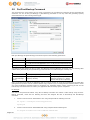
Mapped Network Drive
If you need to backup a mapped network drive on Windows (it will only work in Windows NT/2000/XP/2003/Vista),
you must enter your Window‟s domain, username and password into the [Network Resources Authentication for
Windows] section as shown below. It is required because scheduled backups will always run under the context of
Window‟s “Local System” account (which does not have the privileges required to access network resources) by
default. BA-ServerEd needs to collect your Windows username, password and domain name to authenticate itself to
the windows domain controller to acquire the required access privileges to the network files to be backed up. If you
don‟t supply a username and password, BA-ServerEd will have problems accessing network resources in its
scheduled backup Jobs.
If you need to backup network mapped drive in scheduled backup, please do this:
i.
Select the backup set from the drop down list at the top of the left panel
ii.
Enter your Windows domain, username and password into the right panel and press [OK]
iii.
Press the [OK] button to save.
The steps above apply only to computers running in a Windows domain. If you don‟t have a windows domain with
your network and you are using a workgroup or using a NetWare server, please use the “net use” command to
authenticate the running backup process against the computer hosting the mapped drive. Otherwise, you will get
“Access Denied” error from the backup report.
For example, if you want to backup \\SERVER\SHARE that is located on a NetWare server (or another computer in a
windows workgroup) and you are getting "Network drive is not accessible" error message, please try adding the
following command as a [Pre-backup command]
net use \\SERVER\SHARE [PASSWORD] /USER:[DOMAIN | MACHINE_NAME]\[USERNAME]
E.g.
Pagina 30
Enter one of the following commands directly into the Pre-Backup Command:
net use \\Netware\Data password /USER:peter
net use \\WorkgroupComputer1\Data password /USER:WorkgroupComputer1\peter
This will authenticate the current process with the NetWare server (or another computer in a windows workgroup)
and backup will then run correctly.
5.7
Backup Filter
A “Backup Filter” defines the file selection rules that allow user to easily include/exclude files into/from the backup
set by applying user defined criteria(s) to the file names or directory names.
There are some basic rules regarding backup filters:
i.
Filters are checked in creation order. Once inclusion/exclusion has been identified, the remaining
filters won't be checked.
ii.
Inclusion/Exclusion made by filter always takes precedence over backup source selections
iii.
If all filters do not apply to a particular file, this file is then checked for inclusion/exclusion backup
source selections
To add a new filter, press the [Add] button at the bottom of the right panel.
Pagina 31
Key
Description
Name
The name of a filter
Top Directory
The top directory to which this filter is applied. Filtering rules will be applied to
all files and/or directories under this directory.
Apply To
Define whether to apply the filtering rule to files and/or directories
Pattern Matching
It defines the filtering rules of a filter. A filtering rule can be of one of the
following types:
[Starts With]
Include/Exclude all files/directories with name starting
with a certain pattern.
For example: You can use B* to match all files with
name starting with a „B‟ character
[Contains]
Include/Exclude all files/directories with name
containing a certain pattern.
For example: You can use *B* to match all files with
name containing with a „B‟ character
[Ends With]
Include/Exclude all files/directories with name ending
with a certain pattern.
For example: You can use *.doc to match all files with
name ending with „.doc‟ (all Word documents)
[Regular Expression] Include/Exclude all files/directories with name matching
a regular expression.
To add a new pattern, press the [Add] button in the [Pattern Matching] area.
Filter Mode
Defines whether you want to include or exclude matched files into/from the
backup set. Also, for those unmatched files, you can choose to exclude (if
include filter type) or include (if exclude filter type) them into/from the
backup set.
Example 1:
If you want to backup only Word, Excel and PowerPoint documents in your document directory (e.g. C:\My
Documents), you should setup your backup filter as follows.
Top Directory
Apply To
Matching Type
Matching Patterns
Filter Mode
Exclude all others
Pagina 32
=
=
=
=
=
=
C:\My Documents
File (true)
End With
*.doc, *.xls, *.ppt
Include
True
Example 2:
If you want to backup all files, excluding all *.exe, *.dll and *.tmp, in C:\Applications, you should setup your backup
filter as follows.
Top Directory
Apply To
Matching Type
Matching Patterns
Filter Mode
Include all others
=
=
=
=
=
=
C:\Applications
File (true)
End With
*.exe,*.dll, *.tmp
Exclude
True
Example 3:
If you have made your selection of files (all under C:\) from the backup source setting but you want exclude all
images (e.g. *.jpg and *.gif) from your selection, you should setup your backup filter as follows.
Top Directory
Apply To
Matching Type
Matching Patterns
Filter Mode
Include all others
=
=
=
=
=
=
C:\
File (true)
End With
*.jpg, *.gif
Exclude
false
Please note that the [Include all others] setting is not enabled because you don‟t want to include all other files (NOT
*.jpg, *.gif) under C:\ into the backup set.
Example 4: (advanced)
If you want to include everything, except the “log” directory, under C:\Applications into a backup set, you should
setup your backup filter as follows.
Top Directory
Apply To
Matching Type
Matching Patterns
Filter Mode
Include all others
=
=
=
=
=
=
C:\Applications
Directory (true)
Regular Expression
^log$
Exclude
True
Example 5: (advanced)
If you want to include all directories named “log” from the backup set files with file name starting with “B” and
ending with “*.doc” under C:\My Documents into the backup set, you can use a regular expression of “^B.*\.doc$”
to do your selection. The filter backup can then be setup as follows.
Top Directory
Apply To
Matching Type
Matching Patterns
Filter Mode
Exclude all others
Pagina 33
=
=
=
=
=
=
C:\My Documents
File (true)
Regular Expression
^B.*\.doc$
Include
True
5.8
Pre/Post-Backup Command
The [Command Line Tool] feature has two major components, the [Pre-Backup] command and the [Post-Backup]
command. You can use the [Pre-Backup] or [Post-Backup] commands to run any native OS (operating system)
commands before or after running a backup job.
Both [Pre-Backup] and [Post-Backup] commands comprise of the following parameters:
Key
Description
Name
Name of this Command
Command
The command to be run
(e.g. C:\My Documents\Application.exe or C:\My Documents\BatchJob.bat)
Working Directory
The directory at which this command will run
The backup set type affects the time at which [Pre-Backup] and [Post-Backup] commands run. The following table
outlines when [Pre-Backup] and [Post-Backup] commands will run in different types of backup set.
Backup Set Type
When Pre-Backup Commands run? When Post-Commands run?
File
Before uploading backup files
Non-File Backup Sets Before spooling backup files to
(e.g. Microsoft SQL
temporary directory
Server)
After uploading all backup files
After spooling backup files to
temporary directory (i.e. before
the first backup file is uploaded)
Note: You should never backup an application while it is running as this can result in inconsistent and unusable files
getting backed up. Please use the “Volume Shadow Copy” feature if you‟re running Windows XP/2003/Vista or make
use of the Pre-Backup Command feature to shutdown your application before running a backup job and use the
Post-Backup Command feature to restart your application after the backup job has completed.
For Example
You want to stop Microsoft Outlook using the Pre-Backup Command and restart it after backup using the PostBackup Command, create the two following text files and assigned the files to Pre-Backup and Post-Backup
Command.
1.
Create a text file named “OutlookClose.vbs” using notepad with the following two lines:
Set objOLK = createObject("Outlook.Application")
objOLK.quit
2.
Create a text file named “OutlookStart.bat” using notepad with the following line:
"C:\Program Files\Microsoft Office\OFFICE11\OUTLOOK.EXE"
Pagina 34
5.9
Temporary directory
If you are running a file backup job with in-file delta enabled or a database type backup job, BA-ServerEd will
generate temporary files and the directory that will be used to store all these files are defined by [Options] ->
[Temporary directory for storing backup files]. Please set this to a non-system disk partition that has enough free
space to avoid problems.
You can set the [Temporary directory for storing backup files] to a mapped network drive. If you choose to do this,
please use a UNC path (e.g. \\SERVER\SHARE) and don‟t forget to configure the [Backup Set] -> [Network
Resources Authentication for Windows] setting.
5.10 Transfer Block Size
Transfer block size defines the block size BA-ServerEd will use to transfer your backup blocks. Generally, backup
jobs using a larger block size will have better performance, because of the smaller number of connections involved.
However, some firewalls or proxy servers may block out-going network traffic (HTTP/HTTPS POST method) with
large block size for security reasons. If you are in a network with this type of restriction, please lower the transfer
size value and try again.
To change the transfer block size of any backup set, please select the [Options] node on the left panel and then you
can make changes to the [Transfer Block Size] under [Advanced Options]. After you have made your changes, just
press the [OK] button to save.
Pagina 35
5.11 Follow Symbolic Link (Linux/Unix/Mac only)
Under Unix/Linux/Mac, users can create a symbolic link to link a file/directory from another directory. This setting
defines whether you want BA-ServerEd to traverse any symbolic links encountered on your backup path.
To change the follow symbolic link of any backup set, please select the [Options] node on the left panel. You can
then make changes to the [Follow Symbolic Link] by checking or un-checking the box. After you have made your
changes, just press the [OK] button to save.
5.12 Microsoft’s Volume Shadow Copy Service (VSS)
Microsoft Volume Shadow Copy Service (VSS) allows you to backup files that are exclusively opened. Without VSS,
you will get the error message “The process cannot access the file because another process has locked a portion of
the file” if you are trying to backup a file that is exclusively opened (e.g. Outlook PST file).
Please note that VSS is only available on Windows XP / 2003 / Vista and you must have administrative privileges to
start the VSS service on a computer. Also VSS will only work if at least one of your partitions is formatted using
NTFS.
If you are running Windows 2003, please install the Windows 2003 VSS
http://support.microsoft.com/default.aspx?scid=kb;en-us;887827 before running VSS.
hot
fix
available
in
If you are running into problems with VSS running on Windows XP / 2003, Microsoft's recommendation is to try reregistering the Volume Shadow Copy Service again. Simply run the script [OBM Home]\bin\RegisterVSS.bat to do so.
For more information, please take a look at the following page for a technical introduction to Volume Shadow Copy
Services (VSS):
http://technet2.microsoft.com/windowsserver/en/library/2b0d2457-b7d8-42c3-b6c9-59c145b7765f1033.mspx
5.13 Retention Policy
During backup, if BA-ServerEd finds that you have deleted a file (or updated a file) on your computer, it will put the
corresponding deleted (or updated) file already backed up on the backup server into a retention area. The retention
policy setting defines how long files inside the retention area will be kept on the backup server before they are
deleted automatically from the server.
Retention policy will only affect “retained” file (i.e. files that have already been deleted or updated on your computer
and thus are moved to the retention area of the backup server). For those files that have not been updated on your
computer, the backup of these files is kept in the data area on the backup server and won‟t be affected by the
setting of retention policy. These backup files of unchanged files will stay on the backup server forever until the
original files are removed (or updated) from your computer.
Pagina 36
Standard Retention Policy
The standard retention policy allows you to delete retained files automatically after a user defined number of days
or after a user defined number of backup Jobs. To change the retention policy setting of any backup set, please
select the [Retention Policy] node on the left panel. You can then make changes to your retention policy under the
[Retention Policy] section. After you have made your changes, just press the [OK] button to save.
Advanced Retention Policy
The [Advanced] retention policy allows you to configure a more flexible retention policy. It allows you to keep a set
of snapshots of all backup files based on the time of the backup Jobs. For example, you can configure the advanced
retention policy to keep the following sets of backup files to mimic the retention policy of the old days when you
were still doing tape rotations:
Pagina 37
All files available within the last 7 days
All files available on the last 4 Saturdays within the last 28 days
All files available on the 1st day of each month within the last 3 months
All files available on the 1st day of each quarter within the last 12 months
All files available on the 1st day of each year within the last 7 years
To do so, you need to setup your advanced retention policy as follows:
Type = Daily; Number of copy to keep = 7
Type = Weekly; Frequency = Saturday; Number of copy to keep = 4
Type = Monthly; Frequency = Day 1; Number of copy to keep = 3
Type = Quarterly; Frequency = Day 1 of Jan, Apr, Jul, Oct; Number of copy to keep = 4
Type = Yearly; Frequency = Date 01-01; Number of copy to keep = 7
Assuming today is 17-Jan-2006, if [Remove retention files for overlap policy] is NOT enabled, a total of 22
snapshots (provided you have run backups daily for more than 7 years) will be kept on the server accordingly, i.e.:
Daily
Weekly
Monthly
Quarterly
Yearly
16-Jan-2006
14-Jan-2006
01-Jan-2006
01-Jan-2006
01-Jan-2006
15-Jan-2006
07-Jan-2006
01-Dec-2005
01-Oct-2005
01-Jan-2005
14-Jan-2006
31-Dec-2005
01-Nov-2005
01-Jul-2005
01-Jan-2004
13-Jan-2006
24-Dec-2005
01-Apr-2005
01-Jan-2003
12-Jan-2006
01-Jan-2002
11-Jan-2006
01-Jan-2001
10-Jan-2006
01-Jan-2000
If [Remove retention files for overlap policy] is enabled, only the following snapshots are kept:
Daily
Weekly
Monthly
Quarterly
Yearly
16-Jan-2006
14-Jan-2006
01-Jan-2006
01-Jan-2006
01-Jan-2006
15-Jan-2006
07-Jan-2006
01-Dec-2005
01-Oct-2005
01-Jan-2005
14-Jan-2006
31-Dec-2005
01-Nov-2005
01-Jul-2005
01-Jan-2004
13-Jan-2006
24-Dec-2005
01-Apr-2005
01-Jan-2003
12-Jan-2006
01-Jan-2002
11-Jan-2006
01-Jan-2001
10-Jan-2006
01-Jan-2000
The weekly policy overrides the daily policy so the snapshots of 10-Jan-2006, 11-Jan-2006, 12-Jan-2006, 13-Jan2006 and 14-Jan-2006 are removed. The monthly policy overrides the weekly policy so the snapshots of 24-Dec2005 and 31-Dec-2005 are removed. The same applies to the monthly, quarterly and yearly policy giving a total of
11 snapshots.
5.14 Extra Backup (Off-Line backup, Logout Reminder)
Off-line backup is basically designed for notebook users who are off-line most of the time and cannot rely on the
backup schedule to backup regularly. The "Backup Interval" allows notebook users to specify the interval that they
would like their data to backup. When the machine is online and this interval has elapsed, backup will run
automatically. If [Off-Line Backup Alert] is enabled, a popup message box will ask the user to confirm starting the
backup.
The [Email Notification] setting is the number of days since the last backup that triggers the backup server to send
email notification to the client to remind him to run an off-line backup.
Pagina 38
When the [System Logout Backup Reminder] setting is enabled, a popup message box will ask the user to start a
backup before logging out / shutting down Windows.
5.15 In-File Delta
Please refer to the in-file delta section for more information on this topic.
5.16 Local Copy
If you want to save an extra copy of backup data on your local hard disk (in addition to a copy of backup data
stored on the backup server) to minimize file-restoring time and/or to provide an extra safety precaution, you can
do the following:
Pagina 39
i.
Open BA-ServerEd from the System Tray (see previous sections for details)
ii.
Setup your backup set (see previous sections for details)
iii.
Select [Local Copy] under your backup set from the left panel
iv.
Check the [Copy to Local Hard Disk] checkbox
v.
Enter a directory to where you want an extra copy of your backup files to be stored in the [Copy to]
field provided (preferably a directory under another hard disk)
vi.
An extra copy of backup will be saved in the [Copy to] directory when you run your backup job
If you want to make local copy to a directory located on a NetWare server (or another computer is a windows
workgroup) and you are getting "Network drive is not accessible" error message, please try adding the following
command as a [Pre-backup command]
net use \\SERVER\SHARE [PASSWORD] /USER:[DOMAIN | MACHINE_NAME]\[USERNAME]
Pagina 40
E.g.
C:\> net use \\Netware\Data password /USER:peter
C:\> net use \\WorkgroupComputer1\Data password /USER:WorkgroupComputer1\peter
This will authenticate the current process with the NetWare server (or another computer is a windows workgroup).
Backup will then be allowed to run correctly.
How to restore “Local Copy” files
“Local Copy” files are stored in the [Copy to] directory (under [Local Copy] setting). To restore backup files, please
do the followings:
Pagina 41
i.
Press the
button on the main page of BA-ServerEd dialog.
ii.
Select the required [Backup Set] from the list and press [Next] to proceed.
iii.
Fill in the [Source Directory] (directory where “Local Copy” files are stored) and [Destination
Directory] (directory to where you want “Local Copy” files to be restored)
iv.
Click [Start Decrypt], and when it finishes you can see something similar to the following on the
screen:
5.17 Using One Backup Account for Multiple Computers
BA-ServerEd allows you to backup multiple computers using a single backup account. To backup multiple computers,
you need to create a different backup set to backup each individual computer and to configure the [Run scheduled
backup on this computer] checkbox, which is placed under the [Backup Schedule] node.
For version 5.2 or above
Since the computer that created the backup set will have its computer name associated with the backup set. The
backup scheduler running on each computer will only run backup sets with the same computer name as itself. Thus,
you just need to make sure that all your computer names using a single backup account are unique.
For version 5.1 or Earlier
You must configure BA-ServerEd on each computer that it only runs scheduled backup for the intended backup sets
only. If this is not setup properly, scheduled backup job of the same backup set from different computers will both
be started. This will result in lots of checksum errors and files being deleted on the backup server.
To allow multiple computers to be backed up under a single backup account, you are required to do the following
for each computer that has installed BA-ServerEd under the same backup account:
i.
Logon to one of the computers that has BA-ServerEd installed under the same backup account.
ii.
Open BA-ServerEd and select a backup set that is not intended to run on this computer from the left
panel.
iii.
Make sure that the [Run scheduled backup on this computer] checkbox on the right panel is not
checked.
iv.
Repeat the previous step for the rest of the backup sets that are not intended to run on this
computer.
v.
Repeat steps ii to iv for each computer that has BA-ServerEd installed under the same backup
account.
IMPORTANT If you create a new backup set or want to backup another computer using the same backup account
at a later date (this implies that you need to create an additional backup set under this backup account for the new
computer), please make sure to repeat the procedure above (i.e. uncheck the [Run scheduled backup on this
computer] checkbox for the added backup set) for each computer.
Pagina 42
6
Backing Up Files
This chapter describes how files are backed up by BA-ServerEd to the backup server
6.1
How files are backed up
The diagram below describes how BA-ServerEd backup your files.
Backup Operations:
1. Collect all files which are new or have
been updated since last backup
2. Each of these files is zipped,
encrypted and securely backed up
to Online Backup Server through
Secure Socket Layer (SSL)
User’s Computer
Backup Server
User Directory
Online Backup Manager can be configured
to start automatically every night. All user
files created/updated during the day will
then be backed up to the backup server on the
same night without any user intervention.
Backup Directory
All users' files are encrypted by a
world's first class 128-bit encryption
algorithm with a user defined encrypting
key. File content is meaningless to
everyone except the user.
Run backup at scheduled time automatically
Once you set your backup scheduled, a backup job will be started automatically to perform backup operation for
you at your absence. You can have backup running at your scheduled time as often as you want (e.g. twice a day or
hourly during office hour) without requiring doing any extra work.
Incremental Backup
Unchanged files are already backed up to server and need not to be backed up again. BA-ServerEd will pick the new
or updated files from your backup set files and upload only these files to the server. It significantly reduces the time
required to perform the backup operation since most users update less than 5% of their total data each day.
Compress and encrypt data automatically
Data are compressed and encrypted before they are uploaded to the server. Not only does it reduce the storage
space to keep you backup files, it also ensures the privacy of your data.
File Retention Policy
The built-in file retention policy allows you to access multiple versions of the same file or even deleted files from
your backup set. Backup files are put into a retention area before they are removed from the server. If you want to
get back a deleted file (or you want to get back the previous versions of an updated files) within the retention
period, these files will always be available in the retention area. This feature is particularly useful when you have
accidentally deleted a file or incorrectly updated a file within the file retention period (file retention period is user
customizable).
6.2
Backup files directly to the backup server
You can backup your data to BACKUPAZIENDALE Server Sicuro by following instructions below.
Pagina 43
i.
Open BA-ServerEd.
ii.
Right click BA-ServerEd icon available in the system tray and choose [Open].
a.
To start setting up backup sets, click the
button to open the [Backup Setting] dialog.
b.
On the left panel, press the
c.
Enter a name for your backup set.
d.
Select the files/directories you want to backup.
button to create a new backup set.
Press [Advance] to add more files to the backup set.
Pagina 44
iii.
Pagina 45
e.
Set the backup schedule (Note: You can have more than one schedule in a backup set).
f.
Set the encryption algorithm, encryption mode and encrypting key for this backup set
(Hint: For the sake of simplicity, just select the [Default] radio button (your encrypting key is
set to be the same as your backup account password).
Run Backup
a.
Press the [Backup] button on the main page of BA-ServerEd dialog.
b.
Select the backup set you want to run and select [Offsite Backup Server] to start backing up
your files to BACKUPAZIENDALE Server Sicuro . If applicable, you can change the In-File Delta
Type also.
c.
Press [OK] to start the backup job.
Note:
1. You can have more than one backup set in a backup account.
2. Please write the encrypting key down on paper and keep it in a safe place. If you lose your encrypting key,
you will not be able to restore your backup files.
6.3
Backup files to removable hard disk (seed loading)
If you have a lot of data (e.g. 300GB) to backup to the backup server, it would take a considerable amount of time
to perform the first full backup through the Internet. If you run into this problem, you can use the Seed Loading
Utility to backup your backup set to local hard disk (instead of directly to the backup server) and then transport the
backup data, using removable hard disk, to BACKUPAZIENDALE Server Sicuro . The administrator can then load all
your backup files from your removable hard disk into your backup account. This could then save you days (even
weeks) of performing your first full backup. Since subsequent backup will be incremental backup (only new or
updated files will be uploaded to the server) you should have no problems uploading your backup data afterwards.
To perform seeding loading, please do the following:
Pagina 46
i.
Open BA-ServerEd from the System Tray (see previous sections for details).
ii.
Setup your backup set (see previous sections for details).
iii.
Select the backup set you want to run and select [Local Hard Disk (Seed Load Utility)] to start
backing up your files to local hard disk. In the field under the option, enter a directory where you
want all backup files to be stored.
iv.
Please make sure you have enough free space in the directory specified. If you are going to
transport a removable hard disk to BACKUPAZIENDALE Server Sicuro , please enter a directory
under your removable hard disk here.
Press the [OK] button to start the backup job.
Pagina 47
v.
You should get the message “Backup Completed Successfully” as shown below after all backup files
are spooled to the directory you specified.
vi.
Transport the data in the specified directory to BACKUPAZIENDALE Server Sicuro .
7
Restoring Files
This chapter describes different ways files can be restored from the backup server
It is very important to write down your encrypting key on paper and keep it in a safe
place because there will be no way to restore your backup files if you lose your
encrypting key.
7.1
Restore backup files directly from backup server
You can use either BA-ServerEd or the web restorer to restore backup files from the backup server.
Using BA-ServerEd
You can restore your data from the backup server by following instructions below.
Pagina 48
i.
Open BA-ServerEd from the System Tray (see previous sections for details).
ii.
Select the [Restore] button on the left of the main page of BA-ServerEd dialog.
iii.
Select the backup set from which you would like files to be restored from the list.
iv.
Select the snapshot of your backup files that you would like to restore from the backup server by
using [Show files after Job] drop down list
v.
Use the [Change] button to select the directory to where you want files to be restored (or simply
select [Original location] to restore files to their original path).
vi.
Select the files that you would like to restore and press the [Start Restore] button to start.
vii.
Files will be restored automatically as shown below (a file won‟t be downloaded from the backup
server again if an identical file exists on local path already).
Using the web interface
You can restore your data from BACKUPAZIENDALE Server Sicuro
Pagina 49
i.
Logon to the BACKUPAZIENDALE Server Sicuro
ii.
From the top menu, click [File Explorer]
by following instructions below.
web interface
iii.
Select the [Backup Set] that contains the files that you want to restore by clicking on the links
iv.
Select the snapshot of your backup files that you would like to restore from the backup server by
using [Show files As Of] drop down list
v.
If you want to see all the different versions of all files (shown as gray below), just choose the [Show
all files] radio button on the [File Explorer] page.
Files, which are shown in gray below (e.g. Copy of test.txt), are being stored in the retention area
on the backup server but you can still restore these files from the backup server.
Pagina 50
Pagina 51
vi.
Select the files that you would like to restore and press the [Restore] button on the toolbar
vii.
A dialog shown below would appear
a.
Press the [Restore] button
b.
Enter the directory to which backup files should be restored to in the [Restore files to] textbox
c.
Enter the encrypting key which will be used to decrypt your backup files upon restoring your
backup files
d.
Press the [Start] button to start restoring
7.2
Restore backup files from removable hard disk
If you want to restore lots of backup files from the backup server and you find it too slow to restore all your backup
files from the backup server through the internet. You can ask your backup services provider to send you all your
backup files in removable hard disk (or CD/DVD). However, all backup files stored on backup server are in
encrypted format. You need to decrypt them back to their original format before you can use them. To decrypt your
backup files from removable media, please do the followings:
Pagina 52
i.
Open BA-ServerEd from the System Tray
ii.
Press the
iii.
Use the [Change] button to locate the “files” directory (provided by your backup provider in
removable hard disk or DVD) which contains the backup files that you want to decrypt
iv.
If you have more than one backup set under the “files” directory, select the [Backup Set] which
contains the backup files that you want to decrypt
button to start the [Decrypt Files Wizard].
v.
Select the snapshot of your backup files that you would like to restore from the removable media by
using [Show files after Job] drop down list
vi.
If you want to see all the different versions of all files (shown as gray below), just choose the [Show
all files] radio button on the [Decrypt Files Wizard] dialog.
Files, which are shown in gray below (e.g. test.exe), are being stored in the retention area on the
removable media (but you can still restore these files).
vii.
Use the [Change] button to select the directory to where you want files to be restored (or simply
select [Original location] to restore files to their original path).
viii. Press the [Start Decrypt] button to start restoring. When it finishes, you will see a screen similar to
the following:
Pagina 53
7.3
IP addresses Restriction for Online Restore
Online file restore operation can be restricted by IP addresses. You can ask your backup service provider to restrict
online file restoration for your backup sets by IP addresses to only allow people from authorized IP addresses to
restore files from the backup server. To check if online file restore of any backup set is restricted this way, please
logon to the web interface of BACKUPAZIENDALE Server Sicuro , and check the section of [Backup Set] -> [Online
Restore IP restriction] (shown below).
Users are not allowed to update the [Online Restore IP restriction] directly. Please ask your backup services
provider to do the changes for you.
Pagina 54
8
In-File Delta Technology
The chapter describes what in-file delta technology is and how in-file delta can be used to backup large database
files (e.g. a 10GB Outlook.pst file) without uploading the whole database file everyday.
8.1
Overview
In-file delta technology is an advanced data block matching algorithm which has the intelligence to pick up changes
(delta) of file content between two files. Using this algorithm, daily backing up of large files (e.g. a 10GB
Outlook.pst file) over low-speed internet connection is made possible because it requires only the changes of
information (should be marginal) since the last backup to be sent over a low-speed internet connection to complete
the backup of a large file (here we assume that the full backup of the file has been saved on the backup server
already).
This is what will happen in the backup of a 10GB Outlook.pst file when it is backed up by BA-ServerEd with in-file
delta technology.
i.
The whole files (10GB), along with its checksum file, are backed up to the backup server. This can
be done directly through the internet or indirectly using the seed loading utility on a removable hard
disk.
ii.
When backup runs again later (normally the next day), BA-ServerEd will download a checksum
listing of all data blocks of the full backup file (or last incremental backup file) from the backup
server and use it to pick up all changes that have been made to the current Outlook.pst file.
iii.
Changes detected are then saved in a delta file which is uploaded to the backup server. A new
checksum file is generated and is also uploaded. (This delta file is assumed to be small because the
content of PST files doesn‟t change a lot during daily usage)
iv.
Subsequent backups of this 10GB Outlook.pst file will go through step ii and step iii again. As
explained, only a small delta file and checksum file will be uploaded to the backup server.
v.
With in-file delta technology, daily backing up of large file over low-speed internet connection is now
possible
Incremental in-file delta type
Incremental Delta will facilitate ease of backup. The delta is generated by comparing with the latest uploaded full or
delta file. The delta file generated is the smallest possible and uses the least bandwidth during backup. For
restoration, the full file and all delta files up to the required point-in-time is required to restore the file to a specific
point-in-time.
Example: If you are adding around 100MB changes to a 10G Outlook.pst everyday.
After the first full backup job, BA-ServerEd will continue to generate and upload delta files instead of uploading the
full file until either one of the following two rules are true:
a)
Number of deltas generated since the last full backup is greater than the [No. of Delta] setting.
b)
The delta ratio (the ratio of the delta file size against the full file size) is greater than the [Delta Ratio]
setting
Using incremental delta, the delta generated by comparing the current file with the latest uploaded full or delta file
is around 100MB.
Since the delta file size is around 100MB daily, the delta ratio (around 1%) will not trigger a full file upload. Instead
BA-ServerEd will continue to generate and upload delta files until day 102 (assuming the full file was uploaded on
day 1) when the number of deltas generated exceeds the [No. of Delta] setting and triggers the upload of the full
Outlook.pst file. You can disable the [No. of Delta] and [Delta Ratio] if you don‟t want to upload the full file.
All delta files are generated with respect to changes made since the last incremental or full backup. This means that
the last full backup file and ALL incremental delta backup files are required to restore the latest snapshot of a
backup file.
Differential in-file delta type
Differential Delta will facilitate ease of restore. The delta is generated by comparing with the latest uploaded full file.
The delta file generated grows daily and uses more bandwidth during backup. For restoration, the full file and a
Pagina 55
single delta file is required to restore the file to a specific point-in-time.
Example: If you are adding around 100MB changes to a 10G Outlook.pst everyday.
After the first full backup job, BA-ServerEd will continue to generate and upload delta files instead of uploading the
full file until either one of the following two rules are true:
c)
Number of deltas generated since the last full backup is greater than the [No. of Delta] setting.
d)
The delta ratio (the ratio of the delta file size against the full file size) is greater than the [Delta Ratio]
setting
Using differential delta, the delta generated by comparing the current file with the latest uploaded full file is around
100MB for the 1st delta, 200MB for the 2nd delta, 300MB for the 3rd delta and so on.
Since the delta file grows by 100MB daily, the delta ratio for day 52 (delta file size is approximately 51x100= 5.1GB,
assuming the full file was uploaded on day 1) being over 50% exceeds the [Delta Ratio] setting and triggers the
upload of the full Outlook.pst file. You can disable the [No. of Delta] and [Delta Ratio] if you don‟t want to upload
the full file.
All delta files are generated with respect to changes made since the last full backup file (i.e. differential backup).
This means that only last full backup file and the last delta file are required to restore the latest snapshot of a
backup file. This means that other intermediate delta files are only required if you want to restore other snapshots
of a backup file.
Differential in-file delta backup has the benefits that a corrupted delta file would only make one particular version of
a backup file non-recoverable and all other backups created by other delta files of the same file would still be intact.
Pagina 56
8.2
Block Size
The block size defines the size of data block being used to detect the changes between the last full or delta backup
file and the file sitting on the local computer right now. In general, the smaller the block size, the more likely a
matched data block can be found between the last backup file and the file on local computer. It, therefore, produces
a smaller delta file but it would require more processing power to detect these changes. On the other hand, in-file
delta backup running with larger block size will run faster but this will generally produce a larger delta file.
In most case, the default setting [Auto] will choose the optimal block size for each file (depending on the size of the
file) for you.
8.3
Minimum File Size
The [Minimum Size] setting defines the smallest file size a file must have before the use and application of in-file
delta backup technology.
If the size of a file that is being backed up is smaller than the [Minimum Size] setting, in-file delta backup
technology won‟t be applied to this file and the whole file, instead of just the delta file, will be uploaded to the
backup server. It is not necessary to perform in-file delta backup on small files because backing up the whole file
doesn‟t take too long anyway. Backing up the whole file instead reduces the time required to restore a backup file.
8.4
Uploading full file again
No. of Delta
The [No. of delta] setting defines the maximum number of delta files from the same full backup file to be generated
and backed up to the backup server before a full backup (the whole file) of this file is uploaded to the backup server
instead.
For example, if you have created 100 delta files from the full backup file already and the [No. of delta] setting is set
to 100, the next backup will upload a full backup file (the whole file) instead of just the delta file. However, if the
[No. of delta] rule is disabled, it will keep generating delta files and uploading these delta files to the backup server
until the other delta rule forces a full backup (i.e. delta ratio exceeded). This setting is here to make sure that there
will always be a full backup file after a certain number of delta files have been generated.
Delta Ratio
The [Delta Ratio] setting is defined to be the size of a delta file divided by the size of its full backup files (i.e. the
percentage of changes detected between the last full backup file and the current file).
If the delta ratio calculated from the size of the generated delta file and the size of the full backup file is greater
than the [Delta Ratio] setting, the whole file, instead of just the delta file, will be backed up to the backup server. It
is done this way because the difference between backing up the whole file and the delta file is not significant and it
is better to upload the whole file instead to reduce the time required to restore the file.
The default setting of [Delta Ratio] is 50%. This means that if a file changes by more than 50%, the whole file,
instead of just the delta file, will be backed up and uploaded to the backup server.
Pagina 57
8.5
Advanced In-file delta type
The [In-file delta] -> [Advanced] setting allows users to override default in-file delta type when on a certain number
of days (e.g. all Sundays or the 1st day of each month). This is useful if you want all in-file delta backups to be
incremental but you want to do a differential in-file delta backup on Saturdays as well as the full file backups on the
1st day of every month. If you want to do this, simply press the [Advanced] button and the [Advanced In-File Delta
Type Setting] dialog will be popped up as shown below.
With this setting, all backup Jobs on Saturdays will be differential in-file delta backups, backups for the 1st day of
each month will run a full backup. This ensures that all backup files will be backed up in full at a regular interval.
One benefit of this is that restore time will run faster because of less delta merging. Another benefit is that the risk
of a corrupted incremental delta file resulting in data loss is much lower because a full backup is always available
periodically.
Pagina 58
9
Backup/Restore Oracle 8i / 9i / 10g / 11g
This chapter will describe in details how BA-ServerEd backup your Oracle Database Server and how you can restore
an Oracle database using the backup files.
9.1
Requirements
i.
BA-ServerEd must be installed onto the computer that can connect to your Oracle Database Server
using TCP/IP protocol.
ii.
Data from Oracle database will be backed up to a temporary directory before they are sent to
BACKUPAZIENDALE Server Sicuro . Please make sure you have sufficient space on your computer to
store these data when you run the backup job.
iii.
Database must be in archived log mode
To switch database to archived log mode, please do the following:
a.
Set the parameters below in the PFILE to enable automatic archiving
LOG_ARCHIVE_DEST = [directory where archive redo logs will be stored]
LOG_ARCHIVE_FORMAT = 'log%t_%s_%r.arc'
LOG_ARCHIVE_START = TRUE
b.
Set ORACLE_SID to your database‟s System Identifier (SID)
export ORACLE_SID=GDB1
c.
(assuming your database‟s SID is GDB1)
Run SQL Plus and connect to database as SYSDBA
For Oracle 9i/10g/11g
sqlplus "/ as sysdba"
For Oracle 8i
connect internal;
d.
Shutdown database
shutdown immediate
e.
Start and mount database
startup mount
f.
Switch database to archived log mode
alter database archivelog;
g.
Open database
alter database open;
Oracle 10g Example:
$ export ORACLE_SID=GDB1
$ sqlplus "/ as sysdba"
SQL*Plus: Release 10.2.0.1.0 - Production on Thu Nov 8 15:08:57 2007
Copyright (c) 1982, 2005, Oracle.
All rights reserved.
Connected to:
Oracle Database 10g Enterprise Edition Release 10.2.0.1.0 - Production
With the Partitioning, OLAP and Data Mining options
SQL> shutdown immediate
Database closed.
Database dismounted.
ORACLE instance shut down.
SQL> startup mount
ORACLE instance started.
Total System Global Area 285212672 bytes
Fixed Size
1218992 bytes
Variable Size
96470608 bytes
Database Buffers
184549376 bytes
Redo Buffers
2973696 bytes
Pagina 59
Database mounted.
SQL> alter database archivelog;
Database altered.
SQL> alter database open;
Database altered.
iv.
JAVASYSPRIV role is granted to system account
You can grant this role to system account by executing:
h.
Grant permission to system account
For Oracle 9i/10g/11g
SQL> grant javasyspriv to system;
For Oracle 8i
SVRMGRL> connect internal
SVRMGRL> @?/javavm/install/initjvm.sql;
SVRMGRL> @?/rdbms/admin/catalog.sql;
SVRMGRL> @?/rdbms/admin/catproc.sql;
SVRMGRL> @?/javavm/install/initdbj.sql;
SQL> grant javasyspriv to system;
Oracle 9i/10g/11g Example:
SQL> grant javasyspriv to system;
Grant succeeded.
9.2
Overview
BA-ServerEd will backup your Oracle database by taking the following steps.
i.
Connect to the Oracle database using SQL*NET over TCP/IP
ii.
Run all Pre-Commands of this backup set
iii.
If the backup type to run is [Database Backup type],
iv.
a.
all data files in each of the tablespace(s) selected are copied to the temporary directory
specified by this backup set
b.
if there are temporary files in the database, the script to re-create the temporary files are
generated to a file located in the temporary directory specified by this backup set
c.
all non-default initialization parameters will be spooled to an initializing file located in the
temporary directory specified by this backup set
d.
all control files will be copied to the temporary directory specified by this backup set
e.
all archived log files will be copied to the temporary directory specified by this backup set
If the backup type to run is [Archived Log Backup type],
a.
Note:
Pagina 60
all archived log files will be copied to the temporary directory specified by this backup set
v.
Run all Post-Commands of this backup set
vi.
Upload all files copied to the temporary directory to BACKUPAZIENDALE Server Sicuro
vii.
Remove temporary files from the temporary directory
If your Oracle database is running on Windows, please install BA-ServerEd onto the company running the Oracle
database if BA-ServerEd is to backup this Oracle database. This would shorten the time required to backup the
Oracle database.
9.3
How to backup an Oracle Database (Physical Backup)
Please follow the instructions below to backup your Oracle database to BACKUPAZIENDALE Server Sicuro .
For Windows:
i.
Install BA-ServerEd onto your computer.
ii.
Open BA-ServerEd.
Right click BA-ServerEd icon available in the system tray and choose [Open].
iii.
Pagina 61
Create a backup set.
a.
To start setting up backup sets, click the
button to open the [Backup Setting] dialog.
b.
On the left panel, press the
c.
On the dialog, choose [Oracle Database Server Backup] as the [Type].
d.
Enter a name for your backup set.
button to create a new backup set.
e.
Enter the system password, the Oracle Database Server Host Name, TNS Port and SID.
f.
Select the tablespace(s) you want to backup.
g.
Set the backup schedule for database backup and archived log backup.
Note: You can have more than one schedule in a backup set, i.e. you can perform intra-day
transaction log backup by adding more than one daily transaction log backup schedule to your
backup set.
h.
Pagina 62
Set the encryption algorithm, encryption mode and encrypting key for this backup set.
Hint: For maximum security, please select AES (Advanced Encryption Standard) Algorithm, CBC
(Cipher Block Chaining) mode and use an encrypting key with more than 8 characters.
iv.
Pagina 63
Run Backup.
a.
Press the [Backup] button on the main page of BA-ServerEd dialog.
b.
Select the backup type (e.g. Database Backup, Archived Log Backup) you would like to perform.
Select the backup set you want to run and select [Offsite Backup Server] to start backing up
your files to BACKUPAZIENDALE Server Sicuro . If applicable, you can change the In-File Delta
Type also.
c.
Click [OK] to start backing up your files to BACKUPAZIENDALE Server Sicuro .
d.
When the backup finished, you should see Backup Completed Successfully as below.
For Linux:
Pagina 64
a.
Install OBM onto your Oracle Server
b.
Create a new backup set from OBS web interface
c.
Select “Oracle Database Servers” as the backup set type, then press [Update]. (You may also
change the backup set‟s Name at this stage).
d.
Input the Database Backup Setting and the Backup Source.
Pagina 65
e.
Set the Backup Source as “Oracle Datbase Server” to backup all the table space.
f.
You can also include or exclude a specific table space in your backup source. (e.g. Set the
Backup Source as “Oracle Database Server/SYSTEM” to only backup the SYSTEM table space.)
You may also set up the backup schedule in this stage.
g.
If you intend to perform remote spool (OBM install on a different machine from the Oracle
Server). You may set the Hostname as the Oracle Server‟s IP (e.g. Hostname:
192.168.101.109).
h.
Logon to the Oracle Server machine and run $OBM_HOME\bin\Configurator.sh to input the
encryption key for the new backup set. You can also configure the backup set to run schedule
backup on this computer at this stage.
i.
The backup will run on schedule or you may perform a manual backup.
j.
To perform manual backup, you will need to edit the script file
$OBM_HOME\bin\RunBackupSet.sh. Change the script from BACKUP_TYPE=”FILE” to
BACKUP_TYPE=”DATABASE”. Then save and exit the file.
k.
9.4
Run the script file with the backup set name or ID as the parameter to perform a manual
backup. (e.g, sh RunBackupSet.sh BackupSet-Oracle).
How to restore an Oracle Database
Please follow the instructions below to restore your Oracle 9i/10g/11g databases from BACKUPAZIENDALE Server
Sicuro .
i.
Download the backup files from BACKUPAZIENDALE Server Sicuro .
Please refer to the [Quick Start - Backup File] section for information on how to download backup
files from BACKUPAZIENDALE Server Sicuro .
ii.
For restore an existing database
Shutdown the database
To shutdown the database, please do the following:
a.
Set ORACLE_SID to your database‟s System Identifier (SID)
$ export ORACLE_SID=GDB1
b.
(assuming your database‟s SID is GDB1)
Run SQL Plus and connect to database as SYSDBA
$ sqlplus "/ as sysdba"
c.
Shutdown database
SQL> shutdown immediate
Oracle 9i/10g/11g Example:
$ export ORACLE_SID=GDB1
$ sqlplus "/ as sysdba"
SQL*Plus: Release 10.2.0.1.0 - Production on Thu Nov 8 17:04:57 2007
Copyright (c) 1982, 2005, Oracle.
All rights reserved.
Connected to:
Oracle Database 10g Enterprise Edition Release 10.2.0.1.0 - Production
With the Partitioning, OLAP and Data Mining options
SQL> shutdown immediate
Database closed.
Database dismounted.
ORACLE instance shut down.
Pagina 66
For recover a database that currently does not exist
Create a password file
$ orapwd file=$ORACLE_HOME/dbs/orapwGDB1 password=pwd123
(assuming your database‟s SID is GDB1, and password is pwd123)
Oracle 9i/10g/11g Example:
$ orapwd file=/oracle/OraHome1/dbs/orapwGDB1 password=pwd123
iii.
Put all downloaded backup files in place
Control files, data files and archived logs are stored on BACKUPAZIENDALE Server Sicuro along
with their full path information. You just need to put all these files back to their original locations
when performing a database restore.
For example:
/obm_restore/Oracle Database Server/oracle/product/10.2.0/db_1/admin/GDB1/
/obm_restore/Oracle Database Server/oracle/product/10.2.0/db_1/dbs/initGDB1.ora
/obm_restore/Oracle Database Server/oracle/product/10.2.0/db_1/dbs/spfileGDB1.ora
/obm_restore/Oracle Database Server/oracle/product/10.2.0/db_1/flash_recovery_area/GDB1/
/obm_restore/Oracle Database Server/oracle/product/10.2.0/db_1/oradata/GDB1/
Move to
/oracle/product/10.2.0/db_1/admin/GDB1/
/oracle/product/10.2.0/db_1/dbs/initGDB1.ora
/oracle/product/10.2.0/db_1/dbs/spfileGDB1.ora
/oracle/product/10.2.0/db_1/flash_recovery_area/GDB1/
/oracle/product/10.2.0/db_1/oradata/GDB1/
iv.
Rename database files (Only for restoring database to a new location)
Rename your database files by doing the following:
a.
Modify the PFILE to update file path
Open the PFILE ($ORACLE_HOME/dbs/initGDB1.ora), change every file path to the new location,
and then save it
For example:
background_dump_dest = /oracle/OraHome1/admin/GDB2/bdump
control_files = (/oracle/OraHome1/oradata/GDB2/control01.ctl,
/oracle/OraHome1/oradata/GDB2/control02.ctl,
/oracle/OraHome1/oradata/GDB2/control03.ctl)
core_dump_dest = /oracle/OraHome1/admin/GDB2/cdump
user_dump_dest = /oracle/OraHome1/admin/GDB2/udump
Change to
background_dump_dest = /new_db_location/OraHome1/admin/GDB2/bdump
control_files = (/new_db_location/OraHome1/oradata/GDB2/control01.ctl,
/new_db_location/OraHome1/oradata/GDB2/control02.ctl,
/new_db_location/OraHome1/oradata/GDB2/control03.ctl)
core_dump_dest = /new_db_location/OraHome1/admin/GDB2/cdump
user_dump_dest = /new_db_location/OraHome1/admin/GDB2/udump
b.
You may need to quote the values of dispatchers as a single argument.
Add double quotation marks
dispatchers = "(PROTOCOL=TCP) (SERVICE=GDB1XDB)"
c.
Delete the SPFILE
Delete the SPFILE ($ORACLE_HOME/dbs/spfileGDB1.ora)
Pagina 67
d.
Set ORACLE_SID to your database‟s System Identifier (SID)
$ export ORACLE_SID=GDB1
e.
(assuming your database‟s SID is GDB1)
Run SQL Plus and connect to database as SYSDBA
$ sqlplus "/ as sysdba"
f.
Start and mount database
SQL> startup mount
g.
Create a backup of the control file to trace file
SQL> alter database backup controlfile to trace as '/New_DB_Location/control.trc' reuse;
create a trace file to /New_DB_Location/)
h.
(assuming you
Rename each of data file, log file and tempfile
Open the trace file that just created, and then check for the filename of each datafile, log file
and tempfile.
Please do the following to rename each of the files:
SQL> ALTER DATABASE RENAME FILE 'xxx' TO 'yyy';
where xxx is the old filename found in the trace file, and yyy is the new filename with updated path
For example:
SQL> ALTER DATABASE RENAME FILE '/oracle/product/10.2.0/db_1/oradata/GDB1/system01.dbf' TO
'/new_db_location/oradata/GDB1/system01.dbf';
SQL> ALTER DATABASE RENAME FILE '/oracle/product/10.2.0/db_1/oradata/GDB1/undotbs01.dbf' TO
'/new_db_location/oradata/GDB1/undotbs01.dbf';
SQL> ALTER DATABASE RENAME FILE '/oracle/product/10.2.0/db_1/oradata/GDB1/sysaux01.dbf' TO
'/new_db_location/oradata/GDB1/sysaux01.dbf';
SQL> ALTER DATABASE RENAME FILE '/oracle/product/10.2.0/db_1/oradata/GDB1/users01.dbf' TO
'/new_db_location/oradata/GDB1/users01.dbf';
SQL> ALTER DATABASE RENAME FILE '/oracle/product/10.2.0/db_1/oradata/GDB1/TS1' TO
'/new_db_location/oradata/GDB1/TS1';
SQL> ALTER DATABASE RENAME FILE '/oracle/product/10.2.0/db_1/oradata/GDB1/redo01.log' TO
'/new_db_location/oradata/GDB1/redo01.log';
SQL> ALTER DATABASE RENAME FILE '/oracle/product/10.2.0/db_1/oradata/GDB1/redo02.log' TO
'/new_db_location/oradata/GDB1/redo02.log';
SQL> ALTER DATABASE RENAME FILE '/oracle/product/10.2.0/db_1/oradata/GDB1/redo03.log' TO
'/new_db_location/oradata/GDB1/redo03.log';
SQL> ALTER DATABASE RENAME FILE '/oracle/product/10.2.0/db_1/oradata/GDB1/temp01.dbf' TO
'/new_db_location/oradata/GDB1/temp01.dbf';
Oracle 9i/10g Example:
$ export ORACLE_SID=GDB1
$ sqlplus "/ as sysdba"
SQL*Plus: Release 10.2.0.1.0 - Production on Fri Nov 9 17:50:30 2007
Copyright (c) 1982, 2005, Oracle.
All rights reserved.
Connected to an idle instance.
SQL> startup mount
ORACLE instance started.
Total System Global Area 285212672 bytes
Fixed Size
1218992 bytes
Variable Size
92276304 bytes
Database Buffers
188743680 bytes
Redo Buffers
2973696 bytes
Database mounted.
SQL> alter database backup controlfile to trace as '/new_db_location/control.trc' reuse;
Database altered.
SQL> ALTER DATABASE RENAME FILE '/oracle/product/10.2.0/db_1/oradata/GDB1/system01.dbf' TO
'/new_db_location/oradata/GDB1/system01.dbf';
Database altered.
SQL> ALTER DATABASE RENAME FILE '/oracle/product/10.2.0/db_1/oradata/GDB1/undotbs01.dbf' TO
'/new_db_location/oradata/GDB1/undotbs01.dbf';
Database altered.
SQL> ALTER DATABASE RENAME FILE '/oracle/product/10.2.0/db_1/oradata/GDB1/sysaux01.dbf' TO
'/new_db_location/oradata/GDB1/sysaux01.dbf';
Pagina 68
Database altered.
SQL> ALTER DATABASE RENAME FILE '/oracle/product/10.2.0/db_1/oradata/GDB1/users01.dbf' TO
'/new_db_location/oradata/GDB1/users01.dbf';
Database altered.
SQL> ALTER DATABASE RENAME FILE '/oracle/product/10.2.0/db_1/oradata/GDB1/TS1' TO
'/new_db_location/oradata/GDB1/TS1';
Database altered.
SQL> ALTER DATABASE RENAME FILE '/oracle/product/10.2.0/db_1/oradata/GDB1/redo01.log' TO
'/new_db_location/oradata/GDB1/redo01.log';
Database altered.
SQL> ALTER DATABASE RENAME FILE '/oracle/product/10.2.0/db_1/oradata/GDB1/redo02.log' TO
'/new_db_location/oradata/GDB1/redo02.log';
Database altered.
SQL> ALTER DATABASE RENAME FILE '/oracle/product/10.2.0/db_1/oradata/GDB1/redo03.log' TO
'/new_db_location/oradata/GDB1/redo03.log';
Database altered.
SQL> ALTER DATABASE RENAME FILE '/oracle/product/10.2.0/db_1/oradata/GDB1/temp01.dbf' TO
'/new_db_location/oradata/GDB1/temp01.dbf';
Database altered.
v.
Restore Database
Use Recovery Manager to restore your database by doing the following:
For Oracle 9i/10g/11g
a.
Set ORACLE_SID to your database‟s System Identifier (SID)
$ export ORACLE_SID=GDB1
b.
(assuming your database‟s SID is GDB1)
Run Oracle Recovery Manager (rman) and connect to the target database
$ rman target /
c.
Start and mount database
RMAN> startup mount
d.
Reapply all transactions from the archived log files to the last sequence
RMAN> recover database until sequence=4 thread=1;
(assuming the sequence number of your last
archived redo log is 3)
Sequence number are named on the filename of archived redo log
e.g.
/oracle/OraHome1/dbs/o1_mf_1_2_3m5h1svs_.arc
/oracle/OraHome1/dbs/o1_mf_1_3_3m5h1yby_.arc
in this case, the sequence number of archived redo log is 4.
e.
Open database
RMAN> alter database open resetlogs;
Oracle 9i/10g/11g Example:
$ export ORACLE_SID=GDB1
$ rman target /
Recovery Manager: Release 10.2.0.1.0 - Production on Thu Nov 8 17:46:27 2007
Copyright (c) 1982, 2005, Oracle.
All rights reserved.
connected to target database (not started)
RMAN> startup mount
Oracle instance started
database mounted
Total System Global Area
Fixed Size
Variable Size
Database Buffers
Redo Buffers
285212672 bytes
1218992 bytes
113247824 bytes
167772160 bytes
2973696 bytes
RMAN> recover database until sequence=4 thread=1;
Pagina 69
Starting recover at 08-NOV-07
Starting implicit crosscheck backup at 08-NOV-07
using target database control file instead of recovery catalog
allocated channel: ORA_DISK_1
channel ORA_DISK_1: sid=157 devtype=DISK
Finished implicit crosscheck backup at 08-NOV-07
Starting implicit crosscheck copy at 08-NOV-07
using channel ORA_DISK_1
Finished implicit crosscheck copy at 08-NOV-07
searching for all files in the recovery area
cataloging files...
cataloging done
List of Cataloged Files
=======================
File Name:
/oracle/product/10.2.0/db_1/flash_recovery_area/GDB1/archivelog/2007_11_08/o1_mf_1_3_3m5h1y
by_.arc
using channel ORA_DISK_1
starting media recovery
archive log thread 1 sequence 2 is already on disk as file
/oracle/product/10.2.0/db_1/flash_recovery_area/GDB1/archivelog/2007_11_08/o1_mf_1_2_3m5h1s
vs_.arc
archive log thread 1 sequence 3 is already on disk as file
/oracle/product/10.2.0/db_1/flash_recovery_area/GDB1/archivelog/2007_11_08/o1_mf_1_3_3m5h1y
by_.arc
archive log
filename=/oracle/product/10.2.0/db_1/flash_recovery_area/GDB1/archivelog/2007_11_08/o1_mf_1
_2_3m5h1svs_.arc thread=1 sequence=2
archive log
filename=/oracle/product/10.2.0/db_1/flash_recovery_area/GDB1/archivelog/2007_11_08/o1_mf_1
_3_3m5h1yby_.arc thread=1 sequence=3
media recovery complete, elapsed time: 00:00:01
Finished recover at 08-NOV-07
RMAN> alter database open resetlogs;
database opened
For Oracle 8i
a.
Set ORACLE_SID to your database‟s System Identifier (SID)
(assuming your database‟s SID is GDB1)
$ export ORACLE_SID=GDB1
b.
Run Oracle Server Manager (svrmgrl)
$ svrmgrl
c.
Connect to the target database
SVRMGRL> connect internal
d.
Start and mount database
SVRMGRL> start mount;
e.
Reapply all transactions from the archived log files
RMAN> recover database using backup controlfile
f.
Open database
RMAN> ALTER DATABASE OPEN RESETLOGS;
Oracle 8i Example:
$ svrmgrl
SVRMGRL> connect internal
SVRMGR> startup mount;
ORACLE instance started.
Total System Global Area
Fixed Size
Variable Size
Database Buffers
Redo Buffers
Database mounted.
95874448 bytes
64912 bytes
52744192 bytes
40960000 bytes
2105344 bytes
SVRMGRL> recover database using backup controlfile
ORA-00279: change 419671 generated at 06/14/03 02:51:49 needed for thread 1
ORA-00289: suggestion : /data/ora815/vin/archive/ARCH0000000225.LOG
ORA-00280: change 419671 for thread 1 is in sequence #225
ORA-00278: log file '/data/ora815/vin/archive/ARCH0000000224.LOG' no longer needed for this
recovery
Specify log: {<RET>=suggested | filename | AUTO | CANCEL}
AUTO
Log applied.
. . . . . . . . . . .
ORA-00279: change 547222 generated at 06/18/03 19:58:26 needed for thread 1
Pagina 70
ORA-00289: suggestion : /data/ora815/vin/archive/ARCH0000000384.LOG
ORA-00280: change 547222 for thread 1 is in sequence #384
ORA-00278: log file '/data/ora815/vin/archive/ARCH0000000383.LOG' no longer needed for this
recovery
ORA-00308: cannot open archived log '/data/ora815/vin/archive/ARCH0000000384.LOG'
ORA-27037: unable to obtain file status
Linux Error: 2: No such file or directory
Additional information: 3
SVRMGR> recover database using backup controlfile until cancel
ORA-00279: change 547222 generated at 06/18/03 19:58:26 needed for thread 1
ORA-00289: suggestion : /data/ora815/vin/archive/ARCH0000000384.LOG
ORA-00280: change 547222 for thread 1 is in sequence #384
Specify log: {<RET>=suggested | filename | AUTO | CANCEL}
CANCEL
Media recovery cancelled.
SVRMGR> alter database open resetlogs;
Statement processed.
vi.
(Optional) Create Net Service Name and Database Service Listener
To create Net Service Name
Start Net Manager by running the command netmgr
$ netmgr
expand [Oracle Net Configuration]
expand [Local]
select [Service Naming]
click “+” icon on the toolbar
Net Service Name Wizard will be launched to guide you through creating a net service name
click [File] on the menu bar
[Save Network Configuration] on the menu bar
To create Database Service Listener
Start Net Manager by running the command netmgr
$ netmgr
expand [Oracle Net Configuration]
expand [Local]
expand [Listeners]
select [LISTENER]
select [Database Services] from combo box
click [Add Database]
input Global Database Name and SID
click [File] on the menu bar
[Save Network Configuration] on the menu bar
Pagina 71
9.5
How to restore a single tablespace
Restoring a tablespace required a backup of datafiles consistent with the existing archived logs and control files, as
redo will be applied during the restore operation.
Please follow the instructions below to restore a tablespace from BACKUPAZIENDALE Server Sicuro .
i.
Download the backup files from BACKUPAZIENDALE Server Sicuro .
Please refer to the [Quick Start - Backup File] section for information on how to download backup
files from BACKUPAZIENDALE Server Sicuro .
ii.
Set ORACLE_SID to your database‟s System Identifier (SID)
$ export ORACLE_SID=GDB1
iii.
(assuming your database‟s SID is GDB1)
Run SQL Plus and connect to database as SYSDBA
$ sqlplus “/ as sysdba”
iv.
Shutdown database
SQL> shutdown immediate
v.
Put the downloaded tablespace datafiles in place
Datafile names and paths can be found by using the REPORT SCHEMA command.
a.
Set ORACLE_SID to your database‟s System Identifier (SID)
$ export ORACLE_SID=GDB1
b.
(assuming your database‟s SID is GDB1)
Run Oracle Recovery Manager (rman) and connect to the target database
$ rman target /
c.
Start and mount database
RMAN> startup mount
d.
List the names of all datafiles and tablespaces
RMAN> report schema;
For example:
Report of database schema
File K-bytes
Tablespace RB segs Datafile Name
---- ---------- ----------- ------- ------------------1
419840 SYSTEM
***
/oracle/OraHome1/oradata/GDB1/system01.dbf
2
204800 UNDOTBS1
***
/oracle/OraHome1/oradata/GDB1/undotbs01.dbf
3
20480 CWMLITE
***
/oracle/OraHome1/oradata/GDB1/cwmlite01.dbf
4
20480 DRSYS
***
/oracle/OraHome1/oradata/GDB1/drsys01.dbf
5
141440 EXAMPLE
***
/oracle/OraHome1/oradata/GDB1/example01.dbf
6
25600 INDX
***
/oracle/OraHome1/oradata/GDB1/indx01.dbf
7
20480 ODM
***
/oracle/OraHome1/oradata/GDB1/odm01.dbf
8
10240 TOOLS
***
/oracle/OraHome1/oradata/GDB1/tools01.dbf
9
25600 USERS
***
/oracle/OraHome1/oradata/GDB1/users01.dbf
10
39040 XDB
***
/oracle/OraHome1/oradata/GDB1/xdb01.dbf
11
0 TS1
***
/oracle/OraHome1/oradata/GDB1/TS1_datafile1.dbf
12
0 TS1
***
/oracle/OraHome1/oradata/GDB1/TS1_datafile2.dbf
13
0 TS1
***
/oracle/OraHome1/oradata/GDB1/TS1_datafile3.dbf
e.
Put all the downloaded backup of datafile/s that constitute the tablespace to the listed location
For example:
/obm_restore/Oracle Database Server/oracle/OraHome1/oradata/GDB1/TS1_datafile1.dbf
Pagina 72
/obm_restore/Oracle Database Server/oracle/OraHome1/oradata/GDB1/TS1_datafile2.dbf
/obm_restore/Oracle Database Server/oracle/OraHome1/oradata/GDB1/TS1_datafile3.dbf
Move to
/oracle/OraHome1/oradata/GDB1/TS1_datafile1.dbf
/oracle/OraHome1/oradata/GDB1/TS1_datafile2.dbf
/oracle/OraHome1/oradata/GDB1/TS1_datafile3.dbf
vi.
Restore tablespace
RMAN> recover tablespace TS1;
(assuming your tablespace is TS1)
If your datafiles consistent with the database, you should see:
Oracle 9i/10g Example:
RMAN> recover tablespace TS1;
Starting recover at 19-JUL-07
allocated channel: ORA_DISK_1
channel ORA_DISK_1: sid=156 devtype=DISK
starting media recovery
archive log thread 1 sequence 1 is already on disk as file D:\ORACLE\PRODUCT\10.
2.0\FLASH_RECOVERY_AREA\GDB1\ARCHIVELOG\2007_07_19\O1_MF_1_1_39Y98F0H_.ARC
archive log thread 1 sequence 2 is already on disk as file D:\ORACLE\PRODUCT\10.
2.0\FLASH_RECOVERY_AREA\GDB1\ARCHIVELOG\2007_07_19\O1_MF_1_2_39Y98JSD_.ARC
archive log thread 1 sequence 3 is already on disk as file D:\ORACLE\PRODUCT\10.
2.0\FLASH_RECOVERY_AREA\GDB1\ARCHIVELOG\2007_07_19\O1_MF_1_3_39Y9SW4D_.ARC
archive log filename=D:\ORACLE\PRODUCT\10.2.0\FLASH_RECOVERY_AREA\GDB1\ARCHIVELO
G\2007_07_19\O1_MF_1_1_39Y98F0H_.ARC thread=1 sequence=1
media recovery complete, elapsed time: 00:00:01
Finished recover at 19-JUL-07
If your datafiles does not consistent with the database, you should see:
Oracle 9i/10g Example:
RMAN> recover tablespace TS1;
Starting recover at 19-JUL-07
allocated channel: ORA_DISK_1
channel ORA_DISK_1: sid=156 devtype=DISK
RMAN-00571: ===========================================================
RMAN-00569: =============== ERROR MESSAGE STACK FOLLOWS ===============
RMAN-00571: ===========================================================
RMAN-03002: failure of recover command at 07/20/2007 12:24:49
RMAN-06163: some datafiles cannot be recovered, aborting the RECOVER command
RMAN-06166: datafile 7 cannot be recovered
RMAN-06166: datafile 6 cannot be recovered
RMAN-06166: datafile 5 cannot be recovered
In this case, you need to find the consistent datafiles in order to restore the tablespace.
If there are archive log missing, you should see:
Oracle 9i/10g Example:
RMAN> recover tablespace TS1;
Starting recover at 20-JUL-07
using channel ORA_DISK_1
starting media recovery
archive log thread 1 sequence 12 is already on disk as file D:\ORACLE\PRODUCT\10
.2.0\FLASH_RECOVERY_AREA\GDB1\ARCHIVELOG\2007_07_18\O1_MF_1_12_39VF4JNJ_.ARC
RMAN-00571: ===========================================================
RMAN-00569: =============== ERROR MESSAGE STACK FOLLOWS ===============
RMAN-00571: ===========================================================
RMAN-03002: failure of recover command at 07/20/2007 12:28:52
RMAN-06053: unable to perform media recovery because of missing log
RMAN-06025: no backup of log thread 1 seq 13 lowscn 660617 found to restore
In this case, you need to find the missing archive log files in order to restore the tablespace.
vii.
Pagina 73
Open database
RMAN> alter database open;
Oracle 9i/10g Example:
$ export ORACLE_SID=GDB1
$ rman target /
Recovery Manager: Release 9.2.0.1.0 - Production
Copyright (c) 1995, 2002, Oracle Corporation.
All rights reserved.
connected to target database (not started)
RMAN> startup mount
Oracle instance started
database mounted
Total System Global Area
Fixed Size
Variable Size
Database Buffers
Redo Buffers
235999352 bytes
450680 bytes
201326592 bytes
33554432 bytes
667648 bytes
RMAN> report schema;
using target database control file instead of recovery catalog
Report of database schema
using target database controlfile instead of recovery catalog
Report of database schema
File K-bytes
Tablespace
RB segs Datafile Name
---- ---------- ------------------- ------- ------------------1
419840 SYSTEM
***
/oracle/OraHome1/oradata/GDB1/system01.dbf
2
204800 UNDOTBS1
***
/oracle/OraHome1/oradata/GDB1/undotbs01.dbf
3
20480 CWMLITE
***
/oracle/OraHome1/oradata/GDB1/cwmlite01.dbf
4
20480 DRSYS
***
/oracle/OraHome1/oradata/GDB1/drsys01.dbf
5
141440 EXAMPLE
***
/oracle/OraHome1/oradata/GDB1/example01.dbf
6
25600 INDX
***
/oracle/OraHome1/oradata/GDB1/indx01.dbf
7
20480 ODM
***
/oracle/OraHome1/oradata/GDB1/odm01.dbf
8
10240 TOOLS
***
/oracle/OraHome1/oradata/GDB1/tools01.dbf
9
25600 USERS
***
/oracle/OraHome1/oradata/GDB1/users01.dbf
10
39040 XDB
***
/oracle/OraHome1/oradata/GDB1/xdb01.dbf
11
0 TS1
***
/oracle/OraHome1/oradata/GDB1/TS1_datafile1.dbf
12
0 TS1
***
/oracle/OraHome1/oradata/GDB1/TS1_datafile2.dbf
13
0 TS1
***
/oracle/OraHome1/oradata/GDB1/TS1_datafile3.dbf
List of Temporary Files
=======================
File Size(MB) Tablespace
Maxsize(MB) Tempfile Name
---- -------- -------------------- ----------- -------------------1
20
TEMP
32767
D:\ORACLE\PRODUCT\10.2.0\ORADATA\
GDB1\TEMP01.DBF
RMAN> recover tablespace TS1;
Starting recover at 30-AUG-07
allocated channel: ORA_DISK_1
channel ORA_DISK_1: sid=11 devtype=DISK
starting media recovery
media recovery complete
Finished recover at 30-AUG-07
RMAN> alter database open;
database opened
Pagina 74
9.6
Export and Import a Database (Logical Backup)
While physical backup of database files permit the full reconstruction of database, logical backup is a useful
supplement to physical backup for some purposes. For instance, logical backup using the export and import
utilities are the only method that Oracle supports for moving an existing database from one platform to another.
Please follow the instructions below to backup a database:
i.
Export the full database to a dump file
$ exp system/pwd123 FULL=y FILE='/oracle/data.dmp' LOG='/oracle/export.log'
(assuming your system password is pwd123, the name of dump file is /oracle/data.dmp and the
name of log file is /oracle/export.log)
Oracle 9i/10g Example:
$ exp system/pwd123 FULL=y FILE='/oracle/data.dmp' LOG='/oracle/export.log'
Connected to: Oracle Database 10g Enterprise Edition Release 10.2.0.1.0 - Production
With the Partitioning, OLAP and Data Mining options
Export done in WE8MSWIN1252 character set and AL16UTF16 NCHAR character set
About to export the entire database ...
. exporting tablespace definitions
. exporting profiles
. exporting user definitions
. exporting roles
. exporting resource costs
///////////////////////
// ... exporting ... //
///////////////////////
. exporting dimensions
. exporting post-schema procedural objects and actions
. exporting user history table
. exporting default and system auditing options
. exporting statistics
Export terminated successfully without warnings.
ii.
Backup the exported dump file to BACKUPAZIENDALE Server Sicuro .
Please refer to the [Section 6.2 Backup files directly to the backup server] for information on how to
upload backup files to BACKUPAZIENDALE Server Sicuro .
Please follow the instructions below to restore a database:
iii.
Download the backup files from BACKUPAZIENDALE Server Sicuro .
Please refer to the [Section 7.1 Restore backup files directly from backup server] for information on
how to download backup files from BACKUPAZIENDALE Server Sicuro .
iv.
Import the full database from the downloaded backup of dump file
$ imp system/pwd123 FULL=y FILE='/oracle/data.dmp' LOG='/oracle/import.log'
(assuming your system password is pwd123, the name of dump file is /oracle/data.dmp and the
name of log file is /oracle/import.log)
Oracle 9i/10g Example:
$ imp system/pwd123 FULL=y FILE='/oracle/data.dmp' LOG='/oracle/import.log'
Connected to: Oracle Database 10g Enterprise Edition Release 10.2.0.1.0 - Production
With the Partitioning, OLAP and Data Mining options
Export file
import done
. importing
. importing
. importing
. importing
. importing
created by EXPORT:V10.02.01 via conventional path
in WE8MSWIN1252 character set and AL16UTF16 NCHAR character set
SYSTEM's objects into SYSTEM
OLAPSYS's objects into OLAPSYS
SYSMAN's objects into SYSMAN
SYSTEM's objects into SYSTEM
OLAPSYS's objects into OLAPSYS
///////////////////////
// ... importing ... //
///////////////////////
. importing OLAPSYS's objects into OLAPSYS
. importing SYSTEM's objects into SYSTEM
. importing OLAPSYS's objects into OLAPSYS
. importing SYSMAN's objects into SYSMAN
. importing SCOTT's objects into SCOTT
Import terminated successfully without warnings.
Pagina 75
10 Backup/Restore Microsoft SQL Server 7.0 / 2000 / 2005 / 2008
This chapter will describe in details how to use BA-ServerEd to backup your Microsoft SQL Server 7.0 / 2000 / 2005
/ 2008 server and how you can restore your Microsoft SQL Server 7.0 / 2000 / 2005 / 2008 server from the
backup files.
10.1 Requirements
i.
BA-ServerEd must be installed onto the computer running Microsoft SQL Server.
ii.
Data from Microsoft SQL Server will be backed up to a temporary directory before they are sent to
BACKUPAZIENDALE Server Sicuro . Please make sure you have sufficient space on your computer to
store these data when you run the backup job.
10.2 Overview
BA-ServerEd will backup your Microsoft SQL Server database(s) by taking the following steps:
iii.
Before running any backup activities, BA-ServerEd will run all Pre-Commands of the backup set.
iv.
For each database that is to be backed up, BA-ServerEd will issue a database / transaction log
backup command to Microsoft SQL Server to backup each database to a Microsoft SQL Server
database backup file (*.bak file) and save it in the temporary directory you specified.
v.
After all *.bak files have been spooled to the temporary directories, BA-ServerEd will run all PostCommands of the backup set.
vi.
Upload all files copied to the temporary directory to BACKUPAZIENDALE Server Sicuro .
vii.
Remove temporary files from the temporary directory
10.3 How to backup Microsoft SQL Server database(s)
Please follow the instructions below to backup your Microsoft SQL Server databases using BA-ServerEd.
i.
Open BA-ServerEd
Right click BA-ServerEd icon available in the system tray and choose [Open]
ii.
Create a backup set
a.
Pagina 76
To start setting up backup sets, click the
button to open the [Backup Setting] dialog.
Pagina 77
b.
On the left panel, press the
button to create a new backup set.
c.
On the dialog, choose [MS SQL Server Backup] as the [Type].
d.
Enter a name for your backup set
e.
Enter the Microsoft SQL Server administrator username and password
f.
Select the database(s) you want to backup
g.
Set the backup schedule for full database backup and transaction log backup
(Note: You can have more than one schedule in a backup set, i.e. you can perform intra-day
transaction log backup by adding more than one daily transaction log backup schedule to your
backup set)
h.
Set the encryption algorithm, encryption mode and encrypting key for this backup set
(Hint: For maximum security, please select AES (Advanced Encryption Standard) Algorithm,
CBC (Cipher Block Chaining) mode and use an encrypting key with more than 8 characters.)
iii.
Run Backup
a.
Press the [Backup] button on the main page of BA-ServerEd dialog.
b.
Select the backup type (e.g. Complete, Differential, Transaction Log) you would like to perform.
Select the backup set you want to run and select [Offsite Backup Server] to start backing up
your files to BACKUPAZIENDALE Server Sicuro . If applicable, you can change the In-File Delta
Type also.
c.
Click [OK] to start backing up your files to BACKUPAZIENDALE Server Sicuro .
10.4 How to restore Microsoft SQL Server database(s)
Please follow the instructions below to restore your Microsoft SQL Server databases from BACKUPAZIENDALE Server
Sicuro .
i.
Pagina 78
Download the backup files (.bak) from BACKUPAZIENDALE Server Sicuro
Please refer to the [Quick Start - Backup File] section for information on how to download backup
files from BACKUPAZIENDALE Server Sicuro .
ii.
Open Microsoft SQL Enterprise Manager
You can open Microsoft SQL Enterprise Manager from [Start Menu] -> [Program] -> [Microsoft SQL
Server] -> [Enterprise Manager]
iii.
(Optional) Restore “master” database
You need to restore “master” database if you:
a.
are rebuilding all your databases from scratch
b.
c.
d.
e.
have changing any server-wide or database configuration options
have added logins or other login security-related operations.
have created or removed logical backup devices.
have configured the server for distributed queries and remote procedure calls, such as adding
linked servers or remote logins.
You do not need to restore your master database if you just want to restore a user database. For
more information on Microsoft SQL Server “master” database, please visit
http://www.microsoft.com/sql/.
To restore “master” database, please do the following:
a.
Pagina 79
Start Microsoft SQL Server in “Single User Mode”
1.
Right click your Microsoft SQL Server and select [Properties].
2.
Press the [Startup Parameters] button.
3.
Add a “-m” parameter to the [Startup Parameters].
4.
Restart Microsoft SQL Server.
From [Enterprise Manager], right click your Microsoft SQL Server and select [Stop] and then
[Start].
b.
Restore “master” database
1.
Pagina 80
From [Enterprise Manager] -> [Tools] -> [Restore Database].
Pagina 81
2.
Select [master] in the [Restore as database] drop down list.
3.
Select the [From device] radio button.
4.
Press the [Select Devices] button.
5.
From the [Choose Restore Devices], press the [Add] button.
6.
From the [Choose Restore Destination] panel, press the […] button to choose your master
backup (*.bak) from your backup files.
7.
c.
iv.
Press the [OK] button, to start restoring the “master” database.
Restart Microsoft SQL Server in “Normal Mode”
1.
Remove “-m” parameter from the [Startup Parameters] as in previous step.
2.
Restart your Microsoft SQL Server as in previous step.
(Optional) Restore “model”, “msdb” and “distribution” database
You need to restore “model” database if you have changed the database template of your SQL
Server.
You need to restore “msdb” database if you have changed the scheduling information or you want to
restore the backup and restore history of your databases.
You need to restore “distribution” database if you are running the replication components of SQL
Server.
You do not need to restore these databases if you just want to restore a user database. For more
information on Microsoft SQL Server “model”, “msdb” and “distribution” database, please visit
http://www.microsoft.com/sql/.
You need to restore each of these databases one by one. To restore any of these databases, please
do the following:
v.
a.
From [Enterprise Manager] -> [Tools] -> [Restore Database].
b.
Select the database to be restored in the [Restore as database] drop down list.
c.
Select the [From device] radio button.
d.
Press the [Select Devices] button.
e.
Press the […] button to choose your backup files (*.bak) for the database to be restored.
f.
Press the [OK] button.
Restore user database(s)
For each of the database you would like to restore,
Pagina 82
a.
From [Enterprise Manager] -> [Tools] -> [Restore Database].
b.
Select the database to be restored in the [Restore as database] drop down list.
c.
Select the [Database] radio button.
d.
From the [Show backups of database] drop down list, select the database to be restored
e.
From the [First backup to restore] drop down list, select the snapshot of the database you
would like to restore to.
You can restore your database to the snapshot of your database at any point of the time
between the time you did your full backup and the time you did your last subsequent backup.
f.
Change the [Restore From] entry
If you backup files (*.bak) are not in the default directory, you need to update the full path to
your backup files by pressing the [Properties] button.
g.
vi.
Pagina 83
Press the [OK] button
All database(s) restored successfully
11 Backup/Restore Lotus Domino / Notes
This chapter will describe in details how to use BA-ServerEd to backup your Lotus Domino server / Notes client 5 / 6
/ 6.5 and how you can restore your Lotus Domino server / Notes client 5 / 6 / 6.5 from the backup files.
11.1 Requirements
i.
BA-ServerEd must be installed onto the computer running Lotus Domino server / Notes client.
ii.
Data from Lotus Domino server / Notes client will be backed up to a temporary directory before they
are sent to BACKUPAZIENDALE Server Sicuro . Please make sure you have sufficient disk space on
your computer to store these data when you run the backup job.
iii.
Lotus Domino server must runs with archive transaction logging enabled
To set up transaction logging in archive style, please do the following:
Pagina 84
a.
Ensure that all databases to be logged reside in the Domino data directory, either at the root or
in subdirectories.
b.
From the Domino Administrator, click the Configuration tab.
c.
In the "Use Directory on" field, choose the server's Domino Directory.
d.
Click Server Configuration, and then click Current Server Document.
e.
Click the Transactional Logging tab.
f.
Complete these fields, and then save the document.
Field
Enter
Transactional Logging
Choose Enabled. The default is Disabled.
Log path
Path name location of the transaction log.
The default path name is \LOGDIR in the Domino
data directory, although it is strongly recommended
to store the log on a separate, mirrored device,
such as a RAID (Redundant Array of Independent
Disks) level 0 or 1 device with a dedicated
controller.
The separate device should have at least 1GB of
disk space for the transaction log. If you are using
the device solely for storing the transaction log, set
the "Use all available space on log device" field to
Yes.
Logging style
Choose Archive. The default is Circular.
Maximum log space
The maximum size, in MB, for the transaction log.
Default is 192MB. Maximum is 4096MB (4GB).
Domino formats at least 3 and up to 64 log files,
depending on the maximum log space you allocate.
Use all available
space on log device
Choose one:
“Yes” to use all available space on the device
for the transaction log. This is recommended if
you use a separate device dedicated to storing
the log. If you choose “Yes”, you don‟t need to
enter a value in the "Maximum log space" field.
“No” to use the default or specified value in the
"Maximum log space" field.
Automatic fixup of
corrupt databases
Choose one:
Enabled (default). If a database is corrupt and
Domino cannot use the transaction log to
recover it, Domino runs the Fixup task, assigns
a new DBIID, and notifies the administrator that
a new database backup is required.
Disabled. Domino does not run the Fixup task
automatically and notifies the administrator to
run the Fixup task with the -J parameter on
corrupt logged databases.
Runtime / Restart
This field controls how often Domino records a
performance
recovery checkpoint in the transaction log, which
affects server performance.
To record a recovery checkpoint, Domino evaluates
each active logged database to determine how
many transactions would be necessary to recover
each database after a system failure. When Domino
completes this evaluation, it:
Creates a recovery checkpoint record in the
transaction log, listing each open database and
the starting point transaction needed for
recovery
Forces database changes to be saved to disk if
they have not been saved already
Choose one:
Standard (default and recommended).
Checkpoints occur regularly.
Favor runtime. Domino records fewer
checkpoints, which requires fewer system
resources and improves server run time
performance.
Favor restart recovery time. Domino records
more checkpoints, which improves restart
recovery time because fewer transactions are
required for recovery.
Notes:
You can only run transaction log backup if you have transaction logging enabled and you are
using archive mode. This command does not apply if you have transaction logging enabled not in
archive mode or if transaction logging is not enabled at all. If you try to issue it, you will receive
an error message.
11.2 Overview
BA-ServerEd will backup your Lotus Domino server / Notes client by taking the following steps:
i.
Run all Pre-Commands of this backup set
ii.
If the backup type to run is [Database Backup type],
iii.
a.
all file(s) / database(s) selected are copied to the temporary directory specified by this backup
set
b.
the notes.ini file, if selected, will be copied to the temporary directory
c.
only filled log extents will be copied to the temporary directory, and the Domino server is
notified of their availability for reuse (for Domino server only)
(for Domino server only) If the backup type to run is [Transaction Log Backup type],
a.
Pagina 85
only filled log extents will be copied to the temporary directory, and the Domino server is
notified of their availability for reuse
iv.
Run all Post-Commands of this backup set
v.
Upload all files copied to the temporary directory to BACKUPAZIENDALE Server Sicuro
vi.
Remove temporary files from the temporary directory
11.3 How to backup Lotus Domino / Notes database(s) / file(s) on
Windows
Please follow the instructions below to backup your Lotus Domino server / Notes client databases / files using BAServerEd.
i.
Open BA-ServerEd
Right click BA-ServerEd icon available in the system tray and choose [Open]
ii.
Pagina 86
Create a backup set
b.
To start setting up backup sets, click the
button to open the [Backup Setting] dialog.
c.
On the left panel, press the
d.
On the dialog, choose [Lotus Domino Server Backup] (or [Lotus Notes Client Backup] for Lotus
Notes) as the [Type].
e.
Enter a name for your backup set.
f.
Select the location of the “note.ini” file.
g.
Select the database(s) / file(s) you want to backup
button to create a new backup set.
h.
Set the backup schedule for Database Backup
i.
Set the backup schedule for Transaction Log Backup (for Domino server only)
(Note: You can have more than one schedule in a backup set, i.e. you can perform intra-day
transaction log backup by adding more than one daily transaction log backup schedule to your
backup set)
j.
Set the encryption algorithm, encryption mode and encrypting key for this backup set
(Hint: For maximum security, please select AES (Advanced Encryption Standard) Algorithm,
CBC (Cipher Block Chaining) mode and use an encrypting key with more than 8 characters.)
iii.
Pagina 87
Run Backup
a.
Press the [Backup] button on the main page of BA-ServerEd dialog.
b.
Select the backup type (e.g. Database, Transaction Log) you would like to perform (for Domino
server only). Select the backup set you want to run and select [Offsite Backup Server] to start
backing up your files to BACKUPAZIENDALE Server Sicuro . If applicable, you can change the
In-File Delta Type also.
c.
Click [OK] to start backing up your files to BACKUPAZIENDALE Server Sicuro .
11.4 How to restore Lotus Domino / Notes database(s) / file(s) on
Windows
Please follow the instructions below to restore Lotus Domino server / Notes client database(s) / file(s) from
BACKUPAZIENDALE Server Sicuro .
i.
Install Lotus Domino server / Notes client back to its original folder (if required)
ii.
Install BA-ServerEd
Please refer to the [Installation] section for information on how to install BA-ServerEd onto your
computer.
iii.
Shutdown Lotus Domino Server
iv.
If you want to perform a full domino restore (restore all databases and files):
a.
Download the backup files to be restored from BACKUPAZIENDALE Server Sicuro and save
them back to its original location. It includes “notes.ini”, all backup files from the lotus domino
data directory and all archived transaction logs
b.
Modify the “DominoRecover.bat” located under the bin directory of the BA-ServerEd installation
to reflect your setup. You need to specify the lotus executable directory.
For example change the PROGRAM_DIR to:
PROGRAM_DIR=C:\Lotus\Domino
c.
Run “DominoRecover.bat” and press „Y‟ to continue.
For example: C:\program files\obm\bin\DominoRecover.bat
This will run media recovery for all databases (*.nsf and mail.box) found under the Lotus data
directory (e.g. C:\Lotus\Domino\Data). You should see something similar to the screen below.
Media Recovery Example:
C:\program files\obm\bin>DominoRecover.bat
Media Recovery Utility for Lotus Domino 5.0 or above
Please make sure that you have done the following:
1. Reinstall Lotus Domino on this computer in the same directory
2. Restore Notes.ini to the Lotus Domino installation directory
(e.g. C:\Lotus\Domino)
3. Restore Domino Data directory back to the directory defined
in Notes.ini (e.g. C:\Lotus\Domino\Data)
4. Restore all archived transaction logs to the directory defined
in Notes.ini (e.g. C:\Lotus\Domino\Data\logdir)
Continue ? (Y) or (N) y
Running media recovery ...
Please wait, creating new transaction logs in directory: C:\logdir\
02/12/2003 14:39:19
Recovery Manager: Restart Recovery complete. (0/0
databases needed full/partial recovery)
Media Recovery Replay (122 MB): 10% 20% 30% 40% 50% 60% 70% 80% 90% 100%
Pagina 88
02/12/2003 14:39:22
Recovery Manager: Media Recovery complete for
C:\Lotus\Domino\Data\admin4.nsf, last update applied .
Backup file C:\Lotus\Domino\Data\admin4.nsf recovered.
…………
Media Recovery Replay (122 MB): 10% 20% 30% 40% 50% 60% 70% 80% 90% 100%
02/12/2003 14:40:57
Recovery Manager: Media Recovery complete for
C:\Lotus\Domino\Data\statrep.nsf, last update applied .
Backup file C:\Lotus\Domino\Data\statrep.nsf recovered.
C:\program files\obm\bin>
v.
d.
All content of all database(s) are now rolled forward to the last committed transaction found in
the last archived transaction log.
e.
Restart Lotus Domino server
If you just want to restore a single database:
a.
Download the database file to be restored from BACKUPAZIENDALE Server Sicuro
them back to its original location.
and save
b.
(optional) If you need to perform media recovery on this database, please download all
archived transaction logs and save them back to its original location
c.
Modify the “DominoRecover.bat” located under the bin directory of the BA-ServerEd installation
to reflect your setup.
For example we will recover the “admin4.nsf” and have restored the file to
C:\restore\notesdata, change the tags to:
PROGRAM_DIR=C:\Lotus\Domino
INPUTFILE=C:\restore\notesdata\admin4.nsf
RESTOREDB=C:\Lotus\Domino\Data\admin4.nsf
RECDATE=18/01/2007
RECTIME=00:02
d.
Run “DominoRecover.bat”.
You should see something similar to the screen below.
Media Recovery Example:
C:\program files\obm>DominoRecover.bat
Media Recovery Utility for Lotus Domino 5.0 or above
Running media recovery ...
Restart Analysis (0 MB): 100%
18/01/2007 14:42:15
Recovery Manager: Restart Recovery complete. (0/0
databases needed full/partial recovery)
Media Recovery Replay (122 MB): 10% 20% 30% 40% 50% 60% 70% 80% 90% 100%
18/01/2007 14:42:17
Recovery Manager: Media Recovery complete for
C:\Lotus\Domino\data\admin4.nsf, last update applied .
Backup file C:\Lotus\Domino\data\admin4.nsf recovered.
C:\Lotus\Domino>
e.
All content of the database are now rolled forward to the last committed transaction found in
the last archived transaction log.
f.
Restart Lotus Domino Server
11.5 How to backup Lotus Domino / Notes database(s) / file(s) on
Linux
Please make sure that the user running BA-ServerEd have sufficient privileges to read and write to the “notesenv”
file located in the “bin” subdirectory of where BA-ServerEd is installed. This file is used by BA-ServerEd to store the
location of the domino/notes application executables. e.g. use chmod to set read, write & execute permissions
# cd $OBM_HOME/bin
# chmod 777 notesenv
Pagina 89
Please follow the instructions below to backup your Lotus Domino server / Notes client databases / files using BAServerEd.
i.
Open BA-ServerEd by typing the following in a terminal
# cd $OBM_HOME
# ./bin/RunOBC.sh
ii.
Pagina 90
Create a backup set
a.
To start setting up backup sets, click the
button to open the [Backup Setting] dialog.
b.
On the left panel, press the
c.
On the dialog, choose [Lotus Domino Server Backup] (or [Lotus Notes Client Backup] for Lotus
Notes) as the [Type].
d.
Enter a name for your backup set
e.
Select the location of the “note.ini” file. The default path for this will be in the /local/notesdata
folder.
f.
Select the database(s) / file(s) you want to backup
g.
Enter a temporary location to store the backup files before they are sent to BACKUPAZIENDALE
button to create a new backup set.
Server Sicuro . Please make sure that the user running BA-ServerEd have sufficient privileges
to read and write to this location and sufficient space is available.
h.
Set the backup schedule for Database Backup
i.
Set the backup schedule for Transaction Log Backup (for Domino server only)
(Note: You can have more than one schedule in a backup set, i.e. you can perform intra-day
transaction log backup by adding more than one daily transaction log backup schedule to your
backup set)
j.
Set the encryption algorithm, encryption mode and encrypting key for this backup set
(Hint: For maximum security, please select AES (Advanced Encryption Standard) Algorithm,
CBC (Cipher Block Chaining) mode and use an encrypting key with more than 8 characters.)
iii.
Run Backup
a.
Pagina 91
Press the [Backup] button on the main page of BA-ServerEd dialog.
b.
Select the backup type (e.g. Database, Transaction Log) you would like to perform (for Domino
server only). Select the backup set you want to run and select [Offsite Backup Server] to start
backing up your files to BACKUPAZIENDALE Server Sicuro . If applicable, you can change the
In-File Delta Type also.
c.
Click [OK] to start backing up your files to BACKUPAZIENDALE Server Sicuro .
d.
You should get something similar to the screen shot below.
11.6 How to restore Lotus Domino / Notes database(s) / file(s) on
Linux
Please follow the instructions below to restore Lotus Domino server / Notes client database(s) / file(s) from
BACKUPAZIENDALE Server Sicuro .
i.
Install Lotus Domino server / Notes client back to its original folder (if required)
ii.
Install BA-ServerEd
Please refer to the [Installation] section for information on how to install BA-ServerEd onto your
computer.
iii.
Shutdown Lotus Domino Server
iv.
If you want to perform a full domino restore (restore all databases and files):
a.
Download the backup files to be restored from BACKUPAZIENDALE Server Sicuro and save
them back to its original location. It includes notes.ini, all backup files from the lotus domino
data directory and all archived transaction logs. If you encounter any access problems, please
try restoring using the “root” user.
b.
Make sure that the owner and group permissions of the restored files are the notes user
For example:
# chown –R notes:notes /local/notesdata
This will assign the owner and group to all files and directories within /local/notesdata.
c.
Modify the “DominoRecover.sh” located under the bin directory of the BA-ServerEd installation
to reflect your setup. You need to specify the data directory and the lotus executable directory.
For example change the DATA_DIR and LOTUS tags to:
Pagina 92
DATA_DIR=/local/notesdata
LOTUS=/opt/ibm/lotus
d.
Make sure the current user is the notes user before running the “DominoRecover.sh”.
e.
Run “DominoRecover.sh” and press „Y‟ to continue.
For example: #./usr/local/obm/bin/DominoRecover.sh
This will run media recovery for all databases (*.nsf and mail.box) found under the Lotus data
directory (e.g. /local/notesdata). You should see something similar to the screen below.
Media Recovery Example:
bash-3.00$ cd /usr/local/obm/bin
bash-3.00$ ./DominoRecover.sh
Media Recovery Utility for Lotus Domino 5.0 or above
Please make sure that you have done the following:
1. Reinstall Lotus Domino on this computer in the same directory
2. Restore Notes.ini to the Lotus Domino installation directory
(e.g. /local/notesdata)
3. Restore Domino Data directory back to the directory defined
in Notes.ini (e.g. /local/notesdata)
4. Restore all archived transaction logs to the directory defined
in Notes.ini (e.g. /local/notesdata/logdir)
Continue ? (Y) or (N) y
Running media recovery ...
directory /local/notesdata// already exists
Please wait, creating new transaction logs in directory: /local/notesdata/logdir/
02/01/2007 11:38:43 AM Recovery Manager: Restart Recovery complete. (0/0 databases
needed full/partial recovery)
02/01/2007 11:38:45 AM Recovery Manager: Assigning new DBIID for
/local/notesdata/names.nsf (need new backup for media recovery).
Media Recovery Replay (0 MB): 100%
02/01/2007 11:38:45 AM Recovery Manager: Media Recovery complete for
/local/notesdata/dfc/dfc100.nsf, last update applied .
Backup file /local/notesdata/dfc/dfc100.nsf recovered.
Media Recovery Replay (0 MB): 100%
02/01/2007 11:38:46 AM Recovery Manager: Media Recovery complete for
/local/notesdata/help/decsdoc.nsf, last update applied .
…
Backup file /local/notesdata/iNotes/help70_iwa_en.nsf recovered.
Media Recovery Replay (0 MB): 100%
02/01/2007 11:38:50 AM Recovery Manager: Media Recovery complete for
/local/notesdata/mail/notes.nsf, last update applied .
Backup file /local/notesdata/mail/notes.nsf recovered.
bash-3.00$
v.
f.
All content of all database(s) are now rolled forward to the last committed transaction found in
the last archived transaction log.
g.
Restart Lotus Domino server
If you just want to restore a single database:
a.
Download the database file to be restored from BACKUPAZIENDALE Server Sicuro
them back to its original location.
and save
b.
(optional) If you need to perform media recovery on this database, please download all
archived transaction logs and save them back to its original location
c.
Modify the “DominoRecover.sh” located under the bin directory of the BA-ServerEd installation
to reflect your setup.
For example we will recover the “admin4.nsf” and have restored the file to
/restore/local/notesdata, change the tags to:
DATA_DIR=/local/notesdata
LOTUS=/opt/ibm/lotus
INPUTFILE=/restore/local/notesdata/admin4.nsf
RESTOREDB=/local/notesdata/admin4.nsf
RECDATE=18/01/2007
RECTIME=22:41
d.
Make sure the current user is the notes user before running the “DominoRecover.sh”.
e.
Run “DominoRecover.sh”.
You should see something similar to the screen below.
Media Recovery Example:
Pagina 93
bash-3.00$ cd /usr/local/obm/bin
bash-3.00$ ./DominoRecover.sh
Media Recovery Utility for Lotus Domino 5.0 or above
directory /local/notesdata// already exists
Recovering backup file ...
Restart Analysis (0 MB): 100%
18/01/2007 03:35:56 PM Recovery Manager: Restart Recovery complete. (0/0 databa ses
needed full/partial recovery)
Media Recovery Replay (1 MB): 30% 50% 80% 100%
18/01/2007 03:35:57 PM Recovery Manager: Media Recovery complete for /local/res
tore/local/notesdata/admin4.nsf, last update applied .
Backup file /local/restore/local/notesdata/admin4.nsf recovered.
Taking database /local/notesdata/admin4.nsf offline ...
Restoring database /local/notesdata/admin4.nsf
from recovered backup file /local/restore/local/notesdata/admin4.nsf ...
Database file /local/notesdata/admin4.nsf restored from /local/restore/local/not
esdata/admin4.nsf
Bringing database /local/notesdata/admin4.nsf online ...
Program completed successfully.
bash-3.00$
Pagina 94
f.
All content of the database are now rolled forward to the last committed transaction found in
the last archived transaction log.
g.
Restart Lotus Domino Server
12 Backup/Restore Microsoft Exchange Server
This chapter will describe in details how to use BA-ServerEd to backup your Microsoft Exchange Server 2000 / 2003
/ 2007and how you can restore your Microsoft Exchange Server 2000 / 2003 / 2007 from the backup files.
12.1 Requirements
i.
Microsoft Exchange Server 2000 with Services Pack 3 and post-SP3 update rollup installed. Please
refer to http://www.microsoft.com/exchange/ for more information.
Or
Microsoft Exchange Server 2003 or Microsoft Exchange Server 2007.
ii.
BA-ServerEd must be installed onto the computer running Microsoft Exchange Server 2000 / 2003 /
2007.
iii.
Data from Microsoft Exchange Server will be backed up to a temporary directory before they are
sent to BACKUPAZIENDALE Server Sicuro . Please make sure you have sufficient space on your
computer to store these data when you run the backup job.
12.2 Overview
A Microsoft Exchange Server 2000/2003/2007 stores its data in Windows Active Directory as well as in its databases.
To fully backup a Microsoft Exchange Server 2000/2003/2007, you need to backup the following components:
i.
Windows System State
The Windows System State contains the information about your Windows system, including Windows
Active Directory. A Microsoft Exchange Server 2000 / 2003 / 2007 stores some of its configuration,
e.g. email accounts and mailbox properties, inside Windows Active Directory. It is important that
Windows Active Directory is backup properly when backing up a Microsoft Exchange Server.
Active Directory is stored inside a Windows Server running as Windows domain controller. If your
Exchange Server is a domain controller, you can simply backup the Windows System State of your
Exchange Server. If your Exchange Server is running as a member server, you will need to install
another copy of BA-ServerEd onto the domain controller to backup the Windows System State of
inside the domain controller.
For more information on Active Directory, please refer to
http://www.microsoft.com/windows2000/technologies/directory/ad/default.asp
ii.
Microsoft Information Store
Exchange Server stores all emails and documents inside its databases, which are grouped together
as storage groups inside Microsoft Information Store. It is important that Microsoft Information
Store is fully backed up when backing your Exchange Server.
iii.
Microsoft Site Replication Service
Microsoft Site Replication Service is installed automatically when exchange server site replication
feature is enabled. Microsoft Site Replication stores its runtime and configuration information inside
its own database. If you are running your Exchange Server with Site Replication Service enabled,
please make sure that you backup the site replication database as well.
iv.
Microsoft Key Management Service (Exchange 2000 only)
Similarly, if you have setup your Exchange Server with Key Management Services enabled, please
make sure that you backup the key management database as well.
BA-ServerEd will backup your Microsoft Exchange Server by taking the following steps:
v.
Run all Pre-Commands of this backup set
vi.
If the backup type to run is [Database Backup type],
vii.
Pagina 95
a.
Windows System State will be backed up to a temporary directory specified in its backup set
b.
All exchange database(s) selected are backed up to a temporary directory specified in its
backup set
If the backup type to run is [Transaction Log Backup type],
a.
New transaction log extents generated since last backup will be copied to the temporary
directory
viii. Remove transaction log extents backed up from the Exchange Server
ix.
Run all Post-Commands of this backup set
x.
Upload all backup files from the temporary directory to BACKUPAZIENDALE Server Sicuro
xi.
Remove temporary files from the temporary directory
12.3 How to backup Microsoft Exchange Server
Please follow the instructions below to backup your Microsoft Exchange Server 2000 / 2003 / 2007 using BAServerEd:
i.
Open BA-ServerEd
Right click BA-ServerEd icon available in the system tray and choose [Open]
ii.
Pagina 96
Create a backup set
a.
To start setting up backup sets, click the
button to open the [Backup Setting] dialog.
b.
On the left panel, press the
c.
On the dialog, choose [MS Exchange Server Backup] as the [Type].
d.
Enter a name for your backup set.
e.
Select the database(s) to be backed up.
button to create a new backup set.
If this Exchange Server is also a domain controller of this Active Directory, select the [System
State] checkbox as well. Otherwise, please install BA-ServerEd to the domain controller of this
Active Directory and select the [System State] checkbox on that computer
f.
Enter a temporary directory for storing the backup files before they are sent to
BACKUPAZIENDALE Server Sicuro .
g.
Set the backup schedule for Database Backup.
h.
Set the backup schedule for Transaction Log Backup.
(Note: You can have more than one schedule in a backup set, i.e. you can perform intra-day
transaction log backup by adding more than one daily transaction log backup schedule to your
backup set)
i.
Set the encryption algorithm, encryption mode and encrypting key for this backup set.
(Hint: For maximum security, please select AES (Advanced Encryption Standard) Algorithm,
CBC (Cipher Block Chaining) mode and use an encrypting key with more than 8 characters.)
iii.
Pagina 97
Run Backup
a.
Press the [Backup] button on the main page of BA-ServerEd dialog.
b.
Select the backup type (e.g. Database, Log Files) you would like to perform. Select the backup
set you want to run and select [Offsite Backup Server] to start backing up your files to
BACKUPAZIENDALE Server Sicuro . If applicable, you can change the In-File Delta Type also.
c.
Click [OK] to start backing up your files to BACKUPAZIENDALE Server Sicuro .
d.
You should get something similar to the screen shot below.
12.4 How to restore Microsoft Exchange Server
Please follow the instructions below to restore Microsoft Exchange Server 2000 / 2003
BACKUPAZIENDALE Server Sicuro .
i.
/ 2007 from
Prepare the system for your Exchange Server (if required)
Install the original version of Windows and Exchange Server (with the same level of service pack
installed as in the original system) back to your computer
ii.
Restore Windows Active Directory (if required)
If you have re-installed Windows, please download the Windows System State backup file, named
[SystemState.bkf], from BACKUPAZIENDALE Server Sicuro and then use [NTBackup.exe] to restore
your Windows System State to its backup time from the backup file by following the instructions
below:
Pagina 98
a.
Run [NTBackup.exe] from [Start] -> [Run]
b.
Press the [Restore Wizard] button and then press the [Next] button
c.
iii.
Press the [Import] button and use the [Browse] button to select the backup file
[SystemState.bkf] downloaded
d.
Select the checkbox next to the description that matches your backup file
e.
Press the [Next] button and then the [Finish] button
Install BA-ServerEd (if required)
Please refer to the [Installation] section for information on how to install BA-ServerEd onto your
computer.
iv.
Startup the [Microsoft Information Store] services from Windows Services
v.
Restore exchange database(s) from backup:
a.
Download the database backup files to be restored from the BACKUPAZIENDALE Server Sicuro
(or find the cached copy available in the temporary directory defined in your backup set) and
save them to your hard disk (please make sure the directory structure is the same as it
appears on the browser), namely:
->[C:]
-->[backup]
---->[ABC]
------>[Microsoft Information Store]
-------->[First Storage Group]
---------->[Mailbox Store(ABC)]
--------------->Priv1.edb
--------------->Priv1.stm
---------->[Public Folder Store(ABC)]
--------------->Pub1.edb
--------------->Pub1.stm
---------->E0000001.log
b.
If the database to be restored exists on your computer already, please dismount it from the
services using [Start] -> [Program] -> [Microsoft Exchange] -> [System Manager]
c.
Use [ExchangeRestore.exe] (use [ExRestore2k7.exe] for MS Exchange 2007) from the [bin]
directory under the installation directory of BA-ServerEd (e.g. C:\Program Files\BAServerEd\bin\ExchangeRestore.exe) to restore the exchange database(s).
Simply run [ExchangeRestore.exe] to print the usage
ExchangeRestore.exe Usage:
C:\Program Files\BA-ServerEd\bin> ExchangeRestore.exe
Microsoft Exchange Server 2000/2003 Backup Recovery Utility
Usage:
ExchangeRestore DIR=path SERVER=server TEMP=tempDir [SERVICE=service [STORAGE=st
orage [DATABASE=database]]]
DIR
SERVER
TEMP
Directory containing all backup files
Name of Exchange Server to be restored
Temporary directory to be used during restore
Please specific a path with plenty of free space
SERVICE
Name of Exchange Service to be restored. It must be either
"Microsoft Information Store", "Microsoft Key Management Service"
or "Microsoft Site Replication Service"
STORAGE
Name of storage group to be restored
DATABASE Name of database to be restored
Examples:
1. To restore an exchange server:
ExchangeRestore DIR="C:\Backup" SERVER="ExchangeServer" TEMP="C:\Temp"
2. To restore the information store:
ExchangeRestore DIR="C:\Backup" SERVER="ExchangeServer" TEMP="C:\Temp"
SERVICE="Microsoft Information Store"
3. To restore an exchange storage group:
ExchangeRestore DIR="C:\Backup" SERVER="ExchangeServer" TEMP="C:\Temp"
SERVICE="Microsoft Information Store" STORAGE="StorageGroup1"
4. To restore an exchange database:
ExchangeRestore DIR="C:\Backup" SERVER="ExchangeServer" TEMP="C:\Temp"
SERVICE="Microsoft Information Store" STORAGE="StorageGroup1"
DATABASE="Database1"
where
"C:\Backup"
is the directory containing all backup files
"ExchangeServer"
is the server name of an exchange server
"C:\Temp"
is the temporary directory to be used
"StorageGroup1"
is the name of a storage group
"Database1"
is the name of a database
Pagina 99
d.
(Example 1) To restore all databases from backup available in [F:\Backup] to an exchange
server named [WIN2000SVR] using the temporary directory [F:\Temp], you can use this
command:
E:\Program Files\BA-ServerEd\bin> ExchangeRestore DIR="F:\Backup" TEMP="F:\Temp"
SERVER="WIN2000SVR"
Exchange Server Recovery Example:
E:\Program Files\BA-ServerEd\bin> ExchangeRestore DIR="F:\Backup" TEMP="F:\Temp"
SERVER="WIN2000SVR"
Microsoft Exchange Server 2000/2003 Backup Recovery Utility
[Start] Exchange Server - 'WIN2000SVR'
[Start] Service - 'Microsoft Information Store'
[Start] Storage Group - 'First Storage Group'
[Start] Database - 'Mailbox Store (WIN2000SVR)'
Restoring file 'E:\Program Files\Exchsrvr\mdbdata\priv1.edb' ...
Restoring file 'E:\Program Files\Exchsrvr\mdbdata\priv1.stm' ...
[End] Database - 'Mailbox Store (WIN2000SVR)'
[Start] Database - 'Public Folder Store (WIN2000SVR)'
Restoring file 'E:\Program Files\Exchsrvr\mdbdata\pub1.edb' ...
Restoring file 'E:\Program Files\Exchsrvr\mdbdata\pub1.stm' ...
[End] Database - 'Public Folder Store (WIN2000SVR)'
[Start] Restoring transaction log - 'First Storage Group'
Restoring Log File 'F:\Temp\restore.tmp\First Storage Group\E00000B3.log' ...
Restoring Log File 'F:\Temp\restore.tmp\First Storage Group\E00000B4.log' ...
[End] Restoring transaction log - 'First Storage Group'
[Start] Applying transaction log ...
[End] Applying transaction log
[End] Storage Group - 'First Storage Group'
……………
[Start] Storage Group - 'SG2'
[Start] Database - 'acct'
Restoring file 'E:\Program Files\Exchsrvr\SG2\acct.edb' ...
Restoring file 'E:\Program Files\Exchsrvr\SG2\acct.stm' ...
[End] Database - 'acct'
[Start] Restoring transaction log - 'SG2'
Restoring Log File 'F:\Temp\restore.tmp\SG2\E0100072.log' ...
Restoring Log File 'F:\Temp\restore.tmp\SG2\E0100073.log' ...
[End] Restoring transaction log - 'SG2'
[Start] Applying transaction log ...
[End] Applying transaction log
[End] Storage Group - 'SG2'
[End] Exchange Server - 'WIN2000SVR'
E:\Program Files\BA-ServerEd\bin>
e.
(Example 2) To restore the database named [mail] in storage group [SG5] from backup
available in [F:\Backup] to an exchange server named [WIN2000SVR] using the temporary
directory [F:\Temp], you can use this command:
E:\Program Files\BA-ServerEd\bin> ExchangeRestore DIR="F:\Backup" TEMP="F:\Temp"
SERVER="WIN2000SVR" SERVICE="Microsoft Information Store" STORAGE="SG5"
DATABASE="mail1"
Exchange Server Recovery Example:
E:\Program Files\BA-ServerEd\bin> ExchangeRestore DIR="F:\Backup" TEMP="F:\Temp"
SERVER="WIN2000SVR" SERVICE="Microsoft Information Store" STORAGE="SG5"
DATABASE="mail"
Microsoft Exchange Server 2000/2003 Backup Recovery Utility
[Start] Storage Group - 'SG5'
[Start] Database - 'mail'
Restoring file 'E:\Program Files\Exchsrvr\SG5\mail.edb' ...
Restoring file 'E:\Program Files\Exchsrvr\SG5\mail.stm' ...
[End] Database - 'mail'
[Start] Restoring transaction log - 'SG5'
Restoring Log File 'F:\Temp\restore.tmp\SG5\E0300012.log' ...
Restoring Log File 'F:\Temp\restore.tmp\SG5\E0300013.log' ...
[End] Restoring transaction log - 'SG5'
[Start] Applying transaction log ...
[End] Applying transaction log
[End] Storage Group - 'SG5'
E:\Program Files\BA-ServerEd\bin>
vi.
Pagina 100
f.
Repeat the same procedure for each database to be restored to the Exchange Server.
g.
You can use [Start] -> [Program] -> [Administrative Tools] -> [Event Viewer] to check if there
are any errors generated from the exchange databases restoring activities.
However, if ExchangeRestore.exe still cannot mount the restored files and returns with strange
errors, e.g. bad signature, or null errors, the Exchange server might have incorrectly spooled the
backup files in the first place. Please try to mount the restored database and log files manually by
the following instructions:
a.
In MS Exchange System Manager, dismount both the Mailbox Store and Public Folder Store
from the server.
b.
Copy all the restored database files to the MDBDATA folder (By default, the MDBDATA folder is
located under C:\Program Files\Excgsrvr\)
Mailbox Store:
priv1.edb
priv1.stm
Public Folder Store:
pub1.edb
pub1.stm
c.
Run "eseutil /r" to apply the transaction log files to bring the database to a consistent state,
e.g.:
C:\Program Files\Exchsrvr\MDBDATA> ..\bin\eseutil /r e00
The above command will try to bring all the databases handled by the transaction log files
starting with “e00” located in “C:\Program Files\Exchsrvr\MDBDATA” into clean shutdown state.
d.
Run "eseutil /p" to repair the database files, e.g.:
C:\Program Files\Exchsrvr\MDBDATA> ..\bin\eseutil /p priv1.edb
C:\Program Files\Exchsrvr\MDBDATA> ..\bin\eseutil /p pub1.edb
e.
vii.
Pagina 101
Mount both Mailbox Store and Public Folder Store to the Server through the MS Exchange
System Manager.
Completed
13 Backup/Restore Windows System State
This chapter will describe in details how to use BA-ServerEd to backup Windows System State and how you can
restore your Windows System State from backup.
13.1 Requirements
i.
Microsoft Windows XP Professional / 2003 / Vista
ii.
BA-ServerEd must be installed onto the computer containing the system state you want to backup
iii.
Windows system state will be backed up to a temporary file before it is sent to BACKUPAZIENDALE
Server Sicuro . Please make sure you have sufficient space on your computer to store the temporary
file when you run the backup job.
13.2 Overview
BA-ServerEd will backup your Microsoft Exchange Server by taking the following steps:
i.
Run all Pre-Commands of this backup set
ii.
Windows System State will be backed up to a temporary directory specified in its backup set
iii.
Run all Post-Commands of this backup set
iv.
Upload the Windows System State backup files from the temporary directory to BACKUPAZIENDALE
Server Sicuro
v.
Remove the Windows System State temporary backup files from the temporary directory if [Setting]
-> [Temporary Directory for storing backup files] is enabled
13.3 How to backup Windows System State
Please follow the instructions below to backup Windows System State using BA-ServerEd:
i.
Open BA-ServerEd
Right click BA-ServerEd icon available in the system tray and choose [Open]
ii.
Pagina 102
Create a backup set
a.
To start setting up backup sets, click the
button to open the [Backup Setting] dialog.
b.
On the left panel, press the
c.
On the dialog, choose [System State Backup] as the [Type].
button to create a new backup set.
Pagina 103
d.
Enter a name for your backup set
e.
Set the backup schedule for this backup set
f.
Set the encryption algorithm, encryption mode and encrypting key for this backup set
(Hint: For maximum security, please select AES (Advanced Encryption Standard) Algorithm,
CBC (Cipher Block Chaining) mode and use an encrypting key with more than 8 characters.)
iii.
Run Backup
a.
Press the [Backup] button on the main page of BA-ServerEd dialog.
b.
Select the backup set you want to run and select [Offsite Backup Server] to start backing up
your files to BACKUPAZIENDALE Server Sicuro . If applicable, you can change the In-File Delta
Type also.
c.
You should get something similar to the screen shot below.
13.4 How to restore Windows System State
Please follow the instructions below to restore Windows System State from BACKUPAZIENDALE Server Sicuro .
i.
Pagina 104
Install BA-ServerEd (if required)
Please refer to the [Installation] section for information on how to install BA-ServerEd onto your
computer.
ii.
Restore the Windows System State Backup File (i.e. SystemState.bkf) from the backup server
iii.
Use [NTBackup.exe] to restore your Windows System State to its backup time from the backup file
by following the instructions below:
iv.
Pagina 105
a.
Run [NTBackup.exe] from [Start] -> [Run]
b.
Press the [Restore Wizard] button and then press the [Next] button
c.
Press the [Import] button and use the [Browse] button to select the backup file
[SystemState.bkf] downloaded
d.
Select the checkbox next to the description that matches your backup file
e.
Press the [Next] button and then the [Finish] button
Completed
14 Backup/Restore Individual Brick Level Backup for Microsoft
Exchange Server
14.1 Requirements
i.
Microsoft Exchange Server 2000 with Services Pack 3 and post-SP3 update rollup installed. Please
refer to http://www.microsoft.com/exchange/ for more information.
Or
Microsoft Exchange Server 2003 or Microsoft Exchange Server 2007.
ii.
BA-ServerEd must be installed onto the computer running Microsoft Exchange Server 2000 / 2003 /
2007.
14.2 Overview
Brick Level Backup for Microsoft Exchange Server is not designed to fully protect an Exchange server, but to
facilitate easy backup and fast restore of individual emails, contacts, calendars, tasks etc. The brick level restore
cannot fully recover the Information Store after a disaster. If used, a brick level backup must be utilized in
conjunction with full Information Store Backup, in order to fully protect the exchange server.
14.3 Granting Privileges
Brick Level Backup requires “Full Mailbox Access” permission for the user running BA-ServerEd. Normally, BAServerEd can acquire the permission on it‟s own but if you encounter „Access Denied‟ errors you need to manually
grant access privileges to the user running BA-ServerEd using one of the following instructions below:
For one specific mailbox
Use the following procedure to grant access to an Exchange 2000 / 2003 / 2007 mailbox:
1
Start Active Directory Users and Computers.
2
On the View menu, ensure that the Advanced Features check box is selected.
3
Right-click the user whose mailbox you want to give permissions to and choose Properties.
4
On the Exchange Advanced tab, click Mailbox Rights.
5
Notice that the Domain Admins and Enterprise Admins have both been given Deny access to Full Mailbox
access.
6
Click Add, click the user or group who you want to have access to this mailbox, and then click OK.
7
Be sure that the user or group is selected in the Name box.
8
In the Permissions list, click Allow next to Full Mailbox Access, and then click OK.
9
Click Ok all the way out.
10 Restart the Microsoft Exchange Information Store.
For mailboxes located within a specific mailbox store
Use the following procedure to grant access to an Exchange 2000 / 2003 / 2007 mailbox found on a specific mailbox
store:
1
Pagina 106
Start Exchange System Manager.
2
Drill down to your server object within the appropriate Administrative Group. Expand the server object and
find the required mailbox store within the appropriate Storage Group. Right-click it and choose Properties.
3
In the Properties window go to the Security tab.
4
Click Add, click the user or group who you want to have access to the mailboxes, and then click OK.
5
Be sure that the user or group is selected in the Name box.
6
In the Permissions list, click Allow next to Full Control, and then click OK.
7
Click 'Apply' and 'OK'
8
Restart the Microsoft Exchange Information Store.
For mailboxes located within a specific server
1
Start Exchange System Manager.
2
Drill down to your server object within the appropriate Administrative Group. Right-click it and choose
Properties.
3
In the Properties window go to the Security tab.
4
Click Add, click the user or group who you want to have access to the mailboxes, and then click OK.
5
Be sure that the user or group is selected in the Name box.
6
In the Permissions list, click Allow next to Full Control, and then click OK.
7
Click Ok all the way out.
8
Restart the Microsoft Exchange Information Store.
14.4 How to backup Individual Brick Level Backup
Please follow the instructions below to backup all individual items within your Microsoft Exchange Server 2000 /
2003 / 2007 using BA-ServerEd:
i.
Open BA-ServerEd
Right click BA-ServerEd icon available in the system tray and choose [Open]
ii.
Pagina 107
Create a backup set
a.
To start setting up backup sets, click the
button to open the [Backup Setting] dialog.
b.
On the left panel, press the
c.
On the dialog, choose [MS Exchange Mail Level Backup] as the [Type].
button to create a new backup set.
d.
Enter a name for your backup set.
e.
Select the email account(s) to backup.
You can drill down to select individual items.
Pagina 108
Pagina 109
f.
Set the backup schedule
g.
Set the encryption algorithm, encryption mode and encrypting key for this backup set
(Hint: For maximum security, please select AES (Advanced Encryption Standard) Algorithm,
CBC (Cipher Block Chaining) mode and use an encrypting key with more than 8 characters.)
iii.
Run Backup
a.
Press the [Backup] button on the main page of BA-ServerEd dialog.
b.
Select the backup set you want to run and select [Offsite Backup Server] to start backing up
your files to BACKUPAZIENDALE Server Sicuro . If applicable, you can change the In-File Delta
Type also.
c.
Click [OK] to start backing up your files to BACKUPAZIENDALE Server Sicuro .
d.
You should get something similar to the screen shot below.
14.5 How to restore Individual Brick Level Backup
Please follow the instructions below to restore individual emails, contacts, calendars, tasks etc. from
BACKUPAZIENDALE Server Sicuro back into your exchange server. Please note that individual brick level can only
be restored using the BA-ServerEd client.
Pagina 110
i.
Open BA-ServerEd
Right click BA-ServerEd icon available in the system tray and choose [Open]
Pagina 111
ii.
Open BA-ServerEd from the System Tray (see previous sections for details).
iii.
Select the [Restore] button on the left of the main page of BA-ServerEd dialog.
iv.
Select the backup set from which you would like files to be restored from the list.
v.
Select the items you want to restore
vi.
Press the [Start Restore] button to restore
vii.
Restore complete. Please logon to exchange to get the restored items.
Pagina 112
15 Backup/Restore System with Microsoft Windows System
Backup
This chapter will describe in details how to use BA-ServerEd to backup your Mircosoft Windows Server system and
how you can restore them from backup files. This feature only works on Microsoft Windows Vista
Business/Enterprise/Ultimate Edition and Windows Server 2008.
15.1 Requirements
i.
The computer is using either Microsoft Windows Vista Business/Enterprise/Ultimate Edition or
Windows Server 2008.
ii.
BA-ServerEd must be installed onto the computer.
iii.
You must install the Windows Server Backup, Command-line Tools, and Windows PowerShell items
that are available in the Add Features Wizard in Server Manager. This installs the following tools:
iv.
-
Windows Server Backup Microsoft Management Console (MMC) snap-in
-
Wbadmin command-line tool
-
Windows Server Backup cmdlets (Windows PowerShell commands)
System images generated by Windows Server Backup will be backed up to a temporary directory
before they are sent to BACKUPAZIENDALE Server Sicuro . Please make sure you have sufficient
space on your computer to store these data when you run the backup job.
15.2 Overview
BA-ServerEd will backup your system by taking the following steps:
i.
Before running any backup activities, BA-ServerEd will run all Pre-Commands of the backup set.
ii.
BA-ServerEd will issue a system backup command to backup the volume(s) selected in backup
source to a set of files and save it in the [WindowsImageBackup] directory under the temporary
directory specified in the backup set settings.
iii.
After all files have been spooled to the [WindowsImageBackup] directories, BA-ServerEd will run all
Post-Commands of the backup set.
iv.
Upload all file copied to the temporary directory to BACKUPAZIENDALE Server Sicuro .
15.3 How to backup system with Microsoft Windows System Backup
Please follow the instructions below to backup your Mircosoft Windwos Server 2008 or Windows Vista Business
/Enterprise/Ultimate Edition using BA-ServerEd.
i.
Open BA-ServerEd
Right click BA-ServerEd icon available in the system tray and choose [Open].
Pagina 113
ii.
Pagina 114
Create a backup set
a.
To start setting up backup sets, click the
button to open the [Backup Setting] dialog.
b.
On the left panel, press the
c.
On the dialog, choose [MS Windows System Backup] as the [Type].
button to create a new backup set.
d.
Enter a name for your backup set.
e.
Select the volume(s) you want to backup.
Note: For Windows Vista, C: will be selected as default and cannot be deselected.
f.
Pagina 115
Set the backup schedule.
g.
iii.
Pagina 116
Set the encryption algorithm, encryption mode and encrypting key for this backup set.
Run Backup
a.
Press the [Backup] button on the main page of BA-ServerEd dialog.
b.
Select the backup set you want to run and select [Offsite Backup Server] to start backing up
your files to BACKUPAZIENDALE Server Sicuro . If applicable, you can change the In-File Delta
Type also.
c.
Pagina 117
Click [OK] to start backing up your files to BACKUPAZIENDALE Server Sicuro .
15.4 How to restore system with Microsoft Windows System Backup
Please follow the instructions below to restore your Microsoft Windows Server 2008 or Windows Vista
Business/Enterprise/Ultimate Edtion from BACKUPAZIENDALE Server Sicuro .
i.
Download the backup file (Microsoft_Windows_System_Backup) from BACKUPAZIENDALE Server
Sicuro
Please refer to the [Quick Start – Backup file] section for information on how to download backup
files from BACKUPAZIENDALE Server Sicuro .
ii.
For Windows Server 2008, please follow the instructions below to recover volumes with Recovery
Wizard:
a.
From the [Start] menu, click [Administrative Tools], and then click [Windows Server Backup].
b.
In the [Actions] panel of the snap-in default page, under [Windows Server Backup], click
[Recover]. This opens the Recovery Wizard.
c.
On the [Getting started] page, specify whether you will recover volumes from backups stored
on this computer or another computer, and then click [Next].
d.
If you are recovering volumes from backups stored on another computer, do the following, and
then click [Next]:
-
On the [Specify location type] page, specify thata you want to restore from a local drive.
-
On the [Select backup location] page, select the location of the backup from the drop-down list.
e.
Click [Next] to continue.
f.
For a recovery either from the local computer or another computer, on the [Select backup date]
page, select the date from the calendar and the time from the drop-down list of backup you
want to restore from.
g.
On the [Select recovery type] page, click [Volumes], and then click [Next].
h.
On the [Select volumes] page, select the check boxes associated with the volumes in the
[Source Volume] column that you want to recover. Then, from the associated drop-down list in
the [Destination Volume] column, select the location that you wean to recover the volume to.
Click [Next].
Note: You will receive a message that any data on the desintation volume will be lost when you
perform the recovery. Make sure that the destination volume is empty or does nto contain
information that you will need later.
i.
On the [Confirmation] page, review the details, and then click [Recover] to restore the
specified volumes.
j.
On the [Recovery progress] page, you can view the status of the recovery operation and
whether or not it was successfully completed.
Note: To recover volumes from a backup using Windows Server Backup, you must be a
member of the Backup Operators or Administrators grouop, or you must have been delegated
the appropriate authority. As a security best practice, consider using [Run as] to perform this
procedure.
iii.
Pagina 118
For Windows Server 2008, please follow the instructions below to recover the operating system or a
full server with Instsall Windows Wizard:
a.
Insert the Windows Setup disc into the CD or DVD drive and turn on the computer. If needed,
press the required key to boot from the disc. The Install Windows Wizard should appear.
b.
Specify language settings, and then click [Next].
c.
Click [Repair your computer].
d.
Setup searched the hard disk drives for an existing Windows installation and then displays the results in
[System Recovery Options]. If you are recovering the operating system onto separate hardware, the list
should be empty (there should be no operating system on the computer). Click [Next].
e.
On the [System Recovery Options] page, click [Windows Complete PC Restore]. This opens the Windows
Complete PC Restore Wizard.
f.
Perform one of the following actions:
g.
h.
-
Click [Use the latest available backup (recommended)] and then click [Next].
-
Click [Restore a different backup] and then click [Next].
If you chose to restore a different backup, please perform one of the following actions on the [Select the
location of the backup] page:
-
Click the computer that contains the backup that you want to use, and then click [Next]. Then, on the
[Select the backup to restore] page, click the backup that you want to use, and then click [Next].
-
Click [Advanced] to browse for a backup on the network, and then click [Next].
On the [Choose how to restore the backup] page, do the following optional tasks, and then click [Next]:
-
Select the [Format and repartition disks] check box to delete existing partitions and reformat the
destination disks to be the same as the backup. This enables the [Exclude disks] button. Click this
button and then select the check boxes associated with any disks that you want to exclude from being
formatted and partitioned. The disk that contains the backup that you are using is automatically
excluded.
Note: Unless a disk is excluded, data on it can be lost – regardless of whether it was part of the backup
or whether it has volumes that are being restored. In [Exclude disks], if you do not see all the disks that
are attached to the computer, you might need to install the associated drivers for the storage device.
i.
iv.
-
Select the [Only restore system disks] check box to performa an operating system –only recovery.
-
Click [Install drivers] to install device drivers for the hardware that you are recovering to,
-
Click [Advanbced] to specify whether the computer is restarted and the disks are checked for errors
immediate after the recovery.
Confirm the details for the restoration, and then click [Finish].
For Windows Server 2008, you can also recover volumes with the following sub command:
Wbadmin start recovery –version: <VersionIdentifier> -itemtypeVolume –
items:<VolumesToRecover> -backupTarget: <VolumeHostingBackup> recoveryTarget:<TargetVolumeForRecovery>
-
Version Identifier: Specifies the version identifier of the backup to recover in MM/DD/YYYYHH:MM format. If you do not know the version identifier, type [wbadmin get versions].
-
VolumesToRecover: Specifies a comma-delimited list of volumes.
-
VolumesHostingBackup: Specifies the storage location that coantains the backup that you
want to recover
-
TargetVolumeForReocvery: Specify the volume drive letter of the alternate volume to
restore to.
For example,
Wbadmin start recovery –versionL03/31/2009-09:00 –itemType:Volume –itmes:D: backupTarget:E: -recoveryTarget:F:
v.
For Windows Vista, please perform a Complete PC Restore within the Windows Recovery
Environment:
a.
Pagina 119
Insert Windows Vista DVD into the DVD drive and turn on the computer. You will see that a
bootable DVD is inserted.
b.
Press any key to boot the computer from the Windows Vista DVD. You should now see a black
screen with a white status bar at the bottom stating [Windows is loading files…]. After a while,
the status bar will turn completely white and you will see a screen stating that Windows is
loading.
Note: It is possible that the DVD came with your computer does not allow you to boot off from
it. If this is the case, then your computer manufacturer most likely installed the Windows
Recovery Environment directly to a small partition on your hard drive. To access this partition,
you would slowly tap the [F8] key on your keyboard after the BIOS information clears from
your screen until you see the Windows startup menu. From this menu use your arrow keys to
select the option for the Windows Recovery Environment and press the enter key on your
keyboard.
Pagina 120
c.
Configure the [Language to install], [Time and currency format], and [Keyboard or input
method] options. Then, press the [Next] button.
d.
Click [Repair your computer].
e.
The [System Recovery Options] dialog box will be shown. Select the Vista installation you
would like to repair.
Note: If there are drivers you need to load in order for Vista to access any of your drives or
other components, then you should click on the [Load Drivers] button to load them. When
ready, press the [Next] button to continue. If the repair process does not detect any problems
starting Vista, it will display a list of available recovery tools. If it does detect a problem it will
attempt to perform a Startup Repair to automatically fix these problems. Click on the [Cancel]
button and select the [View advanced options for system recovery and support] option to see
the list of recovery tools.
f.
Pagina 121
Click on the [Windows Complete PC Restore] option.
Pagina 122
g.
Complete PC Restore will search your hard drives and DVD media for any saved backup image.
If none are found, then a message will papear stating that no backups could be found. On the
other hand, if a backup was found in one of your drives or the inserted media, you will see a
screen with the latest backup selected.
h.
If the selected backup is the one you wish to restore, press the [Next] button to continue. If
there is a differenet backup that you would like to use, select the [Restore a different backup]
option and press the [Next] button. This will bring up a screen displaying the list of backups
you have created in the past.
Pagina 123
i.
Select the backup that you would like to restore. Then click on the [Next] button. Compelte PC
Restore will now examine your selected backup and see if there is more than one time you
backed up your computer to this location. If you have backed up multiple times it will display
an entry for each of them.
j.
It is advised that you select the most recent snapshot and then press the [Next] button to
move on to the next screen.
Note: if you select the [Format and repartition disks] options, Complete PC Restore will
repartition and format the hard drive you are restoring to exactly as it was when you made the
backup. If you do not choose this method, it will just erase the hard disk and restore the data
to it. If you are using the same hard drive that you originally used to backup your computer
then you may want to select the option to format and repatition disks. On the other hand, if
this is a new hard drive that you have partitioned in a different manner, then you should not
select this option in order to keep your current disk configuration. It is implrtant to note that
with either option you select all the data on the disk you are restoring ot will be erased. When
you are ready to continue, you should click on the [Finish] button.
Pagina 124
vi.
Pagina 125
k.
A new window is opened stating that all of your data will be erased. If you want to continue
with the restore then you need to put a checkmark in the checkbox labeled [ I confirm that I
want to erase all existing data and restore the backup] and then press the [OK] button.
Complete PC Restore will now restore the backup on your computer.
l.
When the restore is completed, you will see a message stating that it is complete and it will
reboot your computer after a certain amount of time. When your computer reboots, you will
now be using the data and configuration from the backup you just restored.
All volume(s) restored successfully.
16 Backup/Restore Windows System with ShadowProtect
This chapter will describe in details how to use BA-ServerEd to backup your Microsoft Windows System by the use of
ShadowProtect and how you can restore them form the backup files. Please refer to the website of Storagecraft for
the list of operating system supported by Shadow Protect.
16.1 Requirements
i.
BA-ServerEd must be installed onto the computer with ShadowProtect installed.
ii.
System images generated by ShadowProtect will be backed up to a temporary directory before they
are sent to AhsyOBS. Please make sure you have sufficient space on yor computer to store these
data when you run the back job.
16.2 Overview
BA-ServerEd will backup your system by taking the following steps:
i.
Before running any backup activities, BA-ServerEd will run all Pre-Commands of the backup set.
ii.
For each volume that is to be backed up, BA-ServerEd will issue a system backup command to
backup each volume to a ShadowProtect backup image file (*.spf and *spi file) and save it in the
temporary directory you specified.
iii.
After all image files have been spooled to the temporary directories, BA-ServerEd will run all PostCommands of the backup set.
iv.
Upload all files copied to the temporary directory to AhsyOBS.
16.3 How to backup system with ShadowProtect
Please follow the instructions below to backup your System with ShadowProtect using BA-ServerEd.
i.
Open BA-ServerEd
Right click BA-ServerEd icon available in the system tray and choose [Open].
ii.
Pagina 126
Create a backup set
a.
To start setting up backup sets, click the
b.
On the left panel, press the
button to open the [Backup Setting] dialog.
button to create a new backup set.
Pagina 127
c.
On the dialog, choose [ShadowProtect System Backup] as the [Type].
d.
Enter a name for your backup set.
e.
Enter the installation path of Shadow Protect.
Pagina 128
f.
Select the volume(s) you want to backup.
g.
Set the backup schedule.
h.
Set the encryption algorithm, encryption mode and encrypting key for this backup set.
Important: If you have multiple disk partitions, please ensure that the temporary directory of the
backupset is set to a disk volume which is different from the backup source. If you only have 1 disk
partition, please delete the previous shadow protect backup file in your temp directory before
running a new backup. This will avoid a large backup image file to be created.
iii.
Pagina 129
Run Backup
a.
Press the [Backup] button on the main page of BA-ServerEd dialog.
b.
Select the backup type (e.g. Complete, Differential, Incemental) you would like to perform.
Select the backup set you want to run and select [Offsite Backup Server] to start backing up
your files to BACKUPAZIENDALE Server Sicuro . If applicable, you can change the In-File Delta
Type also.
c.
Pagina 130
Click [OK] to start backing up your files to BACKUPAZIENDALE Server Sicuro .
16.4 How to restore system with ShadowProtect
Please follow the instructions below to restore your system form BACKUPAZIENDALE Server Sicuro .
i.
Download the backup files (.spf, .spi) from BACKUPAZIENDALE Server Sicuro . Please refer to the
[Quick Start – Backup file] section for information on how to download backup files form
BACKUPAZIENDALE Server Sicuro .
ii.
There are two methods you can use to restore volumes. The first method is to boot to the
StorageCraft Recovery Environment and perform the restore. This option must be used when
restoring the system volume where the operating system resides. The second method is to restore a
volume, other than the system volume, while running inside of Windows using the Restore Volume
Wizard. This method does not require the machine to be rebooted.
To restore a volume, please do the following:
a.
Pagina 131
Start ShadowProtect or boot to the StorageCraft Recovery Environment.
b.
Start Restore Wizard by clicking the [Restore] button in the left panel of the main screen or
clicking on the Restore Wizard from the center panel of the main screen.
c.
Click [Next] to continue.
d.
This will bring up the Backup Image to Restore dialog screen. You will need to locate the image
file you wish to restore from a destination location. These destination locations can be a local
directory or network share.
-
-
If the image file you wish to restore is located in a previously defined destination location,
then select the destination and locate the backup image set form the list. The next dialog
screen will let you select the specific point-in-time associated with the backup image set.
If the image file you wish toe restore is not located in a previously defined destination
location, you will need to browse to the location of the image file you want to restore.
Note: To restore a backup image that is stored on a network share, you must have the proper
credentials to access the file.
Click [Next] to continue.
e.
Pagina 132
This will bring up the Backup Image Dependencies dialog screen. Here you will be provided
with all the incremental backup image files associated with the full backup image file you
selected. Select a backup image file to view its properties in the right side of the dialog. Image
file properties include:
-
-
Image File Properties – volume size, creation time, compression, password protection,
comment.
Original Partition Information – style, number, type, bootable option, starting offset and
length.
Disk Information – disk geometry, disk size and number of the first track sectors. You can
also view the disk layout graphically at the bottom of the screen. This represents what the
disk looked like at the time of backup.
Originating machine – the operating system version, the machine name, MAC address and
the engine version of ShadowProtect used to create the image file.
By viewing the properties, particularly the information in the image file properties. You will able
to best select the backup image file you wish to restore. You can change your selection and
review the new selection‟s image file properties by highlighting the image file in the left side of
the dialog screen.
Click [Next] to continue.
f.
This will bring up the Restore Destination dialog screen. Select the location where you want to
restore the backup image. You may also right click on a volume and you will have the following
options:
-
Delete Volume – This will delete a volume. The deleted volume will become unassigned
space on the disk that can be repartition.
Set Active –This will set the volume active. Only one partition may be designated as active.
By setting a volume active, the computer will boot to the volume.
Create an exact primary partition – Allows you to define and create a primary partition on
the disk. You cannot create more than four (4) primary paritions on the same disk.
Create extended partition – Allows you to extend a partition and then subdivide this
partition in to one or more logical partitions.
Note: Restoring a backup image to a volume overwrites all data currently on the volume.
Note: You must have enough space to restore the backup image. For example, you cannot
restore a 4GB backup file with only 1GB of free space.
Click [Next] to continue.
Pagina 133
g.
This will bring up the “Specify the Restoration Options” dialog screen. All of these options are
important when restoring the system volume on a computer.
-
-
-
Set Parition Acitve - This will nake the restored drive the active partition (the drive that the
machine boots from).
Restore MBR – Restore the master boot record. The master boot record is contained in the
first sector of the first physical hard drive. The MBR consists of a master boot program and
a partition table that describes the disk partitions. The master boot program looks at the
partition table to see which primary partition is active. It then starts the boot program from
the boot sector of the active partition. You can restore the MBR from the image file that was
saved with the backup image or you can restore an original Windows MBR.
Restore disk signature – Restores the original physical disk signature of the hard drive. Disk.
Disk signatures are included in Windows Server 2003, Windows 2000 Advanced Server, and
Windows NT Server 4.0 Enterprise Edition (SP3 and later) and are necessary before the
hard drive can be used.
Restore Disk Hidden Track – this will restore the first 63 sectors of a drive. Some boot
loader applications require this for the system to boot.
Click [Next] to continue.
h.
Pagina 134
This will bring up the Wizard Summary. Review the Restore Wizard Summary and click [Finish]
to start restoring the volume.
i.
iii.
Pagina 135
You can review the progress of restoring the volume by clicking on the [Volume Restore] tab
associated with the restore job.
All volume(s) restored successfully.
17 Backup/Restore MySQL Server
This chapter will describe in details how to use BA-ServerEd to backup your MySQL server and how you can restore
your MySQL server from the database backup files.
17.1 Requirements
i.
BA-ServerEd must be installed onto the computer running MySQL server.
ii.
Data from MySQL server will be backed up to a temporary directory before they are sent to
BACKUPAZIENDALE Server Sicuro . Please make sure you have sufficient space on your computer to
store these data when you run the backup job.
iii.
There must be a MySQL account can be used to connect from localhost.
Add two new MySQL accounts for BA-ServerEd
mysql>
->
mysql>
->
mysql>
GRANT ALL PRIVILEGES ON *.* TO 'root'@'localhost'
IDENTIFIED BY 'some_pass';
GRANT ALL PRIVILEGES ON *.* TO 'root'@'localhost.localdomain'
IDENTIFIED BY 'some_pass';
FLUSH PRIVILEGES;
They are superuser accounts with full privileges to do anything with a password of some_pass.
17.2 Overview
BA-ServerEd will backup your MySQL server by taking the following steps:
i.
Run all Pre-Commands of this backup set
ii.
All database(s) (either local or external) selected are backed up to a temporary directory specified in
its backup set
iii.
Run all Post-Commands of this backup set
iv.
Upload all backup files from the temporary directory to BACKUPAZIENDALE Server Sicuro
v.
Remove temporary files from the temporary directory if [Setting] -> [Temporary Directory for
storing backup files] is enabled
17.3 How to backup MySQL server on Windows
Please follow the instructions below to backup your MySQL server using BA-ServerEd:
i.
Open BA-ServerEd
Right click BA-ServerEd icon available in the system tray and choose [Open]
ii.
From the Menu, Choose [Backup Set] -> [New] -> [MySQL Backup Set]
Create a backup set
a.
Pagina 136
To start setting up backup sets, click the
button to open the [Backup Setting] dialog.
Pagina 137
b.
On the left panel, press the
button to create a new backup set.
c.
On the dialog, choose [MySQL Backup] as the [Type].
d.
Enter a name for your backup set
e.
Enter the root password, the MySQL server TCP/IP port number and the path to MySQL backup
utility (mysqldump)
f.
Select the database(s) to be backup
g.
Enter a temporary directory for storing the backup files before they are sent to
BACKUPAZIENDALE Server Sicuro , e.g. C:\Backup\MySQL
h.
Set the backup schedule for Database Backup
i.
Set the encryption algorithm, encryption mode and encrypting key for this backup set
(Hint: For maximum security, please select AES (Advanced Encryption Standard) Algorithm,
CBC (Cipher Block Chaining) mode and use an encrypting key with more than 8 characters.)
iii.
Pagina 138
Run Backup
a.
Press the [Backup] button on the main page of BA-ServerEd dialog.
b.
Select the backup set you want to run and select [Offsite Backup Server] to start backing up
your files to BACKUPAZIENDALE Server Sicuro . If applicable, you can change the In-File Delta
Type also.
c.
You should get something similar to the screen shot below.
17.4 How to backup MySQL server on Linux (command line mode)
If you want to setup BA-ServerEd to backup MySQL server running on Linux using command line mode, please do
the followings:
i.
Create a backup account on BACKUPAZIENDALE Server Sicuro
ii.
Logon to the web interface of BACKUPAZIENDALE Server Sicuro using the backup account created
in the previous step (doesn‟t matter if it is not from the Linux server running the MySQL server to be
backed up)
iii.
Create a new backup set by pressing the [Backup Set] -> [Add] button
iv.
Select the [Backup Set] -> [Type] -> [MySQL Database Server] radio button and press the [Update]
button (which can be found at the bottom of the page)
v.
Setup all [Backup Set] -> [Database Backup Setting]
Settings
MySQL Username (e.g.
root)
Descriptions
A MySQL user account that has backup access to the
databases to be backed up (e.g. root). Please refer to
the [Requirements] section for details
MySQL Password
Password of the MySQL user account being used
Host
IP address / Hostname of the MySQL Server, e.g.
localhost
MySQL Connection
TCP/IP Port
TCP/IP port used to access the MySQL Server (default:
3306)
Path to MySQL backup
utility (mysqldump)
Full path to where mysqldump can be found (e.g.
/usr/bin/mysqldump)
Temporary Spooling
Directory
A temporary directory to be used to store all MySQL
database dump files before they are uploaded to the
backup server
Enable Delete Temp. File Whether to delete the temporary MySQL database
dump files after they are uploaded to the backup
server
vi.
Setup the [Backup Set] -> [Backup Source] setting
Pagina 139
Add an “MySQL” entry to the [Backup Source] if you want to backup all databases under this
MySQL Server
Add two entries, “MySQL/database1” and “MySQL/database2”, to the [Backup Source] if you
want to backup both “database1” and “database2” under this MySQL Server
(Please use “\” instead of “/” if the MySQL server to be backed up is running on Windows
instead of Linux)
vii.
Setup the [Backup Set] -> [Backup Schedule] by pressing the [Add] link next the “Backup Schedule”
sub-title
viii. Install BA-ServerEd onto the Linux server running MySQL server (Please refer to the [2.1 Installation
of BA-ServerEd] section for details. The command line mode installation instructions are available on
the web interface)
ix.
Completed
If you have started up the BA-ServerEd backup scheduler in the previous step, selected databases
will be backed up automatically at scheduled time
17.5 How to restore MySQL server
Please follow the instructions below to restore MySQL server from BACKUPAZIENDALE Server Sicuro .
i.
Download the database backup files to be restored from BACKUPAZIENDALE Server Sicuro
Please refer to the [5.3 Restoring file] section for information on how to download backup files from
BACKUPAZIENDALE Server Sicuro .
ii.
Restore the database named [db_name] from the database backup file [db_name.sql]:
a.
Connect to the MySQL server
(Windows) C:\> mysql
(Linux) [root@server ~]# mysql
b.
Create the database to be restored
mysql> CREATE DATABASE IF NOT EXISTS db_name
c.Restore the database backup file back into the MySQL server
mysql> use db_name ;
mysql> source db_name.sql ;
If db_name.sql is not located in the current directory, please specify the full path to the
db_name.sql file in the command above.
Pagina 140
iii.
Repeat the same procedure for each database to be restored to the MySQL Server.
iv.
Completed
18 Email Reporting
BACKUPAZIENDALE Server Sicuro makes use of the email system to keep you informed with the status of your
backup activities. Please make sure your contact information within the backup system is correct to receive the
reports described in this chapter.
18.1 New User Report
When a new backup account is added to the backup server, a new user report will be delivered to the contact
email(s) of the new account. The New User Report contains the following information:
Sample Report
Key
Login Name
Password
Alias
Language
Contact
Backup Quota
Backup Server
Pagina 141
Description
Login name
Password
Alias
Preferred Language for your backup report
Email Address that will be used to contact you
Backup quota
Backup server
18.2 Forgot Password Report
If you have forgotten your password, you can use the [Forgot Password] feature available on the web interface to
have your password delivered to you through email. (Please refer to “Retrieve Forgotten Password” section in the
next chapter for more information on how to retrieve your forgot password report.) The Forgot Password Report
contains the following information:
Sample Report
Key
Login Name
Password
Alias
Language
Contact
Pagina 142
Description
Login name
Password
Alias
Preferred Language for your backup report
Email Address that will be used to contact you
18.3 Backup Job Report
For each backup job you have run, a backup job report will be sent to you by email. This report contains a summary
for the backup job that was run and a full listing of all files being backed up by the backup job. The backup
summary report contains the following information:
Sample Backup Summary Report
Key
Backup Time
Backup Status
New Files
Updated Files
Deleted Files
Moved Files
Description
The time when the backup job ran
The overall status of the backup job. Normally, you should see “Backup
finished successfully” in this field. If you happen to get something else,
please consult the attached full report for more information.
Total number and size of backup files added to your backup set
Total number and size of backup files updated in your backup set
Total number and size of backup files deleted from your backup set
Total number and size of backup files relocated in your backup set
Login Name
Alias
Language
Contact
Login name
Alias
Preferred Language for your backup report
Email Address that will be used to contact you
Backup Source
All files/directories that will be backed up
Backup Data Size
Retention Area Size
The total backup data stored in the data area
The total backup data stored in the retention area. Old copies of updated
or deleted backup files are retained in the retention area for the number of
days as specified by the retention policy of the backup set before they are
removed from the system.
Backup Quota
Remaining Quota
Backup Quota
Remaining Quota
The full backup report, which contains a full listing of all files backed up by the backup job, is attached to the backup
job report email as a zip file. You need to unzip it before you can read the full report.
Sample Report
Pagina 143
Key
Backup Set
Backup Job
Backup Status
Backup Time
Description
The name of the backup set
The name of the backup job (which is the start time of the backup job)
The overall status of the backup job. Normally, you should see “Backup
finished successfully” in this field. If you happen to get something else,
please consult the attached full report for more information.
The time when the backup job ran
Backup Log
New Files
Updated Files
Deleted Files
Moved Files
All messages logged when running this backup job
Total number and size of backup files added to your backup set
Total number and size of backup files updated in your backup set
Total number and size of backup files deleted from your backup set
Total number and size of backup files relocated in your backup set
New File List
Updated File List
Deleted File List
Moved File List
Full
Full
Full
Full
Pagina 144
list
list
list
list
of
of
of
of
all
all
all
all
backup
backup
backup
backup
files
files
files
files
added to your backup set
updated in your backup set
deleted from your backup set
relocated in your backup set
18.4 Setting Change Report
After you have updated your user profile or backup setting, a setting change report will be sent to you. This report
allows you to track record of the changes that have been made to your backup account.
Sample Report
Key
Login Name
Alias
Language
Contact
Backup Quota
Description
Login name
Alias
Preferred Language for your backup reports
Email Address that will be used to contact you
Backup Quota
Backup Source(s)
Backup Schedule(s)
Filter(s)
Retention Policy
Transfer Size
Pre-Command(s)
Post-Command(s)
All backup sources of the backup set
All backup schedules of the backup set
All backup filters of the backup set
The retention policy of the backup set
The transfer block size of the backup set
All Pre-Command(s) of the backup set
All Post-Command(s) of the backup set
Pagina 145
18.5 Inactive User Reminder
You will receive an inactive user reminder in email if your account has been left inactive for the period of 7 days (or
the period specified by the system administrator). This is to remain you that you have not been running backup for
more 7 days. If you are a free trial user, your account will be removed from the system automatically if the system
can track no records of your backup activities in the next 30 days after receiving this report.
Sample Report
Key
Login Name
Alias
Language
Contact
Backup Quota
Description
Login name
Alias
Preferred Language for your backup reports
Email Address that will be used to contact you
Backup Quota
Last Login Time
Last Backup Time
The last time you logon to the backup system
The last time you ran a backup job
Pagina 146
19 Web Features
Other than the features of BA-ServerEd described in the previous chapter, the web interface of BACKUPAZIENDALE
Server Sicuro provides you access to some additional features that are not available in BA-ServerEd. This chapter
describes each of these features in details.
19.1 Install BA-ServerEd
Before you can use BA-ServerEd, you have to download the BA-ServerEd installer from the web interface of
BACKUPAZIENDALE Server Sicuro and install BA-ServerEd onto your computer. Please refer to the installation
section (Chapter 2) for information on how to install BA-ServerEd onto your computer.
19.2 Update User Profile
You can update your user profile by using the [Profile] panel available on the web interface. To change your profile,
just make any changes to your profit on the panel shown below and press the [Update] button.
Key
Quota
Data Area
Retention Area
Total Upload
Total Restore
Description
Backup Quota
Total number and
Total number and
Total number and
Total number and
Login Name
Display Name
Language
Time Zone
Contact
Login name
Alias of your backup account
Preferred Language for your backup report
Your Time zone
Email Address that will be used to contact you
Pagina 147
size
size
size
size
backup files stored in the data area
of backup files stored in the retention area
of backup files uploaded to the backup server
of backup files restored from the backup server
19.3 Request Forgotten Password
If you have forgotten your password, you can retrieve it by simply entering your login name or your registered
email address on the [Password Request] form and press the [Request] button. Your password will be sent to your
registered email address automatically.
Pagina 148
19.4 Restore/Delete/Undelete Backup Files
Using the [File Explorer], you can browse through the backup data (both current and previous versions) on
BACKUPAZIENDALE Server Sicuro . You can select any current backup files to Restore or Delete. You can also select
any deleted backup files (in gray) to Undelete.
Pagina 149
19.5 Review Backup Jobs
In addition to reviewing your backup activities from the email report and from BA-ServerEd, you can also review
any of your backup Jobs by using the [Report] panel available on the web interface. To review a backup job, select
the required backup job from the [Backup Set] and [Backup Job] drop down lists.
Key
Job Status
Backup Time
Description
The overall status of the backup job. Normally, you should see “Backup
finished successfully” in this field. If you happen to get something else, please
click the [Detailed Report] images on the page.
The time when the backup job ran
New Files
Updated Files
Deleted Files
Moved Files
Total
Total
Total
Total
number
number
number
number
and
and
and
and
size
size
size
size
of
of
of
of
backup
backup
backup
backup
files
files
files
files
added to your backup set
updated in your backup set
deleted from your backup set
relocated in your backup set
Backup Data Size The total backup data stored in the data area
Retention Area
The total backup data stored in the retention area. Old copies of updated or
Size
deleted backup files are retained in the retention area for the number of days
as specified by the retention policy of the backup set before they are removed
from the system.
Total Upload
Total number and size of backup files uploaded to the backup server
Backup Quota
Backup Quota
Remaining Quota Remaining Quota
Pagina 150
You can open the [Full Backup Report] to review all information logged by a backup job by clicking the [Detailed
Report] image on the [Report] panel.
Full Backup Report
Parameter
Backup Set
Backup Job
Backup Status
Backup Time
Description
The name of the backup set
The name of the backup job (which is the start time of the backup job)
The overall status of the backup job.
The time when the backup job ran
Backup Log
New Files
Updated Files
Deleted Files
Moved Files
All messages logged when running this backup job
Total number and size of backup files added to your backup set
Total number and size of backup files updated in your backup set
Total number and size of backup files deleted from your backup set
Total number and size of backup files relocated in your backup set
New File List
Updated File List
Deleted File List
Moved File List
Full
Full
Full
Full
list
list
list
list
of
of
of
of
all
all
all
all
backup
backup
backup
backup
files
files
files
files
added to your backup set
updated in your backup set
deleted from your backup set
relocated in your backup set
19.6 Review Storage Statistics
You can review the amount of data you have stored on the backup server and uploaded to the backup server on
each day by opening the [Statistics] panel available on the web interface. To review your storage statistics for a
different month, just select the month you are after by selecting from the [Month] drop down list.
Pagina 151
Key
Date
Data Area
Retention Area
Uploaded Size
Total Storage
Pagina 152
Description
The date the following
Total number and size
date
Total number and size
particular date
Total number and size
particular date
Total number and size
particular date
statistics are collected
of backup files stored in the data area on a particular
of backup files stored in the retention area on a
of backup files uploaded to the backup server on a
of backup files stored under your backup account on a
20 Further Information
20.1 FAQs
Please see if your question has already been answered in our FAQs available on our website.
20.2 Contact Us
You can find our contact information by following instructions below.
Pagina 153
i.
Open BA-ServerEd from the system tray
ii.
Click the
iii.
Contact us by using the information shown in the [About] dialog box
from the top menu