1
3.1. TOUR
CHAPTER 3. INTERFACE GUIDE
3.1.4 The Object Search Window
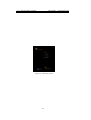
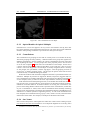
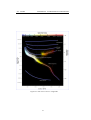
Figure 3.3: The search window
The Object Search window provides a convenient way to locate objects in the sky. Simply type in the name of an object to find, and then click the “go” button or press return.
Stellarium will point you at that object in the sky.
As you type, Stellarium will make a list of objects which begin with what you have
typed so far. The first of the list of matching objects will be highlighted. If you press the
TAB key, the selection will change to the next item in the list. Hitting the RETURN key
will go to the currently highlighted object and close the search dialog.
For example, suppose we want to locate Mimas (a moon of Saturn). After typing the
first letter of the name, m, Stellarium makes a list of objects whose name begins with M:
Mars, Mercury, Mimas, Miranda, Moon. The first item in this list, Mars, is highlighted.
Pressing return now would go to Mars, but we want Mimas. We can either press TAB twice
to highlight Mimas and then hit RETURN, or we can continue to type the name until it is
the first/only object in the list.
13