1
IT-Essential – I
14.5.2
modulo 14
Using Windows Device Manager to troubleshoot
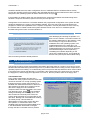
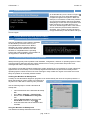
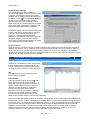
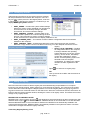
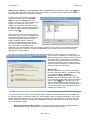
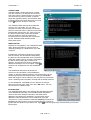
The Windows Device Manager allows the hardware
on a system to be viewed in a graphical interface
and is helpful for managing and troubleshooting the
system. The Device Manager, which is shown in
Figure , can be used to disable, uninstall, and
update device drivers. The Device Manager can
also be used to determine if the system hardware is
working properly and if the correct drivers are
installed for the hardware. Each device that is
having a problem will be labeled so the hardware
that is not installed properly can be easily identified.
When device configurations are being changed
manually, Device Manager can help avoid problems.
The Device Manager is used to identify free
resources and assign devices to those resources,
disable devices to make resources available, and
reallocate resources if necessary. In Windows 2000,
users must be logged on as members of the
administrators group to change resource settings.
Even if a user is logged on as an administrator,
policy settings on a network might prevent them from changing resources
14.5.3
Using Windows system editors
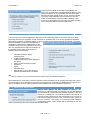
The Windows operating systems contain important editors. These editors allow Windows settings to be
changed and customized to whatever policy the system administrator desires. A system administrator can
use the SYSEDIT.EXE and POLEDIT.EXE editor to edit configuration settings to the user interface. In
Windows 2000 the Group Policy Editor (GPE) allows the administrator to edit a policy for an entire group of
users at one time.
SYSEDIT.EXE
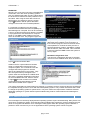
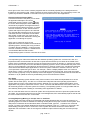
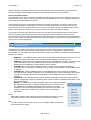
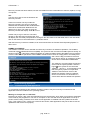
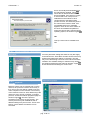
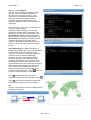
Typing sysedit in the Run dialog box of
the Start menu will open the system editor
tool. The sysedit utility is used to modify
text files such as .INI files and the
CONFIG.SYS and AUTOEXEC.BAT files.
The sysedit commands are similar to
other Windows-based text editing
programs. Figure shows the System
Configuration Editor.
POLEDIT.EXE
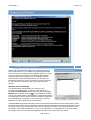
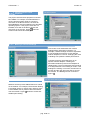
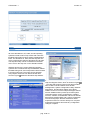
Use the System Policy Editor, or
POLEDIT.EXE, to set up different security
restrictions for different users. Use it to set
one policy for a whole group, configure
desktops for roving users so that any
computer they use will have the same look,
or to protect a computer if it is unplugged
from the network.
The Windows System Policy Editor is a powerful tool that is used to create and edit local registry values to
standardize desktop settings, prevent users from modifying hardware and environment settings, and control
or restrict user actions.
pag. 21 di 44