1
Contents
Chapter 1
1-1
1-2
1-3
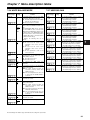
Features of the camera unit ...................... 5
Features of the VTR unit ........................... 6
System configuration ................................ 7
Chapter 2
2-1
2-2
2-3
2-4
2-5
2-6
2-7
2-8
4-4
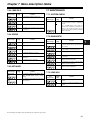
Adjusting the white balance ......................... 26
Adjusting the black balance ......................... 28
Setting the electronic shutter ................. 29
4-2-1
4-2-2
4-2-3
4-3
Adjustments and settings for
recording .............................. 26
Adjusting the white balance and
black balance ........................................... 26
4-1-1
4-1-2
4-2
Recording and playback ..... 19
Cassette tapes .......................................... 19
Basic procedures ..................................... 20
Scene-to-scene continuity ...................... 22
PRE-RECORDING function ...................... 23
INTERVAL REC function .......................... 23
RETAKE function ..................................... 25
Rec-review function ................................. 25
Normal playback and playback
at different speeds ................................... 25
Chapter 4
4-1
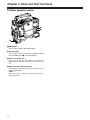
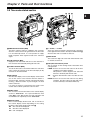
Parts and their functions ....... 8
Power supply and accessory
mounting section ....................................... 8
Audio function section .............................. 9
Shooting and recording/playback
function section ....................................... 11
Menu operation section ........................... 14
Time code related section ....................... 15
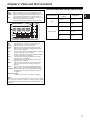
Warning/status display section .............. 16
Display window and its displays ............ 16
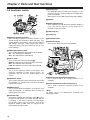
Viewfinder section ................................... 18
Chapter 3
3-1
3-2
3-3
3-4
3-5
3-6
3-7
3-8
General .................................... 5
Shutter modes ............................................. 29
Setting the shutter mode and speed ........... 29
Setting the synchro scan mode ................... 30
Selecting the recording signals and
recording system ..................................... 30
Selecting the audio input signals and
adjusting their recording levels .............. 30
4-4-1
4-4-2
4-4-3
Selecting the audio input signals ................. 30
Adjusting the audio signal recording levels . 31
CH3 and CH4 recording levels .................... 31
4-5
Setting the time data ................................ 32
4-5-1
4-5-2
4-5-3
4-5-4
4-5-5
4-6
Menu displays on the viewfinder screen....... 36
4-6-1
4-6-2
4-6-3
4-7
4-7-3
4-7-4
4-7-5
4-7-6
4-7-7
4-7-8
4-8-4
4-8-5
4-9-6
4-9-7
Chapter 5
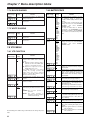
Handling the setup card .............................. 48
Setup card operations ................................. 49
How to use the user data ............................ 52
How to use the scene file data .................... 53
How to return the menus settings to the
user standard settings ................................. 56
How to return the menus settings to the
factory standard settings ............................. 56
How to use the lens file data ....................... 56
Preparation ........................... 57
Supplying the power ................................ 57
5-1-1
5-1-2
5-2
Setting the USER SW GAIN switching ........ 46
Selecting the video output signals ............... 46
Selecting the F.AUDIO LEVEL
control function ............................................ 47
Allocating functions to the USER MAIN,
USER1 and USER2 buttons ........................ 47
Setting the color temperature manually ....... 48
Data handling ........................................... 48
4-9-1
4-9-2
4-9-3
4-9-4
4-9-5
5-1
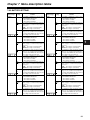
Viewfinder lamp displays.............................. 38
Viewfinder screen status display
configuration..................................................38
Selecting the viewfinder screen display
items ............................................................ 38
Display modes and setting
changes/adjustment result messages ......... 44
Setting the marker displays ......................... 44
Setting the camera ID .................................. 44
Mode check screen displays
(MODE CHECK button function) ................. 45
Marker check screen displays
(MARKER SELECT button function) ........... 45
Menu-driven function setup .................... 46
4-8-1
4-8-2
4-8-3
4-9
Menu configuration ...................................... 36
Basic menu operations ................................ 36
Selecting the user menus ............................ 37
Viewfinder screen status displays ......... 38
4-7-1
4-7-2
4-8
Setting the user bits ..................................... 32
Setting the internal clock’s date and time .... 33
Setting the time code ................................... 34
Externally locking the time code .................. 34
Setting the UMID information ...................... 35
Attaching the battery and setting the
battery type .................................................. 57
Using an AC power supply .......................... 59
Attaching the lens and performing the
flange back and white shading
adjustments .............................................. 59
3