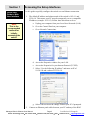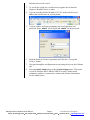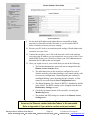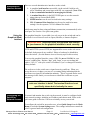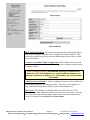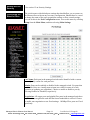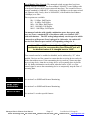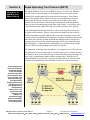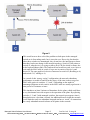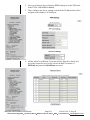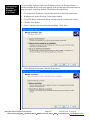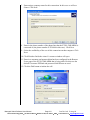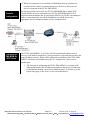
1
USER MANUAL Industrial Ethernet Managed Switch & Remote Access Modem Software User Manual For the latest version of this user manual please go to http://www.sixnet.com Contents at a Glance: Section 1 – Access the Web User Interface Quickly gain access to the switch’s web interface Quick Start Guide Section 2 – Initial Setup and Configuration About the switch and manual Overview General description of key managed switch features Introduction Gain administrative access to configure the switch Administrative Access Learn how to navigate the web interface screens Web User Interface Specify initial configuration parameters (IP, subnet, etc.) Gaining Network Access Define speed, flow control, and negotiation Configuring the Ports Section 3 – Configuration Management and Firmware Updates Access advanced features for maintaining the switch Advanced Operations Save and restore the switch’s configuration Configuration Management Set the switch back to its original settings Factory Defaults Reset (reboot) the switch Resetting the Switch Use the web browser to update the firmware in the switch Update Firmware via Web Use a Trivial File Transfer Protocol server to update firmware Update Firmware via TFTP Use a Windows utility to update the firmware in the switch Update Firmware via Utility Section 4 – Monitoring the Current State of the Switch Display identifying information about the switch System Information Display information about the port and power status Port Status Display the status of the power inputs and OK output Power and OK Status Display various counters and indicators maintained by the switch. Network Status Displays the status of Real-Time Rings(supported models only) Real-Time Ring Status Display the status of the STP or RSTP redundancy if enabled. Spanning Tree Status Display the status if the IGMP multicast filtering if enabled. Multicast Filtering Status This page provides an overview of how the switch is configured. Configuration Summary Display status of the Ethernet modem (-MDM models only) Modem Status Managed Switch Software User Manual Page 1 8 10 11 11 11 12 12 12 14 16 16 16 17 18 18 19 20 21 21 22 22 23 23 47 65 24 24 Last Revised: 12-Aug-09 Sixnet Technology Park 331 Ushers Road Ballston Lake, NY 12019 USA +1-518-877-5173 [email protected] MAC Address Table Display the current MAC address table of the switch Section 5 – Network Management & Remote Monitoring (SNMP and RMON) Using Simple Network Management Protocol and more SNMP, MIB, and RMON Configure the switch to enable unsolicited SNMP responses SNMP Notifications Specify where the unsolicited SNMP responses should go Trap Managers View performance data from SNMP, RMON, and Dot3 Network Statistics Monitor network traffic from/to specific ports Port Mirroring Configure events which trigger the Alarm(OK) output Alarm(OK) Output Section 6 – Redundancy Settings An introduction of Rapid Spanning Tree Protocol (RSTP) What is RSTP? Configure general spanning tree protocol settings RSTP General Settings Configure per port spanning tree protocol settings RSTP Port Settings Basic guidelines when using RSTP or STP protocol RSTP Setup Guidelines Monitor the status of the redundancy operation Spanning Tree Status Examples with switch-over time, RSTP Path costs and more RSTP Examples Configure ports as Real-Time Ring ports(on supported models) Real-Time Ring Settings Section 7 – Priority Queuing (QoS, CoS, ToS/DS) Utilize prioritized traffic to achieve Quality of Service (QoS) Traffic Priority Customize network traffic priority through these settings QoS/CoS Settings Classify the assignments of 802.1p tags to output queues 802.1p Tag Settings Have the switch quench the affects of a broadcast storm Message Rate Limiting QoS Ensures Real-time Delivery of Important Messages QoS Example Section 8 – Multicast Filtering (IGMP) Reduce unnecessary traffic caused by multicast streams About IGMP Configure IGMP general and port settings IGMP Configuration View the IGMP querier and the IGMP groups being forwarded IGMP Status A visual example showing the benefits of enabling IGMP IGMP Example Section 9 – Virtual Local Area Networks (VLANs) Learn what Virtual LANs (VLANs) can do for you Introduction to VLANs Create, delete, and modify VLANs VLAN Settings Define how each port will handle VLAN tags VLAN Port Settings Important information about enabling both VLANs and RSTP VLAN with RSTP Section 10 – Modem Access Settings (-MDM models only) Configure modem parameters Modem Settings Configure Point-to-Point Protocol (PPP) PPP Settings Configure remote users for PPP access Remote Users Configure Routing Information Protocol (RIP) Routing Send a message when digital input is set Dial-out Messaging Section 11 – Other Special Features Use a time server to automatically sync your clock Network Time Protocol Define a fixed IP address to be given out per port Set IP Per Port Command Line Interface (CLI) CLI Section 12 – Security Settings Define how you can remotely access the switch Remote Access Security MAC address-based port security Port Security Managed Switch Software User Manual Page 2 27 28 28 29 29 23 34 35 37 37 41 43 46 47 50 54 55 55 56 57 58 59 62 62 63 65 66 68 68 69 71 73 74 75 77 79 80 81 83 83 84 84 85 85 88 Last Revised: 12-Aug-09 Sixnet Technology Park 331 Ushers Road Ballston Lake, NY 12019 USA +1-518-877-5173 [email protected] Appendices Appendix A Appendix B Appendix C Appendix D Appendix E Appendix F Appendix G Appendix H Appendix I Appendix J Appendix K Basic Troubleshooting Default Software Configuration Settings SNMP Support – MIBs and RMON Concepts and Definitions TFTP Tutorial Remote Access Tutorial (-MDM models only) Dial-Out Messaging Tutorial (-MDM models only) AT Command Summary (-MDM models only) USB Port Configuration Setup for Terminal User Interface Service Information Managed Switch Software User Manual Page 3 90 90 92 95 97 101 103 119 121 123 125 127 Last Revised: 12-Aug-09 Sixnet Technology Park 331 Ushers Road Ballston Lake, NY 12019 USA +1-518-877-5173 [email protected] This manual applies to firmware v4.4.1000 in the following products: ET-5MS-# Managed Ethernet switch with 5 10/100 ports ET-5MS-MDM-# Managed Ethernet switch with 5 10/100 ports and integrated modem ET-9MS-# Managed Ethernet switch with 9 10/100 ports ET-9MG Managed Ethernet switch with 6 10/100 and 3 Gigabit ports ET-10MG Managed Ethernet switch with 8 10/100 and 2 Gigabit ports ET-16MS Managed Ethernet switch with 16 10/100 ports ET-18MG Managed Ethernet switch with 16 10/100 and 2 Gigabit ports SL-5MS-# Slim Line Managed Ethernet switch with 5 10/100 ports SL-5MS-MDM-# Managed Ethernet switch with 5 10/100 ports and integrated modem SL-8MS-# Slim Line Managed Ethernet switch with 8 10/100 ports SL-8MG Slim Line Managed Ethernet switch with 8 10/100/1000 ports SL-10MG Managed Ethernet switch with 7 10/100 and 3 Gigabit ports SL-16MS Managed Ethernet switch with 16 10/100 ports SL-18MG Managed Ethernet switch with 16 10/100 and 2 Gigabit ports EK26 Rack Mount Gigabit Managed Ethernet switch with 26 ports EF26 Rack Mount Managed Ethernet switch with 26 10/100 ports EK32 Rack Mount Gigabit Managed Ethernet switch with 32 ports EF32 Rack Mount Managed Ethernet switch with 32 10/100 ports Download the latest firmware from the web site: http://www.sixnet.com Read the firmware release history on the web site: http://www.sixnet.com Get the latest version of this user manual: http://www.sixnet.com Managed Switch Software User Manual Page 4 Last Revised: 12-Aug-09 Sixnet Technology Park 331 Ushers Road Ballston Lake, NY 12019 USA +1-518-877-5173 [email protected] Sixnet Protected Technology Policy - Sixnet protects your investment in Sixnet systems with long-term planned technology and our unique Protected Technology Policy. We will continue to support the specified capabilities of standard Sixnet products for at least five years (twenty years for Industrial Managed Switches). We plan each product improvement and new feature to be upward compatible with existing designs and installations. Our goals are to make each new software release bring new power to your Sixnet systems and have every existing feature, applications program and data file continue to work. We protect your investment even further with a liberal five-year trade-in policy. Exchange standard products for upgraded versions of the same product to take advantage of new features and performance improvements at any time for five years. A prorated trade-in allowance will be given for your existing equipment. Sixnet protects your long-term productivity with state-of-the-art planned technology and continued support. Sixnet Statement of Limited Warranty - Sixnet, manufacturer of Sixnet products, warrants to Buyer that products, except software, manufactured by Sixnet will be free from defects in material and workmanship. Sixnet's obligation under this warranty will be limited to repairing or replacing, at Sixnet's option, the defective parts within one year of the date of installation, or within 18 months of the date of shipment from the point of manufacture, whichever is sooner. Products may be returned by Buyer only after permission has been obtained from Sixnet. Buyer will prepay all freight charges to return any products to the repair facility designated by Sixnet. This limited warranty does not cover losses or damages which occur in shipment to or from Buyer or due to improper installation, maintenance, misuse, neglect or any cause other than ordinary commercial or industrial applications. In particular, Sixnet makes no warranties whatsoever with respect to implied warranties of merchantability or fitness for any particular purpose. All such warranties are hereby expressly disclaimed. No oral or written information or advice given by Sixnet or Sixnet’s representative shall create a warranty or in any way increase the scope of this warranty. This limited warranty is in lieu of all other warranties whether oral or written, expressed or implied. Sixnet's liability shall not exceed the price of the individual units, which are the basis of the claim. In no event shall Sixnet be liable for any loss of profits, loss of use of facilities or equipment, or other indirect, incidental or consequential damages. INSTALLATION AND HAZARDOUS AREA WARNINGS - These products should not be used to replace proper safety interlocking. No software-based device (or any other solid-state device) should ever be designed to be responsible for the maintenance of consequential equipment or personnel safety. In particular, Sixnet disclaims any responsibility for damages, either direct or consequential, that result from the use of this equipment in any application. All power, input and output (I/O) wiring must be in accordance with Class I, Division 2 wiring methods and in accordance with the authority having jurisdiction. WARNING (EXPLOSION HAZARD) SUBSTITUTION OF COMPONENTS MAY IMPAIR SUITABILITY FOR CLASS 1, DIVISION 2 (ZONE 2). WARNING (EXPLOSION HAZARD) WHEN IN HAZARDOUS LOCATIONS, DISCONNECT POWER BEFORE REPLACING OR WIRING UNITS. WARNING (EXPLOSION HAZARD) DO NOT DISCONNECT EQUIPMENT UNLESS POWER HAS BEEN SWITCHED OFF OR THE AREA IS KNOWN TO BE NONHAZARDOUS. FCC Statement - This equipment has been tested and found to comply with the limits for a Class B digital device, pursuant to Part 15 of the FCC Rules. These limits are designed to provide reasonable protection against harmful interference in a residential installation. This equipment generates, uses and can radiate radio frequency energy and, if not installed and used in accordance with the instructions, may cause harmful interference to radio communications. However, there is no guarantee that interference will not occur in a particular installation. If this equipment does cause harmful interference to radio or television reception, which can be determined by turning the equipment off and on, the user is encouraged to try to correct the interference by one or more of the following measures: Reorient or relocate the receiving antenna; Increase the separation between the equipment and receiver; Connect the equipment into an outlet on a circuit different from that to which the receiver is connected; Consult the dealer or an experienced radio/TV technician for help. Copyright & Trademarks - Copyright 2007 Sixnet, LLC. All Rights Reserved. EtherTRAK is a registered trademark of Sixnet, LLC. Managed Switch Software User Manual Page 5 Last Revised: 12-Aug-09 Sixnet Technology Park 331 Ushers Road Ballston Lake, NY 12019 USA +1-518-877-5173 [email protected] Software License Agreement 1. OWNERSHIP The managed switch Software is the property of the Licensor, as declared on the main menu of the software, and protected by U.S. Copyright Law, Trademark Law and International Treaty Provisions. No ownership in or title to the Software is transferred to Licensee. Licensee will not remove or obscure the Licensor’s copyright, trademark or proprietary notice from the Software and associated documentation. Licensee agrees to prevent any unauthorized copying of the Software. Except as expressly provided herein, Licensor does not grant any express or implied right to Licensee under Licensor’s patents, copyrights, trademarks or trade secret information. This software runs in coordination with firmware embedded into the Licensor’s hardware products. This firmware is agreed to be part of this Licensed Software. It is further agreed that the designs of the Licensor’s hardware products are the proprietary property of the Licensor. 2. LICENSE The author grants you, the “Licensee” a license to use this software only after you have completed the required registration and if you agree to the terms of this agreement and any restrictions of the registration you have obtained. No ownership in or title to the software is transferred to Licensee. This license is nonexclusive. This license is non-transferable except if in accordance with an OEM agreement with the Licensor. Licensee is authorized to make only those copies of this software that are required to use it in accordance with license granted and those copies required for backup or archival purposes. Licensee agrees to prevent any unauthorized copying of the software or any registration number provided. 3. RESTRICTIONS Except as set forth herein, the Licensee may not copy, sell, transfer, loan, rent, lease, modify, create derivative works or alter the Products, without the express written consent of the Licensor. Licensee may not reverse engineer, decompile or disassemble the products or otherwise attempt to derive source code from the Licensed Software. 4. NO WARRANTY LICENSOR MAKES NO WARRANTIES WHATSOEVER WITH RESPECT TO THE SOFTWARE, INCLUDING BUT NOT LIMITED TO IMPLIED WARRANTIES OF MERCHANTIBILITY OR FITNESS FOR PARTICULAR PURPOSE. ALL SUCH WARRANTIES ARE HEREBY EXPRESSLY DISCLAIMED. NO ORAL OR WRITTEN INFORMATION OR ADVICE GIVEN BY THE LICENSOR OR THE LICENSOR’S REPRESENTATIVE SHALL CREATE A WARRANTY OR IN ANY WAY INCREASE THE SCOPE OF THIS WARRANTY. 5. LIMITATION OF LIABILITY Under no circumstances including negligence shall Licensor be liable for any incidental, special or consequential damages that result from the use or inability to use the Products, even if the Licensor is advised of the possibility of such damages. Licensor shall make a reasonable effort to resolve any problems the Licensee may have in its use of the products. In no event shall Licensor’s total liability to Licensee for any and all damages, losses or causes of action in contract, tort or otherwise exceed the amount paid by Licensee for the Software or Hardware Products that are the basis of the claim. 6. HIGH RISK ACTIVITIES Licensee acknowledges that the Licensed Software is not fault tolerant and is not designed, manufactured, or intended by Licensor for incorporation into products intended for use or resale in on-line control equipment in hazardous, dangerous to life, or potentially life-threatening environments requiring fail-safe performance, such as in the operation of nuclear facilities, aircraft navigation or communication systems, air traffic control, direct life support machines, or weapons systems. Licensor specifically disclaims any express or implied warranty of fitness for High Risk Activities. Licensee specifically represents and warrants that this Software or Derivative Work will not be used for High Risk Activities. Managed Switch Software User Manual Page 6 Last Revised: 12-Aug-09 Sixnet Technology Park 331 Ushers Road Ballston Lake, NY 12019 USA +1-518-877-5173 [email protected] 7. INDEMNIFICATION Licensee agrees to indemnify, defend and hold harmless the Licensor from any and all liability, penalties, losses, damages, costs, expenses, attorneys’ fees, causes of action or claims caused by or resulting directly or indirectly from Licensee’s use, sale or distribution of the Software which damages either Licensee, the Licensor or any other party or parties without limitation or exception. This indemnification and hold harmless agreement extends to all issues associated with the Software, or this License. 8. INTELLECTUAL PROPERTY INFRINGEMENT Licensee shall not add, or cause to be added, any item or items to any product of Licensor for which Licensee is granted a license under this Agreement, if said added item or items would cause said product of Licensor to infringe or potentially infringe any intellectual property right, including a patent right, of any third party, said item or items including but not limited to application specific software, configuration files, data or document files, application programs, web pages, GPL (General Public License) software, third party applications software, and the like. Licensee agrees that the Licensor does not supply and is not responsible or liable to Licensee under this agreement for any infringement or potential infringement that may result from the addition of application specific software, configuration files, data or documentation files, application programs, web pages, or the like, that are added to the Licensor’s products by or on the behalf of the Licensee. This limitation of liability includes any or all GPL (General Public License) and third party applications software that may be loaded into any product as an accommodation to the Licensee. 9. TERMINATION This Agreement is effective until terminated. This License will terminate immediately without notice by the Licensor if Licensee fails to comply with any provision of this License or any other Agreement that exists between the parties. Upon termination of this Agreement, any and all use, sale or distribution of the software by Licensee must cease immediately and the Licensee must destroy all copies of this software and all associated documentation. If the licensed software is purchased through an intermediary, the Licensor of this software is an intended third party beneficiary of that transaction and is entitled to enforce it in its own name directly against the Licensee. 10. GOVERNING LAW This License shall be governed in all respects by the courts, jurisdiction and laws of the State of New York. Licensee may not export the Software or materials in violation of applicable export laws and regulations. If for any reason a court of competent jurisdiction finds any provision of this License or portion thereof, to be unenforceable, the provision shall be enforced to the maximum extent possible so as to effect the intent of the parties and the remainder of this Certificate shall continue in full force and effect. Note: All information in this document is subject to change without notice. Managed Switch Software User Manual Page 7 Last Revised: 12-Aug-09 Sixnet Technology Park 331 Ushers Road Ballston Lake, NY 12019 USA +1-518-877-5173 [email protected] Section 1 Quick Start Guide to Web User Interface Accessing the Setup Interfaces Use this guide to quickly configure the switch over an Ethernet connection. 1. The default IP address and subnet mask of the switch is 10.2.0.1 and 255.0.0.0. This means your PC must be temporarily set to a compatible IP address (example: 10.2.0.2). Follow these directions to do so: a. Unplug your computer from your Local Area Network (LAN). Note: This is the recommended method for initially accessing the switch. b. Go to the Control Panel on your computer. c. Go to Network Connections. d. Access the Properties window for your LAN. e. Access the Properties for your Internet Protocol (TCP/IP). f. Select “Use the following IP address” and enter an IP of 10.2.0.100 and a subnet of 255.0.0.0. g. Select OK to activate the change. Reboot your PC if prompted. 2. Connect an Ethernet patch cable between your PC and any of the RJ45 Managed Switch Software User Manual Page 8 Last Revised: 12-Aug-09 Sixnet Technology Park 331 Ushers Road Ballston Lake, NY 12019 USA +1-518-877-5173 [email protected] Ethernet ports on the switch. 3. To access the switch use a web browser program such as Internet Explorer, Mozilla Firefox, or other. 4. Type the switches default IP address 10.2.0.1 in the web browser’s address bar and hit enter on your keyboard. 5. A log in window will open prompting you for a login name and password. Enter ‘admin’ for the login and ‘admin’ for the password. 6. Read the Software License Agreement and Click the “I accept the License” button. 7. Navigate through the configuration screens using the tree on the left hand side. 8. Selecting Quick Setup brings up the System Settings menu. This menu is used to configure the IP address (DHCP or static), subnet mask, redundancy protocol, system name, contact, and location information. See the image below. Managed Switch Software User Manual Page 9 Last Revised: 12-Aug-09 Sixnet Technology Park 331 Ushers Road Ballston Lake, NY 12019 USA +1-518-877-5173 [email protected] 9. Set the desired IP address and subnet that are compatible with the network for which this switch will reside, or you can enable DHCP. Select Commit to activate your new settings. 10. Restore your PC back to its normal network settings (IP and subnet) and reconnect it to your LAN. 11. Connect the switch to your LAN or the network it will reside and now you can use the IP address you just assigned to access your switch. If you enabled DHCP then you will need to contact your LAN administrator to determine the IP address that was assigned. 12. Once you regain access to your switch then you can do the following: a. The default administrative password can be changed from the Remote Access Security menu. b. The individual ports on the switch are configured to a set of defaults and auto-selects that should get you started quickly with no necessary configuration. Customizing the port settings by enabling/disabling a port, choosing the speed, duplex, or flow control is accessed from the Port Configuration menu. c. The Rapid Spanning Tree Protocol (RSTP) is disabled by default in the switch. The RSTP settings can be changed from the from Redundancy Settings screens. d. Check the operational status of the switch by accessing the Monitoring menu. e. The modem and PPP settings are found in the Remote Access Settings menu. Note: The switch can also be initially configured using the serial port. However, the Ethernet method described above is recommended. Refer to Appendix J if you wish to use the serial port method. Managed Switch Software User Manual Page 10 Last Revised: 12-Aug-09 Sixnet Technology Park 331 Ushers Road Ballston Lake, NY 12019 USA +1-518-877-5173 [email protected] Section 2 Initial Setup and Configuration Overview The Industrial Ethernet Managed Switch is a configurable device that facilitates the interconnection of Ethernet devices on an Ethernet network. This includes computers, operator interfaces, I/O, controllers, RTUs, PLCs, other switches/hubs or any device that supports the standard IEEE 802.3 protocol. This switch has all the capabilities of a store and forward Ethernet switch plus advanced management features such as SNMP, RSTP and port mirroring. This manual details how to configure the various management parameters in this easy to use switch. Introduction To take full advantage of all the features and resources available from the switch, it must be configured for your network. The switch implements Rapid Spanning Tree Protocol (RSTP) and Simple Network Management Protocol (SNMP) to provide most of the services offered by the switch. Rapid Spanning Tree Protocol allows managed switches to communicate with each other to ensure that there exists only one active route between each pair of network nodes and provides automatic failover to the next available redundant route. A brief explanation of how RSTP works is given in the Spanning Tree section. The switch is capable of communicating with other SNMP capable devices on the network to exchange management information. This statistical/derived information from the network is saved in the Management Information Base (MIB) of the switch. The MIB is divided into several different information storage groups. These groups will be elaborated in detail in the Management and SNMP information section of this document. The switch implements Internet Group Management Protocol (IGMP) to optimize the flow of multicast traffic on your network. The switch supports both port-based and tag-based Virtual LANs for flexible integration with VLAN-aware networks with support for VLAN-unaware devices. Additional technical documentation is available in the appendices of this manual. These appendices provide important terminology/definitions, an administrative menu map, example of an RSTP network topology, and factory default information extracted from the switch. Managed Switch Software User Manual Page 11 Last Revised: 12-Aug-09 Sixnet Technology Park 331 Ushers Road Ballston Lake, NY 12019 USA +1-518-877-5173 [email protected] Administrative Interface Access There are several administrative interfaces to the switch: 1. A graphical web interface accessible via the switch’s built-in web server. Both http and secure https with SSL are supported. (Note: This is the recommended method for managing the switch.) 2. A terminal interface via the RS232/USB port or over the network using telnet or Secure Shell (SSH). 3. SNMP interface can be used to read/write many settings. 4. CLI (Command Line Interface) can be used to read/write most settings. See the separate CLI User Manual for details. Initial setup must be done using an Ethernet connection (recommended) or the serial port. See Section 1 for quick start guides. Using the Graphical (Web) Interface The graphical interface is provided via a web server in the switch and can be accessed via a web browser such as Opera, Mozilla, or Internet Explorer. Important Note: JavaScript must be supported and enabled in your browser for the graphical interface to work correctly. HTTP and HTTPS (secure HTTP) are supported for access to the web server. By default, both protocols are enabled. Either or both may be disabled to secure the switch. (See the Remote Access Security topic in this section) To access the graphical interface, enter a URL like HTTP://10.2.0.1 in your browser’s address bar. Replace “http” with “https” to use secure http and replace “10.2.0.1” with your switch’s IP address if you’ve changed it from the factory default. The web server in the switch uses a signed security certificate. When you access the server via https, you may see a warning dialog indicating that the certificate was signed by an unknown authority. This is expected and to avoid this message in the future you can choose to install the certificate on your computer. Note: This manual describes and depicts the web user interface in detail. The terminal interface is not specifically shown but is basically the same. Configuring the Switch for Network Access To control and monitor the switch via the network, it must be configured with basic network settings, including an IP address and subnet mask. Refer to the quick start guide in Section 1 for how to initially access your switch. To configure the switch for network access, select Quick Setup from the Main Menu to reach the System Settings menu. The settings in this menu control the switch’s general network configuration. Managed Switch Software User Manual Page 12 Last Revised: 12-Aug-09 Sixnet Technology Park 331 Ushers Road Ballston Lake, NY 12019 USA +1-518-877-5173 [email protected] DHCP Enabled/Disabled: The switch can automatically obtain an IP address from a server using the Dynamic Host Configuration Protocol (DHCP). This can speed up initial set up, as the network administrator does not have to find an open IP address. IP Address and Subnet Mask Configuration: The IP address for the switch can be changed to a user-defined address along with a customized subnet mask to separate subnets. Note to Advanced Users: As additional security you can set the IP address to 0.0.0.0 to disable the use of an IP address. However, any features requiring an IP address (i.e., web interface, etc.) will no longer be available. Default Gateway Selection: A Gateway Address is chosen to be the address of a router that connects two different networks. This can be an IP address or a Fully Qualified Domain Name (FQDN) such as “domainname.org”. NTP Server: The IP address or domain name of an NTP (Network Time Protocol) server from which the switch may retrieve the current time at startup. Please note that using a domain name requires that at least one domain name server be configured. See section 11 for more details. Managed Switch Software User Manual Page 13 Last Revised: 12-Aug-09 Sixnet Technology Park 331 Ushers Road Ballston Lake, NY 12019 USA +1-518-877-5173 [email protected] Remote Access Security Configuring the Ethernet Ports See section 12 on Security Settings. The switch comes with default port settings that should allow you to connect to the Ethernet Ports with out any necessary configuration. Should there be a need to change the name of the ports, negotiation settings or flow control settings, you can do this in the Port Configuration menu. Access this menu by selecting Setup from the Main Menu, and then selecting Main Settings. Port Name: Each port in the managed switch can be identified with a custom name. Specify a name for each port here. Admin: Ports can be enabled or disabled in the managed switch. For ports that are disabled, they are virtually non-existent (not visible in terms of switch operation or spanning tree algorithm). Choose to enable or disable a port by selecting Enabled or Disabled, respectively. Negotiation: All copper ports and gigabit fiber ports in the managed switch are capable of auto-negotiation such that the fastest bandwidth is selected. Choose to enable auto-negotiation or use fixed settings. 100Mbps Fiber ports are Fixed speed only. Managed Switch Software User Manual Page 14 Last Revised: 12-Aug-09 Sixnet Technology Park 331 Ushers Road Ballston Lake, NY 12019 USA +1-518-877-5173 [email protected] Speed/Duplex/Flow Control: The managed switch accepts three local area network Ethernet Standards. The first standard, 10BASE-T, runs 10Mbps with twisted pair Ethernet cable between network interfaces. The second local area network standard is 100BASE-T, which runs at 100Mbps over the same twisted pair Ethernet cable. Lastly, there is 100BASE-F, which enables fast Ethernet (100Mbps) over fiber. These options are available: 10h – 10 Mbps, Half Duplex 10f – 10 Mbps, Full Duplex 100h – 100 Mbps, Half Duplex 100f – 100 Mbps, Full Duplex 1000f – 1000 Mbps, Full Duplex On managed switches with gigabit combination ports, those ports with have two rows, a standard row of checkboxes and a row labeled “SFP” with radio buttons. The SFP setting independently sets the speed at which a transceiver will operate if one is plugged in. Otherwise, the switch will use the fixed Ethernet port and the corresponding settings for it. Note: When 100F is selected for the SFP of a gigabit combination port, the corresponding fixed Ethernet jack will be disabled unless it is changed back to 1000F. Flow control can also be enabled or disabled, and is indicated by ‘FC’ when enabled. Devices use flow control to ensure that the receiving devices takes in all the data without error. If the transmitting device sends at a faster rate than the receiving device, than the receiving device will eventually have its buffer full. No further information can be taken when the buffer is full, so a flow control signal is sent to the transmitting device to temporarily stop the flow of incoming data. Port Mirroring SNMP Traps / Notifications Set IP Per Port See section 5 on SNMP and Remote Monitoring. See section 5 on SNMP and Remote Monitoring. See section 11 on other special features. Managed Switch Software User Manual Page 15 Last Revised: 12-Aug-09 Sixnet Technology Park 331 Ushers Road Ballston Lake, NY 12019 USA +1-518-877-5173 [email protected] Section 3 Advanced Operations Configuration Management and Firmware Updates Use the Advanced Operations Menu for saving and restoring configurations, reloading factory defaults, resetting the switch, updating the firmware, and setting up remote access. Note: The web interface supports direct transfers to and from the system where your browser is running. Alternatively, you can use TFTP (Trivial File Transfer Protocol) for file transfers. Access to the Advanced Operations menu is available by selecting the option in the Main menu. Saving and Retrieving Files Configuration Management The Configuration Management and Update Firmware features allow you to Browse to save and retrieve files directly from your local system. This is the easiest and recommended method. Alternatively, you can use a TFTP (Trivial File Transfer Protocol) server to centralize the storage of your configuration and firmware files. Free TFTP servers for Windows and Linux are available on the web. They are generally easy to install and setup. For more details and links to available TFTP servers see www.sixnet.com or Appendix F. One "checkpoint" (backup) version of the switch’s configuration can be stored in a local file on the switch. Unlimited backups can also be saved to your local system (web interface only) or to a TFTP server elsewhere on the network. Managed Switch Software User Manual Page 16 Last Revised: 12-Aug-09 Sixnet Technology Park 331 Ushers Road Ballston Lake, NY 12019 USA +1-518-877-5173 [email protected] Save Checkpoint: Saves a checkpoint configuration in the switch, which may be used later to revert back to the current state if changes lead to an undesirable configuration. Restore Checkpoint: Reverts to the settings in the saved checkpoint. You can optionally choose to keep your current network settings or use the ones in the checkpoint file. Note: The current administrator’s password will remain in effect after the restoration. SNMP passwords will be restored to the values in the checkpoint. TFTP Configuration: Specifies the name or IP address of the TFTP (Trivial File Transfer Protocol) server where configuration checkpoints may be stored. Save to TFTP: Saves the current configuration checkpoint file to the defined TFTP server. You must specify the name of a file on the server. Retrieve from TFTP: Retrieves a previously saved configuration checkpoint file from the defined TFTP server. After retrieval, the configuration still must be restored to be made active. Note: The web interface also allows you to download (save) and upload (retrieve) files directly from your local system. No TFTP server is needed. Factory Defaults This option sets the switch back to factory default settings. The switch will automatically restart (reset) to put the default settings into effect. See a list of the factory default settings in the ‘Default Software Configuration Settings’ section in Appendix B of this manual. Managed Switch Software User Manual Page 17 Last Revised: 12-Aug-09 Sixnet Technology Park 331 Ushers Road Ballston Lake, NY 12019 USA +1-518-877-5173 [email protected] Reset Switch This feature will cause the switch to perform a “soft” restart (software reset). A software reset may take 30 seconds or more depending on what features are enabled in the switch. Managed Switch Software User Manual Page 18 Last Revised: 12-Aug-09 Sixnet Technology Park 331 Ushers Road Ballston Lake, NY 12019 USA +1-518-877-5173 [email protected] Update Firmware using the Web Interface Firmware updates are released periodically to add features and fix problems. The recommended and easiest way to update firmware is from the web interface. It allows you to Browse and select the firmware update package from your local computer or a computer on your local network. Then just click the Update from File button to load and install the latest firmware files. This method of updating the firmware will retain all your settings. However, it is still recommended that you save a “checkpoint” configuration as a backup. Update Firmware using a TFTP Server Another option for updating firmware is via a TFTP server elsewhere on the network. Simply specify the IP address of the remote TFTP server and the filename of the update. If necessary, the switch will automatically reboot after installing the new firmware files. After the reboot you may see an “Internal Server Error” message. Simply click refresh on your browser to reestablish communications with the switch. Refer to Appendix E for information on setting up a TFTP server. This method of updating the firmware will retain all your settings. However, it is still recommended that you save a “checkpoint” configuration as a backup. Managed Switch Software User Manual Page 19 Last Revised: 12-Aug-09 Sixnet Technology Park 331 Ushers Road Ballston Lake, NY 12019 USA +1-518-877-5173 [email protected] Updating Firmware using the Firmware Loader Utility The switch’s firmware can also be updated using the Managed Switch Firmware Loader utility. This operation will completely restore the switch firmware and factory defaults. Steps for using the utility to load firmware: 1. Download and install the managed switch firmware loader utility. The default and recommended path is c:/program files/switch tools. 2. Download the Firmware Bundle to a folder on your computer. The default and recommended path is c:/program files/switch tools/firmware. 3. Make an Ethernet connection to the switch and make sure you can communicate to it (such as ping it). If the switch is unresponsive for any reason then you will need to also make a serial or USB connection to the switch. Refer to the hardware manual for serial port wiring details. Important Note: If you are running RSTP, disconnect any redundant Ethernet links to the switch. During the update, make sure to re-enable RSTP before reconnecting your redundant links. 4. Run the Managed Switch Firmware Loader utility. 5. Click Next for the firmware selection window. Then Browse and select the new firmware image that you downloaded from the web. 6. Click Next to pick Ethernet Only or Ethernet with Serial plus the appropriate com port that is to be used to communicate with the switch. 7. Click Next and enter your computer’s IP address if it is not automatically detected. Also, enter the appropriate IP address and subnet mask for the switch. For Ethernet Only you also need to enter your username and password. 8. Click Next and then click Load Now. If prompted to cycle power then turn the switches power off and then back on to start the firmware update process. Make sure to check that all the update steps listed in the overall status window are successful. If not, try updating the firmware again. You will then need to interface the switch through a terminal program and re-configure your network settings or reload your saved checkpoint configuration. Managed Switch Software User Manual Page 20 Last Revised: 12-Aug-09 Sixnet Technology Park 331 Ushers Road Ballston Lake, NY 12019 USA +1-518-877-5173 [email protected] Section 4 System Information Monitoring the Current State of the Switch The System Information page displays identifying information about the switch, and current network settings. Model number of the switch. Description is available via SNMP as SYSTEM.SYSDESCR.0. This is the basic description of the switch. System Name: The hostname of the switch. It must contain only letters, digits, and dashes. This may be read or written via SNMP as SYSTEM.SYSNAME.0. Switch Location: The physical location of the switch (the cabinet, closet, rack, etc. it is in). This may be read or written via SNMP as SYSTEM.SYSLOCATION.0. Contact: Typically, this parameter includes the contact’s name and e-mail address. This may be read or written via SNMP as SYSTEM.SYSCONTACT.0. IP Address: IP address of the switch Subnet Mask: Subnet Mask of the switch. Readable via SNMP as RFC1213MIB::IPADENTNETMASK.<IPADDRESS> where <IPADDRESS> is the IP address of the switch (e.g., 10.2.0.1). Gateway: Gateway IP configured for the switch. Readable via SNMP as RFC1213MIB::IPROUTENEXTHOP. Serial Number is a unique serial number assigned to the switch at the factory. This number is not settable. Firmware Revision is the version of the firmware currently in the switch. MAC Address: Media Access Control number of the switch (not settable). System Up Time is available via SNMP as SYSTEM.SYSUPTIME.0. This is the amount of time since the switch was latest powered up. Managed Switch Software User Manual Page 21 Last Revised: 12-Aug-09 Sixnet Technology Park 331 Ushers Road Ballston Lake, NY 12019 USA +1-518-877-5173 [email protected] Port Status The Port Status page displays the current status of each port. The display will be updated every 5 seconds. The following information for each port is displayed: Port: The number of the port. This corresponds to the labels on the switch. Name: The user-configured name of the port. Admin: The configured state of the port (enabled or disabled). Link: The current state of the Ethernet link at a port. If there is a proper connection link status will show Up. If the port is disabled, not connected, or has a faulty connection, the link status will show Down. Negotiation: Shows whether auto-negotiation is enabled (Auto) or disabled (Fixed). Speed/Duplex: Shows the speed of the connection (10, 100 or 1000 Mbps) and the duplex status (h = half duplex; f = full duplex). Power and OK Status A separate area below the Port Status grid mimics the P1, P2, and OK status LEDs on the switch. When P1 is highlighted, power is detected on the first terminal input. P2 is highlighted when power is detected on the second terminal input. OK (To PLC in the ET-5MS-MDM) is highlighted when power is detected on the first and second terminal inputs and the switch software is running. The To PLC output could also be configured to be highlighted when there is a modem-to-modem connection present (CD is on). Managed Switch Software User Manual Page 22 Last Revised: 12-Aug-09 Sixnet Technology Park 331 Ushers Road Ballston Lake, NY 12019 USA +1-518-877-5173 [email protected] Network Statistics The Network Statistics displays network statistics for the selected port. Choose between RMON and Ether-like statistics. The display will be updated every 5 seconds and the change since the last refresh will be displayed in the change column. Note: Statistics are for Ingress traffic only Real-Time Ring Status On support switches, the Real-Time Ring Status page shows the status of the rings configured on the switch, including the status of the primary and pack ports as well as the status of the Real-Time Ring as a whole. Managed Switch Software User Manual Page 23 Last Revised: 12-Aug-09 Sixnet Technology Park 331 Ushers Road Ballston Lake, NY 12019 USA +1-518-877-5173 [email protected] Redundancy Status See the RSTP section of this manual. Multicast Filtering Status See the IGMP section of this manual. Managed Switch Software User Manual Page 24 Last Revised: 12-Aug-09 Sixnet Technology Park 331 Ushers Road Ballston Lake, NY 12019 USA +1-518-877-5173 [email protected] Configuration Summary The Configuration Summary Page provides a complete overview of the configuration settings of the switch. The summary is generated in a printfriendly format. If an NTP server is configured, the report will also report a timestamp. To save these settings to a configuration file, click the “Save these settings” button to be redirected to the Configuration Management screen. Note: This page is for viewing settings only. To change settings, please browse to the individual configuration screens. Managed Switch Software User Manual Page 25 Last Revised: 12-Aug-09 Sixnet Technology Park 331 Ushers Road Ballston Lake, NY 12019 USA +1-518-877-5173 [email protected] Modem Status The Modem Status page shows the status and statistics of the PPP connection along with the connected state of the modem. The display will be updated every 5 seconds. This page is only available in ET-5MS-MDM models. PPP mode: Displays current configuration status of PPP in the Ethernet. PPP state: Current state of the PPP connection – Up or Down. Uptime: Time the PPP connection has been up. It will be blank if there is no PPP connection. IP Address: The IP address being used by the PPP connection. Subnet mask: The Subnet Mask being used by the PPP connection. Received: The number of Bytes, Packets and Errors that have come in via the PPP connection. Transmitted: The number of Bytes, Packets and Errors that have been transmitted by the PPP connection. Input From PLC (From PLC): Status of the ‘From PLC’ input on the ET5MS-MDM. TRUE is displayed when a voltage is detected on the From PLC input. FALSE is displayed when no voltage is detected. Carrier Detect (CD): Displays the status of the modem connection as either Connected or Disconnected. Managed Switch Software User Manual Page 26 Last Revised: 12-Aug-09 Sixnet Technology Park 331 Ushers Road Ballston Lake, NY 12019 USA +1-518-877-5173 [email protected] MAC Address Table The MAC address table page displays the current MAC address table of the switch. This data can be filtered by the Filter Database ID(FID), the port(s) of discovery or by all or part of the MAC address. Please note that Port 33 or 65 is the internal CPU port, depending on the model. Managed Switch Software User Manual Page 27 Last Revised: 12-Aug-09 Sixnet Technology Park 331 Ushers Road Ballston Lake, NY 12019 USA +1-518-877-5173 [email protected] Section 5 SNMP, MIB and RMON Groups Network Management (SNMP and RMON) SNMP (Simple Network Management Protocol) and RMON (Remote Monitoring) provide a means to monitor and manage your network. Each SNMP device maintains Management Information Bases (MIBs) containing information about the operation and configuration of the device. Note: This product uses Net-SNMP (available from www.netsnmp.org) which is subject to the copyrights & license found at: http://www.net-snmp.org/COPYING.txt The MIBs can be accessed with SNMP tools ranging from simple commandline tools like snmpwalk and snmpget (part of the open source Net-SNMP package available at http://www.net-snmp.org) to commercial network management products from various vendors. Key information from the MIBs is also available via the switch’s terminal and web interfaces. The MIBs are divided into groups of related objects. Objects may be scalar (having on only a single value) or tabular (having a list of values varying over time, by port number, etc.). SNMP Security See Appendix C for a list of the supported MIB and RMON groups: SNMP provides several options for securing access to MIBs. SNMPv1 and SNMPv2 provide only weak authentication. SNMPv3 uses encryption to add stronger authentication as well as privacy. In all versions, you may configure read-only and read/write users. SNMPv1 and SNMPv2 authenticate users with a “community string” which is sent in clear text (unencrypted) and no password is required. Some measure of security can be achieved by setting long, obscure community strings. SNMPv3 provides three levels of security and encryption: None – No password is required to read or write values in the MIB. Authentication – A password is required and is used to encrypt the user credentials so that security information is not sent in clear text. A variation of MD5 is used for encryption. Privacy – A password is required and is used to encrypt the user credentials. A second password is used to encrypt the details of the SNMP request using DES encryption. For SNMPv3 access, the managed switch requires authentication and allows privacy. Only one password is configurable and it is used for both authentication and privacy. The following examples use snmpget from the Net-SNMP tools to illustrate the use of authentication and privacy when accessing the managed switch. If SNMPv2 access is enabled, values may be read without a password with a command like: snmpget –v 2c –c public 10.2.0.1 system.sysDescr.0 Managed Switch Software User Manual Page 28 Last Revised: 12-Aug-09 Sixnet Technology Park 331 Ushers Road Ballston Lake, NY 12019 USA +1-518-877-5173 [email protected] If SNMPv3 access is enabled, values may be read with a command like the following (entered all on one line): snmpget –v 3 –u public –l authNopriv –a MD5 –A publicpwd 10.2.0.1 system.sysDescr.0 Finally, if SNMPv3 access is enabled, an authenticated, private request could be made with a command like the following: snmpget –v 3 –u public –l authpriv –a MD5 –A publicpwd -x DES –X publicpwd 10.2.0.1 system.sysDescr.0 The switch supports SNMPv1, v2, and v3. SNMPv1 and v2 access are essentially the same from a security standpoint and are enabled and disabled together. SNMPv3 security may be separately controlled. Thus you may prevent unauthenticated access to your switch by disabling SNMPv1/v2 access entirely while retaining password-secured access via SNMPv3. SNMP Notifications Use the SNMP Notifications Menu to enable traps to be sent when the state of the switch changes. Access this menu by selecting Setup from the Main Menu, and then selecting Main Settings. Authentication: Traps can be sent when invalid credentials (such as an unrecognized community string) are presented to the SNMP agent. Enable this setting to generate authentication traps. Topology change: Traps can be sent when the topology of the spanning tree changes. Enable this setting to generate topology change traps. Link 1 up/down – Link 18 up/down: Traps can be sent when a link goes up or down (the same state reflected in the LED for each port). Enable these settings to generate link up/down traps. Managed Switch Software User Manual Page 29 Last Revised: 12-Aug-09 Sixnet Technology Park 331 Ushers Road Ballston Lake, NY 12019 USA +1-518-877-5173 [email protected] Trap Managers Use the Trap Managers Menu to specify where traps will be sent. The Trap Managers Menu can be accessed by selecting Setup from the Main Menu and then selecting Main Settings. Up to five trap managers may be configured. For each one, the following values may be specified. Host: The IP address of the host where the trap manager is located. Community String: The community string to use when contacting the trap manager on the host. Version: The SNMP trap version to send. Note: There are two system traps that cannot be disabled and will be sent to any configured trap managers. A coldStart trap will be sent whenever the SNMP agent starts up (usually, this is only when the switch is reset). A NotifyRestart trap will be sent whenever the SNMP agent’s configuration changes and is reloaded. This will happen, for example, when you commit changes on a configuration menu that includes SNMP settings. Monitoring Menu The Monitoring menu, which is accessed right off of the Main Menu, provides four status options that may be used to monitor the performance of your switch in real time. System Information shows the network settings and system identity Port and Power Status shows the current status of each port and the power inputs Network Statistics shows RMON or Ether-like statistics for one port at a time and may be switched from port to port as needed. Redundancy Status shows the status related to the spanning tree protocol (See Section 6 for more details). Managed Switch Software User Manual Page 30 Last Revised: 12-Aug-09 Sixnet Technology Park 331 Ushers Road Ballston Lake, NY 12019 USA +1-518-877-5173 [email protected] Network Statistics The Network Statistics page shows a subset of the performance data from SNMP and RMON. Select RMON (Remote Monitoring) statistics or Ether-like statistics and the desired port number. The display will be updated every 5 seconds. Selecting Ether-like statistics will display various Ethernet statistics for the selected port, for which can be used to determine how your network is performing. These statistics come from the Dot3 MIB (RFC 2665). The following statistics are provided: Alignment Errors: Happens when the Ethernet Interface cannot synchronize with the incoming packet because it is not of expected length (packet received has invalid CRC). Causes: This is possibly caused by interference and attenuation. Check for faulty wiring, NICs, or possible causes of interference/line noise. FCS Errors: This error happens when packets have a bad Frame Check Sequence. Single Collision Frames: This happens when an Ethernet device tries to send a frame but discovers that is at least one other device on the network trying to send at the same time (collision detected). When a collision is detected the network devices prepare to access the network medium again, but only after waiting for a random amount of time. Collisions are common in an Ethernet network and collision detection allows the devices on an Ethernet network to work. When the Ethernet device tries to transmit that same frame again and is successful, it is called a single collision. Important: Collisions don’t provide for a very useful statistic as to the current performance of the network, since this is the principle behind how devices on Managed Switch Software User Manual Page 31 Last Revised: 12-Aug-09 Sixnet Technology Park 331 Ushers Road Ballston Lake, NY 12019 USA +1-518-877-5173 [email protected] the network communicate. Multiple Collision Frames: Multiple collisions happen when the Ethernet device tries to transmit a frame through the network medium, but detects a collision. The Ethernet device tries again to transmit the same frame through the network but again encounters another collision. The error count is incremented each time a particular frame fails after the first attempt of transmission. Important: Collisions don’t provide for a very useful statistic as to the current performance of the network, since this is the principle behind how devices on the network communicate. SQE Test Errors: A network device checks for the Signal Quality Error Transmission to see if the collision detection circuitry is working. For whatever reason that the network device does not detect the SQE transmission, the SQE test error counter is incremented. Deferred Transmissions: A transmission is Deferred when the device is trying to access the network but another devices in already transmitting (by detecting a carrier signal, not a collision) on the network. Late Collisions: When an Ethernet Device starts transmitting a frame on the network medium, it believes that it can transmit because it didn’t detect a collision. If for some reason the Ethernet device is transmitting, but after a given time period during the frame transfer it realizes that it really wasn’t clear to transmit because it detected a collision; that is called a late collision. For a 10BASE-T network, a collision is detected (by the device that is transmitting that frame) after 51.2 microseconds into a frame transfer is considered a late collision. For a 100BASE-T network, a collision is detected (by the device that is transmitting that frame) after 5.12 microseconds into a frame transfer is considered a late collision. Causes: Late collisions usually come from a problem on the network such as improper configuration, compliance issues between network devices, incorrect cabling, and faulty Network Interface Cards. Excessive Collisions: When an Ethernet Device attempts to transmit a frame but detects a collision, it attempts to retry to send the same frame at another random time. Should the Ethernet device fail to transmit that particular frame after 16 tries, the Ethernet device gives up and the frame will not be transmitted. Internal MAC Transmit Errors: When frames fail to be transmitted correctly due to an internal MAC sub-layer transmit error. Carrier Sense Errors: When an Ethernet device loses the carrier sense condition whenever a frame is being transmitted. The error is incremented a maximum of one time per transmission attempt (no matter how many times the carrier sense condition fluctuates during a single transmission attempt). Frame Too Longs: Every time there is a frame that is encountered to exceed Managed Switch Software User Manual Page 32 Last Revised: 12-Aug-09 Sixnet Technology Park 331 Ushers Road Ballston Lake, NY 12019 USA +1-518-877-5173 [email protected] the maximum frame size. Internal MAC Receive Errors: When frames fail to be received correctly due to an internal MAC sub-layer receive error. Symbol Errors: This happens when the system could not correctly decode a symbol that it has received. Selecting RMON Statistics will display Remote Monitoring statistics for the selected port that can be used to determine how your network is performing. These statistics come from the RMON MIB (RFC 1757). Drop Events: A packet has been dropped due to insufficient switch resources. Octets: # of data octets received. Packets: # of packets received. Broadcast Packets: # of broadcast packets received. Multicast Packets: # of multicast packets received. CRC Align Errors: # of packets received with an invalid CRC. Undersize Packets: # of packets received less than 64 bytes with a valid CRC. Oversize Packets: # of packets received more than 1536 bytes with valid CRC. Fragments: # of packets received that are less than 64 bytes. Managed Switch Software User Manual Page 33 Last Revised: 12-Aug-09 Sixnet Technology Park 331 Ushers Road Ballston Lake, NY 12019 USA +1-518-877-5173 [email protected] Jabbers: # of packets received more than 1536 bytes with invalid CRC. Collisions: # of collisions detected. 64-octet Packets: # of packet of size 64 bytes received. 65-127-octet Packets: # of packets of 65 to 127 bytes received. 128-255-octet Packets: # of packets of 128 to 255 bytes received. 256-511-octet Packets: # of packets of 256 to 511 bytes received. 512-1023-octet Packets: # of packets of 512 to 1023 bytes received. 1024-1518-octet Packets: # of packets of 1024-1518 bytes received. Port Mirroring The mirroring option is ideal for performing diagnostics by allowing traffic that is being sent to and received from one or more source ports to be replicated out a monitoring/target port. The Port Mirroring menu is accessed by selecting Setup from the Main menu, and then selecting Main Settings. When enabling the port-mirroring feature, choose the source ports to be mirrored (monitored) and the “sink” port to monitor their traffic. For each source port, choose to monitor messages being sent (select Egress), messages being received (select Ingress) or messages being sent and received (select Both). In the sample image above, port 4 is monitoring messages from port 2. Managed Switch Software User Manual Page 34 Last Revised: 12-Aug-09 Sixnet Technology Park 331 Ushers Road Ballston Lake, NY 12019 USA +1-518-877-5173 [email protected] Alarm (OK) Output The OK output can be configured to report a number of conditions by setting the Alarm output. This a discrete output which will be high during normal condition and low when an alarm is triggered. To force the OK output to be always on, simply disable all alarm options. Power Input Lost In switches with redundant power inputs, an alarm condition will be triggered when power is not supplied to one of the inputs. This is the only alarm enabled by default. Ring Failure An alarm condition will be triggered when a ring failure occurs. Ring failure on a local port will be triggered when one of this switch's neighbors in the ring goes down; the general ring failure option will be triggered when any switch in the ring goes down. The general ring failure option implies that local ring port failure is also detected. No Carrier Detected(-MDM models only) An alarm condition will be triggered when there is no carrier signal detected on the phone line (I.E. when the modem achieves carrier detect, the OK output will be high). Ports Unlinked Alarms can be configured for one or more ports, so that the OK output will be low when one of the selected ports is unlinked. Managed Switch Software User Manual Page 35 Last Revised: 12-Aug-09 Sixnet Technology Park 331 Ushers Road Ballston Lake, NY 12019 USA +1-518-877-5173 [email protected] Managed Switch Software User Manual Page 36 Last Revised: 12-Aug-09 Sixnet Technology Park 331 Ushers Road Ballston Lake, NY 12019 USA +1-518-877-5173 [email protected] Section 6 What RSTP Is and Why You Want to Use It Rapid Spanning Tree Protocol (RSTP) The Rapid Spanning Tree Protocol (RSTP) allows you to have an Ethernet network with extra connections, so if one path between two points on the network fails, another path can be used to deliver messages. If one link or switch fails, another link or switch can take over transparently to prevent unnecessary down time. So why not just physically connect each of the switches in your network in various loop configurations such that there are always at least two paths going to and from each switch? A good idea, but it creates broadcast loops that will bring a network to its knees very quickly. In an unmanaged Ethernet network there can be only one path between any two ports on the network. If there is more than one path from one switch to another a broadcast message (and in some cases other messages) sent by the network will be forwarded until it completes a loop by returning on the second path. Since the switches forward all broadcasts and do not keep track of the messages they have sent, the returning message will be sent around the loop again and again. A single message circulating forever around a loop at high speed is clearly not a good thing, so no loops are allowed. The limitations of having only one path are even simpler to see. If the one and only path fails for any reason, such as a broken cable or power failure at one of the switches, there are no paths left and no network traffic can get through. We need a way to add alternate paths without creating loops. Thus the use of Rapid Spanning Tree Protocol, a loop prevention protocol, is used such that switches can communicate with each other to discover and prevent loops. In this diagram, the root ports are those connected directly to the root bridge because they have the lowest port cost (only one hop). The paths that must go through another bridge (switch) have a higher port cost (two hops) and are designated as backup ports. The ports connected directly to end stations are assigned as edge ports so that RSTP doesn’t waste time considering them. Managed Switch Software User Manual Page 37 Last Revised: 12-Aug-09 Sixnet Technology Park 331 Ushers Road Ballston Lake, NY 12019 USA +1-518-877-5173 [email protected] The Rapid Spanning Tree Protocol provides a standardized means for intelligent switches (also called bridges) to enable or disable network paths so there are no loops, but there is an alternative path if it is possible. Why is it called Rapid Spanning Tree Protocol? ‘Rapid’ – it is faster than the previous (and completely compatible) version called Spanning Tree Protocol (STP). ‘Spanning’ – it spans (connects) all of the stations & switches of the network. ‘Tree’ – its branches provide only one connection between two points. The Root Bridge In a Spanning Tree network, only one bridge (managed switch) is responsible for forwarding packets between two adjacent LAN segments to ensure that no loops exist in a LAN. To ensure that only one bridge is responsible, all other bridges on the network must cooperate with each other to form a logical spanning tree that defines the pathways that packets should take from bridge to bridge. The logical spanning tree has exactly one bridge that is assigned the role of root. All of the other bridges need to have exactly one active path to the root. The job of the root bridge is to notify all bridges connected in the tree that there has been a topology change and restructuring of the tree is in progress (due to a communications link failure somewhere in the network). The root bridge is determined by the bridge priority assigned to it and the MAC address. By default, it is the bridge with the lowest MAC address that gets assigned the role as “root”, but a specific bridge can be forced to be the root bridge by changing its bridge priority setting (a lower number with respect to other bridges means higher priority). Path Cost Every communication path between each bridge (managed switch) on the network has an associated cost. This “path cost” may be determined by the speed of each segment, because it costs more time to move data at a slower speed. The path cost can be configured to encourage or discourage the use of particular network. For example, you may not want to use a particular highspeed link except when absolutely necessary because there is a charge (money) for data using that path, while another path is free (no monetary cost). The root path cost is the cumulative cost of all the network paths from the root bridge to a particular port on the network. A Spanning Tree network always uses the lowest cost path available between a port and the root bridge. When the available network connections change, it reconfigures itself as necessary. See the RSTP Examples topic in this section for an example of how the path cost can be utilized to establish the primary and backup connections. Managed Switch Software User Manual Page 38 Last Revised: 12-Aug-09 Sixnet Technology Park 331 Ushers Road Ballston Lake, NY 12019 USA +1-518-877-5173 [email protected] Initial Startup of a Spanning Tree Network For the bridges to cooperate with each other to prevent loops in a LAN, upon startup of each bridge, configuration messages are sent to other bridges. These messages are called Bridge Protocol Data Units (BPDUs), which contain information about ports, addresses, priorities, and costs so data can flow through an optimal loop free network topology. Depending on the choice of protocol these messages are either sent out periodically to other bridges designated by a time period called the “hello time” or are sent when a BPDU is received on a port. Any other network traffic received by the switch is discarded, since initially it is unknown which ports to use to avoid loops. Establish the Root Bridge During the start-up of a Spanning Tree Network, all bridges (managed switches) are transmitting configuration messages (BPDUs) claiming to be the root. If a switch receives a BPDU that is “better” than the one it is sending, it will immediately stop claiming itself as the root and send the “better” root information instead. Assuming the working network segments actually connect all of the switches, after a certain period of time there will be only one switch that is sending its own root information and this bridge is the root. All other switches transmit the root bridge’s information at the rate of the root bridge’s “hello time” or when the root bridge’s BPDU is received on one of their ports. The only factor for determining which switch is the root (has the “best” root information) is the bridge priority and its tie-breaker, the switch MAC address. If a switch has more than one path to get messages from the root, other information in the configuration message determines which path is the best. Assign the Active and Backup Links Once the root bridge is determined, all other switches see the root bridge’s information and information about path (or paths) to the root. If more than one port provides a path to the root the non-root switches must decide which port to use. They check all of their ports to select the port that is receiving messages indicating the best path to the root. The selected port for each bridge is called the root port. It provides the best path to communicate with the root. The best path is determined first by the lowest total path cost to the root (root path cost). Each port is assigned a cost (usually based on the speed) for messages received on that port. The root path cost for a given path is just sum of the individual port costs for that path. The lowest path cost indicates the shortest, fastest path to the root. If more than one path has the same cost the port priority assigned to each port, and its tiebreaker the port number pick the best path. Managed Switch Software User Manual Page 39 Last Revised: 12-Aug-09 Sixnet Technology Park 331 Ushers Road Ballston Lake, NY 12019 USA +1-518-877-5173 [email protected] Let the Network Traffic Through Here we see that the spanning tree is almost complete as we have a root bridge selected, and root ports selected for all other bridges. A hierarchy of bridges has been established, but no traffic is flowing on this network yet. All of the ports are blocking network traffic, except for the configuration messages. Active links are now set to forward network traffic, the backup links continue to block network traffic and the network is working. Bridges participating in the Spanning Tree Network will constantly check to see if there is a better configuration. Communication Loss Should a communications link become severed, the network will change the active and backup links to establish communications. If that is not possible the network is split into two networks, each with its own root. When a working path becomes available, the two networks will merge to create a single network with one root. Recovery Time and Hops The typical RSTP recovery time (time to start forwarding messages on the backup port) on a link-loss failure is <50 mS per “hop” (firmware version 3.1 or higher). A hop is defined as a link between two switches. A link to an end station is not considered a hop. The Max Age setting controls how long RSTP messages may circulate in the network. Since the largest value allowed for Max Age is 40, the largest RSTP network hop-diameter is also 40. Note: Managed switch firmware v2.5 or lower implements the 2001 version of RSTP/STP. Switch firmware v2.6 or higher implements the 2004 version of RSTP/STP (IEEE 802.1D-2004). These versions are compatible but all switches should be running the newer firmware in order to achieve the hop count of 40. See the RSTP Examples topic in this section for a more detailed explanation about hops and recovery time. Convergence Time and RSTP The time it takes for all of the switches to have a stable configuration and send network traffic is called the convergence time. STP was developed when it was acceptable to have a convergence time of maybe a minute or more, but that is not the case anymore. Due to the increased demand for better convergence times, Rapid Spanning Tree Protocol was developed, bringing the normal convergence time for a properly configured network down to a few seconds. The RSTP takes advantage of the fact that most modern Ethernet links between switches are point-to-point connections. With a point-to-point link, the switches can quickly decide if the link should be active or not. Managed Switch Software User Manual Page 40 Last Revised: 12-Aug-09 Sixnet Technology Park 331 Ushers Road Ballston Lake, NY 12019 USA +1-518-877-5173 [email protected] Spanning Tree Settings Redundancy Protocol The Spanning Tree Settings menu allows for you to configure general Spanning Tree Protocol settings for the switch. The menu is reached by selecting Setup option from the Main menu, and then Redundancy Settings. Select none if you do not require the switch to manage redundant network connections. All ports will forward network traffic just as an unmanaged switch would. Otherwise RSTP (Rapid Spanning Tree Protocol) should usually be selected. A selection of STP or RSTP will allow redundant links between switches so those links can keep the network connected even when a primary link fails. RSTP is compatible with switches that only implement plain STP, an older version of the protocol. If STP is selected only the original STP format messages will be generated. Selecting STP reduces the chances of network packets being duplicated or delivered out of order, but at the expense of much longer reconfiguration time. Important Note: Should you intend to use RSTP and VLANs at the same time, please read the VLANs and RSTP topic in Section 9 of this manual for important information concerning the setup of your network. Otherwise, communication failures may occur. Managed Switch Software User Manual Page 41 Last Revised: 12-Aug-09 Sixnet Technology Park 331 Ushers Road Ballston Lake, NY 12019 USA +1-518-877-5173 [email protected] Bridge Priority Bridge priority is important since it is used to determine the root bridge. The priority ranges from 0 to 61440 (default 32768) and must be a multiple of 4096. Lower numbers indicate a better priority; the switch with the lowest priority number will be selected as the root bridge. There are two ways to select a root bridge (switch). The first is by default, leaving all the bridge priority settings the same at the default of 32768. The second way is to customize priority settings of each bridge. When leaving the bridge priority setting at the default on all of the switches, the switches select the managed switch with the lowest MAC address. This may be adequate for networks with light or evenly distributed traffic. Customizing the bridge priority settings allows the network to select a root bridge that gives the best network performance. The goal is generally to have the network traffic pass through the network as directly as possible, so the root should be central in the network. If most messages are between one central server and several clients the root should probably be a switch near the server, so messages do not take a long path to the root and another long path back to the server. Once you decide which switch should be the root, it should be given the best (numerically lowest) bridge priority number in the network. Max Age For STP/RSTP the max age indicates the maximum time (in seconds) that the switch can wait for configuration messages from other managed switches. max age can range from 6 to 40 seconds (20 seconds default). If that time expires, the switch assumes that it is no longer connected to the root of the network. If a link goes down in a way that the switch can detect as loss of link it does not wait before reconfiguring the network. RSTP uses 3 times the Hello Time instead of Max Age Note: Assign all switches in a RSTP/STP network the same max age. Hello Time Configuration messages (BPDUs) are either sent periodically to other bridges based on a time period labeled hello time. Hello time can be set from a range of 1 to 10 seconds (6 seconds default). Decreasing the hello time gives faster recovery times, while increasing the hello time interval decreases the overhead involved. Note: Assign all switches in the RSTP/STP network the same hello time. Managed Switch Software User Manual Page 42 Last Revised: 12-Aug-09 Sixnet Technology Park 331 Ushers Road Ballston Lake, NY 12019 USA +1-518-877-5173 [email protected] Forward Delay The forward delay is a time (in seconds) used by all switches in the network. The forward delay can be set from a range of 4 to 30 seconds (15 seconds default). This value is controlled by the root bridge and is used as a timeout value to allow ports to begin forwarding traffic after network topology changes. If a port is not configured as an edge port and RSTP cannot negotiate the link status a port must wait twice the forward delay before forwarding network traffic. In a properly configured network using RSTP (not STP) this setting has very little effect. For STP networks setting the time too short may allow temporary loops when the network structure changes (switches turn on or off or links are added or broken). A longer time will prevent temporary loops, but network traffic will be disrupted for a longer time. The default value for the forward delay is 15 seconds. If you change this setting, the switch will not allow a value unless it satisfies the following formula: 2 × (forward delay – 1.0 seconds) ≥ max message age Note: Assign all switches in the RSTP/STP network the same forward delay. Transmission Limit The transmission limit controls the maximum number of BPDUs which may be sent in one second. The transmission limit can range from 1 to 10 messages/second (6 messages/second default). Increasing Transmission limit can speed convergence of the network but at the cost of configuration messages using a larger share of the available network bandwidth. Managed Switch Software User Manual Page 43 Last Revised: 12-Aug-09 Sixnet Technology Park 331 Ushers Road Ballston Lake, NY 12019 USA +1-518-877-5173 [email protected] Spanning Tree Port Settings Including or Excluding a Port In this menu, each available port in the managed switch can be configured for optimizing the STP/RSTP behavior of the switch. To access this menu, select the Setup option from the Main Menu, and then select Redundancy Settings. Normally all ports should be included in determining the Spanning Tree network topology, either as a normal port or an edge port. It is possible to completely exclude a port, so that it will always forward network traffic and will never generate or respond to network messages for RSTP or STP. Excluding a port is an advanced option that should be used only if absolutely necessary. Port Priority If the switch has more than one port that provides a path to the root bridge and they have the same root path cost, the selection of which port to use is based on the port priority. The port with the best (numerically lowest) priority will be used. If the port priority is the same, the switch will use lowest numbered port. The port priority can range from 0 to 240 seconds (128 second default). Path Cost As with any network, there is an associated cost to go from a source location to a destination location. For RSTP, the root path cost is calculated based on the bandwidth available for that particular connection to the root bridge. The port with the lowest cost for delivering messages to the root is used to pass traffic toward the root. The path cost can be assigned automatically based on the port speed, using the IEEE standard values of 200,000 for 100Mbps links and 2,000,000 for 10Mbps links, or the value can be specified in the range 1 to 200,000,000. Path costs are set to a fixed value by default See the RSTP Examples topic in this section for an example of how the path cost can be utilized to establish the primary and backup connections. Managed Switch Software User Manual Page 44 Last Revised: 12-Aug-09 Sixnet Technology Park 331 Ushers Road Ballston Lake, NY 12019 USA +1-518-877-5173 [email protected] Port Type A port that connects to other switches in the network may be part of a loop. To ensure such loops do not occur, the switch will not put a port in the Forwarding state until enough time has passed for the spanning tree to stabilize (twice the forwarding delay, 30 seconds by default). However, if a port connects directly to a single device at the edge of the network, it may safely be put in Forwarding state almost immediately. The port Type controls the switch's assumptions about what is connected to the port. Auto: The port will initially be assumed to be an Edge port and go to Forwarding quickly. It will automatically adjust to being a Network port if BPDUs are received and revert to being an Edge port any time no BPDUs are received for 3 seconds. Network: The port will always wait a safe time before going to the Forwarding state. Edge: The port will initially be assumed to be a direct connection to a single device but will change to being a Network port if any BPDUs are received. Thereafter, it will always wait a safe time before going to Forwarding whenever a link is reestablished on the port. Point-To-Point MAC A port is part of a point-to-point network segment when there can be no more than one other network port connected to it. RSTP can decide whether it is safe to forward network traffic very quickly on point-to-point links to other managed switches, otherwise the port must wait many seconds (30 seconds by default, twice the forward delay) before forwarding network traffic. When set to Auto, full-duplex links are assumed to be point-to-point, half-duplex ports are not. This setting can be forced true or false if the automatic determination would be wrong. Managed Switch Software User Manual Page 45 Last Revised: 12-Aug-09 Sixnet Technology Park 331 Ushers Road Ballston Lake, NY 12019 USA +1-518-877-5173 [email protected] RSTP Setup Guidelines Redundancy Protocol Typical Recovery Time A Rapid Spanning Tree network is simple to setup and use. In most cases, where all you want is a simple ring of switches, all you have to do is enable RSTP. Just leave all the RSTP parameters at their factory defaults and the switches in the ring will automatically determine the best primary and backup pathways. For the best RSTP performance here are some basic guidelines to follow: Choose the Rapid Spanning Tree Protocol (RSTP) for most applications because it offers the fastest recovery times and is fully compatible with the original Spanning Tree Protocol (STP). The Managed Switches (firmware v3.1 or higher), with RSTP enabled, typically provide less than 50 mS per hop recovery times when there is a linkloss failure in the network. A typical ring network of ten managed switches will provide a recovery time of <500 mS. Number of "hops" and Switches in a Ring Network The Max Age setting controls how long RSTP messages may circulate in the network. Since the largest value allowed for Max Age is 40, the largest RSTP network hop-diameter is also 40. Bridge Priority This along with the MAC address determines which managed switch is considered the "root bridge". For simple ring networks (which are most common) you can leave all the switches with the default bridge priority and they will automatically decide which should be the "root" based on the MAC address. You only need to change this value in advanced topologies where you want to force a switch to be the root bridge. Port Priority If a switch has redundant direct connections to the root bridge then the port priority determines which will be the primary and backup connections. In most cases you should use the default setting (which is the same for all ports) and let the switch automatically determine which port to make active (port with lowest port number) and which to block. Maximum age, Hello Time and Forward Delay Path Cost See the RSTP Examples topic in this section for a more detailed explanation about hops. These parameters define various aspects of how the RSTP operates. It is recommended that you leave these parameters at the default values for all the managed switches in your network. This parameter helps the switch decide which port offers the best path to the root bridge. It is recommended that you leave each port at its default value. Point-to-point MAC This parameter tells the switch that a port has a direct (one-one-one) connection to another switch, which allows it to start forwarding traffic immediately. It is recommended that you leave it at the default setting of Auto, which will let the switch automatically make the determination. Port Type If you don’t know whether a port is directly connected to an end device or not then set it at auto. In the auto setting, the switch will treat the port like an Edge until a BPDU is received. Managed Switch Software User Manual Page 46 Last Revised: 12-Aug-09 Sixnet Technology Park 331 Ushers Road Ballston Lake, NY 12019 USA +1-518-877-5173 [email protected] Redundancy Status The Redundancy Status page, accessed through the Monitoring Menu from the Main Menu, provides a snapshot of the switch and its role in the managed network. At the top of the page, the protocol in use is displayed along with the MAC address of the current root of the spanning tree. The topology change counter will track the number of changes to the network layout. Also, the current redundancy status of each port on the switch is displayed. Port: The number of the port. This corresponds to the labels on the switch. Name: The user-configured name of the port. Status: The configured state of the port in the STP protocol (included or excluded). An included port is part of the managed network and may carry traffic to other managed switches for other devices. An excluded port will not be used as part of the managed network. For example, a single uplink from a managed network of factory devices to a business network would be configured to be excluded from STP use. State: The STP/RSTP state of the port (see below). Cost: The cost of using this port to reach other parts of the managed network. STP/RSTP Port States: In Spanning Tree Protocol, there are five port states. Rapid Spanning Tree Protocol uses just three. Table 1-1 and Table 1-2 show port states, port participation in the active Spanning Tree Topology, and port participation in learning MAC addresses for STP and RSTP respectively. All ports that are not physically connected to an Ethernet device or have a faulty connection will be labeled as “unlinked” in the port state section. Managed Switch Software User Manual Page 47 Last Revised: 12-Aug-09 Sixnet Technology Park 331 Ushers Road Ballston Lake, NY 12019 USA +1-518-877-5173 [email protected] Port States for the STP Algorithm Blocking (STP): A port in this state does not participate in frame relay (pass frames received to other locations). Once a port is in this state, it is prevented from the possibility of frame duplication caused by multiple paths in an active topology. Listening (STP): A port in this state is about to participate in frame relay, but is not involved in any relay of frames (no frames will be forwarded). The reason for not entering frame relay immediately is to ensure that there are no temporary loops introduced when the network topology is changing. During this state, the bridge will disable all learning states on its ports to prevent the race conditions when ports are changing roles and the forwarding process will discard all frames and not submit any frames for transmission. Meanwhile BPDUs can still be received and forwarded to keep the algorithm running. Learning (STP): A port in this state is about to participate in frame relay, but it is not involved in any relay of frames. Frame relays are not performed to prevent the creation of temporary loops during the active topology of a changing bridged LAN. In addition, the forwarding process will discard all frames and not submit any frames for transmission. The reason for enabling learning is to acquire information prior to any frame relay activities. Information gathered will be used and placed in the filtering database (MAC table) to reduce the number of frames being unnecessarily reduced. Forwarding (STP): A port in the forwarding state is currently participating in frame relay. BPDUs will include the forwarding port in the computation of the active topology. BPDUs received are processed according to the Spanning Tree algorithm and transmitted based on the hello time or BPDU information received. Port States Disabled Blocking Listening Learning Forwarding Port Participates in Active Topology No No Yes Yes Yes Port Participates in Learning MAC Addresses No No No Yes Yes Table 1-1 - 802.1D STP Port States Managed Switch Software User Manual Page 48 Last Revised: 12-Aug-09 Sixnet Technology Park 331 Ushers Road Ballston Lake, NY 12019 USA +1-518-877-5173 [email protected] Port States for the RSTP Algorithm To optimize the efficiency of 802.1D spanning tree protocol, certain states were condensed or eliminated to produce faster convergence times. Specifically, the disabled, blocking, and listening states in STP have been reduced down to a single discarding state in RSTP. Discarding State (RSTP): In this state, station location information is not added to the Filtering Database (MAC table) because any changes in port role will make the Filtering Database information inaccurate. Learning State (RSTP): In this state, information is being added to the Filtering Database under the assumption that the port role is not changing. Gathering information before frame relay (forwarding state) will reduce the number of frames sent out when entering the forwarding state. Forwarding State (RSTP): Frames will be forwarded to and from the particular port that is in the forwarding state. In addition, during the forwarding state, the learning process is still incorporating station information into the filtering database. Port States Port Participates in Port Participates in Active Topology Learning MAC Addresses Discarding No No Learning No No Forwarding Yes Yes Table 1-2 - 802.1D RSTP Port States Managed Switch Software User Manual Page 49 Last Revised: 12-Aug-09 Sixnet Technology Park 331 Ushers Road Ballston Lake, NY 12019 USA +1-518-877-5173 [email protected] RSTP Examples Example 1: Maximum “hops” and Switches in a Redundant Ring The Max Age setting controls how long RSTP messages may circulate in the network. When a switch receives a message, it compares the age of the message with the Max Age (also carried in the message) and if the age has reached the Max Age, the message is discarded. Otherwise, the message age is incremented before the message is forwarded. Therefore, the maximum diameter of a RSTP network is controlled by Max Age. Since the largest value allowed for Max Age is 40, the largest RSTP network hop-diameter is also 40. Number of Hops vs. Recovery Time The diagram below shows a typical redundant ring network with 6 managed switches and 5 hops between stations. The overall recovery time when there is a network segment failure is dependent on the number of hops. The recovery time is typically less than 50 mS per hop. Therefore, in the diagram below of a typical ring with 6 managed switches the overall recovery time would be less than 250 mS (5 hops x <50 mS). Typical Redundant Ring with 5 “hops” between A & B Managed Switch Software User Manual Page 50 Last Revised: 12-Aug-09 Sixnet Technology Park 331 Ushers Road Ballston Lake, NY 12019 USA +1-518-877-5173 [email protected] Example 2: Using Path Costs to Establish Primary & Backup Connections The path cost can be used to distinguish the best connections to use. You can assign a higher cost to pathways that are more expensive, slower or less desirable in any way. The managed switches will then add up the path costs to determine the best route back to the root switch. See the example below. Note: In most networks you can simply leave the path cost at Auto and let the switches automatically determine the best paths. Example of Using Path Costs Managed Switch Software User Manual Page 51 Last Revised: 12-Aug-09 Sixnet Technology Park 331 Ushers Road Ballston Lake, NY 12019 USA +1-518-877-5173 [email protected] Example 3: Hypothetical Scenario Ring Topology with only one Managed Switch (Do not do this!) Implementing a ring topology with a single managed switch and several unmanaged switches is a common question because of the thought of saving money. The topology is legal only if that single managed switch is a member of each ring. Although it is legal, it is not recommended, as the hypothetical scenario indicated below will explain why. An integrator wishes to use implement a single Ethernet ring topology for the proposed network. Only one managed switch is used to connect to three or more unmanaged switches in the loop (Figure 1). Figure 1 Initially, everything is working fine in the network. The managed switch detects the loop by seeing its own configuration messages and based on STP parameters, chooses one port to be in the forwarding state, and the other port to be in the blocking state. No loop is formed and device A can talk to device B. Somewhere in the plant, a construction vehicle accidentally cuts the connection between unmanaged switch #1 and unmanaged switch #2. The managed switch in the network notices (typically around 6 seconds when connected to an unmanaged switch) that the port in blocking mode is not receiving configuration messages and transitions through the listening, learning, and forwarding states (Figure 2). Managed Switch Software User Manual Page 52 Last Revised: 12-Aug-09 Sixnet Technology Park 331 Ushers Road Ballston Lake, NY 12019 USA +1-518-877-5173 [email protected] Figure 2 This would seem to have solved the problem as both ports in the managed switch are in forwarding mode, but it is not the case. Due to the fact that the other three switches are unmanaged, they do not have the intelligence to know that there has been a change in the network topology. Switch #1 still points to switch #2 when device A is trying to talk to device B (for which it cannot, due to the broken Ethernet link). The bottleneck has been discovered, as we have to wait until the MAC table in switch #1 ages out its entries of device A and device B. The same applies for devices connected to switch #2 (B talking to A) and switch #3 (C talking to A). As a result of this “money saving” configuration, the network redundancy performance is traded off and left at the mercy of the time it takes to age out MAC table entries in switches 1, 2, and 3. Depending on the model of unmanaged Ethernet switch, entries in the MAC table are usually aged out in a time period of 5 minutes or more. This introduces at least 5 minutes of downtime for the plant, which could have a very detrimental cost with respect to the operation of the plant. By replacing switches 1, 2, and 3 with managed switches, the network convergence time is brought down to a less than a second. An additional benefit is that the network is not limited to only one redundant loop and can have a “mesh” of connections for a truly redundant network scheme at all points in the network. Managed Switch Software User Manual Page 53 Last Revised: 12-Aug-09 Sixnet Technology Park 331 Ushers Road Ballston Lake, NY 12019 USA +1-518-877-5173 [email protected] Real-Time Ring Settings The Real-Time Ring Settings page, accessed through the Redundancy Settings, allows configuration of Sixnet’s Real-Time Ring protocol in supported switches. A real-time ring increases network reliability by providing an alternative path for message flow in the event of a network segment failure. When a ring port detects a communications break, it quickly notifies the other switches in the ring. Messages are automatically rerouted through the alternative ring path within milliseconds. STP (Spanning Tree Protocol) is more flexible than a ring configuration, but recovery times for spanning trees may be in the hundreds of milliseconds. The real-time ring protocol exchanges topological flexibility for recovery times in the tens of milliseconds. Ring Setup Activate a ring by selecting the appropriate Enable checkbox. You can configure one ring for every two ports on the switch. When a ring is enabled, be sure to choose the two ports being used to connect the switch into that particular ring. To do so, simply pick the available ports from the Primary Port and Backup Port drop-down lists. Each port should be assigned to only one ring. The port defined as Backup will be blocked under normal operating conditions. By default, the switch with the lowest numbered MAC address in a ring will be the master switch, meaning that the communication in the ring will be blocked from one of the two ring ports of that switch. Only the master switch in a ring does this. You may designate a different switch as the master switch by choosing "This is Master" from the Ring Master dropdown list for the desired switch. All other switches in the ring should be set to the default "Automatic" setting. Note: When a port is configured as a Ring port, that port cannot be used for communication to or through the switch. It can ONLY be connected to another Ring port on a managed switch or Real-Time Ring switch. Managed Switch Software User Manual Page 54 Last Revised: 12-Aug-09 Sixnet Technology Park 331 Ushers Road Ballston Lake, NY 12019 USA +1-518-877-5173 [email protected] Section 7 Traffic Priority Priority Queuing (QoS, CoS, ToS/DS) Without enabling special handling, a network provides a “best effort” service to all applications. This means that there are no assurances regarding the Quality of Service (QoS) for any particular application because all packets are treated equally at each switch or router. However, certain applications require deterministic response from the network to assure proper operation. Consider a drilling machine in a plant that is controlled by a computer elsewhere on a local network. The depth of the machine’s drill is critical; such that if the hole is drilled is too deep, the material will have to be thrown out. Under nominal conditions, the drill process is running smoothly (controller and computer are communicating efficiently over the network) but when another user on the network decides to access records from an online database, the large volume of traffic can interfere with timely communication with the drill. A delay in communications between the drill and controller causes the drill to go too far and the material has to be thrown away. To prevent this from happening, we need to provide a certain QoS for all drill-controller communications so delay is avoided. Numerous mechanisms exist to help assure reliable and timely network communication. The managed switch supports two common means of prioritizing messages: IP header and 802.1p user priorities. The IP header is present in all frames and contains a priority field, which defaults to 0 and may be set as high as 255. This field is sometimes referred to as the Type of Service (ToS) field, or the Differentiated Services (DS or DiffServ) field. Applications may add IEEE 802.1p tags, which contain a priority field that may be set from 0 to 7. Each value has a traffic type associated with it. For example, a tag of 5 is prescribed for video data. The switch provides four priority queues for expediting outbound data. The 256 IP priorities and the 7 IEEE priorities are mapped into these ports in a way that optimizes throughput of high priority data. Scheduling When choosing how to handle lower priority data, the switch can use strict or fair scheduling. This choice affects all queues on all ports. With strict scheduling, all data in the highest priority queue will be sent before any lower priority data, then all data from the second highest priority, and so on. This assures that high-priority data always gets through as quickly as possible. With fair scheduling, a round-robin algorithm is used, weighted so that more high-priority than low-priority data gets through Specifically, the switch will send eight frames from the urgent queue, then four from the expedited queue, two from the normal queue, and one from the background queue, then start over with the urgent queue. This assures that the lower priority queues will not be starved. Managed Switch Software User Manual Page 55 Last Revised: 12-Aug-09 Sixnet Technology Park 331 Ushers Road Ballston Lake, NY 12019 USA +1-518-877-5173 [email protected] QoS / CoS Settings Access to the switch’s traffic priority menus can be done by selecting Setup from the Main Menu, and then Traffic Priority. For each port, the following settings may be configured: Use 802.1p Tag Priority: This setting controls whether the switch will honor IEEE tags if present in frames. When enabled, tagged data will be routed to an outbound priority queue based on the configure tag mapping (See below). Disable this setting to ignore IEEE tags on all in-coming frames. Use IP ToS/DiffServ: This setting controls whether the switch will honor priority fields in the IP header. When enabled – and not overridden by an IEEE tag – data will be routed to an outbound priority queue based on IPv4 Type of Service or IPv6 Traffic Class. The priority queue will be the IP priority field value divided by 64. Disable this setting to ignore IP priority fields. Priority Precedence: This setting controls which priority mark – IEEE tag or IP header – takes precedence if both are present and enabled. It has no effect if either Use Tags or Use IP is disabled. Default Priority: This setting controls the default priority to be assigned to frames when it cannot otherwise be determined. For example, if a frame without an IEEE tag arrived at a port where Use IP was disabled. Select an out-bound priority queue from the list. Managed Switch Software User Manual Page 56 Last Revised: 12-Aug-09 Sixnet Technology Park 331 Ushers Road Ballston Lake, NY 12019 USA +1-518-877-5173 [email protected] Port Type: This setting controls how IEEE tags are handled in out-going data: 802.1p Tag Settings Transparent maintains any tag that may have been present in a frame when it entered the switch. Edge removes tags from all out-going frames. Network adds a tag if none is present. The value of the tag is the queue number times two (six for queue 3, etc.) Each of the 8 IEEE tag priority values can be assigned to one of the four output priority queues: Background (0) Normal (1) Expedited (2) Urgent (3) The default assignment follows the IEEE 802.1p recommendation as follows: Priority 0 1 2 3 4 5 6 7 Managed Switch Software User Manual Traffic Type Best Effort Background Spare Excellent Effort Controlled Load Video Voice Network control Page 57 Queue 1 0 0 1 2 2 3 3 Last Revised: 12-Aug-09 Sixnet Technology Park 331 Ushers Road Ballston Lake, NY 12019 USA +1-518-877-5173 [email protected] Message Rate Limiting Poorly configured applications and devices or malicious users can flood your network with broadcast packets that are forwarded to all ports and can quickly consume most of a network’s bandwidth. The managed switch provides some protection from such “broadcast storms” by allowing you to limit the rate at which these messages are accepted by the switch. For each port, you may choose to limit the rate of broadcast and multicast messages accepted. Messages over the preset limit will be discarded. The limits are applied based on priority according to the following table: Priority Background Normal Expedited Urgent Limit 10% of link capacity 20% of link capacity 40% of link capacity 80% of link capacity The exact limit depends on link speed. Managed Switch Software User Manual Page 58 Last Revised: 12-Aug-09 Sixnet Technology Park 331 Ushers Road Ballston Lake, NY 12019 USA +1-518-877-5173 [email protected] QoS Example Hypothetical Scenario QoS Ensures Real-time Delivery of Important Messages Let us investigate a detailed example of how to manage a network such that critical real time data will not be interrupted by data that is not as urgent (relatively speaking). Consider the following: Scenario: There is a power plant that is controlled by a central control system. In addition, because of security concerns, cameras have been mounted and installed at each location of mechanical control. The mechanical control devices and video cameras at each site communicate via Ethernet to their own switch. (For reasons of simplicity and clarity, we will assume that only video and control data reside on the network) Problem: Should any of the mechanical control devices receive delayed control data from the central control system, the power plant can’t generate the maximum energy that it is capable of. Customers will experience brown outs, and the plant will be looked upon with negative scrutiny. It is therefore very important that the video traffic created by the cameras not delay critical data. Goal: To optimize the forwarding of critical real-time control data and minimize or eliminate the impact of video data traversing the network at the same time. Solution: Configure the switch such that video data has lower priority than control data by adjusting the priority queuing settings in the switch. Configuring the Switch for Traffic Prioritization As mentioned earlier in this manual, some applications require a certain Quality of Service (QoS) from the network to achieve a desired level of service. In this example, it is important that we achieve timeliness for control data. Without taking advantage of the switch’s priority queuing abilities, we are using the besteffort network model. This means that the network will try to deliver all packets of information, but will not make any sort of promise or guarantees with respect to the timeliness of data for specific applications. Considering our control/video example, there is no guarantee that we can get the response time needed for control data if the video cameras are sending data at the same time. A way to achieve the QoS desired is to prioritize network traffic. Prioritization of network traffic can be achieved even if the devices (video cameras and control systems) do not support selection or configuration of Quality of Service parameters. Configure all the ports used to interconnect the switches as follows: Use 802.1p Tag Priority Checked Use IP ToS/DiffServ Checked Priority Precedence Tag Output Tag Add Tag Where the data originates (the camera or control system), configure the QoS/CoS settings for the video camera ports as follows: Use 802.1p Tag Priority Unchecked Use IP ToS/DiffServ Unchecked Default Priority Expedited Output Tag Remove Tag Managed Switch Software User Manual Page 59 Last Revised: 12-Aug-09 Sixnet Technology Park 331 Ushers Road Ballston Lake, NY 12019 USA +1-518-877-5173 [email protected] Also, configure the control system ports as follows: Use 802.1p Tag Priority Unchecked Use IP ToS/DiffServ Unchecked Default Priority Urgent Output Tag Remove Tag In this way, the switches will handle the packets appropriately and tag them for handling elsewhere in the network. At the destination, configure the control system port as follows: Use 802.1p Tag Priority Checked Output Tag Remove Tag Also, configure the video concentrator port as follows: Output Tag Remove Tag Result Result: Configuring the video data to have a lower priority than control data results in the QoS required for the control data. In the diagram below, we have an IPm controlling a turbine and some torque converters. In addition, we have a video concentrator device that is collecting video data. Since the switch was configured such that video data (Triangles) has lower priority than control data (circles), we see that the control data gets sent out more often than the video data. For clarity, the diagram notes that untagged data in the network consists of open triangles and circles, while tagged data in the network consists of filled triangles and circles. This achieves the QoS needed for the control application. Managed Switch Software User Manual Page 60 Last Revised: 12-Aug-09 Sixnet Technology Park 331 Ushers Road Ballston Lake, NY 12019 USA +1-518-877-5173 [email protected] Managed Switch Software User Manual Page 61 Last Revised: 12-Aug-09 Sixnet Technology Park 331 Ushers Road Ballston Lake, NY 12019 USA +1-518-877-5173 [email protected] Section 8 About IGMP Multicast Filtering (IGMP) IGMP (Internet Group Management Protocol) allows hosts and routers to work together to optimize forwarding of multicast traffic on a network. Without IGMP, all multicast packets must be forwarded to all network segments. With IGMP, multicast traffic is only forwarded to network segments, which connect interested hosts. IGMPv1 provides a basic mechanism for hosts and routers to communicate about multicast groups. Routers send Query messages and hosts respond with group membership Report messages. IGMPv2 adds a maximum response time to the Query and adds a Leave message to the protocol. IGMPv1 and IGMPv2 should not coexist on the same network. Also, IGMPv2 routers are expected to perform IGMPv1 on segments where IGMPv1 hosts are found. An IGMP snooping switch performs many of the functions of an IGMP router. In passive mode, such a switch processes IGMP protocol messages sent by hosts and routers to configure efficient forwarding of multicast traffic. In active mode, a switch will also send its own queries to speed network convergence. Periodically, routers and IGMP snooping switches in active mode send an IGMP Query on each attached network. (The query interval is generally around 1-2 minutes.) A host that wishes to be a member of a group sets a timer for a short, random delay when it sees the Query. If it sees a Report from another host before its timer expires, it cancels the timer and takes no further action until another Query is seen. If no other Report is seen, a Report is sent when the timer expires. The router or switch uses the Report to configure multicast forwarding. The router or switch keeps track of how long it has been since the last Report on each port for each group. When the group expires, the router or switch stops forwarding multicast data to that port. Since the query interval is less than the expiration time, data for active groups continues to be forwarded without interruption. Managed Switch Software User Manual Page 62 Last Revised: 12-Aug-09 Sixnet Technology Park 331 Ushers Road Ballston Lake, NY 12019 USA +1-518-877-5173 [email protected] Multicast Filtering Configuration IGMP can be configured through two menus: IGMP Switch Settings IGMP Port Settings Selecting Setup from the Main Menu and then selecting Multicast Filtering will get you to these menus. IGMP Switch Settings IGMP Mode: This setting controls how the switch handles IGMP messages to determine how to forward multicast traffic. IGMP Disabled causes the switch to ignore IGMP messages. All multicast traffic will be sent to all ports. Passive IGMP handling causes the switch to listen to IGMP messages and configure forwarding of multicast traffic accordingly. Active IGMP handling causes the switch to act as an IGMP router, sending queries when needed and configuring multicast forwarding according to IGMP membership reports. Multicast Suppression: This enhanced feature can intelligently suppress multicast packets that no host has requested with IGMP. None - Multicast packets will be sent to all ports unless IGMP is enabled and one or more clients have sent IGMP Report requests. IP multicast groups - Multicast packets corresponding to IP multicast groups (with MAC addresses starting 01:00:5e) will be suppressed unless one or more clients have sent IGMP Report messages. Multicast packets with other addresses (any other packet with a MAC address starting 01) will be sent to all ports. Managed Switch Software User Manual Page 63 Last Revised: 12-Aug-09 Sixnet Technology Park 331 Ushers Road Ballston Lake, NY 12019 USA +1-518-877-5173 [email protected] All unreserved multicast - Multicast packets with reserved multicast addresses (01:80:c2:00:00:0x where x is 0..f) will be sent to all ports. All other multicast packets will be suppressed unless one or more clients have sent IGMP Report messages. IGMP Version: This setting controls the highest IGMP version that the switch will use. All IGMP routers and snooping switches on a network should be configured for the same IGMP version. Select 1 or 2 as appropriate for your installation. Robustness: This setting specifies how many queries may be lost without impacting forwarding as the switch tries to find IGMP hosts. Query Interval: This setting specifies how often the switch will send IGMP queries. Query Response Interval: This setting specifies the maximum time for hosts to respond to IGMP queries. (For IGMPv1, this is fixed at 10 seconds.) IGMP Port Settings Generally, the switch will dynamically learn which ports have IGMP routers attached to them by listening for IGMP Query messages. Under some circumstances, it is necessary to statically configure ports as leading to IGMP routers. Force the switch to forward IGMP messages to a specific port by choosing Static as the router type. Exclude Port: A port may be excluded from IGMP processing. IGMP queries and reports received on an excluded port are ignored so devices reached via the excluded port cannot join multicast groups filtered by the switch. IGMP queries and reports will not be forwarded to the excluded port so IGMP routers reached via the excluded port will not know of memberships for devices reached by other ports. Static Router: Specifies whether the switch should assume there is an IGMP router on this port even if no IGMP Query messages are received. Managed Switch Software User Manual Page 64 Last Revised: 12-Aug-09 Sixnet Technology Park 331 Ushers Road Ballston Lake, NY 12019 USA +1-518-877-5173 [email protected] IGMP Status IGMP Port Status IGMP status can be monitored via two menus: IGMP Port Status IGMP Group Status Selecting Monitoring from the Main Menu will get you to these menus. Each network segment can have only one active IGMP querier, the active switch or the IGMP router with the lowest IP address. This screen shows the IP address of the querier on the network segment attached to each switch port. IGMP Group Status Use the group status screen to find out the IGMP groups being forwarded by a switch. There is one line for each group/port combination. That is, if a group is active on more than one port, each port will have a separate line in the table. Managed Switch Software User Manual Page 65 Last Revised: 12-Aug-09 Sixnet Technology Park 331 Ushers Road Ballston Lake, NY 12019 USA +1-518-877-5173 [email protected] The displayed data is separated by several fields: Group: Displays the IP address of a particular multicast group. Port: Displays the port number for which the particular multicast group is active on. Reporter: Displays the IP address of the last host to report membership in this group on this port. Hosts send IGMP Reports to a switch or router for the purpose of having the switch or router include them into a particular multicast group. Age: The number of seconds since this group was last reported on this port. Expiration: The number of seconds until this group will be dropped unless a new report is received. IGMP Example The benefits of enabling IGMP Take an already established control network that has an Ethernet device sending multicast data to several other Ethernet devices. Between the source of the multicast data, and the destination Ethernet devices that are interested in the multicast data, multicast packets might pass through a number of switches or routers. To make this control network more efficient, the switches or routers should know how to handle the flow of multicast data by means of IGMP (Internet Group Management Protocol). Switches or routers that are not capable of supporting IGMP will not know what to do with the multicast data and forward multicast data out all ports. This will slow down the network. Take a look at the diagram below, where the IGMP server is the source of the multicast data, and the IGMP hosts are the devices interested in receiving multicast data. On the network are two switches, where one has IGMP enabled and the other has IGMP disabled. We can clearly see that the switch with IGMP enabled only forwards multicast data to the interested host (Ethernet Station 2). The switch with IGMP disabled will not know where to send the multicast data; thus Ethernet Stations 4 and 6 unnecessarily receive multicast data even though only Station 5 is the interested host. Managed Switch Software User Manual Page 66 Last Revised: 12-Aug-09 Sixnet Technology Park 331 Ushers Road Ballston Lake, NY 12019 USA +1-518-877-5173 [email protected] IGMP Multicast Filtering Example Managed Switch Software User Manual Page 67 Last Revised: 12-Aug-09 Sixnet Technology Park 331 Ushers Road Ballston Lake, NY 12019 USA +1-518-877-5173 [email protected] Section 9 Introduction to VLANs Virtual Local Area Networks (VLANs) VLANs can segregate traffic flowing through a switch to improve bandwidth utilization or security. Segregation is done based on membership in a group of ports (port-based VLANs) or on IEEE 802.1Q tags which include a VLAN ID (tag-based VLANs). A port-based VLAN limits traffic coming in a port to the group of ports to which that port belongs. For example, if ports 1, 3, 5, 7, and 9 were placed in a port-based VLAN, broadcast frames coming in port 3 would be sent to ports 1, 5, 7, and 9 (which are members of port 3's VLAN) but not to ports 2, 4, 6, and 8 (which are not members). A port may be a member of two port-based VLANs though results of this configuration are not always desirable or easily predictable. When initializing port-based VLANs the switch configures each port to be able to send data to all ports in all the port-based VLANs in which it is a member. For example, if one VLAN had ports 1-5 and another had ports 5-9, traffic from port 1-4 could go to ports 1-5, traffic from ports 6-9 could go to ports 5-9, and traffic from port 5 could go to all ports. A tag-based VLAN limits traffic based on the VLAN ID in a 'tag' associated with the frame. VLAN tags may be explicitly placed in frames by applications or switching equipment, or implicitly assigned to frames based on the switch port where they arrive. VLAN IDs are 12-bits long providing 4096 possible IDs but several values are reserved: 0 Indicates that the tag is not being used for VLAN routing but only to carry priority information. (See QoS / CoS topic in Section 7 of this manual) 1 Used for switch configuration and management. 4095 Not allowed by the 802.1Q standard. Note: In the ET-5MS-MDM switch the PPP port is a VLAN edge port. Therefore, all VLAN tags are removed. Managed Switch Software User Manual Page 68 Last Revised: 12-Aug-09 Sixnet Technology Park 331 Ushers Road Ballston Lake, NY 12019 USA +1-518-877-5173 [email protected] VLAN Settings Choosing VLAN Mode of Operation The VLAN Settings Menu can be accessed by selecting Setup from the Main Menu and then selecting Virtual LANs (VLANs). This menu is used to set the VLAN mode of operation and also creating, editing, and removing VLAN definitions. There are several VLAN modes, which will provide varying levels of flexibility and security. To choose the VLAN mode of operation, select option 1 labeled VLAN Mode. You will be asked to choose one of five VLAN modes: Disabled: No VLAN processing is done. VLAN IDs and port-based VLANs are ignored. Port-Based: Only port-based VLANs are used to route frames. VLAN IDs are ignored. Flexible: VLAN IDs are used when present, routing falls back to port-based IDs when no ID is found. Standard: Port-based VLANs are ignored; all routing is done by VLAN ID. The source port of a frame need not be part of a VLAN for the frame to be forwarded. Secure: All routing is done by VLAN ID, however, if the source port of a frame is not a member of the target VLAN, then the frame is dropped. For example, if a tag-based VLAN for ID 1024 was configured to include ports 1-5 and a frame with VLAN ID 1204 in its tag arrived at port 6, the frame would not be forwarded. VLAN Core Type VLAN Learning Specify the Ethertype for double-tagged ("Q-in-Q") frames exiting ports of type Core. The value may be specified in hexadecimal with a 0x prefix In firmware version 4.3 and later, you can choose between Shared and Independent MAC address learning. For implementations where the same MAC address exists on multiple ports, Independent learning is needed. The default setting is Shared, which is acceptable for most installations. Managed Switch Software User Manual Page 69 Last Revised: 12-Aug-09 Sixnet Technology Park 331 Ushers Road Ballston Lake, NY 12019 USA +1-518-877-5173 [email protected] Adding, editing, or deleting a VLAN The switch can handle up to 63 configurable VLANs, and in this menu, each option (starting at option 2) can handle up to 8 VLAN configurations. For example, there are 16 VLANs defined in the switch. The VLAN settings menu should therefore show a total of 3 options available. The first option is for VLAN mode selection (this option is always there). The second option allows you to edit VLANs 1 – 8, and the third option will allow you to edit VLANs 9 – 16. Since there are a total of 63 possible VLAN configurations, the VLAN settings menu could show up to 9 available options for you to choose from (the last option will always end with “New” for the creation of a new VLAN). Upon selection of an option (2-9), will yield a screen such as the one shown below: Choose an entry in the list that has the word <new> as the descriptor, and you will be presented with five options to choose from: Name: A mnemonic name for a VLAN such as “Engineering”, “Manufacturing”, “Building 58”. This is used for display only. Type: The VLAN’s type, port-based or tag-based (make sure to define the VLAN ID before selecting tag-based). ID: This ID identifies the individual VLANs you create on your network. The VLAN ID must be specified in the range from 2 to 4094. For example, in the screen shot above, the Engineering VLAN ID is 56. FID: This filtering ID allows multiple VLANs to be grouped for easy filtering in the MAC address monitoring page. Managed Switch Software User Manual Page 70 Last Revised: 12-Aug-09 Sixnet Technology Park 331 Ushers Road Ballston Lake, NY 12019 USA +1-518-877-5173 [email protected] There are three reserved VLAN IDs (that should not be used): VLAN ID of 0 is used to identify frames whose tags carry only priority information. VLAN ID of 1 is normally used for switch configuration and management Note: On Gigabit model switches(ET/EK/SL-xMG) the management VLAN ID is configurable by changing the Management VLAN ID from 1 to the number of your choice. VLAN ID of 4095 is not allowed by the 802.1Q standard. Ports: To select the ports to include in this VLAN, check the box for each port you wish to include. Remember that if the “CPU” box is not checked, you will be unable to communicate with the switch from within this VLAN. Note: When working with tag-based VLANs, ports included in a VLAN may lead to other network devices (which require tags to properly route data) or to end devices, which cannot process VLAN tags. Use the VLAN Port Settings page to configure the appropriate type for each port. Delete: When selected, this VLAN will be deleted when changes are committed. VLAN Port Settings Each switch port can be configured to control how VLAN tags are handled for frames coming in and going out of the port. Managed Switch Software User Manual Page 71 Last Revised: 12-Aug-09 Sixnet Technology Park 331 Ushers Road Ballston Lake, NY 12019 USA +1-518-877-5173 [email protected] PVID: This is the port's default VLAN ID. It is applied to frames which arrive at the port without a VLAN tag or with a priority-only VLAN tag (one which contains the special VLAN ID 0). Set the desired PVID to make sure your untagged packets for the port get forwarded to other ports in the desired VLAN. Note: Switch management and configuration is only possible through the port if the PVID is set to 1 (the default). Setting the PVID to another value prevents the switch from being managed/configured via that port (unless the system you are using to configure the switch can explicitly tag frames for VLAN 1, the management VLAN). Force: When this is checked, the PVID is forced on all frames coming in this port regardless of any existing tag. Type: The port type controls how tags are handled on frames exiting this port. Network: All frames exiting this port will be tagged. If no tag was present when the frame entered the switch, the source port's PVID will be used. Typically, a Network port will be a member of many or all tagbased LANs on a switch and is used to forward VLAN traffic to another switch which then distributes it to other network segments based on the tags. A Network port can only send packets for VLANs in which it is a member. Edge: No frames exiting this port will be tagged. (Use this setting for ports leading to legacy or end devices without VLAN support.) Transparent: Frames will be forwarded unchanged. Managed Switch Software User Manual Page 72 Last Revised: 12-Aug-09 Sixnet Technology Park 331 Ushers Road Ballston Lake, NY 12019 USA +1-518-877-5173 [email protected] VLAN with RSTP Extra care must be taken when enabling both VLANs and redundancy, or communications failures may occur. The example diagram below depicts the problem with running the Rapid Spanning Tree Protocol (RSTP) and VLANs at the same time. The IEEE 802.1D based RSTP is not aware of the VLAN configuration. Therefore, in the example, one of the Network Ports for VLAN 3 is being blocked (see VLAN Port Settings topic in this section about Network type ports). This prevents VLAN 3 from being able to forward data to all its members. The solution to the problem above is to configure all “Network” type ports to carry all VLANs in the network. In other words, the Network Port should be a member of all VLANs defined in the switch. As seen from the example diagram below, VLAN 3 can forward to all its members through the other Network Port connections and is not affected by the block RSTP connection. Managed Switch Software User Manual Page 73 Last Revised: 12-Aug-09 Sixnet Technology Park 331 Ushers Road Ballston Lake, NY 12019 USA +1-518-877-5173 [email protected] Section 10 Introduction to Remote Access Modem Access Settings (-5MS-MDM Only) The Point-to-Point Protocol (PPP) can be used to connect two computers or other devices that communicate with “IP” packets via a serial connection, typically using modems and phone lines. PPP is a peer-to-peer protocol which simulates an Ethernet network connection. However, it is convenient and customary to refer to the system placing a call to establish the link as the client and the system receiving the call as the server. Typically, the client must authenticate itself to the server before being granted access. There are three basic scenarios for accessing an Ethernet network remotely through a modem Dial-in, Dial-out and Site-to-Site. A basic explanation of how each scenario works will be covered in this introduction. For detailed information on configuring a Microsoft Windows PC see Appendix F. Dial-In In the dial-in scenario a Microsoft Windows PC will act as a client dialing in to the Ethernet Modem (ET/SL-5MS-MDM) configured as a server in the PPP Settings window. Using Microsoft Windows Dial-up networking and Remote Access Services (RAS) the user will initiate the call. The ET/SL-5MS-MDM will answer the call based on the number of rings that it receives as configured in the Modem Settings page. After the modem-to-modem connection is established the PC will send the preconfigured user name and password to authenticate the client to the server over the phone line. The ET/SL-5MS-MDM will accept or reject that authentication based on its database of users configured in the Remote Users page. When the connection is successfully negotiated the user will be able to access the Ethernet devices connected of off the switch. See the figure below for a graphical representation of the connection. Dial-out In the dial-out scenario a PC, Sixnet RTU or other device generates an Ethernet message destined for a PC. When the ET/SL-5MS-MDM configured for Client Mode in the PPP Settings window receives the message it is buffered until the Ethernet Modem can dial and establish a PPP connection with the Micrsoft Windows PC. At that time the message is forwarded on to the PC. See the figure below for a graphical representation of the connection. Managed Switch Software User Manual Page 74 Last Revised: 12-Aug-09 Sixnet Technology Park 331 Ushers Road Ballston Lake, NY 12019 USA +1-518-877-5173 [email protected] Site-to-Site In the site-to-site scenario one ET/SL-5MS-MDM configured for client in the PPP Settings window can call and make a PPP connection to another ET/SL5MS-MDM configured for Server in the PPP Settings window. This allows systems at both sites to exchange data. See the diagram below for graphical representation of the connection. Important Note: Assigning the correct subnet masks and IP addresses in the ET/SL-5MS-MDM and the devices connected to it are essential to routing and dialing. Please see the PPP Settings page for detailed information. Note: In the ET/SL-5MS-MDM switch the PPP port is a VLAN edge port. All VLAN tags are removed. Managed Switch Software User Manual Page 75 Last Revised: 12-Aug-09 Sixnet Technology Park 331 Ushers Road Ballston Lake, NY 12019 USA +1-518-877-5173 [email protected] Modem Settings Set the parameters of the modem for making a modem-to-modem connection. Auto-answer rings: (0 to 255, default = 2) Specify the number of rings before the modem will answer the phone. Zero means do not automatically answer. Note: Auto-answer rings must be at least 1 for PPP Server mode and at least 2 for Caller ID security. Comma delay (seconds): (0 to 255; default = 1) Specify the number of seconds to delay dialing for commas in phone numbers. Speed: (default = MAX) Specify the speed, in baud, to use for modem connections. MAX means use the maximum speed negotiated by the calling and called modem. Data Compression: (default = Both) Specify if data compression is used for transmitted data, received data, both, or neither. Data compression is does not work at all speeds and must be used on both answering and dialing modems. None: Disable data compression on the link. Transmit: Use V.42bis data compression technique on transmitted data only. Receive: Use V.42bis data compression technique on received data only. Both: V.42 bis data compression is used bidirectionally. Error Correction: (default = Enabled) Specify if error correction is used. Error correction does not work at all modem speeds. When enabled, error correction will be used when appropriate and available. Custom initialization: (default = Blank) This field specifies a custom initialization string for the modem that may be used to set some modem parameters in extraordinary circumstances. It must start with AT and may be up to 48 characters. Do not use AT commands E1 and V1 anywhere in your initialization string because the switch needs to disable those features to Managed Switch Software User Manual Page 76 Last Revised: 12-Aug-09 Sixnet Technology Park 331 Ushers Road Ballston Lake, NY 12019 USA +1-518-877-5173 [email protected] successfully communicate with the modem. PPP Mode Specify whether the switch is a PPP server, PPP client, or neither. Disabled - The switch will not initiate nor accept PPP connections. Client - The switch initiates PPP connections to a server. Server - The switch will accept PPP connections from clients. PPP Client Settings Configure the ET/SL-5MS-MDM to dial a PPP Server when it receives an Ethernet message destined for another subnet. User name: (default = PPPLink) Specify the user name of this client when connection to a PPP server. Server phone number: Specify the phone number for the PPP server. This should include any prefix such as 9 needed to access the phone line and may include commas to delay between the prefix and the phone number. Password: (default = Link2Sixnet) Specify the password for this user when connecting to a PPP server. Idle timeout: (default = 60 seconds) Specify the number of seconds of idle time before a link is automatically dropped. Zero (0) means do not drop the link when idle. Default route: (default = Enabled) When connected to a PPP server, use the link to the server as a default route. Server calls back: (default = Disabled) Specifies if the remote system will disconnect and call when this switch initiates a link. Switch's phone number: (default = Blank) Phone number the server should Managed Switch Software User Manual Page 77 Last Revised: 12-Aug-09 Sixnet Technology Park 331 Ushers Road Ballston Lake, NY 12019 USA +1-518-877-5173 [email protected] use to call this switch back. This may be left blank if the server is configured to use a specific number for callback. PPP Server Settings Configure the ET/SL-5MS-MDM to answer the call from a PPP Client and give it an IP address. Client IP: (default = Blank) Enter the IP address that will be assigned the PPP Client when the PPP connection is established. Note: It is recommended to chose a free IP address on the ET/SL-5MS-MDMs subnet. Route to Gateway: (default = Disabled) When enabled the ET/SL-5MS-MDM will send all messages destined for foreign subnets to its Default Gateway configured in the System Settings configuration page. Configuring IP addresses for Server and Client mode Configuring the correct IP addresses is critical to ensure the messages are routed through the ET/SL-5MS-MDM correctly. Please keep the following in mind while configuring the switch: Dial-In usage scenerio: The PC dialing in as the client and the ET/SL5MS-MDM answering as the server must be on the same subnet mask. When configuring the Client IP in the PPP Settings verify it is compatible (on the same subnet) as the switch and the devices connected to the switch. Dial-Out usage scenario: For the ET/SL-5MS-MDM configured as a client to call out it must be on a different subnet as the PC that is receiving the call. When you assign the IP address to the ET/SL-5MSMDM and the devices connected to the ET/SL-5MS-MDM verify that they are not compatible (not on the same subnet) as the Range of IP addresses configured in Windows PC Remote Access Sservices (RAS). The Default Gateway in the devices connected to the client ET/SL- Managed Switch Software User Manual Page 78 Last Revised: 12-Aug-09 Sixnet Technology Park 331 Ushers Road Ballston Lake, NY 12019 USA +1-518-877-5173 [email protected] 5MS-MDM must be set to the IP address assigned to the ET/SL-5MSMDM. Remote Users Site-to-Site usage scenario: For the ET/SL-5MS-MDM configured as a client to call out it must be on a different subnet as the ET/SL-5MSMDM that is receiving the call. When you assign the IP address to the Client ET/SL-5MS-MDM and the devices connected to the Client ET/SL-5MS-MDM verify that they are not compatible (not on the same subnet) as the IP address in the Server ET/SL-5MS-MDM and the Client IP in the PPP Setting configuration page. The Default Gateway in the devices connected to the client ET/SL-5MS-MDM must be set to the IP address assigned to the client ET/SL-5MS-MDM. The Default Gateway in the devices connected to the server ET-5MS-MDM must be set to the IP address assigned to the server ET/SL-5MS-MDM. Create a database of users that will be authorized to make a PPP connection to the ET/SL-5MS-MDM configured as a PPP Server. Enabled: (default = Disabled) Enable or disable a user without changing his or her configuration. Disabled - Do not accept calls from this user. Enabled - Accept calls from this user. User: Specify the user name. User names must be unique and may be up to 16 characters. Password: Specify the password for the user. Passwords are case sensitive, may be up to 32 characters, and may contain letter, digits, and punctuation. Phone number: Specify the phone number for the user. More than one user Managed Switch Software User Manual Page 79 Last Revised: 12-Aug-09 Sixnet Technology Park 331 Ushers Road Ballston Lake, NY 12019 USA +1-518-877-5173 [email protected] may use the same phone number. The phone number may be used to match the number provided by caller ID and may be up to 32 characters. Security: Choose the security level for this user. None - When the user calls in, the connection will be maintained and the user may use the system. Caller ID - When the user calls in, the connection will be maintained if the calling number matches the configured number. Routing Enable Router Information Protocol (RIP) on the PPP and/or Ethernet Interfaces. RIP mode: (default = disabled) Choose to enable/disable the use of the RIP protocol. This protocol is used to exchange routing table information between two ET/SL-5MS-MDMs through a PPP connection, or between one ET/SL5MS-MDM and one or more router(s) on the Ethernet connection. Send: (default = version 2) Select the method the RIP protocol will use to request routing table information. Receive: (default = version 2) Select the method the RIP protocol will use to accept routing table information in either responses or unsolicited messages. Managed Switch Software User Manual Page 80 Last Revised: 12-Aug-09 Sixnet Technology Park 331 Ushers Road Ballston Lake, NY 12019 USA +1-518-877-5173 [email protected] Introduction to Dial-out Messaging Dial-out messaging was intended for a PLC or RTU to send a message to a pager or SCADA PC by simply turning on a 10-30VDC discrete output. In this way the the SCADA PC or technician can be alerted of a problem, and call in using the Dial-In usage scenerio to connect to ET/SL-5MS-MDM and address the problem. The two methods of alarm in this feature are numeric and serial. A basic explanation of how dial-out messaging works will be covered in this introduction. Numeric: When the ET/SL-5MS-MDM is configured for numeric messaging and the ‘From PLC’ input is energized the predefined number is called and after a pause additional numbers are sent. This is similar to the way the numbers are punched in a phone to call a pager manually. A specific time elapses before the numeric message can be entered. This can alert a field technician of an alarm on the connected PLC. Serial: When the ‘From PLC’ input on the ET/SL-5MS-MDM is energized it will dial a predefined number to another modem. After the modem-to-modem connection is established the ET/SL-5MS-MDM will send a predefined ASCII message to be received by a PC running SCADA software. Optionally, the ET/SL-5MS-MDM will look for an acknowledgement message and reset the message if no acknowledgement is seen. Dial-out Messaging Configure the ET/SL-5MS-MDM to send a numeric or serial (ASCII) message upon an alarm. Digital input action: (default = Disabled) Specify the action to take when the digital input is energized. Disabled - Ignore the digital input. Managed Switch Software User Manual Page 81 Last Revised: 12-Aug-09 Sixnet Technology Park 331 Ushers Road Ballston Lake, NY 12019 USA +1-518-877-5173 [email protected] Enabled Dial out and send message. Primary and Secondary phone number: (default = Blank) Specify the primary and secondary phone number. The value may include digits (0-9) and commas. A comma causes a delay in dialing (as configured in Modem Settings). For example, if you must dial 9 to get an outside line and then wait for a dial tone, the phone number might be configured as 9,,555-1234. Number selection: (default = Alternate) Specify how the primary and secondary phone numbers will be used for dialing out. Primary - Use only the primary number Alternate - Alternate between primary and secondary numbers. Fallback - Try the primary number until retry limit is reached then try secondary. Retry limit: (default = 2) Specify how many times to retry dialing before giving up. If set to zero, the modem will dial once and give up. Retry delay: (default = 2) Specify long to wait between redial attempts. Message type: (default = Numeric) Specify how Message is handled after connecting. Serial - Send the text specified in Message via the modem after connection. This simulates a user dialing in to a remote modem and typing a message. Numeric - Dial the digits in Message to send a numeric page after dialing. This feature is used for numeric paging to pagers and cell phones only. A modem-to-modem connection is not established. NOTE: Only the Primary phone number is used for Numeric messages. Message: (default = Blank) This is the message to send. Send message delay: (default = 2) For numeric messages, specify how long to wait after dialing before sending Message. For serial messages, specify how long to wait after connecting before sending Message. ACK message: (default = Blank) Specify acknowledgement message expected from remote system after sending Message. Message resend limit: (default = 2) Specify how many times to send Message before giving up. If set to zero, the modem will send the message once then give up. Message resend delay: (default = 2) Specify how long to wait before resending Message if ACK Message isn't received. Managed Switch Software User Manual Page 82 Last Revised: 12-Aug-09 Sixnet Technology Park 331 Ushers Road Ballston Lake, NY 12019 USA +1-518-877-5173 [email protected] Section 11 Network Time Protocol Other Special Features You can define an IP address for a time server on your network. On startup, the switch will contact the server you specify to acquire the current time. Then any time stamped information will use this time. You can also define the time zone in which the managed switch resides. NTP server (default = none): The IP Address of an NTP server from which the switch may retrieve the current time at startup. Timezone (default = Unset): The local time zone such as America/New_York for the East coast of North America. Managed Switch Software User Manual Page 83 Last Revised: 12-Aug-09 Sixnet Technology Park 331 Ushers Road Ballston Lake, NY 12019 USA +1-518-877-5173 [email protected] Set IP Per Port The switch may provide an IP address to one device on each network port. This feature may be turned on and off for the whole switch and individually controlled for each port. The switch responds to DHCP requests by providing a statically-configured IP address to the first device to request one. The DHCP lease does not expire. Enabled: When this box is checked, the switch will handle DHCP requests for the port. Address: This field specifies the address to provide in response to DHCP requests. CLI The Command Line Interface (CLI) allows you to manage the switch through text based commands. Refer to the separate Managed Switch CLI Manual for complete details. Managed Switch Software User Manual Page 84 Last Revised: 12-Aug-09 Sixnet Technology Park 331 Ushers Road Ballston Lake, NY 12019 USA +1-518-877-5173 [email protected] Section 12 Security Overview Security Settings The managed switch offers several ways to secure access to its management functions. It can be remotely managed (monitored and configured) via the following methods: Telnet – This accesses the terminal or CLI interface (same as you would get through the console serial port) but over the Ethernet network. This type of access offers only password protection (authentication) but no encryption. SSH – Secure Shell, like Telnet, accesses the terminal or CLI interface over the Ethernet network. It offers both password protection and encryption. SNMP/SNMPv3 – This method access the Management Information Bases (MIBs) using an SNMP server or master utility. Standard SNMPv1 or SNMPv2 has password security. SNMPv3 adds encryption. HTTP/HTTPs This method access the web interface. Standard HTTP has password security. The more secure HTTPS adds encryption through SSL (Secure Socket Layers) or TLS (Transport Layer Security). Important Note: The best security method is to turn off or disable any access methods that you are not using. Remote Access Security This screen allows you to set your remote access security settings. To access the Remote Access Security, select Setup from the Main Menu, and then select Main Settings. Managed Switch Software User Manual Page 85 Last Revised: 12-Aug-09 Sixnet Technology Park 331 Ushers Road Ballston Lake, NY 12019 USA +1-518-877-5173 [email protected] SNMP Access: Choose the level of SNMP access to allow. None – No SNMP access allowed. SNMPv2- SNMPv2 access with community string sent in clear text and no password required. SNMPv3 – SNMPv3 access with encrypted password. Both – SNMPv2 and v3 access allowed. Terminal Access: Choose the type of terminal access to allow. None – No terminal access to the switch will be allowed. Telnet – Non-secure access via telnet protocol. Remote access is possible through this protocol, although all information being transacted between server and client will be sent as clear text. Should security be of concern, use the Secure Shell protocol instead. SSH – Secure access can be achieved through the use of the Secure Shell protocol (SSH), which implements strong authentication and secure communications using encryption. Using this protocol will ensure that your login information never gets sent as clear text, keeping the switch protected against possible attacks coming from the network. Both – The switch can be accessed through secure (SSH) and non-secure (telnet) terminal access. The switch supports these encryption algorithms for SSH: 1) 3DES 2) Blowfish 3) AES 4) Arcfour To take advantage of the SSH capability in the switch, you will need to use a SSH client program. There are many SSH client programs available for you to log onto the host (the switch). Two open source SSH client programs are available on the Internet: Program Name: OpenSSH for Windows http://sshwindows.sourceforge.net/ Program Name: PuTTY http://www.chiark.greenend.org.uk/~sgtatham/putty/ The SSH protocol requires some way for clients to be sure they are communicating with the intended host. The host computes a "fingerprint" based on its key and provides that to the client for verification. The first time a client program sees a fingerprint, it typically displays it and asks something like "The host is offering me these credentials, should I trust it?" If you agree, the fingerprint is stored for later reuse. Managed Switch Software User Manual Page 86 Last Revised: 12-Aug-09 Sixnet Technology Park 331 Ushers Road Ballston Lake, NY 12019 USA +1-518-877-5173 [email protected] For the system to be secure, the fingerprint used for comparison must be transmitted "out of band" (by a means other than the channel that is being secured by the fingerprint). In this case, via documentation. The RSA fingerprint for the managed switch's encryption key is: 1e:0f:31:39:26:3f:23:8c:ba:7e:e9:d1:56:ff:98:f6 Web Access: Choose the level of web access to allow. None – No web access allowed. HTTP- Basic HTTP access allowed. HTTPS – Secure HTTP (HTTPS) required. Attempts to access the switch via http will be redirected to the secure protocol. Both – Basic and secure HTTP access allowed CLI Access: Choose the level of web access to allow. Enabled – CLI access enabled. Disabled – CLI access disabled. Automatic Logout: Specify the number of minutes of inactivity before terminal sessions automatically logout to prevent unauthorized access. The default is 5 minutes. SNMP Read-Only Name: This parameter sets the SNMPv2 community string and SNMPv3 user name that may be used by SNMP clients for read-only access of settings. Enter your own value if you wish to secure read-only access. (Default is “public”.) SNMP Read-Only Password: This parameters sets the password for secure SNMPv3 access by the read-only user. SNMP passwords must be at least eight characters long. The default read-only password is ‘publicpwd’ (w/out quotes). SNMP Read/Write Name: This parameter sets the SNMPv2 community string and SNMPv3 user name that may be used by SNMP clients for read/write access to settings. Enter your own value if you wish to secure read/write access. (Default is “private”.) SNMP Read/Write Password: This parameters sets the password for secure SNMPv3 access by the read-write user. SNMP passwords must be at least eight characters long. The default read-only password is ‘privatepwd’ (without the quotes). New Admin Password: Password set here is used for Telnet and Web Access. To change the administrative password, select this option. (Default password is ‘admin’). Managed Switch Software User Manual Page 87 Last Revised: 12-Aug-09 Sixnet Technology Park 331 Ushers Road Ballston Lake, NY 12019 USA +1-518-877-5173 [email protected] Port Security Port Security can be enabled on the MAC address level for additional security. This feature is not available in ET-5MS models. To turn on port security, check Global Port Security Enable. Then choose which ports individual ports should have MAC address security. When the desired ports are enabled, click the Commit button to commit the changes. NOTE: If a port has port security enabled but no MAC addresses are in the MAC entries table, any device connected to that port will be unable to communicate with the switch. Ensure that before security is enabled on all ports, there is at least one MAC address in the table. Managed Switch Software User Manual Page 88 Last Revised: 12-Aug-09 Sixnet Technology Park 331 Ushers Road Ballston Lake, NY 12019 USA +1-518-877-5173 [email protected] Port Security MAC Entries To add a new MAC address to a port, first enter the address. The address must be in a "00:11:22:33:44:55" format. Next, select the port the address will be assigned to. Then, press the ADD button. The address and port assignment will now be in the table, but will not be committed to the switch until the "commit" button is pressed To change an existing port assignment for a MAC address or to delete the MAC address, use the port select drop-down box next to the MAC address. This allows you to change the port, or to select "delete". The changes will not be committed to the switch until the "commit" button is pressed. NOTE: Once a MAC address is added to a port, it can only communicate to the switch through its assigned port(s). Ex.- If MAC 00:a0:1d:38:a2:8a is added to port 1 and is connected to port 2, it will be unable to communicate with the switch. Managed Switch Software User Manual Page 89 Last Revised: 12-Aug-09 Sixnet Technology Park 331 Ushers Road Ballston Lake, NY 12019 USA +1-518-877-5173 [email protected] Appendix A Basic Troubleshooting Symptom: No power to the switch. Answer: Check connections to ensure the power and ground are attached to the correct terminals. Check Voltage of power coming into P1 or P2 to ensure it is within 10V-30V. Ensure there are no shorts between power and ground. If the above fails, contact support. ---------------------------------------------------------------Symptom: No link light on a switch port. Answer: Check to ensure correct connection of Ethernet cable (both ends). Check the CAT-5 RJ45 cable itself. Check the other device to see if it is powered up and operating correctly. Try moving the Ethernet cable that has the possible faulty connection to another port in the switch and check for link light. ---------------------------------------------------------------Symptom: Slow connection on the switch. Answer: Possible negotiation problem. Check to ensure the devices connected to the switch supports the appropriate duplex settings (full or half duplex) that are currently stored in the switch configuration. ---------------------------------------------------------------Symptom: Forgot the password to access the switch. Answer: To recover from this, full firmware must be reloaded into the switch to restore the factory default password and thus to gain access again. ---------------------------------------------------------------Symptom: Can’t access the web page on the switch. Answer: Check to make sure that the IP address being used matches what is in the managed switch. Ensure that the subnet masks for the client and server side are on compatible subnets. Make sure web access (http and/or https) is enabled in the switch. Managed Switch Software User Manual Page 90 Last Revised: 12-Aug-09 Sixnet Technology Park 331 Ushers Road Ballston Lake, NY 12019 USA +1-518-877-5173 [email protected] Symptom: Can’t Telnet into the switch. Answer: Check to ensure that telnet is enabled in the managed switch configuration. Check to make sure that the IP address being used matches what is in the switch. Ensure that the subnet masks for the client and server side are on compatible subnets. ---------------------------------------------------------------Symptom: Not able to communicate via Ethernet. Answer: Check subnet mask to ensure network communication compatibility. Check to make sure the IP address is correct. Check to ensure there is a link light. Check switch management to ensure the right settings are used for what you are trying to do. ---------------------------------------------------------------Symptom: Can’t access command line configuration through terminal window for serial management port. Answer: Make sure flow control is turned off and the correct baud rate, parity, and stop bits are selected. Should there be a blank terminal screen, press enter to have the switch ask for login information again. ---------------------------------------------------------------Symptom: No management access to switch for first minute. Answer: Switch can sometimes take that long to boot up. ---------------------------------------------------------------Symptom: Switch seems to be resetting itself. Answer: Check the input voltage to ensure you have at least the minimum required voltage (10V). ---------------------------------------------------------------Symptom: Can’t communicate successfully over fiber. Answer: Check the duplex settings and also make sure the connected device is operating at 100BASE-FX. Managed Switch Software User Manual Page 91 Last Revised: 12-Aug-09 Sixnet Technology Park 331 Ushers Road Ballston Lake, NY 12019 USA +1-518-877-5173 [email protected] Appendix B Default Software Configuration Settings About Default Settings Management Port Port Configuration for Ports 1-9: The settings below are the factory defaults when the switch comes out of the box. Use this page as a reference for tailoring the switch to your needs. DHCP: disabled IP Address: 10.2.0.1 Subnet Mask: 255.255.0.0 Default Gateway: none NTP: Disabled Timezone: GMT Port 1 2 3 4 5 6 7 8 9 Name Port_1 Port_2 Port_3 Port_4 Port_5 Port_6 Port_7 Port_8 Port_9 Admin Enabled Enabled Enabled Enabled Enabled Enabled Enabled Enabled Enabled Mode Auto Auto Auto Auto Auto Auto Auto Auto Auto Speed & Duplex 10h 10f 100h 100f 10h 10f 100h 100f 10h 10f 100h 100f 10h 10f 100h 100f 10h 10f 100h 100f 10h 10f 100h 100f 10h 10f 100h 100f 1000f 10h 10f 100h 100f 1000f 10h 10f 100h 100f 1000f Flow Control Disabled Disabled Disabled Disabled Disabled Disabled Disabled Disabled Disabled Port Mirroring Mirroring: Disabled RSTP/STP Configuration Redundancy Protocol: none (spanning tree protocol is disabled) Bridge Priority: 32768 Max. Age: 20 Hello Time: 2 Forward Delay: 15 Transmission Limit: 6 RSTP/STP Port Configuration SNMP Notifications Port 1 2 3 4 5 6 7 8 9 Name Port_1 Port_2 Port_3 Port_4 Port_5 Port_6 Port_7 Port_8 Port_9 R(STP) Included Included Included Included Included Included Included Included Included Priority 128 128 128 128 128 128 128 128 128 Cost 200000 200000 200000 200000 200000 200000 200000 200000 200000 Type Auto Auto Auto Auto Auto Auto Auto Auto Auto PtpMAC Auto Auto Auto Auto Auto Auto Auto Auto Auto All traps disabled. Managed Switch Software User Manual Page 92 Last Revised: 12-Aug-09 Sixnet Technology Park 331 Ushers Road Ballston Lake, NY 12019 USA +1-518-877-5173 [email protected] IGMP Settings Trap Managers Priority Queuing SNMP System Information Remote Access Security IEEE Tagging VLAN Mode VLAN Port Settings IGMP Mode: Disabled Multicast suppression: None IGMP Version: 2 Robustness: 2 Query Interval: 125 seconds Query Response Interval: 10 seconds Static Router: Disabled for all ports No trap managers configured. Use 802.1p Tag Priority: Enabled Use IP ToS/DiffServ: Enabled Priority Precedence: Tag Default Priority: Normal Type: Transparent QoS Scheduling: Strict Contact: <Set name (and e-mail) of contact for switch> System Name: Managed Switch Location: <Set location of switch> SNMP Access: both SNMPv2 and v3 enabled Terminal Access: both SSH and telnet enabled Web Access: both http and https enabled Inactivity logout: 5 minutes SNMP Read-only Name: public SNMP Read-only Password: publicpwd SNMP Read/write Name: private SNMP Read/write Password: privatepwd Admin Password: admin Priority 0 1 2 3 4 5 6 7 Traffic Type Best Effort Background Spare Excellent Effort Controlled Load Video Voice Network control Queue 1 0 0 1 2 2 3 3 Disabled Port 1 2 3 4 5 6 7 8 9 Managed Switch Software User Manual PVID 1 1 1 1 1 1 1 1 1 Force Disabled Disabled Disabled Disabled Disabled Disabled Disabled Disabled Disabled Page 93 Type Transparent Transparent Transparent Transparent Transparent Transparent Transparent Transparent Transparent Last Revised: 12-Aug-09 Sixnet Technology Park 331 Ushers Road Ballston Lake, NY 12019 USA +1-518-877-5173 [email protected] Modem Settings PPP Settings Remote Users Routing Dial-out Messaging Auto-answer rings: 2 Comma delay: 1 Speed: MAX Data Compression: Both Error Correction: Enabled Custom initialization: Blank Digital output meaning: Power OK PPP Mode: Disabled User name: PPPLink User phone number: Blank Password: Link2Sixnet Idle Timeout: 60 seconds Default route: Enabled Server calls back: Disabled Switch’s phone number: Blank Client IP: Blank Route to Gateway: Disabled All users are Disabled PPP Rip mode: Disabled PPP Send: RIP v1 PPP Receive: RIP v1 LAN Rip mode: Disabled LAN Send: RIP v1 LAN Receive: RIP v1 Digital input action: Disabled Primary phone number: Blank Secondary phone number: Blank Number Selection: Alternate Retry Limit: 2 Retry delay: 120 seconds Message type: Numeric Message: Blank Send Message delay: 2 seconds ACK Message: Blank Message resend limit: 2 Message resend delay: 2 seconds Managed Switch Software User Manual Page 94 Last Revised: 12-Aug-09 Sixnet Technology Park 331 Ushers Road Ballston Lake, NY 12019 USA +1-518-877-5173 [email protected] Appendix C SNMP SUPPORT Groups System General Description Information about the switch as a system: name, description, physical location, uptime, contact, and a list of other groups in the MIB. Per-port information at the interface layer. Location and RFC 1.3.6.1.2.1.1 RFC 1213 Support This MIB is fully supported 1.3.6.1.2.1.2 RFC 1229 Address translation information to map IP addresses to MAC addresses. Information used to keep track of the IP layer on the managed node. Information to keep track of the application entities using TCP. 1.3.6.1.2.1.3 RFC 1213 ifTable: Basic interface info. ifXTable: Extended interface info. ifStackTable: Interface layering (for VLANs). This MIB is fully supported. UDP Information to keep track of application entities using User Datagram Protocol. 1.3.6.1.2.1.7 RFC 2013 Dot3 Performance statistics for “Ether-like” devices. Statistical information about the SNMP protocol entity and tracks the amount of management traffic that a device responds to. Remote Monitoring 1.3.6.1.2.1.10.7 RFC 2665 1.3.6.1.2.1.11 RFC 1213 Interfaces AT IP TCP SNMP RMON Managed Switch Software User Manual 1.3.6.1.2.1.4 RFC 2011 This MIB is fully supported. 1.3.6.1.2.1.6 RFC 2012 This MIB is supported but keep in mind that this is a host oriented MIB so it may not be particularly helpful to the you. This MIB is supported but keep in mind that this is a host oriented MIB so it may not be particularly helpful to the you. This MIB is fully supported. 1.3.6.1.2.1.16 RFC 1757 Page 95 This MIB is fully supported Group 1: Ethernet statistics. Group 2: Ethernet history (8 samples each at 30 second and 30 minute intervals for each port).. Last Revised: 12-Aug-09 Sixnet Technology Park 331 Ushers Road Ballston Lake, NY 12019 USA +1-518-877-5173 [email protected] Dot1dBridge STP/RSTP MIB 1.3.6.1.2.1.17 RFC 1493 Dot1dBase Dot1qBridge Basic STP/RSTP information. Spanning Tree Protocol operating parameters. Transparent routing parameters and performance. VLAN MIB IGMPStdMIB IGMP MIB ETxMS Switch specific data (private MIB) 1.3.6.1.2.1.17.1 RFC 1493 1.3.6.1.2.1.17.2 RFC 1493 1.3.6.1.2.1.17.4 RFC 1493 1.3.6.1.2.1.17.7 RFC 2674 1.3.6.1.2.1.85 RFC 2933 1.3.6.1.4.1.20540.2.1 Dot1dStp Dot1dTp dot1dStpPortTable: Spanning Tree protocol info. dot1dTpFdbTable: Learned MAC addresses and port associations. dot1dTpPortTable: Port info similar to RMON. This MIB is fully supported. This MIB is fully supported. This MIB is fully supported. This MIB is fully supported. This MIB is fully supported for all things relevant. This MIB is fully supported. See below. For the latest Sixnet MIB text file please go to: http://www.sixnet.com Managed Switch Software User Manual Page 96 Last Revised: 12-Aug-09 Sixnet Technology Park 331 Ushers Road Ballston Lake, NY 12019 USA +1-518-877-5173 [email protected] Appendix D Concepts & Definitions 10/100BASE-Tx, 100BASE-FX, 1000BaseT/F This describes the type of port. 10BASE-T is a 10 Mbps copper (RJ45) port, 100BASE-TX is a 100 Mbps copper port , 100BASE-FX is a 100 Mbps fiber optic port and 1000BaseT/F is 1000 Mbps copper or fiber port. Active Communication Communication is enabled between two devices with no hindrances (such as a port in a blocked state). As long as there is only ONE active communications path from a root to any end node, there will be no loops in the active topology. Auto-MDI/MDIXCrossover The RJ45 (copper) ports on the switch will automatically detect the cable type (straight-thru vs. cross-wired) and re-configure themselves accordingly. Auto-Polarity Auto-Sensing or Auto-Negotiation BPDU Bridge Priority Bridge CoS Designated Bridge Designated Port The RJ45 (copper) ports on the switch will intelligently correct for reverse polarity on the TD and RD pair. The RJ45 (copper) ports on the switch will intelligently detect the speed (10BASE-T – 10 Mbps or 100BASE-TX – 100 Mbps) and duplex (half or full). The fiber ports are fixed at 100BASE-FX and the duplex is settable. Bridge Protocol Data Unit: These data units are used to keep bridges informed of the network status. A setting that helps create the hierarchical levels as to which switch will become root. Device used as a means to connect/communicate between two networks. Also called a “switch”. Class of Service is a method to prioritize the network traffic based on the traffic type. (See also QoS, ToS, Traffic class.) Each managed bridge is designated to the LANs for which it is connected to (via its designated ports). For the root bridge, it is designated to all the LANs in the managed network. The port that sends the best configuration BPDU is assigned as designated. This port is the one used to forward frames between the LAN for which it is connected to and the Root Bridge. DHCP Dynamic Host Configuration Protocol: This is a protocol used to assign IP addresses in a network. The device that uses this protocol to gain access to the network obtains a dynamically changing IP address such that it could have a different IP address every time. DNS Domain Name Server: This server translates domain names into IP addresses. Duplex (full or half) Half duplex means that messages flow in only one direction at a time. Full duplex means that messages flow in both directions at the same time. The RJ45 ports of the switch automatically support (auto-sense) both full and half duplex flow control. The fiber optic port is software configurable for full or half duplex flow control. Managed Switch Software User Manual Page 97 Last Revised: 12-Aug-09 Sixnet Technology Park 331 Ushers Road Ballston Lake, NY 12019 USA +1-518-877-5173 [email protected] Edge Port A port that is only linked to an end station and cannot create a loop in the network. Forward Delay Time used in STP to wait before determining it is safe for a port to make transitions leading to forwarding network traffic. Full Duplex Simultaneous transmission of data in both directions across one link. Gateway IP IP address of the device used to bring two networks together. GDA Group Destination Address. A class D IP address used as the destination address for multicast data. Class D IP addresses have high-order bits 1110 and fall in the range 224.0.0.0 to 239.255.255.255. Half Duplex Only one device is transmitting data at any point in time. Hello Timer Timer value to indicate the interval that STP configuration messages are sent out from the root bridge. IEEE 802.3 IEEE 802.1Q IGMP IP Address This is the primary standard for Ethernet. This switch complies with this primary standard and various related sub standards such as 802.3u (100BASETX), 802.3x (full-duplex with flow control), 802.1D-2004 (STP, RSTP) This switch complies with this standard for the operation of Virtual LANs. Internet Group Management Protocol used for IP multicast filtering. Address used to indicate the destination of where IP packets should go. IPv4 Internet Protocol version 4. IPv6 Internet Protocol version 6. Latency This is the time it takes a message to be routed internal to a switch from one port to another. The typical latency of a message is 5 microseconds (@ 100 Mbps) or faster. MAC Address Each Ethernet device inserts its unique “MAC” address into each message it sends out. The port on the switch used for a given MAC address is automatically learned when a frame is received from that address. Once an address is learned, the switch will route messages to only the appropriate port, instead of broadcasting messages out all ports like a hub. A time stamp is also placed in memory when a new address is learned. This time stamp is used with the aging feature, which will remove unused MAC addresses from the table after 300 seconds. If a device moves, the associated port on the switch will be changed (migrated) as needed. Up to 2,048 MAC addresses can be stored and monitored at any time. Managed Switch A device that forwards packets between LANs. This device also has to capability to support loop configurations using Spanning Tree Protocol. Loop configurations are used to prevent a single point of hardware failure in a network. Management Information about the network is also obtained through the switch by querying the MIB Managed Switch Software User Manual Page 98 Last Revised: 12-Aug-09 Sixnet Technology Park 331 Ushers Road Ballston Lake, NY 12019 USA +1-518-877-5173 [email protected] Multicast Max Message Age MIB Mirroring Notification Path Cost PPP Point to Point MAC Port Priority QoS RMON (Remote Monitoring) Root bridge Root port A means of sending messages to multiple hosts without broadcasting the data to all hosts or sending it individually to each interested host. IGMP may be used to optimize routing of multicast messages so only network segments with interested hosts need carry multicast traffic. Length of time the STP Algorithm waits before reconfiguration is necessary. Management Information Base: This is a database of objects that is used by some form of network management system (like the managed switch). SNMP and RMON are popular tools to obtain the information from the MIB. This diagnostic capability allows messages from one or more source ports to be copied to one or more target (monitor) ports. Then a port analyzer or “sniffer” program can be used to monitor the traffic without affecting the operation of the switch. See “Trap”. For each pathway a packet of information must pass, there is an associated cost. A number is used to indicate the cost from a source port to a destination port. The lowest number (least cost) among a set of paths from a specific source and destination will be chosen as the optimal path of choice. Point-to-Point Protocol. Allows a serial connection to be used as if it was a low-speed network connection. This indicator is used to optimize the convergence time in the STP algorithm. A numeric value placed upon a port to indicate its hierarchical standing to become a designated port. Quality of Service. Generic description of network service parameters such as latency, frame loss, user priority, etc. (See also CoS, ToS.) This network management protocol allows access to a richer MIB to provide more extensive and detailed information about the network. The bridge that controls the Spanning Tree Topology. This port that provides the connection (directly or indirectly) to the root bridge. RSTP Rapid Spanning Tree Protocol: This protocol is an improvement over the original STP technology, providing for faster convergence times. SNMP Simple Network Management Protocol: Protocol used to manage complex networks. A computer/device requests data from SNMP agents through protocol data units. The agents return the data that is stored in their MIBs (Management Information Bases). Managed Switch Software User Manual Page 99 Last Revised: 12-Aug-09 Sixnet Technology Park 331 Ushers Road Ballston Lake, NY 12019 USA +1-518-877-5173 [email protected] SNMP Agent Store & Forward STP Subnet Telnet ToS Traffic Class Trap VLAN The software which monitors the status of a device such as the managed switch and provides information about that status to clients by replying to requests or sending notifications. This is the standard operating mode for the switch. Spanning Tree Protocol: This protocol is used to prevent loops in a bridged network, but still allowing for redundant connections as a safe guard against single points of hardware failure. A subnet is the part of the network that shares the same part of an IP address. For security reasons, a network can be divided into many subnets by using a subnet mask. The subnet mask setting in devices is combined with the binary IP address to extract the subnet ID. On an IP network, only devices with the same subnet ID can communicate with each other. This is a terminal emulation program used to access a telnet server. Once connected and logged in to the telnet server, commands can be remotely executed as if the user were at the server him/herself. Type of Service. A field in the IPv4 header which specifies the type of service requested in handling the packet. The value may be from 0 to 255. (See also CoS, QoS.) A field in the IPv6 header which specifies the relative priority of the frame. The value may be from 0 to 255. A message sent by an SNMP agent to an SNMP trap manager to notify the manager of a change in the state of the device monitored by the agent. Examples of traps include cold start (the device is turned on), authentication failure (a user supplied invalid credentials when attempting to connect to the agent), and link up/down (a connection to a port was made or broken). VLANs segregate traffic flowing through a switch to improve bandwidth utilization or security. Segregation is done based on membership in a group of ports (port-based VLANs) or on IEEE 802.1Q tags which include a VLAN ID (tag-based VLANs). Devices on one VLAN can not talk to devices on another VLAN unless a router is involved to join them. Managed Switch Software User Manual Page 100 Last Revised: 12-Aug-09 Sixnet Technology Park 331 Ushers Road Ballston Lake, NY 12019 USA +1-518-877-5173 [email protected] Appendix E TFTP Tutorial TFTP Servers A TFTP server can be used to Save or Retrieve configuration files, or Update Firmware in the switch. Available on the Internet are many TFTP (Trivial File Transfer Protocol) servers. For your convenience, located at the www.sixnet.com website in the managed switch section, there are links to two TFTP servers that can be downloaded and used for free. Most TFTP servers look and perform very similarly with respect to each other. Since the TFTP servers are so similar to each other, we will only need to explain how to use one of them to effectively show how to use TFTP with the switch. Using TFTPD32 Let’s take a look at a simple and effective TFTP server called TFTPD32, created by Philippe Jounine. This TFTP server is freeware (free, non-commercial product) and available on the Internet at this address: http://tftpd32.jounin.net/ Please read the conditions for using this freeware product. At the site, choose to download the latest version of the TFTPD32 server. The file downloaded is a zip file which contains the TFTPD32 executable (the server itself), an uninstall program, and an online help file. Extract these files to your desired directory on your computer and run the tftpd32.exe executable. Choosing the Ethernet Interface The first step is to find out the IP address and subnet that the switch uses. Knowing this, make sure there is at least one Ethernet interface (Ethernet card) in your computer that resides on the same network as the switch. Next, in the TFTPD32 server, choose the interface that is being used to communicate with the switch from the Server Interface Selection drop down box. Choosing Your Restore Directory Create a directory on your computer for which you would like to store and retrieve the switch’s configuration files. Once the restore directory has been created, the current directory path setting needs to be configured in the TFTPD32 server. For example, a directory is created and named ‘storecfg’ with a full path of ‘c:\switch\storecfg\’. Continuing with this example, click the ‘browse’ button from TFTPD32 and navigate to ‘c:\switch\storecfg\’. We now have the TFTP32 server’s path directory correctly set to read and write your switch’s configuration files. Configure the Switch for TFTP The only thing to configure in the switch for TFTP is the name or IP address of your TFTP server. This is done by selecting the Configuration Management Menu from the Advanced Operations Menu, and then selecting TFTP Configuration. Set the IP address or name of your TFTP server here. Managed Switch Software User Manual Page 101 Last Revised: 12-Aug-09 Sixnet Technology Park 331 Ushers Road Ballston Lake, NY 12019 USA +1-518-877-5173 [email protected] Saving a Configuration via TFTP To save the current switch configuration, simply select Save to TFTP and specify the desired filename for what you want the backup file to be called. Using path settings: It is also possible to access directories that are located “deeper” than the ‘current directory’ path setting that you have configured in the TFTP32. However, it is not possible to navigate directories that are “above” the ‘current directory’ path setting. Path example: ‘Current Directory’ path setting is set to c:\switch\ There is a directory under the switch directory named CurDir. Therefore, to access the c:\switch\CurDir directory from the switch, you would need to type in: \CurDir\restorefile.sv restorefile.sv is the arbitrary file name that you chose to save into the remote machine. Hint: Should you have trouble saving, some machines might need you to create an empty file for the particular name that you have chosen before the save process. Retrieving a configuration To restore a configuration that has been previously saved, choose Retrieve from TFTP and type in the name of the backup file that you specified when you performed your save. To use path information, refer to the Path example above. Updating Firmware To update firmware, select the Advanced Operations option from the Main Menu, and then select Update Firmware. Ensure that the IP address is set for the TFTP server by selecting TFTP Configuration and load the firmware file by selecting the Update Firmware with the firmware file name. Managed Switch Software User Manual Page 102 Last Revised: 12-Aug-09 Sixnet Technology Park 331 Ushers Road Ballston Lake, NY 12019 USA +1-518-877-5173 [email protected] Appendix F Remote Access Tutorial (-MDM Models Only) Dial-in Scenario Configuration For the typical dial-in scenario, the PC that is calling in (the client), the ET/SL5MS-MDM that is answering (the server) and the device(s) connected to the ET/SL-5MS-MDM must be on the same subnet mask. Before you attempt to make a connection make sure all the IP addresses for all the devices are appropriate for the configured subnet. You may also need to set a Gateway in the devices connected to the 5MS-MDM. See the example below. Configuring a 5MS-MDM as a Server The ET/SL-5MS-MDM, as the Server, will need to assign an IP address to the PC when it dials-in, so you must define an IP address that is not being used on the ET5MS-MDM’s LAN. Then a list of remote users must be added so only someone from that list can connect to the Remote Network. Just follow the steps below: 1. The first step is to assign an IP address to the ET/SL-5MS-MDM. To do this go to the Quick Setup page in the ET/SL-5MS-MDM’s Text UI (see the screen capture below). Managed Switch Software User Manual Page 103 Last Revised: 12-Aug-09 Sixnet Technology Park 331 Ushers Road Ballston Lake, NY 12019 USA +1-518-877-5173 [email protected] 2. Next, go to Remote Access SettingsPPP Settings to set the PPP mode in the ET/SL-5MS-MDM to Server. 3. Then, configure the Server settings to include the IP address that will be assigned to the Windows PC dialing in. 4. Finally, add a list of Remote Users that will be allowed to dial-in and access the remote devices. In this case the default User name of PPPLink and password Link2Sixnet was used. Managed Switch Software User Manual Page 104 Last Revised: 12-Aug-09 Sixnet Technology Park 331 Ushers Road Ballston Lake, NY 12019 USA +1-518-877-5173 [email protected] Configuring a Microsoft Windows PC as a Client To successfully configure Microsoft Windows to dial you first need to have a modem installed. Refer to the user manual of the modem used for instructions on how to properly install the modem. Then follow the steps below. 1. Go to Microsoft Windows Control Panel and select Network connections. 2. Windows will open a Network Connections window. 3. Go to FileNew connection, which will open the new connection wizard. 4. Click the Next button. 5. Select Connect to the network at my workplace. Click Next. 6. Select Dial-up connection. Click the Next button. Managed Switch Software User Manual Page 105 Last Revised: 12-Aug-09 Sixnet Technology Park 331 Ushers Road Ballston Lake, NY 12019 USA +1-518-877-5173 [email protected] 7. Enter unique company name for this connection. In this case we will use Sixnet. Click Next. 8. Enter in the phone number of the phone line that the ET/SL-5MS-MDM is connected to (the phone number is 5554444 in this case). Click Next. 9. Select the availability of the use of this connection on that computer. Click Next. 10. Click Finish to finish the wizard. A connect window will open. 11. Enter in a username and password that has been configured in the Remote Users page of the ET/SL-5MS-MDM that is being called. In this case the default User name PPPLink and password Link2Sixnet are used. 12. Click the Dial button to initiate the call. Managed Switch Software User Manual Page 106 Last Revised: 12-Aug-09 Sixnet Technology Park 331 Ushers Road Ballston Lake, NY 12019 USA +1-518-877-5173 [email protected] 13. When the connection is successfully established the dial-up icon that was created will show that it is connected and you will now be able to access devices connected to the ET/SL-5MS-MDM. Dial-out Scenario Configuration For the typical dial-out scenario, the ET/SL-5MS-MDM that is calling (PPP Client) and the device(s) connected to the ET/SL-5MS-MDM must be on a different subnet mask then the PC answering (PPP Server). Before you attempt to make a connection make sure all the IP addresses for all the devices are appropriate for the configured subnet. See the example below. Configuring a 5MS-MDM as a PPP Client The ET/SL-5MS-MDM-1, as a Client, will call a predefined number when it receives an IP address destined for a foreign network or one that does not have the same IP address scheme. When a PPP connection is established the ET/SL-5MSMDM-1 will obtain an IP address from the PC configured as a Server on its modem port. 1. The first step in configuring the ET/SL-5MS-MDM-1 is to assign an IP address that matches the IP addresses assigned to the device(s) connected to the Ethernet modem’s local LAN (Ethernet) ports. To do this, go to the Quick Setup page of the Text UI (See screen shot below). Managed Switch Software User Manual Page 107 Last Revised: 12-Aug-09 Sixnet Technology Park 331 Ushers Road Ballston Lake, NY 12019 USA +1-518-877-5173 [email protected] 2. Next, the Ethernet Modem should be configured to Client mode so it can know to dial-out and initiate the PPP connection. To do this, go to SetupModem Access SettingsPPP Settings and select “Client” as the PPP mode (See the Screen Shot below). 3. Next, the client parameters should be selected. To do this, go to SetupModem Access SettingsPPP SettingsClient settings. Set the User name and Password to the same as what the PPP server is configured to accept (the default user name and password is shown below). The Server phone number is the phone number connected to the PPP server. Set Default route to Enabled and Idle Timeout as desired. Managed Switch Software User Manual Page 108 Last Revised: 12-Aug-09 Sixnet Technology Park 331 Ushers Road Ballston Lake, NY 12019 USA +1-518-877-5173 [email protected] 4. Finally, RIP (Routing Information Protcol) version 1 needs to be enabled on the PPP interface so the PC and the ET-5MS-MDM can exchange routing information. To enable RIP go to SetupModem Access SettingsPPP SettingsRouting. Set the RIP mode to Enabled on the PPP interface, and select RIP v1 for both Send and Receive (See screen shot below). Configuring a Microsoft Windows PC as a PPP Server To successfully configure the Windows PC as a Server you should already have a modem installed. Refer to the user manual of the modem used for instructions on how to properly install the modem. Then follow the steps below. The PC must be configured to accept incoming connections and set to enable RIP. 1. To add RIP listener as one of the enabled windows components go to Windows Control Panel. 2. Click on Add or Remove Programs. 3. Click on Add/Remove Windows Components. 4. Highlight Networking Services and click on the Details button. 5. Check the RIP Listener check box and click OK. Click Next then Finish. Managed Switch Software User Manual Page 109 Last Revised: 12-Aug-09 Sixnet Technology Park 331 Ushers Road Ballston Lake, NY 12019 USA +1-518-877-5173 [email protected] Next, a new incoming connection must be configured so the PC knows to answer the PPP connection. To set up the incoming connection use follow the following steps. 1. Go to Windows Control Panel and Click on Network Connections. 2. To start a new connection go to FileNew Connection. 3. When the new connection wizard starts click Next. 4. Select Set up an advanced connection. Managed Switch Software User Manual Page 110 Last Revised: 12-Aug-09 Sixnet Technology Park 331 Ushers Road Ballston Lake, NY 12019 USA +1-518-877-5173 [email protected] 5. On the next page select “Accept incoming connections”. 6. Select the modem that installed on the computer that will be answering the call (Lucent Win Modem in this case). Managed Switch Software User Manual Page 111 Last Revised: 12-Aug-09 Sixnet Technology Park 331 Ushers Road Ballston Lake, NY 12019 USA +1-518-877-5173 [email protected] 7. In the current user list click on the Add button to add a new user. 8. The User name and Password in the new user should match the user name and Password configured in the ET/SL-5MS-MDM-1. In this case the default Sixnet user name PPPLink and password Link2Sixnet are used. 9. Select the active users that will be used as valid PPP connections. In this case only the new PPPLink user was selected. 10. Click Next. Select the Networking protocols you will use across the PPP link. In this case all protocols were selected, but only TCP/IP is required. Managed Switch Software User Manual Page 112 Last Revised: 12-Aug-09 Sixnet Technology Park 331 Ushers Road Ballston Lake, NY 12019 USA +1-518-877-5173 [email protected] 11. Highlight TCP/IP and click on the Properties button. 12. To assign an IP address to your PC and the PPP interface on the ET/SL5MS-MDM select Specify TCP/IP addresses and enter two consecutive IP addresses in the From and To. The lower of the two addresses will be assigned to the PC and higher will be assigned to the Modem port on the Ethernet modem. In this case 192.168.1.1 will be assigned to the PC and 192.168.1.2 will be assigned to the Ethernet modem. Managed Switch Software User Manual Page 113 Last Revised: 12-Aug-09 Sixnet Technology Park 331 Ushers Road Ballston Lake, NY 12019 USA +1-518-877-5173 [email protected] Site-to-Site Scenario Configuration In the typical site-to-site scenario, the Ethernet Modem that is calling (PPP Client) and the Ethernet Modem that is answering (PPP Server) must be on different subnet masks. Before you attempt to make a connection make sure all the IP addresses for all the devices are appropriate for the configured subnet. See the example below. Configuring an Ethernet Modem as a PPP Client The ET/SL-5MS-MDM-1, as a Client, will call a predefined number when it receives an IP address destined for a foreign network or one that does not have the same IP address scheme. When a PPP connection is established the ET/SL-5MSMDM-1 will obtain an IP address from the PC configured as a Server on its modem port. 1. The first step in configuring the ET/SL-5MS-MDM-1 is to assign an IP address that matches the IP addresses assigned to the device(s) connected to the Ethernet modem’s local LAN (Ethernet) ports. To do this, go to the Quick Setup page of the Text UI (See screen shot below). Managed Switch Software User Manual Page 114 Last Revised: 12-Aug-09 Sixnet Technology Park 331 Ushers Road Ballston Lake, NY 12019 USA +1-518-877-5173 [email protected] 2. Next, the Ethernet Modem should be configured to Client mode so it can know to dial-out and initiate the PPP connection. To do this, go to SetupModem Access SettingsPPP Settings and select “Client” as the PPP mode (See the Screen Shot below). 3. Next, the client parameters should be selected. To do this, go to SetupModem Access SettingsPPP SettingsClient settings. Set the User name and Password to the same as what the PPP server is configured to accept (the default user name and password is shown below). The Server phone number is the phone number connected to the PPP server. Set Default route to Enabled and Idle Timeout as desired. 4. Finally, RIP (Routing Information Protocol) version 1 needs to be enabled on the PPP interface so the two Ethernet Modems can exchange routing information. To enable RIP go to SetupModem Access SettingsPPP SettingsRouting. Set the RIP mode to Enabled on the PPP interface, and select RIP v1 for both Send and Receive (See screen shot below). Managed Switch Software User Manual Page 115 Last Revised: 12-Aug-09 Sixnet Technology Park 331 Ushers Road Ballston Lake, NY 12019 USA +1-518-877-5173 [email protected] Configuring an Ethernet Modem as a PPP Server The Ethernet Modem, as the Server, will need to assign an IP address to the Client Ethernet Modem, so you must define an IP address that is not being used on the Server Ethernet Modem’s LAN. Then a list of remote users must be added so only someone from that list can connect to the Remote Network. Just follow the steps below: 1. The first step is to assign an IP address to the Ethernet. To do this go to the Quick Setup page in the Ethernet Modem’s Text UI (see the screen capture below). 2. Next, go to Remote Access SettingsPPP Settings to set the PPP mode in the ET/SL-5MS-MDM to Server. Managed Switch Software User Manual Page 116 Last Revised: 12-Aug-09 Sixnet Technology Park 331 Ushers Road Ballston Lake, NY 12019 USA +1-518-877-5173 [email protected] 3. Then, configure the Server settings to include the IP address that will be assigned to the Windows PC dialing in. 4. Next, add a list of Remote Users that will be allowed to dial-in and access the remote devices. In this case the default User name of PPPLink and password Link2Sixnet was used. Managed Switch Software User Manual Page 117 Last Revised: 12-Aug-09 Sixnet Technology Park 331 Ushers Road Ballston Lake, NY 12019 USA +1-518-877-5173 [email protected] 5. Finally, RIP (Routing Information Protocol) version 1 needs to be enabled on the PPP interface so the two Ethernet Modems can exchange routing information. To enable RIP go to SetupModem Access SettingsPPP SettingsRouting. Set the RIP mode to Enabled on the PPP interface, and select RIP v1 for both Send and Receive (See screen shot below). Managed Switch Software User Manual Page 118 Last Revised: 12-Aug-09 Sixnet Technology Park 331 Ushers Road Ballston Lake, NY 12019 USA +1-518-877-5173 [email protected] Appendix G Dial-Out Messaging Tutorial (-MDM Models Only) The Ethernet Modem sends an ASCII message This section defines how an ASCII serial message can be sent to a remote computer through a modem by simply energizing the ‘From PLC’ input on the Ethernet modem. The ASCII message in this tutorial is sent to HyperTerminal (a terminal program distributed with the Windows Operating system), but any program that accepts ASCII messages can be used to receive the alarm message sent by the Ethernet Modem. More information on sending messages to specific devices can be found in technical notes 648 and 649 on http://www.sixnet.com. The Ethernet Modem sends an ASCII message All configurations should be done in the Dial-Out Messaging configuration window under the Remote Access Settings menu. 1. First, set the Dial-input action to Enabled. 2. Enter the phone number of the modem attached to the answering PC in the Primary phone number field. 3. Set the Message Type to Serial. 4. Enter the desired serial message in the Message field. In this example <RemoteLocation> to match the Location name of the switch in the system settings, so the destination PC can determine which location is calling in. 5. In this example the Message resend limit delay is set to 2 indicating the number of times the Ethernet Modem will send the Message once there is a modem to modem connection. 6. The ACK Message is set to OK which will be the message that tells the Ethernet Modem to stop sending the message. Managed Switch Software User Manual Page 119 Last Revised: 12-Aug-09 Sixnet Technology Park 331 Ushers Road Ballston Lake, NY 12019 USA +1-518-877-5173 [email protected] Configuring HyperTerminal You should already have a modem installed on your computer before you follow the steps below. Otherwise, refer to the user manual for your PC modem for instructions on how to install and set it up. 1. Go to Control PanelPhone and Modem options to determine the serial port that your modem is connected to. 2. Open HyperTerminal. Normally you can find it by going to StartProgramsAccessoriesCommunicationsHyperTerminal but this may vary slightly with the PC. Enter a name for your connection. 3. Under Connect Using select Direct to Com “X”, where “X” is the COM port the modem is connected to. 4. Enter the desired Bits per second, data bits, parity, stop bits and Flow control. Click OK. 5. You should be at a blank screen. Type ATS0=1<enter> to verify the modem is set to auto-answer. The modem should respond with an OK (See the screen grab below). Trigger the Ethernet Modem Connect the Ethernet modem to a phone line and apply 10-30 VDC to the From PLC input and watch the Hyper Terminal screen. When the message from the Ethernet Modem is successfully sent your HyperTerminal window should look like the screen grab below. Managed Switch Software User Manual Page 120 Last Revised: 12-Aug-09 Sixnet Technology Park 331 Ushers Road Ballston Lake, NY 12019 USA +1-518-877-5173 [email protected] Appendix H AT Commands AT Command Summary (-MDM Models Only) The AT commands defined in this section can be entered to configure the modem for advanced applications in the Modem Settings configuration screen. %C - V.42bis Data Compression n=0 Data Compression Disabled * n=1 Bidirectional Data Compression n=2 Data Compression Transmit Only n=3 Data Compression Receive Only \Nn - Error Control Mode n=0 Normal Mode n=2 MNP Required n=3 V.42 auto reliable mode * n=4 LAPM required for connection n=5 V.42 or MNP required &Z - Sleep Mode Wake on incoming Ring S-Registers The S-Registers defined in this section can be entered to configure the modem for advanced applications in the Modem Settings configuration screen. S0 - Answer on nth Ring: S0 sets the modem to automatically answer on the nth ring. Setting S0 to 0 disables automatic answer. Range: 0 to 255 Units: Rings Default: 0 S1 - Ring Count: S1 is a read-only register showing the number of rings detected. If no ring is detected within 8 seconds, S1 is reset. Range: 0 to 255 Units: Rings Default: 0 S6 - Dial Tone Wait Time: S6 determines how long the modem waits for dial tone before dialing. The Dial Tone Wait Time cannot be set to less than two seconds. Range: 0 to 255 Units: Seconds Default: 2 S7 – Wait for Carrier after Dialing: S7 determines how long the modem waits for a valid carrier signal after dialing. Range: 0 to 255 Units: Seconds Default: 80 S8 - Comma Pause Time: S8 defines the duration of the pause initiated by a comma in the dialing string. The pause is generally used when waiting for a second dial tone. Range: 0 to 255 Units: Seconds Default: 2 S9 - Carrier Detect Response Time: S9 establishes the length of time the remote modem's carrier must be present to be recognized as valid. Range: 1 to 255 Units: 0.1 Seconds Default: 6 Managed Switch Software User Manual Page 121 Last Revised: 12-Aug-09 Sixnet Technology Park 331 Ushers Road Ballston Lake, NY 12019 USA +1-518-877-5173 [email protected] S10 - Carrier Off Disconnect Delay: S10 selects how long carrier must be lost before the modem disconnects. If S10 is smaller than S9 or S10 is set to 255, the modem will not disconnect on any loss of carrier. Range: 1 to 255 Units: 0.1 Seconds Default: 14 S14 - Wait for Dial Tone Delay: S14 determines how long the modem will wait for dial tone when the W dial modifier is used. Range: 0 to 255 Units: Seconds Default: 12 S24 - Sleep Inactivity Timer: S24 sets the length of inactivity before the modem enters sleep mode. Zero disables sleep mode. Range: 0 to 255 Units: Seconds Default: 0 S30 - Disconnect Inactivity Timer: S30 sets how long the modem remains on line with no data flowing. Zero disables the timer. Range: 0-255 Units: Minutes Default: 0 S38 - Hang Up Delay Timer: S38 determines the maximum delay between receipt of the ATH0 command and modem disconnect. Range: 0-255 Units: Seconds Default: 20 S50 Minimum OffHook Duration: S50 determines the minimum length of time the modem will remain off-hook. An attempt to drop the line before this timer expires will be ignored by the modem. Range: 0-255 Units: Seconds Default: 3 Managed Switch Software User Manual Page 122 Last Revised: 12-Aug-09 Sixnet Technology Park 331 Ushers Road Ballston Lake, NY 12019 USA +1-518-877-5173 [email protected] Appendix I Driver Installation USB Port Configuration Select newer models of Sixnet managed switches are equipped with both a USB port and an RS232 port for terminal access. In order to take advantage of the USB port, please visit www.sixnet.com or browse your Sixnet CD to install the USB driver. After completing the installation, you may then connect the switch via USB. The New Hardware Wizard will appear: Select “No, not this time” and click Next. On the next screen, select “Install the software automatically”, and click Next. The computer will locate the driver and confirm that you would like to install the unverified driver. Select “Continue Anyway” and click finish to complete the installation. Note USB Driver installation is for Windows XP only. Please contact Sixnet for assistance with Windows Vista. Managed Switch Software User Manual Page 123 Last Revised: 12-Aug-09 Sixnet Technology Park 331 Ushers Road Ballston Lake, NY 12019 USA +1-518-877-5173 [email protected] View the USB COM Port To view the COM port the USB device has been assigned to, open the Windows Device Manager. Expand the section for Ports(COM & LPT) and locate the port labeled “USB Serial Device”. The COM number following the name can now be used to access the switch using the terminal interface. NOTE: The USB and RS232 ports cannot be connected simultaneously. Please connect only the cable type you wish to use to communicate with the switch. Managed Switch Software User Manual Page 124 Last Revised: 12-Aug-09 Sixnet Technology Park 331 Ushers Road Ballston Lake, NY 12019 USA +1-518-877-5173 [email protected] Appendix J Quick Start Guide to Terminal User Interface Quick Start Setup for Terminal User Interface As an alternative to the web interface, you can use this guide to quickly configure the switch through the RS232 Port or the USB Port. (Note: This interface is for more advanced users. Using the Web interface described in the beginning of this manual is the recommended method.) 1. Connect the serial port of your PC (typically a female DB9 connector) to the serial port of the switch (female RJ45 connector) or on units with a USB port, connect a USB cable from a USB port on your PC to the USB port on the Switch. Refer to the hardware user manual for details on how to make this connection. Contact your switch provider to purchase a pre-wired interface cable or USB cable if necessary. 2. Configure a terminal program (such as HyperTerminal) for 9600, 8N1 and no flow control. See Section further below for more details. 3. Type ‘admin’ for the login name and ‘admin’ for the password. 4. Choose the appropriate terminal emulation setting that is supported by your terminal program. 5. Navigation of the character interface is done by using the arrow keys to highlight the option, the Enter key to select, and the Escape key to go back to the previous menu. Pressing ‘c’ will commit the changes. Press ‘x’ from the main menu to logout. 6. Selecting Quick Setup brings up the System Settings menu. This menu is used to configure the IP address (DHCP or static), subnet mask, redundancy protocol, system name, contact, and location information. Managed Switch Software User Manual Page 125 Last Revised: 12-Aug-09 Sixnet Technology Park 331 Ushers Road Ballston Lake, NY 12019 USA +1-518-877-5173 [email protected] 7. Set the desired IP address and subnet that are compatible with the network for which this switch will reside, or you can enable DHCP. Select “c” to activate your new settings. 8. Now you can access the switch via the web interface or you can continue to make configuration changes using this text interface. 9. Using the text interface you can do the following: a. The default administrative password can be changed from the Remote Access Security menu. b. The individual ports on the switch are configured to a set of defaults and auto-selects that should get you started quickly with no necessary configuration. Customizing the port settings by enabling/disabling a port, choosing the speed, duplex, or flow control is accessed from the Port Configuration menu. c. The Rapid Spanning Tree Protocol (RSTP) is disabled by default in the switch. The RSTP settings can be changed from the from Redundancy Settings screens. d. Check the operational status of the switch by accessing the Monitoring menu. e. The modem and PPP settings are found in the Remote Access Settings menu. Using Microsoft HyperTerminal Configure Microsoft Windows HyperTerminal for use with the switch as follows: Create a new connection by choosing New Connection from the File menu. In the Connection Description dialog, give the connection a name such as “Managed Switch” and click OK. In the Connect To dialog, choose the correct COM port. In the COM Properties dialog, choose the following settings: o 9600 bits per second (Bps or Baud) o 8 data bits, no parity, 1 stop bit o no flow control. Click OK. Open the Connection Properties dialog by choosing Properties from the File menu. Click on Settings to raise the setting tab. Select VT100 from the Emulation list. Click Terminal Setup. In Terminal Settings, check Cursor keypad mode & hit OK. Click OK to close the Connection Properties dialog. Once the terminal screen comes up the switch prompts for a login name. It may be necessary to press Enter once or twice to see the login prompt. The default login user and password are both ‘admin’. After the login and password prompts, select VT100 by pressing 4 and then Enter The main administrative menu will now appear and the managed switch is now ready for full configuration. Managed Switch Software User Manual Page 126 Last Revised: 12-Aug-09 Sixnet Technology Park 331 Ushers Road Ballston Lake, NY 12019 USA +1-518-877-5173 [email protected] Appendix K Service Information Service Information We sincerely hope that you never experience a problem with any Sixnet product. If you do need service, call Sixnet at (518) 877-5173 and ask for Applications Engineering. A trained specialist will help you to quickly determine the source of the problem. Many problems are easily resolved with a single phone call. If it is necessary to return a unit to us, an RMA (Return Material Authorization) number will be given to you. Sixnet tracks the flow of returned material with our RMA system to ensure speedy service. You must include this RMA number on the outside of the box so that your return can be processed immediately. The applications engineer you are speaking with will fill out an RMA request for you. If the unit has a serial number, we will not need detailed financial information. Otherwise, be sure to have your original purchase order number and date purchased available. We suggest that you give us a repair purchase order number in case the repair is not covered under our warranty. You will not be billed if the repair is covered under warranty. Please supply us with as many details about the problem as you can. The information you supply will be written on the RMA form and supplied to the repair department before your unit arrives. This helps us to provide you with the best service, in the fastest manner. Normally, repairs are completed in two days. Sometimes difficult problems take a little longer to solve. If you need a quicker turnaround, ship the unit to us by air freight. We give priority service to equipment that arrives by overnight delivery. Many repairs received by mid-morning (typical overnight delivery) can be finished the same day and returned immediately. We apologize for any inconvenience that the need for repair may cause you. We hope that our rapid service meets your needs. If you have any suggestions to help us improve our service, please give us a call. We appreciate your ideas and will respond to them. For Your Convenience: Please fill in the following and keep this manual with your Sixnet system for future reference: P.O. #:__________________ Date Purchased: ___________________ Purchased From:______________________________________________ Product Support To obtain support for Sixnet products: On-line support: http://www.sixnet.com Phone: (518) 877-5173\ Fax: (518) 877-8346 Latest product info: http://www.sixnet.com E-mail: mailto:[email protected] Mailing address: Sixnet Technology Park, 331 Ushers Rd, Ballston Lake, NY 12019 Managed Switch Software User Manual Page 127 Last Revised: 12-Aug-09 Sixnet Technology Park 331 Ushers Road Ballston Lake, NY 12019 USA +1-518-877-5173 [email protected]