1
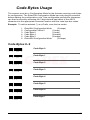
Code Bytes Usage
The scanner must be in Configuration Mode for the features requiring code bytes
for configuration. The Enter/Exit Configuration Mode bar code must be scanned
before starting the configuration cycle. User configurable prefix/suffix characters
can then be saved by scanning the 3 digit decimal equivalent of the ASCII
character into the appropriate character location with the code byte bar codes.
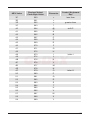
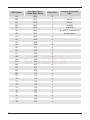
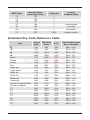
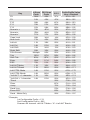
Example: To add an asterisk (*) as a Prefix, scan the bar codes.
1.
2.
3.
4.
5.
6.
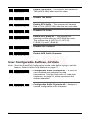
Enter/Exit Configuration Mode
(3 beeps)
Configurable Prefix #1
(1 beep)
Code Byte 0
(1 beep)
Code Byte 4
(2 beeps)
Code Byte 2
(3 beeps)
Enter/Exit Configuration Mode
(3 beeps)
Code Bytes 0–9
Code Byte 0
³
0
³
1
³
2
³
3
³
4
³
5
³
6
³
7
Code Byte 1
Code Byte 2
Code Byte 3
Code Byte 4
Code Byte 5
Code Byte 6
Code Byte 7
23