1
User guide
| GB |
891072
TDX Headend Unit - 492090
TRIAX - your ultimate connection
TRIAX - your ultimate connection
Rev. 05 - 2011 - C
Contents
Contents
Introduction............................................................................................................................ 4
Box content............................................................................................................................. 5
Unit - exterior.......................................................................................................................... 5
Unit - interior........................................................................................................................... 6
Mounting................................................................................................................................. 8
Earthing .................................................................................................................................. 9
Input modules ........................................................................................................................ 9
Output modules ................................................................................................................... 12
CAM/Smart card................................................................................................................. 14
Small Form-factor Plugable (SFP)...................................................................................... 14
Connecting units.................................................................................................................. 15
ID switch............................................................................................................................. 17
Power and RF output........................................................................................................... 18
LEDs...................................................................................................................................... 19
Configuration of system...................................................................................................... 20
Log in..................................................................................................................................... 21
System window.................................................................................................................... 22
System information............................................................................................................. 23
Communication icon........................................................................................................... 24
Administration window........................................................................................................ 24
Language settings.............................................................................................................. 25
Country settings.................................................................................................................. 26
Time zone settings.............................................................................................................. 27
Password settings.............................................................................................................. 29
Licence handling................................................................................................................. 30
IP settings........................................................................................................................... 31
Save settings...................................................................................................................... 34
Create a new system configuration.................................................................................... 35
Save configuration............................................................................................................... 36
Change system configuration............................................................................................. 36
IPTV window......................................................................................................................... 37
IPTV configuration window................................................................................................. 38
Status information ............................................................................................................. 41
Delete IP group .................................................................................................................. 42
Log file................................................................................................................................... 43
Update firmware................................................................................................................... 46
Reboot system...................................................................................................................... 51
Load to TDX.......................................................................................................................... 52
Load from TDX...................................................................................................................... 53
Configuration of modules.................................................................................................... 54
Your notes............................................................................................................................. 55
Rev. 05 - 2011 - C
2
Safety Precautions
Safety precautions
Environment
Operating temperature from -10 C to +50 C.
Storage temperature from -20 C to + 70 C.
Max. operating humidity 80% (RH).
Max. storage humidity 90% (RH).
Power supply
The input voltage must be 190-264 VAC. ~ 45/65 Hz / 280 W (Max).
Use only power connections installed by professionals.
Earth
Every unit in your headend system must be earthed by connecting it
to the ground with a wire according to the electrical regulations of your
country.
Ventilation
The way you position the headend units must leave a minimum of
10 cm on each side of the units for ventilation.
If you position the headend units side by side, the distance between the
units must be at least 20 cm.
Disposal
Rev. 05 - 2011 - C
Within in the European Union this label indicates that the product
cannot be disposed of with the general household waste.
Neither the headend nor the input and output modules can be disposed of with the general household waste.
For proper treatment and recycling of old products, please take
them to designated collection points in accordance with your national legislation.
3
Introduction
Introduction
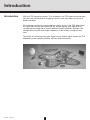
With the TDX headend system, Triax introduces the TDX-pool which provides
you with the full freedom of assigning services from any input to any set of
output modules.
All incoming signals from input modules initially arrive in the TDX-pool. From
this pool they can be converted into any output signals you require while
simultaneously being fed to several different output modules. Besides, the
configuration of input and output modules can be readily changed at any
time.
The ability of converting any input signal to any output signal makes the TDX
headend system uniquely flexible, efficient and economical.
Rev. 05 - 2011 - C
4
Unpacking
Box content
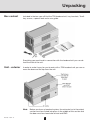
Included in the box you will find the TDX headend unit, key, brackets, Torx®
key, screws, a power lead and a user guide.
Everything you need to do in connection with the headend unit you can do
from the front of the unit.
Unit - exterior
In order to make it easy for you to work with a TDX headend unit you can remove the door and the top from the unit.
Note
Rev. 05 - 2011 - C
Before you leave a headend system, the extractor fan in the output
section must be clicked into place in the middle of this section and
the door must be closed due to heat and EMC.
5
TDX Unit
Unit - interior
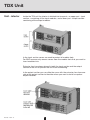
Inside the TDX unit the interior is divided into two parts, an upper part - input
section - containing all the input modules, and a lower part - output section containing all the output modules.
In the input section covers are used to protect all module slots.
For EMC reasons only remove covers from the module slots that you want to
insert modules into.
Extractor fans have been placed in both the input section and the output
section of the unit to prevent the unit from overheating.
In the output section you can slide the cover with the extractor fans from one
side of the output section to the other when you want to install or replace
output modules.
Rev. 05 - 2011 - C
6
TDX Unit
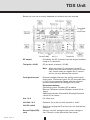
Below you can see an empty headend unit without the front and top.
RF output
Distributes the RF channels from the output modules
using an F-connector.
Test point -20 dB
RF test point of output (-20 dB).
Note
Rev. 05 - 2011 - C
When you attach F-connectors to the RF
output and Test point sockets you have to be
very careful when you tighten the F-connectors or you may destroy the sockets.
Configuration port
Ethernet configuration port for setting up the headend system. Connector type is RJ-45 and cable type
is Cat5. Use a computer/laptop with the software
recommended below to configure the system.
Recommendations:
Operating system: Windows XP or above.
Browser: Windows Internet Explorer version 6.0 or
above.
Additional software: Microsoft© Silverlight Runtime
version 3.0 or above.
Aux 1 & 2
For future use.
Unit link 1 & 2
Connects the main unit with subunits 1 and 2.
Unit ID switch
Switch for setting the ID of the main unit and the two
subunits.
Secure Digital (SD)
card
Memory card for storage of the system configuration. Placed in a slot behind the front cover.
7
Mounting the Unit
Mounting
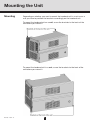
Depending on whether you want to mount the headend unit in a rack or on a
wall you have to position the brackets accordingly on the headend unit.
To mount the headend unit on a wall, screw the brackets to the back of the
unit before you mount it.
To mount the headend unit in a rack, screw the brackets to the front of the
unit before you mount it.
Rev. 05 - 2011 - C
8
Earthing/Input
Earthing
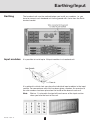
The headend unit must be earthed before you install any modules, i.e. you
have to connect each headend unit to the ground with a wire from the Earth
terminal socket.
Input modules
It is possible to install up to 16 input modules in a headend unit.
It is optional in which slots you place the individual input modules in the input
section. For convenience each slot has been given a number. An overview of
the slot numbers has been placed on the inside of the door of each unit.
Note
Rev. 05 - 2011 - C
Slot no. 1 is placed in the top left-hand corner of the input section
when you face the front of the unit.
9
Input
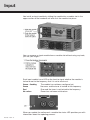
You install an input module by sliding the module into a module slot in the
upper section of the headend unit and click the module into place.
You can remove an input module from a module slot without using any tools,
just use your fingers.
Each input module has a LED on the front to signal whether the module is
locked or not to the frequency that it is set to receive at.
Green - flashing
The module has not been configured yet.
Green
No errors and the tuner is locked to the frequency.
Red
Error and the tuner is not locked to the frequency.
No colour
Power has not been switched on.
When you update the software of a module the status LED provides you with
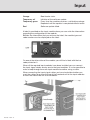
information about the updating process.
Rev. 05 - 2011 - C
10
Input
Orange
Boot loader state.
Temporary off
Initiation of the software update.
Temporary green
Every time the modules receives a valid data package.
Repeated until the update is completed without errors.
Red
Software update failed.
A label is provided on the input module where you can write the information
regarding the configuration of the module.
Besides the information that you write on the label, the module type and
code number are also displayed on the label.
On one of the other sides of the module you will find a label with the bar
code printed on it.
When all the required input modules have been installed you can connect
the input signal cables one by one to the input modules. It is also possible to
make a loop through from one input module to another using a cable.
When connecting the input signal cables you have to decide whether you
want the cables to go from the top of the headend unit to the input modules
or from the side of the unit to the modules.
Rev. 05 - 2011 - C
11
Output
Output modules
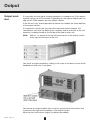
It is possible to install up to 6 output modules in a headend unit. Each output
module consists of 4 RF channels. Depending on the type of module you can
add up to 2 CAM modules on each output module.
In the future it may also be possible to add an Aux module (for future options)
to the output section.
It is optional in which slots you place the individual output modules. For
convenience each slot has been given a number, and an overview of the slot
numbers has been placed on the inside of the door of each unit.
Note
Slot no. 1 is placed in the top left-hand corner of the output section
when you face the front of the unit.
You install an output module by sliding it into a slot in the lower section of the
headend unit and click it into place.
You release an output module from a slot by using the lock mechanism that
is placed to the right of the modules in the output section.
Move the lock mechanism slightly to release the module.
Rev. 05 - 2011 - C
12
Output
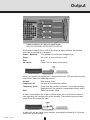
Each output module has a LED on the front to signal whether the module
functions according to its purpose.
Green - flashing
The module has not been configured yet.
Green
No errors and everything is valid.
Red
Error.
No colour
Power has not been switched on.
When you update the software of a module the status LED provides you with
information about the updating process.
Orange
Temporary off
Boot loader state.
Initiation of the software update.
Temporary green
Every time the modules receives a valid data package.
Repeated until the update is completed without errors.
Software update failed.
Red
A label is provided on the output module where you can write the information regarding the configuration of the module. The module type and code
number are printed on the label.
A label with the bar code, serial number and address printed on it is placed
elsewhere on the module.
Rev. 05 - 2011 - C
13
Output
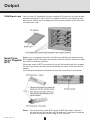
CAM/Smart card You can insert 2 Conditional Access modules (CA) into each of those output
modules that have CI slots. Each CA module is able to unscramble at least
one service. Which services depend on the service provider of the CA module and smart card.
Small Formfactor Plugable
(SFP)
Before you can connect the main unit with any subunits you have to insert
SFP copper or SFP fibre-optic transceivers into the unit link sockets on both
the main unit and the subunit/s.
When you insert an SFP transceiver into a unit link socket you have to open
the lock mechanism on the transceiver before you insert it into the unit link
socket.
Click the lock mechanism into place to lock the transceiver in the socket.
Note
Rev. 05 - 2011 - C
You also have to insert SFP copper or SFP fibre-optic transceivers into the unit link sockets on the main unit if you want to use the
sockets to output services using an IPTV system.
14
Connecting Units
Connecting
units
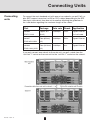
To connect the main headend unit with one or two subunits you pull Cat5 cables (SFP copper transceiver) or 850 or 1310 cables (depending on the SFP
fibre-optic transceiver) from one unit to another following the guidelines in
the table below regarding the maximum length of the cables.
Part
Package
Data rate Reach
Application
492086
Copper SFP
1000Mbps
Gigabit Ethernet
EOLT-C12-02
(RJ45)
492087
Fiber (850nm)
EOLS-8512-MXX
(LC)
492088
Fiber (1310nm)
EOLS-1324_02XX
(LC)
100m
via Cat5 cable
1000Mbps
550m
Gigabit Ethernet
1000Mbps
2km
Gigabit Ethernet
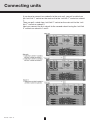
If you only connect one subunit to the main unit, you pull a cable from the
“unit link 1” socket on the main unit to the “unit link 1” socket on the subunit.
Rev. 05 - 2011 - C
15
Connecting units
If you have to connect two subunits to the main unit, you pull a cable from
the “unit link 1” socket on the main unit to the “unit link 1” socket on subunit
1.
Then you pull a cable from “unit link 2” socket on the main unit to the “unit
link 1” socket on subunit 2.
Next you connect the first subunit to the second subunit using the “unit link
2” sockets on subunits 1 and 2.
Rev. 05 - 2011 - C
16
ID Switch
ID switch
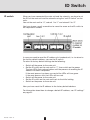
When you have connected the main unit and the subunits, you have to set
the IDs of the main unit and the subunits using the “unit ID switch” on the
units.
You set the main unit to “0”, subunit 1 to “1” and subunit 2 to “2”.
You have to use a small screwdriver to move the arrow on the ID switch to
the required ID number.
In case you need to reset the IP address of a headend unit, i.e. to return to
the factory default address, you use the ID switch.
To return to factory default settings do the following:
• Switch off the power to the main unit.
• Set the ID switch on the main unit to “7”, then switch on the power.
The four LEDs flash red and yellow until the process of resetting the IP
address has been completed.
If the reset process has been successful the LEDs will turn green.
If the reset process fails the LEDs will turn red.
• Switch off the power to the main unit.
• Set the ID switch on the main unit back to the initial setting.
• Switch on the power to the main unit.
Now you have reset the IP address to the factory default address.
For information about how to change a default IP address, see “IP settings”
on page 31.
Rev. 05 - 2011 - C
17
Power & RF
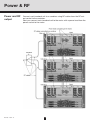
Power and RF
output
Rev. 05 - 2011 - C
Connect each headend unit to a combiner using RF cables from the RF output socket to the combiner.
Next you connect each headend unit to the mains with a power lead from the
power socket to the mains.
18
LEDs
LEDs
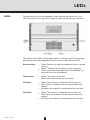
To indicate the state of the headend system and the individual units, four
LEDs are placed at the top of the output section having separate functions.
The colours of the LEDs can be green, green - flashing or red. The message
delivered by the colour depends on the function of the individual LEDs.
Rev. 05 - 2011 - C
System status
• Green: Power is on and the headend system is up and
running.
• Green - flashing: The headend system is booting.
• Red: An error has been detected in the headend system and it must be investigated.
Tuner status
• Green: The tuners are locked.
• Red: One or more tuners are not locked.
Unit link 1
• Green: The subunit is connected to the main unit.
• Red: There is a problem with the connection to the
subunit.
• No colour: No subunit is connected to the main unit.
Unit link 2
• Green: The subunit is connected to the main unit.
• Red: There is a problem with the connection to the
subunit.
• No colour: No subunit is connected to the main unit.
19
Configuration
Configuration
of system
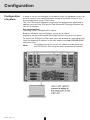
In order to set up and configure the modules within the headend system you
have to connect your laptop (Windows based) to the RJ45 socket on the
main headend unit using a Cat5 cable.
The Triax TDX Digital Headend system uses the programmes below and in
addition to access the TDX Service Tool Microsoft© Silverlight Runtime version 3.0 is required.
Recommendations:
Operating system: Windows XP or above.
Browser: Windows Internet Explorer version 6.0 or above.
Additional software: Microsoft© Silverlight Runtime version 3.0 or above.
To access the TDX Service Tool, open your web browser on your laptop and
input the following IP address in the web address bar http://192.168.0.100
and press enter.
Note
Rev. 05 - 2011 - C
Your laptop has to use a static IP address in order to access
the TDX Service Tool using the above mentioned IP address.
20
Log in
Log in
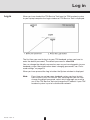
When you have loaded the TDX Service Tool from the TDX headend system
to your laptop/computer the Login window of TDX Service Tool is displayed.
The first time you want to log in to your TDX headend system you have to
enter the default password. The default password is: triax1234
You can change the default password as soon as you have logged in to your
headend system. More information about changing passwords, see “Password settings” on page 29.
When you have pressed the Log in button the System window is displayed.
Note
Rev. 05 - 2011 - C
Every time you set up a new headend system you have to start
from scratch in the TDX Service Tool, meaning that you will have
change the default password, select which language you want to
use in the TDX Service Tool and change the IP address if your TDX
headend system is part of a distribution network.
21
System window
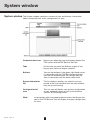
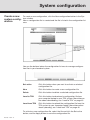
System window The System window contains a number of tabs and buttons, information
about connected units and a configuration list area.
Communication icon
Informs you when the communication between the
TDX system and theTDX Service Tool fails.
Tabs
Via the tabs you enter the different stages of setting up your input and output modules.
Buttons
You use the buttons in the upper right-hand corner
in connection with the TDX Service tool whereas
you use the buttons below the configuration list
area in connection with the entire setup itself.
System information
list
This list displays whether any subunits are connected to the main headend unit and also whether
they are up and running.
Configuration list
area
This list area will display your present configuration
of your headend system as well as the previous
versions of the configuration.
Note
Rev. 05 - 2011 - C
In connection with every new headend system the System window in the TDX Service Tool will display an empty configuration
list area.
22
System window
System information
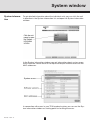
To get detailed information about the individual units you can click the unit
in question in the System information list and open the System information
window.
In the System information window you get information about system errors,
which software version each of the input and output modules uses and the
MAC addresses.
In connection with errors in your TDX headend system you can use the System information window as starting point for locating the errors.
Rev. 05 - 2011 - C
23
System window
Communication
icon
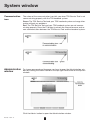
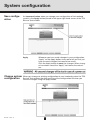
The colour of the communication icon tells you when TDX Service Tool is not
communicating properly with the TDX headend system.
Green: The TDX Service Tool and your TDX headend system exchange information without any problems.
Red: The TDX Service Tool and your TDX headend system are not communicating properly. Press the F5 button to refresh the internet browser and renew communication between the TDX Service Tool and the headend system.
Administration
window
To change password and language you have to open the Administration window by clicking the Admin. button in the top right-hand corner of the System
window.
Click the Admin. button to open the Administration window.
Rev. 05 - 2011 - C
24
Administration window
Language
settings
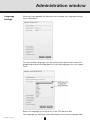
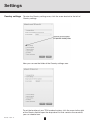
When you have opened the Administration window the Language settings
area is displayed.
To select another language, click the arrow to the right of the Current language field to open the drop-down list with the languages you can choose
from.
Select the language you want to use in the TDX Service Tool.
The language you selected is now displayed in the Current language field.
Rev. 05 - 2011 - C
25
Settings
Country settings
To enter the Country settings area, click the arrow bracket to the left of
Country settings.
Now you can see the fields of the Country settings area.
To set the location of your TDX headend system, click the arrow to the right
of the Country field to open the drop-down list that contains the countries
you can choose from.
Rev. 05 - 2011 - C
26
Settings
Select the country in which your TDX headend system is located. The country you selected is now displayed in the Country field.
Time zone
settings
Rev. 05 - 2011 - C
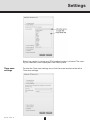
To enter the Time zone settings area, click the arrow bracket to the left of
Time zone settings.
27
Settings
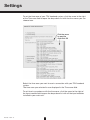
To set the time zone of your TDX headend system, click the arrow to the right
of the Time zone field to open the drop-down list with the time zones you can
choose from.
Select the time zone you want to use in connection with your TDX headend
system.
The time zone you selected is now displayed in the Time zone field.
To set time in accordance with the time zone, click the arrow to the right of
the Input module field to open the drop-down list with all the input modules
installed in your main unit.
Rev. 05 - 2011 - C
28
Settings
Select the input module you want to use for setting the time. The input module you selected is now displayed in the Input module field.
Password
settings
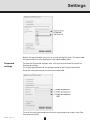
To enter the Password settings area, click the arrow bracket to the left of
Password settings.
To change password enter the old password in the Old password field.
Enter the new password in the New password field.
To verify the new password enter the new password once more in the Confirm password field.
Rev. 05 - 2011 - C
29
Settings
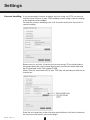
Licence handling If you have bought licences to output services using e.g. IPTV you have to
activate these licences in your TDX headend system using Licence handling
in the Administration window.
To enter the Licence handling area, click the arrow bracket to the left of Licence handling.
Before you can activate a licence you have to contact Triax and provide information about the serial number displayed in the Serial number field and
the ID displayed in the TDX unique ID field.
When Triax has received the ID of your TDX they will provide you with the activation key.
Enter the activation key in the Activation key field then click the Activate button to access the licence you have bought.
Rev. 05 - 2011 - C
30
Settings
Note
When you have clicked the Activate button to access your licence
your TDX unique ID is changed and the activation key is deleted.
If you want to buy more licences you will have to contact Triax with
the new TDX unique ID to Triax to get a new activation key to access an additional licence.
When you have accessed your licence you use e.g. the IPTV tab to select
the services you want to output in connection with the licence.
IP settings
Rev. 05 - 2011 - C
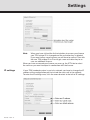
If your TDX headend system is part of a network you have to change the IP
address of the configuration port to include the main unit in the network.
To enter the IP settings area, click the arrow bracket to the left of IP settings.
31
Settings
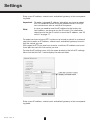
Enter a new IP address, subnet mask and default gateway in the corresponding fields.
Important To make a changed IP address take effect you have to reboot
the TDX headend system using the Reboot button in the System maintenance area or switch off the power.
Note
In case you need to reset the IP address to the factory default address, you have to use the ID switch. For information
about how to use the ID switch to reset the IP address, see “ID
switch” on page 17.
To output services using an IPTV system or to include a subunit in a network
you have to enter an IP address, subnet mask and default gateway for each
unit link socket you use.
With regard to IPTV you also have to enter a multicast IP address and a multicast port for each unit link socket you use. .
To enter the IP settings area, click the arrow bracket to the left of IP settings.
Now click the Unit link 1 tab to display the relevant fields.
Enter a new IP address, subnet mask and default gateway in the corresponding fields.
Rev. 05 - 2011 - C
32
Settings
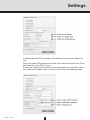
In connection with IPTV the fields at the bottom of the area are needed as
well.
Click the Enable RTP protocol check box if you want to use Real-time Transport Protocol in your IPTV system.
In case you cannot use the default values displayed in the two fields, enter a
new multicast IP address and a multicast port in the corresponding fields.
Rev. 05 - 2011 - C
33
Settings
Click the Unit link 2 tab if you have connected an IPTV system or a second
subunit to the Unit link 2 socket and enter an IP address, subnet mask and
default gateway and in connection with IPTV also a multicast IP address and
a multicast port.
Important To make a changed IP address take effect you have to reboot
the TDX headend system using the Reboot button in the System maintenance area or switch off the power.
Save settings
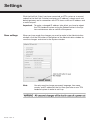
When you have made the changes you want to make in the Administration
window, click the OK button at the bottom of the Administration window to
save the changes and return to the System window.
Note
Rev. 05 - 2011 - C
You only need to change password, language, time zone,
country and IP addresses the first time you enter a new TDX
headend system in order to set it up.
34
System configuration
Create a new
system configuration
To create a new configuration, click the New configuration button in the System window.
Now a configuration file is created and the file is listed in the configuration list
area.
You use the buttons below the configuration list area to manage configuration files in your headend system.
Set active
Click this button when you want to activate a selected
configuration file.
New
Click this button to create a new configuration file.
Delete
Click this button to delete a selected configuration file.
Load to TDX
Click this button to download a configuration file from
your computer/laptop to your TDX system. More information about downloading, see “Load to TDX” on page 45.
Load from TDX
Click this button to upload the configuration file from the
TDX system to your computer/laptop. More information
about uploading, see “Load from TDX” on page 46
To activate a new configuration file, select the file and click the Set active
button, and the Apply button to save the configuration file.
Rev. 05 - 2011 - C
35
System configuration
Save configuration
An important button when you change your configuration of the headend
system is the Apply button placed in the upper right-hand corner of the TDX
Service Tool window.
Apply
Change system
configuration
Rev. 05 - 2011 - C
Whenever you have made changes in your configuration,
“Apply” on the Apply button turns red to tell you that you
have unsaved changes that need to be saved.
Click the Apply button to save the changes. When changes have been saved the “Apply” text looses the red colour.
When you change an existing configuration of your headend system the TDX
Service Tool updates the date and time of the configuration file when you
save the changes using the Apply button.
36
IPTV
IPTV window
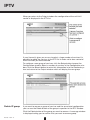
The TDX headend system includes basic IPTV functionality which enables
you to deliver services using the architecture and networking methods of the
Internet Protocol Suite over a packet-switched network infrastructure, e.g.
the Internet and broadband Internet access networks.
To output services using IPTV, click the IPTV tab in the TDX Service Tool to
display the IPTV window.
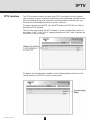
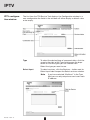
The first time you display the IPTV window in a new configuration the list areas below "Link 1" and "Link 2" representing the unit link 1 and 2 sockets on
the main unit will be empty.
To display the Configuration window, click the Setup button of the unit link
socket to which your IPTV system is connected.
Rev. 05 - 2011 - C
37
IPTV
IPTV configuration window
The first time the TDX Service Tool displays the Configuration window in a
new configuration the fields in the window will either display a default value
or be empty.
Type
To select the desired type of communication, click the
arrow to the right of the Type field to open the dropdown list with the types you can choose from.
Select the type you want to use.
Select input
To select services, click the Services... button next to
Select input label to open the Select services window.
Note
Rev. 05 - 2011 - C
38
If you have selected “Multicast” in the Type
field you can only output one service on each
IP address.
IPTV
In the Select Services window you can select the service that you want to
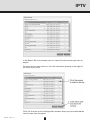
output.
To select one or more services, click the check box (square) to the right of
the service you want.
Click OK to return to the Configuration window when you have selected the
services you want to output.
Rev. 05 - 2011 - C
39
IPTV
If you have selected more services than your licence(s) entitles you to select,
you will get a warning and the services that exceed the number of services
you can select will be deselected
Note
When you have selected a service this service will no longer be
available in the TDX-pool for the unit link in question.
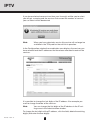
In the Configuration window the combination area displays the services you
have selected and the IP addresses that have been allocated to each of the
services.
It is possible to change the last digits of the IP address if for example you
want to change the order of the services.
Note
You can change the first digits of the IP address in the IP settings area in the Administration window.
To change the last digits of the IP address, click the field, delete the existing
digit(s) and enter the new digit(s).
Rev. 05 - 2011 - C
40
IPTV
When you have selected the services you want you have to click the Submit
button to enter this information in to the headend system and return to the
Output window.
Remember to click the Apply button in the upper right-hand corner to save
new settings in the configuration.
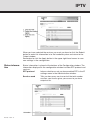
Status information
Status information is placed at the bottom of the Configuration window. The
information displayed in the configuration window includes RTP protocol and
services.
RTP protocol
Informs whether or not you have enabled RTP in the IP
settings menu in the Administration window.
Services used
Rev. 05 - 2011 - C
Tells you how many services out of the total number
services your licence gives you access to you have
output so far.
41
IPTV
When you return to the Output window the configuration of the unit link1
socket is displayed in the IPTV list.
If your licence(s) gives you access to select a large number of services it is
possible to group the services in the IPTV list in order not to lose control of
which services you have selected.
To configure a new group of services, click the Setup button to open the
Configuration window. Select a number of services in the Configuration window, click the Submit button to enter this information in to the headend system and return to the Output window which will display the new group.
Delete IP group
If you want to remove a group of services and the associated configuration
you can use the Delete button of the group in question in the IPTV window.
Click the Delete button of the group you want to remove. A message window
is displayed asking you to confirm that you want to remove group.
Rev. 05 - 2011 - C
42
Log file
Log file
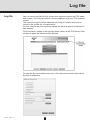
You can save a log file that lists actions that have occurred in the TDX headend system. This may be useful in case of problems with your TDX headend
system.
The size of the log file will be adequate for listing all actions that have occurred in the system for a couple weeks.
To save a log file on your computer/laptop you have to open the Administration window.
Click the Admin. button in the top right-hand corner of the TDX Service Tool
window to open the Administration window.
To enter the System maintenance area, click the arrow bracket to the left of
System maintenance.
Rev. 05 - 2011 - C
43
Log file
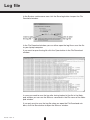
In the System maintenance area click the Save log button to open the File
Download window.
In the File Download window you can either open the log file or save the file
to your laptop/computer.
If you want to open the log file click the Open button in the File Download
window.
In case you need to save the log after having looked at the file in the Notepad window you can use the Save as command in the File menu of the Notepad window.
If you only want to save the log file when you open the File Download window, click the Save button to open the Save as window.
Rev. 05 - 2011 - C
44
Log file
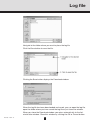
Navigate to the folder where you want to place the log file
Click the Save button to save the file.
Clicking the Save button displays the Download window.
When the log file has been downloaded and saved, you can open the log file,
open the folder where you have saved the log file or just close the window.
When you close the Download window you return automatically to the Administration window. Close this window by clicking the OK or Cancel button.
Rev. 05 - 2011 - C
45
Updating firmware
Update
firmware
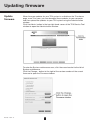
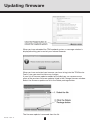
When firmware updates for your TDX system is available on the Triax home
page, www.Triax.com, you can download these updates to your computer
and then upload the updates to your TDX system using the Administration
window.
Click the Admin. button in the top right-hand corner of the TDX Service Tool
window to open the Administration window.
To enter the System maintenance area, click the arrow bracket to the left of
System maintenance.
Click the Change... button to the right of the version number of the current
firmware to open the Firmware window.
Rev. 05 - 2011 - C
46
Updating firmware
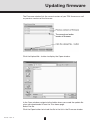
The Firmware window lists the current version of your TDX firmware as well
as previous versions of the firmware.
Click the Upload file... button to display the Open window.
In the Open window navigate to the folder where you saved the update file
when you downloaded it from the Triax home page.
Select the file.
Click the Open button to include the file in the list in the Firmware window
Rev. 05 - 2011 - C
47
Updating firmware
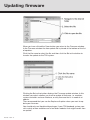
When you have clicked the Open button you return to the Firmware window.
In the Firmware window the new update file is placed at the bottom of the list
of updates.
Click the file name to select the file and then click the Set active button to
transfer the update to the TDX system.
Clicking the Set active button displays the Firmware update window. In this
window you select whether you want to update all firmware, i.e. modules,
system controller and user interface, or only firmware that is in need of an
update.
Triax recommend that you use the Replace all option when you want to update your firmware.
You should only use Update old packages if your TDX headend system consists mainly of new modules and a few older modules that might benefit from
an update.
Rev. 05 - 2011 - C
48
Updating firmware
When updating the firmware, the Firmware update status window will display
information about status and errors as well as the progress of the update itself. An update will take approximately 5 minutes.
When you have finished updating the firmware you have to reboot the system by clicking the Restart button in order to make the update effective.
Important
Rev. 05 - 2011 - C
When rebooting the TDX headend system the distribution of
services to all your end-users will be interrupted for a very
short time.
49
Updating firmware
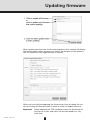
When you have rebooted the TDX headend system, a message window is
displayed asking you to restart your Internet browser.
When you have restarted your browser you have to log into the TDX Service
Tool in case you need to make any changes.
If your list of firmware updates needs to be tidied you can remove one or
more of the previous firmware updates listed in the Change firmware window.
Select the firmware update and click the Delete package button.
The firmware update is removed from the list.
Rev. 05 - 2011 - C
50
Rebooting
Reboot system
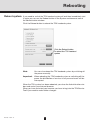
If you need to switch the TDX headend system off and then immediately start
it again you can use the Reboot button in the System maintenance area of
the administration window.
Click the Reboot button to reboot the TDX headend system.
Note
You can also reboot the TDX headend system by switching off
the power manually.
Important
When rebooting the TDX headend system or switching off the
power the distribution of services to all your end-users will be
interrupted.
When the TDX system has been rebooted, you close the Administration window and restart your Internet browser.
When you have restarted your browser you have to log into the TDX Service
Tool if you need to make further changes.
Rev. 05 - 2011 - C
51
Loading
Load to TDX
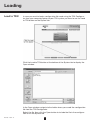
In case you want to load a configuration file made using the TDX Configurator from your computer/laptop to your TDX system you have to use the Load
to TDX button on the System tab.
Click the Load to TDX button at the bottom of the System tab to display the
Open window.
In the Open window navigate to the folder where you saved the configuration
file from the TDX Configurator.
Select the file, then click the Open button to include the file in the configuration list on the System tab.
Rev. 05 - 2011 - C
52
Loading
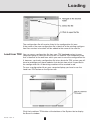
The configuration file will now be listed in the configuration list area.
If the name of the new configuration file is identical to the existing configuration file a number in brackets will be added to the name of the new file.
Load from TDX
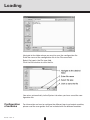
You can save a configuration file from your TDX headend system to your
computer/laptop in case you want to use it in another TDX headend system
that is identical to the one from which you want to save the configuration file.
If, however, you load a configuration file into a dissimilar TDX system you will
have to reconfigure all those modules that deviate from what is specified in
the configuration file. All deviating modules will be marked in red.
To save a configuration file on your computer/laptop you have to use the
Load from TDX button on the System tab.
Click the Load from TDX button at the bottom of the System tab to display
the Save As window.
Rev. 05 - 2011 - C
53
Loading
Navigate to the folder where you want to save the configuration file.
Enter the name of the configuration file in the File name field.
Select file type in the File type field.
Click the Save button to save the file.
You return automatically to the System tab when you have saved the configuration file.
Configuration
of modules
Rev. 05 - 2011 - C
For information on how to configure the different input and output modules,
please read the user guides that are included with the different modules.
54
Your notes
Your notes
Rev. 05 - 2011 - C
55
891072
05 - 2011 - C
TRIAX - your ultimate connection
TRIAX - your ultimate connection