1
ENG
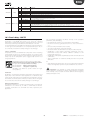
Category
Probes
Icon
Category
Electronic valve
Control
Configuration
Compressor
Alarm log
Defrost
HACCP
Alarm
RTC
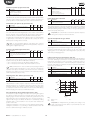
Setting the day/night time bands
Icon
Procedure:
1. access the type C parameters as described in the corresponding
paragraph and select the RTC category;
2. press UP/DOWN and select the parent parameter tS1=time for switching
from night to day;
3. press Set: the parameter d followed is displayed by one or two digits that
indicate the day for switching from night to day mode, as follows:
• 0 = switching disabled;
• 1 to 7 = Monday to Sunday;
• 8 = Monday to Friday;
• 9 = Monday to Saturday;
• 10 = Saturday & Sunday;
• 11 = every day.
4. press Set to confirm and go to the next parameters: h = hour, m= minutes
5. press Set to confirm and Prg/mute to go to parameter tE1 = time for
switching from day to night.
Evaporator fans
Tab. 3.d
3.
4.
5.
6.
press UP or DOWN until reaching the desired parameter;
press Set to display the associated value;
increase or decrease the value of the parameter using UP or DOWN;
press Set to temporarily save the new value and return to display the
parameter code;
7. iftheparameterhassub-parameters,afterhavingselectedtheparameter,
press Set again to enter the sub-menu, use the UP or DOWN button
to scroll between the sub-parameters, which can be modified like a
normal parameter. Press Set again to temporarily save the values and
Prg/mute return to the higher level menu;
8. repeat steps from 3) to 7) to modify other parameters;
9. to permanently save the new values assigned to the parameters Prg/
mute for 5 seconds. This exits the parameter setting procedure.
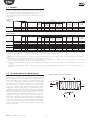
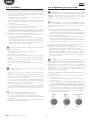
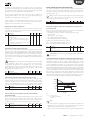
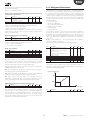
day
night
night
t
tS
tE
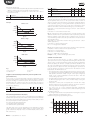
Fig. 3.h
Note:
• all the changes made to the parameters, temporarily stored in the RAM,
can be cancelled, returning to the standard display by not pressing any
button for 60 seconds. The values of the clock parameters, however,
are saved when entered.
• if the controller is powered down before pressing Prg/mute, all the
changes made to the parameters will be lost
• in the two parameter setting procedures (C and A), the new values are
only saved after having pressed Prg/mute for 5 seconds. When setting
the set point, the new value is saved after confirming with Set.
Note: 8 time bands can be set for each day, setting parameters tS1
to tS8 and tE1 to tE8.
3.5 Copy parameters from Master to Slave
(Upload)
All the parameters with upload attribute can be uploaded from a
Master controller to the Slave controllers in the subnetwork. The upload
attribute can only be set for the parameters using the VPM program
(Visual Parameter Manager). This procedure can be used instead of the
programming key, with the advantage of being able to update all the
Slave boards in the subnetwork at the same time, without powering down
the controllers and without overwriting the parameters that should not
be modified, such as the serial address, the clock parameters, etc. rather
than having to repeat the procedure individually for each board with the
programming key.
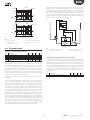
3.4 Example:settingcurrentdate/timeandday/
night time bands
Setting the current date/time
Procedure:
1. press Prg/mute for 5 seconds: this accesses the list of type F parameters;
2. press Prg/mute: the first category of parameters, “Pro”, is shown;
3. press the UP/DOWN buttons until reaching category“rtc”, highlighted by
the “clock” icon at the top right;
4. press Set: parameter “tc”is displayed. Press Set: parameter y is displayed
followed by two digits that indicate the current year;
5. press Set and set the value of the current year (e.g.: 8=2008), press Set
again to confirm;
6. press the UP button to select the next parameter, M=month, and repeat
steps 3, 4 and 5 for parameters: M=month, d=day of the month,
u=day of the week, h=hour, m=minutes;
7. to return to the list of main parameters press Prg/mute.
MPXPRO
Procedure:
1. press Prg/mute and Set together for more than 5 seconds (if there are
active alarms the buzzer is muted): the display shows the number
0 flashing;
2. press UP or DOWN and enter the PASSWORD: 66. Confirm by selecting
Set;
3. press UP or DOWN to select the Slave controller to be programmed.
Confirm by selecting Set. Selecting ALL programs all the Slave
controllers in the network;
4. during the programming procedure, the terminal display shows the
normal display alternating with the message uPL, and the spanner
icon comes on;
5. once the programming procedure is complete, the message uPL
disappears and the spanner icon goes off. In the event of errors, the
message uPX is displayed (X= number of the Slave controller where
the error occurred).
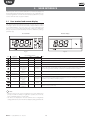
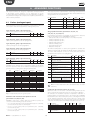
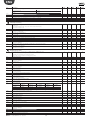
Par. Description
tc
y__
M__
d__
u__
h__
n__
Date/time (Press Set)
Date/time: year
Date/time: month
Date/time: day of the month
Date/time: day of the week
Date/time: hours
Date/time: minutes
Def.
Min
Max
U.O.M.
0
1
1
6
0
0
0
1
1
1
0
0
99
12
31
7
23
59
year
month
day
day
hour
min
MPXPRO
Fig. 3.g
Fig. 3.i
21
MPXPRO - + 0300055EN rel. 1.4 - 16.07.15