1
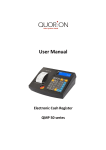
User Manual
Electronic Cash Register
QMP 50 series
Dear valued customer!
On behalf of our proud company we wish to welcome you to the QUORION family of fine business
machines. We sincerely hope you will appreciate the many benefits of being associated with a
distinguished product name that represents both quality and commitment to customer satisfaction.
The QUORION QMP 50 series is fully customizable and yet simple to operate. Users can easily
adapt it to any type of retail/scanning or hospitality system.
Moreover, our dynamic software
generates a compatible environment for a wide array of peripheral devices.
It is exactly this
versatility and quality that has made us successful among our multinational customers.
It is therefore with great pride that we look forward to continuing our close collaboration with our
customers.
Your QUORION Team
2
Index
1. Safety Precautions .................................................................................. 5
2. General information ................................................................................. 6
2.1 Technical data ....................................................................................................................... 6
2.2 Components .......................................................................................................................... 7
2.3 Thermal printer ...................................................................................................................... 8
2.3.1 Paper Insertion ................................................................................................................. 8
2.4 Switch ON / OFF cash register ............................................................................................. 9
2.4.1 Operating modes .............................................................................................................. 9
2.5 Interfaces ............................................................................................................................. 10
2.5.1 Pin Assignment .............................................................................................................. 10
2.5.2 Connection to PC ........................................................................................................... 11
2.5.3 Adapter Cable for RS232................................................................................................ 12
2.6 Keyboard ............................................................................................................................. 13
2.6.1 Names of Keys and their Function ................................................................................ 13
3. Getting Started ....................................................................................... 15
4. Sign in and Register .............................................................................. 15
4.1 Sign in a Clerk Person ........................................................................................................ 15
4.2 Register a Department ........................................................................................................ 16
4.3 Register Pre-Programmed PLU’s ....................................................................................... 16
4.4 Enter a New Price ................................................................................................................ 16
4.5 Create a PLU during the Sale ............................................................................................. 17
4.6 Multiplication/Division ........................................................................................................ 18
4.7 Holding a Sale ..................................................................................................................... 19
4.8 Tendering in Local Currency .............................................................................................. 19
4.9 Tendering in Foreign Currency .......................................................................................... 20
4.10 Receipt On/Off and Receipt Copy .................................................................................... 20
4.11 Time and Date.................................................................................................................... 20
4.12 No Sale / Open Drawer ...................................................................................................... 20
5. Corrections ............................................................................................ 21
5.1 Clearing of Inputs and Error Messages ............................................................................. 21
5.2 Error correction ................................................................................................................... 21
5.3 Void Function ...................................................................................................................... 21
5.4 Refund.................................................................................................................................. 22
5.5 Transaction Refund............................................................................................................. 22
5.6 Transaction Cancel ............................................................................................................. 23
5.7 Tender Correction ............................................................................................................... 23
6. Discounts, RA and PO ........................................................................... 23
6.1 Percentage Discount/Surcharge ........................................................................................ 23
6.2 Amount Discount/Surcharge .............................................................................................. 24
6.3 Received on Account / Paid Out ........................................................................................ 24
7. Using Shift Levels .................................................................................. 25
7.1 PLU/Department Shift ......................................................................................................... 25
7.2 Price Shift ............................................................................................................................ 25
7.3 Tax Shift ............................................................................................................................... 25
3
8. Reports ................................................................................................... 26
8.1 System Reports ................................................................................................................... 26
8.2 User Reports........................................................................................................................ 27
8.3 Electronic Journal ............................................................................................................... 29
8.3.1 Text Format ..................................................................................................................... 29
8.3.2 Binary Format ................................................................................................................. 30
9. Programming ......................................................................................... 30
9.1 Programming of Date and Time ......................................................................................... 30
9.2 Easy PLU Programming...................................................................................................... 31
9.3 File Programming ................................................................................................................ 32
9.4 Scanning .............................................................................................................................. 33
9.5 Program Version and Test Routines .................................................................................. 35
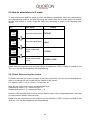
9.6 How to enter letters in P mode ........................................................................................... 36
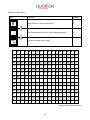
9.6.1 Enter letters using hex codes ........................................................................................ 36
9.6.2 Enter letters using mobile mode ................................................................................... 38
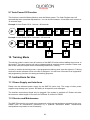
9.7 Auto Power Off Function .................................................................................................... 39
10. Training Mode ...................................................................................... 39
11. Instructions for Use ............................................................................. 39
11.1 Power Supply and Interfaces ........................................................................................... 39
11.2 Service and Maintenance.................................................................................................. 39
12. Error Messages .................................................................................... 40
13. Information on the Electromagnetic Compatibility and Safety......... 41
4
1. Safety Precautions
This section presents important information intended to ensure safe and effective use. Please read
this section carefully and store it in an accessible location.
Be sure the voltage of your main power net corresponds to the input voltage printed on the
rating plate of the system. Do not connect power adapters from other manufacturers. Use this
product only for its intended application. Improper usage may lead to equipment damage, fire,
or shock.
Be sure your power cable meets the relevant safety standards and includes a power-system
ground terminal (PE terminal). Otherwise shock may result.
Never attempt to stretch the cables to enable a connection. The power cable and DC cable
must have adequate slack at all times during use.
Do not connect to electrical outlets close to devices that generate voltage fluctuations or
electrical noise. In particular, stay clear of devices that use large electric motors.
Never insert or disconnect the power plug with wet hands. Doing so may result in severe
shock.
Always connect the DC cable before plugging the power cable into the wall outlet.
When disconnecting the DC cable, hold it firmly at the connector area. Do not tug on the cable
itself.
Never attempt to repair this product yourself. Improper repair work can be dangerous.
Never disassemble or modify this product. Tampering with this product may result in injury, fire,
or electric shock.
Be sure to set this unit on a firm, stable, horizontal surface. Product may break or cause injury
if it falls.
Keep the system away from all conditions, which may cause damage, fire or accidents: Direct
sunlight, high temperature and humidity, extreme changes in temperature, heating and cooling
equipment, or humidity, volatile materials, high levels of dust, vibration, and impact.
Keep away any liquids from the system. If water or other liquid spills into the equipment, unplug
the power cable immediately, and then contact your dealer for advice. Continued usage may
lead to fire or shock.
To prevent possible harm to the environment or human health please separate this product
from other waste streams to ensure that it can be recycled in an environmentally sound
manner. For more details on available collection facilities please contact your local dealer
where you purchased this product.
5
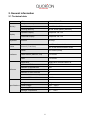
2. General information
2.1 Technical data
Processor
CPU
32 bit ARM 966E
Program Memory
1 MB FLASH ROM
Data Memory
2 MB FLASH ROM
Working Memory
96 kB SRAM (battery buffered)
Operator Display
Graphical 192 x 32
Customer Display
Graphical 192 x 32
Keyboard
Internal
36 keys
Printer
Internal (2 versions)
Memory
Display
Interfaces
Software
1 x 57 mm thermal without cutter
2 x 38 mm thermal without cutter
Serial
2 x RS232 (RJ45)
Cash Drawer (DRW 9V, 5Ω)
1 x Device
USB
1 x Device
Application
Application software QMP-Lite
Number of PLU’s
10000
Number of Departments
100
Number of Clerks
8
Number of Sales Persons
8
Number of Customer Reports
10
Number of EJournal Lines
20000
Dimension
300 x 260 x 100 mm
Weight
2 kg
110 … 240 V
Specifications Power Supply
Operating Temperature
5 … +45°C
Storage Temperature
-5 … +50°C
6
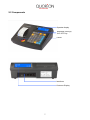
2.2 Components
Operator display
Keyboard (36 keys)
ON / OFF Key
Printer
Interfaces
Customer Display
7
2.3 Thermal printer
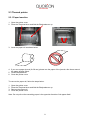
2.3.1 Paper Insertion
1. Open the printer cover
2. Press the Easyload lever and fold the Easyloadcover up.
3. Insert the paper roll as shown below.
4. If you use a paper journal (2x 38 mm) please turn the paper of the journal a few times around
the paper winding wheel.
5. Close Easyloadcover
6. Close the printer cover
To remove the paper roll, follow the steps below:
1.
2.
3.
4.
Open the printer cover
Press the Easyload lever and fold the Easyloadcover up.
Remove the paper roll
Close the printer cover
Note: Do not pull out the remaining paper in the opposite direction of the paper feed!
8
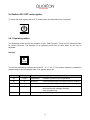
2.4 Switch ON / OFF cash register
To switch the cash register ON or OFF, please press and hold this button 3 seconds.
2.4.1 Operating modes
The operating modes control the operation of your Cash Register. There are five different modes
for various functions. The selection of an operating mode can be done either by soft key on
keyboard.
Soft key
X
RXZMP
The soft key alternating switches the modes R - X - Z - M - P. The access authority is realized by
programming of special operator flags. See system option 221.
Mode
Display
Function
R
– REG –
Registration
– all sales operations and registrations
X
––X––
X-Report
– viewing and printing of all reports without clearing
Z
––Z––
Z- Report
– viewing and printing of all reports with clearing
M
– MGR –
Manager
– all sales operations and registrations
– all functions with manager authority
– easy programming
P
––P––
Programming – programming of all functions
9
2.5 Interfaces
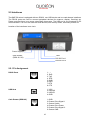
The QMP 50 series is equipped with two RS232, one USB device and one cash drawer interfaces.
The RS232 ports are used to connect peripheral devices like scanner, display, QuoriLog etc.
Please note that there is no power output from these ports. The USB port is only prepared for PC
communication. It is not to be used with USB devices, like memory sticks, scanners, printers etc
Location of the interfaces (rear view):
Power Supply
Cash Drawer
(DRW 9V, 5Ω)
USB
RS 232 Port 1
RS 232 Port 2
2.5.1 Pin Assignment
RS232 Ports
1: -2. RxD
3: TxD
4. DTR
5: GND
6: DSR
7: RTS
8: CTS
USB Host
1: VCC
2: USB N0
3: USB P0
4: GND
Cash Drawer (DRW 9V)
1: GND
2: Drawer Drive Signal 1
3: Sensor Switch
4: Drawer Drive Power
5: Drawer Drive Signal 2
6: Sensor GND
10
2.5.2 Connection to PC
The QMP 50 series can be connected to a PC for programming, reporting and back-office.
QUORiON offers a small software tool, called QProg, for this purpose. The connection can be
established via RS232 or USB.
Connection via RS232
By default RS232 port 1 is prepared for PC communication with 57600 baud. Please note that you
will need an adapter cable from the RJ45 connector of the QMP 50 series to DSUB-9 on PC (see
chapter 2.5.3). If your PC does not have an RS232 port, you may use a Serial-to-USB converter or
the direct USB connection.
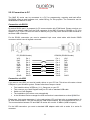
For the RS232 connection you need a standard 9-pin cross wired cable with female DSUB
connectors which have all signals connected.
PC (DSUB9 female)
VCC
RxD
TxD
DTR
GND
DSR
RTS
CTS
-SHLD
CR20/28 (DSUB9 female)
Pin 1
Pin 2
Pin 3
Pin 4
Pin 5
Pin 6
Pin 7
Pin 8
Pin 9
SHLD
Pin 1
Pin 2
Pin 3
Pin 4
Pin 5
Pin 6
Pin 7
Pin 8
Pin 9
SHLD
VCC
RxD
TxD
DTR
GND
DSR
RTS
CTS
-SHLD
Connection via USB
If you want to use USB, you need to install a driver on your PC first. This driver will create a virtual
COM port in your Windows system. Please follow these steps to install:
First install the driver VCPDriver_V1.1_Setup.exe on your PC
Then connect your Cash Register and your PC with a standard USB-cable
Switch on Cash Register
The installation of the driver runs automatically
In the Windows Device manager the USB connection is associated as a virtual COM-Port
Please note, that system parameter 1 in the cash register (PC port) has to be re-programmed to 16
for USB communication. This will activate the USB communication, but de-activate RS232 for PC.
The communication between PC and QMP 50 series will run with 12 MBit/s (USB full speed).
For the USB connection you need a standard USB adapter cable with a series A to series B
connector.
11
2.5.3 Adapter Cable for RS232
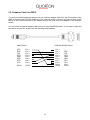
To connect standard peripheral devices you will need an adapter cable from the RJ-interface of the
QMP 50 series to the D-SUB connector of the external device. Connect the original cable of the
device to the D-SUB connector of the adapter and put the other end of the adapter in the interface
socket.
You can order the special adapter cable from your local QUORION dealer. If you want to make the
connection by yourself, please note the following specifications:
QMP (RJ45)
VCC
RxD
TxD
DTR
GND
DSR
RTS
CTS
Pin 1
Pin 2
Pin 3
Pin 4
Pin 5
Pin 6
Pin 7
Pin 8
SHLD
SHLD
CR20/28 (DSUB9 male)
Pin 1
Pin 2
Pin 3
Pin 4
Pin 5
Pin 6
Pin 7
Pin 8
Pin 9
SHLD
12
-RxD
TxD
DTR
GND
DSR
RTS
CTS
VCC
SHLD
2.6 Keyboard
RECEIPT
CURSOR
CURSOR
X
NEW
PRICE
PLU
R-X-Z-M-P
CLERK
#
NS
#
P/O
R/A
TYPE
CAPS
3
7
8
9
ABC
DEF
5
6
GHI
JKL
MNO
REFUND
C
2
3
PQRS
TUV
WXYZ
0
00
,
PRINT
F
5
VOID
B
1
1
SYS
6
2
4
-%
HEX
DATE
E
4
EC
A
CLEAR
TIME
D
SUB
TOTAL
CASH
ENTER
2.6.1 Names of Keys and their Function
Key label
Key name
Key function
Numeric Keys
- used to enter numbers
- used to enter letters in P-mode
Receipt Feed
- advances the receipt paper
Clear
- clears incorrect entries and stops the error alarm
Error Correction
- deletes the last registration
Void
- voids a previously entered transaction
Clerk
#
Clerk
- used to enter a preset clerk ID numeric code no.
New
Price
PLU Price Entry
- used to manually change a preset PLU price
0
9
RECEIPT
CLEAR
EC
VOID
13
Key Label
Key Name
Key Function
Multiplication
- used to enter multiplications
- used to switch the operating mode of the cash register
PLU
- used to access preset PLU items
Department
- used to enter items to the respective departments
RA
Received on Account
- used to record payments to the drawer
PO
Paid Out
- used to record payments out from the drawer
+%
Percent Plus
- used to add percentage values to the total
-%
Percent Minus
- used to deduct percentage values from the total
(-)
Coupon Key
- used to deduct fixed amounts from the total
No Sale
- prints a reference number / opens the cash drawer
Sub Total
- calculates sub total
- prints out receipt copy if no receipt opened
CASH
Cash Payment
- used to tender payments in cash
Card
Card Payment
- used to tender payments with credit cards
Shift
Shift Key
- shift department key levels
- shift PLU key levels
Foreign Currency
Exchange
- calculate amounts in foreign currency
Receipt Hold
- temporarily holds a sale to be recalled later
Receipt On/Off
- receipt printer can be switched on or off
Scroll Cursor
- used to scroll the display selection by one line
X
R-X-Z-M-P
PLU
1
#
NS
SUB
TOTAL
FCE
Hold
Receipt
on/off
CURSOR
CURSOR
14
3. Getting Started
Place the QMP 50 series on a stable or even surface. Use it only within the operating temperature
range (see technical data) and protect it from splashes and high humidity.
The QMP 50 series comes with an external power supply. First, please check if the specifications
printed on the label fit your local voltage. If so, connect the power pack to the CR 20/28. The power
plug is at the rear next to the interfaces. Now connect the power supply with the power circuit and
turn on the QMP 50 series with the main switch.
The QMP 50 series will now load the operating system and automatically launch the cash register
program. You may immediately start working with your new system.
4. Sign in and Register
4.1 Sign in a Clerk Person
A clerk is the person who is working on the point-of-sale and performing registrations. Before
starting any transaction, it is necessary to sign in a clerk. Now all sales and actions can be
assigned to each single clerk in the reports. Furthermore, it is possible to define individual access
rights for each clerk (e.g. for refund or program modifications).
To sign in with the keyboard it is necessary to have a dedicated clerk button on the keyboard. If
you push this key, you will see a list of all programmed clerks. Use the scroll keys or enter a
number to select a certain clerk. Alternatively, you may also enter the clerk number directly on the
clerk button or define a dedicated key for each clerk. Depending on the programming, it may be
necessary to enter an additional code number to sign in.
Example:
1
Clerk
#
Enter
code number
15
Clerk
#
4.2 Register a Department
Department keys may be used either to enter free prices or to select PLU’s from a list. If you press
a department key without entry, you will see a list with all PLU’s which are linked to that
department. Use the scroll keys or enter a number to select a certain PLU from that list.
If you wish to register an undefined price for a department,
just enter the price with the numeric keys and press the
respective department key.
CUSTOMER LOGO
1 Department
2,00
--------------------------1 Total
2,00
Example: Register 2.00 EUR in department 3:
2
3
00
CASH
2,00
4.3 Register Pre-Programmed PLU’s
Pre-programmed PLU’s are registered by entering the respective number on the PLU key. The preprogrammed price and the description are now read from memory. Alternatively, you may also
program direct keys for certain PLU’s on the keyboard. You only need to press one key for
registering a PLU.
If you are working with scan codes, you may either enter
the code number by keyboard or use a barcode scanner.
In that case, you do not need to press any additional key –
the PLU will be registered directly.
CUSTOMER LOGO
1 PLU23
5,00
--------------------------1 Total
5,00
Example: Register PLU number 123:
Cash
1
2
3
5,00
PLU
4.4 Enter a New Price
It is possible to change the price of a PLU for a transaction. Simply enter the new price and press
the key “New price” before entering the PLU. This is valid for both scanning as well as manual
entry.
Example: Register PLU number 1 with new price of 2.00 EUR:
2
00
New
price
1
16
PLU
4.5 Create a PLU during the Sale
Occasionally, a clerk may have to enter a new item, which has not been programmed in the data
base of the POS. If this happens, the QMP 50 series / QTouch2 will automatically prompt you to
create this item. Press the “Sub total” key to confirm or the “Clear” key to exit the prompt.
Once confirmed the QMP 50 series will ask you for the price. Upon entry of the price, press the
“Sub total” key again to confirm. Then enter the department to which the PLU is linked and press
Subtotal to confirm.
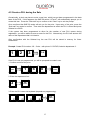
If the system has been programmed to allow for the creation of new PLU names during
registration, you will be asked to enter a name for the PLU. Alternatively, the PLU will assume the
name of the department that it is linked to.
After confirmation with the Subtotal key the new PLU will be stored in memory for future
transactions.
Example: Create PLU number 123 – Coke – with price of 1.50 EUR, linked to department 3:
1
2
3
PLU
If the PLU is not yet programmed, you will be prompted to create it now:
1. Confirm and enter the price:
Sub
total
1
5
Sub
total
0
2. Enter the department link:
Sub
total
3
3. Enter the PLU name via keyboard (depends on programming):
C
O
K
Sub
total
E
17
4.6 Multiplication/Division
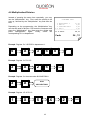
Instead of pressing the same item repeatedly, you may
use the “Multiplication” key. First, enter the quantity to be
rung up, followed by the “Multiplication” key and then the
item.
Depending on the programming, the “Multiplication” key
can also be used for division. First enter the numerator and
press the “Multiplication” key. Now enter the divider and
press “Multiplication” again. Finally, select the
corresponding PLU or department.
CUSTOMER LOGO
5 Department 1
17,50
3 PLU 25
3,00
3 4912345678901
3,00
0.2 PLU 2
1,20
--------------------------11.2 Total
24,70
Cash
24,70
Example: Register 5 x 3.50 EUR in department 1:
5
X
3
5
2
5
1
0
Example: Register 3 x PLU 25:
3
X
PLU
Example: Register 3 x the scan code 4912345678901:
3
X
Scan
4912345678901
Example: Register 1/5 of PLU 2:
1
X
5
X
18
2
PLU
4.7 Holding a Sale
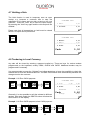
The Hold function is used to temporary save an open
receipt, e.g. because a customer has to stop the
registration of his items and you wish to tend on the next
customer. Press the “Hold” key to save the open receipt.
By pressing the “Hold” key again and the old receipt will be
recalled.
CUSTOMER LOGO
1 PLU 1
0,10
--------------------------1 On Hold
0,10
Please note that all transactions on hold must be closed
before a Z-report can be performed!
CUSTOMER LOGO
HOLD
1 Recall
0,10
1 PLU 2
0,20
--------------------------2 Total
0,30
Cash
0,30
4.8 Tendering in Local Currency
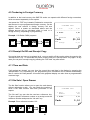
Any sale will be closed by entering a payment media key. There are keys for various tenders
programmed on the keyboard, usually CASH, CHECK and CARD. Additional tenders may be
programmed if necessary.
It is recommended to press the “Subtotal” key before tendering, to have the possibility to check the
subtotal and to enter the tendered amount. The QMP 50 series will then automatically calculate the
change owed to the customer.
Example: 1.00 Euro CASH payment:
CUSTOMER LOGO
Sub
total
1
00
CASH
2 Cola
0,40
0,80
--------------------------2 Total
0,80
Tendered
Cash
Generally, it is also possible to split the subtotal to different
tenders. After each tender the QMP 50 series will show the
short amount on the display.
Change
Example: 1.00 Euro CARD payment, short CASH payment:
Sub
total
1
00
CARD
19
CASH
1,00
0,80
-0,20
4.9 Tendering in Foreign Currency
In addition to the local currency the QMP 50 series can operate with different foreign currencies,
which are saved separately in the reports.
Just press the “FCE” key instead of Subtotal to convert the
total amount in a pre-programmed foreign currency. On the
display the new amount in foreign currency will now
appear. Select a tender as described above and the
change amount will be calculated either in local or in
foreign currency, depending on programming.
2 Cola
0,40
0,80
--------------------------2 Total
0,80
Example: 1.00 Dollar CASH payment:
USD
CUSTOMER LOGO
Tendered
Cash
1
FCE
00
CASH
1,00
$0,96
EUR
Change
-0,03
4.10 Receipt On/Off and Receipt Copy
If a receipt does not have to be printed at all, you may switch off the receipt printer by pressing the
“Receipt on/off” key. To reactivate the printer, simply press the “Receipt on/off” key again. In any
case you can print a receipt copy by pressing the “Sub total” key after a sale.
4.11 Time and Date
If all receipts are closed, you can view the current time and date in the display by pressing the
“Multiplication” key. Depending on the programming this information will be shown automatically
after a certain time has passed. All models with graphical display can also show a programmable
customer logo.
4.12 No Sale / Open Drawer
The No Sale function allows you to open the cash drawer
without registering a sale. You can check the number of
times a No Sale function has been performed in the
reports.
The “No sale” key can also be used as a reference key.
To print a specific reference number on a receipt, enter the
reference number and press the “No sale” key.
2
3
1 PLU 1
0,10
Number:
123
--------------------------1 Total
0,10
Cash
Example: Enter reference number 123:
1
CUSTOMER LOGO
No
sale
20
0,10
5. Corrections
5.1 Clearing of Inputs and Error Messages
To erase an incorrect entry not yet registered, and to clear any error messages just press the
“Clear” key.
CLEAR
5.2 Error correction
The “Error Correct” key (EC) is used to clear the last item
immediately. Alternatively you may use the scroll keys to
select another item from the actual receipt for voiding.
CURSOR
Select
item
CUSTOMER LOGO
1 PLU 1
1 PLU 2
0,10
0,20
EC
-1 PLU2
-0,20
--------------------------1 Total
0,10
EC
Cash
0,10
5.3 Void Function
The “Void” function is used to clear certain items from the
current receipt. First press the “Void” key and then enter
the item which should be cleared. You can also use a
barcode scanner to enter the item number.
CUSTOMER LOGO
1 PLU 1
0,10
1 PLU 2
0,20
VOID
-1 PLU1
-0,10
--------------------------1 Total
0,20
Example: Void PLU with scan code 4912345678901:
VOID
Scan
4912345678901
Cash
0,20
Example: Void 3.50 EUR from department 1. Please note that only those amounts can be voided,
which were previously entered.
VOID
3
5
1
0
21
5.4 Refund
A refund is used to return previously sold items. The PLU’s
will be added to the stock and the money is returned to the
customer. The turnover in the reports will be corrected.
CUSTOMER LOGO
REFUND
-1 PLU 1
-0,10
REFUND
-1 PLU 2
-0,20
---------------------------2 Total
-0,30
To refund an item, press the “Refund” key first and then
the item to be returned. The “Refund” key has to be
pressed before each item, if more than one item is being
returned. After refund the receipt can be continued with
normal sales or can be closed with a payment media.
Cash
-0,30
Example: Refund of PLU 1 and 2:
Refund
1
PLU
2
Refund
PLU
Example: Exchange of PLU 1 and 2:
Refund
1
2
PLU
PLU
Example: Refund of 3.50 EUR from department 1:
Refund
3
5
1
0
5.5 Transaction Refund
The function “Transaction refund” operates just as the “Refund” function. The difference is that the
does not automatically return to normal sales mode after each item, but stays in refund mode until
you finish the receipt with a payment.
Press first the key “Transaction Refund” and then enter all items which should be returned. Please
note that it is not possible to switch into normal sales mode.
Example: Refund of PLU 1, 2 and 3:
Transrefund
1
PLU
2
22
PLU
3
PLU
5.6 Transaction Cancel
The “Transaction cancel” is used to void a complete receipt before it is finalized with a payment.
Simply press the key “Transaction cancel” to automatically void all items from the current receipt.
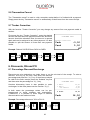
5.7 Tender Correction
With the function “Tender Correction” you may change any amount from one payment media to
another.
First press the key “Tender Correction”, enter the desired
amount and then select the payment media from which this
amount should be rebooked. Now, the amount is opened
again and can be assigned to any other payment. It is also
possible to split the amount to more than one payment
media.
CUSTOMER LOGO
Tender correction
Cash
Card
-5,00
5,00
Example: Rebook 5.00 EUR from CASH to CARD:
Tender
correct.
5
00
CASH
CARD
6. Discounts, RA and PO
6.1 Percentage Discount/Surcharge
Discounts are price deductions on single items or on the sub total of the receipt. To enter a
discount, first ring up the item, then enter the discount
percentage and press the “%(-)” key. If the discount should
be valid for the entire receipt, press the “Subtotal” key first
and then enter the percentage on “%(-)” key.
CUSTOMER LOGO
Likewise discounting items is also possible to order
surcharges. In that case please use the function “%(+)”.
In both cases the percentage values can be preprogrammed to avoid mistakes and manipulation.
Furthermore, it is possible to block single or subtotal
discounts and to set maximum limits.
1 PLU 1
10,00
1 PLU 2
5,00
-10% Rabatt
-0,50
--------------------------2 Total
14,50
Cash
Example: Percentage discount of 10% to PLU 2:
2
PLU
1
0
% (–)
23
14,50
6.2 Amount Discount/Surcharge
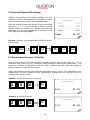
Similarly, it is possible to use amount rebates. The only
difference is that no percentages are calculated but rather
total amounts such as coupons are subtracted/added.
Enter the amount directly after the item or the subtotal and
press the “(-)” or “(+)” key to subtract or add the entered
amount from/to the actual price. Amount discounts and
surcharges can be pre-programmed or blocked in the
same way as percentage rebates.
CUSTOMER LOGO
1 PLU 1
10,00
1 PLU 2
5,00
COUPON
-1,00
--------------------------2 Total
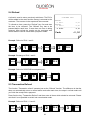
14,00
Cash
14,00
Example: Discount a pre-programmed COUPON amount
from the total:
1
2
PLU
PLU
Sub
total
(–)
CASH
6.3 Received on Account / Paid Out
Cash can be paid out of the cash drawer for special purposes, such as petty cash, etc. This is
referred to as a “Paid Out” (PO). Conversely, cash can also be added to the cash drawer. This
transaction is known as “Received on Account” (RA). Adding more cash to the cash drawer is
another example of “Received on Account”.
In both cases enter the amount first and then press either the key “RA” or “PO”. Depending on the
programming of the the operation will be automatically finalized with the Cash key or can be
continued as a normal receipt.
Example: 25.00 EUR Received on account:
CUSTOMER LOGO
2
5
00
RA
R.A.
25,00
Example: 25.00 EUR Paid out:
CUSTOMER LOGO
2
5
00
PO
P.O.
24
25,00
7. Using Shift Levels
7.1 PLU/Department Shift
The PLU/department shift is a preset function to switch all article- and department keys to a
second level. This is done by adding a pre-programmed offset to the actual PLU or department
number. Please note that the shift is valid for the very next item, it will be automatically reset after
entry. It is also possible to block the shift for either PLU’s or departments.
7.2 Price Shift
The QMP 50 series allows for more than one sales price for each PLU. This is a useful function for
special occasions, such as Happy Hour or item promotions. You may program an automatic price
shift based on a time period or manually change the price shift via key entry.
First select the price level by pressing the corresponding key. Then, enter the PLU. Depending on
the programming the price level will be reset automatically after an item, a transaction or not at all.
In that case you must reset the price level manually by choosing another keyboard level.
By using price levels it is also possible to realize tax shifts. In such a case the second price level
has the same price but a different tax rate.
Example: Shift to price level 2 and register PLU 1:
Price
level 2
1
PLU
7.3 Tax Shift
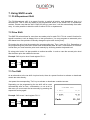
As an alternative to the tax shift via price levels, there is a preset function to activate or deactivate
certain tax rates directly.
Just press the corresponding “Tax” key to activate or deactivate a certain tax rate.
Depending on the programming the tax shift will be reset
automatically after an item, a transaction, or not at all. In
that case you must reset the tax manually by pressing the
respective tax key again.
Example: Shift to tax 3 and register PLU 1:
Tax
shift 3
CUSTOMER LOGO
1 PLU 1
10,00
--------------------------1 Total
10,00
Tax 3
1,00
Cash
1
PLU
25
10,00
8. Reports
The QMP 50 series offer a wide range of reports to collect and monitor your sales data. All
functions of the system have their own report memory in four periods. They can be checked
separately as system reports or combined as free programmable user reports. The report memory
of each function does not only contain the total sum, but also information about clerks and time
periods.
All reports can be performed as X or Z. Both types contain the same information. The X-report can
be printed as a temporary report at any time, because the report data will not be cleared. The
Z-report is a final report – after printing the data, the report memory will be cleared.
8.1 System Reports
Each function of the has its own system report, which is permanent in the software. Depending on
the configuration, this report can contain different information such as customer count, quantity,
and amount.
If you press the key “SYS” in mode X or Z you will receive a list of all available system reports.
Now, you can select one report with the cursor keys and confirm by pressing “SYS” again.
Alternatively, you may also enter the number of a system report directly on the “SYS” key.
Please note the programming of the system keys. By default the “SYS” key is located on the key
“(–) Coupon”.
Flowchart:
CODE
#
XZ
(-)
SYS
(-)
SYS
26
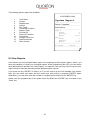
The following system reports are available:
CUSTOMER LOGO
1
2
3
4
5
6
7
8
9
10
11
12
13
System Report
Total Sales
Groups
Departments
Articles
Tax Totals
Tendering Functions
Drawer Totals
PO and RA
Discount Functions
Corrections
Foreign Currencies
Special Itemizers
Stock Control
---------------------------
Period 1: Standard
--------------------------Departments
--------------------------Dept 1
CCount
1
Quantity
2
Amount
10,00
Dept 2
CCount
3
Quantity
5
Amount
25,00
--------------------------X-Counter
:000001
---------------------------
8.2 User Reports
User reports are freely programmable report lists containing several system reports. Hence, you
have the possibility to create your individual reports. While programming the POS, you can define
what data should be printed in the “Daily Report”, for instance. Later you only need to call one user
report instead of manually selecting several different system reports.
If you press the key “ENTER” in mode X or Z you will receive a list of all available user reports.
Now, you can select one report with the cursor keys and confirm by pressing “ENTER” again.
Alternatively, you may also enter the number of a system report directly on the “ENTER” key.
Please note the programming of the system keys. By default the “ENTER” key is located on the
“Cash” key.
27
Flowchart:
CUSTOMER LOGO
Daily Report
XZ
CODE
#
CASH
ENTER
CASH
ENTER
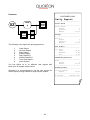
The following user reports are pre-programmed:
1
2
3
4
5
6
7
8
Clerk Report
All Clerk Report
Daily Report
Weekly Report
Daily Dept/PLU
Weekly Dept/PLU
Time Zone Report
Stock Control
You can define up to 10 different user reports with
each up to 38 system report entries.
Generally it is recommended to use the user reports for
normal report printing instead of single system reports.
28
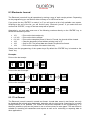
--------------------------Total Sales
--------------------------Total Sales
CCount
1
Quantity
2
Amount
10,00
--------------------------Groups
--------------------------Group 1
CCount
1
Quantity
2
Amount
10,00
--------------------------Tax Totals
--------------------------16% Tax 1
Gross
10,00
Taxable
8,62
Tax
1,38
--------------------------Tendering Function
--------------------------Cash
CCount
1
Amount
10,00
--------------------------Drawer Totals
--------------------------Cash in Drawer
Amount
10,00
--------------------------X-Counter
:000001-0001
---------------------------
8.3 Electronic Journal
The Electronic journal will log all operations by storing a copy of each receipt printout. Depending
on the programming you can do this either in binary or in ASCII text format.
If you press the key “ENTER” in mode X or Z you will receive a list of all available user reports.
Scrolling to the end of the list, you will find the entry “Electronic journal”. If you select this and
confirm with “ENTER”, a copy of the last receipt will be printed.
Alternatively, you may also enter one of the following numbers directly on the “ENTER” key to
access the electronic journal:
101
n X 101
0 X 101
102
103
104
– Print out the last receipt only.
– Print out the last n receipts.
– Print out the complete journal. If done in Z-mode, the journal will be cleared.
– Clear the electronic journal without printing (only in Z).
– Only for PC! The journal data are saved in a special csv-format.
– Print out the receipts of the active clerk only.
Please note the programming of the system keys. By default the “ENTER” key is located on the
“Cash” key.
Examples:
Print out the last receipt:
1
0
1
CASH
ENTER
Print out the last 3 receipts:
3
X
1
0
1
CASH
1
0
1
CASH
ENTER
Print out the complete journal:
0
X
ENTER
8.3.1 Text Format
The Electronic journal is saved in normal text format. Journal data, saved in text format, can only
be displayed and printed going backwards, beginning with the last receipt. Searching for a certain
receipt number is not possible. The format of the printout depends on the programming. It is
therefore possible to print out the journal in two or more columns to save paper. The text format is
suitable for recording all transactions and reports as well as for controlling or exporting data to
other applications.
29
8.3.2 Binary Format
The Electronic journal is saved in binary format. Any receipt can be recalled by number for
controlling purposes or print out. Please note that only sales receipts are saved. The increasing
receipt number is used as reference to navigate through the journal. Reports and programming
are not saved in the binary electronic journal.
To recall the last receipt, press the keys “PAGE UP” or “CURSOR UP” in mode R or M. Using the
keys “PAGE DOWN” or “CURSOR DOWN” you receive the first receipt. If you want to view a
certain receipt, just enter the receipt number before pressing “PAGE UP” or “CURSOR UP”. After
the initial recall you may use the scroll keys to navigate through the journal entries.
If you are in manager mode (M), you can print out a copy of the activated receipt by pressing the
“Subtotal” key. If you print a copy of a table invoice, the endorsement message will be added
automatically.
Example: Search receipt number 15 and print out a copy:
1
5
PAGE
Sub
total
9. Programming
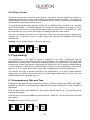
The programming of the QMP 50 series is classified in two parts: configuration and file
programming. First the requested functions must be activated in the configuration. This will allocate
the memory for each function. Then the pre-configured functions can be filled with user data in the
programming. Please note that the configuration can only be done by PC with the software QProg.
It is not possible to configure the systems directly. However, the file programming can be done
directly in X, Z or P mode. All functions, which were configured before, can be programmed.
This manual only gives a general overview of the programming. If you have further questions
please check our website www.quorion.de for special programming manuals or ask your local
QUORION dealer. He will gladly help you.
9.1 Programming of Date and Time
Programming the date and time is achieved in mode P, using the system keys “DATE” and “TIME”.
By default you will find it on the function keys “Table Split” and “Invoice” at QTouch2 or “CARD” at QMP 50
series series.
Enter the date in the format DDMMYYYY and confirm with the “DATE” key. The new date will be
activated immediately.
Enter the time in the format HHMM and confirm with the “TIME” key. The new time will be activated
immediately.
Example: Set new time 8:00 (only in P):
8
0
0
CARD
TIME
30
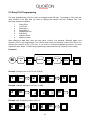
9.2 Easy PLU Programming
The easy programming of PLU’s is done in manager mode (M) only. To program a PLU enter the
code number of the data field you want to change and confirm with the “Subtotal” key. The
following codes are available:
1
2
3
4
5
6
7
8
Sales Price
Cost Price
Description
Description 2
Department Link
Add Stock
Subtract Stock
Minimum Stock
After selecting a data field, enter the new value, confirm it by pressing “Subtotal” again, and
choose a PLU to be programmed. This can be done either by pressing a direct PLU key or by
entering the number on the “PLU” key. If you want to continue programming articles, you may
repeat the same steps. To finish the programming mode press the key “Subtotal” without entry.
Flowchart:
M
CODE
#
Sub
total
RECORD
#
Sub
total
VALUE
Sub
total
PLU
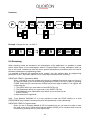
Example: Change price of PLU 5 to 2.00 EUR:
1
Sub
total
2
00
Sub
total
5
PLU
Example: Change description of PLU 5 to ABC:
3
Sub
total
A
B
C
5
Sub
total
Example: Add 10 pieces to stock of PLU 5:
6
Sub
total
1
Sub
total
0
31
5
9.3 File Programming
Start programming either by entering the file number directly on the “TYPE” key or by pressing the
“TYPE” key without entry and selecting the file from the programming window. At the end of each
line the file number is shown in brackets for reference.
Please note that files, which are not activated in the configuration, will not be shown. The following
files are available:
1
2
3
4
5
6
7
8
9
10
11
12
13
14
15
16
17
18
19
20
21
22
23
24
25
26
27
28
29
Parameters
Options
Time Zones
Day of Week Zones
Day of Month Zones
Date Zones
Receipt Header
Receipt Trailer
Slip Header
Slip Trailer
General Texts
Error Messages
General Messages
Day Descriptors
Month Descriptors
Counters
Total Sales
Groups
Departments
PLU
Tax
Clerks
Salespersons
Tenders
Drawers
PO/RA
Discounts
Corrections
Foreign Currencies
30
31
32
33
34
36
38
39
40
41
42
43
44
45
46
47
48
49
97
98
99
200
201
202
205
206
210
305
306
User Reports
Keyboard 1
Special Itemizers
Password
Print program version
Init printer logo
When the file has been selected, the first record will automatically be displayed. You can jump to
another record by entering the record number on the “Multiplication” key. Pressing the “X” key
without entry will select the next record.
The data field to be programmed can be selected by the cursor keys “PAGE UP”, “CURSOR UP”,
“PAGE DOWN”, “CURSOR DOWN”. When the field is selected just input the new data and confirm
with “ENTER”. When a field was modified, the new programming is automatically printed.
If you want to continue programming files, you may repeat the same steps. To finish the
programming mode press the key “TYPE” without entry.
32
Flowchart:
P
CODE
#
PLU
TYPE
PLU
TYPE
RECORD
#
X
VALUE
CASH
ENTER
PLU
TYPE
Example: Change tax rate 1 to 9.00 %:
2
1
PLU
TYPE
CURSOR
9
00
CASH
ENTER
PLU
TYPE
9.4 Scanning
When scanning codes are activated in the configuration of the application it is possible to create
and/or delete items on the cash-register either in Program Mode or during transaction when an
item is not found. Furthermore there are some special maintenance procedures which are can be
activated in Manager or programming mode.
It is possible to connect two scanners to the register. You can activate them by programming
parameter 56 & 57 also check option# 78 for check digit verification when scanning.
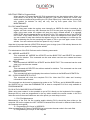
CREATING ITEMS in Transaction Mode
When Option#79 is set the register will prompt for creation of an article when not found. If
you want to create it you must confirm by pressing the SUBTOTAL key or abort by pressing
CLEAR (Note that you can press the CLEAR key at any stage to abort!!). The register will
now prompt for:
1 - The PRICE which you must enter on the SUBTOTAL key
2 - The Department which you must enter on the SUBTOTAL key
3 - The Descriptor when Option# 80 is set which you must enter on the
SUBTOTAL key
4 -Now the article is registered.
Note: From Release XX030605 on it is also possible to enter the PRICE directly on a fixed
DEPARTMENT key instead of entering the price and department on the subtotal key.
CREATING ITEMS in Program Mode
When you are in Program Mode# 20 (PLU programming) you can scan the code or enter
the code on the X key. When not found the register will ask you for creation which must be
confirmed by pressing the CR (User Report) key.
33
DELETING ITEMS in Program Mode
When you are in Program Mode# 20 (PLU programming) can also delete codes. When you
enter ZERO on the X key the register will ask you if you want to delete the current code
which must be confirmed by pressing the CR (User Report) key. Note that the records are
only marked for deletion so they will only free up their space after PLU FILE
MAINTENANCE.
PLU FILE MAINTENANCE
When using scan codes the register uses internally an INDEX file which is sorted so the
register can find a code very fast. Because the PLU file can grow very large (max 50000)
when using scan codes the register will store the newly created articles in a separate
UPDATE file which is located at the end of the PLU file. The maximum size of the UPDATE
file is HALF of the FREE SPACE in the PLU file. When for example the free space is 100
you can create 50 new items before the register will give the message to re-index the file.
After re-indexing the file the remaining free space is 50 so you can again create 25 new
articles. You can continue until the free space is only 1 record.
Note that is important that the UPDATE file doesn’t grow to large (over 1000 articles) because this
will have effect on the speed of creating new articles.
For maintenance of the PLU file there are the following commands:
100 – MERGE and DELETE
This command will MERGE the UPDATE and the BASE FILE and DELETE the articles
marked for deletion. This command can be used when new item are created and items
were deleted.
101 – MERGE
This command will MERGE the UPDATE and the BASE FILE. This command can be used
when only new item are created.
102 – DELETE
This command will DELETE the articles marked for deletion. This command can be used
items were only deleted.
103 – CHECK STATUS
This command will print and display the number of articles in the BASE and UPDATE file.
255 – CLEAR COMPLETE PLU FILE
This command will clear the complete PLU file. Note that PLU sales and inventory
information is also cleared.
The command can be issued in programming mode on the TYPE key and in MANAGER mode on
the SUBTOTAL key. Note that COMMAND 255 to clear to complete PLU file is only available in
PROGRAM MODE.
PLU’S WITH SCANCODES ON KEYBOARD
When using scan codes it is also possible to put a PLU directly on the keyboard of the register.
Because the key code as programmed in the key table contains the record number in the PLU
Index file and not the scan code there are a few points you must keep in mind.
1 – PLU File Maintenance
Maintenance of the PLU file like creating and/or deleting PLU’s should be done either on the
computer OR on the register but NOT ON BOTH because this will result in different Index files for
the computer and register.
2 – Programming PLU keys in WQPROG
When programming PLU keys in WQPROG you must enter the scan code in the code field.
3 – Programming PLU keys on the Register
34
When programming PLU keys on the register you must enter the scan code in the keyprogramming mode. The register will automatically insert the correct index record number in the
key table. The register will recognize the entry as a scan code when MORE then 5 digits are
entered. Normal key codes have a value of maximal 5 digits. This means that when you want the
program a PLU with scan code “123” you MUST enter “000123”. Suppose this PLU is located at
record number 5 the register will put 10005 as key code which is also shown on the display. When
you enter “123” the register will program key code “123”.
USING PLU’S WITH SCANCODES IN COMBINATION WITH BALANCES
On the Balance the Index Number of the PLU is stored so at the moment it is NOT ALLOWED to
create or delete PLU when there are still balances open because the sequence of the index file will
be changed which will result in wrong PLU on invoices.
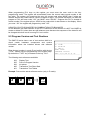
9.5 Program Version and Test Routines
The QMP 50 series have a set of test routines built-in to
check certain hardware components and receive
information about the installed drivers and software
version.
Enter the test number in mode P and confirm with the key
“TYPE”. Please note the programming of the system keys.
By default the “TYPE” key is located on the key “PLU”.
--------------------------F: 1v-WE
P: G0091009
C: QMP 50
RAM: 8192K
SERIAL#: 1234567
MAC: 00 16 4B 00 01 0D
---------------------------
The following test routines are available:
302
305
306
400
401
Display Test
Print out Program Version
Init printer
Transaction Test Direct Sale
Transaction Test Tables
Example: Print out the actual software version (only in P mode):
3
0
5
PLU
TYPE
35
9.6 How to enter letters in P mode
To enter letters at the QMP 50 series you have two different possibilities, either the traditional way
using hexadecimal codes or the new way using the numeric keys like a mobile phone. By default
the hex code system is active. Press the CAPS key repeatedly to switch to the following input
modes:
Key
P/O
Input mode
Hex code small letters
default
Hex code capital letter
caps
Mobile mode small
letters
mobile
Mobile mode capital
letters
mobile caps
CAPS
P/O
CAPS
P/O
CAPS
P/O
CAPS
Display
Please note the programming of the system keys. By default the “CAPS” function is located on the
“P/O” key. This can be changed by user programming.
9.6.1 Enter letters using hex codes
First select the letter you want to program in the code chart below. Find out the corresponding hex
code by combining the row number with the number of the column.
For example: letter L: row 4, column C hex code: 4C.
Enter the hex code using numeric and department keys:
Hexadecimal codes 0...9 = numeric keys 0...9.
Hexadecimal codes A...F = department keys 1...6
Press the HEX key after each entry to convert the hex code to the corresponding letter. After that
you may continue with the next hex code.
Please note the programming of the system keys. By default the “HEX” function is located on the
“R/A” key. This can be changed by user programming.
36
Example: Enter letter L
Key
4
Function
Display
Enter number 4 using numeric keys.
4
Enter hexadecimal number C using department keys.
C
Convert hex code 4C to letter L.
L
GHI
3
C
R/A
HEX
0
1
2
3
4
5
6
7
8
9 A B C D E F
2
Space
!
"
#
$
%
&
‘
(
)
*
+
,
-
.
/
3
0
1
2
3
4
5
6
7
8
9
:
;
<
=
>
?
4 @ A
B
C
D
E
F
G
H
I
J
K
L
M
N
O
5
P
Q
R
S
T
U
V
W
X
Y
Z
[
\
]
^
_
6
`
a
b
c
d
e
f
g
h
i
j
k
l
m
n
o
7
p
q
r
s
t
u
v
w
x
y
z
{
|
}
~
Ä
II
III IV
¡
¢
£
¤
¥
¦
§
¨
©
ª
«
¬
-
®
¯
±
²
³
´
µ
¶
·
¸
¹
º
»
¼
½
¾
¿
C À Á Â Ã Ä Å Æ Ç
È
É
Ê
Ë
Ì
Í
Î
Ï
D Đ Ñ Ò Ó Ô Õ Ö
×
Ø
Ù
Ú
Û
Ü
İ
Þ
ß
E
à
á
â
ã
ä
å
æ
ç
è
é
ê
ë
ì
í
î
ï
F
ð
ñ
ò
ó
ô
õ
ö
÷
ø
ù
ú
û
ü
ý
þ
ÿ
8
9
A
B
°
Code chart for Western Europe
37
9.6.2 Enter letters using mobile mode
The numeric keys have got an additional functionality to enter letters. This feature becomes active
when the mobile mode is selected. See above.
To enter a letter just press the appropriate numeric key 1 – 9 repeatedly until the character you
want appears in the display. If you do not press the key again after 1 second the actual letter will
be confirmed and the cursor goes to the next position.
Please note that the numeric display can only show abstract icons for the characters. The keys are
defined as follows:
Numeric key
Characters
Display
7
Space
8
9
4
5
6
1
2
3
ABCÄ8
DEF9
GHI4
JKL5
MNOÖ6
PQRS1
TUVÜ2
WXYZ3
ABCÄ8
DEF9
GHI4
JKL5
MNOÖ6
PQRS1
TUVÜ2
WXYZ3
Example: Enter letter L
Key
Function
Display
5
Press numeric key 5 to get the first letter J.
J
5
Press numeric key 5 again within 1 sec to get letter K.
K
5
Press numeric key 5 again within 1 sec to get letter L.
L
JKL
JKL
JKL
38
9.7 Auto Power Off Function
This function is used for Battery Mode to save the Battery power. The Cash Register turns off
automatically after a personal adjusted time. You can choose between 10 seconds to 40 minutes in
10 seconds steps.
Example for Auto Power Off in 1 minute = 60 seconds:
P
PLU
PLU
8
Cash
PLU
X
Cash
PLU
3
0
X
6
Example for Auto Power Off in 5 minutes = 300 seconds:
P
PLU
PLU
8
10. Training Mode
The training mode is used to test all functions of the QMP 50 series without adding the turnover to
the reports. The report memory will not be changed and all counters remain constant. Please note
that in this mode all receipts will be automatically marked as „Training”.
In order to access the training mode, a pre-programmed training clerk must be signed-in. Training
mode will remain activated until a new clerk is assigned. You will have full access to all registration
and programming functions for testing and training purposes.
11. Instructions for Use
11.1 Power Supply and Interfaces
Please use the delivered power supply for the QMP 50 series only. The usage of other power
supplies may damage your system. No liability is accepted for such damages.
The interface connections should only be plugged if the system is switched off. Please note also
the maximum cable lengths of 5 meters for USB and 15 meters for RS232.
11.2 Service and Maintenance
The QMP 50 series do not contain any components, which can be serviced or repaired by the user.
Please have all maintenance performed by a qualified QUORION dealer. Unauthorized
manipulations may lead to a loss of warranty.
39
12. Error Messages
ID
1
2
3
4
5
6
7
8
9
10
11
12
13
14
15
16
17
18
19
20
21
22
23
24
25
26
27
28
29
30
31
32
33
34
35
36
37
38
39
40
Error Description
Invalid Entry
Invalid Time
Invalid Date
Invalid Article
Unknown Report
Invalid Function
Transbuf. Full
Still in Transaction
User Break
No Under/Tender
Still in Tender
Scanning Error
Select Clerk
Select Salesperson
Item not Sold
No Price Entered
No Zero Price
Closed Drawer
Manager Required
Entry to High
Discount not Allowed
Correct not Allowed
Already Discounted
Enter Quantity
Journal Full
Enter Balance #
Invalid Balance
Wrong Clerk
Closed Balance
Print Invoice
Receipt Paper End
Journal Paper End
Slip No Paper
Logging Error
KP Error
Balance not Open
Invoice Buffer Full
Balance Used
PLU File Full
Reindex PLU File
40
13. Information on the Electromagnetic Compatibility and
Safety
CE Conformance
This QUORiON cash register conforms to the European Community’s EMC 2004/108 and 2006/95
directive. The cash register fulfills the following technical European requirements:
EN 55022: “Norm values and measuring procedures for radio interference properties
characteristics of information technology devices“
EN 55024: “Norm values and measuring procedures for the interference resistance
properties characteristics of information technology devices“
EN 60950: “Security measurements for the installation of IT“
A "conformance explanation" in accordance with the directives and standards cited on top has
been delivered and can be reviewed with
QUORiON Data Systems GmbH
An der Klinge 6
99195 Erfurt
(Email: [email protected]; web: www.quorion.de)
WARNING:
This is a Class A device. This device may cause radio interference in a residential area. In this
case it can be required to carry out adequate measures.
REMARK: If the cash register is installed in a system with other devices and components, all other
devices and components must each show EMC conformance to the norm. According to the EMC
2004/108 directive as well as EC and national laws, the system integrator is responsible to ensure
that the built system complies with regulations
1.50.417389 UM-English QMP 50 series QUORION CE (Stand: 08.06.11)
41