1
INSTALLATION
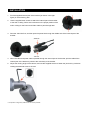
1. Find the supplied internal part of the bracket (as shown in the right
figure) in the accessory pack.
2. Use the supplied three screws to attach the internal part of the bracket
to the wall or ceiling. Drill a hole in advance on the proper position of the
wall or ceiling for the Power and Video Cable to pass through later.
3. Pass the video line first, and then pass the power line through the middle hole of the internal part of the
bracket.
4. When the video and power cable is passed through the internal part of the bracket, pull the cable till the
internal part of the bracket is joined to the main body of the bracket.
5. Adjust the viewing angle of the camera, and use the supplied wrench to fasten the joint lock by clockwise
rotating the attached screw to the end.
* The product image may differ from the actual product.