1
USER MANUAL
Regulator for the three circuits
- control for 2 heating circuits
- 1 domestic hot water control
www.ouman.fi
This user manual explains the C203 regulator’s functions and the displays that are visible to all users. The
service mode functions are covered in separate service manual atwww.ouman.fi.
The regulator also has a service mode that is used when connecting and implementing features as well as
the regulator’s configuration. It includes certain setting values that do not usually need to be changed or
require in-depth knowledge of the regulation process.
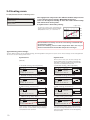
The C203 is a heat regulator for 3 circuits (two heating circuits and one hot water circuit). Wiring and configurating selections define what the regulator displays on the display screen.
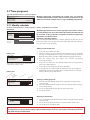
Control knob and OK
OK
OK
Press the control button to enter the menu.
Turn the control knob
to navigate in the menu.
A maximum of five windows can be displayed with the favourite
views key. Default settings for favourite views show menus for
each circuit, including all default settings that can be changed
by the user as well as information about measurements and the
regulator’s operation.
You can move from one favourite view to another by tapping
the key.
Main menu
>
Measur ement s
>
H 1 C ont r ol cir cuit
>
H 2 C ont r ol cir cuit
>
H W D omest ic hot wat er c o n tro l
Cancel button
Basic view
13:51 05.12.2014
O ut door t emp.
H1 S upply wat er
H2 S upply wat er
HW S upply wat er
2
Se l e c ti o n >
-12.4° C
45.2° C
Au to ma ti c
58.0° C
Au to ma ti c
32.8° C
Au to ma ti c
Holding the key down for an extended period of time returns the regulator to its basic mode. The display
shows the basic view, the monitor
dims and the keyboard locks if the
locking function is in use.
Contents
1Display menus ...................................................................................................................................................... 4
1.1 Basic view .............................................................................................................................................................4
1.2 Favourite views .....................................................................................................................................................5
1.3 Menu structure ......................................................................................................................................................6
2 Measurements .............................................................................................................................................................7
2.1Trend display .....................................................................................................................................................9
3 Regulation of supply water in heating circuits ...................................................................................................10
3.1 Supply water information ................................................................................................................................................10
3.2 Room temperature information ..........................................................................................................................................11
3.3 Measurements ..................................................................................................................................................11
3.4 Heating curve ...........................................................................................................................................................12
3.5Setting values ....................................................................................................................................................14
3.5.1 Room setting values .........................................................................................................................................14
3.5.2 Temperature drops ..........................................................................................................................................15
3.5.3 Special setting values .....................................................................................................................................15
3.6 Control mode .......................................................................................................................................................18
3.7 Time programs ...................................................................................................................................................19
3.7.1 Weekly schedule .............................................................................................................................................19
3.7.2 Exception schedule .........................................................................................................................................20
3.7.3 Special days ...................................................................................................................................................20
3.7.4 Temperatur level according to time program ..................................................................................................20
4Domestic hot water control ............................................................................................................................... 21
4.1 Setting values ...........................................................................................................................................................21
4.2 Control modes .................................................................................................................................................. 21
4.3 Measurements ..................................................................................................................................................21
5Alarms
..........................................................................................................................................................22
5.1Active alarms ........................................................................................................................................................22
5.1.1 Sensor fault alarms .............................................................................................................................23
5.2Alarm history .....................................................................................................................................23
5.3Acknowledge all alarms ..................................................................................................................................23
5.4Reset alarm history ..........................................................................................................................23
5.5Alarm receivers ..................................................................................................................................................23
5.6 Routing schedule ................................................................................................................................................24
6 System settings ...................................................................................................................................................25
6.1Setting date, time and language ......................................................................................................................25
6.2Text message (SMS) settings ...........................................................................................................................26
6.3 Network settings...........................................................................................................................................26
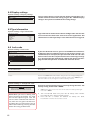
6.4 Display settings ..................................................................................................................................................30
6.5 Type information.................................................................................................................................................... 30
6.6 Lock code ...........................................................................................................................................................30
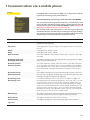
7Communication via a mobile phone ................................................................................................................. 31
7.1 Informative messages ...................................................................................................................................... 31
7.2 Changing setting values via text message (SMS) ............................................................................................31
7.3Changing the control mode by using asterisk (*) .......................................................................................31
7.4HOME/AWAY control ...................................................................................................................................... 32
7.5 Connecting the modem and taking it into use ....................................................................................................32
7.6 Text message quick reference ...........................................................................................................................33
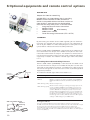
Optional equipment ..............................................................................................................................................34
Index .......................................................................................................................................................................35
Technical information ......................................................................................................................................... 36
3
1 Display menus
Different levels of display menus are used to make the C203 clear and easy to use. The basic view shows the
most important information for monitoring operation of the unit. Favourite views that can be changed by
users enable them to easily access desired menus. Setting values needed by the user can easily be found in
the versatile menu structure.
1.1 Basic view
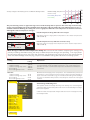
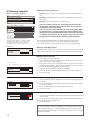
Central factors related to controlling heating are visible in the regulator’s basic view. When the unit is dormant (keys have not been touched) the display shows the basic view.
13:51 05.12.2014
Ou t d o o r t e m p .
H1 S u p p l y w a t e r
H2 S u p p l y w a t e r
Hw S u p p l y w a t e r
Selection
-12.4°C
45.2°C
Automatic
58.0°C
Automatic
32.8°C
Temperature measurements
enable quickly determining proper operation of the circuit.
Acknowledging alarms: Press OK and
the alarm sound will stop. If the reason
for the alarm has not been corrected, the
exclamation point in the top right will
continue to blink.
Deviation alarm
PRIO1 GROUP1
H1 Supply water=10.2 °C
Received: 08.11.2008 02:27
Press OK to acknowledge the alarm
Automatic
2
Alarms
•
A blinking exclamation
point means the unit
has active alarms.
•
The number indicates
the number of alarms.
Circuit control. This shows whether the
circuit’s heating level has been continuously forced to a particularly level or if
the regulator is in manual mode.
Alarm notice
C203 can generate different kinds of alarms. In the event of an alarm,
an alarm window pops up showing detailed alarm information and a
beeping alarm signal goes off.
If there are several unacknowledged alarms and you acknowledge
the alarm currently appearing in the device display, the previous alarm
will appear. As soon as all active alarms have been acknowledged, the
alarm window disappears and the alarm signal stops.
Alarm signal of all active alarms may also be stopped by pressing Esc
button. When you press Esc, the alarm signal stops and all the alarm
windows disappear from the display.
You may look into the alarms later by going to ”Alarms” > ”Active alarms”.
If an alarm has been acknowledged by pressing Esc, an exclamation
mark will appear in the beginning of the row.
4
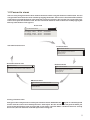
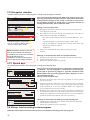
1.2 Favourite views
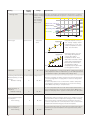
You can easily navigate from the basic view to the desired menu using the favourite view function. You can
navigate from one favourite view to another by tapping the button. There can be a maximum of five of these
views. The pre-installed favourite views show the circuits’ main menus. You can also save a particular regulator view as your own favourite view. You can return from favourite views to the basic view by tapping the
ESC key until the basic view appears.
Basic view
1 3: 51 05. 06. 201 3
Outdoor temp.
H 1 S uppl y w ater
H 2 S uppl y water
H W S uppl y water
- 1 2 .4°C
Selection
45.2°C
A utom atic
58.0°C
A utom atic
32.8°C
>2
A utom atic
Your own favourite view
H1 Circuit menu
H1 Control circuit
Supply water information
>
Measurements
>
Room temperature information
>
Heating curve
Your own favourite view
Alarm history
H2 Circuit menu
2
H2 Control circuit
02.12.2012 10:11:42 Sensor fault H1 Supply w >
05.12.2012 11:22:40 Sensor fault H1 Return
>
>
Supply water information
>
Measurements
>
Room temperature information
Heating curve
>
>
HW Circuit menu
HW D o m e s t i c h o t wa t e r c o n t r o l
Setting values
Control mode
Measurements
>
Automatic >
>
Setting a favourite view
Navigate to the view you want to add to your favourite views. Hold down the
key for an extended period
of time until the ”Save view in memory location:” menu opens. Use the dial to select the position where you
want to add the favourite view and press OK. If you select a location where a favourite view has already
been saved, the new favourite view will replace the existing one.
5
1.3 Menu structure
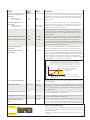
In the user manual
Main menu
Measurements
>
H2 Control circuit
>
H1 Control circuit
HW Domestic hot water control
Alarms
System settings
Service
>
>
>
>
>
Pa g e 7
Measurements, trends
Outdoor temp.
-18.2 °C >
---------------------------------------------------- >
H1 Supply water
35.1 °C>
H1 Return water
22.0 °C>
LH1 Room temperature
21.5 °C
H1 Actuator control
22 %
----------------------------------------------------
H2 Supply water
28.1 °C
H2 Return water
21.1 °C
Page 10
H1 Control circuit
Supply water information
>
Measurements
>
Room temperature information
>
Heating curve
>
Setting values
>
Control mode
Automatic >
TIme programs
>
Page 10
H2 Control circuit
Supply water information
>
Measurements
>
>
Room temperature information
>
Heating curve
>
Setting values
Automatic >
Control mode
>
TIme programs
Pa g e 2 1
HW D o m e s t i c h o t wa t e r c o n t r o l
Setting values
>
Control mode
Automatic >
Measurements
>
Pa g e 2 2
Alarms
Active alarms
>
Acknowldge all alarms
>
Alarm history
>
Reset alarm history
>
Routing schedule
>
Alarm receivers
>
Pa g e 2 5
System settings
Time
17:01
Date
Language
English>
SMS settings
>
Network settings
>
Display settings
>
Type info
>
Lock code
Th e
service
Not in use >
mode
is
covered
in
the
C 2 0 3 S e r v i c e m a n u a l (I n s t a l l a t i o n a n d c o n f i g u ra t i o n) .
6
>
29.06.2013 >
2 Measurements
Main menu
Measurements
>
H2 Control circuit
>
H1 Control circuit
>
HW Domestic hot water control
>
Measurements
Measurements, trends
Home-Away-control
Home
Outdoor temp.
-18.2 °C
H1 Supply water
35.1 °C
>
>
---------------------------------------------------- >
H1 Return water
>
22.0 °C >
21.5 °C >
H1 Room temperatur
H1 Actuator control
22 %
---------------------------------------------------- >
H2 Supply water
28.1 °C >
H2 Return water
21.1 °C
MEASUREMENTS
MEASUREMENTS:
Outdoor temp. = -18.2 °C /
H1 Supply water = 35.1 °C/
H1 Return water = 22.0 °C /
H1 Room temp. = 21.5 °C /
H2 Supply water = 35,7 °C/
HW Supply water = 57,7 °C/
You can see the measurements and mode information linked to the
C203. When you press OK on the measurement row, you can see
the measurement’s trend or trend log, change the settings of the
trend log and change the name of the measurement.
General measurements are informational temperature measurements with names set by the factory for a particular use. The
general measurement can also be put to a different use and be renamed.
If the sensor is not connected or is defective, the measurement value shown will be -50 or 130 °C.
You can also see circuit-specific measurements under each circuit.
Home-Away mode. By pressing OK you can change the status of the Home/
Away mode from the regulator.
If a GSM is connected to the controller, you can read measurement information form a mobile phone.
Send a message: Measurements
The controller sends the present measurement information to your mobile
phone. (If you have a device ID, write the device ID in front of the key word,
e.g., Ou01 Measurements)
2.1 Trend display
Measurements -> ”Select measurement, press OK” -> Trend display
When you press OK on ”measurement,” a menu for viewing trends and changing settings will open. You can also use the menu to rename a measurement
to better describe what is being measured.
Trend display 28.01 08:26:19 [ 34.7 °C ] ( s )
38
28
Measurement channels continuously monitor trends. Trends show measurements from the past 45 seconds. The measurements displayed are updated at
one-second intervals.
Setting
Factory setting
Range
Information about setting
Trend display
Press OK to view trends. The trend view is updated at one-second intervals, so the
measurement can be monitored in real time.
Trend log
From there you can view the trend log if the trend log is turned on. The trend log
is not shown in real time, i.e. the view is not updated in real time. The interval for
trend-log monitoring can be changed and the log can be saved to a memory stick.
Trend log on
No
Trend log
sampling interval
60 s
Yes/No
A different sampling interval can be set for different measurements. The memory
can store 2,000 measurement samples. For example, if the sample interval is 60
seconds, the trend buffer will contain measurement information for 33 hours. If the
sampling interval is 1,800 seconds (30 minutes) the buffer will contain measurement history for 41 days.
Trend log saving
The trend log can be saved to a memory stick. A csv file is created on the memory
stick, which is named according to the point measured. For example, the trend log
for outdoor temperature is saved in a file named UI1.csv.
Trend log automatic Not in use
saving
Name of meas.
Supply water
Name oF meas.:
S
u
p
p
l
y
The trend log can hold 2,000 measurement samples. The regulator produces a
separate trend log for each measurement.
w
a
t
e
r
Approve: Press OK a number of seconds
Cancel: Press ESC a number of seconds
Not in use/
20 min/
1 h/
6h
You can set the regulator to automatically create a csv file at the intervals
that have been set and forward the data to Oulink (additional equipment). If
the trend log becomes full before the interval for saving data has passed, the
regulator will save the data immediately when the log is full (2,000 measurements).
You can change the name of the measurement shown in the display. If the measurement is circuit-specific, the identifier for the circuit appears before the measurement, e.g. H1.
7
3 Regulation of supply water in heating circuits
Main menu
Measurements
>
H2 Control circuit
>
H1 Control circuit
HW Domestic hot water control
Alarms
System settings
Service
>
>
>
>
>
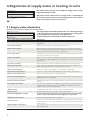
The C203 enables control of two different supply water circuits
independently (H1 and H2).
Regulation of the temperature of supply water is controlled by
the outside temperature. Use of room temperature measurements
keeps room temperature more consistent.
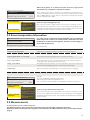
3.1 Supply water information
H1 (H2) Control circuit-> Supply water information
The supply water info shows which factors are affecting the suppH1 Control circuit
ly water temperature at the time of inspection. The starting point
Measurements
>
Supply water information
>
is the supply water temperature according to the
Room temperature information
>
outdoor temperature (according to the heating curve).
Heating curve
>
Factors effecting the supply water temp.
Explanation
According to curve
Supply water temperature according to the curve at the present outdoor
temperature.
Effect of parallel shift
Effect of parallel shift on the supply water temperature
Effect of time program
Effect of weekly or exception schedule mode on the temperature of supply
water. Near the end of the temperature reduction time, the pre-increase operation can increase the temperature of supply water.
Force control effect
Supply water has been forced permanently to the desired temperature reduction level (see Control mode selection).
Away -control effect
”Away” control for reduction of supply water temperature. The control command
can come from the Home/Away switch, the regulator or be sent as a text message (see 29).
Floor heat. anticipate
Effect of anticipation of floor heating on the temperature of supply water.
Outd. temp delay effect
Value - how much the reduced value of outdoor temperature measurement
affects the setting value seen in the supply water curve..
Effect of autumn drying
Effect of automatic autumn drying on the supply water temperature.
Return water compensation
Increase in supply water temperature due to return water compensation.
Effect of room compensation
Effect of room compensation on the supply water
Room comp. time adjustment
Additional correction for more precise room compensation based on realised
regulation (effect of I-regulation).
General compensation effect
General compensation can be based for example on wind, solar or pressure measurements.
The amount of compensation required is determined by a device outside the
regulator that conveys information to the C203, for example from channel
compensation to weather compensation.
Bus compensation effect
Min limit effect
Supply water temperature increase due to the minimum limit.
Max limit effect
Supply water temperature drop due to the maximum limit.
Calculated supply water setting
Present supply water temperature determined by the controller. All the
factors are considered that affect the supply water temperature.
Supply water temperature
Present measured supply water temperature.
Actuator control
Position set for the device by the regulator. If series regulation is in use, 50 %
means that valve 1 is fully open and vent 2 is closed. 100 % means that both
valves are open.
The average outdoor temperature that the controller uses for control. (setting
the average p. 16)
Delayed outdoor temperature
8
When the regulator is in summer function mode, the supply water
information says ”Regulator is stopped for summer.”
S u p p l y wa t e r i n f o r m a t i o n
According to cure
35.1 °C
Away-control effect
-8.5 °C
Calculated supply water setting
29.1 °C
-------------------------------------------------------
L1
H1HUONELÄMPÖTILAINFO
SUPPLY WATER INFO
L1
H2HUONELÄMPÖTILAINFO
SUPPLY WATER INFO
H1 Supply water info:
According to the curve
= 35.1 °C/
Away-control effect = -6.0 °C/
Calculated supply water
setting = 29.1 °C.
In the example in the picture, supply water according to the heating curve is
35.1°C. In the Away mode the controller reduces the temperature of the supply
water to 6.0°C. Based on these data, the computational setting value of supply water is 29.1°C (= 35.1 - 6.0).
Send a message: H1 Supply water info.
The controller sends a supply water info from the H1 heating circuit to
your mobile phone that shows you the controller determined supply water
temperature at the present and the factors effecting supply water control. The
message cannot be changed or sent back to the controller.
3.2 Room temperature information
H1 Control circuit
Measurements
>
Room temperature information
>
Supply water information
>
Heating curve
>
If a room sensor is connected to the controller, you can check the
room temperature info to see which factors determine the room
temperature at the time of inspection. The basis is the setting value of room temperature.
H1 (H2) Control circuit-> Room temperature information
Factor effecting the room temperature
Explanation
Delayed room temperature
Delayed room temperature that the controller uses in control (see p. 17).
Room temperature setting
Room temperature setting set by the user.
Time program effect on room temp.
Room temperature drop by week clock or exception calendar.
Force control effect
Room temperature has been forced permanently to the desired reduction in
room temperature (see Control mode selection).
Away -control effect
Home/Away mode for reduction of room temperature. The mode command can
come from the Home/Away switch or be sent as a text message.
Autumn dry
Effect of automatic autumn drying on room temperature (see page 15).
Calculated roomtemperature
Present room temperature setting determined by the controller.
R o o m t e m p e ra t u r e i n f o r m a t i o n
Room temperature setting
Time program effect on room temp.
21.0 °C
-1.5°C
---------------------------------------------------Calculated room temperature
L1
H1HUONELÄMPÖTILAINFO
ROOM TEMPERATURE
INFORMATION
L1
H2HUONELÄMPÖTILAINFO
ROOM TEMPERATURE
INFORMATION
19.5°C
L1 Huonelämpötilainfo:
Hidastettu huonelämpötilamittaus = 19.1 °C/
Huonelämpötilan asetusarvo
= 21.0 °C/
Poissa-ohjauksen vaikutus =
2.0 °C/
Laskennall. huoneasetusarvo = 19.0 °C.
Example.
The room temperature has been set at 21.0°C.
The time program drop the temperature 1.5°C.
The controller sets the calculated room temperature at 19.5°C (=21.0-1.5).
Send a message: H1 Room temperature info.
The controller sends a room temperature info from the H1 heating control
circuit to your mobile phone that shows you the calculated room temperature
setting that can be used in control. The message can’t be changed or sent back
to the controller.
3.3 Measurements
H1 (H2) Control circuit -> Measurements
The ”Measurements” menu under the circuit shows the measurements related to the circuit.
All measurements connected to the regulator can be found in the Measurements menu at the root level (see
page 7).
9
3.4 Heating curve
H1 (H2) Control circuit-> Heating curve
H1 Control circuit
Supply water information
>
Heating curve
>
Measurements
Setting values
>
>
The supply water temperature for different outdoor temperatures
is set in heating curve settings. With C203 the heating
curve can be adjusted exactly to meet the needs of the facility
from either three or five points.
A 3 point curve is the factory setting.
Supply water
In case of a 3-point curve, you define the
supply water temperature for the outdoor
temperatures -20 °C, 0 °C and +20 °C.
+80
Max limit
+60
+40
Min limit
+20
- 20
°C
+ 20
0
Outdoor temp.
The controller has factory set curves and settings suitable for different heating modes.
Correct the heating curve if room temperature does not stay at
the desired level when the outdoor temperature changes.
Typical heating curve settings:
Factory default settings are for radiator heating, normal regulation settings for a 3-point curve. These settings can be changed from
the circuit’s custom setting values menu.
3-point curve
5-point curve
(default)
On a 5-point curve you can also change the
three middle values for outdoor temperature.
Navigate to change mode by pressing the OK
key for an extended period of time.
1. Radiator heating, normal (default)
1. Radiator heating, normal (default)
Heating curve
60
-20 = 50 °C
+20
0
-20
0
-20
0
-20
°C
80
60
40
+10= 26 °C
20
+20
0
-20
°C
3. Floor heating, normal curve
Heating curve
-20 = 33 °C
40
0 = 27 °C
20
+20 = 20 °C
0
-20
0 = 27 °C
+20 = 20 °C
60
-10= 30 °C
40
+10= 23 °C
Min limit: 18 Max limit: 42
°C
4. Floor heating, damp rooms
80
Heating curve
60
-20 = 33 °C
20
+20
0
-20
°C
4. Floor heating, damp rooms
Heating curve
Heating curve
80
-20 = 31 °C
60
+20 = 24 °C
20
40
0 = 27 °C
0
-20
°C
The supply water minimum limit setting
also ensures a comfortable and good drying
temperature in the summer.
10
20
+20
-10= 50 °C
Min limit: 18 Max limit: 75
80
+20
0 = 41 °C
+20 = 18 °C
°C
3. Floor heating, normal curve
Min limit: 23 Max limit: 35
20
+20 = 18 °C
-20 = 58 °C
40
+20
40
Heating curve
60
0 = 41 °C
Min limit: 18 Max limit: 42
60
+10=28 °C
Min limit: 18 Max limit: 75
80
-20 = 58 °C
80
-10= 44 °C
2. Radiator heating, steep curve
Heating curve
+20
0 = 37 °C
+20 = 18 °C
°C
2. Radiator heating, steep curve
Min limit: 18 Max limit: 75
20
+20 = 18 °C
-20 = 50 °C
40
0 = 37 °C
Min limit: 18 Max limit: 75
Heating curve
80
-20 = 31 °C
0 = 27 °C
+20 = 24 °C
80
60
-10= 29 °C
40
+10= 25 °C
Min limit: 23 Max limit: 35
20
+20
0
-20
°C
The maximum supply water setting ensures
that floor heating temperatures never rise too
high. Some floor materials can be damaged by
excessive heat.
Factory settings of the heating curves of different heating modes
80
Radiator heating, steep curve
60
Radiator heating
Floor heating, damp rooms
40
Floor heating
20
+20
0
-20
°C
The preset heating curves are typical average curves for the heating mode in question. The curve may need to be adjusted to suit your building. The setting should be done during the cold period and if the room compensation is in use, it
should be switched off during the setting. The curve is appropriate when the room temperature is maintained constant
although the outdoor temperature changes.
Heating curve
-20 = 58 °C
0 = 41 °C
+20 = 18 °C
80
60
62 °C
40
43 °C
Min limit: 12 Max limit: 75
20
+20
0
-20
-20 = 58 °C
0 = 41 °C
+20 = 18 °C
60
54 °C
40
39 °C
Min limit: 12 Max limit: 75
(Set higher values for supply water temperature at the outdoor temperatures
-20 °C and 0 °C).
°C
80
Heating curve
If room temperature drops, make the curve steeper.
If room temperature rises, make the curve less steep.
(Set lower values for supply water temperature at the outdoor temperatures
-20 °C and 0 °C).
20
+20
0
-20
°C
Note! Changes influence room temperature slowly. Wait at least 24 hours before readjusting the settings. Especially in buildings with foor heating, the delays in room temperature changes are quite long. The supply water
minimum limit setting ensures that pipes will not freeze. The maximum limit setting ensures that excessively hot
water that could damage structures (e.g. parquet in case of foor heating) does not enter the heating system.
Setting
Factory
setting
Min limit
radiator heating
radiator heating, steep curve
floor heating
floor heating, damp rooms
18.0
18.0
18.0
23.0
Max limit
radiator heating
radiator heating, steep curve
floor heating
floor heating, damp rooms
°C
°C
°C
°C
75 °C
75 °C
42 °C
35 °C
Explanation
Minimum allowed supply water temperature. A higher minimum temperature is used in damp rooms and tiled rooms than in, e.g., rooms having a parquet floor to ensure a comfortable temperature and removal of moisture in
the summer.
Maximum allowed supply water temperature. The maximum limit prevents the
temperature in the heating circuit from rising too high, preventing damage to
pipes and surface materials. If, e.g., the characteristic heating curve setting is
incorrect, the maximum limit prevents excessively hot water from entering the
network.
H1 HEATING CURVE
H1 Heating curve:
Suppl.w. (-20) = 50°C/
Outd.t. 2 = -10°C/
Suppl.w. 2 = 44°C/
Outd.t.3 = 0 °C/
Suppl.w. 3 = 37°C/
Outd.t.4 = 10°C/
Suppl.w. . 4 = 28°C/
Menov.(+20) = 18 °C
H1 Heating curve:
Minimumm limit = 18°C/
Suppl.w. (-20) = 54°C/
Maximum limit = 42°C/
Outd.t. 2 = -10°C/
Suppl.w. 2 = 47°C/
Outd.t. 3 = 0 °C/
Suppl.w. 3 = 39°C/
Outd.t. 4 = 10°C/
Suppl.w. 4 = 23°C/
Suppl.w. (+20) = 20 °C
Minimum limit = 18°C/
Maximum limit = 42°C/
Send message: H1 Heating curve
The regulator sends a message showing curve settings. You can change the
settings by replacing the setting value with a new one and sending a message
back to the regulator.
C203 will make the requested changes and send a new message showing
the changes made.
H2 HEATING CURVE
11
3.5 Setting values
The regulator has two types of setting values: those that are always visible and those than can only be changed using a service
code. Setting values in the regulator’s service mode are described
in a manual for service personnel.
H1 Control circuit
Measurements
>
Heating curve
Setting values
Control mode
>
>
Automatic >
H1 (H2) Control circuit-> Setting values
Both circuits have the same circuit-specific setting values.
Changing a setting:
• Choose the desired setting by turning the control knob.
• Press OK to go to the view where editing is possible. Change
the setting.
• Press OK to accept the change.
• Press Esc to exit the editing view.
Setting
Factory
setting
Range
Explanation
Room temperature setting
21.5
21.0
5... 50 °C
Basic room temperature setting for the controller set by the user.
This setting value is not visible unless room compensation is in use.
Taking it into use is done from the room setting values menu.
Summer function outd.limit
Pump summer stop
Valve summer close
Autumn dry effect on supply water
Supply water (Radiator heating)
Supply water (Floor heating)
Autumn dry effect on room temp.
19
10 ... 35 °C
In use
In use/
Not in use
In use
4.0
1.5
1.0
In use/
Not in use
0... 25 °C
0... 15 °C
0.0... 1.5 °C
Summer function outdoor temperature limit. When the measured
or forecast outdoor temperature exceeds the outdoor temperature
limit of the summer function, the regulation vent closes and the circulation water pump stops as selected.
If the regulator is connected to control the pump, the pump can
be stopped while the summer function is in use.
The setting value is used to select whether or not the regulation
vealve is closed when the summer function is in use.
The setting value shows how much the autumn dry function
increases supply water temperature. If room temperature regulation is in use, the user sets how much the room temperature is
increased.
3.5.1 Room temperature settings
The room temperature setting menu is visible if room measurement is in use in the ”Connections and configuration” menu in service mode.
H1 (H2) Control circuit-> Setting values-> Room temperature settings
Setting
Room compensation
Factory
setting
In use
Room compensation ratio
Floor heating
Radiator heating
Comp. max.effect on
supply water
Floor heating
Radiator heating
Room temp.measurement
delay
12
Range
Explanation
In use/
Not in use
Defines whether room temperature affects regulation of supply
water. If the measured room temperature differs from its setting value, room compensation corrects the temperature of the
supply water.
0...7.0
Coefficient used in applying the difference between room measurement and the room setting value to the supply water setting value. For example, if room temperature in radiator heating
is one degree below the setting value, supply water is raised
by four degrees.
1.5
4.0
0...25 °C
Room compensation’s maximum effect on the supply water.
0...2.0 h
Amount of room temperature measurement delay (time constant). Different buildings react to temperature changes at different rates. This setting value can reduce the effect of the building on room regulation.
5.0
16.0
2.0
3.5.2 Temperature drops
You can designate separate temperature reduction settings for each circuit. When transitioning from a temperature reduction period to normal temperature level, a preliminary increase in supply water can be used.
H1 (H2) Control circuit-> Setting values -> Temperature drops
Setting
Factory
setting
Range
Explanation
Temperature drop
Supply water, radiator heating
Supply water, floor heating
Room temperature
3
1.5
3
0... 40 °C
0... 40 °C
0... 40 °C
Temperature drop in supply water, which can start due to scheduling
software or a Home/Away text message command or when selecting
constant big temperature drop as the circuit’s mode. If room temperature measurement has been taken into use, the temperature drop is
given directly as a room temperature drop.
Big temperature drop
Supply water, radiator heating
Supply water, floor heating
Room temperature
5
2
5
0...40 °C
0...40 °C
0...40 °C
A big temperature drop in supply water temperature can be initiated by
the scheduling programme or a command from the home/away switch,
or when the continuous big temperature mode mode is selected. If room
temperature measurement has been taken into use, the big temperature
drop is given directly as a room temperature drop.
Home/Away control
Not in use
Temp. level on Away control Temp.drop
In use/
Not in use
The Home/Away mode makes transitions between temperature levels. If
transmitter measurement mode is connected to the regulator for general compensation, you cannot connect the Home/Away switch but you
can use the Home/Away mode via SMS or from the regulator’s ”Measurements” menu.
Temp.drop /Big
temp. drop
If the Home/Away mode is in use, you can select the desired
temperature in the ”Away” mode. The selections are temperature
drop or big temperature drop. The default is temperature drop.
3.5.3 Special setting values
Setting values related to the summer function, autumn dry function, heating regulation and compensation can
be found in special setting values.
H1 (H2) Control circuit-> Setting values -> Special setting values
Setting
Supply water pre-increase
Radiator heating
Floor heating
Factory
setting
Range
4.0
1.5
Explanation
The amount, in degrees, of the automatic supply water pre-increase
occurring at the end of the temperature drop (week clock or exception
calendar). The pre-increase helps raise the room temperature more quickly
back to a nominal room temperature after a temperature drop. value.
0... 25 °C
0... 25 °C
-10...20
The summer function is turned off immediately if the real-time
outdoor temperature falls to the ”Summer function inhibition limit.”
The summer function is also turned off if room temperature falls at
least 0.5 °C below the setting value or when the regulator restarts.
In use
In use/
Not in use
The flushing operation is done in connection with inspection of the
valve’s position when the regulator is in summer function mode.
During the flushing operation the regulator opens the valve to 20%
and then closes it. If the regulator has stopped the pump, the regulator
uses the pump during flushing of the valve.
Outdoor temperature forecast
Not in use
In use/
Not in use
In addition to measured outdoor temperature, temperature
forecasts can be used with the summer function (requires
Ounet connectivity). If the regulator has not received outdoor
temperature forecasts via the data channel for 2 hours, the
forecast is not used in the summer function.
Autumn dry
Not in use
In use/
Not in use
In autumn dry mode, supply water temperature is automatically
raised for 20 days. The function is turned on automatically when the
average daytime temperature has been more than 7°C for a minimum
of 20 days and then falls below +7°C. The function remains on for the
following 20 days if the outdoor temperature is below 7°C (10 hour
time constant for measurement).
Summer func.inh.limit
6 °C
Valve summer flushing
°C
7 °C
24-hour average temperature v
v
The temperature limit that
activates autumn drying
Continually above +7 °C for a
period of at least 20 days
Autumn drying in use
(usually 20 days)
Time/
24 hours
13
Setting
Heating mode
Factory
setting
Range
Explanation
Radiator heating Radiator heating/ The type of heating is selected based on whether floor or radiator
Radiator heating- heat is used and whether the space is a normal area or damp area.
steep curve/
Floor heating/
80
Floor heating,
damp rooms
60
Radiator heat., steep curve
Radiator heating
40
Floor heating, damp rooms
20
Floor heating
+20
Curve type
3-point curve
3-/5-point
curve
supply water
1
2
0
-20
°C
Using the 3-point curve you
can change supply water
temp eratures with the
outdoor temperature values
-20°C, 0°C and +20°C.
3
outd.t. 20
0
-20 °C
supply water
1
3
2
4
5
outd.t. 20
Parallel shift
0.0
-15 ... +15 °C
0
-20 °C
Using the 5-point curve you
can change the regulation
curve to the outdoor
temperature values -20°C
and +20°C as well as to three
other outdoor temperatures
between -20°C and +20°C.
To change the outdoor
temperature point, press OK
for a long period of time.
If room temperature is continuously above or below the setting
value despite the outdoor temperature, you can add a permanent
compensation value to the supply water setting value.
These setting values are shown only when radiator heating is used.
Outd.temp.delay on temp.
increase
Radiator heating
Outd.temp.delay on
temp.drop
Radiator heating
2
2
0... 15 h
0... 15 h
Amount of slowing of outdoor temperature measurement (time
constant). Regulation of supply water is based on delayed measurement.
If room temperature rises too much when outdoor temperatures fall further below the freezing point, increase the setting
value ”Outd.temp.delay on temp.increase.”
If room temperature falls too much when temperatures below
the freezing point rise, increase the setting value ” Outd.temp.
delay on temp.drop” If the opposite occurs, lower the delay time
These setting values are shown only when floor heating is used.
Floor heating anticipate
on temp.incr
Floor heating
Floor heating anticipate on temp.drop
Floor heating
14
2
2
0... 15 h
0... 15 h
Anticipation of floor heating is used to try to stabilise room temperature when outdoor temperature changes. In floor heating,
the concrete mass of the floor slows transmission of heat to
room air temperature. If room temperature rises too much when
temperatures below freezing rise, increase anticipation.
If room temperature falls too much when freezing temperatures
fall further, increase anticipation. If the opposite occurs, lower
anticipation.
Factory
setting
Setting
Room comp. adjustm. time
(I control)
Radiator heating
Floor heating
I control’s max effect on
sup water
Radiator heating
Floor heating
2.5
1.0
6
2
Range
Explanation
0.5...7 h
0.5...7 h
Time correction improves the room compensation function (I-regulation). In massive houses or houses where floor heating has been
installed on a concrete floor, longer room compensation correction
times are used.
0 ... 15.0 °C
0 ... 15.0 °C
Room compensation correction time can change supply water
temperature to no more than this setting value. If room temperature continuously fluctuates, check whether the problem is
resolved by lowering the setting value.
General compensation can increase or decrease the temperature of
supply water. Transmitter measurement can utilise for example wind
or solar measurement or a pressure differential measurement over the
heating network.
General compensation min
0
0 ...100 %
General compensation max
100
0 ...100 %
General compensation
max effect
0
-20 ... 20 °C
The compensation minimum tells you how much supply water temperature is changed when the supply water compensation starts.
General compensation
max effect
0
-20 ... 20 °C
Maximum compensation shows the maximum amount that compensation can raise or lower supply water temperature. If wind measurement is
used in transmitter measurement the setting value is positive, i.e. supply
water temperature is raised due to the wind. If solar measurement is
used in transmitter measurement the setting value is negative, i.e. supply
water temperature is lowered due to solar radiation.
Maximum compensation
Setting limit values for a compensation area. Set the transmitter
measurement message value at which compensation begins and
the value at which it reaches its maximum level. The amount of
compensation is linear between the limit values. (Implementation of
a transmitter and setting values for the measurement area are done
during implementation of measurement.)
0
An example of general compensation. A wind sensor is connected
to the measurement channel. Wind compensation should start
when the transmitter’s measurement message is 30% and reach
its maximum when the measurement message is 70%. Wind com°C pensation can raise supply water temperature by no more than 4°C.
7
6
5
4
3
2
1
0
Compensation is at its maximum when the
measurement message reaches 70%
Raising supply
temperature
25
50
75
100
water
Measurement message %
Compensation begins when the measurement message
reaches 30%
5
0...300 s
Filtering of measurement signal. The filtering will dampen the effect
of rapid changes.
Not in use
In use/
Not in use
The need for compensation can be defined by an external device
that relays the need for a supply water temperature exception
to the C203 through a communication channel (e.g. Ounet
S-compensation).
Gen. compensation filtering
Bus compensation
Supply water max decrease
0
-30.0 ... 0 °C
Channel compensation cannot drop supply water temperature
more than allowed by the setting value.
Supply water max increase
0
0 ... 30.0 °C
Channel compensation cannot increase supply water temperature
more than allowed by the setting value.
Return water compensation
2
0 ... 7.0
If return water temperature falls below the setting value for danger
of return water freezing, supply water temperature is raised by the
value: amount of the deficit multiplied by the compensation ratio.
H1 SETTINGS
H1 Settings:
Room temperature = 21.5°C/
Temp.drop = 3.0°C/
H2 SETTINGS
Send a message: H1 Settings.
The controller sends the main settings to your mobile phone. Editing
the setting values: write the new setting in place of the old setting
and send a message
back to the controller. The controller sends the setting as a return
message.
15
3.6 Control mode
H1 (H2) Control circuit-> Control mode
Automatic control is the mode that is used normally. You may
change automatic control to manual control here, and drive the
valve to the desired position. You can also force a mode to the desired temperature level. A continuous mode command bypasses
possible scheduling programmes.
H1 Control circuit
Heating curve
>
Setting values
>
Control mode
Automatic >
Time programss
>
Control mode
Automatic
Continuous normal templ
Continuous temp. drop
Continuous big temp. drop
Manual
Control mode
Explanation
Automatic
C203 controls the supply water temperature automatically according to
the need for heating and possible time programs
Continuous normal temp.
Normal heating that is not dependent on scheduling programs is on.
Continuous temp. drop
Temperature drop independent of scheduling programs is on.
Continuous big temp. drop
Big temperature drop that does not depend on scheduling programs is on.
Manual
The valve remains in the position it has been set to until manual mode is
turned off.
Control mode
Continuous normal temp.
Continuous temp. drop
Continuous big temp. drop
Manual
H1 Control circuit
Heating curve
>
Setting values
Control mode
Actuator manual position
Manual
In manual mode the valve’s position is changed with the setting
value ”H1 (H2) Manual mode position.”
>
>
42% >
Manual mechanical
In mechanical manual mode the valve’s position is set from the actuator. To
prevent the regulator from changing the position of the valve, the actuator’s
power input must be disconnected.
H1 CONTROL MODE
H1 CONTROL MODE:
*Automatic/
Continuous normal temp./
Continuous temp. drop/
Continuous big temp. drop/
Manual 0 %
L1 Ohjaustapa:
Automaatti /
Jatkuva normaalilämpö/
Jatkuva lämmönpudotus/
* Käsiajo 20 %/
L2 Ohjaustapa
16
Send a message: H1 Control mode
The controller sends a return message in which a * appears in front of the
control mode in use. If you want to change the control mode, move the *
in front of the desired control mode and send the message back to the
controller. The controller
will then send a return message showing that it has switched to the desired
control mode.
3.7 Time programs
H1 (H2) Control circuit-> Time programs
H1 Control circuit
Heating curve
>
Control mode
Automatic >
Setting values
>
Time programs
Weekly programmes, programmes for specific days and calendar
exception programmes can be added to heating regulation in the
C203. You can lower temperatures using scheduling programmes.
>
3.7.1 Weekly schedule
H1 (H2) Control circuit-> Time programs ->Temp. drop Weekly schedule
Graph view
Temp.drop Weekly schedule
Monday
Tuesday
Wednesda
03691215182124
Thursday
Friday
Saturday
Sunday
Weekly programmes have a standard graph view as well as a change view showing the exact time when the new mode command will
be executed. In the graph view, exceptions to normal temperature
reductions are shown as bars.
Browsing a weekly program:
Turn the control knob to browse a weekly program. If you wish to see
the exact switch times or you wish to change, delete or add switch times, press OK at any weekday.
Adding a new switch time:
Editing view
Time Mode
M T WT F S S
21:00 Temp.drop
06:00 Normal temp.
00:00 Add new
In this example, you can see a weekly temperature
drop program. Temperature drop is on from 10 pm
to 6 am from Monday to Friday.
Editing view
tc
wi
ts
Se
e
im
e
ht
tat
t s ed )
Se desir level
.
(= mp
te
Time Mode le c
Se
td
(s)
ay
M T W T F S S
06:00 Normal temp.
17:00
OK
Temp. drop
00:00 Add new
Time
21:00 Temp. drop
06:00Delete switch time
00:00Add new
Ac
1. Press OK at the “Add new” row.
2. You can select the value you want to change using the selection
dial. By pressing OK you can change the value by the cursor. Press
ESC to return to the previous mode without changing the value.
3. Set the switch time (set hours and minutes separately).
Press OK to accept.
4. Press OK and then turn the control knob to set the temperatu-re
level. Press OK to accept.
5. Press OK at each weekday you wish to choose.
6. Press OK at the end of the row to accept the new time program.
Note! Also remember to define when the control returns to automatic (=normal). Press Esc to exit.
pt
ce
Editing a weekly program:
1. Turn the control knob to move to the value you wish to change
and press OK.
2. Turn the control knob to make the time and temperature changes.
Press OK to accept.
3. Press the OK button to change the day of the week.
4. Press Esc to exit.
Deleting a switch time:
M T W T F S S
OK
1. Turn the control knob to move to the switch time you wish to delete
and press OK.
2. Press OK at temperature level and select ”Delete switch time”.
3. Press OK at the end of the row.
Tip: Use the preincrease function. With the pre increase function the regulator automatically increases supply water temperature at the end of the reduction phase. Normal temperature has already been reached when the heating mode changes to normal heat.
17
3.7.2 Exception schedule
H1 (H2) Control circuit-> Time programs -> Temp. drop Exception schedule
Day
Time
You can easily make changes that differ from normal routine use
by using the exception schedule. The date, time and mode to which
heating will be changed in the period in question are entered in
the exception schedule. To switch from an exception schedule to
weekly schedule mode, select automatic mode.
1
Add new
>
Add/change switch time
Day:
31.03.2013
Time:
Mode:
Adding a new activation time:
2
11:30
Big temp. drop
Accept:
Day
1. Navigate to ”Exception schedule” and press OK. The display will
read ”Add new.” Press OK
3
Ready
Time
31.03.2013
11:30
14.04.2013
Big temp. drop
16:00 Automatic
Add new
2. Press OK and set the start date for the program, then the time and
mode. You can select from the following:
>
>
>
•
The picture shows an exception
schedule program. Heat reduction is on from 31 March 2013,
11:30 to 14 April 2013, 16:00
•
•
•
one day schedule from the weekly schedule (Monday - Sunday)
a special dayfrom the special day program (SD1 - SD7)
one of the following heating levels: ”temperature drop,” ”big
temperature drop,” or ”normal”
”automatic.”
3. Accept the exception schedule you created by pressing
”Ready.”
NOTE! Remember to also set the end
time for the exception schedule program! When you set the date and time,
the mode will change to
”Automatic”. In this case, the control
returns back to the weekly schedule.
Deleting an activation time from an exception schedule:
1. Navigate to the row with the activation time you want to delete.
2. Select ”Delete switch time.”
3. Accept the deletion by pressing ”Ready.”
3.7.3 Special days
H1 (H2) Control circuit-> Time programs -> Temp. drop Special days
Graph
Special days
SD1
>
1
SD3
>
SD2
>
03691215182124
Editing view
Time Mode
SD1
00:00 Add new
Time Mode
08:00 Temp. drop
0
6
OK
SD1
2
12 18 24
0
Time Mode
6
12 18 24
SD1
08:00 Temp. drop
22:00 Normal
00:00 Add new
3
0
6
12 18 24
Special days
SD1
>
SD3
>
SD2
>
03691215182124
You can enter special day programs as exceptions to normal weekly schedule. You can designate a maximum of 7 special day pograms (SD). A special day program is typically created for each
holiday. When the special day program will be applied it is set in
the exception schedule.
Adding a new activation time:
1. Navigate to ”Special days” and press OK. Select an unused special
day and press OK.
2. Place the cursor on ”Add new” and press OK. Set the time for the
program (hours and minutes are set separately). Select the mode
to be switched to at the time specified. Accept the program by
pressing OK when the cursor is on OK.
3. Navigate to the ”Add new” row. Set the time when the mode will
change from temperature drop mode back to normal temperature.
Accept the program by pressing OK. You can set several different
periods of temperature drop for the same special day.
Deleting an activation time from special day day program:
1. Navigate to the row with the activation time you want to delete.
2. Select ”Delete switch time.”
3. Accept the deletion by pressing ”Ready.”
3.6.4 Temp. level according to time program
Controller shows, what is the desired heat level, at the moment according to the time program.
18
4 Domestic hot water control
The C203 tries to keep the temperature of domestic hot water at
the designated setting value. This ensures that the temperature
of water from the shower always remains constant. Because of
danger of bacteria, it is recommended that the domestic hot water
temperature is not permanently set below +55°C.
Main mene
H1 Control circuit
>
DH Domestic hot water control
>
H2 Control circuit
>
Alarms
>
4.1 Setting values
DH Domestic hot water control -> Setting values
D H D o m e s t i c h o t wa t e r c o n t r o l
Setting values
>
Control mode
Automatic >
Measurements
>
HW S e t t i n g va l u e s
Domestic hot water etting value
58.0 °C
Anticipation control
In use
Domestic hot water control
Setting name
In use
>
>
Range
Domestic hot water setting value
Factory
setting
58.0 °C
Explanation
20...90 °C
Domestic hot water temperature setting.
Anticipation control
In use
In use/
Not in use
Anticipation speeds up regulation when water consumption
changes by using measurement information from the circulation water sensor. The regulator recognises the sensor and
automatically starts to use anticipation when the sensor is
turned on. You can also stop using anticipation.
4.2 Control mode
DH Domestic hot water control -> Control mode
Automatic mode is normally used in regulating domestic hot waD o m e s t i c h o t wa t e r c o n t r o l
ter. Here you can switch from automatic to manual mode and move
Setting values
>
Control mode
Automatic >
the vent into the desired position. You can use manual mode for
Measurements
>
example when a sensor malfunctions.
Control mode
Automatic
Manual
Control mode
Explanation
Automatic
Manual
C203 maintains the temperature of domestic hot water at the setting value
set by the user.
LV K ä y t t ö v e d e n s ä ä t ö
Asetusarvot
Ohjaustapa
LV Käsiajoasento
Mittaukset
Manual mechanical
>
Käsiajo >
The position of the desired vent is set with the setting value ”HW Manual position.”
0% >
>
In mechanical manual mode the valve’s position is set from the actuator. To
prevent the regulator from changing the position of the valve, the actuator’s
power input must be disconnected.
4.3 Measurements
DH Domestic hot water control -> Measurements
The ”Measurements” menu under the circuit shows the measurements related to the circuit.
All measurements linked to the regulator can be found in the Measurements menu at the root level (see page
7).
19
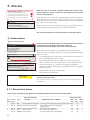
5 Alarms
C203 can send an alarm for a number of different reasons. Information about the alarm is shown on the display. The alarm also
sounds a beeping noise.
Acknowledging alarms: press OK and
the alarm sound will stop. If the
reason for the alarm has not been
corrected, the exclamation point in
the top right will continue to blink.
If the regulator has a number of unacknowledged alarms and you acknowledge the last one, the one before it will appear on the monitor.
When all active alarms have been acknowledged, the alarm window closes and the alarm sound stops.
Deviation alarm
PR 1 GROUP 1
H1 Supply water temp. =10.2 °C
Received: 08.11.2008 02:27
All active alarms can also be suppressed by pressing the Esc key. The
alarm windows close when you press the Esc key only once.
Press OK to acknowledge the alarm
You can find both active and inacitve alarms in the Alarm menu.
5.1 Active alarms
Alarms > Active alarms
Alarms
2
Active alarms
>
Acknowledge all alarms
>
Alarm history
>
Reset alarm history
>
Routing schedule
>
Alarm receivers
>
Active alarms
2
07.12.2010 12:24:52 H2 Risk of freeze
>
08.12.2010 01:12:40 Sensor fault H1 Return >
Deviation alarm
In the alarm menu of C203 device, you can check the active alarms
and what alarms have been active. The number of
active alarms can be shown in the main view if you wish.
Every active alarm is shown in a separate row, where you can see
when the alarm has become active. Press OK to get more information
about the alarm.
•
An exclamation mark in front of the date shows that the alarm has
been acknowledged by pressing Esc.
•
The heading of the alarm view shows the reason for the alarm.
•
You can also see where the source of the alarm is located, what is
the alarm priority (1 ...5 ) and what alarm group it belongs to
(Group 1 has urgent alarms, group 2 malfunction alarms and group
3 service alarms).
•
What location the alarm is coming from
•
time the alarm was received
PR 1 GROUP 1
H1 Supply water temp. =10.2 °C
Received: 08.11.2008 02:27
Press OK to acknowledge the alarm
ACTIVE ALARMS
Send message: Active alarms
The regulator sends a message showing all active alarms. Message is
informational.
5.1.1 Sensor fault alarms
If the sensor is defective, the regulator’s display will show the measurement reading -50°C.
Sensor error alarm (SE)
Row con- Sensor
nection type
Sensor
1
2
NTC-10
NTC-10
3
4
NTC-10
NTC-10
NTC-10
TMO
Sensor fault Outdoor temperature The control system uses the value of the outdoortemp. at 0 ° C.
TMW/TMS Sensor fault H1 Supply water
Valve remains in the position it was in before
the sensor defect.
TMW/TMS Sensor fault H1 Return water
Return water control is disabled.
TMR
Sensor fault UI 4
Room control is taken away of use.
TMW/TMS Sensor fault UI 4
Informational measurement (HE1 DH Return)
20
Alarm text
Delay areas: 0...600 s
Operation when a sensor is defective
Entry
delay
Exit
delay
Alarm
group
20 s 10 s 1
20 s10 s 1
20 s 10 s 2
10 s10 s 1
10 s10 s 1
Sensor error alarm (SE)
Row con- Sensor
nection type
Sensor
Delay areas: 0...600 s
Alarm text
Operation when a sensor is defective
5
NTC-10
TMW/TMS
Sensor fault H2 Supply water
6
7
NTC-10
NTC-10
NTC-10
TMW/TMS
TMR
TMW/TMS
8
NTC-10
9
10
11
Entry
delay
Exit
delay
Alarm
group
20 s 10 s
Sensor fault H2 Return water
Sensor fault UI 7
Sensor fault UI 7
Valve remains in the position it was in before
the sensor defect.
Return water regulation is taken off-line.
Roomcontrol is disabled.
Informational measurement (HE2 DH Return)
TMW/TMS
Sensor fault HW Supply water
Valve is closed.
20 s 10 s
1
NTC-10
TMW/TMS
Sensor error HW circulation water
Does not affect regulation.
20 s 10 s
3
NTC-10
NTC-10
TMW/TMS
TMW/TMS
Sensor fault DH Supply water
Sensor fault DH Return water
Informational measurement (DH Supply)
Informational measurement (DH Return)
10 s 10 s
10 s 10 s
1
1
5.2 Alarm history
Alarms -> Alarm history
Alarm history
2
1
20 s 10 s 2
10 s10 s 1
10 s10 s 1
From alarms you can see the cause of the alarm, where the alarm has
come from and when the alarm has become inactive. (e.g., 02.11.2014 at
10:11:42). The last 10 alarms can be seen in inactive alarms.
02.11.2014 10:11:42 Sensor fault H1 Supply w >
02.12.2010 11:22:40 Sensor fault H2 Return w >
ALARM HISTORY
Send message: Alarm history
The regulator sends a message showing
the last alarms. Message is informational.
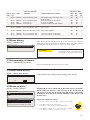
5.3 Acknowledge all alarms
Alarms -> Acknowledge all alarms
You can acknowledge all alarms by pressing OK.
5.4 Reset alarm history
Alarms -> Reset alarm history
C203 requests confirmation before deleting alarm history.
Confirm
Empty alarm history
Yes
No
5.5 Alarm receivers
Alarms -> Alarm receivers
Alarm receivers
Team 1
>
Team 3
>
Team 2
>
1. Phone number
+
3
5
8
4
0
8
A GSM modem can be connected to the C203 unit to send information about the alarm as a text message to the alarm team. A
substitute team can also be designated. The alarm is sent to the
team that is set in the alarm system’s software as the correct team
for that time.
Entering the telephone numbers:
4
0
0
0
0
Approve: Press OK a number of seconds
Cancel: Press ESC a number of seconds
1.
Turn the control knob. Press OK to accept a number/sign.
2. Press OK to move to the next square.
Press Esc to return to the previous square. OK
OK
3. Press OK for a number of seconds to accept the number.
Press Esc for a number of seconds to cancel
21
5.6 Routing schedule
C203 default alarm groups are:
Alarms > Routing schedule
•
Group 1: Urgent alarm that should always be immediately forwarded.
•
Group 2: Malfunction alarms than can be forwarded during business hours.
•
Group 3: Service alarms or non-urgent alarms.
Routing schedule
Group 1 Weekly schedule
>
Group 1 Alarm routing now
Team 1 >
Group 2 Alarm routing now
Team 1 >
Group 2 Weekly schedule
>
Graph
Group 1 Weekly schedule
Monday
Tuesday
>
>
Wednesda >
03691215182124
Thursday
>
Saturday
>
Friday
Sunday
>
>
This example shows that group 1 alarms are
always forwarded. During business hours
(Monday - Friday 8:00 a.m. - 4:00 p.m.) alarms
are forwarded to different teams than during
evenings and weekends. More detailed
information is shown in the ”Editing view”.
Editing view
TimeMode
An editing view opens, and it shows all the switch times and also to
which alarm teams alarms are routed at these times on the chosen days.
16:00 Team 2
00:00Add new
Adding a new switch time:
1. Press OK at the “Add new” row.
2. Press OK. Set the switch time for alarm routing (set hours and minutes separately) and press OK.
3. Press OK and then turn the control knob to set the alarm team or
the ”No routing” option. (No routing selection means that alarms
will not be forwarded.) Accept by pressing OK.
4. Press OK at each weekday you wish to choose.
5. Press OK at the end of the row to accept the new time program.
6. Press Esc to exit.
1. Set switch time
Time Mode
3.Select day(s)
M TW TF S S
08:00Team 1
16:00 Team 2
00:00 Add new
Time Mode
M T W T F S S
08:00 Team 1
16:00 No routing
OK
00:00Add new
TimeMode
08:00Team 1
21:00 Delete switch time
00:00Add new
Turn the control knob to browse a weekly program. If you wish to
see the exact switch times and names of alarm teams, or if you
wish to edit, remove or add switch times, press OK at any weekday.
Browsing a weekly program:
M T W T FS S
08:00Team 1
2.Set alarm team
You can see where alarms are currently being routed in the
routing time software display. You can also set up a routing
schedule for each alarm group.
You can create a weekly schedule for each alarm group. Weekly schedule have a general graphic view and an editing view,
where you can see to which alarm team each alarm is directed
at different points of time. In the graph, alarm teams are distinguished from each other by the thickness of the black bar.
M T W TFS S
OK
Editing a weekly program:
1. Turn the control knob to move to the value you wish to change and
press OK.
2. Turn the control knob to make the time and alarm team changes.
Press OK to accept.
3. Press the OK button to change the day of the week.
4. Press Esc to exit.
Deleting a switch time:
1. Turn the control knob to move to the switch time you wish to delete
and press OK.
2. Press OK at the selected alarm team and select ”Delete switch time”
3. Press OK at the end of the row.
4. Press Esc to exit.
If alarms are routed, alarm information is sent to the alarm team by
text message. Alarms are relayed according to the alarm time software. You can acknowledge an alarm by sending the same message
back to the C203.
22
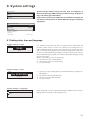
6 System settings
Main menu
HW Domestic hot water control
>
System settings
>
Alarms
>
Service
>
System settings include setting the time, date and language, as
well as text message (SMS) settings, network settings, display settings and device type information.
If you want to connect the C203 unit to an Ethernet network, the
unit must be connected to an Oulink Ethernet adapter (additional
equipment).
System settings
Time
17:01 >
Date
29.06.2013 >
Language
English>
SMS settings
>
Network settings
>
Display settings
>
Type info
>
Lock code
Not in use >
6.1 Setting date, time and language
System settings > Time
Time
Enter hours
19:44
hh:mm
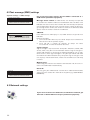
It is important that time and date are correct. Alarm information, for
instance, shows when an alarm has activated and inactivated. It is
highly recommendable to ensure that time and date are correct when
you are making time programs with the weekly program or special calendar. The device clock takes daylight savings and leap years into account automatically. The clock has a backup for power outages lasting
at least three days.
Hours and minutes can be set separately.
1. Set hours and press OK to accept.
2. Set minutes and press OK to accept.
3. Press Esc to exit.
System settings > Date
Date
Enter day:
Thu 13.03.2014
dd.mm.yyyy
1. Set day and press OK to accept (name of weekday is updated automatically).
2. Set month and press OK to accept.
3. Set year and press OK to accept.
4. Press Esc to exit.
System settings > Language
Language
English
Suomi
If the application has been downloaded to your Ouflex device as multilingual, you can change the UI language here.
23
6.2 Text message (SMS) settings
System settings > SMS settings
Message center number
+
3
5
8
4
4
7
9
8
3
5
0
0
Approve: Press OK for a number of seconds
Cancel: Press ESC for a number of seconds
SMS PIN code
1
2
3
4
Approve: Press OK for a number of seconds
Cancel: Press ESC for a number of seconds
Use of text messaging requires that the C203 is connected to a
GSM modem (additional equipment).
Message centre number: A C203 device can identify the operator
in use from the modem’s SIM card. Identification does not occur until
PIN code has been entered. If the device does not identify the operator
even though PIN is correct, enter message center number. If you change message centre number, the number is saved on the SIM card. C203
device reads the number saved on the SIM card.
SMS PIN:
If the SIM card has PIN inquiry in use, C203 device asks you to enter
PIN code.
Entering the code:
1. Turn the control knob and press OK to accept each number.Press
ESC to return to the previous square.
2. Press OK for a number of seconds to accept the code.
Press ESC for a number of seconds to cancel.
Signal strength:
Signal strength is expressed with description: ”Excellent”, ”Good”, ”Moderate”, ”Low”, ”Very low” and ”Initialization failed”. If signal strength indicates ”No network,” try changing the modem’s location or use an additional antenna. If the signal strength is ”Very low” you should also move
the modem to another location to try to improve signal strength. If the
unit displays ”Initialisation failed,” check that the SIM card is correctly
installed.
Modem status:
C203 recognizes whether the modem is connected or not. The unit initialises the GSM modem automatically.
Device ID
O
U 00
1
Approve: Press OK for a number of seconds
Device ID:
You may give your C203 device a device ID. In SMS communication,
always type the device ID in front of the keyword (e.g. OU01 MEASUREMENTS).
Cancel: Press ESC for a number of seconds
6.3 Network settings
If you want to connect the C203 unit to an Ethernet network, you
will need an Oulink Ethernet adapter (additional equipment).
24
System settings > Network settings
System settings
Time
Date
Language
SMS settings
17:01>
English >
>
Network settings
>
Type info
>
Display settings
Lock code
Backup
There are two alternative ways to set the C203 device IP address and
network settings:
1. IP address is retrieved via DHCP function. This requires that DHCP
service is in use in the network and network cables have been
connected.
2. IP address is set manually.
Tue 17.12..2013 >
>
Not in use >
>
Network settings
DHCP
Gateway adress
Off >
0.0.0.0 >
Subnet mask
0.0.0.0
Nameserver address
0.0.0.0 >
IP address
Update nework settings
>
0.0.0.0 >
>
-------------------------------------FTP
Modbus TCP/IP
Off >
>
ModBus RTU settings
SNMP
Access
Access IP
>
>
On >
0.0.0.0 >
-------------------------------------OULINK
Serial number
Device state
WEB user interface
v. 1.5
Uninitialized>
On>
Setting the IP address via DHCP function:
1. Go to DHCP and press OK.
2. Select ”On” and press OK to accept selection.
3. Select ”Update network settings” and press OK to accept selection.
4. Wait approximately one minute.
5. If DHCP is ”On”, setting the IP address and other network settings
was successful. The device now functions in the network.
6. Otherwise, make sure the connections and the fact that the network
has a DHCP server.
Setting the IP address manually:
1. Go to DHCP and press OK.
2. Select ”Off” and press OK to accept selection. If DHCP function is
on, manual changes in ”Subnet mask”, ”Gateway address”, ”Name
server address” and ”IP address” will be ignored.
3. Select ”Start” -> ”Run” to open Windows command prompt in your
PC.
4. A window opens. Type ”cmd” in the text field. Select ”OK”.
5. Type ”ipconfig/all” in the command prompt and press ”Enter”. C203
can be connected to intranet in case the IP address begins with:
6. Take down the following information:
- Name server address in the first view
• 10.x.x.x (e.g. 10.2.40.50)
• 192.168.x.x (e.g. 192.168.0.2)
• 172.16.x.x – 172.31.x.x (e.g. 172.18.0.5 )
If the IP address does not begin with any of these sequences, it usually
means that:
• The subscriber connection does not have a firewall in use, i.e. it
is a public IP address. C203 can not be connected to property intranet under these circumstances.
7.
8.
9.
10.
11.
12.
13.
- IP address, e.g. 10.2.74.146
- Subnet mask, e.g. 255.255.255.0
- Gateway, e.g.10.2.74.1
Type ”Exit” to close the command prompt.
Go to ”System settings”-> ”Network settings” in your C203 device.
Enter the address you wrote down in step 6 + 10 in the IP address
field (e.g. 10.2.74.146 + 10 = 10.2.74.156). Enter the first figure of
the address and accept. Do the same with the second, third and
fourth figure. (The fourth figure must be between 1 and 253. The
set figure should not be reserved for another device.)
Enter the subnet mask you wrote down in step 6.
Enter the gateway address you wrote down in step 6.
Enter the first name server address you wrote down in step 6.
Select “Update network settings”
25
A tip! How to set the network settings easier and faster
You can make setting of the IP settings easier
• if you know DHCP service exists in the network
• if you know the DHCP address range and fixed address range in the network
• if you wish to use a fixed IP address.
1. First, set DHCP function On. After the settings have been set successfully, set DHCP Off.
2. Change only IP address manually. (A fixed IP address must fit the fixed address range).
System settings > Network settings->FTP
Network settings
FTP
Modbus TCP/IP
>
ModBus RTU settings
SNMP
Access
FTP
Off >
Oulink Eth device can be updated by using FTP protocol and trend files can be
export to the computer. If you do not use these features, FTP put off.
>
>
On >
System settings > Network settings->Modbus TCP/IP
Modbus TCP/IP
Modbus TCP port (internal registers) >
Max connections >
Idle timeout >
Allowed address >
Active
On >
Modbus TCP/IP gateway >
Modbus TCP port (internal registers): Port number 502 is reserved for communication of C203 device. Information of Modbus registers of C203 device
are read through this port.
Max connections: It is possible to decrease server load by changing this setting that defines the maximum number of simultaneous connections from different IP addresses to the server.
Idle timeout: This setting defines the time after which the server closes an inactive connection.
Allowed address: It is possible to improve the information security of the system by taking permitted connection address into use. If the value is 0.0.0.0,
connections to the server are permitted from any IP address. If you define one
permitted connection address, connections to the server are not permitted
from any other IP address.
Function on: This selection either enables or disables the entire Modbus/TCP
communication.
Modbus TCP/IP gateway ->Modbus 1 port: It is possible to connect a ModBus/RTU bus to an C203 device. The bus has its own port address that is used
to communicate with bus devices via Modbus/TCP interface. Port 1 setting defines the TCP/IP port that functions as a gateway to Ouflex I/O extension bus.
ModbusTCP/IP gateway
Modbus 1 port
>
503
System settings > Network settings-> ModBus RTU settings
ModBus RTU settings
Master-Slave
Baude rate
Modbus slave address
Taken selections to use
Slave>
9600 >
10 >
ModBus RTU settings: C203 device can be connected to ModBus RTU-bus.
If C203 is connected to the bus as a slave, you have to set the address of the
C203 device. Note! All the slave devices connected to the bus must have
unique address. If you do changes, you must select “Taken selections to use”.
>
System settings > Network settings-> SNMP
SNMP
IP address
Acticve
>
On >
SNMP settings: SNMP function can be used to send notifications about
alarms activating, inactivating and being acknowledged via SNMP protocol to
a desired server.
IP address: The IP address of the target server to which messages are sent.
Active: This selection either enables or disables the entire SNMP function.
26
Network settings
SNMP
Access
Access IP
>
On >
0.0.0.0 >
--------------------------------------
System settings > Network settings-> Access
Access
Oulink supports Ouman Access-service which gives you a secure remote connection to the C203 device. With this setting you can activate the ACCESS-service in order to be able to use it.
OUMAN ACCESS- service is “on” by default in C203. OUMAN
ACCESS- service is taken in use in following way: Ouman salesperson
feeds in the target and billing information to the Ouman system and
activates the service based on the serial number of the C203 device.
OUMAN ACCESS- device can be connected to LAN if following conditions are fulfilled:
1. LAN is routed to internet
2. The VPN ports used by ACCESS are not blocked
1. LAN is routed to internet
Access –service uses internet. Therefore it is available only if the local
LAN has connection to internet. ACCESS-device examines the availability internet connection once per minute by sending a ping-package
to a server in internet.
Network has to allow ICMP towards internet and also allow the
response message to come back to C203.
2. The VPN ports used by ACCESS are not blocked
ACCESS-service is using VPN to the internet connection.
Network has to allow UDP communication from any port towards port
1194 in internet and the responces from that port back to C203 device.
System settings > Network settings-> OULINK
OULINK
Network settings
OULINK
Serial number
Device state
WEB user interface
v. 1.5
Uninitialized>
From network settings you can see OULINK ETH-device serial number and
version number. If all the settings are correct, the status of the device is “OK”.
On>
By using the WEB user interface in Oulink, you can download trendfiles into
your pc. You can also update the Oulink ETH firmware through the WEB user
interface.
In local use, login URL is the IP address. In internet use ask for login URL Ouman sales. If you do not need these functions, please disable the FTP functionality.
27
6.4 Display settings
System settings > Display settings
Display settings
Display version
xxxxx
Contrast
75 >
You can adjust contrast. If you wish the display to be brighter, set a
smaller numerical value. The setting range is 50… 100. The display
changes after you have confirmed the setting change.
6.5 Type information
System settings > Type information
Type information
Application version
0.0.0
Serial number
xxxxxxx
CPU SW
0.0.0
Display SW
I O SW
1 .1 .1
Type information shows the hardware configuration and the software versions that have been used to create the application. This
information is useful especially in case of maintenance or upgrade.
0.0
75 >
6.6 Lock code
System settings > Lock code
Lock code
Display settings
>
Type information
Connections, meas. and states
Lock code
>
>
Not in use >
Lock code
In use
If you take lock code into use, you can read C203 device information when the device is locked, but you can not change settings. It is
recommended, for example, that you take lock code into use if the
device is located so that anyone could reach it and change settings
(e.g. deactivate burglar monitoring). Locking the device and changing the lock code prevents unauthorized use of the device.
Not in use
>
Lock code function
Description
Not in use
You can read C203 device information and change settings.
In use
You can read C203 device information but you can not change settings without entering the lock code. The factory setting of lock code is 0000. If you
take lock code into use, change the code for security reasons.
System settings > Change lock code
Give lock code
0 0 0 0
Approve: Press OK for a number of seconds
Cancel: Press ESC for a number of seconds
NOTE! When you enter a locking code
when changing the default, the code
will not be required again until the
unit has been untouched for 10 minutes, when the unit goes into hibernation mode. You can also place the unit in
hibernation mode by pressing the ESC
button for a long period of time.
28
If you have taken lock code into use, you may change the code. The
factory setting of lock code is 0000.
1.
C203 device asks you to enter the current code. The factory setting of
lock code is 0000.
2. Turn the control knob and press OK to accept each number.
Press ESC to return to the previous square.
3. Press OK for a number of seconds to accept the code.
Press ESC for a number of seconds to cancel
7 Communication via a mobile phone
KEY WORDS
If a GSM modem is connected to the C203 you can communicate with the
regulator by text message using command words.
Key words
Home/
Away/
Measurements
H1 Supply water info
H1 Setting values
H1 Control mode
H1 Heating curve
Active alarms
Alarm history
Type info
Key word
Send the following text message to the controller: KEY WORDS.
You can send the text message question mark to the controller to get a list of
key words. If the controller has a device ID in use, always write the device ID
in front of the key word (example. Ou01 KEY WORDS or Ou01 ?). Capital and
small letters are different characters in the device ID!
The controller sends a list of key words as a text message that gives you
information about the controllers’ function. The key word is separated by a /.
You can write the key word using capital or small letters. Write only one key
word/message. Store the key words into your phone’s memory.
Explanation
?
Reply messages show all commands in the language that has been
selected for the regulator.
Key words
If the regulator is set up in English, the regulator sends a list of commands.
Home
Away
C203 goes into ”Home” mode.
C203 goes into ”Away” mode.
Measurements
The most important measurement information is shown in the reply
message.
H1 Supply water info
H2 Supply water info
The reply message shows the computational setting value of supply
water. Data are informational.
H1 Setting values
H2 Setting values
The most important setting values are shown in the reply message.
You can change the setting values. Send a changed message back
to the regulator, and it will make the change to the setting value and
send you another message showing the changes to the setting values.
H1 Control mode
H2 Control mode
In the reply message, the current control mode will have a star next
to it. You can change the mode for the circuit by moving the star and
sending a change message to the regulator.
H1 Heating curve
H2 Heating curve
If a 3-point heating curve is in use you can change the supply water temperatures for outdoor temperatures -20, 0 and +20°C, as well
as the minimum and maximum setting values for supply water. If a
5-point heating curve is in use you can set temperatures for supply
water for 5 outdoor temperatures. Of the outdoor temperatures two
are fixed values (-20 and +20°C). You can change the three outdoor
temperature setting values between these. You can also change the
minimum and maximum limits of supply water.
HW Settings
The reply message will show the setting value for domestic hot water and its mode. You can also change the setting and mode.
Acitve alarms
The reply message will show all active alarms.
Alarm history
The reply message will show information about the last alarms.
Type info
29
6 Optional equipments and remote control options
OULINK ETH
Adapter for C203 for networking
OULINK ETH is an C203 adapter that is providing
Modbus TCP/ID interface to C203 serie device.
Oulink is compatible with 2.0 and later versions of
C203. Ouflex C series devices can be identified
from that that they always have a SD-card reader
•
Integrated Ouman Access connection
•
Modbus TCP/IP
•
Modbus TCP/IP
RTU Gateway
•
SNMP alarm transfer
•
Trend file storage and transfer (FTP + HTTP)
GSMMOD5
By connecting the modem to the C203 regulator, you can communicate with the regulator text messages and pass this information on
alarms to your mobile via SMS. Selainpohjaisessa etäkäytössä hälytykset voidaan välittää tekstiviestinä GSM-puhelimeen.
Ouman’s GSM modem (GSMMOD5) is connected to the C203 unit or
to an Oulink Ethernet adapter if the C203’s RJ-45 port has been connected to an Oulink Ethernet adapter. The modem has a fixed antenna
that can be changed to an external antenna with a 2,5m cord (optional
equipment) if needed. The modem’s indicator light shows what mode
it is in.
Connecting the modem and taking it into use
C203
OUMAN
GSMMOD5
RJ45-2
Ouman’s GSM modem (GSMMOD5) is connected to the C203 unit or
to an Oulink Ethernet adapter if the C203’s RJ-45 port has been connected to an Oulink Ethernet adapter. The modem has a fixed antenna
that can be changed to an external antenna with a 2,5m cord (optional
equipment) if needed.
The modem’s indicator light shows what mode it is in.
LED indicator light
Modem mode/instructions
LED is not lit:
Modem is not on. Connect network device to modem.
LED is lit:
Modem is on, but it is not ready for use. Make sure that C203 and
GSM modem SIM card have the same PIN code, if PIN inquiry is in
use.
LED is blinking slowly: Modem is ready for use.
LED is blinking rapidly: Modem is either sending or receiving a message. If you do not
receive an SMS from C203, check the SMS you sent tosee if
device ID and keyword were spelt correctly. Device ID is case
sensitive. Ouflex C can identify the operator in use from the
modem’s SIM card. Identification does not occur until PIN code
has been entered. If C203 does not identify the operator even
though PIN is correct, enter message center number. You can
find message centre number, PIN code and device ID in ”System
settings” > ”SMS settings” in your C203 device.
SIM card release button
Antenna
mounting
point
SIM card slot
30
Inserting the SIM card
Press the small black SIM card release button with, for example, a pen tip. Part of
the SIM card slot will stick out of the modem. Pull the slot out of the modem. Do not pull
the slot out of the modem without pressing the SIM card release button first!
Insert SIM card into the slot and make sure it settles properly. Push the slot back to
its place. Set the SIM card PIN code as C203 device PIN code. Make sure PIN inquiry is
in use in the SIM card.
Index
3-point/5-point curve 12-13, 16
Access 29
Active alarms 4, 22, 33
Alarm groups 24
Alarm history 23, 33
Alarm recipients 23
Alarm routing 24
Alarms 4, 22-24
Automatic control 18, 21
Autumn dry 15, 10-11
Away control 7, 10-11, 15, 32
Basic view 4
Big temperature drop 15, 18-20
Bus compensation 17
Calculated room temperature 11
Changing language 25
Changing locking code 30
Circulation water temperature 7
Compensation functions 17
Continious big temperatur drop 18
Continious normal temperatur 18
Continious temperatur drop 18
Contrast 30
Control mode 18, 21, 32, 33
Create csv file 9
Date setting 25
Delayed outdoor temp. measurement 8, 10, 16
Delayed room temp. measurement 8, 11, 14
Device ID 26
Display settings 30
Disposal 34
Domestic hot water anticipation 7, 21
Domestic hot water control 21
EH-net 34
Energy measurement 8
Exception schedule 20
Favorite views 5
Floor heating anticipate 10, 16
Forced control 18
FTP 28
General compensation 17
GSM-modem 29, 34
Heating control circuits 10-20
Heating curves 12-13, 16, 31-32
Heating mode 16
Home-Away-control 7, 15, 32-33
HW Circulation/anticipation 7, 21
Manual use 18, 21
Measurement 7-8, 31-32
Measurement labelling 9
ModBus RTU settings 28
Modem connection 35
Modem status 26
Naming 9
Network settings 26-29
Outdoor temperature 8, 10, 15-16
Oulink 29, 34
Ounet 34
Parallel shift 16
PIN 26
Pre increase 15
Pressure measurement 7-8
Protection class 36
Pump running info 8
Radiator heating delay 16
Return water compensation 10, 17
Return water temperature 7
Room compensation 10, 14, 17
Room compensation info 11, 33
Room I control 10, 17
Room temperatur setting 14, 33
Sensor fault alarms 22-23
Setting values 14-17, 21, 31-32
Signal strength 26
SIM card 26, 32
SMS settings 26
SMS use 31-34
SNMP settings 28
Special days 20
Summer function 11, 14-15
Supply water temperature 7, 10-13
Supply water temperature info 10-11, 33
Supply water temperature max limit 12-13
Supply water temperature min limit 12-13
System settings 25-30
Technical information 36
Temperature drop 15, 18-20, 29, 10-11
Textmessage kommunication 31-34
Time programs 19-20, 10-11
Time setting 25
Trend 9
Trend file storage and transfer 34
Trend log sampling period 9
Type information 30
Valve flushing 15
IP-address 27-28
Key words 31-32
Language selection 25
Locking code 30
Water volume measrument 8
Weekly schedule 19
31
Technical information
Protection classIP 20 Operating temperature0 ºC…+40 ºC
Storing temperature-20 ºC…+70 ºC
Power supply
Operating voltage230 Vac / 120 mA
Battery backup12 Vdc
Remote control options
EH-net
Use a GSM phone
requires that the GSM modem
(optional) is connected to the
controller.
Product disposal
Local Web Server
remote control and monitoring
(optional).
Internet-based on-line control room for
professional remote control and monitoring
(optional).
OUMAN OY, Voimatie 6, FI-90440, Kempele, Finland
Tel. +358 424 8401, fax +358 8 815 5060, www.ouman.fi
32
We reserve the right to make changes to our products without a special notice.
ver.1.3.6
Z89541-N-01_C203_User manual_ENG-V.1.3.6.pdf_01062015
The enclosed marking on the additional material of the product indicates that
this product must not be disposed of together with household waste at the end
of its life span. The product must be processed separately from other waste to
prevent damage caused by uncontrolled waste disposal to the environment
and the health of fellow human beings. The users must contact the retailer
responsible for having sold the product, the supplier or a local environmental
authority, who will provide additional information on safe recycling opportunities of the product. This product must not be disposed of together with other
commercial waste.